
Disclosure: As an Amazon Associate, The PC Audit earns from qualifying purchases. If you buy through links on this page, we may earn a small commission at no extra cost to you.
Direct Answer: In the SSD DRAM cache vs. HMB gaming decision, dedicated onboard DRAM matters substantially for your Windows OS drive, sustained game patching, and full-drive longevity, while delivering minimal differences in raw game launches. Buy a DRAM-equipped TLC NVMe SSD for your primary boot bay and reserve DRAM-less HMB drives for secondary storage.
Open any retail SSD listing or prebuilt desktop spec sheet in 2026 and the headline banner almost always screams peak sequential megabytes per second—often promising 5,000 MB/s to 7,400 MB/s over PCIe 4.0 x4. Yet two drives advertising nearly identical sequential read figures can behave completely differently once Windows 11 finishes booting, Steam begins unpacking a 120GB AAA patch, and your free capacity crosses the 70% threshold. The hidden differentiator separating snappy long-term storage from frustrating background slowdowns sits inside the controller’s address-lookup memory: dedicated DRAM cache versus DRAM-less Host Memory Buffer (HMB).
Across our audited gaming NVMe SSD buyer hub and Processors & Platforms hardware archive, storage selection follows a straightforward architectural principle: sequential peak bandwidth dictates marketing banners, whereas NAND flash type and DRAM mapping capacity govern real-world OS responsiveness and sustained write resilience. Worse still, many budget retail drives and prebuilt desktops quietly bundle DRAM-less controllers together with low-endurance QLC flash—a pairing we flag repeatedly in our prebuilt gaming PC red flags audit.
Below, we break down exactly how Flash Translation Layer (FTL) mapping works, why Windows HMB caps create a roughly 32-to-1 memory disparity on 2TB drives, when HMB drops out entirely, and how DRAM cache interacts with Microsoft DirectStorage, gaming frame rates, and TLC vs. QLC NAND endurance.
In This Guide
- Quick Decision Matrix: DRAM Cache vs. HMB Tiers for 2026 Gaming PCs
- Why SSDs Need Mapping Memory: FTL Tables and the 1GB-per-1TB Rule
- Dedicated DRAM Cache vs. Host Memory Buffer (HMB): The 64MB Bottleneck
- Real-World Gaming & OS Impact: FPS, Load Times, DirectStorage & Steam Patching
- Why DRAM-less Plus QLC Is the Real Trap (Not HMB Alone)
- Myth vs. Engineering Reality: Five SSD DRAM & HMB Myths Debunked
- Actionable Buyer & Builder Checklist
- Commercial Bridge: Audited 2026 DRAM + TLC NVMe SSDs
- Official Standards & Engineering References
- Frequently Asked Questions
Quick Decision Matrix: DRAM Cache vs. HMB Tiers for 2026 Gaming PCs
Not every NVMe drive without DRAM behaves identically, and separating controller mapping design from NAND cell density is essential before purchasing storage. The reference matrix below classifies the four major consumer SSD architectures sold in 2026 by how they store mapping tables and where they belong inside a desktop or laptop build.
| SSD Architecture Tier | Mapping Table Location | Typical Cache Pool (2TB Drive) | Random 4K IOPS & Windows OS Feel | Sustained Write & Full-Drive Behavior | Recommended 2026 PC Role |
|---|---|---|---|---|---|
| Dedicated DRAM + 3D TLC (PCIe 4.0 / 5.0) | Onboard LPDDR4 / LPDDR4X / DDR4 chip | ~2GB (1GB per 1TB NAND) | Highest Stability: 1.2M–2.6M random IOPS; ultra-consistent multitasking | Steady post-pSLC write speed; full 1,200+ TBW endurance | Primary OS + Active Games + Creator Scratch |
| DRAM-less HMB + 3D TLC (PCIe 4.0) | Controller SRAM + Host System RAM via PCIe DMA | 16MB–64MB HMB window in DDR5/DDR4 | Responsive Light Use: Strong hot-cache hits; minor slowdown under mixed OS writes | Moderate TLC write recovery once pSLC fills; solid TBW rating | Secondary Game Library Drive / Budget OS Entry |
| DRAM-less HMB + QLC NAND (PCIe 4.0) | Controller SRAM + Host System RAM via PCIe DMA | 16MB–64MB HMB window in DDR5/DDR4 | Degrades Under Load: Sharp latency spikes when concurrent reads and writes collide | Severe Write Cliff: Drops toward ~100–200 MB/s past pSLC cache (>70% full) | Bulk Cold Media / Infrequently Patched Archive Only |
| DRAM-less Without HMB (SATA or USB Enclosure) | Tiny controller SRAM + raw NAND page lookups | Zero HMB (~2MB–8MB internal SRAM) | Sluggish Multitasking: Constant NAND map reads cause UI stalls during updates | Frequent controller pauses during garbage collection | Avoid for OS or Active Gaming |
Why SSDs Need Mapping Memory: FTL Tables and the 1GB-per-1TB Rule
To grasp why dedicated DRAM cache exists on high-end NVMe SSDs—and why omitting it creates measurable engineering trade-offs—you first need to examine how solid-state NAND flash physically reads and writes data. Unlike a spinning hard drive platter that overwrites magnetic sectors in place, NAND flash faces an asymmetric hardware constraint: controllers read and program (write) data in small pages (typically 4KB to 16KB), yet can only erase old data in massive blocks spanning hundreds of pages (often multiple megabytes).
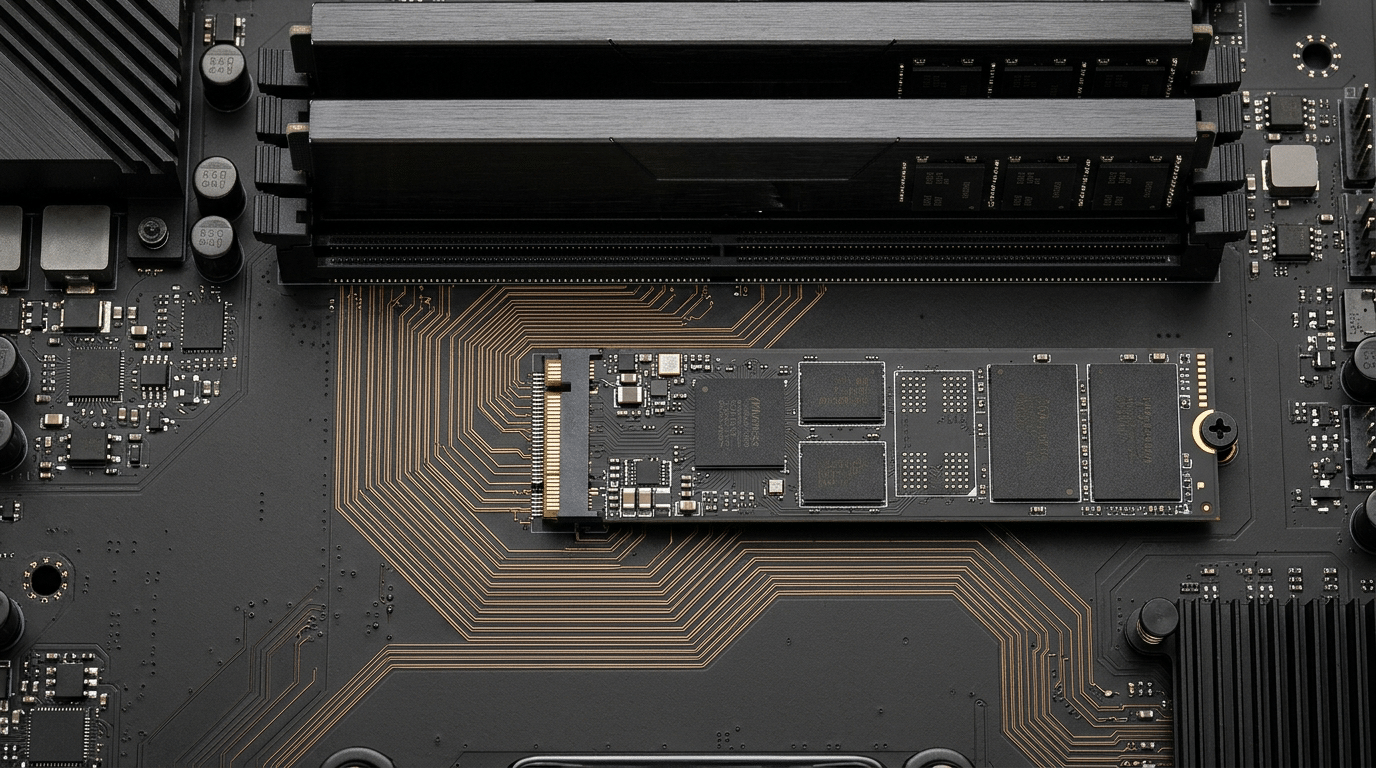
Because Windows, NTFS, and game engines constantly overwrite small save files, registry hives, shader caches, and telemetry logs, an SSD controller cannot write updated 4KB blocks back onto the exact same physical NAND cells. Instead, the controller writes the fresh data into a clean erased page elsewhere on the flash dies, marks the old page invalid for future background Garbage Collection and TRIM consolidation, and spreads wear evenly across cells via wear leveling.
To prevent Windows from losing track of where every single piece of data actually lives, the controller maintains a massive real-time translation directory called the Flash Translation Layer (FTL) Logical-to-Physical (L2P) mapping table. Every 4KB logical block address (LBA) presented to your operating system maps to a physical NAND die, plane, block, and page address stored inside this L2P table.
The Capacity Math: Why 1TB of NAND Needs ~1GB of DRAM
Storage engineers follow a straightforward sizing formula across client NVMe drives: roughly 1GB (1,024 MB) of DRAM per 1TB of raw NAND capacity (approximately 0.1% of total drive storage). That ratio stems directly from page-addressing math:
- Total 4KB Logical Pages on a 1TB SSD: 1,000,000,000,000 bytes divided by 4,096 bytes equals roughly 244 million individual 4KB pages.
- Pointer Width per Page Entry: Addressing hundreds of millions of physical flash locations cleanly requires a 4-byte (32-bit) mapping entry per 4KB page.
- Resulting Full L2P Table Footprint: 244 million entries multiplied by 4 bytes equals roughly 976 MB (~1GB) for a 1TB SSD, scaling linearly to ~2GB for a 2TB SSD and ~4GB for a 4TB SSD.
You can confirm this exact engineering ratio inside official manufacturer datasheets. According to Samsung Semiconductor’s 990 PRO documentation, the 1TB model carries 1GB of LPDDR4 DRAM, the 2TB model carries 2GB, and the 4TB model carries 4GB. Likewise, the Crucial T500 2TB official specification equips 2GB of LPDDR4 DRAM alongside Micron 232-layer TLC flash, and Samsung’s flagship PCIe 5.0 9100 PRO scales up to 2GB LPDDR4X on its 2TB configuration.
Keep one vital misconception out of your mental model: DRAM cache on a consumer SSD does not primarily buffer your incoming user files. User writes land first in fast pseudo-SLC (pSLC) flash cache blocks before folding down into TLC or QLC cells. The DRAM chip’s true mission is keeping that entire gigabyte-scale FTL L2P map resident in nanosecond-latency volatile memory—allowing the controller to resolve random 4K read/write lookups instantaneously without hunting through slower NAND pages.
Dedicated DRAM Cache vs. Host Memory Buffer (HMB): The 64MB Bottleneck
Adding a discrete LPDDR4 or DDR4 package increases bill-of-materials cost, consumes idle board power, and occupies valuable PCB real estate on compact M.2 2230 and M.2 2280 modules. To build affordable PCIe NVMe SSDs without crashing back to the sluggish random I/O speeds of early DRAM-less SATA drives, the storage industry standardized Host Memory Buffer (HMB) inside the NVM Express Base Specification (introduced in NVMe Revision 1.2 under Feature Identifier 0x0Dh).
When Windows 11 boots and initializes a DRAM-less NVMe SSD that advertises HMB capability, the OS storage driver negotiates a small contiguous region of your PC’s system memory (DDR5 or DDR4 RAM) and hands those memory descriptors exclusively to the SSD controller. Using PCIe Direct Memory Access (DMA), the SSD controller reads and updates cached FTL mapping entries across the PCIe bus rather than relying solely on its tiny onboard SRAM (typically just a few megabytes) or stalling to read mapping pages out of NAND flash.
Three Architectural Gaps Between Dedicated DRAM and HMB
While HMB dramatically rescues DRAM-less NVMe drives compared to zero-cache designs, three physical boundaries prevent HMB from matching dedicated onboard DRAM in demanding workloads:
- The 64MB Allocation Ceiling (A 32-to-1 Ratio on 2TB Drives): Modern Windows 10 and Windows 11 storage stacks typically cap HMB allocations at 16MB to 64MB of host RAM (with 64MB being the upper ceiling on most mainstream Phison, Silicon Motion, and InnoGrit DRAM-less controllers). On a 2TB NVMe SSD whose complete FTL map requires ~2,048 MB, a 64MB HMB allocation holds only about 3% of the drive’s total address table. Controllers treat HMB as a “hot cache” holding only recently touched file blocks; the moment a large game patch, search indexer, or virtual machine reads cold regions scattered across a 2TB volume, HMB suffers cache misses and forces the controller back to slow NAND lookups.
- PCIe Bus Round-Trip Latency: An onboard LPDDR4/DDR4 chip sits millimeters away from the SSD controller over dedicated point-to-point memory traces. Conversely, every HMB lookup must serialize into a PCIe DMA transaction, travel up through your M.2 socket (and through the motherboard chipset uplink if installed in a secondary chipset M.2 slot rather than a CPU-direct slot), clear the CPU’s PCIe root complex, hit system DDR5, and travel all the way back. Under heavy concurrent queuing, bus arbitration adds measurable microsecond overhead compared to local PCB DRAM.
- Zero HMB Support Over USB Enclosures and Console Bays: Because Feature ID
0x0Dhrelies on native PCIe bus-master DMA per the PCI-SIG PCI Express specification, HMB disappears whenever the drive leaves a native PCIe host. Slip a DRAM-less HMB SSD into a USB 3.2 Gen 2 or USB4-to-NVMe bridge enclosure and the USB UASP protocol blocks host memory DMA—instantly dropping your portable SSD into pure DRAM-less/SRAM mode. Likewise, consoles like the PlayStation 5 do not grant HMB host allocations, explaining why Sony explicitly requires fast sustained read margins while DRAM-equipped PCIe 4.0 drives hold cleaner consistency.
| Engineering Parameter | Dedicated Onboard DRAM SSD | DRAM-less HMB NVMe SSD |
|---|---|---|
| 2TB Mapping Capacity | ~2,048 MB (100% of full L2P table resident) | 16MB–64MB typical in Windows (~1%–3% hot cache only) |
| Physical Memory Path | Direct short PCB traces to controller | M.2 → PCIe lanes (→ Chipset) → CPU → System DDR5 |
| Host RAM Consumption | 0 MB of system DDR5/DDR4 | 16MB–64MB locked per drive (negligible on 32GB+ rigs) |
| Random 4K Mixed Read/Write | Highly consistent across full 2TB address space | Drops sharply on cache misses across cold data |
| USB Enclosures & Non-HMB Hosts | Full DRAM speed preserved everywhere | HMB disabled; reverts to SRAM + NAND lookups |
| Power-Loss Mapping Safety | Requires firmware flush/supercap strategies on enterprise | Host power loss/BSOD drops HMB RAM; relies on journal recovery |
Real-World Gaming & OS Impact: FPS, Load Times, DirectStorage & Steam Patching
Knowing the silicon architecture is one thing; knowing whether it actually alters your Saturday night gaming session is another. Let’s separate marketing paranoia from measurable Windows 11 and gaming workloads.
1. Average FPS & 1% Lows: Almost Always 0 FPS Difference
Once a game finishes loading level geometry and shaders into your GPU’s GDDR7/GDDR6 VRAM and your system’s 32GB DDR5-6000 memory, your SSD sits largely idle during active gameplay. As documented in our best gaming NVMe SSD framework, storage speed does not accelerate GPU rasterization or ray tracing—even stepping all the way from PCIe 4.0 to PCIe 5.0 yields 0 FPS difference in rendered frames.
The sole exception occurs when a chronically undersized system (such as an 8GB VRAM GPU paired with 16GB single-channel DDR5) spills pagefile swaps and high-res textures continuously across a saturated, near-full DRAM-less QLC drive while Windows Defender scans or game recorders write concurrently. Keeping 32GB of DDR5 and a healthy 12GB–16GB GPU keeps active frame rendering decoupled from SSD latency entirely.
2. Game Launches, Fast Travel & Microsoft DirectStorage
Modern game loading consists mostly of large sequential or semi-sequential block reads spanning contiguous archive files (.pak, .utoc, or .ba2 containers), paired with GPU asset streaming through Microsoft DirectX DirectStorage. DirectStorage replaces legacy single-threaded Windows file APIs with deep parallel NVMe submission queues and leverages GDeflate GPU decompression on DirectX 12 Shader Model 6.0+ hardware so compressed textures travel rapidly from NVMe flash straight into VRAM.
Because launching a single title touches one concentrated region of the SSD sequentially, a 64MB HMB window easily caches the active game’s hot L2P blocks. Consequently, on a clean drive with ample free space, a well-built DRAM-less TLC HMB SSD boots games within 0 to 2 seconds of a flagship DRAM-equipped PCIe 4.0 or PCIe 5.0 drive—nearly imperceptible without a stopwatch.
3. Windows 11 Boot, Heavy Multitasking & Steam Game Patching (Where DRAM Wins)
Where does a dedicated DRAM SSD pull dramatically ahead? Everywhere random 4K writes and mixed simultaneous I/O collide with large directory structures—specifically on your primary Windows C: drive:
- Windows 11 OS & Background Services: Your OS drive simultaneously processes NTFS journal updates, browser profiles, Windows Update staging, Discord caches, shader compilation databases, and antivirus scans across thousands of tiny 4KB–64KB files. Dedicated DRAM drives sustain
1.2M to 2.6Mrandom 4K IOPS effortlessly while maintaining snappy system responsiveness. - Decompressing Massive Game Patches (Steam / Unreal Engine): Updating a 100GB–180GB game involves reading compressed chunks, decompressing via CPU, and writing tens of thousands of patched files back onto NAND simultaneously. On a DRAM-less drive once its small pSLC buffer fills or HMB thrashes across scattered LBAs, Steam download graphs frequently stall into jagged “disk usage” flatlines while the controller scrambles to rebuild FTL pages and run garbage collection.
- OBS / ShadowPlay Recording While Gaming: Recording high-bitrate gameplay onto the same SSD streaming open-world textures forces simultaneous sustained writes and random reads—precisely the mixed queue scenario where onboard DRAM prevents I/O hitching.
Why DRAM-less Plus QLC Is the Real Trap (Not HMB Alone)
Hardware discussions often treat “DRAM-less” as a binary flaw, overlooking an equally decisive pairing on the PCB: NAND flash cell architecture. Storing 3 bits per cell (TLC NAND) versus 4 bits per cell (QLC NAND) creates vastly different worst-case behavior when an SSD runs without onboard DRAM—a distinction we explore thoroughly in our TLC vs. QLC NAND endurance guide.
A modern PCIe 4.0 DRAM-less + TLC drive with HMB still relies on relatively fast native TLC programming (~800–1,500+ MB/s even after pSLC cache exhaustion) and carries solid write endurance (~600 TBW per 1TB). When installed as a secondary D: drive strictly for holding installed Steam, Epic, and Battle.net libraries that are read far more often than rewritten, a DRAM-less TLC drive works reliably for years at a lower cost per gigabyte.
By contrast, combining DRAM-less HMB + QLC NAND in a primary Windows OS drive creates a compounding bottleneck. QLC requires writing 16 distinct voltage levels per memory cell instead of 8, drastically slowing native flash programming and cutting TBW longevity by roughly half to two-thirds. Once a DRAM-less QLC drive surpasses 70% capacity—shrinking its dynamic pSLC write buffer—sustained writes routinely collapse to ~100–200 MB/s (slower than a mechanical hard drive) while HMB stalls on fragmented FTL tables. Because prebuilt desktops and budget laptops frequently advertise generic `”1TB Gen4 NVMe SSD”` lines while shipping unbranded DRAM-less QLC sticks, verifying the exact SKU prevents severe mid-life slowdowns—one of the primary checks in our prebuilt gaming PC audit guide.
Myth vs. Engineering Reality: Five SSD DRAM & HMB Myths Debunked
- Myth 1: “Installing a DRAM-equipped NVMe SSD boosts your in-game FPS.”
Engineering Reality: Once assets load into VRAM and system DDR5, storage cache produces 0 FPS gain. Dedicated DRAM accelerates Windows responsiveness, shader/patch decompression, sustained file transfers, and OS multitasking—not GPU pixel shading. - Myth 2: “HMB turns your system DDR5 RAM into a full replacement for onboard SSD DRAM.”
Engineering Reality: Windows caps typical HMB allocations at 16MB–64MB, whereas a 2TB drive’s full FTL mapping table occupies ~2,048 MB. HMB covers only ~3% of the map as a hot-block cache and pays PCIe bus round-trip latency on every miss. - Myth 3: “Sequential read speeds of 7,000+ MB/s guarantee a drive has dedicated DRAM cache.”
Engineering Reality: Several modern PCIe 4.0 4-channel DRAM-less controllers easily advertise 6,000–7,400 MB/s sequential reads out of pSLC cache while containing zero DRAM on the PCB. Always inspect datasheets or component teardowns for LPDDR4/DDR4 cache specs rather than trusting peak sequential banners. - Myth 4: “All DRAM-less SSDs fail quickly and should never touch a gaming PC.”
Engineering Reality: Only DRAM-less QLC drives make poor primary OS choices. A quality DRAM-less 3D TLC HMB SSD inside an internal M.2 slot performs dependably as a dedicated secondary game library drive—especially when keeping 20% capacity free. - Myth 5: “Putting a DRAM-less HMB SSD in a fast USB-C enclosure preserves HMB performance.”
Engineering Reality: USB mass-storage bridge chips (even 10Gbps/20Gbps USB 3.2 Gen 2×2 adapters) do not expose PCIe DMA memory descriptors to NVMe Feature ID0x0Dh. DRAM-less HMB drives lose HMB entirely over standard USB, whereas DRAM-equipped SSDs retain full onboard mapping speed externally.
Actionable Buyer & Builder Checklist
Apply these six engineering checks before finalizing your 2026 PC build or storage upgrade:
- Mandate DRAM + 3D TLC on Your Primary OS Drive (1TB Minimum, 2TB Ideal): Never sacrifice onboard DRAM or TLC endurance on your Windows boot drive. Modern AAA installs routinely occupy 100GB–180GB each, making 500GB drives obsolete and 2TB PCIe 4.0 DRAM + TLC the sweet spot for balanced gaming builds.
- Prioritize 2TB PCIe 4.0 DRAM+TLC Over 1TB PCIe 5.0 on Fixed Budgets: Unless you move 100GB+ 8K video timelines or AI model weights daily, double your capacity on cool-running PCIe 4.0 DRAM+TLC rather than overpaying for PCIe 5.0 bandwidth that adds 0 FPS and demands heavy heatsinks.
- Verify Exact LPDDR4/DDR4 DRAM Specs and TBW Before Buying: Check the official PDF datasheet for explicit DRAM size (matching the ~1GB per 1TB rule) and confirm standard TLC endurance (at least 600 TBW per 1TB, or 1,200 TBW on 2TB SKUs).
- Check Motherboard M.2 Slot Routing and Heatsink Clearance: Seat your primary DRAM+TLC OS drive in the CPU-direct
M2_1slot for lowest HMB/DMA latency, keep secondary SSDs on chipset PCIe 4.0 lanes to avoid GPU x16-to-x8 bifurcation, and never double-stack a factory-heatsinked SSD underneath a motherboard M.2 armor plate. - Audit Prebuilt Desktop Listings for Omitted Storage Details: If a prebuilt seller lists only `”1TB NVMe M.2″` without naming the drive model, assume an OEM DRAM-less HMB or QLC stick—and verify in Windows Device Manager or SSD vendor utilities once unboxed.
- Maintain at Least 20% Free Space for pSLC and Garbage Collection: Even flagship DRAM + TLC drives lose write efficiency when packed to 95% capacity. Keeping ~20% headroom on a 2TB drive (~400GB free) preserves large dynamic pSLC buffers and extends cell wear longevity.
Commercial Bridge: Audited 2026 DRAM + TLC NVMe SSDs
Every drive below satisfies every engineering requirement outlined in this guide: dedicated onboard LPDDR4/DDR4 DRAM cache adhering to the 1GB-per-1TB rule, verified high-endurance 3D TLC NAND (1,200 TBW on 2TB SKUs), sustained random 4K IOPS stability under heavy Windows 11 patching, and proven DirectStorage throughput. Compare complete capacity tiers inside our best gaming NVMe SSDs buying guide.
1. WD_BLACK 2TB SN850X NVMe SSD — Best PCIe 4.0 Gaming Value with Dedicated DRAM + TLC

Budget Tier: High-tier PCIe 4.0 | Audited Specs: 2TB M.2 2280 | PCIe 4.0 x4 NVMe | Up to 7,300 MB/s sequential read | 3D TLC NAND | 2GB DDR4 DRAM cache | 1,200 TBW endurance | WD Dashboard Game Mode 2.0.
Engineering Audit Verdict: The go-to sweet-spot OS and gaming drive in our knowledge base. Pairing 3D TLC flash with a dedicated 2GB DDR4 DRAM chip keeps random 4K read/write behavior steady during simultaneous Steam decompression, Windows updates, and OBS recording—while running markedly cooler than PCIe 5.0 drives beneath standard motherboard M.2 armor.
2. Samsung SSD 990 PRO 2TB PCIe 4.0 M.2 2280 — Best Random 4K IOPS & Power Efficiency

Budget Tier: High-tier PCIe 4.0 | Audited Specs: 2TB M.2 2280 (MZ-V9P2T0B/AM) | PCIe 4.0 x4 NVMe | Up to 7,450 MB/s sequential read | Samsung V-NAND TLC | 2GB LPDDR4 DRAM cache | 8nm Pascal controller | 1,200 TBW endurance.
Engineering Audit Verdict: Built around an efficiency-tuned 8nm controller and full 2GB LPDDR4 cache, the 990 PRO excels at high queue-depth random 4K workloads (up to 1.4M read / 1.55M write IOPS on 2TB). It is an ideal primary Windows 11 OS + active game drive for both airflow desktop chassis and thermally constrained gaming laptops.
3. Crucial T500 2TB PCIe Gen4 NVMe M.2 SSD — Best Modern Single-Sided TLC + DRAM Design
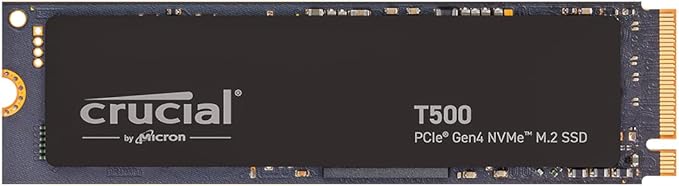
Budget Tier: High-tier PCIe 4.0 | Audited Specs: 2TB M.2 2280 (CT2000T500SSD8) | PCIe 4.0 x4 NVMe | Up to 7,400 MB/s read / 7,000 MB/s write | Micron 232-layer TLC NAND | 2GB LPDDR4 DRAM cache | Phison E25 controller | 1,200 TBW endurance.
Engineering Audit Verdict: Micron’s dense 232-layer TLC allows Crucial to pack 2TB of flash plus a dedicated 2GB LPDDR4 chip onto a cool, power-efficient single-sided PCB. The bare-drive SKU drops straight beneath any AM5 B850 or Intel Z890 motherboard M.2 heatsink without thermal-pad interference.
4. Samsung SSD 9100 PRO 2TB PCIe 5.0 x4 M.2 2280 — Best PCIe 5.0 Creator & AI Scratch Pick

Budget Tier: Enthusiast PCIe 5.0 | Audited Specs: 2TB M.2 2280 (MZ-VAP2T0B/AM) | PCIe 5.0 x4 NVMe | Up to 14,700 MB/s read / 13,400 MB/s write | Samsung V-NAND TLC | 2GB LPDDR4X DRAM cache | 5nm Presto controller | 1,200 TBW endurance.
Engineering Audit Verdict: Pure gamers should stick with the PCIe 4.0 SN850X, 990 PRO, or T500 above because Gen 5 yields 0 FPS uplift. However, for hybrid 4K/8K video editors and local AI creators moving 100GB+ datasets who still require an uncompromised 2GB LPDDR4X DRAM cache and cooler 5nm efficiency, the 9100 PRO sets the PCIe 5.0 benchmark—just ensure it sits beneath a substantial motherboard M.2 heatsink.
Storage Buying Traps to Avoid
- DRAM-less QLC Drives as Primary OS Storage: Low TBW endurance and severe post-pSLC write cliffs (~100–200 MB/s) degrade Windows updates and heavy game patching once capacity passes 70%.
- 500GB Boot Drives in 2026 Gaming Rigs: Three modern AAA releases consume 350GB–500GB immediately, trapping small drives permanently near full capacity where FTL thrashing and garbage collection hit hardest.
- Sacrificing 2TB Capacity for 1TB PCIe 5.0 Speed: On gaming-only budgets, doubling storage to a 2TB PCIe 4.0 DRAM + TLC SSD keeps more games installed with ample free pSLC headroom while delivering identical FPS and 0–2s load parity.
Official Standards & Engineering References
- NVM Express Base Specification (Feature ID
0x0DhHost Memory Buffer): nvmexpress.org/specifications/ - PCI-SIG PCI Express Base & M.2 CEM Specifications: pcisig.com/specifications
- Microsoft DirectX DirectStorage Architecture & GDeflate Documentation: devblogs.microsoft.com/directx/directstorage
- Samsung Semiconductor 990 PRO NVMe SSD Technical Datasheet (LPDDR4 DRAM & V-NAND TLC): semiconductor.samsung.com/consumer-storage/internal-ssd/990-pro/
- Crucial T500 2TB PCIe 4.0 NVMe SSD Official Specifications (Micron 232-Layer TLC & LPDDR4): crucial.com/ssd/t500/ct2000t500ssd8
How We Audited This Guide
- Processors, motherboards, memory, and storage were compared by socket longevity, chipset lane allocation, VRM design, DDR5 EXPO/XMP support, and PCIe generation.
- Every specification claim was cross-checked against official OEM datasheets, platform vendor documentation, and published industry standards (PCI-SIG, JEDEC, VESA, Intel ATX) rather than marketplace listing copy.
- Recommendations were evaluated against our weighted audit rubric and documented compatibility rules; we do not publish fabricated FPS, thermal, or acoustic numbers.
Frequently Asked Questions
Does an SSD without DRAM cache lower my gaming FPS?
No, dedicated SSD DRAM does not directly increase rendered FPS once a game loads textures and shaders into GPU VRAM and system DDR5. However, a DRAM-less QLC drive running near full capacity can stutter during open-world background streaming or heavy Windows updates running simultaneously.
How much system RAM does Host Memory Buffer (HMB) actually use?
Windows 10 and Windows 11 typically allocate between 16MB and 64MB of host RAM per DRAM-less HMB SSD via PCIe DMA. On a 32GB gaming system, 64MB represents just 0.2% of available memory, though that small window holds only ~3% of a 2TB drive’s full FTL mapping table.
Is a DRAM-less HMB SSD safe to use as a secondary game library drive?
Yes, provided the drive uses 3D TLC NAND rather than slow QLC flash and stays inside a native internal M.2 slot where HMB functions properly. Reserve DRAM-equipped TLC drives for Windows 11 and heavy patching, while DRAM-less TLC drives serve reliably as cost-effective secondary game storage.
Does Microsoft DirectStorage require an SSD with dedicated DRAM cache?
DirectStorage officially requires an NVMe SSD on Windows 10 or Windows 11 alongside a DirectX 12 Shader Model 6.0 GPU, not dedicated onboard DRAM. Still, a DRAM + TLC PCIe 4.0 drive maintains cleaner queue stability when OS tasks write concurrently during gameplay.
Why do DRAM-less HMB SSDs slow down inside external USB-C enclosures?
NVMe Host Memory Buffer relies on direct PCIe bus-master DMA access to host memory under Feature ID 0x0Dh. Standard USB 3.2 bridge controllers translate NVMe commands over USB SCSI protocols without exposing PCIe DMA, disabling HMB and forcing the drive onto raw NAND address lookups.


