
On This Page
Disclosure: As an Amazon Associate, The PC Audit earns from qualifying purchases. If you buy through links on this page, we may earn a small commission at no extra cost to you.
Direct Answer: Understanding motherboard VRM phases and DrMOS amperage comes down to matching real CPU wattage, not chasing inflated marketing numbers. For 95% of 2026 gaming builds, a true 12+2 to 14+2+2 VRM with 60A DrMOS and finned aluminum heatsinks handles a 162W Ryzen 7 9800X3D or 230W–250W flagship smoothly without thermal throttling.
Open any motherboard spec sheet in 2026 and the headline marketing almost always leads with dramatic power delivery claims—18+2+2 phases, 110A Smart Power Stages, or 20-phase Duet Rail designs. Those specifications leave many builders wondering how much motherboard vrm phases drmos capacity a gaming rig actually requires, and whether skipping a $400 flagship board risks throttling a modern processor. Across both AMD Socket AM5 (Ryzen 7000, 8000, and 9000/X3D) and Intel LGA 1851 (Core Ultra 200S / 270K Plus), separating genuine electrical efficiency from showroom overkill saves substantial budget without sacrificing a single frame—a principle central to our 2026 AM5 motherboard buying guide and Processors & Platforms hub.
Quick Reference: Matching Motherboard VRM Tiers to 2026 CPUs
Rather than comparing raw phase counts in isolation, size your motherboard’s Voltage Regulator Module (VRM) against your processor’s sustained Package Power Tracking (PPT) on AMD AM5 or Maximum Turbo Power (MTP) on Intel LGA 1851. Base TDP numbers printed on CPU retail boxes rarely reflect sustained multi-core draw; power stages and heatsinks must handle real boost ceilings cleanly.
| 2026 CPU Workload Tier | Verified Peak Draw (PPT / MTP) | Minimum Safe VRM Spec | Sweet-Spot Gaming / Creator VRM | Heatsink & EPS12V Requirement |
|---|---|---|---|---|
| Entry AM5 Gaming Ryzen 5 9600X, Ryzen 7 8700F (OEM) | 65W – 88W | 8+2+1 (Discrete or 50A DrMOS) | 10+2+1 to 12+2+1 (50A–60A DrMOS) | Single extruded aluminum heatsink; 1x 8-pin EPS12V |
| Pure Gaming & X3D Sweet Spot Ryzen 7 9800X3D, 9850X3D, 9900X3D, Core Ultra 5 245K | 159W – 162W | 10+2+1 (55A–60A DrMOS) | 12+2 to 14+2+2 (60A–80A DrMOS) | Extended finned VRM heatsink; 1x or 2x 8-pin EPS12V |
| Flagship Creator & Heavy Multitasking Ryzen 9 9950X3D, Core Ultra 7 270K Plus, Core Ultra 9 285K | 230W – 250W+ | 14+2+1 (60A–80A DrMOS/SPS) | 16+2+1 to 16+2+2 (80A–90A+ SPS) | Dual finned heatsinks + copper heatpipe; dual 8-pin EPS12V |
| Prebuilt Warning Pairings Unlocked Core i9-14900KF on budget B760 | 253W+ sustained | Avoid bare 6-phase discrete MOSFET boards | 14+ to 18+ phase 70A–90A SPS on Z-series | Heavy dual aluminum blocks; weak B760 VRMs throttle boost clocks |
What Is a Motherboard VRM and How Does It Deliver Power?
A motherboard’s Voltage Regulator Module (VRM) is a multi-phase synchronous buck converter seated around the top and left edges of the CPU socket. Your ATX 3.1 power supply delivers 12V direct current (DC) to the motherboard through one or two 8-pin EPS12V headers near the top-left corner of the PCB. Because modern processor silicon operates on ultra-tight voltage rails—typically fluctuating rapidly between 0.85V and 1.35V depending on load and boost state—feeding 12V directly into a CPU would destroy the chip instantaneously.
The VRM steps that 12V input down to clean, stable core voltages while multiplying available electrical current up to 120A–220A+ under heavy rendering or shader compilation workloads. Four core hardware stages work together in every VRM channel to achieve this conversion with minimal electrical ripple:
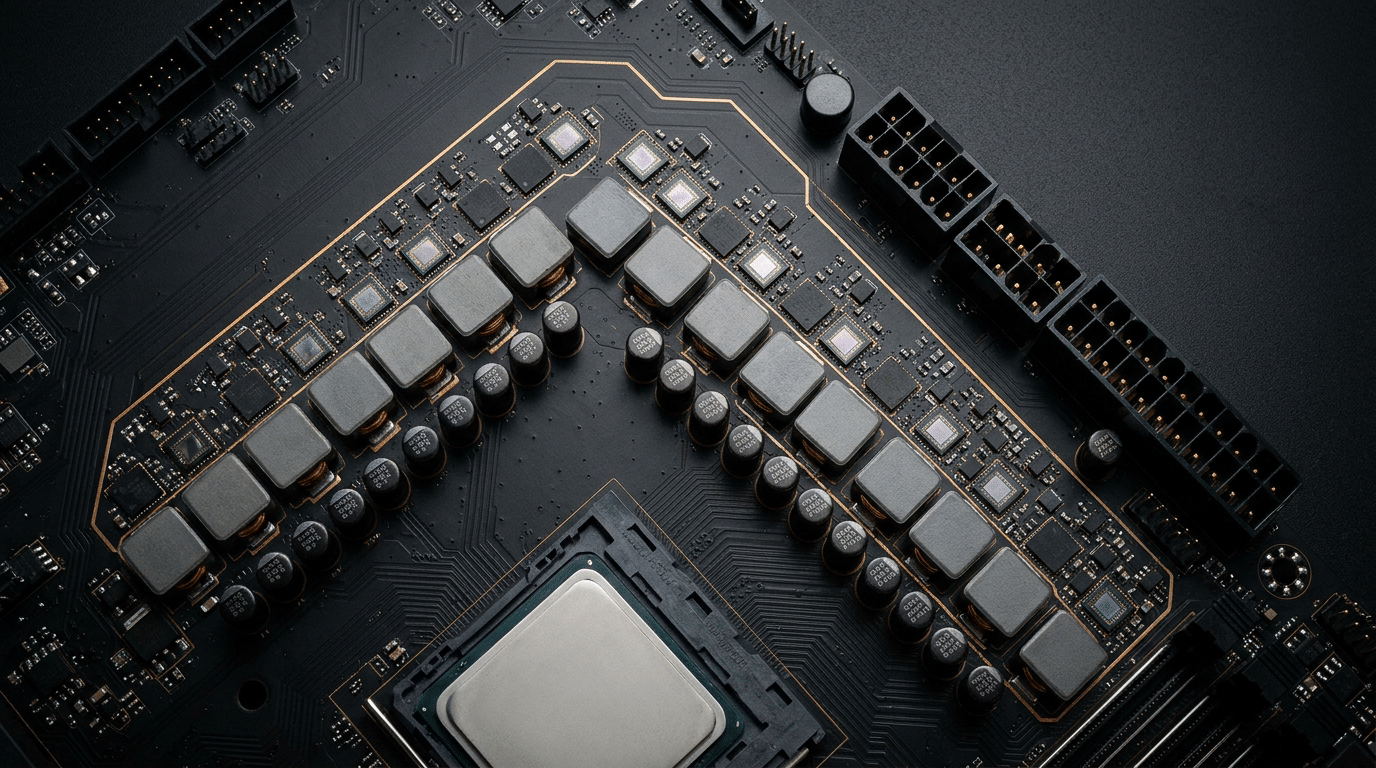
- Digital PWM Controller: The master integrated circuit governing switching timing across all active phases. By firing phases out of sequence (interleaving), the PWM controller smooths combined current output and adjusts rapidly when a game thread spikes CPU demand in microseconds.
- Power Stages (MOSFETs, DrMOS, or SPS): High-speed semiconductor switches that chop the incoming 12V rail into precisely timed square-wave pulses. This stage accounts for the overwhelming majority of VRM heat generation and dictates overall power-delivery quality.
- Ferrite Chokes (Inductors): The row of square grey or black blocks lining the socket perimeter. Chokes store energy magnetically during each high-side pulse and release it continuously as the low-side switch opens, flattening jagged voltage pulses into smooth DC current.
- Solid Polymer & MLCC Capacitors: Situated closest to the CPU socket, output capacitors absorb sudden microsecond current drops and spikes (transient excursions) so core voltage remains rock steady without triggering crashes or aggressive Vdroop.
Decoding “14+2+2” and “16+2+1” Phase Notation
Board vendors love quoting combined sums like “18-phase VRM” or “20-phase power,” yet the three-number notation (X+Y+Z) separates completely distinct voltage rails:
- First Number (Vcore): The most critical figure. In a
14+2+2design like the GIGABYTE B850 AORUS Elite WIFI7, those 14 phases exclusively power the CPU execution cores. - Second Number (SoC / VCCGT / VCCSA): Supplies the processor’s uncore fabric, integrated memory controller (crucial for maintaining 1:1 DDR5-6000 stability on AM5), and integrated graphics engine.
- Third Number (MISC / VCCAUX): Feeds auxiliary low-current rails including CPU-direct PCIe lanes and I/O PHYs. On many boards, these auxiliary phases use simpler Ppak MOSFETs rather than full DrMOS stages because their amperage draw stays modest.
Discrete MOSFETs vs. DrMOS vs. Smart Power Stages (SPS)
Two motherboards can both advertise “12+2+1 phases” while exhibiting dramatically different thermal ceilings. The deciding variable is almost always the type and amperage rating of the power stage silicon sitting beneath the heatsink.
| Power Stage Architecture | Component Integration | Typical Amperage Rating | Efficiency & Thermal Behavior | 2026 Market Placement |
|---|---|---|---|---|
| Discrete MOSFETs | Separate Driver IC + High-Side + Low-Side chips | ~30A – 45A effective | Higher switching loss, slower transient response, hotter PCB footprint | Budget entry A620 / low-end B760 / OEM boards; avoid for 170W+ CPUs |
| DrMOS (Driver MOSFET) | Driver IC + High-Side + Low-Side integrated into one QFN chip | 50A – 80A per stage | Dramatically lower parasitic resistance (R_DS(on)); cool and efficient up to 230W+ | Mainstream & sweet-spot gaming (e.g., AMD B850 boards at 60A–80A) |
| Smart Power Stage (SPS) | Integrated DrMOS + real-time current & temperature telemetry | 80A – 110A+ per stage | Peak efficiency, active per-phase balancing, precise OCP/OTP protection | Upper-midrange & flagship (X870, X870E, Z890, premium B850 boards) |
Traditional discrete MOSFET layouts split the driver chip and upper/lower transistors across separate silicon packages linked by copper PCB traces. Those external traces introduce parasitic inductance and resistance, forcing the switches to waste extra watts as heat at higher switching frequencies. That thermal inefficiency is precisely why older budget motherboards—such as bare-VRM Intel B760 boards paired with high-wattage processors—hit thermal throttling thresholds rapidly under sustained load.
DrMOS (Driver MOSFET) packages solve those bottlenecks by co-locating the driver IC and both power MOSFETs inside a single compact thermally conductive package. Shortening internal bond wires slashes switching losses and allows tighter layout around the socket. Step one tier higher to Smart Power Stages (SPS)—used on boards like the ASUS TUF Gaming X870-PLUS WiFi (16+2+1 80A SPS) and MSI MAG B850 Tomahawk MAX WiFi (14+2+1 80A SPS)—and each stage feeds live per-phase current and die-temperature telemetry back to the PWM controller. Active balancing prevents one hot stage from bearing disproportionate stress during multi-hour renders or aggressive overclocking.
Phase-Count Math: Why 14x 60A Equals 840A for a 200A CPU
First-time builders frequently ask why a GIGABYTE B850 AORUS Elite WIFI7 specifies 14 Vcore phases rated at 60A each—an aggregate theoretical rating of 840 amps—when even a flagship 250W processor pulls nowhere near 840A. Using fundamental Ohm’s Law power math, a Ryzen 9 9950X3D running at its 230W PPT ceiling around 1.20V draws roughly 192A total (230W / 1.20V ≈ 192A), while an Intel Core Ultra 9 285K peaking at 250W MTP draws roughly 208A under stock limits.
Why build 840A to 1,280A of Vcore capacity for a ~135A–208A CPU? The answer sits in resistive heating physics (Power Loss = Current² × Resistance):
- Efficiency Sweet Spot (20%–35% Load): Integrated DrMOS and SPS stages do not deliver peak efficiency at 100% of their sticker amperage; they operate coolest and most efficiently when pulling roughly 15A to 25A per stage. Because resistive waste heat rises with the square of current, splitting 192A across 14 phases drops per-stage load to just 13.7A—keeping switching efficiency comfortably above 90% and slashing heat output dramatically compared to forcing 32A through 6 phases.
- True Phases vs. Teamed (Parallel) Phases vs. Phase Doublers: Very few PWM controllers natively drive 16 independent signals. Most upper-midrange boards—including GIGABYTE’s Digital Twin (
7+7 = 14) and MSI’s Duet Rail Power System—wire two DrMOS + choke pairs in parallel per PWM channel. Teaming preserves fast transient response while halving current per component. Older phase-doubler chips interleave switching cleanly at half frequency per stage, which works well thermally though slightly slower during sudden load jumps than teamed architectures. - PCB Copper Layers & EPS12V Input Margin: A standard 8-pin EPS12V connector reliably handles roughly 300W–336W continuous power, so a single 8-pin plug is technically sufficient for a 162W Ryzen 7 9800X3D. However, 6-layer or 8-layer PCBs using 2oz copper inner planes paired with dual 8-pin EPS headers (found on high-tier B850, X870, X870E, and Z890 boards) distribute current across twice as many pins, eliminating localized connector heating under 230W–250W sustained loads.
Myth vs. Engineering Reality: VRM Marketing Claims Debunked
Aggressive spec-sheet marketing creates false trade-offs that push buyers toward $400–$600 motherboards when their gaming processor only pulls 70W–100W while rendering frames.
| Common Hardware Myth | Verified Engineering Reality (2026) |
|---|---|
| “A 20-phase VRM gives higher gaming FPS than a 12-phase VRM on a Ryzen 7 9800X3D.” | Once a VRM sustains clean voltage below thermal throttling limits, extra phases deliver 0 extra FPS. A 12+2 or 14+2+2 60A DrMOS B850 board holds identical 5.2 GHz boost clocks to a flagship X870E board. |
| “16+2+1 means 19 phases all power the processor cores.” | Only the first digit (16) feeds Vcore; the remaining digits power the SoC/memory controller (2) and auxiliary PCIe/IO rails (1). |
| “Liquid AIO coolers automatically cool motherboard VRMs better than air coolers.” | Dual-tower air coolers blow stray airflow across VRM fins, whereas AIO pump blocks eliminate socket airflow—making case exhaust and real aluminum finned heatsinks mandatory with AIOs. |
| “Any B-series motherboard handles any flagship CPU safely.” | While AMD B850 boards routinely ship strong 12+2 to 14+2+2 DrMOS setups, budget OEM or legacy Intel B760 boards with bare discrete VRMs throttle unlocked K-series chips like the i9-14900KF, and Intel B860 locks CPU overclocking altogether. |
How Much Power Delivery Do You Need for AM5 vs. LGA 1851?
Platform architecture dictates how heavily your build stresses motherboard power delivery. Under Knowledge Graph rule R-MB-01, pairing the right chipset tier with realistic CPU wattage prevents both VRM overheating and wasted motherboard budget.
AMD Socket AM5: Why B850 (12+2 / 14+2+2 60A–80A) Covers 95% of Gamers
According to AMD’s official Socket AM5 chipset specifications, the mainstream AMD B850 platform mandates PCIe 5.0 M.2 support and unlocks full Precision Boost Overdrive (PBO) CPU tuning alongside AMD EXPO memory overclocking. Even better, AMD’s undisputed gaming leaders—the Ryzen 7 9800X3D (120W TDP / 162W PPT) and Ryzen 7 9850X3D (120W TDP / ~162W PPT)—spend most gaming sessions drawing well under 100W.
A mid-range B850 board carrying 12+2 to 14+2+2 phases with 60A DrMOS or 80A SPS runs effortlessly cool beneath a 9800X3D or even a 230W Ryzen 9 9950X3D, freeing $100–$180 to invest directly into your graphics card or a true 1:1 32GB (2x16GB) DDR5-6000 CL30 memory kit. Explore specific model pairings in our Best AMD B850 Motherboards guide.
Flagship Creators & Intel LGA 1851: When 80A SPS and Z890 Matter
Workload profiles shift sharply when you step up to all-core rendering, Unreal Engine shader builds, or heavy 4K/8K video exports comparing chips like the Ryzen 9 9950X3D vs. Core Ultra 9 285K. Both the 16-core Ryzen 9 9950X3D (230W PPT) and 24-core Intel Core Ultra 9 285K / Core Ultra 7 270K Plus (250W MTP) pull heavy continuous current for hours. On Intel LGA 1851, Intel’s Z890 chipset (rule R-MB-02) is mandatory if you want unlocked CPU multiplier overclocking on K-series chips—because Intel B860 locks out CPU core multiplier tuning, even though it retains RAM XMP support.
If your workflow pins 16 to 24 cores at 100% daily, stepping up to a 16+2+1 or 16+2+2 VRM armed with 80A Smart Power Stages, dual 8-pin EPS connectors, and copper heatpipe-linked heatsinks keeps VRM board temperatures low and prevents silent clock droop in warm summer rooms.
Actionable Buyer & Builder Checklist: 6 VRM Checks Before Clicking Buy
Run every prospective motherboard—or prebuilt desktop parts list—through these six engineering checks before finalizing your order:
- Check Vcore Phase Count & Amperage Together: Require at least 12+2 phases at 60A DrMOS for Ryzen 7 9800X3D / 9850X3D builds, and target 14+2+1 to 16+2+2 at 80A SPS for sustained 230W–250W Ryzen 9 9950X3D or Core Ultra 9 285K workloads.
- Inspect Real Aluminum Fin Mass (Reject Bare VRMs): Never buy an unheatsinked VRM for any CPU above 65W–88W. Look for thick extruded aluminum or stacked fins with thermal pads bridging both MOSFETs and chokes—not hollow decorative plastic shrouds that trap stagnant air.
- Audit EPS12V Headers & ATX 3.1 PSU Compliance: Pair dual 8-pin EPS motherboard headers with an ATX 3.1 80+ Gold power supply carrying two dedicated CPU cables—and never mix modular PSU cables across different brands or models.
- Check the PCIe Block Diagram Alongside VRM Specs: Strong VRMs mean nothing if a board silently cuts your primary GPU slot from PCIe 5.0 x16 down to x8 when you populate a second M.2 NVMe bay (
Motherboard --[ROUTES_PCIE_LANES_TO]--> GPU). Always verify lane routing in the manual before installing secondary drives. - Demand BIOS Flashback & Diagnostic LEDs: Especially on Socket AM5, ensure your board includes USB BIOS Flashback (such as Q-Flash Plus or ASUS BIOS FlashBack) plus EZ Debug LEDs so future CPU launches work out of the box without an older spare processor.
- Maintain Case Airflow Across the Top-Left Corner: If you use a 360mm AIO liquid cooler (which removes tower-fan airflow near the socket), verify your chassis supplies unobstructed front/side intake and top/rear exhaust across the VRM heatsinks.
Commercial Bridge: Verified 2026 Motherboards by VRM Tier
The three audited AM5 boards below demonstrate how VRM architecture scales from sweet-spot 60A DrMOS B850 value up to flagship 80A SPS X870E capacity—each verified against our 2026 AM5 motherboard buyer’s guide and B850 motherboard picks.
Choose a 60A DrMOS B850 Board If…
- You are building around a Ryzen 7 9800X3D, 9850X3D, or Ryzen 5 9600X primarily for 1080p, 1440p, or 4K gaming.
- You want zero PCIe x16-to-x8 GPU lane sharing across three M.2 drives alongside Wi-Fi 7 and 2.5GbE LAN without paying X870 USB4 taxes.
Step Up to 80A SPS X870 / X870E If…
- You run sustained all-core rendering or AI workloads on a 230W Ryzen 9 9950X3D with PBO tuning and want telemetry-backed 80A Smart Power Stages.
- You actively need dual rear USB4 40Gbps Type-C ports and four M.2 NVMe bays for external creator arrays.
1. GIGABYTE B850 AORUS Elite WIFI7 — Best 60A DrMOS Sweet Spot (Zero GPU Lane Sharing)

Audited Specs: $200–$250 tier (~$230 Launch MSRP) | Socket AM5 ATX | 14+2+2 Digital Twin VRM (60A DrMOS for Vcore & SoC, Ppak MISC) | 1x PCIe 5.0 x16 (unshared) | 3x M.2 (1x Gen5 x4 + 2x Gen4 x4) | Wi-Fi 7 + 2.5GbE LAN | Q-Flash Plus (BIOS Flashback), EZ-Latch Plus GPU & M.2.
Per GIGABYTE’s official B850 AORUS Elite WIFI7 specifications, its teamed 7+7 Vcore layout spreads current cleanly across 14 60A DrMOS stages—effortlessly running a 162W Ryzen 7 9800X3D or 9850X3D while avoiding any x16-to-x8 GPU lane penalty even when all three M.2 bays are populated.
2. ASUS TUF Gaming X870-PLUS WiFi — Mid-Upper 16+2+1 80A SPS + Dual USB4

Audited Specs: $290–$330 tier (~$310 Launch MSRP) | Socket AM5 ATX | 16+2+1 80A Smart Power Stages (SPS) | 1x PCIe 5.0 x16 (shares lanes with M.2_2) | 4x M.2 (2x Gen5, 2x Gen4) | 2x Rear USB4 40Gbps | Wi-Fi 7 + 2.5GbE LAN | BIOS FlashBack, PCIe Q-Release, Q-LED.
Stepping up from 60A DrMOS to 16 Vcore 80A Smart Power Stages delivers 1,280A of Vcore capability alongside per-stage current and thermal telemetry for 230W Ryzen 9 9950X3D workloads plus dual USB4 40Gbps ports. Lane-Sharing Note: Populating M.2_2 splits the primary GPU slot to x8 (keep secondary SSDs in M.2_3 to preserve full x16).
3. GIGABYTE X870E AORUS PRO — Enthusiast 16+2+2 80A SPS & Dual-Chipset Expansion

Audited Specs: $350–$400 tier (~$360–$395 Launch MSRP) | Socket AM5 Dual-Chipset ATX | 16+2+2 Digital Twin VRM with 80A Smart Power Stages (Vcore & SoC) | 1x PCIe 5.0 x16 UD Slot X | 4x M.2 (3x Gen5, 1x Gen4) + 4x SATA | 2x Rear USB4 40Gbps | Qualcomm Wi-Fi 7 + 2.5GbE | Q-Flash Plus, EZ-Latch Plus.
Built for heavy multi-core creators pushing 230W Ryzen 9 9950X3D PBO loads, the X870E AORUS PRO pairs 80A SPS telemetry with substantial finned thermal mass and dual-chipset I/O headroom. Use M2A_CPU and M2D_SB first to keep your PCIe 5.0 graphics slot at full x16 (M2B_CPU and M2C_CPU bifurcate the GPU slot to x8).
Motherboard VRM Pairings Flagged & Rejected Under Our Audit Rules
- Bare-VRM Boards Without Heatsinks on 170W+ CPUs: Uncooled discrete MOSFET banks rapidly exceed safe PCB temperatures under sustained rendering, forcing aggressive CPU clock throttling and shortened capacitor life.
- Unlocked i9-14900KF Prebuilts on Budget Intel B760 Boards (
R-AMZ-04): Pairing 253W+ unlocked processors with lightweight OEM B760 power stages triggers immediate thermal/power throttling while masking weak motherboard specs in Amazon listings. - AM5 Motherboards Omitting USB BIOS Flashback: Any AM5 board lacking CPU-less firmware updates risks leaving Ryzen 9800X3D or 9850X3D builders stranded on an older factory BIOS at first boot.
Official Engineering References
- AMD Socket AM5 Chipsets: X870E, X870, and B850 Official Platform Matrix
- Intel Z890 Chipset & LGA 1851 Desktop Platform Specifications
- GIGABYTE B850 AORUS ELITE WIFI7: 14+2+2 Digital Twin 60A DrMOS Specifications
- ASUS TUF GAMING X870-PLUS WIFI: 16+2+1 80A SPS Power Stage Architecture
- MSI MAG B850 TOMAHAWK MAX WIFI: 14+2+1 Duet Rail 80A SPS Specifications
Frequently Asked Questions
How many VRM phases do I need for a Ryzen 7 9800X3D or 9850X3D?
A true 12+2 or 14+2+2 VRM using 60A DrMOS stages and solid aluminum heatsinks handles the 162W PPT ceiling of a Ryzen 7 9800X3D or 9850X3D effortlessly. Paying extra for 18+ phase flagship boards adds zero gaming frame-rate uplift.
What is the difference between DrMOS and Smart Power Stages (SPS)?
Both DrMOS and Smart Power Stages combine the driver IC and high/low-side MOSFETs inside one low-resistance chip. Smart Power Stages add real-time per-phase current and thermal telemetry back to the PWM controller, improving load balancing and protection on 230W–250W flagship processors.
Does a stronger motherboard VRM increase gaming FPS?
No, provided your existing motherboard VRM stays cool enough to hold rated CPU boost clocks. Once voltage stability and VRM thermals remain within specification, upgrading from a 14+2+2 60A B850 board to an 80A or 110A flagship motherboard yields zero extra FPS.
Are teamed or parallel VRM phases worse than true direct phases?
Not for gaming or desktop creators. Teamed designs drive two DrMOS stages and chokes simultaneously per PWM channel, lowering current per stage, cutting resistive heat, and preserving fast transient response without needing expensive 16-channel controllers or extra phase-doubler latency.
What happens if a motherboard VRM overheats under load?
When poorly cooled discrete MOSFETs approach thermal limits, the motherboard’s VRM over-temperature protection throttles CPU package power and clock speeds sharply to prevent permanent silicon damage. That sudden frequency drop causes noticeable stuttering and lower multi-core rendering throughput.


