
Disclosure: As an Amazon Associate, I earn from qualifying purchases. If you buy through links on this page, we may earn a small commission at no extra cost to you.
Finding the best AM5 motherboard in 2026 is no longer about chasing the highest phase-count marketing sticker or blindly paying flagship prices. A single poorly routed M.2 slot on an expensive board can quietly cut your graphics card from PCIe 5.0 x16 down to x8, while an overlooked power delivery heatsink can throttle a 16-core Ryzen processor under sustained shader compilation.
Across The PC Audit hardware hub, we audited block diagrams, VRM DrMOS ratings, PCIe 5.0 lane routing, networking chips, and rear I/O layouts across dozens of live Amazon US listings to narrow down the 10 strongest ATX and Mini-ITX boards spanning AMD B850, X870, and X870E chipsets. Whether you are building around one of the best gaming CPUs like the Ryzen 7 9800X3D or scaling up to dual-USB4 creator storage, these 10 verified boards deliver full multi-generation AM5 runway without hidden lane bottlenecks.
In This Guide
Quick Picks: Best AM5 Motherboard Recommendations at a Glance
#1 Best Overall AM5 Motherboard
GIGABYTE B850 AORUS Elite WIFI7
Zero GPU x8 lane sharing across three M.2 bays, cool 14+2+2 VRM stages, Wi-Fi 7, toolless EZ-Latch Plus latches, and a 5-year warranty around $230 Launch MSRP. (Audit #1)
#3 Best Overall X870E Flagship
ASRock Phantom Gaming X870E Nova WiFi
Five M.2 bays, 20+2+1 110A SPS power delivery, 5GbE LAN, and dual USB4 ports while keeping your graphics slot at unshared PCIe 5.0 x16 in the $300–$360 tier. (Audit #3)
#4 Best Value Under $200
ASRock B850 Steel Legend WiFi
Brings 14+2+1 80A DrMOS VRMs, four PCIe x4 M.2 slots, Wi-Fi 7, and a clean white/silver ATX finish into the $160–$200 tier with zero GPU lane compromises. (Audit #4)
Side-by-Side Comparison: Top 10 Best AM5 Motherboards
| Motherboard & Award | Chipset & VRM | M.2 & Lane Behavior | Networking, USB4 & Tier | Link |
|---|---|---|---|---|
| GIGABYTE B850 AORUS Elite WIFI7 Best Overall AM5 Motherboard | AMD B850 | ATX 14+2+2 (60A DrMOS) | 3x M.2 (1x Gen5, 2x Gen4) Zero GPU x8 sharing | Wi-Fi 7 + 2.5GbE | No USB4 ($200–$250 tier) | View on Amazon |
| MSI MAG B850 Tomahawk MAX WiFi Best B850 for 5GbE & Storage | AMD B850 | ATX 14+2+1 (80A SPS) | 4x M.2 (2x Gen5, 1x Gen4 x4, 1x x2) Zero GPU x8 sharing | Wi-Fi 7 + 5GbE | No USB4 ($200–$260 tier) | View on Amazon |
| ASRock X870E Nova WiFi Best Overall X870E Motherboard | AMD X870E | ATX 20+2+1 (110A SPS) | 5x M.2 (1x Gen5, 3x Gen4, 1x Gen3) Zero GPU x8 sharing | Wi-Fi 7 + 5GbE | 2x USB4 ($300–$360 tier) | View on Amazon |
| ASRock B850 Steel Legend WiFi Best Value B850 & White-Build Pick | AMD B850 | ATX 14+2+1 (80A DrMOS) | 4x M.2 (1x Gen5, 3x Gen4) Zero GPU x8 sharing | Wi-Fi 7 + 2.5GbE | No USB4 ($160–$200 tier) | View on Amazon |
| MSI MAG X870 Tomahawk WiFi Best Value X870 Motherboard | AMD X870 | ATX 14+2+1 (80A SPS) | 4x M.2 (2x Gen5, 2x Gen4) M.2_2 shares with USB4 (GPU x16) | Wi-Fi 7 + 5GbE | 2x USB4 ($200–$260 tier) | View on Amazon |
| ASUS TUF Gaming B850-PLUS WiFi Best Durable Mainstream B850 | AMD B850 | ATX 14+2+1 (80A DrMOS) | 3x M.2 (1x Gen5, 2x Gen4) Zero GPU x8 sharing | Wi-Fi 7 + 2.5GbE | 20G USB-C ($200–$260 tier) | View on Amazon |
| GIGABYTE X870E AORUS PRO Best Dual-Chipset Creator X870E | AMD X870E | ATX 16+2+2 (80A SPS) | 4x M.2 (3x Gen5, 1x Gen4) M2B/M2C drop GPU to x8 | Wi-Fi 7 + 2.5GbE | 2x USB4 ($350–$400 tier) | View on Amazon |
| ASUS TUF Gaming X870-PLUS WiFi Best Dual-USB4 Mid-Tier X870 | AMD X870 | ATX 16+2+1 (80A SPS) | 4x M.2 (2x Gen5, 2x Gen4) M.2_2 drops GPU to x8 | Wi-Fi 7 + 2.5GbE | 2x USB4 ($290–$330 tier) | View on Amazon |
| ASRock AMD B850 LiveMixer WiFi Best AM5 Board for Streamers | AMD B850 | ATX 14+2+1 (80A DrMOS) | 3x M.2 (1x Gen5, 2x Gen4) Dual PCIe 4.0 x16 (x4) slots | Wi-Fi 7 + 2.5GbE | 13 Rear USB-A ($160–$200 tier) | View on Amazon |
| ASUS ROG Strix B850-I Gaming WiFi Best Mini-ITX AM5 Motherboard | AMD B850 | Mini-ITX 10+2+1 (90A Stages) | 2x M.2 (Both Gen5 x4) Zero GPU x8 sharing | Wi-Fi 7 + Intel 2.5GbE | ALC4080 ($300–$340 tier) | View on Amazon |
Match Your Use Case: Which AM5 Motherboard Fits Your Build?
| Buyer Scenario | Best Match | Why & Expected Outcome |
|---|---|---|
| Mainstream Ryzen 7 9800X3D / 9850X3D ATX rig | GIGABYTE B850 AORUS Elite WIFI7 | Keeps your graphics card at PCIe 5.0 x16 across three M.2 drives while delivering toolless latches and a 5-year warranty. |
| Multi-SSD gaming + 5GbE NAS network | MSI MAG B850 Tomahawk MAX WiFi | Upgrades wired networking to 5GbE and packs two CPU Gen5 M.2 bays on 80A VRM stages without splitting GPU lanes. |
| Workstation + 4–5 NVMe drives + dual USB4 | ASRock X870E Nova WiFi | Routes five M.2 bays and dual 40Gbps USB4 ports without dropping your GPU slot to x8, backed by 20+2+1 110A power stages. |
| White-themed ATX build under $200 | ASRock B850 Steel Legend WiFi | Combines silver/white armor, four PCIe x4 M.2 slots, 80A DrMOS VRMs, and Wi-Fi 7 inside a tight budget. |
| Streaming desk with mics, capture cards & 8K mice | ASRock AMD B850 LiveMixer WiFi | Eliminates USB hubs with 13 rear Type-A ports, 20Gbps Type-C, Lightning Gaming low-jitter USB ports, and dual x4 add-in slots. |
| Compact sub-15L SFF Mini-ITX desktop | ASUS ROG Strix B850-I Gaming WiFi | Fits 90A stages, dual Gen5 x4 M.2 slots, Wi-Fi 7, and 2-DIMM DDR5 tuning into a dense 170mm Mini-ITX footprint. |
Detailed AM5 Motherboard Audits (Ranks 1–10)
1. GIGABYTE B850 AORUS Elite WIFI7 — Best Overall AM5 Motherboard

Quick Specs: AMD B850 | ATX | 14+2+2 Digital Twin VRM (60A DrMOS) | 1x PCIe 5.0 x16 (unshared) | 3x M.2 (1x Gen5 x4, 2x Gen4 x4) | Wi-Fi 7 + 2.5GbE LAN | Price Tier: Mid-range ($200–$250 tier; around $230 Launch MSRP)
Audit Score: 9.3 / 10
- VRM Power Delivery & Heatsinks (30%): 9.2 / 10
- PCIe 5.0 Lanes & Storage Expansion (25%): 9.5 / 10
- Networking & Rear I/O (25%): 8.9 / 10
- BIOS Features & DIY Ergonomics (20%): 9.6 / 10
Most Socket AM5 buyers do not need dual-chipset X870E silicon or mandatory USB4 controllers—they need clean PCIe lane routing and zero thermal throttling on a Ryzen 7 9800X3D or Ryzen 7 9850X3D. According to the official GIGABYTE B850 AORUS Elite WIFI7 specifications, GIGABYTE allocates one CPU PCIe 5.0 x4 M.2 slot, one CPU PCIe 4.0 x4 slot, and one chipset PCIe 4.0 x4 slot so filling every bay leaves your graphics card running at full PCIe 5.0 x16. Its 14+2+2 Digital Twin VRM with 60A DrMOS stages easily sustains 162W to 230W Ryzen PPT power targets, backed by a generous 5-year warranty.
Compared with the #2 MSI MAG B850 Tomahawk MAX WiFi, GIGABYTE trims the fourth M.2 bay and sticks with 2.5GbE Ethernet instead of 5GbE, yet scores higher on hassle-free DIY engineering thanks to EZ-Latch Plus GPU ejection, click-in M.2 heatsinks, Q-Flash Plus, and zero slot-disabling trade-offs. Against the #7 GIGABYTE X870E AORUS PRO, it saves well over $100 and completely removes the x8 graphics bifurcation trap that catches unsuspecting builders. As noted in our Best AMD B850 Motherboards guide, this layout defines the 2026 mainstream sweet spot.
Buyer Verification Alert: Check that your case includes a front-panel Type-C cable if you want to take advantage of the internal 20Gbps USB 3.2 Gen 2×2 header, as rear I/O skips 40Gbps USB4.
Pros
- Zero GPU x8 lane sharing across all three M.2 NVMe sockets protects full PCIe 5.0 x16 graphics throughput
- Toolless EZ-Latch Plus GPU latch, EZ-Latch Click M.2 armor, and quick-plug WIFI EZ-Plug simplify assembly
- 5-year manufacturer warranty plus Q-Flash Plus BIOS Flashback for CPU-less Ryzen 9000X3D readiness
Cons
- Omits rear 40Gbps USB4 Type-C ports found on mandatory X870 and X870E platforms
- Uses 160MHz Wi-Fi 7 and 2.5GbE LAN rather than 320MHz wireless channels or 5GbE Ethernet
Verdict: Buy it if you want the cleanest, most dependable AMD B850 foundation for a Ryzen 9000X3D gaming build without paying for unused USB4 lanes. Skip it if you connect high-speed external Thunderbolt/USB4 docks or run a 5GbE NAS. Upgrade note: Pair with a heatsink-free 2TB PCIe 4.0 DRAM+TLC NVMe drive beneath GIGABYTE’s integrated M.2 thermal shield.
2. MSI MAG B850 Tomahawk MAX WiFi — Best B850 for 5GbE & Storage

Quick Specs: AMD B850 | ATX | 14+2+1 Duet Rail Power System (80A SPS) | 1x PCIe 5.0 x16 (unshared) | 4x M.2 (2x Gen5 x4, 1x Gen4 x4, 1x Gen4 x2) | Wi-Fi 7 + 5GbE LAN | Price Tier: Upper mid-range ($200–$260 tier)
Audit Score: 9.1 / 10
- VRM Power Delivery & Heatsinks (30%): 9.4 / 10
- PCIe 5.0 Lanes & Storage Expansion (25%): 9.1 / 10
- Networking & Rear I/O (25%): 9.0 / 10
- BIOS Features & DIY Ergonomics (20%): 9.0 / 10
MSI’s B850 Tomahawk MAX WiFi blurs the line between mainstream and flagship platforms by pairing heavy 14+2+1 80A Smart Power Stages on an 8-layer 2oz copper PCB with two CPU-wired PCIe 5.0 x4 M.2 sockets. Detailed in the official MSI MAG B850 Tomahawk MAX WiFi documentation, both Gen5 M.2 bays pull dedicated CPU lanes without cutting your primary graphics slot below x16, while Realtek 8126VB 5GbE Ethernet and Wi-Fi 7 handle multi-gigabit game downloads.
Compared directly against its sibling, the #5 MSI MAG X870 Tomahawk WiFi, the B850 Tomahawk MAX keeps the identical 80A VRM, 5GbE LAN, and dual CPU Gen5 M.2 setup while eliminating the X870’s awkward bandwidth split between M.2_2 and rear USB4 ports. Against the #1 GIGABYTE B850 AORUS Elite WIFI7, MSI delivers higher-amperage 80A stages for 16-core Ryzen 9 9950X3D chips and doubles wired LAN throughput, though GIGABYTE avoids any x2 chipset M.2 compromises.
Buyer Verification Alert: Chipset slot M2_3 runs at PCIe 4.0 x2 and shares bandwidth with the bottom PCI_E3 slot; populate M2_1, M2_2, and M2_4 first before touching M2_3.
Pros
- 14+2+1 80A SPS VRM with 7 W/mK thermal pads sustains 230W PPT Ryzen 9 workloads effortlessly
- Dual PCIe 5.0 x4 M.2 bays plus two chipset M.2 slots without stealing lanes from the primary GPU slot
- Realtek 5GbE LAN, Wi-Fi 7, Flash BIOS Button, and MSI EZ PCIe Release push-button GPU removal
Cons
- Third M.2 slot (M2_3) steps down to PCIe 4.0 x2 and shares lanes with the lower PCI_E3 add-in slot
- Drops rear 40Gbps USB4 ports compared with X870 and X870E alternatives
Verdict: Buy it if you want workstation-grade 80A power stages, 5GbE wired speeds, and four M.2 bays without sacrificing GPU lanes or overpaying for USB4. Skip it if you rely on external 40Gbps USB4 storage arrays (#5 MSI MAG X870 Tomahawk WiFi). Upgrade note: Pair with dual 8-pin EPS connectors from an ATX 3.1 PSU if running overclocked 16-core Ryzen 9 silicon.
3. ASRock Phantom Gaming X870E Nova WiFi — Best Overall X870E Motherboard

Quick Specs: AMD X870E (Dual Chipset) | ATX | 20+2+1 Power Phases (110A SPS) | 1x PCIe 5.0 x16 (unshared) | 5x M.2 (1x Gen5 x4, 3x Gen4 x4, 1x Gen3 x2/SATA) | 2x USB4 + 5GbE LAN + Wi-Fi 7 | Price Tier: Enthusiast ($300–$360 tier)
Audit Score: 9.5 / 10
- VRM Power Delivery & Heatsinks (30%): 9.8 / 10
- PCIe 5.0 Lanes & Storage Expansion (25%): 9.6 / 10
- Networking & Rear I/O (25%): 9.6 / 10
- BIOS Features & DIY Ergonomics (20%): 9.0 / 10
Dual-chipset X870E boards frequently fumble CPU lane routing by splitting the primary GPU slot down to x8 whenever enthusiasts load up extra M.2 SSDs. ASRock solves that headache cleanly on the Phantom Gaming X870E Nova WiFi by routing one Gen5 x4 M.2 slot directly to the CPU and pushing three Gen4 x4 M.2 slots plus a fifth Gen3 x2/SATA bay onto the dual Promontory 21 AMD X870E chipset architecture. Combined with massive 20+2+1 110A Smart Power Stages, 8-layer 2oz copper PCB traces, 5GbE LAN, Wi-Fi 7, and dual 40Gbps USB4 ports, it earns our highest raw hardware score in this roundup.
Compared with the #7 GIGABYTE X870E AORUS PRO, ASRock trades two extra CPU Gen5 M.2 slots for uncompromised PCIe 5.0 x16 graphics lanes across five usable M.2 drives, adds faster 5GbE Ethernet, and typically sells for slightly less in the $300–$360 tier. Pure gamers who only ever install one or two SSDs still save over $100 with #1 GIGABYTE B850 AORUS Elite WIFI7, while heavy workstation builders get zero-compromise expansion here.
Buyer Verification Alert: Populating the fifth slot (M2_5, PCIe 3.0 x2 / SATA) disables the bottom PCIE3 x2 slot; avoid pairing X870E boards with Ryzen 8000 APUs whose limited lanes cap the primary GPU slot to Gen4 x8/x4.
Pros
- Five M.2 slots and dual rear 40Gbps USB4 ports with zero GPU x16-to-x8 lane sharing penalty
- Overbuilt 20+2+1 110A SPS power phases and 20K capacitors handle flagship Ryzen 9 9950X3D tuning
- Realtek 5GbE LAN, Wi-Fi 7, toolless M.2 heatsinks, rear BIOS Flashback, and Graphics Card Lite Release latch
Cons
- Limited to a single PCIe 5.0 x4 M.2 socket (M2_2 through M2_4 run at Gen4 x4, M2_5 at Gen3 x2)
- Expensive overkill for mainstream gaming rigs running one OS SSD and zero USB4 accessories
Verdict: Buy it if you want the best AM5 motherboard for multi-NVMe workstations, dual 40Gbps USB4 accessories, and flagship 16-core CPUs without risking x8 graphics bifurcation. Skip it if your build uses one or two SSDs (#1 GIGABYTE B850 AORUS Elite WIFI7 delivers identical gaming FPS). Upgrade note: Fill M2_1 through M2_4 before M2_5 to preserve your bottom PCIe slot.
4. ASRock B850 Steel Legend WiFi — Best Value B850 & White-Build Pick

Quick Specs: AMD B850 | ATX (White/Silver) | 14+2+1 Power Phases (80A DrMOS) | 1x PCIe 5.0 x16 (unshared) | 4x M.2 (1x Gen5 x4, 3x Gen4 x4) | Wi-Fi 7 + 2.5GbE LAN | Price Tier: Budget-friendly ($160–$200 tier)
Audit Score: 9.0 / 10
- VRM Power Delivery & Heatsinks (30%): 9.2 / 10
- PCIe 5.0 Lanes & Storage Expansion (25%): 9.2 / 10
- Networking & Rear I/O (25%): 8.7 / 10
- BIOS Features & DIY Ergonomics (20%): 8.8 / 10
Budget-conscious builders often expect compromises under $200, yet ASRock packs 14+2+1 80A DrMOS stages, four full x4 M.2 sockets, Wi-Fi 7, and 2.5GbE Ethernet into the B850 Steel Legend WiFi. According to PCI-SIG PCIe 5.0 topology standards, its primary x16 graphics slot and top M.2_1 (Gen5 x4) plus M.2_2 (Gen4 x4) sockets run cleanly off CPU lanes with zero graphics bandwidth splitting across any M.2 configuration.
Compared with the #1 GIGABYTE B850 AORUS Elite WIFI7, Steel Legend hits a lower $160–$200 tier and slips in a fourth Gen4 x4 M.2 socket alongside crisp silver-white styling, though GIGABYTE wins on toolless EZ-Latch Plus GPU release ergonomics and a 5-year warranty. Compared with the #9 ASRock B850 LiveMixer WiFi at identical pricing, Steel Legend prioritizes an extra NVMe bay over LiveMixer’s 13 rear USB-A ports.
Buyer Verification Alert: Populating the fourth NVMe slot (M.2_4) disables the secondary chipset PCIe 4.0 x4 slot (PCIE2); install your top M.2 SSD before seating a wide 3.5-slot GPU because there is no remote quick-release button.
Pros
- Strongest under-$200 VRM and storage combo with 14+2+1 80A DrMOS stages and four x4 M.2 bays
- Unshared PCIe 5.0 x16 graphics slot across every NVMe configuration
- White PCB and brushed silver heatsinks match white dual-chamber builds cleanly alongside Wi-Fi 7 and BIOS Flashback
Cons
- M.2_4 shares bandwidth with the secondary PCIe 4.0 x4 expansion slot, disabling PCIE2 when used
- Uses a conventional PCIe slot retention latch instead of a push-button remote GPU release
Verdict: Buy it if you want maximum AM5 storage expansion, cool 80A VRMs, or a clean white theme under $200. Skip it if you swap GPUs frequently and insist on push-button quick-release latches (#1 GIGABYTE B850 AORUS Elite WIFI7). Upgrade note: Pair with a 2x16GB DDR5-6000 CL30 EXPO kit in slots A2 and B2 to maximize 1% Lows.
5. MSI MAG X870 Tomahawk WiFi — Best Value X870 Motherboard

Quick Specs: AMD X870 | ATX | 14+2+1 Duet Rail Power System (80A SPS) | 1x PCIe 5.0 x16 (unshared) | 4x M.2 (2x Gen5 x4, 1x Gen4 x4, 1x Gen4 x2) | 2x USB4 + 5GbE LAN + Wi-Fi 7 | Price Tier: Mid-range ($200–$260 tier)
Audit Score: 9.0 / 10
- VRM Power Delivery & Heatsinks (30%): 9.4 / 10
- PCIe 5.0 Lanes & Storage Expansion (25%): 8.4 / 10
- Networking & Rear I/O (25%): 9.3 / 10
- BIOS Features & DIY Ergonomics (20%): 9.0 / 10
Because the single-chipset AMD X870 platform enforces mandatory USB4 40Gbps specifications using four direct CPU PCIe lanes, most X870 boards run out of lanes and drop your graphics card to x8 if you populate a second Gen5 M.2 drive. On the MSI MAG X870 Tomahawk WiFi, engineers chose a far more gamer-friendly lane compromise: your primary PCIe 5.0 x16 graphics slot stays completely unshared, while the second CPU slot (M.2_2) shares its x4 link with the dual rear USB4 Type-C controller.
Compared with the #8 ASUS TUF Gaming X870-PLUS WiFi, MSI undercuts ASUS significantly in the $200–$260 tier, steps wired LAN up to 5GbE, and preserves full x16 GPU bandwidth regardless of your NVMe layout. However, if you never plug in 40Gbps USB4 docks, the #2 MSI MAG B850 Tomahawk MAX WiFi gives you unshared dual Gen5 M.2 bays instead of USB4 lane juggling.
Buyer Verification Alert: Populating M.2_2 defaults both M.2_2 and rear USB4 ports to x2 bandwidth; you can toggle M.2_2 to full PCIe 5.0 x4 in BIOS if you disable rear USB4, or keep USB4 at 40Gbps by using M.2_1 and M.2_4 first.
Pros
- Brings dual rear 40Gbps USB4 ports, 5GbE LAN, Wi-Fi 7, and 14+2+1 80A SPS VRMs down to B850-tier pricing
- Never throttles the primary PCIe 5.0 x16 graphics slot down to x8 when secondary M.2 drives are installed
- EZ PCIe Release button, toolless M.2 Shield Frozr armor, Flash BIOS Button, and 8-layer PCB construction
Cons
- M.2_2 shares lanes directly with the USB4 controller, splitting both to x2 unless USB4 is disabled in BIOS
- M.2_3 tops out at PCIe 4.0 x2 and drops the bottom PCI_E3 slot down to x2 (or disables M.2_3 if PCI_E3 is forced to x4)
Verdict: Buy it if you specifically need dual USB4 40Gbps ports and 5GbE Ethernet near $200–$260 while keeping your GPU at x16. Skip it if you want two simultaneous full-speed Gen5 M.2 bays plus full-speed USB4 (#3 ASRock X870E Nova WiFi—though Nova carries only one Gen5 bay). Upgrade note: Install two drives in M.2_1 and M.2_4 to keep USB4 running at 40Gbps.
6. ASUS TUF Gaming B850-PLUS WiFi — Best Durable Mainstream B850

Quick Specs: AMD B850 | ATX | 14+2+1 Power Stages (80A DrMOS) | 1x PCIe 5.0 x16 (unshared) | 3x M.2 (1x Gen5 x4, 2x Gen4 x4) | Wi-Fi 7 + 2.5GbE LAN + Rear 20Gbps USB-C | Price Tier: Upper mid-range ($200–$260 tier)
Audit Score: 8.9 / 10
- VRM Power Delivery & Heatsinks (30%): 9.2 / 10
- PCIe 5.0 Lanes & Storage Expansion (25%): 8.8 / 10
- Networking & Rear I/O (25%): 8.7 / 10
- BIOS Features & DIY Ergonomics (20%): 8.9 / 10
ASUS builders who prefer UEFI BIOS tuning and Q-Design assembly ergonomics get a remarkably balanced AM5 platform in the TUF Gaming B850-PLUS WiFi. Equipped with 14+2+1 80A DrMOS stages, dual 8-pin EPS headers, and dedicated heatsinks across all three M.2 bays, it mirrors the clean single-chipset AMD B850 lane layout where M.2_1 (Gen5 x4) and M.2_2 (Gen4 x4) never steal PCIe 5.0 x16 bandwidth from your discrete GPU.
Interestingly, the B850-PLUS is actually safer for multi-SSD gamers than ASUS’s pricier #8 TUF Gaming X870-PLUS WiFi because the B850 edition avoids splitting GPU lanes down to x8 when you install a second drive. Next to the #2 MSI MAG B850 Tomahawk MAX WiFi in the same $200–$260 bracket, ASUS supplies rear 20Gbps USB-C and toolless push-on Q-Antenna hardware, while MSI takes the lead with four M.2 slots and 5GbE Ethernet.
Buyer Verification Alert: Populating the third chipset M.2 socket (M.2_3) completely disables the bottom PCIe 4.0 x16 (x4 electrical) slot; keep M.2_3 empty if you run an internal capture card.
Pros
- 14+2+1 80A DrMOS VRMs keep Ryzen 7 9800X3D and Ryzen 9 9900X3D boost clocks stable under sustained loads
- Unshared CPU M.2_1 and M.2_2 routing protects full PCIe 5.0 x16 graphics slot bandwidth
- Polished Q-Design DIY suite: BIOS FlashBack, PCIe Q-Release, M.2 Q-Latch, Q-LED, and rear 20Gbps USB-C
Cons
- Installing an SSD in M.2_3 shuts off the bottom full-length PCIe x16 (x4) expansion slot
- Limited to three M.2 bays and 2.5GbE LAN where #2 MSI Tomahawk MAX hits four M.2 slots and 5GbE
Verdict: Buy it if you favor ASUS UEFI BIOS workflows, push-on Q-Antenna hardware, and unshared dual-SSD support in a sturdy B850 ATX frame. Skip it if you want four M.2 bays or 5GbE LAN (#2 MSI MAG B850 Tomahawk MAX WiFi). Upgrade note: Populate M.2_1 and M.2_2 with 2TB TLC NVMe drives before touching M.2_3.
7. GIGABYTE X870E AORUS PRO — Best Dual-Chipset Creator X870E

Quick Specs: AMD X870E (Dual Chipset) | ATX | 16+2+2 Digital Twin VRM (80A SPS) | 1x PCIe 5.0 x16 (shares with M2B/M2C) | 4x M.2 (3x CPU Gen5 x4, 1x Chipset Gen4 x4) | 2x USB4 (DP 4K 240Hz) + Wi-Fi 7 + 2.5GbE | Price Tier: Premium ($350–$400 tier; around $360–$395 Launch MSRP)
Audit Score: 9.1 / 10
- VRM Power Delivery & Heatsinks (30%): 9.4 / 10
- PCIe 5.0 Lanes & Storage Expansion (25%): 8.5 / 10
- Networking & Rear I/O (25%): 9.2 / 10
- BIOS Features & DIY Ergonomics (20%): 9.4 / 10
Heavy content creators working with 8K RAW timelines or local AI datasets often prize triple PCIe 5.0 x4 NVMe slots above everything else, and the GIGABYTE X870E AORUS PRO wires three separate M.2 bays straight to the CPU alongside a fourth chipset Gen4 x4 slot. It pairs 16+2+2 80A Smart Power Stages with Qualcomm Wi-Fi 7, dual 40Gbps USB4 outputs supporting DisplayPort Alt Mode up to 4K 240Hz, an internal Sensor Panel Link HDMI header, and a 5-year warranty.
Compared with the #3 ASRock Phantom Gaming X870E Nova WiFi, however, GIGABYTE forces a critical trade-off: installing an SSD into either M2B_CPU or M2C_CPU steals eight lanes from the UD Slot X graphics connector, knocking your GPU down to PCIe 5.0 x8. While PCIe 5.0 x8 equals PCIe 4.0 x16 in raw bandwidth (losing very little on current cards), builders who want four or five uncompromised SSDs alongside a full x16 GPU lane budget get smarter routing from ASRock Nova or #1 GIGABYTE B850 AORUS Elite WIFI7.
Buyer Verification Alert: To preserve full PCIe 5.0 x16 graphics bandwidth on this board, populate ONLY M2A_CPU (top Gen5 bay) and M2D_SB (bottom chipset Gen4 bay); leave M2B_CPU and M2C_CPU empty unless you strictly need triple Gen5 scratch disks.
Pros
- Three CPU-direct PCIe 5.0 x4 M.2 sockets accommodate ultra-fast multi-drive RAID or creator scratch arrays
- 16+2+2 80A SPS VRM, dual USB4 40Gbps ports, Qualcomm Wi-Fi 7, and Sensor Panel Link header
- Toolless EZ-Latch Plus GPU release, magnetic EZ-Latch Click M.2 heatsinks, and 5-year warranty
Cons
- Populating M2B_CPU or M2C_CPU drops the primary PCIe 5.0 x16 GPU slot to x8
- Sticks to 2.5GbE LAN around $360–$395 Launch MSRP while #3 ASRock X870E Nova offers 5GbE for less
Verdict: Buy it if you actively run triple PCIe 5.0 SSDs, dual 40Gbps USB4 displays, and value GIGABYTE’s 5-year warranty and EZ-Latch ergonomics. Skip it if you want four or five SSDs without x8 GPU lane splitting (#3 ASRock X870E Nova WiFi). Upgrade note: Pair with high-capacity 4TB PCIe 4.0 drives in M2A_CPU and M2D_SB to skip M2B/M2C altogether.
8. ASUS TUF Gaming X870-PLUS WiFi — Best Dual-USB4 Mid-Tier X870

Quick Specs: AMD X870 | ATX | 16+2+1 Power Stages (80A SPS) | 1x PCIe 5.0 x16 (shares with M.2_2) | 4x M.2 (2x Gen5 x4, 2x Gen4 x4) | 2x USB4 + Wi-Fi 7 + 2.5GbE | Price Tier: Upper mid-range ($290–$330 tier; around $310 Launch MSRP)
Audit Score: 8.8 / 10
- VRM Power Delivery & Heatsinks (30%): 9.2 / 10
- PCIe 5.0 Lanes & Storage Expansion (25%): 8.2 / 10
- Networking & Rear I/O (25%): 9.0 / 10
- BIOS Features & DIY Ergonomics (20%): 8.8 / 10
Stepping up into ASUS’s X870 lineup unlocks two rear 40Gbps USB4 Type-C ports with DisplayPort Alt Mode alongside a beefy 16+2+1 80A Smart Power Stage VRM. According to the ASUS TUF Gaming X870-PLUS WiFi tech specs, it also delivers four M.2 slots (two PCIe 5.0 x4 and two PCIe 4.0 x4), Wi-Fi 7, 2.5GbE LAN, and ASUS’s full Q-Design toolkit including PCIe Slot Q-Release and Q-Antenna.
However, like the #7 GIGABYTE X870E AORUS PRO, ASUS taps primary GPU lanes to feed M.2_2—meaning populating M.2_2 forces your graphics slot down to x8, while populating M.2_4 disables the chipset PCIe 4.0 x4 slot. Compared with the #5 MSI MAG X870 Tomahawk WiFi, ASUS costs slightly more and drops to 2.5GbE LAN instead of 5GbE, though gamers installing up to three SSDs (skipping M.2_2) still keep all 16 GPU lanes active.
Buyer Verification Alert: Leave M.2_2 empty in gaming builds so your graphics card never drops to x8; use M.2_1, M.2_3, and M.2_4 for up to three full-speed NVMe drives without GPU lane penalties.
Pros
- 16+2+1 80A SPS power stages supply ample sustained current for overclocked Ryzen 9 9950X3D processors
- Dual rear 40Gbps USB4 Type-C ports alongside front 20Gbps USB-C and Wi-Fi 7
- PCIe Q-Release latch, M.2 Q-Latch, Q-Antenna, Q-LED debug array, and BIOS FlashBack
Cons
- Using M.2_2 cuts primary PCIe 5.0 x16 graphics bandwidth in half to x8
- Populating M.2_4 disables the chipset PCIe 4.0 x4 slot, and wired networking stops at 2.5GbE around $310 Launch MSRP
Verdict: Buy it if you specifically want ASUS TUF build durability plus dual 40Gbps USB4 ports and plan to run one to three M.2 drives outside M.2_2. Skip it if you want four uncompromised SSD bays (#3 ASRock X870E Nova WiFi) or better X870 value (#5 MSI MAG X870 Tomahawk WiFi). Upgrade note: See our AMD B850 vs. X870 vs. X870E chipset guide before paying extra for X870.
9. ASRock AMD B850 LiveMixer WiFi — Best AM5 Board for Streamers & USB I/O

Quick Specs: AMD B850 | ATX | 14+2+1 Power Phases (80A DrMOS) | 1x PCIe 5.0 x16 + Dual PCIe 4.0 x16 (x4) | 3x M.2 (1x Gen5 x4, 2x Gen4 x4) | 13 Rear USB-A + 20Gbps USB-C + Wi-Fi 7 + 2.5GbE | Price Tier: Budget-friendly ($160–$200 tier)
Audit Score: 8.8 / 10
- VRM Power Delivery & Heatsinks (30%): 9.1 / 10
- PCIe 5.0 Lanes & Storage Expansion (25%): 8.6 / 10
- Networking & Rear I/O (25%): 9.1 / 10
- BIOS Features & DIY Ergonomics (20%): 8.3 / 10
Streamers, sim racers, and multi-peripheral creators routinely burn out rear I/O ports with webcams, capture cards, stream decks, audio interfaces, and wireless mouse dongles. ASRock engineers the B850 LiveMixer WiFi specifically for those desks, packing an extraordinary 13 Type-A USB ports plus a 20Gbps Type-C port directly onto the rear shield—alongside Lightning Gaming Ports wired to independent controllers for low-jitter 8K mouse polling and Ultra USB Power ports delivering clean voltage to audio gear.
Underneath that I/O wall sits the identical 14+2+1 80A DrMOS VRM, Wi-Fi 7, and 2.5GbE LAN found on our #4 ASRock B850 Steel Legend WiFi in the same $160–$200 tier. Where Steel Legend uses those chipset lanes for a fourth M.2 bay, LiveMixer leaves them available across dual chipset PCIe 4.0 x16 (x4 electrical) slots so capture cards and Thunderbolt/capture add-ins install cleanly below a thick GPU.
Buyer Verification Alert: Eight of the 13 rear Type-A connectors run at USB 2.0 speeds tailored for keyboards, mice, MIDI decks, and mics; plug external NVMe drives into the rear 20Gbps Type-C or 10Gbps Type-A ports.
Pros
- 13 rear USB-A ports plus 20Gbps Type-C with Lightning Gaming and Ultra USB Power lanes
- 14+2+1 80A DrMOS power stages, Wi-Fi 7, 2.5GbE LAN, and BIOS Flashback under $200
- Dual chipset PCIe 4.0 x4 slots keep capture cards or audio DSP cards well clear of thick GPUs
Cons
- Drops from four M.2 slots on Steel Legend down to three M.2 sockets
- Uses a standard GPU slot clip rather than a push-button remote release latch
Verdict: Buy it if your gaming desk juggles capture cards, XLR mixers, flight-sim throttles, and wireless dongles and you want zero external USB hubs under $200. Skip it if you prefer four internal M.2 slots (#4 ASRock B850 Steel Legend WiFi). Upgrade note: Plug your mouse receiver into the dedicated Lightning Gaming ports for lowest polling jitter.
10. ASUS ROG Strix B850-I Gaming WiFi — Best Mini-ITX AM5 Motherboard
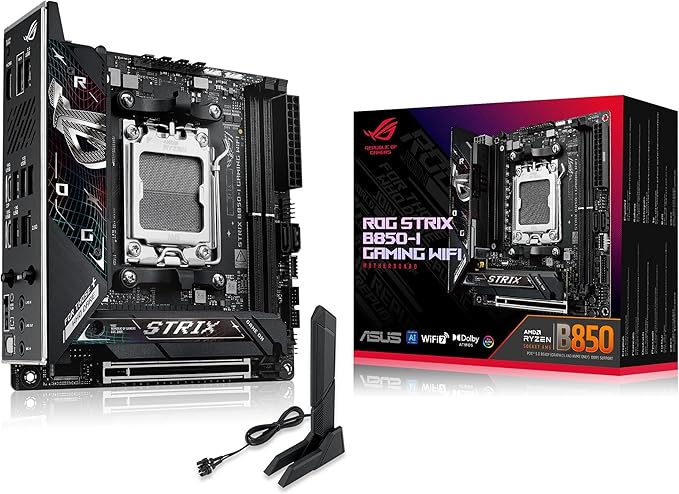
Quick Specs: AMD B850 | Mini-ITX | 10+2+1 Power Stages (90A) | 1x PCIe 5.0 x16 (Q-Release) | 2x M.2 (Both PCIe 5.0 x4) | Wi-Fi 7 + Intel 2.5GbE LAN + ALC4080 | Price Tier: Premium SFF ($300–$340 tier)
Audit Score: 8.9 / 10
- VRM Power Delivery & Heatsinks (30%): 9.0 / 10
- PCIe 5.0 Lanes & Storage Expansion (25%): 9.0 / 10
- Networking & Rear I/O (25%): 8.9 / 10
- BIOS Features & DIY Ergonomics (20%): 8.7 / 10
Small Form Factor (SFF) builds shrink PCB real estate down to 170mm by 170mm without reducing CPU thermal requirements. ASUS solves Mini-ITX density cleanly on the ROG Strix B850-I Gaming WiFi by pairing 10+2+1 90A power stages and active compact VRM cooling with two full-speed PCIe 5.0 x4 M.2 bays, Intel I226-V 2.5GbE Ethernet, Wi-Fi 7, and ROG SupremeFX ALC4080 audio driven by a Savitech amplifier. Its two-DIMM layout also provides naturally cleaner signal integrity than four-slot ATX boards for tight DDR5-6000 CL30 and faster EXPO tuning.
Compared with ATX picks like the #6 ASUS TUF Gaming B850-PLUS WiFi or #1 GIGABYTE B850 AORUS Elite WIFI7, you naturally pay a compact engineering premium ($300–$340 tier) and give up extra PCIe add-in slots and third/fourth M.2 bays. If your desk uses a standard mid-tower chassis, an ATX B850 board stretches your budget much further; if your build lives inside a sub-15-liter SFF enclosure, this is the cleanest dual-Gen5 Mini-ITX AM5 board available.
Buyer Verification Alert: Tall stacked M.2 and VRM heatsinks around the AM5 socket can clash with oversized low-profile air coolers; check cooler socket keep-out clearances and stick to low-profile DDR5 modules.
Pros
- Dual PCIe 5.0 x4 M.2 sockets and unshared PCIe 5.0 x16 graphics slot in a 170mm Mini-ITX layout
- 10+2+1 90A stages and 2-DIMM signal topology support fast DDR5-6000 CL30 and higher OC profiles cleanly
- Intel 2.5GbE LAN, Wi-Fi 7, PCIe Q-Release, BIOS FlashBack, and Savitech-amplified ALC4080 audio
Cons
- High Mini-ITX engineering cost lands in the $300–$340 X870 tier despite using the B850 chipset
- Compact VRM cooling fans and tall M.2 heatsinks limit compatibility with wide low-profile air coolers
Verdict: Buy it if you are building a compact SFF Ryzen 9000X3D desktop and want uncompromised dual Gen5 storage, Wi-Fi 7, and 90A VRM muscle. Skip it if your PC case accepts standard ATX motherboards (#1 GIGABYTE B850 AORUS Elite WIFI7 saves budget and adds expansion). Upgrade note: Pair with 2x16GB low-profile G.Skill Flare X5 or Corsair Vengeance DDR5-6000 CL30 RAM.
Buying Guide: How to Choose the Best AM5 Motherboard
Choosing the best AM5 motherboard is an exercise in avoiding hidden infrastructure bottlenecks rather than chasing higher retail stickers. Motherboards rarely add raw FPS on their own, yet choosing poorly can trap you in x8 GPU lane splits, VRM thermal throttling, or dead-end DDR5 memory speeds.
1. AMD B850 vs. X870 vs. X870E: Chipset Reality Check
Per AMD’s Socket AM5 chipset specification, all three modern 800-series chipsets—AMD B850, AMD X870, and AMD X870E—support full CPU Precision Boost Overdrive (PBO) overclocking, DDR5 AMD EXPO tuning, and at least one mandatory PCIe 5.0 x4 M.2 slot. Where they split is mandatory I/O routing:
- AMD B850 (Sweet Spot for 95% of Gamers): Mandates PCIe 5.0 M.2 support while making USB4 optional, freeing up direct CPU lanes so graphics cards stay safely at PCIe 5.0 x16 across multiple NVMe bays.
- AMD X870 (Single-Chipset USB4): Mandates both PCIe 5.0 x16 graphics and dual 40Gbps USB4 rear ports. Because those USB4 controllers consume four CPU lanes, several X870 boards steal lanes from the GPU slot when secondary Gen5 M.2 bays are used.
- AMD X870E (Dual Promontory 21 Chipsets): Doubles chipset downstream PCIe lanes for creators running four or five NVMe SSDs, capture cards, and dual USB4 devices—though you still must check manual block diagrams (as shown by #3 ASRock Nova vs. #7 GIGABYTE AORUS PRO).
For a full architectural breakdown across every chipset register, read our AMD B850 vs. X870 vs. X870E comparison.
2. VRM Phases, DrMOS Amperage & Sustained PPT Cooling
Ignore inflated marketing phase numbers and inspect two specifications: real VCore VRM phases (12+2 or 14+2+1 minimum for upper-mid gaming) and per-stage DrMOS or Smart Power Stage current ratings (60A to 110A). An 8-core Ryzen 7 9800X3D draws up to 162W PPT, which any modern 14-phase 60A board handles with zero effort. However, stepping up to a 16-core Ryzen 9 9950X3D (230W PPT under heavy rendering) favors 80A+ SPS designs (#2 MSI Tomahawk MAX, #3 ASRock X870E Nova, #7 GIGABYTE X870E AORUS PRO) paired with thick extruded aluminum VRM heatsinks.
3. PCIe Lane Sharing & M.2 Heatsink Ergonomics
Before clicking buy, always inspect the motherboard manual’s block diagram for PCIe lane sharing. Ryzen 7000 and 9000 CPUs expose 24 usable PCIe 5.0 lanes: 16 go to the GPU slot, 4 go to M2_1, and 4 go either to a second CPU M.2 slot (on B850) or the USB4 controller (on X870/X870E). Any board promising two or three CPU Gen5 M.2 bays plus USB4 must bifurcate your 16 GPU lanes down to x8 when those extra slots are filled. Additionally, verify that every M.2 bay sits beneath an integrated M.2 heatsink—and always buy SSDs without factory-attached bulky coolers when your motherboard includes built-in thermal armor.
4. DDR5-6000 CL30 (2-DIMM Rule), Networking & Back-Connect Layouts
Every board on this list features four memory slots (two on Mini-ITX), yet AM5 gaming builds should strictly follow the 2-DIMM rule: install two sticks of 32GB (2x16GB) DDR5-6000 CL30 into slots A2 and B2. That keeps the Zen 5 memory controller locked in an optimal 1:1 UCLK:MCLK ratio around 10.0ns latency, whereas exceeding 6400 MT/s triggers a 2:1 divider penalty and populating all four DIMMs frequently forces speeds back down to 4800–5200 MT/s. For connectivity, prioritize onboard Wi-Fi 7 and at least 2.5GbE LAN (5GbE if you run local NAS backups), alongside rear BIOS Flashback so firmware updates never require an older spare CPU.
Also watch physical chassis standards before ordering: reverse-connector ecosystems such as ASUS BTF back-connect, MSI Project Zero, and GIGABYTE Project Stealth relocate 24-pin ATX, 8-pin EPS, and fan headers to the rear PCB—requiring specially cut dual-chamber PC cases. Standard front-plug ATX boards like the 10 models audited here fit virtually every ATX mid-tower chassis on the market.
5. Upgrade Roadmap & Hidden Ownership Costs
Budgeting solely for the motherboard can backfire if hidden add-on costs blow up your total build value. Factor these post-purchase realities into your parts list:
- PCIe 4.0 vs. PCIe 5.0 SSD Reality: Skip expensive 1TB Gen5 SSDs priced above $150 in gaming builds and spend that budget on a 2TB PCIe 4.0 DRAM+TLC drive (like WD Black SN850X or Samsung 990 Pro). Real-world game loading differs by zero to two seconds, FPS remains identical (0 FPS delta), and Gen4 drives run noticeably cooler.
- Low-Profile DDR5 Clearance: Oversized dual-tower air coolers overhang the primary DIMM slots; choose low-profile DDR5-6000 CL30 kits (G.Skill Flare X5 or non-RGB Corsair Vengeance) to prevent front-fan collision.
- USB 2.0 vs. High-Speed Front Headers: Verify your case’s front-panel USB-C cable matches the board’s internal 10Gbps or 20Gbps Type-E header so you don’t end up buying an adapter bracket around $15 later.
6. Secondary Intent Resolver: AMD AM5 vs. Intel LGA 1851
Still debating whether to invest in an AM5 motherboard or build on Intel’s LGA 1851 platform (Z890 / B860)? Pure gaming and multi-year upgrade seekers win decisively on AM5: AMD’s multi-generation socket roadmap lets you drop a budget Ryzen 5 9600X into a $160–$200 B850 board today and upgrade to future flagship X3D silicon years later without swapping motherboards. By contrast, Intel’s B860 chipsets lock CPU multiplier overclocking (forcing unlocked Core Ultra K-series chips onto pricier Z890 boards), making LGA 1851 primarily compelling for heavy multi-core Quick Sync creators. Compare total platform value in our AMD AM5 vs. Intel LGA 1851 platform guide.
How We Audited, Scored & Filtered These Boards
Every motherboard in this roundup was evaluated strictly on verified manufacturer PCB specifications, manual PCIe block diagrams, DrMOS/SPS power-stage datasheets, and live Amazon US availability rather than sponsored placements or synthetic marketing phase labels. Read our full editorial methodology for complete verification criteria.
| Evaluation Criterion | Weight | What We Audited |
|---|---|---|
| VRM Power Delivery & Heatsinks | 30% | Phase count, DrMOS/SPS amperage (60A to 110A), PCB layer count, and heatsink coverage under 162W–230W Ryzen PPT loads. |
| PCIe 5.0 Lanes & Storage Expansion | 25% | Primary PCIe 5.0 x16 integrity, M.2 NVMe count/speeds, and lane-sharing penalties cutting GPUs to x8 or killing USB4. |
| Networking & Rear I/O | 25% | Wi-Fi 7 vs. Wi-Fi 6E radios, 2.5GbE vs. 5GbE Ethernet controllers, USB4 40Gbps availability, and total rear USB density. |
| BIOS Features & DIY Ergonomics | 20% | CPU-less BIOS Flashback buttons, remote PCIe GPU release mechanisms, screwless M.2 armor, Q-LEDs, and warranty length. |
Models & Configurations We Audited & Rejected (And Why)
- Bare-VRM Entry AMD A620 Motherboards (Sub-$120 Tier): Rejected because A620 disables CPU overclocking/PBO, omits mandatory PCIe 5.0 M.2 support, and ships bare low-amperage VRMs without heatsinks that risk throttling 120W–170W X3D processors.
- Legacy AMD B650 Stock Without BIOS Flashback: Rejected because older warehouse B650 boards frequently lack Ryzen 9000X3D firmware out of the box; without a rear Flashback button, you cannot update BIOS without borrowing a Ryzen 7000 CPU.
- Unvetted 4-DIMM DDR5-6000+ Builds on ATX AM5 Boards: Disqualified as a recommended setup because populating all four DDR5 slots stresses the Ryzen memory controller and drops speeds back down to 4800–5200 MT/s.
- Multi-Gen5 X870 Boards Used Blindly With Secondary CPU M.2 Drives: Flagged for disqualification in single-GPU gaming builds unless buyers follow strict slot rules avoiding x8 graphics bifurcation (as documented in our #7 GIGABYTE and #8 ASUS audits).
Frequently Asked Questions About AM5 Motherboards
What is the best AM5 motherboard for gaming in 2026?
The GIGABYTE B850 AORUS Elite WIFI7 is the best AM5 motherboard overall for 95% of gamers. It combines 14+2+2 60A VRM power stages, zero GPU x8 lane sharing across all three M.2 bays, Wi-Fi 7, toolless EZ-Latch Plus latches, and a 5-year warranty in the $200–$250 tier.
Should I buy an AMD B850, X870, or X870E motherboard for a Ryzen 7 9800X3D?
Buy an AMD B850 motherboard unless you specifically need dual rear 40Gbps USB4 ports or extreme multi-SSD expansion. B850 already mandates PCIe 5.0 M.2 support, allows full CPU Precision Boost Overdrive and DDR5 EXPO tuning, and delivers identical gaming frame rates to X870E.
What is PCIe lane sharing on AM5 motherboards and why does it matter?
PCIe lane sharing happens when a motherboard steals CPU lanes from your primary graphics card slot to feed secondary PCIe 5.0 M.2 slots. On affected X870 and X870E boards, populating the second M.2 bay drops your GPU slot from PCIe 5.0 x16 down to x8.
What DDR5 memory speed works best with AM5 B850 and X870 motherboards?
Pair every AM5 gaming motherboard with a two-stick 32GB (2x16GB) DDR5-6000 CL30 EXPO kit installed in slots A2 and B2. That keeps the Zen 5 memory controller in a 1:1 UCLK:MCLK ratio near 10.0ns latency without the speed drops caused by four-stick configurations.
Do I need BIOS Flashback on an AM5 motherboard for Ryzen 9000X3D CPUs?
Yes—BIOS Flashback lets you update motherboard firmware from a FAT32 USB flash drive without a compatible processor or memory installed. This guarantees out-of-the-box support for newer chips like the Ryzen 7 9850X3D or Ryzen 9 9950X3D even on boards manufactured months earlier.
Is a PCIe 5.0 NVMe SSD worth paying extra for on an AM5 gaming motherboard?
For pure gaming, no: PCIe 4.0 DRAM+TLC drives like the WD Black SN850X and Samsung 990 Pro load games within zero to two seconds of Gen5 SSDs, produce zero FPS difference, and run significantly cooler under standard motherboard M.2 heatsinks.
Final Verdict: Which AM5 Motherboard Should You Buy?
For the vast majority of Ryzen 9000 and 9000X3D gamers, the GIGABYTE B850 AORUS Elite WIFI7 stands out as the best AM5 motherboard overall, pairing zero GPU lane sharing with cool 14+2+2 VRMs, Wi-Fi 7, and a 5-year warranty around $230 Launch MSRP. Builders demanding 5GbE Ethernet and a fourth M.2 bay can step cleanly up to the MSI MAG B850 Tomahawk MAX WiFi, while value shoppers under $200 get unmatched storage density on the ASRock B850 Steel Legend WiFi. Only reach for X870E—specifically our #3 ASRock Phantom Gaming X870E Nova WiFi—if your workflow genuinely demands five M.2 bays alongside dual 40Gbps USB4 ports.


