
Disclosure: As an Amazon Associate, The PC Audit earns from qualifying purchases. If you buy through links on this page, we may earn a small commission at no extra cost to you.
In this MSI MAG B850 Tomahawk MAX WiFi audit, we examine whether MSI’s flagship mainstream AM5 ATX board delivers enthusiast power delivery and clean PCIe 5.0 routing without pushing buyers into costlier X870 models. Positioned in the $200–$260 tier, it combines a 14+2+1 80A Smart Power Stage (SPS) VRM and 8-layer server-grade PCB with an unshared PCIe 5.0 x16 GPU slot, four M.2 slots, Realtek 5GbE LAN, and 320MHz Wi-Fi 7.
Across our best AM5 motherboards and best AMD B850 motherboards rankings, one architectural tension stands out: X870 mandates dual USB4 controllers that claim four CPU PCIe 5.0 lanes, while entry B850 boards compromise on DrMOS amperage or Ethernet speed. Here is how the Tomahawk MAX WiFi compares against ASUS, GIGABYTE, and MSI’s own X870 sibling.
In This Hardware Audit
Summary Verdict & Weighted Motherboard Scorecard
Evaluated against The PC Audit’s weighted motherboard rubric, the MSI MAG B850 Tomahawk MAX WiFi earns 9.2 / 10. Instead of spending silicon budget on mandatory USB4 hardware, MSI upgrades VRM stages to 80A SPS, doubles Ethernet to 5GbE, unlocks 320MHz Wi-Fi 7, and keeps primary GPU lanes unshared.
Overall Audit Score: 9.2 / 10
- VRM Power Delivery & Heatsinks (30%): 9.4 / 10
- PCIe 5.0 Lanes & Storage Expansion (25%): 9.1 / 10
- Networking & Rear I/O (25%): 9.0 / 10
- BIOS Features & DIY Ergonomics (20%): 9.2 / 10
Key Strengths
- 14+2+1 80A SPS VRM on an 8-layer 2oz copper PCB handles 162W–230W PPT Ryzen CPUs
- Zero primary GPU bifurcation: PCI_E1 stays PCIe 5.0 x16 across all M.2 slots
- Realtek 5GbE LAN and 320MHz Wi-Fi 7 beat typical 2.5GbE B850 rivals
- Tool-less EZ PCIe Release, EZ M.2 Clip II, Shield Frozr II, and Flash BIOS
Documented Limitations
- No 40Gbps USB4 ports (caps rear and front USB-C at 20Gbps Gen 2×2)
- Lower chipset M.2 slots and PCI_E3 x4 share the B850 chipset uplink
- Standard front-facing ATX headers (not BTF back-connect compatible)
Audit Verdict: Buy the MSI MAG B850 Tomahawk MAX WiFi if you want 80A VRM headroom for Ryzen 7 9800X3D, 9850X3D, or 9950X3D builds alongside unshared PCIe 5.0 graphics lanes and 5GbE Ethernet. Skip it only if you need 40Gbps USB4 docks or a back-connect case.
Verified Specifications & Chipset Positioning
The matrix below summarizes verified specs from AMD AM5 documentation and MSI motherboard specifications.
| Subsystem | Verified Specification | Audit Note |
|---|---|---|
| Socket & Chipset | AM5 / AMD B850 Single-Chipset | CPU PBO & DDR5 EXPO unlocked |
| Supported CPUs | Ryzen 9000, 8000 & 7000 Series | Built for 9800X3D, 9850X3D, 9950X3D |
| PCB Build | ATX / 8-Layer Server PCB (2oz Copper) | High DDR5 & Gen 5 signal integrity |
| VRM Array | 14+2+1 (80A SPS) + 2x 8-Pin EPS | Ahead of 60A DrMOS mainstream rivals |
| Memory | 4x DDR5 UDIMM (Dual-Channel EXPO) | Sweet spot: 2x16GB DDR5-6000 CL30 |
| Primary GPU | 1x PCIe 5.0 x16 (Steel Armor II) | Zero x8 drop from M.2 slots |
| M.2 Storage | 4x M.2 (2x CPU Gen 5, 2x Chipset Gen 4) | Verify chipset M.2 / PCI_E3 overlap |
| Expansion | Chipset PCIe x1 & x4 + 4x SATA 6Gb/s | Shares B850 downstream bandwidth |
| Networking | Realtek 5GbE LAN + Wi-Fi 7 (320MHz) | Needs Windows 11 24H2+ for Wi-Fi 7 |
| USB I/O | Rear 20G/10G USB-C + Front 20G Header | No USB4; keeps CPU lanes free |
| DIY Tools | EZ PCIe Release, EZ M.2 Clip II, Flash BIOS | Clear CMOS & EZ Debug LED onboard |
In AMD’s 800-series stack, AMD B850 is the gaming sweet spot detailed in our AMD B850 vs. X870 vs. X870E comparison. Unlike Intel’s LGA 1851 split—where Intel B860 locks CPU multiplier overclocking and requires Intel Z890—AMD unlocks PBO and EXPO on B850. Step up to AMD X870E only for heavy USB4 I/O and simultaneous add-in cards.
VRM Power Delivery & Heatsink Audit: 14+2+1 80A SPS
As detailed in our motherboard VRM and DrMOS guide, raw phase counts mean little without stage amperage and heatsink mass. MSI equips the Tomahawk MAX WiFi with a 14+2+1 Duet Rail Power System using 80A Smart Power Stages (SPS)—14 VCore VRM phases, 2 SoC phases, and 1 MISC phase—backed by dual 8-pin EPS connectors.
- X3D Headroom: Ryzen 7 9800X3D and 9850X3D chips cap at 162W PPT (120W TDP), drawing well under 15% of this 14-stage 80A capacity.
- 16-Core Creator Loads: Even the dual-CCD Ryzen 9 9950X3D (170W TDP / 230W PPT) runs within safe thermal limits under PBO.
- 8-Layer PCB vs. 60A Rivals: An 8-layer 2oz copper PCB and 7W/mK-padded heatsinks run cooler under load than 60A DrMOS boards like the GIGABYTE B850 AORUS Elite WIFI7 or bare-VRM sub-$150 boards.
PCIe 5.0 Lane Routing, Zero Bifurcation & M.2 Topology
Hidden PCIe lane sharing is a frequent trap on AM5 boards when extra M.2 SSDs cut the primary GPU slot from x16 to x8. Per our PCIe lane sharing explainer and PCI-SIG electrical standards, Ryzen 9000 and 7000 CPUs expose 24 usable PCIe 5.0 lanes (16 + 4 + 4) plus a x4 chipset uplink. Because B850 omits mandatory X870 USB4 controllers, MSI allocates all 24 CPU lanes cleanly.
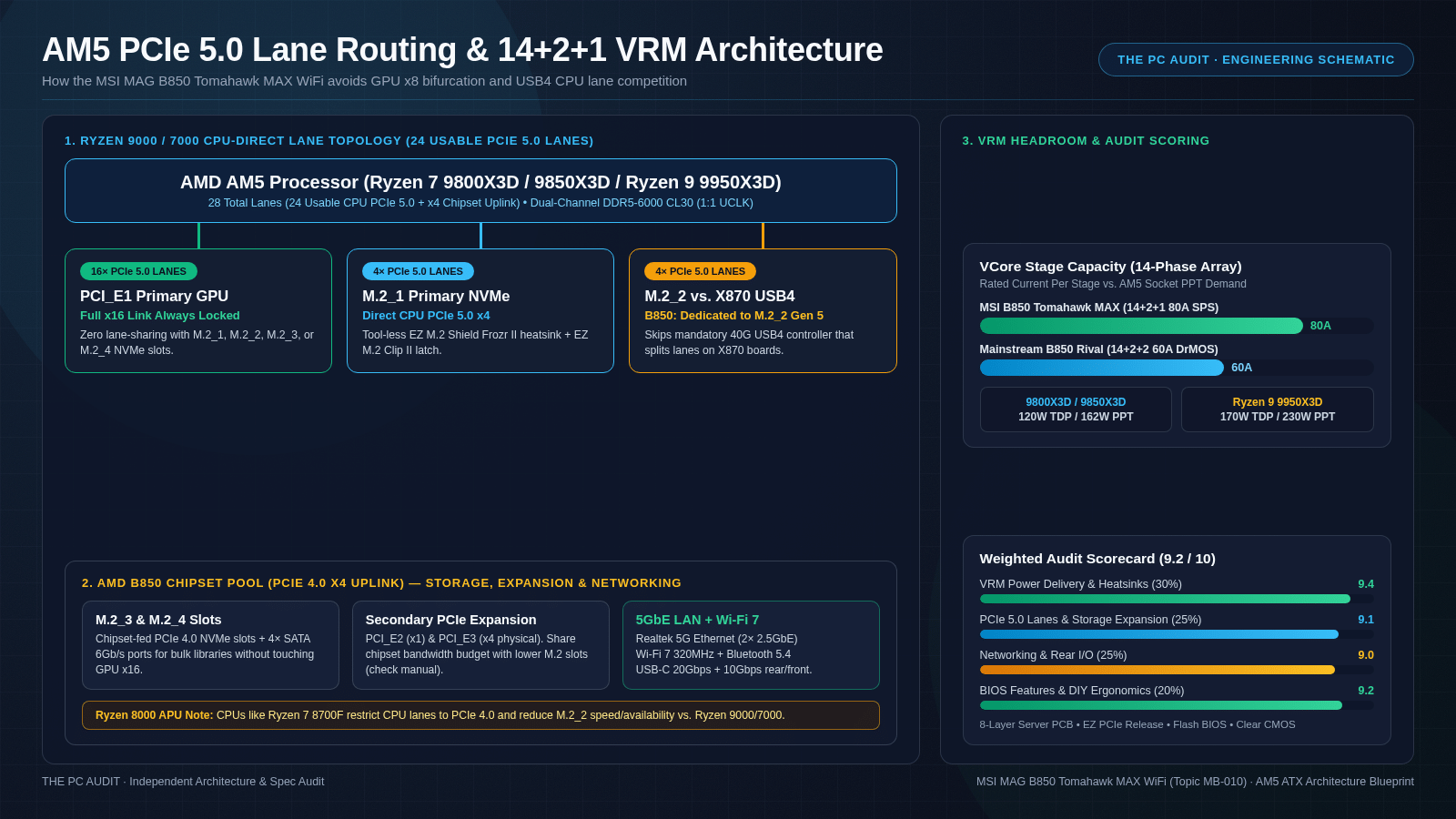
| Board Slot | Source | Ryzen 9000 / 7000 Link | Lane-Sharing Behavior |
|---|---|---|---|
| PCI_E1 (GPU) | CPU Direct | PCIe 5.0 x16 | Unshared—always x16 with any M.2 count |
| M.2_1 | CPU Direct | PCIe 5.0 x4 | Primary slot under Shield Frozr II |
| M.2_2 | CPU Direct | PCIe 5.0 x4 | Unshared on Ryzen 9000/7000 (no USB4 clash) |
| M.2_3 & M.2_4 | B850 Chipset | PCIe 4.0 (chipset pool) | Share chipset budget with lower expansion |
| PCI_E2 & PCI_E3 | B850 Chipset | PCIe 3.0 x1 / PCIe 4.0 x4 | PCI_E3 x4 overlaps chipset M.2 lanes |
With Ryzen 9000 or 7000 chips, PCI_E1 never drops to x8. Watch two constraints: OEM Ryzen 8000 CPUs like the Ryzen 7 8700F restrict usable CPU lanes to 16 PCIe 4.0 lanes (limiting M.2_2), and populating 3–4 NVMe drives alongside a PCI_E3 x4 card requires checking MSI’s manual lane matrix first.
- SSD Pairing: PCIe 5.0 SSDs (Samsung 9100 Pro, Crucial T705) yield 0 FPS gain and 0–2s faster loads over PCIe 4.0 DRAM+TLC drives (WD Black SN850X, Samsung 990 Pro). Choose a 2TB Gen 4 DRAM+TLC drive and omit third-party SSD coolers when using the board’s M.2 heatsink.
- DDR5 Rule: Populate slots A2 and B2 with 32GB (2x16GB) DDR5-6000 CL30 (10.0 ns latency) for 1:1 UCLK:MCLK sync. Avoid 4-DIMM setups and 6800+ MT/s kits that trigger 2:1 divider penalties.
Networking (5GbE LAN & Wi-Fi 7) & USB4 Tradeoffs
Networking elevates this board above standard B850 competition. While the ASUS TUF Gaming B850-PLUS WiFi and GIGABYTE B850 AORUS Elite WIFI7 stop at 2.5GbE LAN, MSI provides a Realtek 5GbE Ethernet port plus full 320MHz Wi-Fi 7 and Bluetooth 5.4 via its magnetic EZ Antenna—doubling both wired transfer headroom and wireless channel width over 160MHz rivals.
Per USB-IF specifications, AMD X870 mandates dual 40Gbps USB4 ports that consume four CPU lanes. MSI replaces USB4 with rear USB-C 20Gbps and 10Gbps ports plus a front 20Gbps header, preserving unshared dual Gen 5 M.2 slots for gaming builds.
BIOS Features, DIY Ergonomics & Buyer Alerts
MSI includes key 2026 DIY conveniences: EZ PCIe Release unlatches 3-slot GPUs cleanly, EZ M.2 Clip II and Shield Frozr II lock SSDs screw-free, EZ Antenna snaps in directly, and EZ Debug LEDs pinpoint POST stalls. Rear BIOS Flashback enables CPU-less AGESA updates alongside a Clear CMOS button. Its standard front-wired ATX layout fits regular cases rather than BTF back-connect or Project Zero enclosures.
Buyer Verification Alerts:
1. Windows 11 24H2+ & Drivers: Full 320MHz Wi-Fi 7 requires Windows 11 24H2 or newer (Windows 10 lacks full Wi-Fi 7 support); stage Realtek 5GbE and Wi-Fi 7 drivers on USB beforehand.
2. B850 20G USB-C vs. X870 USB4: Confirm you do not need 40Gbps USB4 or Type-C DP Alt Mode before choosing B850.
3. Chipset M.2 & PCI_E3 Sharing: Check MSI’s manual block diagram before combining 3–4 NVMe SSDs with a card in the bottom PCIe x4 slot.
Recommended System Pairings & Top Alternatives
Pair the Tomahawk MAX WiFi with a Ryzen 7 9800X3D or 9850X3D, 32GB (2x16GB) DDR5-6000 CL30 EXPO RAM, a 2TB PCIe 4.0 DRAM+TLC SSD, a dual-tower air cooler or 360mm AIO, and an ATX 3.1 80+ Gold PSU (750W–850W for RTX 5070 Ti / RX 9070 XT; 1000W+ for RTX 5080/5090). Below are all four audited AM5 ATX contenders in this tier.
1. MSI MAG B850 Tomahawk MAX WiFi Motherboard, ATX — Audited Best Overall

Quick Specs: AM5 · AMD B850 · 8-Layer ATX · 14+2+1 80A SPS · PCIe 5.0 x16 (Unshared) · 4x M.2 · 5GbE + Wi-Fi 7 (320MHz) · $200-$260 tier
Audit Score: 9.2 / 10
- VRM Power Delivery & Heatsinks (30%): 9.4 / 10
- PCIe 5.0 Lanes & Storage Expansion (25%): 9.1 / 10
- Networking & Rear I/O (25%): 9.0 / 10
- BIOS Features & DIY Ergonomics (20%): 9.2 / 10
MSI’s B850 Tomahawk MAX WiFi pairs 14+2+1 80A SPS power delivery and an 8-layer PCB with unshared PCIe 5.0 x16 GPU routing, four M.2 slots, 5GbE LAN, and tool-less latches—outspecifying ASUS and GIGABYTE B850 rivals.
Pros
- 14+2+1 80A SPS VRM handles 9800X3D, 9850X3D, and 9950X3D
- Four M.2 slots with zero GPU x16 lane bifurcation
- 5GbE LAN, 320MHz Wi-Fi 7, EZ PCIe Release, Flash BIOS
Cons
- Omits 40Gbps USB4 (caps USB-C at 20Gbps)
- Chipset M.2 and PCI_E3 share lower-board lanes
Verdict: Best all-around AM5 gaming balance of 80A VRM headroom, four M.2 slots, and 5GbE LAN. Skip only for 40Gbps USB4 workflows.
2. ASUS TUF Gaming B850-PLUS WiFi AMD AM5 ATX Motherboard — Best ASUS Alternative

Quick Specs: AM5 · AMD B850 · ATX · PCIe 5.0 x16 · 3x M.2 · Wi-Fi 7 + 2.5GbE LAN · $200-$260 tier
Audit Score: 8.7 / 10
- VRM Power Delivery & Heatsinks (30%): 8.9 / 10
- PCIe 5.0 Lanes & Storage Expansion (25%): 8.5 / 10
- Networking & Rear I/O (25%): 8.5 / 10
- BIOS Features & DIY Ergonomics (20%): 8.9 / 10
The ASUS TUF Gaming B850-PLUS WiFi delivers PCIe 5.0 x16 support, Wi-Fi 7, and ASUS’s clean Q-Release DIY latches, but drops to three M.2 slots and 2.5GbE Ethernet compared with MSI’s four M.2 slots and 5GbE LAN.
Pros
- PCIe 5.0 x16 GPU support, Wi-Fi 7, and polished UEFI BIOS
- Q-Release PCIe latch and M.2 Q-Latch convenience
- Solid TUF heatsinks for Ryzen 7 9800X3D rigs
Cons
- Three M.2 slots vs. four on MSI Tomahawk MAX
- 2.5GbE LAN instead of 5GbE at similar pricing
Verdict: Buy it if you favor ASUS UEFI BIOS or spot a steep discount; at equal pricing, MSI wins on networking and storage.
3. GIGABYTE B850 AORUS Elite WIFI7 — Best Value Tool-Less Alternative

Quick Specs: AM5 · AMD B850 · ATX · 14+2+2 60A DrMOS · PCIe 5.0 x16 (Unshared) · 3x M.2 · Wi-Fi 7 (160MHz) + 2.5GbE · $200-$250 tier (~$230 Launch MSRP)
Audit Score: 8.8 / 10
- VRM Power Delivery & Heatsinks (30%): 8.7 / 10
- PCIe 5.0 Lanes & Storage Expansion (25%): 8.8 / 10
- Networking & Rear I/O (25%): 8.6 / 10
- BIOS Features & DIY Ergonomics (20%): 9.1 / 10
Near ~$230 Launch MSRP, the GIGABYTE B850 AORUS Elite WIFI7 guarantees zero GPU lane sharing across three M.2 slots and adds effortless EZ-Latch Click M.2 armor, though its 60A DrMOS stages, 2.5GbE LAN, and 160MHz Wi-Fi 7 trail MSI’s 80A SPS and 5GbE spec.
Pros
- Zero GPU x8 lane sharing across all three M.2 slots
- EZ-Latch Click tool-less M.2 heatsinks and 5-year warranty
- Attractive ~$230 Launch MSRP value positioning
Cons
- 60A DrMOS and 2.5GbE LAN sit below MSI’s 80A SPS + 5GbE
- 160MHz Wi-Fi 7 cap and three M.2 slots total
Verdict: Buy it when discounted clearly below MSI and three M.2 drives suffice; choose the Tomahawk MAX WiFi near parity.
4. MSI MAG X870 Tomahawk WiFi AM5 ATX Motherboard — Best USB4 Step-Up Alternative

Quick Specs: AM5 · AMD X870 · ATX · 14+2+1 80A SPS · PCIe 5.0 x16 + Gen 5 M.2 · Dual USB4 40Gbps · 5GbE + Wi-Fi 7 · $200-$260 tier
Audit Score: 8.9 / 10
- VRM Power Delivery & Heatsinks (30%): 9.3 / 10
- PCIe 5.0 Lanes & Storage Expansion (25%): 8.1 / 10
- Networking & Rear I/O (25%): 9.2 / 10
- BIOS Features & DIY Ergonomics (20%): 8.9 / 10
The MSI MAG X870 Tomahawk WiFi shares the 14+2+1 80A SPS VRM, 5GbE LAN, and Wi-Fi 7 pedigree while adding mandatory dual 40Gbps USB4 ports—at the cost of M.2_2 sharing four CPU PCIe 5.0 lanes with the USB4 controller.
Pros
- Dual rear 40Gbps USB4 ports with DisplayPort Alt Mode
- Matches B850 MAX’s 80A SPS VRM, 5GbE LAN, and Wi-Fi 7
- Strong $200–$260 tier value for X870 connectivity
Cons
- USB4 shares CPU Gen 5 lanes with M.2_2
- Less straightforward multi-NVMe routing than B850 MAX
Verdict: Buy it for 40Gbps USB4 docks or external NVMe RAID; stick with B850 MAX for unshared dual CPU M.2 lanes.
How We Audited This Guide
- Processors, motherboards, memory, and storage were compared by socket longevity, chipset lane allocation, VRM design, DDR5 EXPO/XMP support, and PCIe generation.
- Every specification claim was cross-checked against official OEM datasheets, platform vendor documentation, and published industry standards (PCI-SIG, JEDEC, VESA, Intel ATX) rather than marketplace listing copy.
- Recommendations were evaluated against our weighted audit rubric and documented compatibility rules; we do not publish fabricated FPS, thermal, or acoustic numbers.
Frequently Asked Questions: MSI MAG B850 Tomahawk MAX WiFi
Does the MSI MAG B850 Tomahawk MAX WiFi cut GPU lanes to x8 with M.2 SSDs installed?
No. On Ryzen 9000 and 7000 CPUs, PCI_E1 stays locked at PCIe 5.0 x16 across every M.2 combination. Unlike X870 designs that split lanes for USB4 or extra Gen 5 drives, primary graphics bandwidth remains unshared.
Can the MSI MAG B850 Tomahawk MAX WiFi run a Ryzen 7 9800X3D, 9850X3D, or 9950X3D?
Yes. Its 14+2+1 80A SPS VRM, dual 8-pin EPS connectors, and 8-layer PCB easily sustain 162W PPT X3D chips and the 230W PPT Ryzen 9 9950X3D. Use the rear Flash BIOS button to update AGESA microcode beforehand.
Should I choose the B850 Tomahawk MAX WiFi or the X870 Tomahawk WiFi?
Pick the B850 Tomahawk MAX WiFi for gaming because skipping USB4 keeps both CPU Gen 5 M.2 slots uncontested while retaining the 80A VRM, 5GbE LAN, and Wi-Fi 7. Buy X870 only if you need 40Gbps USB4.
What DDR5 RAM configuration works best on this motherboard?
Populate slots A2 and B2 with a 32GB (2x16GB) DDR5-6000 CL30 AMD EXPO kit for 10.0 ns latency in synchronous 1:1 UCLK:MCLK mode. Four-DIMM kits or 6800+ MT/s speeds degrade stability or force 2:1 divider penalties.
Do Wi-Fi 7 and 5GbE LAN require Windows 11 24H2 or newer?
Yes for Wi-Fi 7: 320MHz scheduling and Multi-Link Operation require Windows 11 24H2 or newer, as Windows 10 lacks full Wi-Fi 7 driver support. Keep Realtek 5GbE and Wi-Fi 7 installers on a USB drive during setup.


