
Disclosure: As an Amazon Associate, I earn from qualifying purchases. If you buy through links on this page, we may earn a small commission at no extra cost to you.
Shopping for the best B850 motherboard for an AMD Ryzen 7 9800X3D gaming rig comes down to avoiding two expensive traps: paying an X870 tax for dual 40Gbps USB4 ports you will never plug in, or buying a stripped-down budget board whose bare VRM throttles multi-core upgrades. In our November 2026 specification audit of verified Amazon US ATX and Mini-ITX listings, eight AMD B850 models from MSI, ASRock, GIGABYTE, and ASUS stood out by delivering full PCIe 5.0 x16 graphics routing, mandatory PCIe 5.0 M.2 storage, unlocked PBO and EXPO tuning, and rear USB BIOS Flashback without mid-tier X870 lane-sharing compromises.
Whether you are building an all-purpose ATX rig or a compact small-form-factor machine, our complete AM5 motherboards hub explains where Socket AM5 fits in 2026. If you are weighing whether native USB4 justifies jumping a price bracket, see our AMD B850 vs. X870 vs. X870E chipset breakdown, and check our Ryzen 7 9800X3D vs. Ryzen 7 9850X3D comparison before locking in your processor and DDR5-6000 CL30 memory kit.
In This Guide
- Quick Picks at a Glance
- Side-by-Side Comparison (All 8 Boards)
- Match Your Build Scenario
- Detailed B850 Motherboard Audits (1–8)
- 1. MSI MAG B850 Tomahawk MAX WiFi — Best Overall
- 2. ASRock B850 Steel Legend WiFi — Best Value ATX
- 3. GIGABYTE B850 AORUS Elite WIFI7 — Best Tool-Free DIY Design
- 4. ASUS TUF Gaming B850-PLUS WiFi — Best for Durability & Rear USB 20Gbps
- 5. ASRock AMD B850 LiveMixer WiFi 7 — Best for Streamers & USB Peripherals
- 6. MSI B850 Gaming Plus WiFi — Best Budget 5G LAN ATX
- 7. ASUS ROG Strix B850-I Gaming WiFi — Best Enthusiast Mini-ITX
- 8. ASRock AMD B850I Lightning WiFi — Best Budget Mini-ITX
- Buying Guide: Choosing a B850 Motherboard
- Scoring Rubric & Rejected Models
- Frequently Asked Questions
- Final Verdict
Quick Picks: Best B850 Motherboard Recommendations at a Glance
#1 Best Overall
MSI MAG B850 Tomahawk MAX WiFi
Packs a 14+2+1 80A SPS VRM, four M.2 slots (two Gen 5), 5GbE LAN, and Wi-Fi 7 in one balanced ATX board. (Jump to audit)
#2 Best Value ATX
ASRock B850 Steel Legend WiFi
Delivers 80A Dr.MOS phases on an 8-layer PCB with four M.2 slots and Wi-Fi 7 in the $160-$200 bracket. (Jump to audit)
#3 Best Tool-Free DIY Design
GIGABYTE B850 AORUS Elite WIFI7
Pairs tool-less EZ-Latch Plus GPU and M.2 hardware with three zero-lane-sharing NVMe slots. (Jump to audit)
Side-by-Side Comparison: Top 8 AMD B850 Motherboards
| Product & Award | Best For | VRM & Form Factor | M.2 & Networking | Link |
|---|---|---|---|---|
| MSI MAG B850 Tomahawk MAX WiFi Best Overall | High-end 9800X3D & 9950X3D ATX builds | 14+2+1 (80A SPS) ATX | 4x M.2 (2x Gen5, 2x Gen4) Wi-Fi 7 + 5GbE LAN | View on Amazon |
| ASRock B850 Steel Legend WiFi Best Value ATX | Budget-conscious 4-SSD & white ATX rigs | 14+2+1 (80A Dr.MOS) ATX (8-Layer) | 4x M.2 (1x Gen5, 3x Gen4) Wi-Fi 7 + 2.5GbE LAN | View on Amazon |
| GIGABYTE B850 AORUS Elite WIFI7 Best Tool-Free DIY Design | Clean assembly & unshared M.2 routing | 14+2+2 (60A DrMOS) ATX (6-Layer 2x Cu) | 3x M.2 (1x Gen5, 2x Gen4) Wi-Fi 7 + 2.5GbE LAN | View on Amazon |
| ASUS TUF Gaming B850-PLUS WiFi Best for Durability & Rear USB 20Gbps | Fast external Type-C SSDs & ASUS BIOS | 14+2+1 (80A DrMOS) ATX | 3x M.2 (1x Gen5, 2x Gen4) Wi-Fi 7 + 2.5GbE LAN | View on Amazon |
| ASRock AMD B850 LiveMixer WiFi 7 Best for Streamers & USB Peripherals | Capture cards, DACs & 14 rear USB ports | 14+2+1 (80A Dr.MOS) ATX (8-Layer) | 3x M.2 (1x Gen5, 2x Gen4) Wi-Fi 7 + 2.5GbE LAN | View on Amazon |
| MSI B850 Gaming Plus WiFi Best Budget 5G LAN ATX | 5GbE wired gaming under $200 | 12+2+1 (60A DrMOS) ATX | 3x M.2 (1x Gen5, 2x Gen4) Wi-Fi 7 + 5GbE LAN | View on Amazon |
| ASUS ROG Strix B850-I Gaming WiFi Best Enthusiast Mini-ITX | Flagship SFF cases with dual Gen 5 SSDs | 10+2+1 (90A Stages) Mini-ITX | 2x M.2 (2x Gen5 x4) Wi-Fi 7 + Intel 2.5GbE | View on Amazon |
| ASRock AMD B850I Lightning WiFi Best Budget Mini-ITX | Sub-$220 SFF builds with 110A SPS power | 10+1+1 (110A SPS) Mini-ITX (8-Layer) | 2x M.2 (1x Gen5, 1x Gen4) Wi-Fi 6E + Killer 2.5GbE | View on Amazon |
Match Your Build Scenario: Which B850 Motherboard Fits Best?
| Buyer Scenario | Best Match | Why & Expected Outcome |
|---|---|---|
| Maxed Ryzen 7 9800X3D or 9950X3D ATX rig | MSI MAG B850 Tomahawk MAX WiFi | 80A SPS VRM stages stay cool at 162W–230W loads while providing 5GbE Ethernet, Wi-Fi 7, and four M.2 slots. |
| Best value 4-SSD gaming ATX under $200 | ASRock B850 Steel Legend WiFi | 8-layer PCB, 80A Dr.MOS phases, and four M.2 bays match higher-priced boards in the $160-$200 tier. |
| First-time builder wanting tool-less latches | GIGABYTE B850 AORUS Elite WIFI7 | EZ-Latch Plus GPU release, tool-less M.2 heatsinks, and unshared M.2 slots prevent accidental lane mistakes. |
| Streamers running capture boxes & XLR DACs | ASRock AMD B850 LiveMixer WiFi 7 | 14 rear USB ports plus low-jitter Lightning Gaming Ports eliminate messy external powered USB hubs. |
| Budget ATX needing 5GbE LAN for NAS/fiber | MSI B850 Gaming Plus WiFi | Brings 5GbE wired networking and Wi-Fi 7 down to the $160-$200 bracket with a dependable 12+2+1 VRM. |
| Compact Mini-ITX living-room or desk rig | ASUS ROG Strix B850-I / ASRock B850I Lightning | Choose Strix B850-I for dual Gen 5 M.2 + Wi-Fi 7, or B850I Lightning for 110A SPS VRM power around $180-$220. |
Best B850 Motherboard Reviews: All 8 Audited AM5 Picks
1. MSI MAG B850 Tomahawk MAX WiFi — Best Overall

Quick Specs: ATX | 14+2+1 Duet Rail Power (80A SPS) | 1x PCIe 5.0 x16 | 4x M.2 (2x Gen5 x4 CPU, 1x Gen4 x4, 1x Gen4 x2) | Wi-Fi 7 + 5GbE LAN | Realtek ALC4080 | Price Tier: $200-$260 tier (Upper Mid-Range ATX)
Audit Score: 9.5 / 10
- VRM Power Delivery & Heatsinks (30%): 9.5 / 10
- PCIe 5.0 Lanes & Storage Expansion (25%): 9.3 / 10
- Networking & Rear I/O (25%): 9.6 / 10
- BIOS Features & DIY Ergonomics (20%): 9.4 / 10
MSI’s Tomahawk line earned its reputation by skipping flashy RGB bloat in favor of heavy aluminum VRM heatsinks and clean I/O routing, and the MSI MAG B850 Tomahawk MAX WiFi specification sheet extends that formula cleanly onto Socket AM5. Its 14+2+1 Duet Rail Power System pairs 80A Smart Power Stage (SPS) modules with dual 8-pin EPS connectors and 7W/mK thermal pads, providing ample electrical margin for a 162W PPT Ryzen 7 9800X3D as well as future 230W Ryzen 9 9950X3D workstation upgrades. Better yet, MSI routes two full PCIe 5.0 x4 M.2 slots straight to the CPU without stealing a single lane from the primary PCIe 5.0 x16 graphics slot.
Against our #3 pick, the GIGABYTE B850 AORUS Elite WIFI7, the Tomahawk MAX WiFi pulls ahead with higher-rated 80A SPS power stages, a fourth M.2 bay, Realtek ALC4080 audio with optical S/PDIF, and a faster 5GbE wired Ethernet controller instead of 2.5GbE LAN. Compared with our #2 value champ, the ASRock B850 Steel Legend WiFi, MSI justifies its slightly higher price tier with button-activated EZ PCIe Release graphics removal and tool-less EZ M.2 Shield Frozr II armor—features you appreciate immediately when fitting triple-slot Blackwell or RDNA 4 GPUs inside mid-tower cases.
Buyer Verification Alert: On MSI’s block diagram, M.2_3 shares bandwidth with the bottom PCI_E3 expansion slot. Installing an NVMe drive in M.2_3 drops both M.2_3 and PCI_E3 to x2 bandwidth by default, and forcing PCI_E3 to x4 in BIOS disables M.2_3 completely. Populate M.2_1, M.2_2, and M.2_4 first if you use an internal PCIe capture card.
Pros
- 14+2+1 80A SPS VRM phases handle 162W-230W Ryzen X3D processors with low VRM temperatures
- Four M.2 slots including two direct-CPU PCIe 5.0 x4 bays with tool-less M.2 heatsink locks
- 5GbE LAN plus Wi-Fi 7, Realtek ALC4080 codec, and optical S/PDIF audio
- Dedicated EZ PCIe Release button and rear USB BIOS Flashback simplify installation
Cons
- M.2_3 runs at PCIe 4.0 x2 speed and shares lanes with the bottom PCI_E3 slot
- Omits native 40Gbps USB4 rear ports reserved for costlier X870 models
Verdict: Buy it if you want the single most complete AM5 gaming motherboard under X870 pricing, combining 80A VRM muscle, four NVMe bays, and 5GbE Ethernet. Skip it if you specifically need 40Gbps USB4 external storage or require four simultaneous unshared expansion drives alongside a bottom PCIe x4 card. Upgrade Note: Populate slots A2 and B2 with a 32GB (2x16GB) DDR5-6000 CL30 EXPO kit and pair M.2_1 with a cool-running 2TB PCIe 4.0 TLC+DRAM SSD.
2. ASRock B850 Steel Legend WiFi — Best Value ATX

Quick Specs: ATX (8-Layer PCB) | 14+2+1 VRM (80A Dr.MOS) | 1x PCIe 5.0 x16 | 4x M.2 (1x Gen5 x4, 3x Gen4 x4) | Wi-Fi 7 + 2.5GbE LAN | Realtek ALC4082 | Price Tier: $160-$200 tier (Value Mid-Range ATX)
Audit Score: 9.2 / 10
- VRM Power Delivery & Heatsinks (30%): 9.3 / 10
- PCIe 5.0 Lanes & Storage Expansion (25%): 9.4 / 10
- Networking & Rear I/O (25%): 8.9 / 10
- BIOS Features & DIY Ergonomics (20%): 9.1 / 10
Rarely does a motherboard in the $160-$200 bracket pack hardware specifications that embarrass costlier mid-range competitors, yet the ASRock B850 Steel Legend WiFi specification profile checks nearly every enthusiast box. You get an 8-layer PCB with 14+2+1 80A Dr.MOS power stages across VCore and SOC rails, matching the electrical muscle of boards priced noticeably higher. Even better for storage hoarders, all four M.2 slots run at full four-lane width—one CPU-driven PCIe 5.0 x4 Blazing M.2 socket plus three PCIe 4.0 x4 Hyper M.2 slots—without knocking the primary PCIe 5.0 x16 GPU slot down to x8.
Compared with the #6 MSI B850 Gaming Plus WiFi in the same $160-$200 tier, ASRock delivers stronger 80A VRM stages (versus 60A), an extra full-width x4 M.2 slot, Realtek ALC4082 audio, and 11 rear USB ports including dual 10Gbps USB-C connectors. Only two trade-offs separate it from our #1 MSI MAG B850 Tomahawk MAX WiFi: wired networking caps at 2.5GbE LAN instead of 5GbE, and the primary graphics card slot uses a standard mechanical tab rather than a remote button release.
Buyer Verification Alert: Because the Steel Legend retains a classic lever latch on its primary PCIe 5.0 x16 slot, dual-tower air coolers (like a Thermalright Phantom Spirit or Noctua NH-D15 G2) can make reaching that tab tight; keep a plastic pry stick handy before installing an oversized GPU.
Pros
- 8-layer PCB and 14+2+1 80A Dr.MOS VRM deliver flagship power stability under $200
- Four full x4 M.2 slots (1x Gen5 x4 + 3x Gen4 x4) with tool-less M.2 heatsink quick-release
- 11 rear USB ports including two 10Gbps Type-C jacks plus Wi-Fi 7 and BIOS Flashback
- Silver-white heatsink armor suits clean white or two-tone gaming builds
Cons
- 2.5GbE Ethernet falls behind the 5GbE port on MSI’s Tomahawk MAX and Gaming Plus boards
- No remote GPU quick-release button mechanism for tight air-cooler clearances
Verdict: Buy it if you want maximum VRM amperage, four M.2 SSD bays, and Wi-Fi 7 per dollar in a standard ATX chassis. Skip it if you have 5Gbps multi-gig home fiber or strictly want an all-black motherboard finish. Upgrade Note: Pair this 8-layer board with low-profile G.Skill Flare X5 32GB DDR5-6000 CL30 RAM so large dual-tower cooler fans clear the DIMMs cleanly.
3. GIGABYTE B850 AORUS Elite WIFI7 — Best Tool-Free DIY Design

Quick Specs: ATX (6-Layer 2x Copper PCB) | 14+2+2 Digital Twin VRM (60A DrMOS) | 1x PCIe 5.0 x16 (Unshared) | 3x M.2 (2x CPU, 1x Chipset) | Wi-Fi 7 (160MHz) + 2.5GbE LAN | Price Tier: $200-$250 tier (around $230 Launch MSRP)
Audit Score: 9.0 / 10
- VRM Power Delivery & Heatsinks (30%): 8.9 / 10
- PCIe 5.0 Lanes & Storage Expansion (25%): 9.1 / 10
- Networking & Rear I/O (25%): 8.8 / 10
- BIOS Features & DIY Ergonomics (20%): 9.5 / 10
First-time PC builders and frequent GPU upgraders will immediately appreciate the GIGABYTE B850 AORUS Elite WIFI7 design documentation. GIGABYTE eliminates nearly every tiny screw during assembly using EZ-Latch Plus for one-press GPU release, tool-less M.2 clips, EZ-Latch Click magnetic-style heatsink covers, and a single snap-in WIFI EZ-Plug antenna connector instead of finicky dual brass thumbscrews. Equally compelling is its clean lane topology: two of its three M.2 sockets wire directly to the Ryzen CPU (one PCIe 5.0 x4 and one PCIe 4.0 x4) alongside a third chipset PCIe 4.0 x4 slot, leaving zero PCIe lane sharing against the primary PCIe 5.0 x16 graphics slot.
Backed by a five-year manufacturer warranty, this board runs a 14+2+2 Digital Twin VRM using 60A DrMOS stages on a 2x Copper PCB—plenty for a 162W PPT Ryzen 7 9800X3D, though trailing the 80A stages on the #1 MSI MAG B850 Tomahawk MAX WiFi and #4 ASUS TUF Gaming B850-PLUS WiFi if you plan heavy multi-hour Ryzen 9 9950X3D rendering. You also get Q-Flash Plus, 10 rear USB ports, and a front 20Gbps Type-C header.
Buyer Verification Alert: GIGABYTE’s spec page notes a hardware revision split on audio: Rev. 1.1 carries the higher-grade Realtek ALC1220 codec, whereas early Rev. 1.0 inventory used a standard Realtek audio chip. Also note its Wi-Fi 7 radio operates at 160MHz channel bandwidth rather than 320MHz.
Pros
- Class-leading tool-less DIY suite: EZ-Latch Plus GPU latch, EZ-Latch Click M.2 armor, and WIFI EZ-Plug
- Zero PCIe lane sharing across all three M.2 drives and the PCIe 5.0 x16 GPU slot
- Front USB 3.2 Gen 2×2 20Gbps header, 10 rear USB ports, Q-Flash Plus, and 5-year warranty
Cons
- 60A DrMOS VCore stages offer less headroom than 80A rivals on #1 MSI and #2 ASRock
- Three M.2 slots total (versus four on Tomahawk MAX and Steel Legend) and 160MHz Wi-Fi 7 cap
Verdict: Buy it if hassle-free tool-less installation, a five-year warranty, and zero M.2 lane-sharing complexity matter most. Skip it if you want four NVMe slots, 5GbE Ethernet, or 80A power stages in the same $200-$250 tier. Upgrade Note: Populate both CPU-connected M.2 slots first so your OS drive and primary game library talk directly to the processor with lowest latency.
4. ASUS TUF Gaming B850-PLUS WiFi — Best for Durability & Rear USB 20Gbps

Quick Specs: ATX | 14+2+1 Power Stages (80A DrMOS) | 1x PCIe 5.0 x16 | 3x M.2 (1x Gen5 x4, 2x Gen4 x4) | Wi-Fi 7 + 2.5GbE LAN | Realtek ALC1220P | Price Tier: $200-$260 tier (Mid-Range ATX)
Audit Score: 8.9 / 10
- VRM Power Delivery & Heatsinks (30%): 9.2 / 10
- PCIe 5.0 Lanes & Storage Expansion (25%): 8.5 / 10
- Networking & Rear I/O (25%): 9.0 / 10
- BIOS Features & DIY Ergonomics (20%): 8.8 / 10
If you prefer ASUS’s polished UEFI fan curves and memory training profiles alongside heavy-duty electrical specs, the ASUS TUF Gaming B850-PLUS WiFi product specifications deliver a dependable, industrial-styled platform. Its 14+2+1 VRM steps up to 80A power stages fed by dual 8-pin ProCool sockets, comfortably sustaining Ryzen 7 9800X3D, 9850X3D, and 16-core 9950X3D boosts. Around back, ASUS equips a 20Gbps USB 3.2 Gen 2×2 Type-C port—a welcome upgrade for creators transferring 4K footage onto high-speed external NVMe enclosures—paired with Realtek ALC1220P 120dB SNR analog audio and TUF LANGuard 2.5GbE protection.
In direct comparison with the #3 GIGABYTE B850 AORUS Elite WIFI7, ASUS takes the edge on 80A VRM headroom, rear 20Gbps Type-C connectivity, and guaranteed ALC1220P audio quality. However, ASUS stops at three M.2 bays instead of the four offered by our #1 MSI MAG B850 Tomahawk MAX WiFi, and populating its third slot interacts with lower PCIe expansion bandwidth.
Buyer Verification Alert: On the TUF Gaming B850-PLUS WiFi, the M.2_3 slot shares bandwidth with the lower secondary PCIe x16 physical slot. Leave M.2_3 open if you plan to install a dedicated internal sound card, 10GbE NIC, or PCIe capture card at the bottom of the board.
Pros
- Robust 14+2+1 80A DrMOS VRM with dual 8-pin ProCool connectors for high-wattage AM5 CPUs
- Rear 20Gbps USB Type-C port plus guaranteed Realtek ALC1220P audio with impedance sensing
- Button-style PCIe Slot Q-Release, M.2 Q-Latch, Q-Antenna, and clean UEFI BIOS layout
Cons
- Three M.2 slots and 2.5GbE LAN trail the #1 MSI Tomahawk MAX in the same $200-$260 bracket
- M.2_3 shares lanes with the bottom PCIe x16 expansion slot
Verdict: Buy it if you want ASUS’s UEFI ecosystem, 80A VRM durability, ALC1220P analog audio, and a rear 20Gbps Type-C port for external NVMe drives. Skip it if you need four internal M.2 slots or 5GbE wired Ethernet. Upgrade Note: Pair the rear 20Gbps Type-C port with an external USB 3.2 Gen 2×2 SSD enclosure for effortless modular backup storage.
5. ASRock AMD B850 LiveMixer WiFi 7 — Best for Streamers & USB Peripherals

Quick Specs: ATX (8-Layer PCB) | 14+2+1 VRM (80A Dr.MOS) | 1x PCIe 5.0 x16 | 3x M.2 (1x Gen5 x4, 2x Gen4 x4) | Wi-Fi 7 + 2.5GbE LAN | 14 Rear USB Ports | Price Tier: $160-$200 tier (Creator Value ATX)
Audit Score: 8.8 / 10
- VRM Power Delivery & Heatsinks (30%): 9.1 / 10
- PCIe 5.0 Lanes & Storage Expansion (25%): 8.2 / 10
- Networking & Rear I/O (25%): 9.2 / 10
- BIOS Features & DIY Ergonomics (20%): 8.5 / 10
Streamers, podcasters, and competitive gamers running 8K polling mice routinely run out of clean rear USB headers long before they run out of CPU performance. The ASRock B850 LiveMixer WiFi official layout solves that bottleneck directly by crowding 14 rear USB ports onto the backplane—including dedicated low-jitter Lightning Gaming Ports wired to separate controllers and clean-power Ultra USB Power ports for audio interfaces and webcams. Underneath its stealthier dark-slate styling compared with older LiveMixer boards, ASRock keeps the same 8-layer PCB and 14+2+1 80A Dr.MOS VRM found on the Steel Legend.
Comparing the LiveMixer directly against our #2 ASRock B850 Steel Legend WiFi makes the trade-off crystal clear: both boards handle a Ryzen 7 9800X3D or Ryzen 9 9900X3D identically on power delivery, Wi-Fi 7, and 2.5GbE LAN inside the $160-$200 tier. Steel Legend wins if you want four M.2 slots and four SATA ports, while LiveMixer wins if rear USB peripheral density and Realtek ALC1220 audio trump adding a fourth NVMe stick.
Buyer Verification Alert: The LiveMixer trims SATA ports down to two and shares bandwidth between M2_3 and the bottom PCIE3 expansion slot—populating M2_3 disables PCIE3 completely. Streamers using an internal Elgato/AVerMedia PCIe capture card should stick to M2_1 and M2_2.
Pros
- Massive 14-port rear USB array with dedicated Lightning Gaming Ports and Ultra USB Power
- Identical 14+2+1 80A Dr.MOS power design and 8-layer PCB as the #2 Steel Legend
- Wi-Fi 7, 2.5GbE LAN, Realtek ALC1220 audio, and rear BIOS Flashback under $200
Cons
- Only three M.2 slots and two SATA3 ports compared with Steel Legend’s four-and-four count
- Populating M2_3 completely disables the lower PCIE3 expansion slot
Verdict: Buy it if your desk runs multiple cameras, microphones, lighting controllers, and high-polling esports peripherals and you want zero external USB hub latency. Skip it if you want four M.2 slots or multiple SATA HDDs. Upgrade Note: Keep M2_3 vacant if an internal PCIe capture card is on your roadmap, and fill M2_1 with a high-capacity 2TB Gen 4 TLC SSD.
6. MSI B850 Gaming Plus WiFi — Best Budget 5G LAN ATX

Quick Specs: ATX | 12+2+1 Duet Rail Power (60A DrMOS) | 1x PCIe 5.0 x16 | 3x M.2 (1x Gen5 x4, 1x Gen4 x4, 1x Gen4 x2) | Wi-Fi 7 + 5GbE LAN | EZ PCIe Release | Price Tier: $160-$200 tier (Entry-Mid ATX)
Audit Score: 8.6 / 10
- VRM Power Delivery & Heatsinks (30%): 8.5 / 10
- PCIe 5.0 Lanes & Storage Expansion (25%): 8.2 / 10
- Networking & Rear I/O (25%): 9.0 / 10
- BIOS Features & DIY Ergonomics (20%): 8.6 / 10
Most entry-level ATX motherboards slash wired networking down to basic 2.5GbE or 1GbE ports, which makes the MSI B850 Gaming Plus WiFi specification profile an appealing wildcard for wired NAS and multi-gig fiber homes. Priced in the $160-$200 bracket, it brings flagship 5GbE Ethernet and Wi-Fi 7 together alongside MSI’s convenient EZ PCIe Release latch, dual 8-pin CPU power connectors, extended VRM heatsinks with 7W/mK pads, and rear BIOS Flashback. Its 12+2+1 Duet Rail power stage layout handles a 162W PPT Ryzen 7 9800X3D or 88W Ryzen 5 9600X effortlessly during long gaming marathons.
Stack it next to the #2 ASRock B850 Steel Legend WiFi in the same budget tier and the buyer split becomes obvious: ASRock gives you beefier 14+2+1 80A VRM phases and four full-speed x4 M.2 slots, whereas MSI wins on 5GbE LAN speed and easier single-finger GPU removal. Just watch its third M.2 slot bandwidth before loading up three SSDs.
Buyer Verification Alert: Unlike M.2_1 (PCIe 5.0 x4) and M.2_2 (PCIe 4.0 x4), the third M.2_3 socket on the MSI B850 Gaming Plus WiFi is wired for PCIe 4.0 x2 bandwidth—cutting peak sequential read/write ceilings in half on high-end Gen 4 drives. Reserve M.2_3 for secondary bulk game storage.
Pros
- Rare combination of 5GbE wired LAN and Wi-Fi 7 in the $160-$200 ATX price bracket
- 12+2+1 VRM with dual 8-pin EPS plugs easily sustains 120W-162W gaming X3D CPUs
- Includes EZ PCIe Release clip, EZ M.2 Shield Frozr, and rear BIOS Flashback
Cons
- M.2_3 steps down to PCIe 4.0 x2 rather than full x4 throughput
- 12+2+1 60A power design trails the 14+2+1 80A VRM on #2 Steel Legend at similar pricing
Verdict: Buy it if you have 5Gbps Ethernet infrastructure or want MSI’s EZ PCIe Release convenience under $200 for a Ryzen 7 9800X3D build. Skip it if you want four full-width x4 M.2 slots or 80A+ VRMs for 16-core rendering. Upgrade Note: Drop a single 2TB PCIe 4.0 TLC+DRAM SSD into M.2_1 so you rarely ever need the half-speed M.2_3 bay.
7. ASUS ROG Strix B850-I Gaming WiFi — Best Enthusiast Mini-ITX
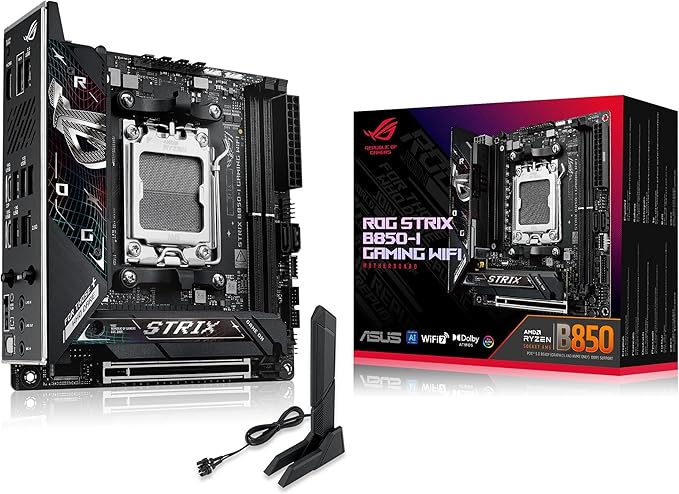
Quick Specs: Mini-ITX | 10+2+1 Power Stages (90A) | 1x PCIe 5.0 x16 | 2x M.2 (Both PCIe 5.0 x4) | Wi-Fi 7 + Intel 2.5GbE LAN | SupremeFX ALC4080 + Savitech AMP | Price Tier: $300-$340 tier (Flagship Mini-ITX)
Audit Score: 8.5 / 10
- VRM Power Delivery & Heatsinks (30%): 9.0 / 10
- PCIe 5.0 Lanes & Storage Expansion (25%): 8.3 / 10
- Networking & Rear I/O (25%): 8.8 / 10
- BIOS Features & DIY Ergonomics (20%): 7.7 / 10
Packing flagship AM5 features onto a 170mm x 170mm Mini-ITX footprint requires careful PCB engineering, and the ASUS ROG Strix B850-I Gaming WiFi official specifications spare zero hardware corners. ASUS fits 10+2+1 90A power stages alongside a full PCIe 5.0 x16 slot and dual PCIe 5.0 x4 M.2 slots (on Ryzen 9000/7000 CPUs), meaning even a tiny desktop build gets uncompromised Gen 5 storage throughput. Rear connectivity leads the ITX class too: Wi-Fi 7, Intel 2.5GbE Ethernet, a 20Gbps USB Type-C port, optical S/PDIF, and SupremeFX ALC4080 audio paired with a dedicated Savitech SV3H712 headphone amplifier.
Stacked against our #8 pick, the ASRock AMD B850I Lightning WiFi, the Strix B850-I pulls clearly ahead in wireless speed (Wi-Fi 7 vs. 6E), rear USB 20Gbps I/O, and dual PCIe 5.0 M.2 slots. Its sole glaring drawback is price: sitting in the $300-$340 bracket costs roughly $100-$120 more than ASRock’s Mini-ITX board and overlaps with full-size ATX X870 competitors.
Buyer Verification Alert: The Strix B850-I uses ASUS’s button-less PCIe Slot Q-Release Slim mechanism. Rather than pulling straight upward from the rear of the GPU, gently lift from the display-bracket side first per ASUS guidelines to prevent scratching or wearing the graphics card’s gold PCIe fingers.
Pros
- Dual PCIe 5.0 x4 M.2 sockets plus PCIe 5.0 x16 GPU support on a compact Mini-ITX PCB
- 90A VRM power stages handle 9800X3D and 9950X3D thermal density inside SFF cases
- Wi-Fi 7, rear 20Gbps USB-C, optical S/PDIF, and amplified SupremeFX ALC4080 audio
Cons
- $300-$340 price tier carries a steep SFF premium over ATX B850 and even X870 boards
- Q-Release Slim requires strict angled removal technique to avoid GPU PCB edge wear
Verdict: Buy it if you are building a no-compromise Mini-ITX console-killer with a Ryzen 7 9800X3D, Wi-Fi 7, 20Gbps USB-C, and high-impedance headphones. Skip it if you have room for an ATX chassis or prefer saving $100-$120 with ASRock’s B850I Lightning. Upgrade Note: Mini-ITX caps you at two DIMM slots, so install 32GB (2x16GB) or 64GB (2x32GB) DDR5-6000 CL30 upfront.
8. ASRock AMD B850I Lightning WiFi — Best Budget Mini-ITX

Quick Specs: Mini-ITX (8-Layer PCB) | 10+1+1 VRM (110A SPS VCore) | 1x PCIe 5.0 x16 | 2x M.2 (1x Front Gen5 x4, 1x Rear Gen4 x4) | Wi-Fi 6E + Killer 2.5GbE LAN | ALC1220 | Price Tier: $180-$220 tier (Value Mini-ITX)
Audit Score: 8.4 / 10
- VRM Power Delivery & Heatsinks (30%): 9.0 / 10
- PCIe 5.0 Lanes & Storage Expansion (25%): 8.0 / 10
- Networking & Rear I/O (25%): 7.9 / 10
- BIOS Features & DIY Ergonomics (20%): 8.4 / 10
Small-form-factor builders historically had to swallow brutal markups just to fit an AM5 CPU inside a 10-liter chassis. The ASRock B850I Lightning WiFi product sheet resets SFF pricing expectations in the $180-$220 bracket while over-delivering on silicon power: its 10+1+1 VRM uses massive 110A Smart Power Stages (SPS) on an 8-layer PCB, surpassing even the #7 ASUS ROG Strix B850-I’s 90A stage amperage. You still get a full PCIe 5.0 x16 graphics slot, front PCIe 5.0 x4 Blazing M.2 socket, Realtek ALC1220 audio, Killer E3100G 2.5GbE LAN, USB BIOS Flashback, and a rear USB-C port with DisplayPort Alt-Mode.
Why does it rank #8 behind the #7 ASUS ROG Strix B850-I Gaming WiFi? To hit its budget-friendly SFF price point, ASRock trims wireless networking down to Wi-Fi 6E—making it the sole board on this list without Wi-Fi 7—and mounts its second PCIe 4.0 x4 M.2 slot on the back of the motherboard without active heatsink cooling.
Buyer Verification Alert: In sandwich-style Mini-ITX cases where the GPU riser cable sits flush against the back of the motherboard, a rear-mounted M.2_2 SSD gets almost zero airflow. Install a cool-running single-sided PCIe 4.0 drive in the rear slot and reserve the heatsinked front Blazing M.2 slot for your primary OS and games.
Pros
- 10+1+1 110A SPS VCore power stages on an 8-layer PCB deliver massive SFF VRM headroom
- Saves roughly $100-$120 compared with the Strix B850-I while retaining PCIe 5.0 GPU and M.2
- Includes USB BIOS Flashback, Realtek ALC1220 codec, and USB-C DP Alt-Mode video out
Cons
- Wi-Fi 6E radio lags behind Wi-Fi 7 boards on this list (though replaceable via M.2 Key-E)
- Underside M.2_2 bay runs hot in tightly packed sandwich Mini-ITX enclosures
Verdict: Buy it if you want the strongest SFF power delivery per dollar for a Mini-ITX Ryzen 7 9800X3D build over wired 2.5GbE Ethernet or Wi-Fi 6E. Skip it if you demand factory Wi-Fi 7, 20Gbps USB-C, or dual front-cooled PCIe 5.0 SSDs. Upgrade Note: Because the wireless adapter uses a standard Key-E socket, you can swap in a Wi-Fi 7 card later if your home router upgrades.
Buying Guide: How to Choose the Best B850 Motherboard for Ryzen 9800X3D
Motherboards rarely add raw frame rate on their own, yet choosing an underspecified board creates thermal VRM throttling, DDR5 memory instability that wrecks 1% Lows, or unexpected PCIe lane bottlenecks. Selecting the best B850 motherboard means checking electrical power delivery, storage lane routing, and firmware readiness before buying.
According to AMD’s official Socket AM5 chipset documentation, AMD B850 hits the mainstream gaming sweet spot by mandating at least one PCIe 5.0 NVMe M.2 slot while keeping both CPU Precision Boost Overdrive (PBO) and DDR5 EXPO memory overclocking unlocked. Here are the five technical checkpoints we audit before recommending any AM5 board.
1. VRM Phases, DrMOS Amperage, and Ryzen 9800X3D Power Limits
Do not fall for inflated marketing phase counts without verifying power-stage amperage and aluminum heatsink mass. A Ryzen 7 9800X3D or Ryzen 7 9850X3D carries a 120W base TDP and peaks at 162W PPT under sustained all-core shader compilation or heavy CPU workloads, while a 16-core Ryzen 9 9950X3D scales up to 230W PPT.
Our minimum baseline for a mid-to-high-end AM5 gaming board is 12+2 VRM phases using 60A–80A DrMOS (or Smart Power Stage) silicon covered by finned aluminum heatsinks. Every single pick in our top eight meets or exceeds that standard—culminating in 80A stages on the MSI MAG B850 Tomahawk MAX WiFi, ASRock B850 Steel Legend WiFi, and ASUS TUF B850-PLUS, plus 90A–110A stages on the two compact Mini-ITX boards.
2. PCIe Lane Sharing: Read the Block Diagram Before Buying
Ryzen 7000 and 9000 processors supply 24 usable PCIe 5.0 lanes outside the four lanes dedicated to the chipset link: 16 lanes feed the primary graphics card slot, 4 lanes feed the primary M.2_1 NVMe socket, and 4 spare CPU lanes power either a second Gen 5 M.2 slot (on boards like the MSI Tomahawk MAX and ASUS ROG Strix B850-I) or USB4 on pricier X870 boards.
The danger with sloppy motherboard layouts—especially on certain mid-tier X870 models—is PCIe lane sharing that drops your primary PCIe 5.0 x16 graphics slot down to x8 the moment you install a second M.2 SSD. Across all eight B850 boards audited here, none steal lanes from your primary GPU slot. However, chipset-wired tertiary slots (M.2_3 on MSI Tomahawk MAX, ASUS TUF B850-PLUS, and ASRock LiveMixer) do share bandwidth with bottom expansion slots, while GIGABYTE’s B850 AORUS Elite WIFI7 stands out with zero lane-sharing compromises across all three M.2 sockets.
3. DDR5-6000 CL30 Sweet Spot and the 2-DIMM Rule
Chasing massive DDR5 megatransfer numbers on an AM5 socket backfires if you ignore latency and memory controller gearing. First Word Latency equals (CAS Latency × 2000) / Data Rate, meaning a 32GB (2x16GB) DDR5-6000 CL30 kit hits a crisp 10.0 nanoseconds while budget DDR5-6000 CL42 kits lag at 14.0 nanoseconds.
More importantly, Zen 4 and Zen 5 memory controllers run an optimal 1:1 synchronous UCLK:MCLK ratio at 6000 MT/s (with lucky silicon reaching 6200–6400 MT/s); pushing past 6400 MT/s forces a 2:1 divider that adds latency and hurts gaming frame-time stability. Always follow the 2-DIMM rule: populate slots A2 and B2 with two 16GB or two 32GB AMD EXPO sticks rather than four DIMMs, and choose low-profile kits (such as G.Skill Flare X5 or Corsair Vengeance) if using large dual-tower air coolers.
4. PCIe 5.0 vs. 4.0 SSDs, 5GbE Networking, and USB4 Reality
While every best B850 motherboard here includes a CPU-wired PCIe 5.0 x4 M.2 slot covered by a dedicated M.2 heatsink, gamers should resist overspending on Gen 5 drives unless moving massive 4K/8K video projects or local AI datasets. High-grade PCIe 4.0 TLC drives with dedicated DRAM cache (like the WD Black SN850X or Samsung 990 Pro at 7,000–7,450 MB/s) produce identical FPS and load games within zero to two seconds of 14,500+ MB/s Gen 5 SSDs while running far cooler—letting you afford 2TB of capacity instead of 1TB.
On networking, Wi-Fi 7 and 2.5GbE LAN represent the baseline across seven of our eight winners (only the budget ITX ASRock B850I Lightning steps down to Wi-Fi 6E), while MSI upgrades both the Tomahawk MAX and Gaming Plus to 5GbE LAN for fast local NAS transfers. Native 40Gbps USB4 remains optional on AMD B850 and omitted across most boards here; if you do not plug in external 40Gbps PCIe/NVMe enclosures, a rear 20Gbps USB 3.2 Gen 2×2 Type-C port (found on ASUS TUF B850-PLUS and Strix B850-I) delivers more than enough external throughput.
5. Upgrade Roadmap & Hidden Ownership Costs
Before finalizing your motherboard budget (ideally 8–12% of a balanced custom build), account for four hidden system costs. First, avoid buying an M.2 SSD with a bulky factory heatsink if your B850 board already includes thick integrated M.2 armor—buy the bare drive version so the motherboard plate seats flat against the thermal pad. Second, budget immediately for 32GB (2x16GB) DDR5-6000 CL30 EXPO memory rather than buying a single 16GB stick or slow 4800 MT/s modules, and enable EXPO inside BIOS right after building.
Third, check case clearance if looking at back-connect ASUS BTF or MSI Project Zero chassis, as standard ATX B850 boards will not fit rear-cutout-only layouts. Fourth, verify your chassis length and ATX 3.1 PSU capacity (750W–850W 80+ Gold with native 12V-2×6 cabling for modern 1440p/4K GPUs) alongside rear BIOS Flashback readiness in case a fresh AGESA update is needed for a Ryzen 7 9850X3D.
Secondary Intent Resolver: B850 vs. X870 / X870E vs. Legacy B650
Still torn between AM5 chipset tiers? Skip legacy B650 boards unless heavily discounted and explicitly confirmed to include rear BIOS Flashback, as older inventory lacks mandatory PCIe 5.0 M.2 lanes and modern Wi-Fi 7 controllers. On the upper end, only step up to AMD X870 or AMD X870E if you strictly need dual 40Gbps USB4 ports or extreme dual-chipset PCIe expansion—our AMD B850 vs. X870 vs. X870E guide details how X870’s mandatory USB4 wiring often forces awkward GPU or M.2 compromises that well-designed B850 boards completely avoid.
How We Audited, Scored, and Filtered These B850 Boards
Rather than publishing fabricated lab frame-rate deltas where a motherboard changes zero FPS when VRMs remain cool, every pick in this best B850 motherboards roundup underwent a technical specification and block-diagram audit following The PC Audit editorial evaluation methodology. We cross-referenced official OEM manuals, VRM power-stage datasheets (60A to 110A DrMOS/SPS ratings), PCB layer counts, PCIe lane-routing tables, rear USB 10Gbps/20Gbps specifications, audio codecs, and Amazon US variant listings to ensure zero hidden x8 GPU lane drops or missing BIOS Flashback buttons.
| Evaluation Criterion | Weight | What We Audited |
|---|---|---|
| VRM Power Delivery & Heatsinks | 30% | True VCore/SOC phase topology, DrMOS/SPS amperage (60A–110A), dual 8-pin EPS support, PCB copper layers, and aluminum fin/heatsink coverage for 162W–230W Ryzen X3D loads. |
| PCIe 5.0 Lanes & Storage Expansion | 25% | Unshared PCIe 5.0 x16 GPU routing, PCIe 5.0 x4 M.2 slots, total NVMe count, M.2 heatsink inclusion, and block-diagram lane-sharing interactions. |
| Networking & Rear I/O | 25% | Wi-Fi 7 vs. Wi-Fi 6E wireless modules, 5GbE vs. 2.5GbE LAN controllers, rear 10Gbps/20Gbps USB Type-C ports, total USB count, and ALC1220/ALC4080 audio codecs. |
| BIOS Features & DIY Ergonomics | 20% | USB BIOS Flashback button presence, quick-release GPU latches, tool-less M.2 clips, EZ Debug LEDs, warranty coverage, and street price-tier value. |
Models We Audited & Rejected (And Why)
- Gigabyte B850M D3HP (Entry 5+2+2 VRM): Rejected for Ryzen 9800X3D rigs because its compact 5+2+2 VCore design and modest block heatsink leave slim thermal headroom if you ever upgrade to a 12- or 16-core Ryzen 9 X3D processor.
- ASUS Prime B840M Series & AMD B840 Chipset Boards: Disqualified because AMD’s B840 chipset locks CPU overclocking/PBO flexibility and strips mandatory PCIe 5.0 M.2 support—unacceptable compromises when $160-$200 B850 ATX boards exist.
- Legacy Entry B650 Boards Without BIOS Flashback: Older B650 stock can ship with pre-Zen 5 firmware; without a dedicated rear BIOS Flashback button, you risk a no-POST roadblock when installing a Ryzen 7 9800X3D or 9850X3D.
- Lane-Splitting X870 Motherboards for Pure Gaming: Several pricier X870 models sacrifice primary PCIe 5.0 x16 GPU bandwidth down to x8 when secondary M.2 slots are filled to feed mandatory USB4 controllers—worse real-world routing than unshared B850 boards.
Frequently Asked Questions About Buying the Best B850 Motherboard
Is AMD B850 good enough for the Ryzen 7 9800X3D and 9850X3D?
Yes, AMD B850 is the ideal chipset for both the Ryzen 7 9800X3D and Ryzen 7 9850X3D. Both 8-core processors top out around 162W PPT under sustained load, which any 12+2 to 14+2 60A–80A DrMOS B850 motherboard handles comfortably while supporting full PBO and DDR5-6000 CL30 EXPO tuning.
Do B850 motherboards support PCIe 5.0 for graphics cards?
Yes—every board ranked here includes PCIe 5.0 x16 graphics support. Although AMD technically makes PCIe 5.0 mandatory only for M.2 storage on B850 and optional for the primary x16 slot, all eight MSI, ASRock, GIGABYTE, and ASUS models audited in this guide wire the top GPU slot at full PCIe 5.0 x16.
When should I pay extra for X870 instead of buying the best B850 motherboard?
Choose X870 or X870E only if you actively need native 40Gbps USB4 ports or extreme dual-chipset PCIe add-in card bandwidth. Many mid-tier X870 boards split GPU or M.2 lanes to accommodate mandatory USB4 controllers, making an unshared B850 board smarter for pure gaming builds.
What DDR5 RAM speed and capacity works best on AMD B850 boards?
Install 32GB (2x16GB) DDR5-6000 CL30 with AMD EXPO in motherboard slots A2 and B2. That configuration holds Zen 5’s memory controller in its optimal 1:1 UCLK:MCLK ratio at 10.0ns latency, whereas kits above 6400 MT/s drop into a slower 2:1 divider and 4-DIMM setups risk failing EXPO boot speeds.
Do I need to update the BIOS on a B850 motherboard for Ryzen 9000X3D?
Most B850 boards boot Ryzen 9000X3D CPUs out of the box, though newer chips like the January 2026 Ryzen 7 9850X3D may call for a fresh AGESA firmware update. Every motherboard in our top eight features a rear USB BIOS Flashback button so you can flash firmware without an older processor.
Will populating multiple M.2 SSDs cut my GPU slot from x16 to x8 on B850?
No—none of these eight B850 motherboards steal x16 GPU lanes when populating M.2 SSDs. On boards with four M.2 bays or heavy lower expansion slots—such as the MSI MAG B850 Tomahawk MAX WiFi, ASUS TUF B850-PLUS, or ASRock LiveMixer—only the third chipset M.2 socket shares bandwidth with bottom PCIe expansion slots.
Final Verdict: Which B850 Motherboard Should You Buy?
Finding the best B850 motherboard for a Ryzen 7 9800X3D build comes down to matching VRM headroom, M.2 slot count, and wired networking to your budget tier without overpaying for unused X870 ports. For most ATX builders, our #1 overall pick—the MSI MAG B850 Tomahawk MAX WiFi—delivers the sharpest balance with its 14+2+1 80A SPS power design, four M.2 bays (including two Gen 5 slots), 5GbE LAN, Wi-Fi 7, and push-button GPU release.
If keeping your build under $200 matters most, grab the ASRock B850 Steel Legend WiFi (#2) for identical 80A Dr.MOS power on an 8-layer PCB with four full-width M.2 slots, or choose the GIGABYTE B850 AORUS Elite WIFI7 (#3) for the cleanest tool-less DIY installation and zero M.2 lane sharing. Streamers drowning in USB peripherals belong on the ASRock B850 LiveMixer WiFi 7 (#5), while compact SFF builders can split cleanly between the flagship ASUS ROG Strix B850-I Gaming WiFi (#7) and the value-packed ASRock AMD B850I Lightning WiFi (#8).


