
On This Page
Affiliate Disclosure: The PC Audit is reader-supported. As an Amazon Associate, we earn from qualifying purchases made through verified retail links at no additional cost to you. Our architectural audits remain independent and strictly grounded in manufacturer specifications.
Shopping for an i9 14900kf on b760 motherboard prebuilt gaming desktop on Amazon looks like a bargain on paper: flagship 24-core Intel silicon with a headline 6.0 GHz boost clock inside a turnkey chassis priced well below custom Z790 systems. Beneath the tempered glass, however, pairing an unlocked 253W Maximum Turbo Power (MTP) processor with an entry-tier Intel B760 motherboard creates one of the most common thermal and electrical bottlenecks in prebuilt PCs.
Instead of sustaining flagship clock speeds across modern DirectX 12 games, shader compilation passes, and creator renders, stripped-down prebuilt B760 boards routinely force voltage, current, and firmware clamps that slash all-core throughput. This technical compatibility audit breaks down exactly why the pairing throttles, which hidden specs to inspect on Amazon listings, and which 2026 platforms deliver higher 1% Lows without VRM headaches.
Audit Verdict: Core i9-14900KF + Prebuilt B760 Motherboard
Overall Audit Score: 6.4 / 10 — Conditional Value Only on Verified Heavy-VRM Boards; Avoid Blind Prebuilt Pairings
Buy It If: You secure a deep clearance discount on a verified retail B760 board featuring robust DrMOS VRM heatsinks, a 360mm AIO cooler, dual-channel DDR5, and confirmed 0x12F microcode firmware.
Skip It If: The prebuilt listing hides the motherboard model, uses basic air or 120mm cooling, bundles slow DDR5-4800 or Wi-Fi 5, or sits near AM5 Ryzen 7 9800X3D pricing.
Weighted CPU Platform Audit Scorecard (100% Rubric)
| Audit Criterion | Weight | Score | Architectural Rationale |
|---|---|---|---|
| Gaming Frame Rate & 1% Lows | 35% | 7.5 / 10 | High 6.0 GHz single-core peak when cool, yet trails 3D V-Cache silicon and suffers 1% Low dips if VRMs or slow DDR5-4800 bottleneck draw calls. |
| Platform Longevity & PCIe I/O | 25% | 4.5 / 10 | Dead-end LGA 1700 socket offers zero future CPU runway, B760 halves DMI 4.0 uplink bandwidth to x4, and CPU multiplier overclocking stays locked. |
| Multi-Core Creator Headroom | 20% | 7.0 / 10 | 24 cores (8P + 16E) excel in Blender and compiles only if PL1 exceeds 125W; KF silicon removes Intel Quick Sync video acceleration entirely. |
| Power Efficiency & Thermal Behavior | 20% | 5.2 / 10 | 253W MTP overwhelms budget B760 VRM phases, Current Excursion Protection (CEP) blocks basic undervolts, and 0x12F BIOS validation is mandatory. |
Verified Strengths
- Up to 6.0 GHz Thermal Velocity Boost delivers snappy single-threaded responsiveness when kept under thermal thresholds.
- 24-core / 32-thread architecture still handles heavy parallel compiles and multi-stream background workloads if power limits remain open.
- Retail clearance prebuilts occasionally bundle the chip alongside RTX 5070 or RX 9070 graphics cards at steep discounts.
Concrete Compromises
- Entry B760 VRMs saturate quickly under 253W MTP or force silent BIOS PL1=125W caps that cut sustained multi-core clocks.
- Locked CPU multiplier and strict CEP firmware behavior hinder simple voltage reductions without AC/DC load-line tuning.
- No integrated GPU (no Quick Sync) and zero upgrade path compared to modern AM5 and LGA 1851 processors.
Verified Technical Specifications & Silicon Architecture
Understanding why an i9 14900kf on b760 motherboard prebuilt configuration behaves unpredictably begins with comparing the processor’s electrical appetite against the B760 chipset specification sheet and 2026 rivals. On paper, Intel’s 14th Gen Raptor Lake Refresh flagship packs eight Performance-cores (P-cores) with Hyper-Threading and sixteen Efficient-cores (E-cores) for 32 threads total, backed by 32 MB of L2 cache and 36 MB of Intel Smart Cache (L3).
While Intel lists a Processor Base Power (PL1) of 125W, the official Maximum Turbo Power (PL2 / MTP) climbs to 253W, and unrestricted retail motherboards frequently allow transient ICCMax current spikes past 307A. Meanwhile, the entry-mainstream Intel B760 chipset was engineered around 65W to 125W locked non-K processors—cutting chipset-to-CPU Direct Media Interface (DMI 4.0) bandwidth in half versus Z790 and removing CPU core multiplier overclocking entirely.
| Specification Axis | Core i9-14900KF + B760 (Audited Pairing) | Core i9-14900KF + Z790 (Reference Platform) | Ryzen 7 9800X3D + B850 (2026 Gaming Benchmark) | Core Ultra 7 265K + Z890/B860 (2026 Intel Hybrid) |
|---|---|---|---|---|
| Socket & Architecture | LGA 1700 (Raptor Lake Refresh, Intel 7) | LGA 1700 (Raptor Lake Refresh, Intel 7) | AM5 (Zen 5 + 2nd Gen 3D V-Cache, 4nm) | LGA 1851 (Arrow Lake Chiplet, TSMC N3B) |
| Cores / Threads | 24C / 32T (8P + 16E) | 24C / 32T (8P + 16E) | 8C / 16T (Uniform Performance Cores) | 20C / 20T (8P + 12E, No Hyper-Threading) |
| Cache Hierarchy | 32 MB L2 + 36 MB L3 Smart Cache | 32 MB L2 + 36 MB L3 Smart Cache | 8 MB L2 + 96 MB L3 (104 MB Total) | 36 MB L2 + 30 MB L3 (66 MB Total) |
| Peak Boost Clock | Up to 6.0 GHz (Thermal Velocity Boost) | Up to 6.0 GHz (Thermal Velocity Boost) | Up to 5.2 GHz (Unlocked PBO) | Up to 5.5 GHz |
| Base TDP / Max Power | 125W Base / 253W MTP (Often Clamped in OEM BIOS) | 125W Base / 253W+ MTP | 120W TDP / 162W Max PPT | 125W Base / 250W MTP |
| iGPU & Media Engine | None (KF Suffix — No Quick Sync) | None (KF Suffix — No Quick Sync) | 2-CU Radeon iGPU (Display Fallback) | Xe-LPG iGPU + Quick Sync + 13 TOPS NPU |
| CPU PCIe Lanes | 16x PCIe 5.0 + 4x PCIe 4.0 | 16x PCIe 5.0 + 4x PCIe 4.0 | 24 Usable PCIe 5.0 (x16 GPU + 2×4 NVMe) | 20 CPU PCIe 5.0 + 4x PCIe 4.0 |
| Chipset Uplink & OC | DMI 4.0 x4; 14 PCH Lanes; CPU OC Locked | DMI 4.0 x8; 28 PCH Lanes; Full CPU/RAM OC | PCIe 4.0 x4 Uplink; Full CPU PBO & RAM OC | DMI 4.0 x8 (Z890) / x4 (B860); Z890 Full OC |
| Platform Runway | End of Line (No Next-Gen Upgrade) | End of Line (No Next-Gen Upgrade) | Multi-Gen AM5 Support | Limited LGA 1851 Runway |
Non-Obvious Silicon & Chipset Trade-Offs Beneath the Badge
First, the “KF” suffix disables the integrated Intel UHD Graphics 770 block. For pure gaming that sounds harmless, because every prebuilt pairs the chip with a dedicated PCIe x16 graphics card. Yet dropping the iGPU eliminates Intel Quick Sync hardware encoding/decoding in Adobe Premiere Pro, DaVinci Resolve, and OBS dual-engine setups, while also removing emergency display output if your discrete GPU ever needs troubleshooting.
Second, compare thermal economics against 2026 architectures. AMD’s Zen 5 3D V-Cache silicon pulls a maximum Package Power Tracking (PPT) limit of roughly 162W—nearly 90W less heat than a 253W Raptor Lake chip—because placing 96 MB of L3 cache beneath the compute die lets the cores contact the heatspreader directly while sustaining Precision Boost Overdrive (PBO) headroom. Intel’s newer Arrow Lake chips on LGA 1851 drop Hyper-Threading to improve efficiency per watt and restore an integrated GPU plus AI Boost NPU, leaving the 14900KF as a high-wattage legacy powerhouse that demands serious motherboard hardware.
Why Prebuilt i9-14900KF + B760 Pairings Throttle: 4 Engineering Bottlenecks
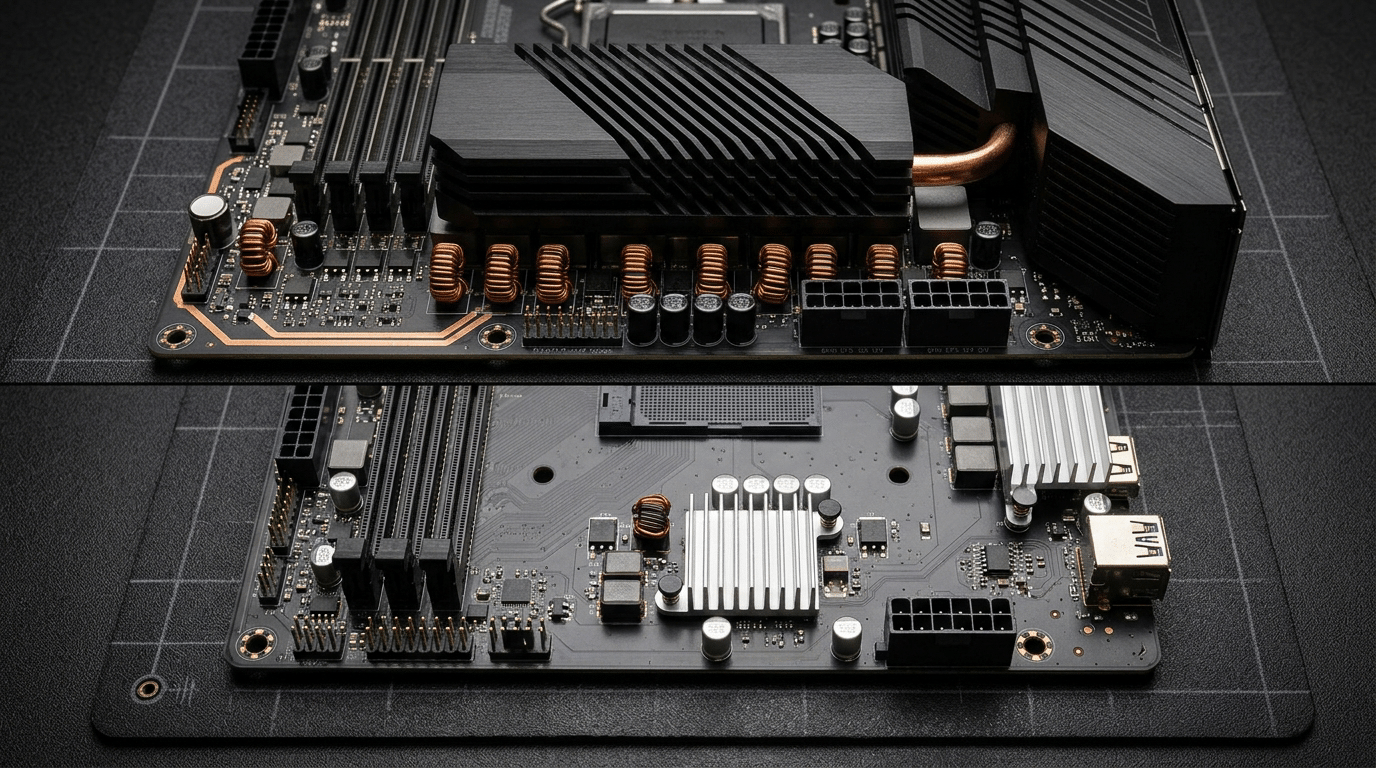
A processor cannot exceed the electrical envelope supplied by its socket or the thermal headroom provided by its cooling loop. When prebuilt integrators drop a Core i9-14900KF into an entry-level B760 chassis, throttling happens through four distinct hardware and firmware mechanisms.
1. 253W MTP vs. Entry B760 VRM Thermal Saturation
Every motherboard converts 12V ATX rail current into ~1.1V to ~1.45V CPU core voltage through its Voltage Regulator Module (VRM). Enthusiast Z790 boards deploy 16+1+2 or 20+1+2 power stages using 70A to 105A DrMOS Smart Power Stages beneath heavy, heatpipe-linked aluminum blocks and dual 8-pin EPS CPU connectors. By contrast, budget B760 boards built for prebuilt volume contracts frequently use 6+1+1 or 8+1+1 discrete MOSFET designs or low-current 50A phases cooled by small, thin aluminum extrusions—sometimes leaving top-side SoC phases bare entirely and supplying only a single 8-pin EPS header.
Under brief single-core bursts, that budget VRM survives. Once a modern game launches heavy shader compilation, streams uncompressed assets across 24 threads, or runs simultaneous gameplay plus OBS software encoding, current draw surges past 200A toward the 253W MTP ceiling. Inefficient discrete MOSFETs dump excessive switching heat directly into the motherboard PCB. As VRM temperatures climb past 100°C to 115°C, the board asserts BD PROCHOT (Bi-Directional Processor Hot) or VRM thermal throttling, violently cutting CPU clock multipliers to 3.0–3.8 GHz until components cool down. To inspect exactly what phase counts and DrMOS ratings prevent this wall, see our breakdown of motherboard VRMs and DrMOS power delivery.
2. Silent OEM BIOS Power-Limit Clamping (PL1 = 125W & Short Tau)
Many system integrators and OEMs already know a budget micro-ATX B760 board—or an undersized 120mm AIO / single-tower 92mm air cooler—cannot survive 253W continuously. Rather than paying extra for a Z790 board and 360mm radiator, builders flash custom BIOS defaults or lock PL1 (Long Duration Power Limit) to 125W (or even 95W–115W) with a brief 28-second or 56-second Tau turbo window.
For the buyer, this behaves like silent performance throttling. You boot a game or launch a render, the chip flashes high boost clocks for half a minute inside PL2, and then abruptly drops into a flat 125W wall where all-core P-core speeds fall dramatically below retail benchmarks. Worse, many Amazon prebuilt product pages omit motherboard model names, cooler dimensions, and BIOS power configurations altogether.
3. The B760 Multiplier Lock & Current Excursion Protection (CEP) Trap
Enthusiasts who buy an unlocked K-series processor on Z-series silicon routinely lower temperatures without losing clock speed through adaptive voltage offsets and per-core ratio tuning. On B760, Intel disables IA core multiplier overclocking entirely—just as Intel reserves full K-series CPU tuning for Z890 on newer platforms, detailed in our Intel Z890 vs. B860 chipset comparison.
Even more punishing is Current Excursion Protection (CEP). Modern Raptor Lake BIOS updates enforce CEP on B760 motherboards to guard against transient voltage droop instability. If a buyer tries applying a standard negative VCore voltage offset to stop a hot prebuilt from thermally throttling, CEP interprets the lower supplied voltage relative to the requested VID table as a voltage droop fault—and immediately engages internal clock stretching that can cut real-world performance nearly in half while clock monitoring software still reports normal GHz numbers. Bypassing CEP throttling on B760 requires fine-tuned AC/DC Load Line calibration or dedicated microcode tuning menus that stripped OEM prebuilt BIOS builds routinely hide.
4. Microcode 0x12B / 0x12F & Vmin Shift Longevity Risk
Every buyer evaluating a 14th Gen Intel i9 desktop in 2026 must audit firmware status carefully. Intel officially identified a root-cause reliability flaw in 13th and 14th Gen Raptor Lake IA core clock-tree circuits called Vmin Shift Instability, driven by elevated operating voltages during idle, light-threaded bursts, and unchecked motherboard power profiles.
Intel shipped cumulative mitigations—first 0x129 (capping VID requests at 1.55V), then 0x12B, and subsequently 0x12F—alongside mandatory Intel Default Settings profiles and an extended five-year warranty for boxed retail processors. However, prebuilt OEM systems sitting in fulfillment warehouses often ship with older 2023 or early-2024 BIOS revisions lacking 0x12B and 0x12F protections, or use proprietary OEM motherboard firmware paths that lag retail motherboard vendor updates by months. Microcode updates protect healthy silicon, but they cannot reverse degradation that has already occurred.
Real-World Workload & Resolution Ceiling: 1080p, 1440p, 4K & Creator
How does an i9 14900kf on b760 motherboard prebuilt system behave once you actually launch demanding software? Rather than looking at averages alone, hardware audits focus on frametime pacing, 1% Lows, and whether the CPU or GPU dictates the ceiling.
- 1080p Competitive Esports (240Hz–480Hz): At 1080p Low/Competitive settings, frame delivery depends heavily on CPU instruction-per-clock (IPC) efficiency, L3 cache hit rates, and RAM latency. An unthrottled 14900KF paired with fast DDR5 still pushes high average FPS, yet prebuilt B760 machines commonly pair 16GB DDR5-4800 or loose-timing DDR5-5600—and occasionally a single-channel 1x16GB stick—which degrades 1% Lows by double-digit percentages during intense teamfights. Meanwhile, AM5 X3D chips hold markedly tighter frametime pacing thanks to 96 MB of L3 cache feeding draw calls directly.
- 1440p High-Refresh Gaming: Paired with modern 12GB to 16GB GPUs like the RTX 5070, RTX 5070 Ti, or RX 9070 XT, GPU utilization climbs near 90%–99% in visually heavy Unreal Engine 5 titles. Here, VRM throttling during background shader compilation or map traversal causes the most noticeable stutter spikes: when a budget B760 board drops CPU power to 115W mid-session, asset decompression stalls briefly even though average FPS looks acceptable.
- 4K Ultra & Ray Tracing: At 3840×2160 with hardware ray tracing enabled, almost every modern title becomes strictly GPU-bound. Running a 253W MTP processor in a 4K prebuilt rig provides negligible framerate advantage over a 65W Ryzen 5 9600X or 120W Ryzen 7 9800X3D, while forcing your case fans and PSU to manage unnecessary thermal waste inside the chassis.
- Video Editing, Streaming & 3D Rendering: In sustained Blender renders or Unreal Engine light baking, a throttled PL1=125W B760 board strips away the 14900KF’s multi-core advantage, dropping it closer to cheaper mid-range processors. Simultaneously, missing Quick Sync forces timeline decoding onto the discrete GPU or CPU cores in H.264/HEVC 4:2:2 workflows.
Prebuilt Buyer Alert: 5 Mandatory Checks Before Buying Any i9-14900KF + B760 System
Amazon prebuilt spec sheets routinely obscure the exact parts that cause an i9 14900kf on b760 motherboard prebuilt configuration to underperform. Audit these five specifications before clicking buy—and cross-check the complete checklist in our 10 Prebuilt Gaming PC Red Flags guide:
- Verify Exact Motherboard & VRM Heatsinks: Demand a named retail ATX or high-end mATX board with dual-block VRM heatsinks and at least 12+1 60A DrMOS phases; reject listings using vague “Intel B760 Motherboard” labels or bare top-edge power stages.
- Reject 120mm AIOs & Choked Front Glass: A 253W MTP CPU requires a 360mm AIO liquid cooler (or massive dual-tower air cooler) inside an airflow mesh or ventilated dual-chamber chassis.
- Spot Memory & Wi-Fi Downgrades: Many $1,500–$2,800 prebuilts quietly ship 16GB DDR5-4800 or outdated Wi-Fi 5 adapters; insist on dual-channel 32GB (2x16GB) DDR5-6000+ and Wi-Fi 6E or Wi-Fi 7.
- Confirm ATX 3.1 PSU Wattage & Native 12V-2×6: Never settle for omitted wattage or generic Bronze PSUs when driving a 253W CPU alongside a modern RTX 50-series GPU; require 850W+ 80+ Gold ATX 3.1 power delivery.
- Confirm Microcode 0x12F + New Condition: Avoid renewed/refurbished 14th Gen i9 systems where prior degradation is unknown, and flash BIOS to microcode 0x12F with Intel Default Settings immediately upon setup.
Best System Pairings & Top 2026 Alternatives
If you are configuring a custom build—or comparing a prebuilt discount against cleaner retail platforms—here is how the audited Core i9-14900KF stacks up against the two cleanest 2026 platform alternatives and a proper VRM-equipped motherboard standard. For complete cross-tier rankings, visit our pillar hub on the Best Gaming CPUs (2026).
Ideal Companion Spec for an Unthrottled Build: Pair modern high-refresh builds with 32GB (2x16GB) DDR5-6000 CL30 for AM5 (or DDR5-6400 CL32 for Intel), a 2TB PCIe 4.0 NVMe TLC SSD with DRAM cache, a 360mm AIO or dual-tower air cooler rated beyond 220W, and an 850W ATX 3.1 80+ Gold power supply featuring a native 12V-2×6 GPU cable.
1. Audited CPU Baseline: Intel Core i9-14900KF Unlocked Desktop Processor

Positioning: Legacy LGA 1700 Flagship ($300-$350 tier standalone) | Key Specs: 24 Cores (8P + 16E) / 32 Threads, 36 MB Smart Cache, 125W Base / 253W MTP, Up to 6.0 GHz, No iGPU.
While standalone street pricing in the $300-$350 tier makes the i9-14900KF tempting for existing Z790 owners upgrading from 12th Gen chips, it requires heavy VRM cooling, 360mm liquid dissipation, and immediate 0x12F BIOS enforcement. Avoid pairing it with bare-bones B760 boards when starting a fresh build from scratch.
2. Top Pure Gaming Alternative: AMD Ryzen 7 9800X3D

Positioning: Enthusiast Gaming Sweet Spot ($479 Launch MSRP) | Key Specs: 8 Cores / 16 Threads (Zen 5), 104 MB Total Cache (96 MB L3 2nd Gen 3D V-Cache), 120W TDP / 162W PPT, 24 Usable PCIe 5.0 Lanes.
Instead of fighting 253W VRM heat on a dead-end socket, the Ryzen 7 9800X3D delivers superior gaming frame rates and ultra-stable 1% Lows while drawing roughly 90W less peak power. Its relocated under-die 3D V-Cache supports full PBO tuning on affordable mid-range B850 boards and includes an integrated 2-CU Radeon iGPU for display diagnostics.
3. What Good Power Delivery Looks Like: GIGABYTE B850 AORUS Elite WIFI7

Positioning: Mainstream AM5 Value Benchmark ($200-$250 tier / ~$230 Launch MSRP) | Key Specs: 14+2+2 Digital Twin VRM (60A DrMOS), Unshared PCIe 5.0 x16 GPU Slot, 3x M.2, Wi-Fi 7 + 2.5GbE LAN, Q-Flash Plus.
Unlike prebuilt B760 boards hiding weak VRMs and Wi-Fi 5 cards, the B850 AORUS Elite WIFI7 illustrates balanced mid-range engineering: 14+2+2 60A DrMOS phases with real heatsinks, zero GPU x8 lane-sharing traps across all three M.2 slots, full CPU/RAM overclocking support, and built-in Wi-Fi 7 networking ready for future AM5 CPU drops.
4. Modern Intel Creator Alternative: Intel Core Ultra 7 265K

Positioning: LGA 1851 Hybrid Creator Pick ($300-$350 tier) | Key Specs: 20 Cores (8P + 12E) / 20 Threads, 36 MB Smart Cache (66 MB Total), Up to 5.5 GHz, Integrated Intel Graphics + AI Boost NPU.
Buyers anchored to Intel for multi-core rendering and video editing gain far cleaner efficiency on Arrow Lake silicon than chasing discounted Raptor Lake prebuilts. Choosing the full K model over F-series variants restores Quick Sync hardware acceleration, while TSMC N3B fabrication runs noticeably cooler during mixed gaming and productivity workloads.
Authoritative Engineering References
- Intel ARK — Core i9-14900KF Processor Official Specifications (125W Base / 253W MTP)
- Intel ARK — Intel B760 Chipset Specifications (PCIe / DMI 4.0 / Overclocking Matrix)
- Intel Community Advisory — 13th and 14th Gen Vmin Shift Instability & Microcode 0x12F Update
- AMD Official Specifications — Ryzen 7 9800X3D Zen 5 with 2nd Gen 3D V-Cache
How We Audited This Guide
- Processors, motherboards, memory, and storage were compared by socket longevity, chipset lane allocation, VRM design, DDR5 EXPO/XMP support, and PCIe generation.
- Every specification claim was cross-checked against official OEM datasheets, platform vendor documentation, and published industry standards (PCI-SIG, JEDEC, VESA, Intel ATX) rather than marketplace listing copy.
- Recommendations were evaluated against our weighted audit rubric and documented compatibility rules; we do not publish fabricated FPS, thermal, or acoustic numbers.
Frequently Asked Questions
Does an i9-14900KF always throttle on a B760 motherboard?
Not on every board, but budget prebuilt B760 models commonly throttle under sustained 253W loads. High-end retail B760 boards with 12+1 or 14+1 60A+ DrMOS heatsinks handle stock Intel Default power limits cleanly, whereas stripped OEM boards hit VRM thermal limits or lock PL1 to 125W.
Can you undervolt an i9-14900KF on a B760 motherboard to stop overheating?
Only on select boards with exposed AC/DC Load Line controls or microcode switching options. Because B760 enforces Current Excursion Protection (CEP) on modern BIOS builds, applying a simple negative VCore offset triggers internal clock stretching that cuts performance drastically unless CEP is properly balanced.
How much gaming FPS do you lose with PL1 clamped to 125W on a B760 prebuilt?
In lightly threaded games at 1440p or 4K, a 125W PL1 clamp impacts average FPS minimally while GPU load remains dominant. However, during shader compilation, heavy CPU-bound simulation titles, or streaming plus gameplay, clock drops reduce multi-core boost and noticeably worsen 1% Low frametime dips.
What BIOS microcode version should an i9-14900KF prebuilt run in 2026?
Every Core i9-14900KF desktop should run motherboard firmware containing Intel microcode 0x12F (which builds upon 0x12B and 0x129) alongside the Intel Default Settings power profile. Updating immediately guards healthy silicon against idle and light-load voltage spikes tied to Vmin shift instability.
Should you buy an i9-14900KF B760 prebuilt or switch to Ryzen 7 9800X3D?
For dedicated gaming, an AM5 Ryzen 7 9800X3D pairing on a B850 motherboard is the stronger choice. It delivers higher 1% Lows, draws roughly 90W less peak power, avoids VRM saturation, restores an iGPU, and keeps a multi-generation AM5 socket upgrade pathway open.


