
Disclosure: As an Amazon Associate, I earn from qualifying purchases. If you buy through links on this page, we may earn a small commission at no extra cost to you.
Tracking down the best compact mini itx prebuilt gaming pc in 2026 is far trickier than shopping for a standard full-size tower. Small-footprint buyers often face silent compromises: choked solid glass, hot PCIe 5.0 drives trapped inside sub-10L shells, 24GB memory kits with unclear stick counts, and legacy 6GB graphics cards masquerading as capable compact rigs.
To separate genuine engineering from cramped thermal traps, we audited ten verified 2025–2026 RTX 50-series builds spanning serviceable ~18L Mini-ITX towers, carry-on 8.1L sandwich SFF desktops, and console-sized Mini PCs. Whether you want flagship 4K OLED speed on a minimalist desk or travel-ready 1440p firepower, these ten small-footprint selections expand our broader Best Prebuilt Gaming PC (2026): 9 Audited Amazon Builds for Every Budget hub with strict spatial and power checks.
In This Guide
- Quick Picks at a Glance
- Side-by-Side Comparison (All 10 Audited Builds)
- Match Your Use Case
- Detailed Small-Footprint Audits (1–10)
- 1. Cooler Master NR2 Pro (9800X3D & RTX 5070 Ti)
- 2. Thermaltake LCGS Traveler 9880S (9800X3D & RTX 5080)
- 3. LAN Gamer 8.1L SFF (9800X3D & RTX 5080)
- 4. ASUS ROG NUC 16 Mini PC (290HX Plus & RTX 5080)
- 5. Thermaltake LCGS Traveler 7870 (7800X3D & RTX 5070)
- 6. LAN Gamer 8.1L SFF (Core Ultra 7 265 & RTX 5070 Ti)
- 7. Cooler Master NR2 Pro (Core Ultra 7 265F & RTX 5070)
- 8. Thermaltake LCGS Traveler u2670 (Core Ultra 7 265KF & RTX 5070)
- 9. LAN Gamer 8.1L SFF (Ryzen 7 8700F & RTX 5070)
- 10. Cooler Master NR2 Pro (Core Ultra 7 & RTX 5060 Ti)
- Buying Guide & Upgrade Roadmap
- Scoring Rubric & Excluded Models
- Frequently Asked Questions
- Final Verdict
Quick Picks: Best Compact Mini ITX Prebuilt Gaming PC Options
#1 Best Overall Mini-ITX Rig
Cooler Master NR2 Pro (9800X3D & 5070 Ti)
Balances 16GB GDDR7 VRAM, Ryzen 7 9800X3D 3D V-Cache, 32GB DDR5-6000, and 2TB storage inside a serviceable Mini-ITX shell. (Jump to audit)
#2 Best 4K Flagship Mini-ITX
Thermaltake LCGS Traveler 9880S
Steps up to a full desktop RTX 5080 16GB alongside the 9800X3D, 32GB DDR5-6000, and 2TB NVMe for uncompromised 4K OLED output. (Jump to audit)
#3 Best Sub-10L Backpack SFF
LAN Gamer 8.1L SFF (9800X3D & 5080)
Packs desktop RTX 5080 and 9800X3D power plus a 2TB Gen5 NVMe drive into an ultra-portable 8.1-liter LAN-ready frame. (Jump to audit)
Side-by-Side Comparison: Top 10 Compact & Mini ITX Prebuilt Gaming PCs
| Product & Award | Best For | CPU & Memory | GPU & Storage | Link |
|---|---|---|---|---|
| Cooler Master NR2 Pro (9800X3D) Best Overall Mini-ITX | 1440p Ultra & 4K balance | Ryzen 7 9800X3D / 32GB DDR5-6000 | RTX 5070 Ti 16GB / 2TB M.2 | View on Amazon |
| Thermaltake Traveler 9880S Best 4K Flagship Mini-ITX | 4K high-refresh OLED setups | Ryzen 7 9800X3D / 32GB DDR5-6000 | RTX 5080 16GB / 2TB NVMe | View on Amazon |
| LAN Gamer 8.1L SFF (5080) Best Sub-10L Backpack SFF | Portable LAN-party 4K power | Ryzen 7 9800X3D / 24GB DDR5 | RTX 5080 16GB / 2TB Gen5 | View on Amazon |
| ASUS ROG NUC 16 Mini PC Best Ultra-Tiny Console Mini PC | Zero-footprint minimalist desks | Core Ultra 9 290HX Plus | RTX 5080 / Compact Vapor Chassis | View on Amazon |
| Thermaltake Traveler 7870 Best 1440p X3D Value | Competitive 1440p esports | Ryzen 7 7800X3D / 32GB DDR5-6000 | RTX 5070 12GB / 2TB NVMe | View on Amazon |
| LAN Gamer 8.1L SFF (5070 Ti) Best Sub-10L Creator SFF | Quick Sync edits + 16GB VRAM | Core Ultra 7 265 / 24GB DDR5 | RTX 5070 Ti 16GB / 1TB Gen4 | View on Amazon |
| Cooler Master NR2 Pro (265F) Best Quiet Workstation Mini-ITX | Low-noise 20-core rendering | Core Ultra 7 265F / 32GB DDR5-6000 | RTX 5070 12GB / 2TB M.2 | View on Amazon |
| Thermaltake Traveler u2670 Best Unlocked LGA 1851 Mini-ITX | 5.5 GHz hybrid tuning + 2TB | Core Ultra 7 265KF / 32GB DDR5-6000 | RTX 5070 12GB / 2TB NVMe | View on Amazon |
| LAN Gamer 8.1L SFF (8700F) Best Entry-AM5 Sub-10L Build | Travel SFF w/ AM5 upgrade path | Ryzen 7 8700F / 24GB DDR5 | RTX 5070 12GB / 2TB Gen4 | View on Amazon |
| Cooler Master NR2 Pro (5060 Ti) Best Entry RTX 50-Series ITX | 1080p Ultra / entry 1440p | Intel Core Ultra 7 / NR2 Pro ITX | RTX 5060 Ti / Verify Variant | View on Amazon |
Match Your Use Case: Which Small-Footprint Rig Fits Your Desk?
| Buyer Scenario | Best Match | Why & Expected Outcome |
|---|---|---|
| Best Overall Serviceable Mini-ITX 1440p/4K Build | Cooler Master NR2 Pro (9800X3D & 5070 Ti) | 16GB GDDR7 VRAM, 9800X3D 1% Lows, 32GB DDR5-6000, and 2TB storage inside an accessible Mini-ITX tower. |
| Uncompromised 4K High-Refresh Mini-ITX Gaming | Thermaltake LCGS Traveler 9880S | Full desktop RTX 5080 16GB and 9800X3D silicon paired with 32GB DDR5-6000 and 2TB NVMe for 4K DLSS 4. |
| Carry-On Backpack / LAN-Party 8.1L SFF Powerhouse | LAN Gamer 8.1L SFF (9800X3D & 5080) | Peak 9800X3D + RTX 5080 performance packed into an ultra-portable 8.1-liter shell with a 2TB Gen5 SSD. |
| Zero-Footprint Desk or Living-Room Console Replacement | ASUS ROG NUC 16 Gaming Mini PC | Ultra-tiny vapor-chamber Mini PC footprint delivering RTX 5080 graphics where even an 8.1L tower will not fit. |
| 1440p Competitive Esports With 3D V-Cache Value | Thermaltake LCGS Traveler 7870 | High-refresh 1440p stability via 7800X3D 3D V-Cache, 32GB DDR5-6000, and 2TB NVMe without flagship pricing. |
| Sub-10L SFF Video Creation With Quick Sync + 16GB VRAM | LAN Gamer 8.1L SFF (265 & 5070 Ti) | Non-F Core Ultra 7 265 preserves Quick Sync media acceleration alongside 16GB RTX 5070 Ti textures in 8.1L. |
Detailed Small-Footprint Audits (Ranked #1 to #10)
1. Cooler Master NR2 Pro Mini-ITX Gaming PC (Ryzen 7 9800X3D & RTX 5070 Ti) — Best Overall Mini-ITX Gaming PC

Quick Specs: Mini-ITX (NR2 Pro Chassis) | AMD Ryzen 7 9800X3D (8C/16T, 104MB Cache, AM5) | NVIDIA GeForce RTX 5070 Ti 16GB GDDR7 | 32GB DDR5-6000 | 2TB M.2 NVMe SSD | Price Tier: Enthusiast tier (over $900)
Audit Score: 9.5 / 10
- GPU & VRAM Headroom (35%): 9.4 / 10
- CPU & Platform Runway (25%): 9.8 / 10
- Memory & Storage Balance (20%): 9.5 / 10
- Cooling, PSU & Warranty Support (20%): 9.2 / 10
Every specification inside this Cooler Master NR2 Pro configuration aligns with our 2026 desktop hardware targets without demanding a full-tower footprint. Pairing the AMD Ryzen 7 9800X3D (8C/16T, 104MB total cache including 96MB of L3 3D V-Cache) with a 16GB GDDR7 RTX 5070 Ti eliminates both CPU frametime dips and the 12GB VRAM ceilings that constrain lesser mid-range cards during 1440p gaming and 4K gaming with ray tracing enabled. You also receive 32GB DDR5-6000—hitting AM5’s optimal 1:1 UCLK:MCLK memory controller ratio—plus a full 2TB M.2 NVMe SSD straight out of the box.
Stacked against our #2 Thermaltake LCGS Traveler 9880S, this NR2 Pro drops one rung on raw GPU horsepower (RTX 5070 Ti at 300W TBP versus RTX 5080 at 360W TBP) while keeping identical 16GB GDDR7 memory capacity, CPU silicon, RAM speed, and 2TB storage. Inside an ~18L Mini-ITX layout, that 60W GPU power reduction pays dividends in quieter fan curves and cooler interior air while preserving full off-the-shelf AM5 serviceability compared to #4 ASUS ROG NUC 16.
Buyer Verification Alert: Confirm that the active Amazon selector specifies the Ryzen 7 9800X3D + RTX 5070 Ti 16GB variant, because sibling NR2 Pro pages list Intel Core Ultra 7 + RTX 5070 and RTX 5060 Ti builds in the same exterior shell.
Pros
- Hits our exact 2026 gaming sweet spot: Ryzen 7 9800X3D + 16GB RTX 5070 Ti + 32GB DDR5-6000
- 2TB M.2 NVMe SSD leaves plenty of room for modern 120GB+ AAA game installs
- Serviceable NR2 Pro Mini-ITX chassis avoids proprietary motherboard lock-in
- 60W lower GPU heat load than RTX 5080 rivals improves compact acoustic headroom
Cons
- Requires roughly twice the desk footprint of 8.1L SFF shells (#3, #6, #9)
- Listing sheet omits exact SFX PSU model and Mini-ITX motherboard chipset details
Verdict: Buy it if you want the strongest all-around Mini-ITX prebuilt balancing 16GB VRAM, top-tier X3D 1% Lows, 32GB DDR5-6000, and maintainable desktop thermals. Skip it only if you need carry-on 8.1L portability (#3) or native 4K RTX 5080 peak throughput (#2). Upgrade roadmap: Verify AMD EXPO and Resizable BAR are active in BIOS on day one; hardware swaps are unnecessary for years.
2. Thermaltake LCGS Traveler 9880S Mini-ITX Gaming PC (Ryzen 7 9800X3D & RTX 5080) — Best 4K Flagship Mini-ITX Tower

Quick Specs: Mini-ITX (LCGS Traveler Chassis) | AMD Ryzen 7 9800X3D (8C/16T, 104MB Cache, AM5) | NVIDIA GeForce RTX 5080 16GB GDDR7 | 32GB DDR5-6000 | 2TB NVMe M.2 SSD | Price Tier: Flagship tier (over $900)
Audit Score: 9.4 / 10
- GPU & VRAM Headroom (35%): 9.8 / 10
- CPU & Platform Runway (25%): 9.8 / 10
- Memory & Storage Balance (20%): 9.2 / 10
- Cooling, PSU & Warranty Support (20%): 8.5 / 10
Players driving 4K 240Hz QD-OLED panels via DisplayPort 2.1b need every ounce of Blackwell rasterization they can fit onto a small desk. The Thermaltake LCGS Traveler 9880S pairs a full desktop RTX 5080 (16GB GDDR7, 256-bit bus, 360W TBP) with the Ryzen 7 9800X3D, 32GB DDR5-6000 memory, and a 2TB NVMe M.2 SSD—giving 4K Ultra gamers zero bottlenecks in either VRAM capacity or memory speed. With DLSS 4 Multi-Frame Generation layered over a clean 50–60+ native base frame rate with NVIDIA Reflex active, it handles demanding path-traced titles that overwhelm 12GB cards.
Compared directly with our #3 LAN Gamer 8.1L SFF (which uses the exact same 9800X3D + RTX 5080 core), Thermaltake wins on day-one memory balance (32GB DDR5-6000 vs. 24GB) and avoids trapping a 360W flagship GPU inside an 8.1-liter thermal chamber. While #1 Cooler Master NR2 Pro (RTX 5070 Ti) edges ahead slightly for 1440p efficiency, the Traveler 9880S stands out as the clear pick for pure 4K desktop Mini-ITX firepower.
Buyer Verification Alert: Because 360W RTX 5080 cards draw sharp millisecond transient spikes, inspect the internal ATX 3.1 SFX power supply wattage and confirm at least 35mm of straight 12V-2×6 cable entry before closing the side panel.
Pros
- Uncompromised 4K desktop flagship pairing: RTX 5080 16GB GDDR7 + Ryzen 7 9800X3D
- Includes full 32GB DDR5-6000 and 2TB NVMe M.2 storage out of the box
- Standard Mini-ITX format maintains AM5 upgradeability and cleaner internal airflow than sub-10L shells
Cons
- 360W GPU heat load produces higher fan noise under sustained 4K loads than #1 NR2 Pro
- Listing omits explicit PSU model/wattage rating and motherboard chipset name
Verdict: Buy it if you play on a 4K high-refresh OLED monitor and want full desktop RTX 5080 + 9800X3D hardware inside a compact Mini-ITX tower. Skip it if you game at 1440p where #1 NR2 Pro delivers better acoustic balance. Upgrade roadmap: Tune a 2–3 second PWM fan hysteresis delay in BIOS to smooth desktop boost fan ramps.
3. LAN Gamer 8.1L Mini-ITX SFF Desktop (Ryzen 7 9800X3D & RTX 5080) — Best Sub-10L Backpack SFF Flagship

Quick Specs: 8.1L Mini-ITX SFF Chassis | AMD Ryzen 7 9800X3D (8C/16T, AM5) | NVIDIA GeForce RTX 5080 16GB GDDR7 | 24GB DDR5 | 2TB PCIe Gen5 NVMe SSD | Price Tier: Flagship ultra-compact tier (over $900)
Audit Score: 9.1 / 10
- GPU & VRAM Headroom (35%): 9.8 / 10
- CPU & Platform Runway (25%): 9.6 / 10
- Memory & Storage Balance (20%): 8.4 / 10
- Cooling, PSU & Warranty Support (20%): 8.1 / 10
True sub-10-liter SFF enthusiasts usually sacrifice graphics tiers to fit a desktop inside a travel backpack. The LAN Gamer 8.1L Mini-ITX SFF Desktop breaks that ceiling by housing a socketed Ryzen 7 9800X3D, an RTX 5080 16GB graphics card, and a 2TB PCIe Gen5 NVMe SSD inside an 8.1L enclosure—delivering flagship 4K gaming performance in a chassis roughly half the internal volume of typical Mini-ITX towers.
Despite identical GPU and CPU headlines to #2 Thermaltake LCGS Traveler 9880S, two architectural compromises explain why this system sits at #3. First, 24GB DDR5 sits awkwardly between 16GB and 32GB DDR5, demanding verification that it ships as two 12GB sticks rather than one bandwidth-halving 1x24GB module. Second, packing a 360W RTX 5080 alongside a fast-running PCIe 5.0 SSD inside 8.1 liters raises thermal density noticeably—making careful desk placement and ventilation essential compared to #1 Cooler Master NR2 Pro.
Buyer Verification Alert: Verify memory channel status immediately in Task Manager or CPU-Z. If the 24GB DDR5 configuration uses a single 1x24GB stick, upgrade to a low-profile 2x16GB DDR5-6000 CL30 dual-channel kit to protect 1% Lows. Also verify the PCIe riser latch is seated cleanly after transit.
Pros
- Unmatched sub-10L compute density: socketed 9800X3D + RTX 5080 16GB in 8.1L
- 2TB PCIe Gen5 NVMe SSD offers ultra-fast asset streaming and bulk transfers
- True AM5 Mini-ITX layout avoids proprietary laptop-board dead ends
Cons
- 24GB DDR5 trails proven 32GB (2x16GB) DDR5-6000 kits and risks single-stick penalties
- PCIe 5.0 SSDs run hot in tight 8.1L pockets with zero real-world gaming FPS edge over Gen4
- Higher acoustic levels under full 360W GPU loads than ~18L Mini-ITX enclosures
Verdict: Buy it if carry-on LAN portability under 10 liters is mandatory and you refuse to step down from RTX 5080 + 9800X3D power. Skip it if quiet acoustics or out-of-the-box 32GB DDR5-6000 matter more (#2 Traveler 9880S). Upgrade roadmap: Monitor Gen5 SSD controller thermals with HWiNFO64 and apply a gentle -15 PBO Curve Optimizer offset on the 9800X3D to shave CPU heat.
4. ASUS ROG NUC 16 Gaming Mini PC (Core Ultra 9 290HX Plus & RTX 5080) — Best Ultra-Tiny Console Mini PC

Quick Specs: Ultra-Compact Mini PC Chassis | Intel Core Ultra 9 290HX Plus | NVIDIA GeForce RTX 5080 | Engineered Compact Vapor-Chamber Thermal Design | Price Tier: Flagship ultra-mini tier (over $900)
Audit Score: 8.9 / 10
- GPU & VRAM Headroom (35%): 9.3 / 10
- CPU & Platform Runway (25%): 8.8 / 10
- Memory & Storage Balance (20%): 8.5 / 10
- Cooling, PSU & Warranty Support (20%): 8.9 / 10
When even an 8.1-liter SFF box exceeds your media shelf or travel briefcase, the ASUS ROG NUC 16 Gaming Mini PC bridges the gap between console footprint and high-refresh PC gaming. Combining Intel’s Core Ultra 9 290HX Plus processor with an RTX 5080 inside ASUS’s custom vapor-chamber thermal module, it brings Blackwell DLSS 4 Multi-Frame Generation and multi-core workstation responsiveness to a fraction of traditional desktop volume.
That extreme miniaturization comes with a clear architectural trade-off versus #1 Cooler Master NR2 Pro and #3 LAN Gamer 8.1L: NUC-class systems rely on a proprietary motherboard, custom cooling assembly, and HX-class power envelopes rather than standard swappable desktop PCIe graphics cards and SFX power supplies. You gain effortless desk-space liberation and cohesive factory acoustic tuning, but you give up future GPU and CPU socket upgrades.
Buyer Verification Alert: Check the active Amazon product configuration table closely for installed RAM capacity and M.2 NVMe storage size before checkout, as Mini PC listings frequently ship across multiple memory and storage tiers.
Pros
- Smallest physical footprint on this list—slides effortlessly beside consoles or beneath dual monitors
- Core Ultra 9 290HX Plus + RTX 5080 brings DLSS 4 and high-end ray tracing to a Mini PC
- Factory-engineered ASUS ROG vapor-chamber cooling avoids DIY SFF cable-routing headaches
Cons
- Proprietary Mini PC chassis and integrated graphics module cannot be upgraded to future desktop GPUs
- Sustained HX-class power limits trail full 360W desktop RTX 5080 Mini-ITX towers (#2)
Verdict: Buy it if absolute physical compactness on a living-room console rack or ultra-minimalist desk outranks future GPU upgrades. Skip it if you want standard AM5/Mini-ITX part modularity (#1 NR2 Pro or #3 LAN Gamer 8.1L). Upgrade roadmap: Keep rear and side intake grilles dust-free, as user upgrades are limited to internal memory and M.2 SSD expansion.
5. Thermaltake LCGS Traveler 7870 Mini-ITX Gaming PC (Ryzen 7 7800X3D & RTX 5070) — Best 1440p X3D Mini-ITX Value

Quick Specs: Mini-ITX (LCGS Traveler Chassis) | AMD Ryzen 7 7800X3D (8C/16T, 104MB Cache, AM5) | NVIDIA GeForce RTX 5070 12GB GDDR7 | 32GB DDR5-6000 | 2TB NVMe M.2 SSD | Price Tier: Upper mid-range tier (over $900)
Audit Score: 8.8 / 10
- GPU & VRAM Headroom (35%): 8.5 / 10
- CPU & Platform Runway (25%): 9.1 / 10
- Memory & Storage Balance (20%): 9.5 / 10
- Cooling, PSU & Warranty Support (20%): 8.5 / 10
Competitive 1440p esports and MMO players do not always need flagship RTX 5080 pricing, yet sacrificing 3D V-Cache immediately hurts 1% Lows. The Thermaltake LCGS Traveler 7870 solves that balance neatly by uniting the proven AM5 Ryzen 7 7800X3D (104MB total cache) with a 250W RTX 5070 12GB GDDR7 GPU, 32GB DDR5-6000 memory, and a 2TB NVMe M.2 SSD—every core gaming spec tuned cleanly for high-refresh 1440p play.
Pitted against #7 Cooler Master NR2 Pro (Core Ultra 7 265F & RTX 5070) and #8 Thermaltake Traveler u2670 (Core Ultra 7 265KF & RTX 5070), the Traveler 7870 pulls ahead in pure gaming smoothness thanks to 3D V-Cache while sitting on AMD’s multi-generation AM5 platform. Its main ceiling is the RTX 5070’s 12GB VRAM capacity on a 192-bit bus—ample for 1440p Ultra today, though 16GB builds (#1, #6) hold wider future 4K texture headroom.
Buyer Verification Alert: Double-check the processor selector before adding to cart: Thermaltake’s LCGS Traveler 7870 (7800X3D) and u2670 (265KF) share identical chassis imagery on Amazon.
Pros
- Ryzen 7 7800X3D 3D V-Cache sustains superior 1440p 1% Lows vs. non-X3D Intel builds
- Complete 32GB DDR5-6000 + 2TB NVMe M.2 configuration leaves zero day-one upgrade gaps
- 250W RTX 5070 stays thermally manageable in a compact Mini-ITX enclosure
Cons
- 12GB GDDR7 VRAM demands Balanced DLSS or texture tuning at native 4K Ultra
- 8-core 7800X3D trails 20-core Arrow Lake rigs (#7, #8) in heavy multi-core rendering
Verdict: Buy it if you target 1440p 240Hz–360Hz OLED gaming and want X3D frametime stability with 32GB/2TB specs ready on arrival. Skip it if you require 16GB VRAM for native 4K (#1 NR2 Pro). Upgrade roadmap: Verify AMD EXPO 6000 MT/s and Resizable BAR in BIOS, then drop in a future AM5 X3D chip years later.
6. LAN Gamer 8.1L Mini-ITX SFF Desktop (Core Ultra 7 265 & RTX 5070 Ti) — Best Sub-10L 16GB VRAM SFF Creator Pick
Quick Specs: 8.1L Mini-ITX SFF Chassis | Intel Core Ultra 7 265 (Non-F w/ iGPU & Quick Sync, LGA 1851) | NVIDIA GeForce RTX 5070 Ti 16GB GDDR7 | 24GB DDR5 | 1TB Gen4 NVMe SSD | Price Tier: Upper mid-range SFF tier (over $900)
Audit Score: 8.7 / 10
- GPU & VRAM Headroom (35%): 9.4 / 10
- CPU & Platform Runway (25%): 8.6 / 10
- Memory & Storage Balance (20%): 7.9 / 10
- Cooling, PSU & Warranty Support (20%): 8.2 / 10
Most Intel-powered prebuilt gaming PCs ship F-series chips that silently strip away integrated graphics. This LAN Gamer 8.1L Mini-ITX SFF configuration retains the non-F Core Ultra 7 265, keeping Intel Quick Sync media acceleration intact alongside a 16GB GDDR7 RTX 5070 Ti and a cooler-running 1TB PCIe 4.0 NVMe SSD—an ideal pairing for portable 4K video editors and creative travelers.
Compared against #7 Cooler Master NR2 Pro (Core Ultra 7 265F & RTX 5070), this 8.1L build delivers stronger GPU headroom (16GB RTX 5070 Ti vs. 12GB RTX 5070) and Quick Sync video decoding inside under half the chassis volume. Its #6 placement reflects two compromises: a 1TB Gen4 drive that fills quickly with creative scratch media, and 24GB DDR5 instead of a guaranteed 32GB (2x16GB) kit.
Buyer Verification Alert: Check Task Manager upon setup to verify whether 24GB DDR5 runs in dual-channel (2x12GB) or single-channel (1x24GB) mode, and inspect your Mini-ITX board’s rear M.2 slot access before purchasing a secondary 2TB SSD.
Pros
- Non-F Core Ultra 7 265 retains iGPU and Quick Sync hardware media decoding for creators
- 16GB RTX 5070 Ti matches #1 NR2 Pro’s VRAM ceiling inside an 8.1L carry-on frame
- PCIe Gen4 NVMe drive generates far less heat in cramped 8.1L quarters than Gen5
Cons
- 1TB SSD capacity fills rapidly across modern games and 4K video timelines
- 24GB DDR5 trails 32GB dual-channel configurations (#1, #2, #5, #7)
Verdict: Buy it if you edit H.265/HEVC footage on the road and want both Quick Sync and 16GB RTX 5070 Ti graphics in 8.1 liters. Skip it if you want 2TB storage and 32GB DDR5 ready out of the box (#1 NR2 Pro). Upgrade roadmap: Add a 2TB PCIe 4.0 DRAM TLC SSD (like a WD Black SN850X) early to expand scratch storage without adding thermal strain.
7. Cooler Master NR2 Pro Mini-ITX Gaming PC (Core Ultra 7 265F & RTX 5070) — Best Quiet Workstation & 1440p Mini-ITX Rig

Quick Specs: Mini-ITX (NR2 Pro Chassis) | Intel Core Ultra 7 265F (20C/20T, 65W Base / 182W Max Turbo, No iGPU) | NVIDIA GeForce RTX 5070 12GB GDDR7 | 32GB DDR5-6000 | 2TB M.2 NVMe SSD | Price Tier: Mid-to-Upper tier (over $900)
Audit Score: 8.6 / 10
- GPU & VRAM Headroom (35%): 8.5 / 10
- CPU & Platform Runway (25%): 8.3 / 10
- Memory & Storage Balance (20%): 9.3 / 10
- Cooling, PSU & Warranty Support (20%): 8.6 / 10
Acoustic discipline matters heavily when a compact tower sits inches from your mouse hand. According to official Intel Core Ultra 7 265F specifications, this 20-core (8P+12E) Arrow Lake chip scales from a 65W base TDP up to a disciplined 182W maximum turbo power ceiling—substantially easier to cool quietly inside a Cooler Master NR2 Pro chassis than 250W K-series silicon. Coupled with an RTX 5070 12GB, 32GB DDR5-6000, and a 2TB M.2 SSD, it handles 1440p gaming and heavy multi-threaded workloads gracefully.
Versus #8 Thermaltake LCGS Traveler u2670 (265KF + RTX 5070), the NR2 Pro’s 265F avoids 250W thermal peaks while preserving identical 32GB/2TB capacity and standard Mini-ITX serviceability. Just keep in mind that the Core Ultra 7 265F omits integrated graphics and Quick Sync—so pure esports buyers still fare better with #5 Traveler 7870 (7800X3D) on AM5, while 16GB VRAM hunters should aim for #1 NR2 Pro (9800X3D & 5070 Ti).
Buyer Verification Alert: Because the Core Ultra 7 265F lacks an iGPU, configure Premiere Pro, DaVinci Resolve, and OBS Studio to accelerate encoding strictly through the RTX 5070’s hardware NVENC block rather than Quick Sync.
Pros
- 182W turbo ceiling on the 20-core 265F runs cooler and quieter in ITX quarters than 250W KF chips
- Full 32GB DDR5-6000 memory and 2TB M.2 SSD need zero immediate upgrades
- Proven Cooler Master NR2 Pro layout simplifies future GPU or storage swaps
Cons
- F-series CPU removes integrated graphics and Intel Quick Sync media support
- 12GB RTX 5070 VRAM trails 16GB options (#1, #6) in demanding 4K Ultra textures
Verdict: Buy it if you want a low-noise 20-core 1440p Mini-ITX workstation with generous 32GB/2TB specs ready day one. Skip it if you need Quick Sync (#6), X3D 1% Lows (#5), or 16GB VRAM (#1). Upgrade roadmap: Confirm XMP 6000 MT/s memory speed in BIOS and reserve future upgrades for higher-VRAM GPUs.
8. Thermaltake LCGS Traveler u2670 Mini-ITX Gaming PC (Core Ultra 7 265KF & RTX 5070) — Best Unlocked LGA 1851 Mini-ITX Tower
Quick Specs: Mini-ITX (LCGS Traveler Chassis) | Intel Core Ultra 7 265KF (20C/20T, Up to 5.5 GHz, 250W MTP, No iGPU) | NVIDIA GeForce RTX 5070 12GB GDDR7 | 32GB DDR5-6000 | 2TB NVMe M.2 SSD | Price Tier: Upper mid-range tier (over $900)
Audit Score: 8.5 / 10
- GPU & VRAM Headroom (35%): 8.5 / 10
- CPU & Platform Runway (25%): 8.4 / 10
- Memory & Storage Balance (20%): 9.2 / 10
- Cooling, PSU & Warranty Support (20%): 8.1 / 10
Enthusiasts who compile code, run multi-core simulations, and game at 1440p will appreciate the unlocked Core Ultra 7 265KF inside the Thermaltake LCGS Traveler u2670. Boosting up to 5.5 GHz across 20 cores alongside an RTX 5070 12GB, 32GB DDR5-6000, and a 2TB NVMe M.2 SSD, it brings desktop workstation clock speeds into Thermaltake’s upright Mini-ITX frame without skimping on memory or drive space.
Even so, our platform audit reveals two caveats compared with #5 Traveler 7870 and #7 NR2 Pro 265F. First, Intel’s 265KF pushes up to 250W MTP under sustained all-core loads—requiring higher fan speeds in a tight Mini-ITX interior than the 182W 265F or 120W 7800X3D. Second, unlocked K/KF processors only unlock CPU multiplier tuning on Intel Z890 motherboards; if the prebuilt ships a B860 Mini-ITX board, CPU overclocking remains locked while Quick Sync stays absent due to the KF suffix.
Buyer Verification Alert: Check your Mini-ITX motherboard chipset in BIOS or Windows System Information after delivery: Z890 boards allow 265KF multiplier tuning, whereas B860 boards lock CPU overclocking. Also confirm Intel Default Settings power profiles are active.
Pros
- 5.5 GHz boost across 20 cores delivers strong multi-threaded creation and compilation speed
- Ships complete with 32GB DDR5-6000 and 2TB NVMe M.2 capacity
- RTX 5070 12GB powers high-refresh 1440p gaming cleanly with DLSS 4
Cons
- 250W MTP headroom generates more thermal and acoustic stress inside Mini-ITX builds than 265F (#7)
- Lacks Quick Sync iGPU; Amazon listing omits whether board chipset is Z890 or B860
Verdict: Buy it if multi-core clock speed in a Mini-ITX footprint takes priority and you want 32GB/2TB specs ready upfront. Skip it for pure gaming (#5 Traveler 7870) or quieter 20-core acoustics (#7 NR2 Pro 265F). Upgrade roadmap: Confirm radiator airflow paths remain unobstructed behind desk walls and apply Intel Default Settings in BIOS.
9. LAN Gamer 8.1L Mini-ITX SFF Desktop (Ryzen 7 8700F & RTX 5070) — Best Entry-AM5 Sub-10L SFF Build
Quick Specs: 8.1L Mini-ITX SFF Chassis | AMD Ryzen 7 8700F (8C/16T, 16MB L3 Cache, 65W TDP, AM5, No iGPU) | NVIDIA GeForce RTX 5070 12GB GDDR7 | 24GB DDR5 | 2TB Gen4 NVMe SSD | Price Tier: Mid-range SFF tier (over $900)
Audit Score: 8.2 / 10
- GPU & VRAM Headroom (35%): 8.5 / 10
- CPU & Platform Runway (25%): 7.4 / 10
- Memory & Storage Balance (20%): 8.4 / 10
- Cooling, PSU & Warranty Support (20%): 8.4 / 10
Travel-focused buyers hunting an 8.1-liter SFF chassis with a spacious 2TB Gen4 NVMe SSD and RTX 5070 12GB graphics often run into the Ryzen 7 8700F on Amazon. On the positive side, the 65W processor sips power quietly inside tight SFF chambers while sitting inside a modern AM5 Mini-ITX socket—giving you a future drop-in upgrade path to a Ryzen 7 7800X3D or 9800X3D down the road.
However, our CPU architecture audit explains why it ranks #9 below #5 Traveler 7870. Derived from AMD’s Phoenix mobile silicon, the Ryzen 7 8700F ships with just 16MB of L3 cache—half of standard desktop Ryzen 9000 chips and one-sixth of X3D’s 96MB L3—plus only 16 usable PCIe 4.0 lanes and no iGPU. In CPU-sensitive esports and simulation titles, expect noticeably softer 1% Lows than X3D builds until you swap the processor later.
Buyer Verification Alert: Do not mistake the Ryzen 7 8700F for a full-cache Zen 4/Zen 5 desktop chip: confirm its 16MB L3 / 16-lane PCIe 4.0 limits fit your workloads, and verify whether the 24GB DDR5 kit runs in dual-channel mode.
Pros
- 65W CPU thermal load stays cool and tame inside an 8.1L backpack enclosure
- Generous 2TB Gen4 NVMe SSD and RTX 5070 12GB handle 1440p libraries effortlessly
- AM5 socket preserves a clear future drop-in upgrade path to X3D processors
Cons
- Ryzen 7 8700F’s 16MB L3 cache and 16 PCIe 4.0 lanes soften competitive 1% Lows
- 24GB DDR5 requires dual-channel stick verification compared to 32GB (2x16GB) kits
Verdict: Buy it if you need a cool-running 8.1L SFF travel rig with 2TB Gen4 storage and RTX 5070 graphics at a friendlier price than X3D tiers, knowing AM5 lets you upgrade the CPU later. Skip it for competitive high-refresh shooters right out of the box (#5 Traveler 7870). Upgrade roadmap: Update BIOS before ever dropping in a 9800X3D and check low-profile CPU cooler clearances first.
10. Cooler Master NR2 Pro Mini-ITX Gaming PC (Core Ultra 7 & RTX 5060 Ti) — Best Entry RTX 50-Series Mini-ITX Starter
Quick Specs: Mini-ITX (NR2 Pro Chassis) | Intel Core Ultra 7 (LGA 1851) | NVIDIA GeForce RTX 5060 Ti (Blackwell) | Serviceable Standard Mini-ITX Layout | Price Tier: Mid-range entry tier (over $900)
Audit Score: 8.0 / 10
- GPU & VRAM Headroom (35%): 7.8 / 10
- CPU & Platform Runway (25%): 8.2 / 10
- Memory & Storage Balance (20%): 7.5 / 10
- Cooling, PSU & Warranty Support (20%): 8.6 / 10
Buyers anchored to 1080p Ultra or light 1440p monitors who specifically want the durable, serviceable Cooler Master NR2 Pro Mini-ITX shell can step into Blackwell graphics via this Intel Core Ultra 7 & RTX 5060 Ti configuration. Compared with proprietary OEM desktops, its standard Mini-ITX architecture avoids dead-end layouts and grants access to DLSS 4 upscaling and frame generation inside a quiet, ventilated enclosure.
It drops to #10 because of incomplete Amazon catalog transparency and GPU bus limits compared with #7 NR2 Pro (265F & RTX 5070). NVIDIA produces the RTX 5060 Ti in both 16GB and 8GB GDDR7 editions on a 128-bit memory bus, and this specific listing leaves exact VRAM size, Core Ultra 7 suffix, RAM capacity, and SSD volume unstated in top-line metadata—making pre-checkout inspection mandatory.
Buyer Verification Alert: Check the full Amazon technical specifications block carefully before ordering: confirm whether the included RTX 5060 Ti is the 16GB or 8GB model, verify dual-channel RAM stick count, and check SSD size. Avoid paying mid-range RTX 5070 money if an 8GB card is bundled.
Pros
- Serviceable Cooler Master NR2 Pro Mini-ITX frame supports clean GPU, RAM, and SSD upgrades
- Blackwell RTX 5060 Ti supports DLSS 4 Multi-Frame Generation and modern AV1 encoding
- Core Ultra 7 handles background streaming and everyday productivity smoothly at 1080p
Cons
- Listing omits exact RTX 5060 Ti VRAM tier (8GB vs. 16GB), RAM capacity, and SSD specs
- 128-bit memory bus trails #7 NR2 Pro’s RTX 5070 12GB at native 1440p settings
Verdict: Buy it only when live pricing sits meaningfully below #7 NR2 Pro (RTX 5070) and you verify a 16GB VRAM / dual-channel RAM configuration in the listing details. Skip it if you want full spec clarity upfront (#7 or #1 NR2 Pro). Upgrade roadmap: Replace any 16GB single-stick DDR5 kit with 2x16GB DDR5-6400 CL32 and expand storage via a 2TB PCIe 4.0 DRAM TLC drive.
Buying Guide: Choosing the Best Compact Mini ITX Prebuilt Gaming PC
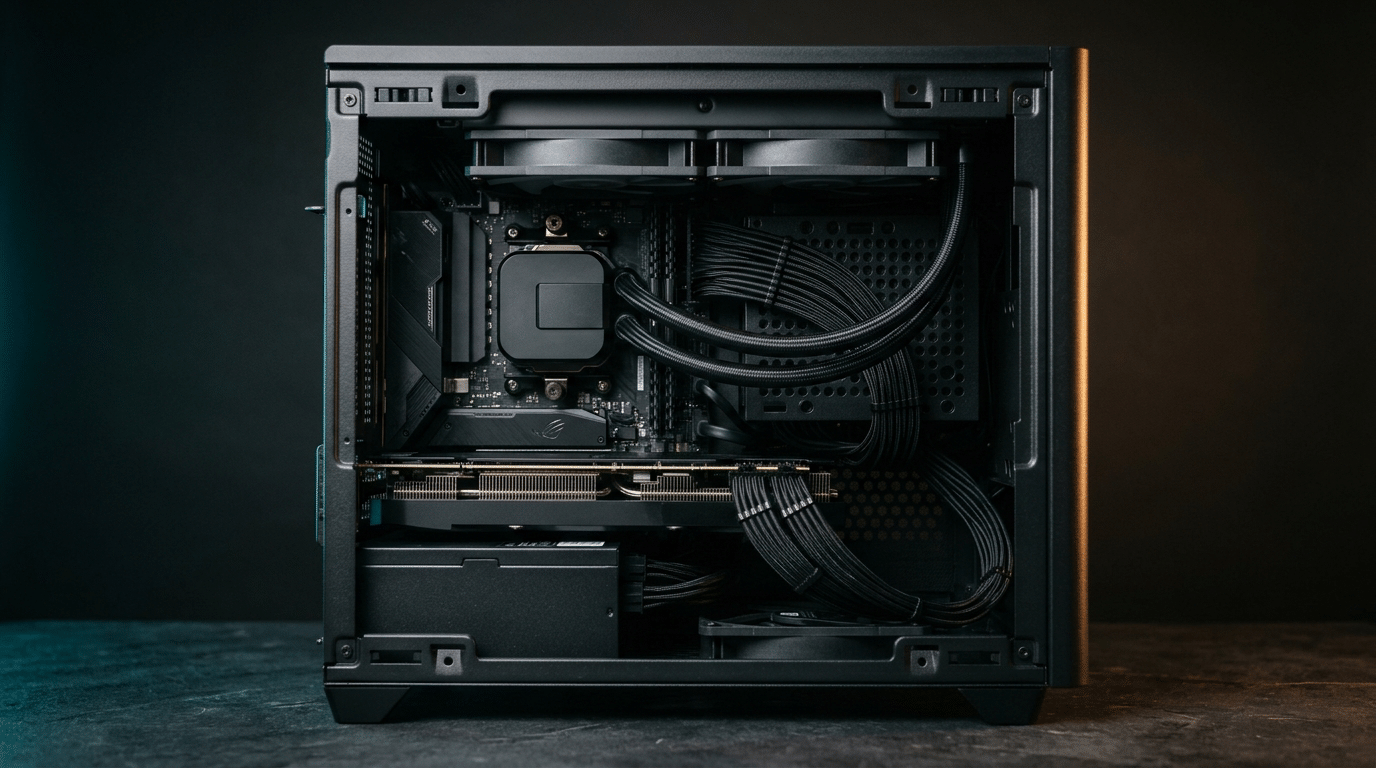
Selecting the best compact mini itx prebuilt gaming pc means evaluating thermal volume, cable bend geometry, and hidden component trade-offs alongside raw GPU horsepower. Because shrinking a desktop from a 45-liter ATX tower down to 8–18 liters leaves zero wasted margin for choking glass or undersized cooling, verify six physical and electrical rules before checking out.
1. Chassis Volume Tiers: 18L Mini-ITX vs. 8.1L SFF vs. Console Mini PCs
Compact gaming systems fall into three distinct volume brackets. Serviceable ~18-liter Mini-ITX towers like the Cooler Master NR2 Pro (#1, #7, #10) and Thermaltake LCGS Traveler (#2, #5, #8) accommodate triple-slot graphics cards, 240mm–280mm liquid radiators, and standard SFX power supplies while keeping components quiet and upgradable. Sub-10-liter sandwich SFF builds like the LAN Gamer 8.1L (#3, #6, #9) slice footprint in half via PCIe riser spines for carry-on luggage portability at the cost of tighter airflow and warmer internal acoustics. Finally, console-sized Mini PCs like the ASUS ROG NUC 16 (#4) prioritize absolute minimum desk space using custom vapor-chamber coolers, giving up future GPU upgrades completely. Want to compare raw enclosure clearances before deciding? Review our Best Small Form Factor & Mini-ITX PC Cases (2026): Clearance-Audited Picks guide.
2. GPU VRAM Ceilings, DLSS 4 Multi-Frame Generation & Rumored GPUs
Graphics memory directly dictates how smoothly compact rigs handle modern Unreal Engine 5 textures. For 1440p gaming and 4K gaming longevity, 16GB GDDR7 cards—such as the RTX 5080 (#2, #3, #4) and RTX 5070 Ti (#1, #6)—prevent sudden texture pop-in and frametime hitches when ray tracing is enabled. Twelve-gigabyte RTX 5070 models (#5, #7, #8, #9) excel at 1440p Ultra and reach 4K smoothly with DLSS 4 upscaling, whereas 8GB configurations on an RTX 5060 Ti (#10) require texture moderation outside 1080p. Remember too that DLSS 4 Multi-Frame Generation improves motion smoothness rather than controller responsiveness, so keep your native base frame rate above 50–60 FPS with NVIDIA Reflex active before multiplying frames. Also treat rumored RTX 5070 Super and RTX 5080 Super refreshes strictly as unannounced, unreleased rumors as of November 2026—never pass on verified stock waiting on speculative leaks.
3. CPU Cache, Quick Sync & Mini-ITX Platform Longevity (AM5 vs. LGA 1851)
Core count alone misleads compact PC shoppers. On AMD’s AM5 socket, the Ryzen 7 9800X3D (#1–#3) and Ryzen 7 7800X3D (#5) pack 104MB of total cache (96MB L3 3D V-Cache), dramatically smoothing competitive 1% Lows compared to standard desktop chips. Conversely, OEM-oriented AM5 processors like the Ryzen 7 8700F (#9) drop to just 16MB of L3 cache and 16 usable PCIe 4.0 lanes with no iGPU—though AM5 still preserves a drop-in path to X3D later. On Intel LGA 1851, verify processor suffixes carefully: the Core Ultra 7 265 (#6) keeps integrated graphics and Quick Sync media acceleration intact, whereas the Core Ultra 7 265F (#7) and 265KF (#8) disable Quick Sync, and unlocked KF chips only support multiplier overclocking on Intel Z890 boards rather than B860 boards. Explore board VRM and M.2 routing trade-offs in our Best Mini-ITX Gaming Motherboards (2026): AM5 & LGA 1851 SFF Picks breakdown.
4. SFX Power Supplies, 12V-2×6 Clearance & Thermal Hygiene
Small enclosures amplify electrical and thermal shortcuts. Modern Blackwell GPUs generate brief 200%–300% transient power excursions, making an ATX 3.1 SFX power supply (650W–1000W depending on GPU tier) with native 12V-2×6 cabling mandatory for reliable stability. Look for Cybenetics ETA and Lambda or 80+ Gold ratings, and inspect the 12V-2×6 GPU power plug on arrival: its recessed sense pins protect against loose contact, so leave at least 35mm of straight, unbent cable clearance before closing the side panel. Never accept solid unvented front glass or 120mm AIOs on 170W–250W chips—and favor cooler PCIe 4.0 DRAM+TLC NVMe drives over hot Gen5 SSDs in sub-10L cases, since Gen5 yields zero gaming FPS gain while elevating internal heat.
5. Avoiding Amazon Catalog Traps & Memory Stick Cuts
Amazon’s desktop search filters lag behind current PC hardware. Left-sidebar Graphics Memory checkboxes stop at “8 GB & above,” lumping legacy 8GB boxes alongside 16GB flagships, while shared parent ASIN pages sometimes pool thousands of older reviews onto current RTX 50-series SKUs. Inside compact listings specifically, inspect memory stick counts closely: 32GB DDR5 running as two 16GB sticks (DDR5-6000 CL30 on AM5; DDR5-6400 CL32 on LGA 1851) maximizes 1% Lows, whereas single-stick 16GB or 1x24GB kits slash memory bandwidth. Lock the Amazon Condition filter to New, double-check Wi-Fi 6E/7 networking rather than silent Wi-Fi 5 downgrades, and confirm exact GPU VRAM before ordering.
6. Upgrade Roadmap, Hidden Costs & Prebuilt vs. DIY SFF
Building custom DIY Mini-ITX parts lists offers full PSU and motherboard control, yet compact prebuilts spare you hours of millimeter-tight SFX cable routing and backplate troubleshooting while giving you a single-point warranty. Once your system arrives, budget modestly for two high-impact upgrades where needed: adding a 2TB PCIe 4.0 DRAM+TLC NVMe SSD to 1TB configs (#6), or replacing single-stick 24GB/unknown kits (#3, #6, #9, #10) with a low-profile 32GB (2x16GB) DDR5-6000 CL30 kit. Finally, tune a 2–3 second PWM fan spin-up delay in BIOS so transient CPU bursts never trigger jarring fan ramps on your desk.
How We Audited, Scored & Filtered These Models
Every small-footprint PC on this shortlist underwent a transparent specification audit based on official AMD, Intel, NVIDIA, and PCI-SIG documentation alongside The PC Audit’s evaluation methodology—without paid placements or fabricated benchmark figures. Each model earns an overall score out of 10 across four weighted pillars totaling 100%:
| Evaluation Criterion | Weight | What We Audited |
|---|---|---|
| GPU & VRAM Headroom | 35% | Blackwell RTX 5080, 5070 Ti, 5070, and 5060 Ti tiering, 16GB vs. 12GB vs. 8GB VRAM buffers, DLSS 4 Multi-Frame Generation readiness, and DisplayPort 2.1 output. |
| CPU & Platform Runway | 25% | 9800X3D/7800X3D 3D V-Cache 1% Lows, 8700F 16MB L3 trade-offs, Core Ultra 7 Quick Sync vs. F-series behavior, and AM5 vs. LGA 1851 Mini-ITX upgrade paths. |
| Memory & Storage Balance | 20% | 32GB dual-channel DDR5-6000 vs. 24GB SFF stick layouts, plus 1TB/2TB Gen4 vs. Gen5 NVMe SSD thermal behavior inside tight enclosures. |
| Cooling, PSU & Warranty Support | 20% | Chassis volume (18L ITX vs. 8.1L SFF vs. Mini PC), mesh ventilation, 240/280mm radiator or vapor-chamber cooling, SFX ATX 3.1 12V-2×6 clearance, and warranty. |
Models We Audited & Rejected (And Why)
- HP OMEN 16L Compact (Core i5-14400F & RTX 3050 6GB): Excluded under our GPU VRAM policy because its 6GB RTX 3050 lacks DLSS 4 Multi-Frame Generation and hits hard texture ceilings outside lightweight 1080p esports, trailing current RTX 50-series Mini-ITX configurations.
- Legacy 4GB–6GB Compact OEM Towers (RX 6500 XT 4GB / Older AM4 Mini Boxes): Disqualified from small-footprint recommendations due to severe 4GB VRAM bottlenecks, restricted proprietary motherboard/PSU layouts, and poor upgrade value.
- Unlocked Core i9-14900KF + Locked Intel B760 Compact Builds: Disqualified under our chipset audit standard because pairing high-wattage unlocked Intel chips with locked B760 boards blocks CPU multiplier tuning and strains VRM thermals inside compact enclosures.
- 120mm AIO & Choked Solid-Glass Small Chassis Towers: Rejected whenever 170W–250W processors rely on undersized 120mm liquid coolers or solid unvented front glass panels that induce rapid thermal throttling.
- Parent-ASIN Review-Pooled & DDR5-4800 / Wi-Fi 5 SFF Listings: Excluded where Amazon Set-name dropdowns inherit legacy GTX 1660 Ti reviews onto current configs or ship single-stick DDR5-4800 memory and Wi-Fi 5 adapters above the entry tier.
Frequently Asked Questions About Compact & Mini-ITX Gaming PCs
What makes a compact or Mini-ITX prebuilt gaming PC worth buying over a standard ATX tower?
A Mini-ITX prebuilt shrinks footprint by 50% to 75% without sacrificing full desktop RTX 5070 Ti or RTX 5080 performance. Look for ventilated mesh panels, standard SFX power supplies, and off-the-shelf ITX motherboards so you keep desktop upgradeability on cramped desks.
Should I choose an 18L Mini-ITX tower, an 8.1L SFF desktop, or a Mini PC like the ROG NUC?
Choose an 18L Mini-ITX rig like the Cooler Master NR2 Pro for quieter acoustics and effortless GPU upgrades. Pick an 8.1L SFF build for backpack LAN portability, and reserve console-sized Mini PCs solely when zero desktop floor space exists and GPU swaps aren’t needed.
Do RTX 5080 and RTX 5070 Ti GPUs overheat inside small Mini-ITX cases?
Not when the chassis uses perforated mesh panels and direct intake pathways. Modern 18L Mini-ITX cases feed cool ambient air straight into triple-fan GPUs, though sub-10L SFF shells run warmer and demand careful 12V-2×6 cable clearance and smart PWM fan curves.
Is 24GB DDR5 enough inside compact prebuilt gaming PCs compared to 32GB DDR5-6000?
Twenty-four gigabytes handles current games cleanly only if installed as two 12GB dual-channel DIMMs. Always confirm stick count upon arrival, because a single 1x24GB stick cuts memory bandwidth and degrades 1% Lows compared to verified 2x16GB DDR5-6000 kits.
Why should compact PC buyers check F-series CPU suffixes and Ryzen 7 8700F specs carefully?
Intel F and KF processors omit integrated graphics and Quick Sync video decoding, shifting all media encoding onto the GPU. Meanwhile, AMD’s Ryzen 7 8700F trims L3 cache to 16MB and PCIe 4.0 lanes to 16, softening competitive 1% Lows compared to 9800X3D chips.
Can I trust sub-$1,000 compact OEM desktops with 6GB GPUs for 2026 gaming?
Only for strict 1080p esports compromises. Legacy 6GB GPUs such as the RTX 3050 6GB lack DLSS 4 Multi-Frame Generation and hit texture ceilings in modern AAA titles, making RTX 5060 Ti 16GB or RTX 5070 Mini-ITX configurations far safer long-term investments.
Final Verdict: Selecting the Best Compact Mini ITX Prebuilt Gaming PC
Across our November 2026 hardware audit, the Cooler Master NR2 Pro (Ryzen 7 9800X3D & RTX 5070 Ti) earns the #1 rank as the best compact mini itx prebuilt gaming pc for most players. By bringing together 16GB GDDR7 VRAM, 9800X3D 3D V-Cache smoothness, 32GB DDR5-6000, and 2TB of M.2 storage inside a maintainable Mini-ITX frame, it delivers flagship responsiveness without the thermal density or higher cost of 360W GPUs.
If your setup centers on a 4K 240Hz OLED monitor and peak frame rates, step up to the Thermaltake LCGS Traveler 9880S for full desktop RTX 5080 headroom. Frequent flyers needing backpack portability should pick the LAN Gamer 8.1L SFF (RTX 5080)—or grab the ASUS ROG NUC 16 when zero desktop space exists—while 1440p esports buyers looking for smart X3D value will feel right at home with the Thermaltake LCGS Traveler 7870.


