
Disclosure: As an Amazon Associate, The PC Audit earns from qualifying purchases. If you buy through links on this page, we may earn a small commission at no extra cost to you.
Direct Answer: With AMD 3D V-Cache explained at the silicon level, 2nd-Gen 3D V-Cache places 64MB of stacked SRAM underneath Zen 5 cores rather than on top—expanding total L3 capacity to 96MB per CCD while allowing direct cooling contact. That reduces system DDR5 memory stalls, elevates 1% Lows, unlocks Precision Boost Overdrive, and smooths gaming frametimes.
Before your graphics card shades a single pixel inside a modern game frame, the desktop processor has to finish the hardest preparatory work of the pipeline. Every frame demands rapid physics calculations, NPC artificial intelligence, spatial audio mixing, asset decompression, shader compilation, and thousands of GPU draw calls. Whenever the CPU stalls waiting for data to arrive from system memory, your graphics card idles momentarily—causing utilization to dip below 95% and producing jarring micro-stutters even when average frame counters look impressive.
That frame-pacing bottleneck explains why cache architecture has overtaken raw core counts and peak boost numbers in gaming silicon design. Across our best gaming CPUs hub and Processors & Platforms archive, AMD’s Ryzen 9000X3D lineup governs competitive smoothness through a straightforward engineering principle: AMD 3D V-Cache --[ELEVATES]--> 1% Lows & 0.1% Lows Frametime Stability. Below, we examine how AMD’s second-generation vertical stacking redesign works, why moving cache beneath the compute cores solved first-generation compromises, and how to pair X3D chips with the right memory, motherboard, and cooling hardware.
In This Guide
- 1st-Gen vs. 2nd-Gen 3D V-Cache: Quick Architecture & Spec Comparison
- How 96MB of L3 Cache Elevates 1% Lows and Smooths Frametimes
- Why Inverting the Stack Fixed Thermals and Unlocked Overclocking
- Single-CCD vs. Dual-CCD Scheduling, DDR5-6000 Ratios & Cooling
- Myth vs. Engineering Reality: Five 3D V-Cache & CPU Myths Busted
- Actionable Buyer & Builder Checklist for 2nd-Gen X3D Rigs
- Verified 2nd-Gen 3D V-Cache Processors Worth Buying in 2026
- Frequently Asked Questions About AMD 2nd-Gen 3D V-Cache
1st-Gen vs. 2nd-Gen 3D V-Cache: Quick Architecture & Spec Comparison
Not every processor carrying an X3D badge—or eight Socket AM5 cores—handles heat, clock speeds, and memory traffic identically. Understanding the structural leap between standard monolithic L3 designs, 1st-Gen top-stacked 3D V-Cache, 2nd-Gen bottom-stacked 3D V-Cache, and Intel’s tile-based Arrow Lake architecture clarifies immediately where gaming frametime gains originate.
| Architecture & Tier | Representative 2025–2026 Models | L3 / Total Cache Topology | Base / Boost & Tuning | TDP / Max PPT or MTP |
|---|---|---|---|---|
| 2nd-Gen 3D V-Cache (Single-CCD Zen 5) | Ryzen 7 9800X3D ($479 Launch MSRP), Ryzen 7 9850X3D ($499 Launch MSRP) | 96MB L3 (32MB CCD + 64MB SRAM below cores) / 104MB Total | 4.7 GHz Base / 5.2–5.6 GHz Boost; fully unlocked PBO & multiplier | 120W TDP / ~162W Max PPT |
| 2nd-Gen 3D V-Cache (Dual-CCD Zen 5) | Ryzen 9 9900X3D ($599 Launch MSRP), Ryzen 9 9950X3D ($699 Launch MSRP) | 128MB L3 (1 X3D CCD w/ 96MB + 1 std CCD w/ 32MB) / 140MB–144MB Total | 4.3–4.4 GHz Base / 5.5–5.7 GHz Boost; fully unlocked PBO | 120W–170W TDP / 162W–230W Max PPT |
| 1st-Gen 3D V-Cache (Single-CCD Zen 4) | Ryzen 7 7800X3D | 96MB L3 (64MB SRAM stacked on top of CCD) / 104MB Total | 4.2 GHz Base / 5.0 GHz Boost; voltage & multiplier restricted | 120W TDP / 162W Max PPT |
| Standard Non-X3D Zen 5 | Ryzen 5 9600X, Ryzen 7 9700X | 32MB L3 on single CCD / 38MB–40MB Total | 3.8–3.9 GHz Base / 5.4–5.5 GHz Boost; unlocked | 65W TDP / 88W Max PPT (default) |
| Intel LGA 1851 Arrow Lake (Tile-Based) | Core Ultra 7 270K Plus (~$289–$300 Launch MSRP), Core Ultra 9 285K ($589 Launch MSRP) | 36MB Smart Cache + 40MB L2 / 76MB Total | 3.7 GHz Base / 5.5–5.7 GHz Boost; unlocked on Z890 only | 125W TDP / 250W Max MTP |
Notice the decisive pattern across that comparison: both the older Ryzen 7 7800X3D and the newer Ryzen 7 9800X3D and 9850X3D pack the exact same 96MB of L3 cache (32MB native to the Core Complex Die plus 64MB on the vertical SRAM chiplet, totaling 104MB including L2). What transformed between 1st-Gen and 2nd-Gen was physical geometry, core architecture (Zen 5 IPC gains over Zen 4), base/boost frequency headroom, and thermal conductivity.
How 96MB of L3 Cache Elevates 1% Lows and Smooths Frametimes
To grasp why adding 64MB of extra L3 memory transforms how responsive a game feels, look at how a frame is built and how dramatically access latency climbs at each step away from the execution core. Average frame rate (AVG FPS) simply divides total frames rendered by total seconds—it can hide brief 40-millisecond freezes completely. By contrast, 1% Lows and 0.1% Lows isolate the slowest individual frames delivered during intense gameplay, which is exactly what your eyes perceive as stutter or hitching. We break down those frame-pacing metrics in depth inside our 1% Lows vs. Average FPS guide.
The CPU Memory Hierarchy Latency Cliff
Inside any modern desktop processor, execution units cycle billions of times per second, meaning waiting for data is pure wasted frame time. Game engines constantly read and modify active state tables, entity coordinates, collision meshes, animation skeletons, and GPU draw-call queues. Every time a core seeks a piece of data, it checks a strict hierarchy:
- L1 & L2 Private Per-Core Cache (Sub-nanosecond to ~4ns): Ultra-fast SRAM embedded beside each Zen 5 core (1MB L2 per core), holding tiny immediate instruction and data loops.
- Shared L3 Cache / 3D V-Cache (~10ns to ~15ns class on-die access): Shared across all cores inside a Core Complex Die (CCD). Standard Zen 5 desktop chips provide 32MB of L3 per CCD, whereas 3D V-Cache triples that pool to 96MB directly inside the die stack.
- System DDR5 Memory (~65ns to ~85ns+ round-trip): Once data exceeds L3 capacity (a cache miss), the request must cross the Infinity Fabric interconnect, traverse the Integrated Memory Controller (IMC), travel down motherboard PCB traces into DDR5 DIMMs, and return. Even well-tuned AM5 DDR5-6000 CL30 memory carries a 10.0ns column access latency plus multi-stage controller overhead—order-of-magnitude slower than hitting on-die SRAM.
On a processor with 16MB or 32MB of L3 cache, complex scenes regularly overflow that shared pool. When fifty players trigger abilities simultaneously in an MMO raid, or when a strategy title evaluates thousands of pathfinding agents per tick, cache misses surge. The CPU pipeline pauses repeatedly waiting on external DDR5 fetches, stretching individual frame generation times from 4 milliseconds to 18 milliseconds and crashing 1% Lows. Tripling L3 capacity to 96MB holds vastly more of the active game working set right inside the silicon package—cutting expensive RAM trips dramatically.
Draw Calls, Shader Compilation & Genre Sensitivity
Not every workload stresses L3 equally. Three real-world gaming scenarios reveal the sharpest separation between standard CPUs and 2nd-Gen 3D V-Cache models documented in our AMD Ryzen desktop processor architecture references:
- Competitive Esports at 1080p/1440p High-Refresh: Titles like Counter-Strike 2 and Valorant shift workload pressure squarely onto the CPU (
1080p Competitive High-Refresh --[SHIFTS_BOTTLENECK_TO]--> CPU L3 / 3D V-Cache & RAM Latency). Keeping frame queues inside 96MB L3 stops sudden dips during smoke grenades, utility bursts, and gunfights on 240Hz–540Hz OLED monitors. - Simulation, Strategy & Large-Scale MMOs: Games such as Civilization, Cities: Skylines, and crowded MMO cities maintain massive state arrays across thousands of independent units. Large L3 pools accelerate late-game turn ticks and preserve smooth camera panning.
- Open-World Traversal & Asset Streaming: Moving rapidly across dense Unreal Engine 5 environments requires continuous draw-call dispatch and shader decompression. While 8 to 16 strong Zen 5 cores handle raw shader compilation throughput, 96MB of L3 minimizes frame-time spikes during asset handoffs.
Even against Intel’s newest LGA 1851 chips—such as the 24-core Core Ultra 7 270K Plus or Core Ultra 9 285K detailed in Intel Core Ultra 200S Series documentation—AMD’s stacked L3 approach retains a decisive gaming lead. While Arrow Lake improved desktop efficiency on TSMC N3B and removed Hyper-Threading, its tile-based compute-to-SoC interconnect adds memory latency and caps L3 Smart Cache at 36MB, leaving pure gaming frametime consistency behind Ryzen 9000X3D.
Why Inverting the Stack Fixed Thermals and Unlocked Overclocking
If 96MB of L3 cache already powered the Ryzen 7 7800X3D, what makes AMD’s 2nd-Gen 3D V-Cache on Zen 5 fundamentally superior? The answer lies purely in thermal physics and vertical silicon packaging.
On 1st-Gen X3D chips (Zen 3 Ryzen 5800X3D and Zen 4 Ryzen 7000X3D), AMD bonded the 64MB SRAM cache die on top of the Core Complex Die, filling the outer perimeter around the SRAM with structural silicon spacers so the package remained flat beneath the Integrated Heat Spreader (IHS). While effective for low-power cache hits, that top-mounted SRAM layer acted like a thermal blanket sitting directly over the hottest compute cores. Heat generated inside the CPU execution units had to travel upward through the extra silicon die and bonding interface before reaching your CPU cooler.
Because SRAM voltage tolerance and stacked heat density created strict thermal limits, AMD had to cap base and boost clocks on 1st-Gen chips (the Ryzen 7 7800X3D tops out at 4.2 GHz base / 5.0 GHz boost) and lock out traditional multiplier overclocking and aggressive Precision Boost Overdrive (PBO) voltage tuning.
In 2nd-Gen 3D V-Cache (introduced on the Ryzen 7 9800X3D and carried across the 9850X3D, 9900X3D, and 9950X3D), AMD inverted the physical stack:
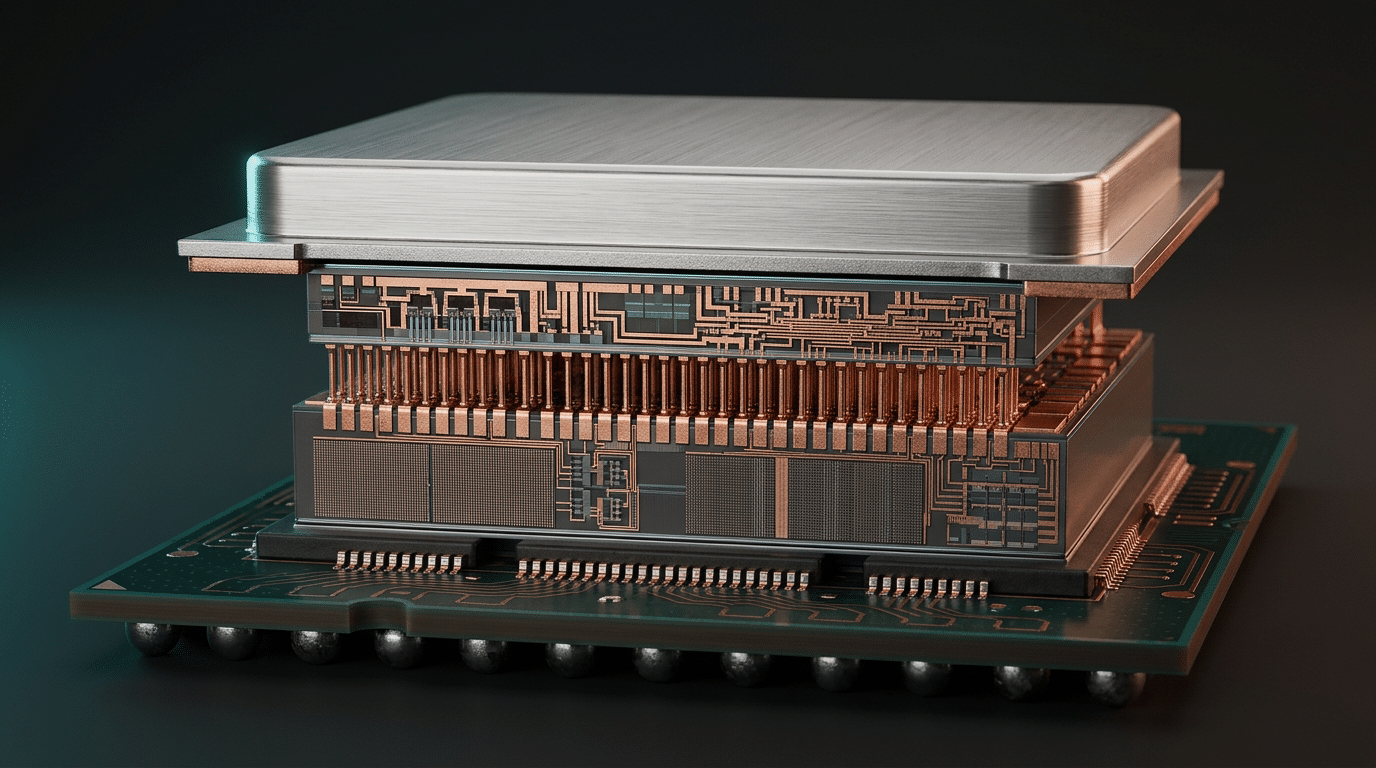
- Cache Relocated Below Compute Cores: The 64MB 3D V-Cache SRAM slab now sits underneath the Zen 5 CCD, connected upward via ultra-dense Through-Silicon Vias (TSVs) and direct copper-to-copper hybrid bonding.
- Direct IHS Thermal Contact: The Zen 5 execution cores now sit at the very top of the silicon stack—pressed straight against the soldered Integrated Heat Spreader with zero extra cache die insulating them from your air cooler or 360mm AIO cold plate.
- Higher Clocks Without Sacrificing Cache: With heat escaping unimpeded, AMD raised base frequency to 4.7 GHz on the 8-core Ryzen 7 9800X3D (boosting to 5.2 GHz) and pushed peak clocks to 5.6 GHz on the January 2026 Ryzen 7 9850X3D—bridging the single-thread clock penalty that once slowed 1st-Gen X3D chips in frequency-sensitive apps.
- Fully Unlocked Precision Boost Overdrive (PBO): Better thermal transfer allowed AMD to fully unlock Ryzen 9000X3D processors for manual clock overclocking, PBO boost overrides, and Curve Optimizer undervolting—let builders lower operating heat or sustain maximum boost bins longer under multi-core loads.
Single-CCD vs. Dual-CCD Scheduling, DDR5-6000 Ratios & Cooling
Moving from 8 cores to 12 or 16 cores inside AMD’s 2nd-Gen 3D V-Cache family introduces an architectural nuance that every system builder must verify before buying: single-CCD symmetry versus dual-CCD asymmetric caching.
Single-CCD (9800X3D / 9850X3D) vs. Dual-CCD (9900X3D / 9950X3D)
Both the Ryzen 7 9800X3D and Ryzen 7 9850X3D use a single 8-core Zen 5 CCD sitting over one 64MB V-Cache die. Every single thread on all 8 cores (16 threads) accesses the full 96MB L3 pool directly with zero cross-die latency penalty. There is no thread-parking guesswork required for games.
By contrast, 12-core and 16-core Ryzen 9 X3D processors combine two CCDs: only one CCD features the 64MB 3D V-Cache stack (96MB L3), while the second CCD carries standard 32MB L3 optimized for peak boost clocks up to 5.7 GHz:
- Ryzen 9 9950X3D (16C/32T): Pairs an 8-core X3D CCD with an 8-core frequency CCD (144MB total L2+L3). Games get a full 8-core V-Cache cluster matching 9800X3D topology while background rendering, 4K exports, or code compilation run across all 16 cores up to 230W Max PPT.
- Ryzen 9 9900X3D (12C/24T): Splits into two 6-core CCDs (140MB total L2+L3), meaning games running strictly on the V-Cache die only access 6 cores / 12 threads—making the 9800X3D or 9950X3D stronger choices whenever budgets allow.
- Driver & Scheduling Hygiene: Dual-CCD X3D rigs rely on current AMD Chipset Drivers (including the 3D V-Cache Performance Optimizer service) and Windows Game Mode / Xbox Game Bar thread scheduling so games stay locked onto the 96MB cache CCD instead of bouncing across the Infinity Fabric link to the second CCD.
DDR5-6000 CL30 1:1 Ratios & Dual-Channel Discipline
Because 96MB of L3 satisfies most routine game data fetches on-die, X3D chips buffer users against the steep price premiums of extreme memory kits. Still, the requests that do miss L3 cache depend heavily on clean memory-controller timing: AM5 Memory Controller (UCLK) --[RUNS_OPTIMAL_1_TO_1_AT]--> DDR5-6000 CL30. Using the standard First Word Latency formula (CAS Latency × 2000) ÷ Data Rate (MT/s), a 32GB (2×16GB) DDR5-6000 CL30 kit with AMD EXPO profiles achieves exactly 10.0 nanoseconds while keeping the memory controller clock (UCLK) locked 1:1 with memory clock (MCLK).
Pushing an AM5 processor past DDR5-6400 generally forces UCLK down into an asynchronous 2:1 divider, adding latency overhead unless manually tuned. Equally important under our memory audit rules (R-RAM-01 and R-RAM-02): never run a single stick of 1×16GB RAM (single-channel cuts effective bandwidth and slashes 1% Lows by 15%–30%), and avoid populating four DDR5 DIMMs (4×16GB), which forces the controller to drop speeds. Stick to two dual-channel modules (2×16GB or 2×32GB), as explained in our DDR5-6000 CL30 vs. 6400 vs. CUDIMM guide.
PPT vs. Base TDP Cooling & AMD B850 Motherboards
Always size coolers to actual PPT (Package Power Tracking) rather than box TDP. Both the Ryzen 7 9800X3D and 9850X3D state a 120W TDP yet draw up to 162W Max PPT under full load, comfortably tamed by a quality dual-tower air cooler in a mesh airflow case or a 240mm–360mm AIO in dual-chamber glass cases. Meanwhile, the 16-core Ryzen 9 9950X3D carries a 170W TDP and scales to 230W Max PPT, strongly favoring a 360mm AIO liquid cooler alongside a robust VRM motherboard—and strictly avoiding undersized 120mm AIOs (R-CASE-01).
On the motherboard side, rule R-MB-01 designates AMD B850 as the sweet spot for 95% of AM5 gaming builds: B850 mandates a PCIe 5.0 M.2 slot, unlocks full CPU PBO and RAM EXPO tuning, and offers 12+2+2 (60A+) VRM boards cleanly without X870E price premiums. Always verify the board’s block diagram against PCI-SIG PCI Express lane routing rules so populating extra M.2 SSDs never splits your primary GPU slot from PCIe 5.0 x16 down to x8.
L3 Cache per Gaming Core: How Each AM5 SKU Actually Distributes Its Cache
Headline totals like “144MB” hide the number that matters for frame pacing: how much L3 a game thread can reach without crossing to another CCD. The table below divides each chip’s L3 by the cores that share it, using AMD and Intel published cache configurations from our verified 2026 hardware data.
| Processor | Cores / Threads | CCD Layout | L3 Reachable by Game Threads | L3 per Core (Fast CCD) | Boost Clock | TDP / Max Power |
|---|---|---|---|---|---|---|
| Ryzen 7 9850X3D | 8C/16T | 1 × X3D CCD | 96 MB | 12 MB | 5.6 GHz | 120 W / ~162 W |
| Ryzen 7 9800X3D | 8C/16T | 1 × X3D CCD | 96 MB | 12 MB | 5.2 GHz | 120 W / 162 W |
| Ryzen 7 7800X3D | 8C/16T | 1 × X3D CCD (top-stacked) | 96 MB | 12 MB | 5.0 GHz | 120 W / 162 W |
| Ryzen 9 9900X3D | 12C/24T | 6-core X3D CCD + 6-core standard CCD | 96 MB (of 128 MB total) | 16 MB | 5.5 GHz | 120 W / 162 W |
| Ryzen 9 9950X3D | 16C/32T | 8-core X3D CCD + 8-core standard CCD | 96 MB (of 128 MB total) | 12 MB | 5.7 GHz | 170 W / 230 W |
| Ryzen 5 9600X | 6C/12T | 1 × standard CCD | 32 MB | ~5.3 MB | 5.4 GHz | 65 W / 88 W |
| Ryzen 7 8700F | 8C/16T | Monolithic | 16 MB | 2 MB | 5.0 GHz | 65 W / 65 W |
| Core Ultra 9 285K | 24C/24T (8P+16E) | Compute tile, shared ring | 36 MB | 1.5 MB (all cores) | 5.7 GHz | 125 W / 250 W |
Every X3D chip caps out at 96MB of cache-reachable L3 for a single game, because the second CCD on dual-die models carries only a standard 32MB pool and sits across the Infinity Fabric. That is why the 8-core 9800X3D and 9850X3D match the 16-core 9950X3D in most games despite the smaller total figure. The 9900X3D is the curious outlier: its six V-Cache cores enjoy 16MB each, the highest ratio on AM5, but titles that spawn more than six heavy threads spill onto the standard CCD, a trade-off we audit in Ryzen 9 9900X3D vs. 9800X3D.
At the other end, the Ryzen 7 8700F offers just 2MB per core, one sixth of an X3D part, which explains its weaker 1% lows in simulation and MMO titles. If you are weighing an older X3D chip instead, the 7800X3D keeps the same 12MB-per-core ratio at a lower 5.0 GHz boost, as compared in our Ryzen 7 7800X3D vs. 9800X3D audit.
Myth vs. Engineering Reality: Five 3D V-Cache & CPU Myths Busted
Misconceptions around cache stacking, screen resolution scaling, and AM5 hardware pairing lead buyers into wasted spending or hidden performance cliffs. Here is how engineering reality separates from forum myths:
- Myth 1: “3D V-Cache does nothing at 1440p or 4K gaming.”
Engineering Reality: While1440p / 4K AAA & Ray Tracing --[SHIFTS_BOTTLENECK_TO]--> GPU Compute, Memory Bus & VRAM Capacity—pushing GPU load to 95%–100% and narrowing average FPS deltas—modern upscalers (DLSS 4 Quality/Performance and FSR 4) render internally at 1080p or lower before reconstructing 4K output. Moreover, Frame Generation relies on consistent base frames (>= 50–60 base FPS), and 96MB L3 still protects1% Lowsduring sudden traversal or draw-call spikes. - Myth 2: “Online Bottleneck Percentage Calculators accurately match CPUs to GPUs.”
Engineering Reality: Under audit ruleR-CPU-03, static bottleneck percentages are fiction. A Ryzen 5 9600X paired with an RTX 5080 behaves completely differently depending on the workload: running Counter-Strike 2 at 1080p Low is CPU-bound (leaving GPU utilization near 50%–60% at 400+ FPS), whereas Cyberpunk 2077 at 4K Ultra with Path Tracing is 99%–100% GPU-bound. Use real-time overlays (PresentMon, NVIDIA Overlay, or MSI Afterburner) to inspect GPU usage at your target resolution rather than trusting calculator websites. - Myth 3: “All Ryzen 9000X3D processors share identical overclocking locks and thermal limits as the 7800X3D.”
Engineering Reality: Relocating the 64MB SRAM die underneath the Zen 5 CCD eliminated the insulating layer over the CPU cores. Consequently, Ryzen 7 9800X3D, 9850X3D, 9900X3D, and 9950X3D run cooler under equivalent power, reach 5.2–5.7 GHz boost speeds, and unlock full Precision Boost Overdrive and manual multiplier overclocking. - Myth 4: “Any 8-core Ryzen AM5 CPU delivers strong gaming 1% Lows.”
Engineering Reality: Under marketplace ruleR-AMZ-03, many budget prebuilt desktops advertise a generic “AMD Ryzen 7” using the OEM-focused Ryzen 7 8700F. Despite offering 8 cores and 16 threads on AM5, the 8700F slashes L3 cache to just 16MB (half of a Ryzen 5 9600X’s 32MB L3 and one-sixth of a 9800X3D’s 96MB L3), trims usable lanes to 16 PCIe 4.0 lanes, and omits integrated graphics—yielding noticeably weaker 1% Lows in cache-hungry games. - Myth 5: “You need pricey DDR5-7200+ CUDIMM RAM to get maximum speed from Ryzen 9000X3D.”
Engineering Reality: High-speed CUDIMM kits shine on Intel Arrow Lake (LGA 1851), where tile interconnect latency benefits from memory bandwidth. On AMD AM5 (R-RAM-03), exceeding DDR5-6400 drops the controller into 2:1 mode, and 96MB of on-die L3 absorbs most game memory stalls. A reliable 2-stick 32GB DDR5-6000 CL30 EXPO kit remains the optimal price-to-latency ceiling per JEDEC DDR5 memory standards.
Actionable Buyer & Builder Checklist for 2nd-Gen X3D Rigs
Before ordering parts or clicking buy on an AM5 gaming rig, verify these six hardware rules to extract full 2nd-Gen 3D V-Cache frametime consistency:
- Balance CPU Against Display & GPU Budget First: Allocate 35%–52% of system budget to the GPU for 1440p/4K builds; invest in a Ryzen 7 9800X3D or 9850X3D once you pair a mid-to-flagship GPU (
RX 9070 XT,RTX 5070 Ti,RTX 5080,RTX 5090) or play 240Hz–540Hz esports. On tighter $1,000–$1,600 1440p budgets, a Ryzen 5 9600X or discounted Ryzen 7 7800X3D lets you step up a GPU tier first. - Match CCD Topology to Your Workload: Pick an 8-core single-CCD chip (
9800X3Dor9850X3D) for pure gaming and streaming via GPU NVENC/AV1; choose the 16-core9950X3Donly when you need workstation rendering, heavy compilation, and uncompromised 8-core X3D gaming simultaneously. - Select an Unshared-Lane AM5 Motherboard (
R-MB-01): Choose a quality AMD B850 (or X870/X870E if USB4 is mandatory) board with 12+2+2 60A+ DrMOS stages, BIOS Flashback, and verified unshared GPU PCIe 5.0 x16 routing when multiple NVMe drives are installed. - Install Two Matched DDR5-6000 CL30 Modules: Use slots A2 and B2 with a 32GB (2×16GB) AMD EXPO kit and confirm EXPO is active inside UEFI BIOS. Avoid 1×16GB single-channel configs and 4-DIMM setups.
- Size Cooling & PSU to Peak PPT + GPU Transients: Use a dual-tower air cooler or 240mm/360mm AIO rated comfortably past 162W PPT on 8-core X3D CPUs (or a 360mm AIO for the 230W PPT 9950X3D), powered by an ATX 3.1 80+ Gold PSU with native 12V-2×6 cabling.
- Update BIOS & AMD Chipset Drivers Immediately: Freshly install the latest motherboard AGESA BIOS and official AMD Chipset Drivers after Windows installation—critical on dual-CCD X3D rigs so thread parking pins games cleanly to the 96MB L3 die.
Verified 2nd-Gen 3D V-Cache Processors Worth Buying in 2026
Three shipping Socket AM5 processors on Amazon US deliver AMD’s inverted 2nd-Gen 3D V-Cache silicon across distinct gaming and creator tiers. For full multi-brand CPU rankings—including Intel Core Ultra 200S creator alternatives and budget AM5 entry chips—visit our best gaming CPUs buyer guide, explore how frametime pacing scales in our 1% Lows vs. Average FPS breakdown, and pair your chip correctly using our DDR5-6000 CL30 vs. 6400 vs. CUDIMM tuning guide.
1. AMD Ryzen 7 9800X3D — Best Overall 2nd-Gen 3D V-Cache Gaming Sweet Spot

Budget Tier: $479 Launch MSRP (Enthusiast Tier) | Audited Specs: Zen 5 (Granite Ridge) + 2nd-Gen 3D V-Cache | Socket AM5 | 8 Cores / 16 Threads (4.7 GHz Base / 5.2 GHz Boost) | 104MB Total Cache (8MB L2 + 96MB L3) | 120W TDP / 162W Max PPT | 24 Usable PCIe 5.0 Lanes | Integrated 2-CU Radeon Graphics.
Why It Excels in Our 3D V-Cache Audit: As the benchmark single-CCD implementation of inverted 2nd-Gen 3D V-Cache, the Ryzen 7 9800X3D places all 8 Zen 5 cores directly beneath the heat spreader above a shared 96MB L3 pool. With zero cross-CCD scheduling complexity, unlocked Precision Boost Overdrive headroom, and an easy-to-cool 162W PPT ceiling on an AMD B850 motherboard, it sets the sweet-spot standard for 1080p/1440p high-refresh gaming and 1% Low smoothness.
2. AMD Ryzen 7 9850X3D Desktop Processor — Peak-Clock 8-Core Esports Flagship

Budget Tier: $499 Launch MSRP ($400–$450 promotional tier) | Audited Specs: Zen 5 (Granite Ridge) + 2nd-Gen 3D V-Cache | Socket AM5 | 8 Cores / 16 Threads (4.7 GHz Base / up to 5.6 GHz Boost) | 104MB Total Cache (8MB L2 + 96MB L3) | 120W TDP / ~162W Max PPT | Unlocked for PBO & EXPO.
Why It Excels in Our 3D V-Cache Audit: Built on the exact same single-CCD inverted thermal design as the 9800X3D, the January 2026 Ryzen 7 9850X3D pushes maximum boost clocks 400 MHz higher to 5.6 GHz while holding the same 120W-class TDP envelope. Whenever street pricing sits close to the 9800X3D—or dips into the $400–$450 tier—it delivers AMD’s absolute highest pure-gaming ceiling for 360Hz–540Hz OLED esports monitors without jumping to dual-CCD complexity.
3. AMD Ryzen 9 9950X3D 16-Core Processor — Dual-Threat Gaming & Workstation Flagship

Budget Tier: $699 Launch MSRP ($550–$600 tier street bracket) | Audited Specs: Dual-CCD Zen 5 + 2nd-Gen 3D V-Cache | Socket AM5 | 16 Cores / 32 Threads (4.3 GHz Base / up to 5.7 GHz Boost) | 144MB Total Cache (128MB L3 across 1 X3D CCD + 1 Std CCD) | 170W TDP / 230W Max PPT | Unlocked PBO.
Why It Excels in Our 3D V-Cache Audit: For creators, 3D artists, and developers who refuse any gaming sacrifice, the Ryzen 9 9950X3D pairs a full 8-core 96MB L3 gaming CCD with a second 8-core frequency CCD reaching 5.7 GHz—avoiding the 6-core gaming CCD split of the 12-core 9900X3D ($599 Launch MSRP). Plan on a 360mm AIO liquid cooler and a 14+2 VRM B850 or X870 motherboard to sustain its 230W Max PPT cleanly.
When Non-X3D or Intel Alternatives Make Better Sense: Under our creator audit rule (R-CPU-02), buyers running heavy Premiere or DaVinci timelines on tighter budgets under $300–$400 gain huge multi-core throughput plus hardware Quick Sync from Intel’s 24-core Core Ultra 7 270K Plus (~$289–$300 Launch MSRP) or Core Ultra 9 285K ($589 Launch MSRP)—just skip iGPU-less F/KF variants if Quick Sync matters. Likewise, budget 1440p AM5 builders should favor the Ryzen 5 9600X or discounted 1st-Gen Ryzen 7 7800X3D over OEM traps like the 16MB-L3 Ryzen 7 8700F.
Official Standards & Engineering References
- AMD Ryzen Desktop Processors & 2nd-Gen 3D V-Cache Specifications: amd.com/en/products/processors/desktops/ryzen.html
- AMD EXPO Memory Overclocking & Socket AM5 Architecture: amd.com/en/products/processors/technologies/expo.html
- Intel Core Ultra 200S Series Desktop Processor Datasheet: intel.com/content/www/us/en/products/docs/processors/core-ultra/core-ultra-200s-series-datasheet.html
- PCI-SIG PCI Express 5.0 & 4.0 Lane Specifications: pcisig.com/specifications
- JEDEC DDR5 Synchronous Dynamic Random-Access Memory Standards: jedec.org/standards-documents
How We Audited This Guide
- Processors, motherboards, memory, and storage were compared by socket longevity, chipset lane allocation, VRM design, DDR5 EXPO/XMP support, and PCIe generation.
- Every specification claim was cross-checked against official OEM datasheets, platform vendor documentation, and published industry standards (PCI-SIG, JEDEC, VESA, Intel ATX) rather than marketplace listing copy.
- Recommendations were evaluated against our weighted audit rubric and documented compatibility rules; we do not publish fabricated FPS, thermal, or acoustic numbers.
Frequently Asked Questions About AMD 2nd-Gen 3D V-Cache
How does 2nd-Gen AMD 3D V-Cache differ from 1st-Gen 3D V-Cache?
1st-Gen X3D chips like the Ryzen 7 7800X3D stacked 64MB of SRAM on top of the CPU cores, insulating heat and restricting overclocking. 2nd-Gen 3D V-Cache moves that 64MB cache underneath the Zen 5 CCD, letting cores contact the heat spreader directly for higher clocks and unlocked Precision Boost Overdrive.
Why does 3D V-Cache improve 1% Lows more than average FPS?
Frame-time stutters happen when a CPU misses its 32MB L3 cache during busy physics, draw-call, or AI bursts and waits over 65 nanoseconds on system DDR5 RAM. Expanding shared L3 to 96MB keeps active game data on-die, eliminating pipeline stalls and sharply raising worst-case 1% and 0.1% Low frames.
Does AMD 3D V-Cache help at 1440p and 4K resolutions?
At native 4K Ultra settings, the GPU hits 95% to 100% load first and narrows average framerate gaps. However, 3D V-Cache still protects 1% Lows during complex fights and delivers strong gains whenever DLSS 4 or FSR 4 renders internally at lower 1080p or 1440p resolutions.
Should I buy the Ryzen 7 9800X3D, 9850X3D, or Ryzen 9 9950X3D?
Choose the Ryzen 7 9800X3D for the best overall 2nd-Gen X3D gaming value, or step up to the 5.6 GHz Ryzen 7 9850X3D when promotional pricing sits close for competitive esports monitors. Pick the 16-core Ryzen 9 9950X3D only if heavy 3D rendering or video encoding runs alongside gaming.
What DDR5 RAM speed works best with Ryzen 9000X3D processors?
Pair any Ryzen 9000X3D processor with a matched 2-stick 32GB (2x16GB) DDR5-6000 CL30 AMD EXPO kit. That locks the AM5 memory controller in an optimal 1:1 UCLK:MCLK ratio at 10.0ns latency, avoiding the 2:1 divider penalty above 6400 MT/s and four-stick stability drops.


