
Disclosure: As an Amazon Associate, I earn from qualifying purchases. If you buy through links on this page, we may earn a small commission at no extra cost to you.
Settling the rtx 5070 ti vs rx 9070 xt debate comes down to a clear $150 architectural fork in the $1,500 to $2,000 gaming PC bracket: NVIDIA prices the Blackwell GeForce RTX 5070 Ti at a $749 Launch MSRP for stronger ray tracing, GDDR7 bandwidth, and DLSS 4 Multi-Frame Generation, while AMD targets $599 Launch MSRP rasterization value with the RDNA 4 Radeon RX 9070 XT.
Across our broader hierarchy of the best graphics cards for gaming, both GPUs share Tier A+ positioning for high-refresh 1440p Ultra and entry 4K gaming. This comparison audits both cards under our weighted GPU rubric: Rasterization & Ray Tracing Tier (35%), VRAM Capacity & Memory Bus (25%), Upscaling, Frame Gen & Media Engine (20%), and Thermals, Acoustics & Power Spec (20%).
In This Comparison
- TL;DR Winner Matrix: Quick Verdict
- Side-by-Side Verified Spec Table
- Battleground 1: Rasterization, Ray Tracing & 1440p/4K Scaling
- Battleground 2: 16GB GDDR7 vs. GDDR6 Memory Bus & VRAM Longevity
- Battleground 3: DLSS 4 Multi-Frame Generation vs. AMD FSR 4 & Media Engines
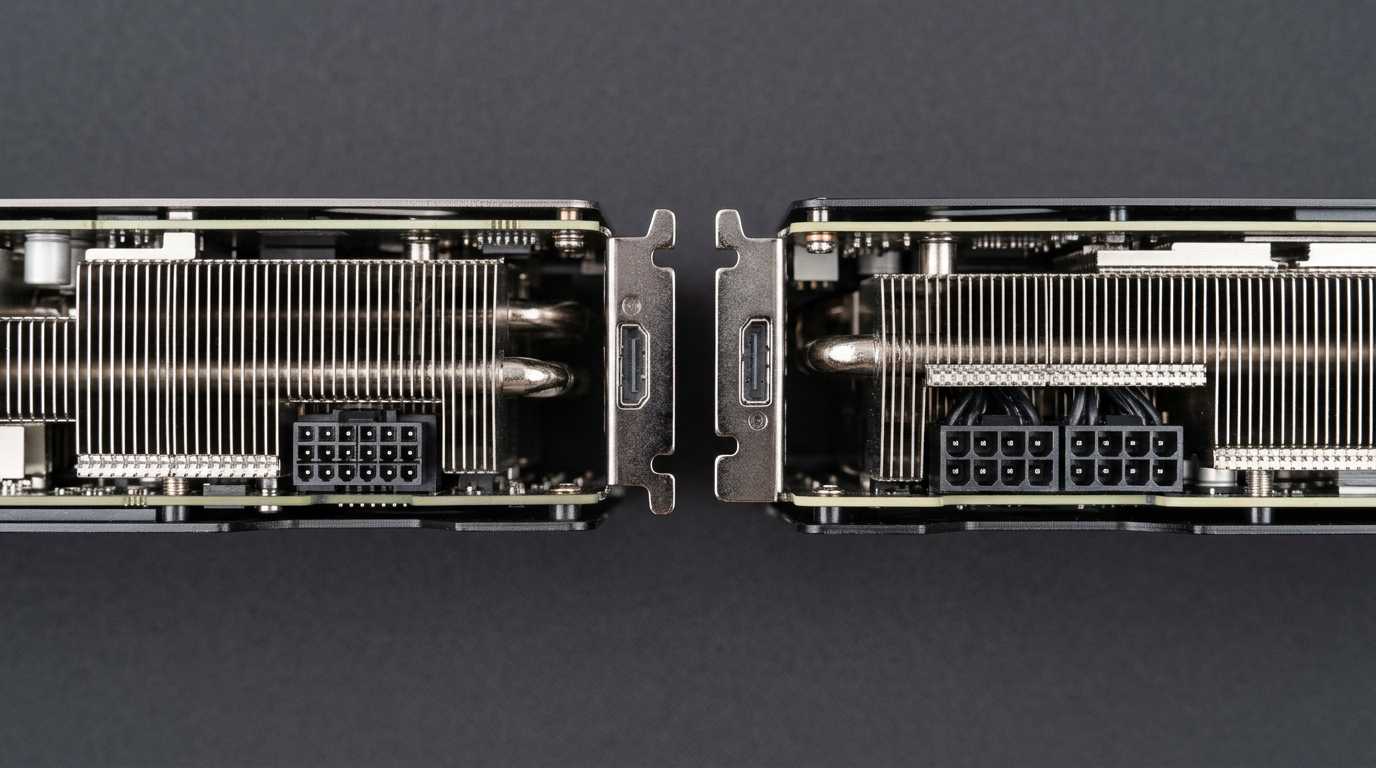
- Battleground 4: ATX 3.1 Power Specs, 12V-2×6 vs. 8-Pin & DisplayPort 2.1
- Platform Pairing & Avoiding System Bottlenecks
- Decisive Verdict: Which 16GB GPU Should You Buy?
- Verified Retail Picks: RTX 5070 Ti & RX 9070 XT Models on Amazon
- Frequently Asked Questions
TL;DR Winner Matrix: Quick Verdict
Before dissecting memory buses, upscaling pipelines, and power headers, here is the unambiguous winner across every core evaluation category.
| Evaluation Category | Declared Winner | Decisive Technical Reason |
|---|---|---|
| Overall Value Winner | AMD Radeon RX 9070 XT | At $599 Launch MSRP ($150 below RTX 5070 Ti), RDNA 4 delivers Tier A+ 1440p Ultra gaming and full 16GB capacity per dollar. |
| Raw Rasterization FPS/$ | AMD Radeon RX 9070 XT | 64 RDNA 4 Compute Units (4,096 Stream Processors) push competitive native 1440p throughput while freeing $150 for CPU or SSD upgrades. |
| Ray Tracing & AI Upscaling | NVIDIA GeForce RTX 5070 Ti | 4th-Gen RT Cores, 5th-Gen Tensor Cores, Transformer DLSS 4, Multi-Frame Generation, and dual 9th-Gen NVENC lead clearly. |
| VRAM Capacity & Bandwidth | RTX 5070 Ti (Tie Capacity / Edge Bandwidth) | Both avoid the 12GB VRAM bottleneck with 16GB on a 256-bit bus; Blackwell GDDR7 hits 896 GB/s vs. 640 GB/s GDDR6. |
| Power Header Simplicity | AMD Radeon RX 9070 XT | Most AIB models keep dual or triple 8-pin PCIe headers rather than 12V-2×6, simplifying upgrades on quality existing PSUs. |
Side-by-Side Verified Spec Table
Raw shader counts never translate directly across rival architectures: 8,960 NVIDIA CUDA Cores schedule work differently from 4,096 AMD Stream Processors. Compare memory bus width, total bandwidth, Launch MSRP, Total Board Power (TBP), and display standards directly from verified manufacturer sheets.
| Specification | NVIDIA GeForce RTX 5070 Ti | AMD Radeon RX 9070 XT |
|---|---|---|
| Architecture | NVIDIA Blackwell (GB203) | AMD RDNA 4 |
| Release Date | February 20, 2025 | March 2025 |
| Launch MSRP | $749 | $599 |
| Compute Hardware | 8,960 CUDA Cores / 5th-Gen Tensor / 4th-Gen RT | 64 CUs / 4,096 SP / 64 3rd-Gen Ray Accelerators |
| Reference Boost Clock | ~2.45 GHz (AIB clocks vary) | Up to 2.97 GHz (2.40 GHz Game Clock) |
| VRAM Capacity & Type | 16GB GDDR7 | 16GB GDDR6 (20 Gbps) |
| Memory Bus & Bandwidth | 256-bit / 896 GB/s | 256-bit / up to 640 GB/s + 64MB Infinity Cache |
| Total Board Power (TBP) | 300W | ~304W |
| Power Header Standard | 16-pin 12V-2×6 | Dual or Triple 8-pin PCIe (AIB dependent) |
| Recommended PSU Tier | 750W–850W ATX 3.1 / 80+ Gold+ | 750W–850W ATX 3.1 / 80+ Gold+ |
| Upscaling & Frame Gen | DLSS 4 + Multi-Frame Generation + Reflex / Reflex 2 | AMD FSR 4 (ML) + Frame Gen + Anti-Lag 2 |
| Display Outputs | DisplayPort 2.1b UHBR20 (80Gbps) + HDMI 2.1 | DisplayPort 2.1a + HDMI 2.1b |
| Media / Encode Engine | Dual 9th-Gen NVENC (AV1 + 10-bit 4:2:2) | AMD VCN (4K H.264, HEVC, AV1) |
| Host Bus Interface | PCIe 5.0 x16 | PCIe 5.0 x16 |
Battleground 1: Rasterization, Ray Tracing & 1440p/4K Scaling (35%)
Both GPUs target high-refresh 1440p Ultra monitors and entry-level 4K displays, sitting cleanly in Tier A+ above 12GB and 8GB mid-range boards. Yet NVIDIA and AMD allocate silicon very differently to hit that tier.
AMD focused RDNA 4 squarely on mainstream and upper-midrange value rather than fielding an ultra-expensive $1,999 Halo card against the RTX 5090. With 64 Compute Units (4,096 Stream Processors) boosting near 2.97 GHz and 128 ROPs, the Radeon RX 9070 XT competes directly with the RTX 5070 Ti in traditional DirectX 12 and Vulkan shader workloads while launching 20% cheaper at $599 MSRP. For competitive shooters, action RPGs, and Unreal Engine 5 titles running without max ray tracing, AMD maximizes native framerate per dollar.
NVIDIA directs its GB203 die on the NVIDIA Blackwell architecture toward neural rendering and heavy ray intersections. Pairing 8,960 CUDA Cores with 4th-Generation RT Cores (~133 TFLOPS) and 5th-Generation Tensor Cores (~1,406 AI TOPS), the RTX 5070 Ti maintains a decisive edge once full hardware ray-traced reflections, global illumination, or path tracing are enabled. While AMD’s 64 3rd-Generation Ray Accelerators markedly improve RDNA ray tracing over prior generations, NVIDIA retains superior computational cushion—especially as resolution climbs toward 4K.
Consider total rig allocation too. Saving $150 at Launch MSRP on an RX 9070 XT inside a $1,500-tier build lets you step up to an AM5 3D V-Cache processor or a 2TB NVMe SSD without dropping a GPU tier. Choose the RTX 5070 Ti when max ray tracing and 4K AI upscaling sit at the top of your library priorities—and stick strictly to released 2025–2026 retail GPUs rather than waiting on rumored, unconfirmed Super refreshes.
Battleground 2: 16GB GDDR7 vs. GDDR6 Memory Bus & VRAM Longevity (25%)
VRAM capacity is the defining strength shared by both cards. Packing 16GB across a 256-bit bus allows both the RTX 5070 Ti and RX 9070 XT to sidestep the VRAM bottleneck that hamstrings 8GB entry cards and increasingly crowds 12GB GPUs like the $549 Launch MSRP RTX 5070 when Ultra texture packs, ray tracing structures, and frame-generation buffers overlap.
Once a game exhausts local VRAM, assets spill across PCIe into slower system DDR5 memory. Average FPS barely tells the story; 1% Lows collapse, camera movement stutters, and texture streaming blurs mid-frame. Holding 16GB secures both GPUs comfortably through the 2026–2029 lifecycle for 1440p Max Settings and upscaled 4K textures.
- RTX 5070 Ti (16GB GDDR7, 256-bit): High-speed GDDR7 delivers 896 GB/s of external memory bandwidth—roughly 40% higher raw throughput to feed 4K framebuffers, heavy AI inference, and dense texture streaming.
- Radeon RX 9070 XT (16GB GDDR6, 256-bit): AMD pairs 20 Gbps GDDR6 (640 GB/s) with 64MB of 3rd-Gen Infinity Cache, detailed in AMD Radeon RX 9000-series documentation. At 1440p, keeping hot render targets inside Infinity Cache closes most of the practical gap; GDDR7 primarily widens its lead at 4K.
After installing either card, confirm Resizable BAR and Above 4G Decoding are enabled in BIOS so the CPU accesses the entire 16GB pool directly. Also check your motherboard’s PCIe lane-sharing diagram before filling secondary M.2 bays, ensuring extra NVMe drives never cut the primary PCIe 5.0 x16 GPU slot down to x8.
Battleground 3: DLSS 4 Multi-Frame Generation vs. AMD FSR 4 & Media Engines (20%)
In demanding Unreal Engine 5 releases, AI reconstruction separates playable smoothness from compromised clarity. On Blackwell, NVIDIA introduces Transformer-based DLSS 4 upscaling plus exclusive DLSS 4 Multi-Frame Generation. Compared to legacy convolutional networks, Transformer inference sharpens fine thin geometry—wires, foliage, chain-link textures—with noticeably cleaner temporal stability and wider native AAA support.
AMD answers with AMD FSR 4, shifting away from FSR 3’s shader-only path onto dedicated machine-learning accelerators inside RDNA 4. Visual stability improves dramatically over FSR 3, and AMD supports driver-level upgrades for compatible FSR 3.1 games, though native title-by-title integration still lags DLSS 4.
Regardless of brand, follow one strict Frame Generation guideline: never equate 120 generated frames per second with 120 native FPS. Interpolated frames enhance visual motion smoothness on high-refresh monitors without improving mouse or controller responsiveness. Running frame generation—especially Multi-Frame Generation—below a 50–60 base FPS floor (particularly under 45 FPS) produces sluggish input feel and visible artifacts. Dial upscaling first to sustain 50–60+ native FPS, and always pair frame generation with NVIDIA Reflex (or Reflex 2) on GeForce or AMD Anti-Lag 2 on Radeon.
Media creators see an equally clear divergence: the RTX 5070 Ti integrates dual 9th-Gen NVENC encoders supporting hardware AV1 and 10-bit 4:2:2 video acceleration for Premiere Pro and DaVinci Resolve, while the RX 9070 XT’s updated AMD VCN engine handles crisp 4K H.264, HEVC, and AV1 streaming cleanly without NVIDIA’s broader workstation plugin ecosystem.
Battleground 4: ATX 3.1 Power Specs, 12V-2×6 vs. 8-Pin & DisplayPort 2.1 (20%)
Nominal board wattage is virtually tied: 300W TBP on the RTX 5070 Ti versus ~304W TBP on the RX 9070 XT. Both 300W-class GPUs generate brief millisecond transient power excursions reaching 200%–300% of rated draw, making outdated Bronze power supplies a stability hazard. Pair either card with a 750W to 850W ATX 3.1 / PCIe 5.1 PSU rated 80+ Gold or Cybenetics Gold+ so gaming loads stay quietly in the 50%–60% efficiency band. See our full breakdown of ATX 3.1 and 12V-2×6 standards for rail details.
- RTX 5070 Ti (16-pin 12V-2×6): Defined under PCI Express CEM 5.1 by PCI-SIG, the 12V-2×6 socket lengthens power terminals and recesses sideband sense pins so full power cuts off if partially unseated. Still leave at least 35mm of side-panel bend clearance (or use a native 90-degree cable), and never mix modular PSU cables across models or brands.
- Radeon RX 9070 XT (Dual or Triple 8-Pin PCIe): Most partner RX 9070 XT models stick to familiar 2x or 3x 8-pin headers, letting upgraders on robust existing 750W–850W units plug in directly without multi-dongle adapters or tight side-glass bends.
Thermals and noise depend primarily on AIB partner engineering. Compact 2-slot SFF boards run warmer and louder than thick 3-slot vapor-chamber models stretching past 300mm and 1.3kg. Support any 300mm+ card with a sag bracket, house it in a high-airflow mesh or ventilated dual-chamber chassis (never choked solid front glass), look for a hardware Dual BIOS (`Performance` / `Quiet`) toggle, and cap menu FPS in drivers to mute coil whine alongside Zero-RPM idle stop.
For flagship OLED buyers, DisplayPort 2.1 details matter: the RTX 5070 Ti supports DisplayPort 2.1b UHBR20 (80 Gbps over DP80/DP80LL cables for uncompressed 4K 240Hz), whereas the RX 9070 XT pairs DisplayPort 2.1a with HDMI 2.1b—effortless for 1440p 240Hz–360Hz OLEDs and capable of 4K 240Hz via visually lossless DSC.
Platform Pairing & Avoiding System Bottlenecks
Either Tier A+ card loses 1% Lows consistency if bottlenecked by slow memory or weak CPU cache. Follow our how to build a gaming PC fundamentals to keep your platform balanced:
- CPU & Motherboard: Pair pure gaming builds with an AMD Ryzen 7 9800X3D (or 7800X3D / 9850X3D) on an AMD B850 board with PCIe 5.0 M.2 support. Hybrid creators can step to a Ryzen 9 9950X3D or Intel Core Ultra 7 265K / 270K Plus on Z890 (avoiding B860 if CPU overclocking is desired).
- RAM & Storage: Run two sticks of 32GB (2x16GB) DDR5-6000 CL30 on AM5 for 1:1 controller timing—never 1x16GB single-channel or 4-DIMM kits—and pick a 2TB PCIe 4.0 DRAM + TLC SSD instead of costlier Gen 5 drives that yield 0 FPS in current games.
Shopping turnkey desktops? Cross-check our best prebuilt gaming PC and best prebuilt gaming PC under $2000 audits to dodge hidden corners like 16GB DDR5-4800 RAM, Ryzen 7 8700F 16MB L3 limits, Wi-Fi 5 adapters, or undocumented PSUs.
Decisive Verdict: Which 16GB GPU Should You Buy?
Both 16GB contenders future-proof 1440p Ultra gaming, yet their $150 Launch MSRP divide creates a straightforward decision.
Choose NVIDIA GeForce RTX 5070 Ti ($749 Launch MSRP) If…
- You play ray-traced or path-traced AAA titles at 1440p Ultra or upscaled 4K.
- You want DLSS 4 image reconstruction and DLSS 4 Multi-Frame Generation for 240Hz+ monitors.
- Your 4K 240Hz OLED monitor benefits from uncompressed DisplayPort 2.1b UHBR20.
- You edit 10-bit 4:2:2 video, stream on dual NVENC, or run CUDA/Tensor AI workflows.
Choose AMD Radeon RX 9070 XT ($599 Launch MSRP) If…
- You want peak 1440p Ultra rasterization FPS per dollar with $150 spared for CPU or SSD upgrades.
- You want 16GB VRAM and ML-powered AMD FSR 4 without paying NVIDIA’s $749 tier.
- You prefer dual or triple 8-pin PCIe headers over 12V-2×6 side-panel clearance checks.
- Your library favors competitive shooters and raster-driven games over heavy path tracing.
Overall, the AMD Radeon RX 9070 XT earns our value recommendation for 1440p builders at $599 Launch MSRP, while the NVIDIA GeForce RTX 5070 Ti remains the superior $749 specialist for heavy ray tracing, DLSS 4 Multi-Frame Generation, DP 2.1b UHBR20, and creator encoding. Compare wider tiers inside our best graphics cards for gaming hub or browse Graphics Cards.
Verified Retail Picks: RTX 5070 Ti & RX 9070 XT Models on Amazon
Availability on flagship 16GB partner cards shifts quickly, and third-party marketplace markups can erode Launch MSRP value. Below are two in-stock Amazon US retail configurations verified for balanced triple-fan cooling and authentic specifications.
Best RTX 5070 Ti Pick
ASUS TUF Gaming GeForce RTX 5070 Ti 16GB GDDR7 OC Edition

Key Specs: NVIDIA Blackwell (GB203) | 16GB GDDR7 (256-bit, 896 GB/s) | 3.125-slot triple Axial-tech cooler | Phase-change thermal pad | 300W TBP (16-pin 12V-2×6) | DisplayPort 2.1b UHBR20 + HDMI 2.1b
Pros
- Full 16GB GDDR7 bandwidth handles ray-traced 1440p Ultra and upscaled 4K cleanly
- Substantial 3.125-slot TUF cooler with phase-change thermal pad sustains quiet boost clocks
- Supports DLSS 4 Multi-Frame Generation, DP 2.1b UHBR20, and dual 9th-Gen NVENC
Cons
- Thick 3.125-slot footprint requires checking case length and 35mm+ 12V-2×6 cable clearance
- Higher $749 Launch MSRP tier than AMD’s RDNA 4 contender for pure raster players
Best Value Pick (RX 9070 XT)
XFX Swift AMD Radeon RX 9070 XT Triple Fan Gaming Edition 16GB GDDR6

Key Specs: AMD RDNA 4 (64 CUs / 4,096 SP) | 16GB GDDR6 (256-bit, 640 GB/s + 64MB Infinity Cache) | Triple-fan cooler | ~304W TBP (8-pin PCIe power headers) | DisplayPort 2.1a + HDMI 2.1b
Pros
- Strongest Tier A+ 1440p Ultra rasterization value around AMD’s $599 Launch MSRP class
- 16GB GDDR6 + 64MB Infinity Cache avoids VRAM bottlenecks in texture-heavy AAA games
- Standard 8-pin PCIe headers simplify drop-in upgrades on quality 750W–850W PSUs
Cons
- Falls behind Blackwell under intense path tracing and lacks 10-bit 4:2:2 NVENC encoding
- Fewer native AAA titles ship FSR 4 out of the box compared to DLSS 4
How We Audited This Guide
- Graphics cards were evaluated by VRAM capacity, memory bus, power connector and PSU requirements, slot width and length clearance, and display output standards.
- Every specification claim was cross-checked against official OEM datasheets, platform vendor documentation, and published industry standards (PCI-SIG, JEDEC, VESA, Intel ATX) rather than marketplace listing copy.
- Recommendations were evaluated against our weighted audit rubric and documented compatibility rules; we do not publish fabricated FPS, thermal, or acoustic numbers.
Continue Your Audit
- Best 1440p Graphics Cards (2026): RTX 5070 Ti, RX 9070 XT & Mid-Range Picks
- DLSS 4 Multi-Frame Gen vs. AMD FSR 4 vs. XeSS 2: Image Quality & Latency
Frequently Asked Questions
Is the RTX 5070 Ti worth $150 more than the Radeon RX 9070 XT?
At Launch MSRP ($749 vs. $599), the RTX 5070 Ti earns the $150 premium if you prioritize heavy ray tracing, DLSS 4 Multi-Frame Generation on high-refresh OLEDs, or 10-bit 4:2:2 dual NVENC editing. For pure 1440p rasterization value, the RX 9070 XT wins decisively.
Does 16GB GDDR6 on the RX 9070 XT bottleneck compared to 16GB GDDR7 on the RTX 5070 Ti?
Neither card hits a capacity VRAM bottleneck at 1440p or upscaled 4K thanks to 16GB over a 256-bit bus. Blackwell GDDR7 reaches 896 GB/s versus 640 GB/s on GDDR6, though AMD’s 64MB 3rd-Gen Infinity Cache neutralizes most bandwidth deficits at 1440p.
What power supply wattage and cables do the RTX 5070 Ti and RX 9070 XT require?
Both 300W–304W cards need a 750W to 850W ATX 3.1 / PCIe 5.1 80+ Gold PSU to handle 200%–300% transient spikes. The RTX 5070 Ti uses a 16-pin 12V-2×6 plug requiring 35mm+ side-panel clearance, whereas most RX 9070 XT models use dual or triple 8-pin connectors.
Can DLSS 4 Multi-Frame Generation or AMD FSR 4 fix low native framerates?
No. Frame generation boosts visual fluidity without cutting input latency. Always target a 50–60 base FPS baseline via upscaling before enabling DLSS 4 Multi-Frame Generation or FSR 4 Frame Gen, and pair it with NVIDIA Reflex or AMD Anti-Lag 2.
Which CPU and RAM pair best with the RTX 5070 Ti or RX 9070 XT?
An AMD Ryzen 7 9800X3D (or 7800X3D) on a B850 motherboard with 32GB (2x16GB) DDR5-6000 CL30 memory maximizes 1% Lows stability at 1440p. Heavy video creators can also pair either GPU with a Ryzen 9 9950X3D or Intel Core Ultra 7 265K / 270K Plus.


