
On This Page
Direct Answer: Comparing ATX 3.1, PCIe 5.1, and 12V-2×6 vs. 12VHPWR comes down to mechanical pin safety and transient power handling. The revised 12V-2×6 (H++) socket extends 12V power pins by 0.25mm and recesses the four sense pins by 1.5mm, cutting power immediately if partially unseated to prevent connector melting.
Modern graphics cards—including the NVIDIA GeForce RTX 5090 (575W TDP, Launch MSRP $1,999), RTX 5080 (360W TDP, Launch MSRP $999), and RTX 5070 Ti (300W TDP, Launch MSRP $749)—push high current through a single 16-pin connector while firing millisecond load spikes far beyond average ratings. Early ATX 3.0 builders suffered melted 12VHPWR plugs because minor insertion gaps left sense circuits closed while starving main power terminals. Understanding ATX 3.1, PCIe 5.1, and 12V-2×6 vs. 12VHPWR prevents those thermal failures across any rig featured in our Cases, Cooling & Power hub and gaming GPU buying guide.
ATX 3.1 & 12V-2×6 vs. ATX 3.0 & 12VHPWR: Quick Reference
Both generations deliver up to 600W over one 16-pin harness, yet Intel’s ATX 3.1 specification and PCI-SIG’s CEM 5.1 update changed socket pin lengths, hold-up requirements, and certification validation.
| Specification Metric | ATX 3.0 / PCIe 5.0 (12VHPWR) | ATX 3.1 / PCIe 5.1 (12V-2×6) | Engineering Impact |
|---|---|---|---|
| Socket Stamp | H+ | H++ | Identifies revised recessed-sense receptacle |
| 12V Conductor Pins | Baseline length | +0.25mm longer | Lower resistance and deeper contact grip |
| Sideband Sense Pins | Baseline length | 1.5mm shorter (recessed) | Breaks signal first upon backing out |
| Power Excursions | 200% (100µs), 3x GPU | 200% (100µs), 3x GPU | Prevents false OCP trips during spikes |
| Hold-Up Time | 17ms at 100% load | 12ms at 100% (17ms at 80% rec.) | Boosts low-load efficiency safely |
| 2% / 10W Efficiency | ≥60% min (≥70% rec.) | ≥60% min (≥70% rec.) | Reduces idle heat during desktop tasks |
| Physical Fit | 16-pin shell | Identical 16-pin shell | Backward compatible; H++ enables interlock |
12V-2×6 vs. 12VHPWR Pin Geometry: How Recessed Sense Pins Stop Melting
First-generation 12VHPWR failures did not occur because 16AWG copper cannot carry 600W. Overheating occurred because partial seating or side-panel tension spiked electrical contact resistance across unevenly loaded pins.
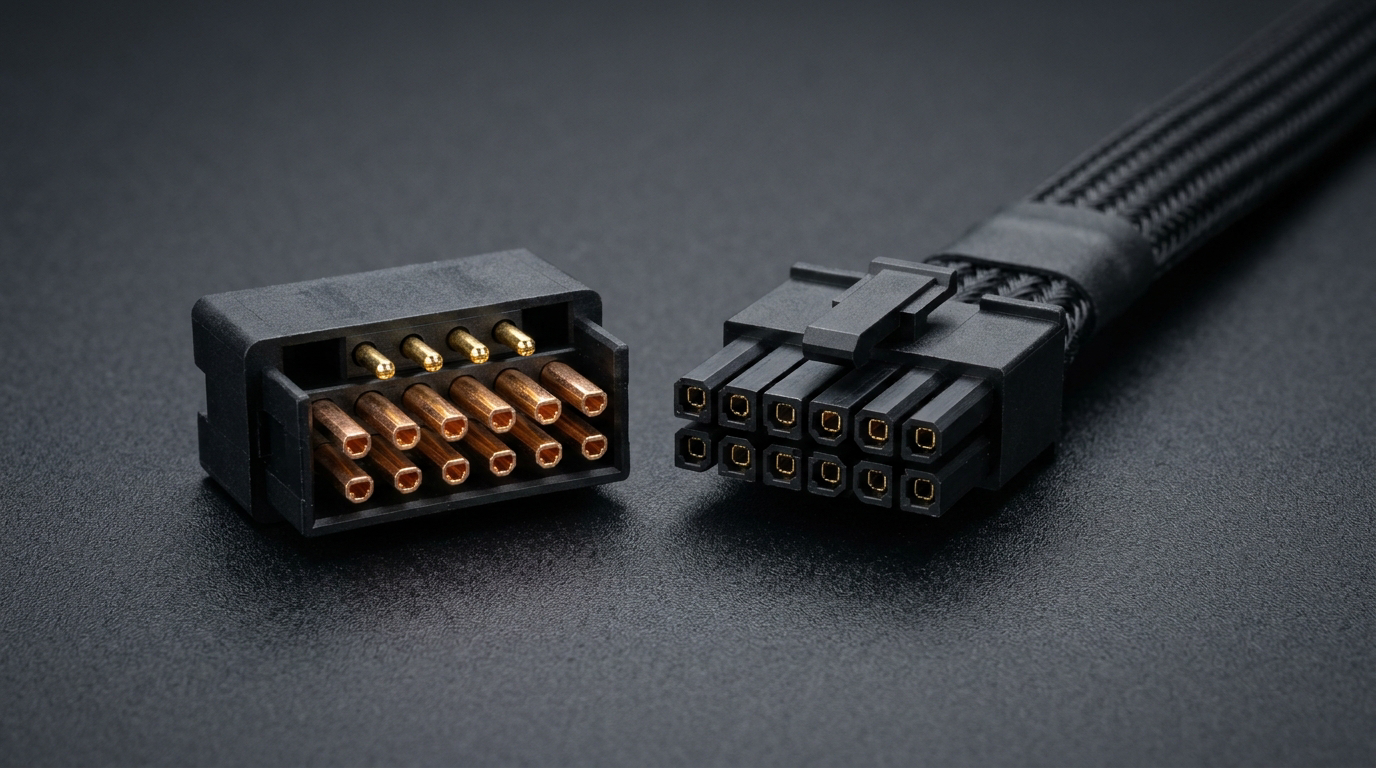
Why Legacy 12VHPWR (H+) Allowed Partial Seating
A 16-pin GPU header divides power across six +12V pins and six ground pins, topped by four sideband signal pins (SENSE0, SENSE1, CARD_PWR_STABLE, and CARD_CBL_PRES#). Delivering 600W pushes roughly 50A across those six +12V conductors. By Joule’s law (P = I² × R), heat spikes dramatically whenever terminal contact area shrinks.
On legacy 12VHPWR (H+) headers, the sense pins stayed connected even when a plug backed out by 1mm to 2mm or tilted sideways. Because SENSE0 and SENSE1 remained bridged, the GPU still drew full 450W–600W boost power through partially engaged conductors, superheating the housing until plastic melted.
The PCIe 5.1 Safety Interlock (+0.25mm Conductors, -1.5mm Sense Pins)
PCI-SIG’s PCIe 5.1 CEM update redesigned the male socket as 12V-2x6 (H++), capturing our core safety rule: 12V-2x6 Connector --[IMPROVES_SAFETY_VIA]--> Recessed Sense Pins. Two millimeter shifts establish a hardware interlock:
- 0.25mm Longer Power Pins: Extending the 12 main power pins deepens metallic engagement, cutting contact resistance and thermal buildup under sustained GPU load.
- 1.5mm Recessed Sense Pins: Shortening the four upper sideband pins makes them engage last on insertion and break contact first during pull-out.
If a plug sits partially unseated, the recessed sense pins lose continuity while the longer power pins still maintain physical grip. Recognizing an open circuit, the GPU immediately withholds high-power states or drops to a safe low-wattage fallback before arcing can begin.
Identifying H+ vs. H++ Markings and Backward Compatibility
Check the plastic shroud lip above the socket for H+ (legacy 12VHPWR) or H++ (revised 12V-2x6). Because pin depth changes live inside the GPU and PSU receptacles rather than the cable shell, Corsair’s 12V-2×6 specification guide notes that existing 12VHPWR cables fit H++ headers cleanly—though native ATX 3.1 PSUs deliver H++ protection at both ends.
ATX 3.1 Transient Power Excursions, Hold-Up Time, and Certification Tiers
Safe plugs only matter if the PSU underneath absorbs sudden current spikes without shutting down: ATX 3.1 / PCIe 5.1 PSU --[WITHSTANDS]--> 200%–300% GPU Transient Power Excursions.
Surviving 200% to 300% Transient Power Excursions
Steady TDP figures mask sub-millisecond spikes when GPUs transition from idle frames into ray-traced loads. Under Intel’s ATX desktop power design guide, compliant units above 450W must handle 200% system transient power excursions for 100µs (180% for 1ms, 160% for 10ms) and up to 300% excursions on the PCIe rail. Legacy ATX 2.x units misread these spikes as faults and trip OCP OVP OPP circuits mid-game.
Hold-Up Time (12ms vs. 17ms) and Low-Load Efficiency
As Seasonic’s ATX 3.0 vs. ATX 3.1 engineering brief explains, ATX 3.1 lowered mandatory full-load hold-up time from 17ms to 12ms at 100% load while recommending 17ms at 80% load. Because gaming PCs run near 50%–60% PSU capacity, this change eliminates wasteful primary-capacitor over-sizing and improves 2% idle efficiency without hurting brownout safety.
80 Plus Gold vs. Cybenetics ETA and Cybenetics Lambda
Under rule R-PSU-01, an 80 Plus Gold sticker alone leaves critical blind spots because it checks only 20%, 50%, and 100% load efficiency. Cybenetics ATX v3.x certification expands validation across thousands of load combinations:
- Cybenetics ETA (Efficiency): Grades overall conversion across 115V/230V inputs from Silver through Titanium, including mandatory 2% (10W) light-load checks.
- Cybenetics Lambda (Noise): Certifies real dBA noise profiles from Standard up to whisper-quiet Lambda A (20–25 dBA), A+ (15–20 dBA), and A++ (under 15 dBA).
Myth vs. Engineering Reality: Five GPU Power Myths Busted
- Myth 1: “Older ATX 3.0 cables break RTX 50-series 12V-2×6 cards.”
Engineering Reality: Recessed sense pins sit inside the GPU and PSU sockets (H++). Intact 12VHPWR cables work safely onH++GPUs, though native ATX 3.1 units protect both ends. - Myth 2: “3x or 4x 8-pin dongle adapters equal native 12V-2×6 cables.”
Engineering Reality: Multi-plug adapters add extra resistive junctions and stiff leverage near tempered glass, increasing partial-seating risk. - Myth 3: “ATX 3.1’s 12ms hold-up spec downgrades quality.”
Engineering Reality: Keeping 17ms at 80% load protects real gaming builds while boosting low-load efficiency and transient stability. - Myth 4: “80 Plus Gold guarantees Japanese capacitors and quiet operation.”
Engineering Reality: Efficiency badges measure neither acoustic output nor component longevity. Always verify Cybenetics ETA, Cybenetics Lambda, and Japanese 105C capacitors. - Myth 5: “Modular cables from matching wattages are interchangeable.”
Engineering Reality: Never mix modular cables across PSU brands or different model lines within the same brand. PSU-side pinouts vary completely by OEM design; mixing cables causes instant rail shorts that destroy GPUs, SSDs, and motherboards.
Wattage Sizing, PSU Clearance, and the 35mm+ Cable Bend Rule
Rule R-PSU-01 targets 50% to 60% of rated capacity under typical gaming load for peak efficiency and quiet fan curves. Check our RTX 5070 Ti vs. RX 9070 XT comparison to pair 300W-class GPUs with the 750W–850W tier.
| 2026 Gaming Tier | Example GPU & CPU Pairing | Target Wattage | Required Specifications |
|---|---|---|---|
| Entry 1080p | RTX 5060 / RX 9060 XT / Arc B580 + 9600X | 650W | ATX 3.1, 80 Plus Gold |
| Mid-Range 1440p | RTX 5060 Ti 16GB / RX 9070 + Ryzen 7 | 750W | ATX 3.1, 80 Plus Gold, Native 12V-2×6 |
| Performance 1440p | RTX 5070 Ti / RX 9070 XT + 9800X3D | 750W – 850W | ATX 3.1, Cybenetics Gold+, Full Modular |
| High-End 4K | RTX 5080 (360W) + 9850X3D / 285K | 850W – 1000W | ATX 3.1, Cybenetics Platinum, Japanese 105C caps |
| Flagship / AI | RTX 5090 (575W) + 9950X3D / 285K | 1000W – 1200W+ | ATX 3.1, Cybenetics Platinum–Titanium, Lambda A+ |
35mm+ Straight Bend Clearance and PSU Clearance Checks
To protect any 12V-2x6 latch from lateral stress, verify at least 35mm to 40mm of straight clearance between the GPU header and your glass side panel before curving the cable—never bend sharply at the plastic collar. Inside narrow cases, install a vertical GPU bracket or OEM-certified 90-degree cable. Likewise, check bottom PSU clearance against drive cages: 850W ATX 3.1 units average 140mm deep, 1000W quiet platforms reach 160mm, and 1200W+ flagships exceed 180mm. Demand full modular cabling, Japanese 105C capacitors, full OCP OVP OPP / UVP / SCP / OTP protections, and a 10-year warranty.
Actionable Buyer & Builder Checklist
Follow these six checks before finalizing your build in our PC building guide and post-build setup checklist:
- Verify ATX 3.1 & H++ Spec: Confirm explicit ATX 3.1 compliance and
12V-2x6sockets rather than outdated ATX 2.x stock. - Select Native 12V-2×6 Cabling: Use a direct 16-pin-to-16-pin harness instead of multi-8-pin dongles.
- Check Cybenetics ETA & Lambda: Pair 80 Plus Gold with independent Cybenetics efficiency, noise, and 105°C capacitor ratings.
- Measure Case Depth & 35mm+ GPU Space: Confirm 140mm–160mm PSU clearance plus 35mm+ unbent cable space beside the GPU.
- Pre-Curve and Click Flush: Shape the harness outside the case first, then seat straight until the latch clicks with zero gap.
- Quarantine Old Modular Cables: Never reuse modular cables from an earlier power supply; install only cables included in the box.
Verified ATX 3.1 & PCIe 5.1 Power Supplies Worth Buying
These verified ATX 3.1 units deliver native 12V-2x6 safety, full modular wiring, complete protections, and 10-year warranty coverage across our Cases, Cooling & Power hub.
1. Seasonic Focus GX-850 (ATX 3.1 / V4) — Best Compact 850W Flagship
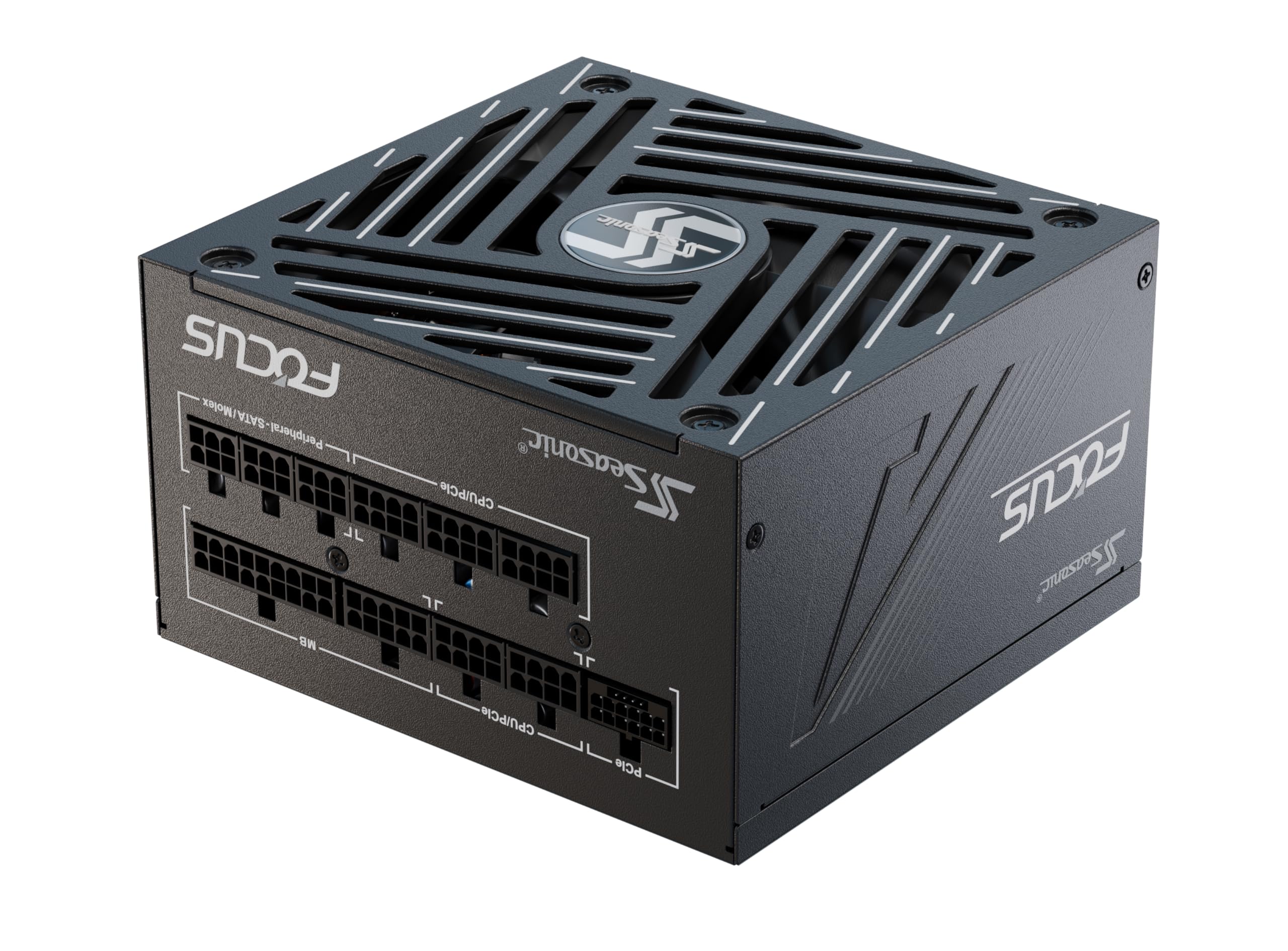
Audited Specs: 850W | ATX 3.1 & PCIe 5.1 | Native 600W 12V-2×6 | 80 Plus Gold & Cybenetics Report 26PS3202A | 135mm FDB Hybrid Fan | 100% Japanese 105C capacitors | 140mm Depth | OCP OVP OPP / UVP / SCP / OTP | 10-year warranty.
Seasonic’s V4 OptiSink redesign shrinks internal PCB layouts for superior airflow inside a 140mm frame, leaving effortless PSU clearance for 1440p RTX 5070 Ti and RX 9070 XT builds.
2. MSI MAG A850GL PCIE5 — Best Visual 12V-2×6 Seating Check

Audited Specs: 850W | ATX 3.1 Ready & PCIe 5.1 Ready | Dual-Color Yellow 12V-2×6 Connector | 80 Plus Gold & Cybenetics ETA Gold | 120mm FDB Fan | 105°C Capacitors | 140mm Depth | OCP/OVP/UVP/OPP/SCP/OTP | 10-year warranty.
MSI’s dual-color yellow 12V-2×6 plug eliminates seating guesswork—if any yellow band remains visible, the connector needs another firm push. Handles 2x total and 3x GPU transient power excursions inside a 140mm chassis.
3. Corsair RM1000x (2024 ATX 3.1) — Best 1000W 4K & Low-Noise Pick

Audited Specs: 1000W | ATX 3.1 & PCIe 5.1 | Native 600W 12V-2×6 | 80 Plus Gold / Cybenetics ETA Platinum & Lambda A | 140mm FDB Zero RPM + Fan Dial | 100% Japanese 105C capacitors | 160mm Depth | Full Protections | 10-year warranty.
Ideal for 4K RTX 5080 builds targeting the 50%–60% efficiency window, delivering verified 20–25 dBA Lambda A acoustics alongside flexible embossed Type-4 cables. Confirm 160mm PSU clearance in compact cases.
Power Supply Profiles Disqualified Under R-PSU-01
- Legacy ATX 2.x Group-Regulation Bronze Units: Suffer severe rail droop and false shutdowns under 200%–300% GPU power spikes.
- Multi-Dongle 12VHPWR (H+) Adapters Above 450W: Multiply contact junctions and apply lateral strain near glass side panels.
- Omitted-Spec or Sub-5-Year Warranty Prebuilt PSUs: Units hiding ATX version, efficiency tier, capacitor grade, or OCP/OVP/OPP protections fail durability checks.
Official Engineering References
- Seasonic Knowledge Base: Differences Between ATX 3.0 and ATX 3.1 Standards
- Corsair Explorer: Evolving Standards — 12VHPWR and 12V-2×6 Compared
- Cybenetics Labs: ATX v3.x Power Excursion and ETA/Lambda Certification Protocol
- Intel Engineering Design Center: ATX Version 3 Desktop Platform Power Supply Design Guide
- NVIDIA GeForce RTX 50 Series Architecture and System Power Specifications
How We Audited This Guide
- Power supplies, coolers, and cases were audited for ATX 3.1 / PCIe 5.1 compliance, 12V-2x6 support, efficiency certification, radiator and GPU clearance, and fan configuration.
- Every specification claim was cross-checked against official OEM datasheets, platform vendor documentation, and published industry standards (PCI-SIG, JEDEC, VESA, Intel ATX) rather than marketplace listing copy.
- Recommendations were evaluated against our weighted audit rubric and documented compatibility rules; we do not publish fabricated FPS, thermal, or acoustic numbers.
Continue Your Audit
- Parent hub: Best Gaming Power Supplies (2026): Audited ATX 3.1 & 12V-2×6 PSUs
- Best 1000W & 1200W+ Power Supplies for RTX 5080 and RTX 5090 (2026)
- GPU Black Screen & Fans 100% Fix: Auditing 12V-2×6 Seating & Transient Load
Frequently Asked Questions
Can I plug a 12VHPWR cable into a 12V-2×6 GPU socket?
Yes. The 12V-2×6 standard retains the identical 16-pin shell dimensions as 12VHPWR because the +0.25mm conductor extension and 1.5mm sense-pin recess sit inside the device header. An undamaged 12VHPWR cable gains H++ partial-seating protection on the GPU side, though a native ATX 3.1 PSU upgrades both ends.
How can I tell if my GPU or PSU uses 12V-2×6 instead of 12VHPWR?
Check the molded text stamped directly along the plastic shroud above the 16-pin socket. Legacy 12VHPWR headers carry an H+ code, while updated PCIe 5.1 / 12V-2×6 headers display H++ alongside explicit ATX 3.1 compliance printed on your power supply specification sheet and packaging.
Is ATX 3.1 worse than ATX 3.0 because of the 12ms hold-up time?
No. Intel lowered the mandatory full-load floor from 17ms to 12ms while keeping a 17ms recommendation at 80% load. Because gaming systems operate well below 100% continuous PSU output, this change preserves brownout protection while letting engineers improve 2% low-load efficiency and thermal performance.
How much cable clearance do I need between my GPU and side panel?
Leave at least 35mm to 40mm of straight, unbent clearance directly out of the 12V-2×6 connector before curving the harness toward the motherboard tray. Tighter gaps push sideways against the plug collar, risking terminal strain; narrow cases should use vertical GPU mounts or OEM 90-degree cables.
Is it safe to reuse modular PSU cables from an older power supply?
Never mix modular cables across different PSU brands or even different model lines from the same manufacturer. PSU-side connector pinouts are not standardized, so reusing old modular cables frequently sends +12V into ground or 5V rails, permanently destroying graphics cards, motherboards, and NVMe SSDs instantly.


