
Disclosure: As an Amazon Associate, The PC Audit earns from qualifying purchases. If you buy through links on this page, we may earn a small commission at no extra cost to you.
Direct Answer: Determining how much VRAM for gaming you need in 2026 comes down to target resolution and settings: 8GB fits 1080p Esports and medium textures, 12GB handles 1080p Ultra and entry 1440p, 16GB is the 2026–2029 sweet spot for 1440p Ultra, ray tracing, and 4K upscaling, while 32GB serves 4K path tracing and local AI.
Picking the wrong graphics memory pool is the single fastest way to shorten a gaming rig’s useful lifespan. Even a fast GPU core stutters violently once asset allocation spills past local video memory into system DDR5 over the PCIe bus. Across our best graphics cards for gaming hub and Graphics Cards archive, matching frame-buffer size to your display pipeline follows one governing rule: Target Monitor Resolution & Hz --[DETERMINES_MINIMUM_TIER]--> GPU & VRAM Tier.
Modern engines built on Unreal Engine 5 geometry pipelines, high-resolution texture streaming, hardware ray tracing, and AI frame generation consume dramatically more memory than older rasterized titles. Below, we audit exact 2026 capacity tiers across shipping NVIDIA Blackwell, AMD RDNA 4, and Intel Xe2 Battlemage GPUs so you never overpay for an 8GB trap or misjudge a 12GB card.
In This Guide
- 2026 VRAM Capacity Quick Decision Table: 8GB vs. 12GB vs. 16GB vs. 32GB
- What Happens Inside Your PC When VRAM Overflows?
- Capacity vs. Bandwidth: Bus Width, GDDR7 vs. GDDR6 & Cache
- Which Settings Eat VRAM Fastest? Resolution, Ray Tracing & DLSS 4 / FSR 4
- Myth vs. Engineering Reality: Five VRAM Myths Busted
- Actionable VRAM Buyer & Builder Checklist
- Verified 12GB & 16GB GPUs Worth Buying in 2026
- Frequently Asked Questions
2026 VRAM Capacity Quick Decision Table: 8GB vs. 12GB vs. 16GB vs. 32GB
Video memory does not boost raw frame rates on its own while unused; instead, capacity sets a hard ceiling on texture detail, ray-tracing structures, and frametime stability (1% Lows). Use this audited tier matrix to align capacity with your monitor and multi-year upgrade timeline.
| VRAM Tier | Safe Gaming Ceiling (2026) | Shipping 2025–2026 GPU Examples | Editorial Audit Verdict |
|---|---|---|---|
| 8GB | 1080p Esports & AAA Medium–High (RT Off) | RTX 5060 ($299 Launch MSRP), RTX 5060 Ti 8GB ($379 Launch MSRP), RX 9060 XT 8GB ($299 Launch MSRP) | Entry-only; disqualified above $350–$400 tier or in $1,100+ prebuilts |
| 10GB – 12GB | 1080p Ultra & 1440p High Rasterization | Intel Arc B570 10GB ($219 Launch MSRP), Arc B580 12GB ($249 Launch MSRP), RTX 5070 12GB ($549 Launch MSRP), RX 9070 GRE 12GB (OEM) | Outstanding budget value on Arc B580; tight 4-year cushion on RTX 5070 |
| 16GB | 1440p Ultra + RT, High-Res Texture Packs & 4K Upscaled | RX 9060 XT 16GB ($349 Launch MSRP), RTX 5060 Ti 16GB ($429 Launch MSRP), RX 9070 ($549 Launch MSRP), RX 9070 XT ($599 Launch MSRP), RTX 5070 Ti ($749 Launch MSRP), RTX 5080 ($999 Launch MSRP) | 2026–2029 Sweet Spot for long-term DIY and prebuilt gaming rigs |
| 24GB – 32GB | Uncompromised 4K/8K Path Tracing, Heavy Mod Packs & Local AI | NVIDIA GeForce RTX 5090 32GB GDDR7 ($1,999 Launch MSRP) | Enthusiast workstation + 4K flagship tier |
8GB VRAM: Esports-Only Ceiling and the Mid-Range Price Trap
In competitive esports titles such as Counter-Strike 2, Valorant, and League of Legends, 8GB of GDDR6 or GDDR7 memory remains completely adequate at 1080p because competitive settings prioritize low geometric overhead and maximum frame throughput. At the sub-$300 entry bracket, cards like the GeForce RTX 5060 ($299 Launch MSRP, 145W) and Radeon RX 9060 XT 8GB ($299 Launch MSRP, 150W) serve budget 1080p systems that maintain sensible medium-to-high texture presets with ray tracing disabled.
Problems erupt the moment buyers carry an 8GB card past $350 or turn up settings in 2025–2026 AAA releases. Under our GPU audit rule R-GPU-01, any 8GB graphics card priced above the $350–$400 threshold—or tucked inside a prebuilt gaming desktop over $1,100—receives an immediate VRAM ceiling warning. Turning on Ultra texture packs, hardware ray tracing, and Frame Generation in modern single-player games rapidly pushes allocations beyond 8GB, triggering texture pop-in, muddied surface streaming, or sharp 1% Lows drops. We dissect this exact price-versus-memory divide in our RTX 5060 Ti 8GB vs. 16GB comparison, where stepping from the $379 Launch MSRP 8GB model to the $429 Launch MSRP 16GB variant rescues multi-year usability for a modest budget difference.
10GB to 12GB VRAM: Budget Winner vs. Mid-Range Compromise
Between 10GB and 12GB, context depends entirely on price bracket and monitor resolution. At the budget tier, Intel’s Xe2 Battlemage lineup breaks the 8GB stranglehold cleanly: the Intel Arc B570 ($219 Launch MSRP) delivers 10GB GDDR6 across a 160-bit bus, while the Intel Arc B580 ($249 Launch MSRP) supplies 12GB GDDR6 on a 192-bit bus with 456 GB/s bandwidth—comfortably outlasting 8GB competitors under $250 in texture-heavy 1080p Ultra and entry 1440p games.
Higher up the ladder, 12GB shifts from luxury to compromise. NVIDIA’s GeForce RTX 5070 ($549 Launch MSRP) pairs strong Blackwell compute and 672 GB/s GDDR7 speed with 12GB capacity over a 192-bit bus, while AMD’s OEM/prebuilt-oriented Radeon RX 9070 GRE also carries 12GB GDDR6 across 48 Compute Units. While 12GB handles today’s 1440p High presets cleanly, enabling Ultra textures alongside path tracing and Multi-Frame Generation already crowds the 12GB wall. As detailed in our RTX 5070 vs. Radeon RX 9070 audit, buyers keeping a $550-tier card for four to five years should weigh whether 16GB offers safer longevity.
16GB VRAM: The 2026–2029 Sweet Spot for 1440p Ultra and 4K
Sixteen gigabytes stands as the clear canonical standard for serious 2026 gaming builds. With 16GB of high-speed memory, a GPU stores full uncompressed texture mipmaps, dense ray-tracing acceleration hierarchies, and Frame Generation temporal buffers simultaneously without thrashing the PCIe bus. Both AMD and NVIDIA now anchor their strongest value-to-longevity SKUs at 16GB—starting with the Radeon RX 9060 XT 16GB ($349 Launch MSRP) and GeForce RTX 5060 Ti 16GB ($429 Launch MSRP) for 1080p Ultra and 1440p, scaling up through the RX 9070 ($549 Launch MSRP), RX 9070 XT ($599 Launch MSRP), RTX 5070 Ti ($749 Launch MSRP), and 4K-focused RTX 5080 ($999 Launch MSRP).
24GB to 32GB VRAM and Unreleased Rumor Warnings
Above 16GB, the shipping 2026 desktop lineup jumps directly to NVIDIA’s flagship GeForce RTX 5090 ($1,999 Launch MSRP), armed with 32GB of GDDR7 across a colossal 512-bit interface (575W TDP). Pure rasterized 4K gaming rarely demands 32GB today, yet extreme path-tracing workloads, heavily modded open-world environments, 8K video timelines, and local large language model (LLM) inference readily fill 20GB to 30GB buffers. Under rule R-GPU-02, note that rumors around an RTX 5070 Super (18GB GDDR7, 192-bit, 275W TBP) and RTX 5080 Super (24GB GDDR7) remain unreleased and unconfirmed—widely projected around late 2026 or Q1 2027 memory supply windows—and must never be treated as active retail buying choices.
What Happens Inside Your PC When VRAM Overflows?
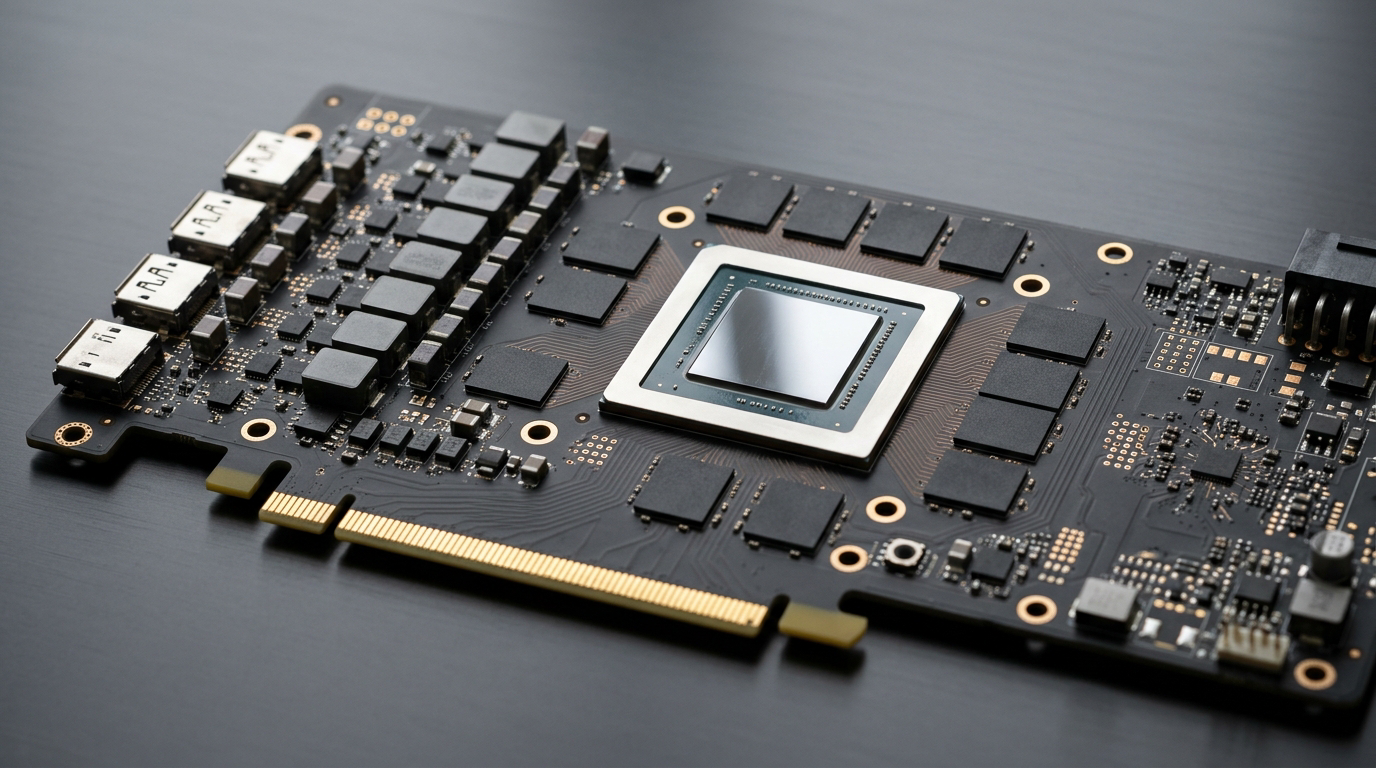
To understand why insufficient VRAM ruins gameplay even when a GPU core looks fast on paper, examine the physical board layout around the silicon die. Local video memory chips sit millimeters from the GPU processor, wired across ultra-wide parallel traces designed for hundreds of gigabytes per second of simultaneous texture reads and frame-buffer writes.
The PCIe Bus Bottleneck and 1% Lows Collapse
When a game requests 9.5GB of assets on an 8GB graphics card, the driver cannot discard active geometry without crashing. Instead, the GPU pages overflow textures and render targets across the motherboard PCIe slot into system DDR5 memory. Look at the bandwidth cliff created by that spill according to PCI-SIG PCI Express bandwidth specifications:
- On-Card VRAM Bandwidth (2026 GPUs): Ranges from 320 GB/s to 448 GB/s on 128-bit entry/midrange cards, 456 GB/s to 672 GB/s on 192-bit cards, and 640 GB/s to 960 GB/s on 256-bit 16GB GPUs (reaching past 1.7 TB/s on the 512-bit RTX 5090).
- PCIe 5.0 x16 Link: Caps at roughly 63 GB/s unidirectional (126 GB/s bidirectional).
- PCIe 4.0 x16 Link: Caps at roughly 31.5 GB/s unidirectional.
- PCIe 4.0 x8 / PCIe 3.0 x16 Link: Drops to roughly 15.75 GB/s unidirectional.
- PCIe 3.0 x8 Link (Legacy Platform + x8 Card): Collapses to roughly 7.87 GB/s—over 50x slower than local GDDR6 or GDDR7 memory.
Even on a top-tier PCIe 5.0 motherboard, spilling over the bus forces the GPU to wait thousands of clock cycles while fetching textures from system RAM. Average frames per second might dip only slightly on an overlay counter, yet 1% Lows and 0.1% Lows plummet—producing jarring camera hitches whenever you turn toward new scenery. Worse still, many modern engines silently downgrade texture mipmap fidelity under memory pressure, turning sharp Ultra surfaces into blurry low-resolution mud without warning.
PCIe Lane Splitting (x16 to x8), ReBAR, and DirectStorage
Three platform mechanics amplify or cushion how cleanly VRAM feeds your GPU:
- Motherboard M.2 Lane Sharing: Under our platform rule
Over-Populated M.2 Slots --[CAN_SPLIT_GPU_LANE]--> PCIe x16 Down to x8, populating secondary PCIe 5.0 M.2 NVMe sockets on certain motherboards bifurcates the primary graphics slot from x16 down to x8. On cards with ample 16GB VRAM, x8 PCIe 4.0/5.0 rarely costs measurable frame rate—but if a smaller 8GB GPU spills into system RAM on an x8 or PCIe 3.0 link, overflow stutters worsen dramatically. - Resizable BAR (ReBAR / Smart Access Memory): Older PCIe protocols restricted CPU access to VRAM to tiny 256MB windows at a time. Enabling Resizable BAR in UEFI BIOS exposes the entire VRAM buffer directly to the CPU. Under rule
Intel Arc B580 / B570 --[REQUIRES_BIOS_SETTING]--> Resizable BAR (ReBAR) Enabled, modern Intel Battlemage GPUs rely heavily on ReBAR for clean scheduling and suffer severe frame-pacing penalties on legacy non-ReBAR boards. - Microsoft DirectStorage Asset Streaming: Traditional game loading forces the CPU to decompress textures from storage into system RAM before copying them to VRAM. Following
Microsoft DirectStorage --[ROUTES_COMPRESSED_ASSETS]--> NVMe SSD Directly to GPU VRAM, supported PC games stream compressed texture blocks directly from a fast PCIe 4.0 DRAM+TLC NVMe SSD straight into GPU memory for hardware decompression—shrinking loading bottlenecks while demanding steady VRAM headroom so streamed assets stay resident.
Capacity vs. Bandwidth: Bus Width, GDDR7 vs. GDDR6 & Cache
VRAM capacity and VRAM bandwidth solve two different engineering constraints. Capacity determines how many assets fit simultaneously inside local memory; bandwidth determines how rapidly shader cores read and write pixels, shadow maps, and ray structures every millisecond. You can calculate raw theoretical memory bandwidth for any graphics card with one straightforward formula:
Memory Bandwidth (GB/s) = (Effective Memory Data Rate in Gbps × Bus Width in Bits) ÷ 8
| 2026 Graphics Card | VRAM Capacity & Type | Bus Width | Raw Bandwidth + On-Die Cache Strategy | Primary Resolution Fit |
|---|---|---|---|---|
| Intel Arc B580 | 12GB GDDR6 | 192-bit | 456 GB/s raw bandwidth (19 Gbps) | 1080p Ultra / Entry 1440p |
| AMD RX 9060 XT (16GB) | 16GB GDDR6 | 128-bit | 320–340 GB/s + 32MB Infinity Cache | 1080p Ultra / 1440p High |
| NVIDIA RTX 5060 Ti (16GB) | 16GB GDDR7 | 128-bit | 448 GB/s raw bandwidth (28 Gbps GDDR7) + large L2 | 1080p Ultra / 1440p & AI |
| NVIDIA RTX 5070 | 12GB GDDR7 | 192-bit | 672 GB/s raw bandwidth (28 Gbps GDDR7) | 1440p High-Refresh |
| AMD RX 9070 XT | 16GB GDDR6 | 256-bit | 640 GB/s raw bandwidth + 64MB Infinity Cache | 1440p Ultra / Entry 4K |
| NVIDIA RTX 5070 Ti | 16GB GDDR7 | 256-bit | 896 GB/s raw bandwidth (28 Gbps GDDR7) | 1440p Max RT / 4K DLSS 4 |
| NVIDIA RTX 5080 | 16GB GDDR7 | 256-bit | 960 GB/s raw bandwidth (30 Gbps GDDR7) | High-End 4K High-Refresh |
| NVIDIA RTX 5090 | 32GB GDDR7 | 512-bit | ~1,792 GB/s raw bandwidth | 4K/8K Path Tracing & AI |
Notice how Blackwell and RDNA 4 compensate for narrower 128-bit buses differently. On the NVIDIA GeForce RTX 50-series architecture, shifting from GDDR6 to 28 Gbps GDDR7 lifts a 128-bit RTX 5060 Ti to 448 GB/s—essentially matching an older 192-bit GDDR6 interface while using tighter signaling efficiency. Meanwhile, AMD RDNA 4 Radeon RX 9000 cards lean on 32MB to 64MB of ultra-fast 3rd-Gen Infinity Cache to catch repetitive frame-buffer reads on die before touching external GDDR6 modules. However, neither GDDR7 speed nor Infinity Cache creates missing gigabytes: once an 8GB card overflows at 1440p Ultra, a 16GB card—even on a 128-bit bus—maintains smoother frame pacing.
Which Settings Eat VRAM Fastest? Resolution, Ray Tracing & DLSS 4 / FSR 4
Knowing how much VRAM for gaming your PC requires also depends on which graphical switches you toggle inside game menus. Five specific settings drive almost all memory growth in 2026 titles:
- 1. Texture Quality & Anisotropic Filtering: Texture resolution accounts for the largest single chunk of VRAM—often 3GB to 6GB by itself. Dropping from Ultra to High textures immediately saves 1GB to 2.5GB with minimal visual loss at 1080p, though 1440p and 4K monitors expose downgraded texture sharpness much more clearly.
- 2. Display Resolution (1080p vs. 1440p vs. 4K): Doubling pixel count from 1920×1080 (2.07 million pixels) to 2560×1440 (3.69 million pixels) and 3840×2160 (8.29 million pixels) enlarges G-buffers, shadow maps, depth passes, and post-processing render targets. Jumping from 1080p to 4K typically adds 1.5GB to 3GB of non-texture frame-buffer overhead before ray tracing is even enabled.
- 3. Ray Tracing & Path Tracing (BVH Structures): Hardware ray tracing builds Bounding Volume Hierarchy (BVH) geometric trees in VRAM alongside reflection, global illumination, and shadow denoiser buffers. Enabling full ray tracing commonly adds 1GB to 2.5GB of memory demand—and heavy path tracing with neural Mega Geometry can demand even more, pushing 12GB GPUs straight to their ceiling at 1440p Ultra.
- 4. AI Upscaling vs. Frame Generation (DLSS 4 MFG, FSR 4, XeSS 2): Upscalers such as NVIDIA DLSS Super Resolution, AMD FSR 4, and Intel XeSS 2 render internally at a lower resolution (such as 960p or 1080p when targeting 1440p/4K), slightly lowering G-buffer memory overhead. By contrast, enabling Frame Generation or DLSS 4 Multi-Frame Generation allocates additional optical-flow, motion-vector, and multi-frame history buffers in VRAM—often consuming an extra 400MB to 1.2GB. Remember rule
R-GPU-03:Frame Generation / DLSS 4 MFG --[INCREASES_VISUAL_SMOOTHNESS_NOT]--> Base Input Responsiveness; always maintain at least a 50–60+ base FPS baseline paired with NVIDIA Reflex, AMD Anti-Lag 2, or Intel Xe Low Latency rather than forcing Frame Gen on a memory-starved 35 FPS GPU. - 5. Background Desktop & Dual-Monitor Overhead: Windows 11 desktop composition, hardware-accelerated browser tabs, Discord overlays, secondary monitors, and OBS NVENC or AV1 capture routinely reserve 0.6GB to 1.5GB of VRAM before your game reaches the main menu—shrinking an 8GB card to roughly 6.5GB of usable game space.
Myth vs. Engineering Reality: Five VRAM Myths Busted
- Myth 1: “Faster GDDR7 memory on an 8GB card makes up for having less VRAM.”
Engineering Reality: Speed does not expand storage volume. A fast 8GB GDDR7 buffer empties and refills more quickly, yet once textures, BVH trees, and Frame Gen surfaces require 9.5GB, excess data still spills across the PCIe slot—crashing1% Lowsidentically to slower 8GB GDDR6 cards. - Myth 2: “Having 32GB or 64GB of system DDR5 RAM replaces missing GPU VRAM.”
Engineering Reality: System DDR5-6000 sits across the CPU memory controller and PCIe bus, running roughly 6x to 50x slower in latency and throughput than dedicated on-card GDDR6/GDDR7. Dual-channel 32GB DDR5-6000 CL30 keeps CPU asset feeding smooth, but it cannot prevent GPU stutter when VRAM overflows. - Myth 3: “Turning on DLSS 4 Multi-Frame Generation solves VRAM shortages.”
Engineering Reality: DLSS Super Resolution lowers internal render buffers modestly, yet Frame Generation and Multi-Frame Generation allocate more VRAM for extra interpolated frames and optical-flow buffers. Enabling Frame Gen on an already-full 8GB card frequently pushes allocation over the cliff. - Myth 4: “Amazon’s ‘8 GB & above’ Graphics Memory filter cleanly sorts modern GPUs.”
Engineering Reality: Under marketplace audit ruleR-AMZ-01, Amazon’s left-sidebar Graphics Memory facet caps at 8 GB & above, grouping 8GB entry cards alongside 12GB, 16GB, and 32GB flagships—while legacy Graphics Processor labels and mixed Renewed listings further cloud search pages. Always confirm exact VRAM capacity and architecture in the product title and specification sheet. - Myth 5: “All 12GB and 16GB GPUs perform identically on older PCIe 3.0 motherboards.”
Engineering Reality: Full x16 cards with 16GB VRAM tolerate PCIe 3.0 well when memory stays local, whereas PCIe 4.0 x8 cards (such as Intel Arc B580) lose half their host bandwidth on PCIe 3.0 platforms and suffer major slowdowns if the motherboard lacks UEFI Resizable BAR support.
Actionable VRAM Buyer & Builder Checklist
Run through these six engineering checks before purchasing a standalone graphics card or prebuilt desktop:
- Match Display Resolution & Refresh Ceiling First: Lock your target panel (1080p Esports, 1440p 165Hz–360Hz OLED, or 4K 240Hz DisplayPort 2.1 UHBR20 per VESA DisplayPort standards) before picking a GPU tier.
- Enforce the 2026 Minimum VRAM Floor (Rule R-GPU-01): Accept 8GB only below $300–$350 for 1080p Esports; demand 12GB in the $250 tier (
Arc B580at $249 Launch MSRP) and 16GB for any $350+ card or $1,100+ gaming PC aimed at 1440p Ultra. - Bypass Ambiguous Storefront Filters (Rule R-AMZ-01): Never trust “8 GB & above” sidebar checkboxes or identical-looking dual-capacity SKUs (
RTX 5060 Ti 8GBvs.16GB,RX 9060 XT 8GBvs.16GB); verify exact gigabyte capacity in the listing title and specs. - Check Motherboard PCIe Block Diagrams: Confirm that adding secondary M.2 NVMe SSDs does not bifurcate your primary GPU slot from x16 down to x8.
- Enable Resizable BAR in UEFI BIOS: Disable legacy CSM boot, confirm GPT partitioning, and turn on Above 4G Decoding plus Resizable BAR—mandatory for Intel Arc Battlemage and beneficial on Blackwell and RDNA 4.
- Do Not Wait on Unreleased Rumored Refreshes (Rule R-GPU-02): Rumored
RTX 5070 Super(18GB) andRTX 5080 Super(24GB) cards remain unconfirmed for late 2026 or Q1 2027; buy shipping 12GB–16GB retail hardware today if upgrading now.
Verified 12GB & 16GB GPUs Worth Buying in 2026
If your audit points toward stepping past 8GB limits, three shipping 2025–2026 graphics cards on Amazon US cleanly anchor the budget 12GB, mainstream 16GB GDDR7, and 1440p/4K 256-bit 16GB tiers. You can also explore complete multi-tier rankings in our best graphics cards for gaming buyer guide, our RTX 5060 Ti 8GB vs. 16GB audit, and our RTX 5070 vs. RX 9070 breakdown.
1. Intel Arc B580 Limited Edition 12GB — Best Budget 12GB Escape from 8GB Limits

Budget Tier: Budget tier (starting at $249 Launch MSRP) | Audited Specs: Intel Xe2 Battlemage (BMG-G21) | 20 Xe-Cores & 160 XMX AI Engines | 12GB GDDR6 | 192-bit Bus (456 GB/s Bandwidth) | 190W TBP | 1x 8-Pin PCIe Connector (600W–650W PSU Recommended) | 3x DisplayPort 2.1 + 1x HDMI 2.1 | 272 × 115 × 44 mm 2-Slot PCIe 4.0 x8 (Requires ReBAR).
Why It Passes Our VRAM Audit: While competing budget cards under $300 cap out at 8GB on 128-bit buses, Intel’s Arc B580 puts 12GB GDDR6 across a wide 192-bit interface delivering 456 GB/s of memory throughput at a $249 Launch MSRP. Paired with XeSS 2 upscaling and hardware AV1 encoding, it handles 1080p Ultra and entry 1440p textures without early stutter—provided you pair it with a modern CPU and motherboard supporting Resizable BAR in BIOS.
2. ASUS Dual GeForce RTX 5060 Ti 16GB GDDR7 OC — Best Mainstream 16GB GDDR7 Pick

Budget Tier: Lower-midrange tier (starting at $429 Launch MSRP) | Audited Specs: NVIDIA Blackwell | 4,608 CUDA Cores (2,632 MHz OC Boost) | 16GB GDDR7 | 128-bit Bus (28 Gbps) | 180W TBP | 1x 8-Pin PCIe Connector (550W–650W PSU Recommended) | 3x Native DisplayPort 2.1b + 1x HDMI 2.1b | 229 × 120 × 50 mm 2.5-Slot Compact Dual Axial-Tech Cooler.
Why It Passes Our VRAM Audit: Choosing the 16GB RTX 5060 Ti ($429 Launch MSRP) over its 8GB sibling ($379 Launch MSRP) completely removes frame-buffer anxiety for 1080p Ultra, 1440p gaming, DLSS 4 Multi-Frame Generation buffers, and local AI workloads. Its 28 Gbps GDDR7 chips compensate smoothly for the 128-bit interface, while a compact 229mm length and single 8-pin power plug drop effortlessly into existing 550W–650W rigs.
3. XFX Swift AMD Radeon RX 9070 XT Triple Fan 16GB — Best 256-Bit 1440p & 4K 16GB Pick

Budget Tier: Mid-upper tier (starting at $599 Launch MSRP) | Audited Specs: AMD RDNA 4 | 64 Compute Units (4,096 SP, Up to 2,970 MHz Boost) | 16GB GDDR6 | 256-bit Bus (640 GB/s + 64MB Infinity Cache) | 304W Class TBP | 2x PCIe 8-Pin Connectors (800W PSU Recommended) | 3x DisplayPort 2.1 + 1x HDMI 2.1 | 325 × 150 × 65 mm 3.5-Slot Triple 100mm Double Ball-Bearing Cooler.
Why It Passes Our VRAM Audit: Pairing 16GB GDDR6 with a full 256-bit memory bus (640 GB/s) and 64MB of 3rd-Gen Infinity Cache equips the RX 9070 XT for high-refresh 1440p Ultra, demanding texture mods, and ML-accelerated AMD FSR 4 at 4K without paying flagship prices. Verify 325mm case length clearance and use an 800W-class ATX 3.1 PSU with dual 8-pin leads plus a GPU sag bracket.
VRAM Configurations Disqualified Under Rules R-GPU-01 & R-GPU-02
- 8GB Mid-Range SKUs Priced Above $350–$400 (Rule R-GPU-01): Buying an 8GB RTX 5060 Ti ($379 Launch MSRP) or an $1,100+ prebuilt anchored by an 8GB card leaves zero cushion for upcoming Unreal Engine 5 texture and Frame Gen demands.
- Legacy 4GB and 6GB Marketplace Holdovers: Older entry models such as 4GB RX 6500 XT or 6GB RTX 3050 units still surface in search pages; avoid them for modern AAA gaming, as even 1080p Medium textures overrun 4GB–6GB buffers immediately.
- Unreleased Rumored Super Refreshes (Rule R-GPU-02): Rumored 18GB RTX 5070 Super and 24GB RTX 5080 Super models remain unconfirmed and unavailable for retail purchase today.
Official Standards & Engineering References
- NVIDIA GeForce RTX 50-Series Blackwell Architecture & GDDR7 Specifications: nvidia.com/en-us/geforce/graphics-cards/50-series/
- AMD Radeon RX 9000-Series RDNA 4 Architecture & Infinity Cache Specs: amd.com/en/products/graphics/desktops/radeon.html
- Intel Arc Discrete Desktop GPUs & Battlemage Specifications: intel.com/content/www/us/en/products/details/discrete-gpus/arc.html
- PCI-SIG PCI Express Base & Link Bandwidth Specifications: pcisig.com/specifications
- VESA DisplayPort 2.1 High-Bandwidth Display Standards: displayport.org
How We Audited This Guide
- Graphics cards were evaluated by VRAM capacity, memory bus, power connector and PSU requirements, slot width and length clearance, and display output standards.
- Every specification claim was cross-checked against official OEM datasheets, platform vendor documentation, and published industry standards (PCI-SIG, JEDEC, VESA, Intel ATX) rather than marketplace listing copy.
- Recommendations were evaluated against our weighted audit rubric and documented compatibility rules; we do not publish fabricated FPS, thermal, or acoustic numbers.
Frequently Asked Questions
Is 8GB VRAM enough for gaming in 2026?
8GB VRAM suffices only for 1080p competitive esports games or modern single-player titles set to Medium or High textures with ray tracing disabled. Above the $350–$400 tier or on 1440p displays, 8GB creates frequent 1% Low stutters and blurry texture downgrades, making 12GB or 16GB much safer.
Is 12GB VRAM enough for 1440p gaming over the next few years?
12GB VRAM handles 1080p Ultra and current 1440p High settings well, making cards like the $249 Launch MSRP Intel Arc B580 strong budget picks. However, enabling Ultra textures alongside ray tracing and Frame Generation pushes allocations close to 12GB, so 16GB offers noticeably safer 4–5 year headroom.
Why is 16GB VRAM considered the sweet spot in 2026?
16GB comfortably stores Ultra texture mipmaps, ray-tracing BVH geometry structures, DirectStorage streaming assets, and Frame Generation buffers across 1440p Ultra and upscaled 4K gaming. Shipping cards from $349 to $999 Launch MSRP now offer 16GB, preventing PCIe overflow stutters throughout a multi-year upgrade cycle.
Does DLSS 4 or FSR 4 reduce how much VRAM a game uses?
Super Resolution upscaling lowers internal render buffers slightly by scaling from a lower resolution, saving modest memory. However, turning on Frame Generation or DLSS 4 Multi-Frame Generation reserves extra temporal and optical-flow buffers—raising total VRAM demand while requiring at least 50–60 base FPS paired with Reflex or Anti-Lag 2.
Does having 32GB of system DDR5 RAM fix a low-VRAM graphics card?
No. Dual-channel 32GB DDR5-6000 keeps CPU frame pacing smooth, yet spilling overflow GPU textures across the PCIe slot into system RAM drops effective memory bandwidth by up to 50x compared to on-board GDDR6 or GDDR7. Once local VRAM saturates, heavy 1% Low hitches or blurry textures remain unavoidable.


