
Disclosure: As an Amazon Associate, I earn from qualifying purchases. If you buy through links on this page, we may earn a small commission at no extra cost to you.
Finding the best prebuilt gaming PC under $2000 on Amazon requires separating genuine next-generation Blackwell desktops from overpriced older configurations. At this price ceiling, you should expect effortless 1440p gaming at high refresh rates, credible 4K play with DLSS upscaling, fast NVMe SSD storage, and DDR5 memory—not last-generation AM4 DDR4 leftovers.
We audited live Amazon desktop listings priced under $2,000, disqualified out-of-stock SKUs and weak legacy builds, and narrowed the lineup to eight verified in-stock systems. Whether you want an RTX 5070 12GB powerhouse with 32GB DDR5, Wi-Fi 7 networking, or a high-value RTX 5060 Ti rig well under $1,350, each audit below breaks down the real component trade-offs before you order.
In This Guide
Quick Picks: Best Prebuilt Gaming PC Under $2000 at a Glance
#1 Best Overall
MSI Codex Z2 (RTX 5070 / 2TB)
Hits the RTX 5070 12GB, 32GB DDR5, and 2TB SSD sweet spot on upgradeable AM5. (Jump to audit)
#2 Best Networking & Support
Alienware Aurora ACT1250
Intel Core Ultra 7 265F, RTX 5070, 32GB DDR5, Wi-Fi 7, and 1-Yr Dell Onsite Service. (Jump to audit)
#3 Best Value Under $1,350
CyberPowerPC Gamer Xtreme
20-core Core i7-14700F and RTX 5060 Ti 8GB leaving room for a 1440p monitor. (Jump to audit)
Side-by-Side Comparison: Top 8 Prebuilt Gaming PCs Under $2,000
| Product & Award | Best For | CPU & RAM | GPU & Storage | Link |
|---|---|---|---|---|
| MSI Codex Z2 (A8NVP) Best Overall | 1440p/4K & 2TB library | Ryzen 7 8700F / 32GB DDR5 | RTX 5070 12GB / 2TB SSD | View on Amazon |
| Alienware Aurora ACT1250 Best Networking & Support | Wi-Fi 7 & Dell Onsite | Core Ultra 7 265F / 32GB DDR5 | RTX 5070 12GB / 1TB SSD | View on Amazon |
| CyberPowerPC Gamer Xtreme Best Value Under $1,350 | Multitasking & savings | Core i7-14700F / 16GB DDR5 | RTX 5060 Ti 8GB / 1TB SSD | View on Amazon |
| ASUS ROG G700 Best Tool-Less Chassis | 58L airflow & upgrades | Core Ultra 7 265F / 16GB DDR5 | RTX 5070 12GB / 1TB SSD | View on Amazon |
| Skytech Crystal Series Best High-Cache AM5 | Esports CPU cache | Ryzen 7 7700 / 32GB DDR5 | RTX 5060 Ti 8GB / 1TB SSD | View on Amazon |
| MSI Codex R2 Best RTX 5070 Wi-Fi 6E | Backup 5070 + Wi-Fi 6E | Core i5-14400F / 32GB DDR5 | RTX 5070 12GB / 1TB SSD | View on Amazon |
| MSI Codex Z2 (A8NVM) Best AM5 Upgrade Base | Entry AM5 under $1,350 | Ryzen 7 8700F / 16GB DDR5 | RTX 5060 Ti 8GB / 1TB SSD | View on Amazon |
| STORMCRAFT Sirius Best DDR5-6000 Boutique | B650 & 6000MHz RAM | Ryzen 7 8700F / 16GB DDR5-6000 | RTX 5060 Ti 8GB / 1TB SSD | View on Amazon |
Match Your Use Case: Which Prebuilt Gaming PC Fits Your Setup?
| Buyer Scenario | Best Match | Why & Expected Outcome |
|---|---|---|
| Best overall 1440p & 2TB library | MSI Codex Z2 (RTX 5070 / 2TB) | 12GB GDDR7 RTX 5070, 32GB DDR5, and 2TB storage on upgradeable AM5 under $1,850. |
| Fastest networking & onsite support | Alienware Aurora ACT1250 | Intel Core Ultra 7 265F, Wi-Fi 7, Killer 2.5GbE, and 1-year Dell Onsite Service. |
| Under $1,350 + budget for monitor | CyberPowerPC Gamer Xtreme | 20-core i7-14700F and RTX 5060 Ti leave enough budget headroom for a 1440p monitor. |
| Tool-less 58L tower for tinkerers | ASUS ROG G700 | Quad-fan dual-glass chassis with triple-slot clearance; simply bump RAM to 32GB later. |
| High-cache AM5 competitive esports | Skytech Crystal (Ryzen 7 7700) | Full 32MB L3 cache on Ryzen 7 7700 plus 32GB DDR5-5600 and a 650W 80+ Gold PSU. |
Detailed Audits: 8 Best Prebuilt Gaming PCs Under $2000
1. MSI Codex Z2 Gaming Desktop (A8NVP-436US — RTX 5070 / 2TB) — Best Overall

Quick Specs: AMD Ryzen 7 8700F (8 cores / 16 threads, up to 5.0 GHz, AM5) | NVIDIA GeForce RTX 5070 12GB GDDR7 | 32GB DDR5 | 2TB NVMe SSD | 4-Fan Airflow + ARGB Air Cooler | USB Type-C | Windows 11 Home | Price Tier: Upper tier (under $1,850)
Audit Score: 9.1 / 10
- GPU & VRAM Headroom (35%): 9.2 / 10
- CPU & Upgrade Runway (25%): 8.8 / 10
- Memory & Storage Balance (20%): 9.6 / 10
- Cooling, Connectivity & Support (20%): 8.8 / 10
Few prebuilts below $2,000 nail every core pillar without hiding a stingy 16GB RAM kit or a cramped 1TB drive. MSI hits the rare trifecta with its Codex Z2 A8NVP-436US by pairing Blackwell NVIDIA GeForce RTX 50-series RTX 5070 12GB GDDR7 graphics alongside 32GB DDR5 memory and a spacious 2TB SSD—all on AMD’s upgradeable AM5 socket and comfortably under $1,850.
Compared directly with the Alienware Aurora (#2) and ASUS ROG G700 (#4), the Codex Z2 doubles Alienware’s storage while avoiding ASUS’s 16GB memory compromise. The trade-off lies in its AMD Ryzen desktop processor choice: the Ryzen 7 8700F omits integrated graphics and trims L3 cache to 16MB compared with the Ryzen 7 7700’s 32MB, and cooling relies on an ARGB tower air cooler rather than liquid cooling. For 1440p gaming and light 4K play with DLSS enabled, however, the RTX 5070 and 2TB drive deliver unmatched value per dollar.
Pros
- RTX 5070 12GB GDDR7, 32GB DDR5, and 2TB NVMe SSD together under $1,850
- AM5 socket and standard MSI ATX layout simplify future X3D CPU or GPU upgrades
- Three front intake fans and one rear exhaust maintain steady chassis airflow
Cons
- Ryzen 7 8700F has 16MB L3 cache and no integrated graphics fallback for GPU troubleshooting
- Uses tower air cooling instead of a 240mm AIO liquid cooler
Verdict: Buy it if you want the cleanest 1440p and entry 4K balance of GPU power, 32GB DDR5, and 2TB storage on an upgradeable AM5 board. Skip it if you want Wi-Fi 7 or onsite technician support (#2 Alienware Aurora). Upgrade roadmap: Drop in a Ryzen 7 9800X3D years from now without changing motherboards.
2. Alienware Aurora Gaming Desktop (ACT1250) — Best Networking & Onsite Support

Quick Specs: Intel Core Ultra 7 265F (up to 5.3 GHz, 66MB total cache) | NVIDIA GeForce RTX 5070 12GB GDDR7 | 32GB DDR5 | 1TB SSD | Wi-Fi 7 & Killer 2.5GbE | 1-Yr Dell Onsite Service | Price Tier: Upper tier (under $1,950)
Audit Score: 9.0 / 10
- GPU & VRAM Headroom (35%): 9.2 / 10
- CPU & Upgrade Runway (25%): 9.1 / 10
- Memory & Storage Balance (20%): 8.5 / 10
- Cooling, Connectivity & Support (20%): 9.2 / 10
Alienware’s redesigned ACT1250 drops the cramped proprietary bottlenecks of older Aurora R-series shells in favor of a quieter matte basalt tower packed with current hardware. Anchored by an Intel Core Ultra desktop processor (Core Ultra 7 265F boosting up to 5.3 GHz with 66MB total cache), RTX 5070 12GB graphics, and 32GB DDR5, it handles both demanding 1440p frame rates and heavy creator timelines smoothly.
Where Alienware separates itself from the MSI Codex Z2 (#1) and ASUS ROG G700 (#4) is connectivity and after-sales backing. You get Wi-Fi Alliance Wi-Fi 7 wireless alongside Killer 2.5Gb Ethernet plus 1-year Dell Onsite Service—meaning a technician visits your home if a major component fails. The compromise is paying roughly $100 more than the Codex Z2 while stepping down from a 2TB SSD to a 1TB drive and accepting Dell’s tighter internal OEM motherboard conventions.
Pros
- Intel Core Ultra 7 265F plus RTX 5070 12GB and 32GB DDR5 deliver swift gaming and rendering
- Includes Wi-Fi 7, Killer 2.5Gb Ethernet, and 1-year Dell Onsite Service
Cons
- 1TB SSD gives half the base storage of MSI Codex Z2 (#1) at a higher spend tier
- Dell chassis layout limits full third-party ATX motherboard swaps later
Verdict: Buy it if Core Ultra 7 speed, Wi-Fi 7 networking, and at-home Dell warranty support justify slightly less base SSD space. Skip it if you prefer 2TB storage and off-the-shelf ATX parts (#1 MSI Codex Z2). Upgrade roadmap: Budget for an extra M.2 SSD if you store large multi-game libraries.
3. CyberPowerPC Gamer Xtreme (i7-14700F / RTX 5060 Ti) — Best Value Under $1,350

Quick Specs: Intel Core i7-14700F (20 cores, B760 chipset) | NVIDIA GeForce RTX 5060 Ti 8GB GDDR7 | 16GB DDR5 | 1TB PCIe 4.0 NVMe SSD | Wi-Fi 6 & USB-C 3.2 | Keyboard & Mouse | Price Tier: Value tier (under $1,350)
Audit Score: 8.7 / 10
- GPU & VRAM Headroom (35%): 8.3 / 10
- CPU & Upgrade Runway (25%): 8.9 / 10
- Memory & Storage Balance (20%): 8.5 / 10
- Cooling, Connectivity & Support (20%): 9.1 / 10
You do not have to spend all the way up to $2,000 to bring home Blackwell DLSS frame generation and workstation-class CPU threads. CyberPowerPC’s Gamer Xtreme pairs a 20-core Intel Core i7-14700F with an RTX 5060 Ti 8GB GDDR7 card, 16GB DDR5, 1TB PCIe 4.0 NVMe SSD, Wi-Fi 6, USB-C, and bundled peripherals well below $1,350—leaving substantial budget room for a 1440p monitor.
Stacked against the STORMCRAFT Sirius (#8) and Skytech Crystal (#5), CyberPowerPC undercuts both in spend while beating their 8-core CPUs in heavy background streaming and encoding. The clear compromises are 8GB GPU VRAM (which trails the 12GB RTX 5070 leaders in native 4K textures) and Intel’s 14th-generation LGA1700 socket, which lacks future CPU generations unlike the AM5 MSI Codex Z2 (#7).
Pros
- 20-core Core i7-14700F, RTX 5060 Ti, Wi-Fi 6, and 1TB PCIe 4.0 SSD well under $1,350
- Standard Intel B760 chassis layout with lifetime tech support and included peripherals
Cons
- 16GB DDR5 and 8GB VRAM sit below the 32GB/12GB upper tier
- LGA1700 motherboard has reached end-of-socket for newer Intel processors
Verdict: Buy it if you want strong 20-core multitasking and crisp 1080p/1440p gaming while saving hundreds toward peripherals. Skip it if you want AM5 CPU upgradability (#7 MSI Codex Z2) or 12GB RTX 5070 power (#1 MSI Codex Z2). Upgrade roadmap: Moving from 16GB to 32GB DDR5 takes five minutes on the standard B760 board.
4. ASUS ROG G700 Gaming Desktop (G700TF-DS774) — Best Tool-Less Showcase Chassis
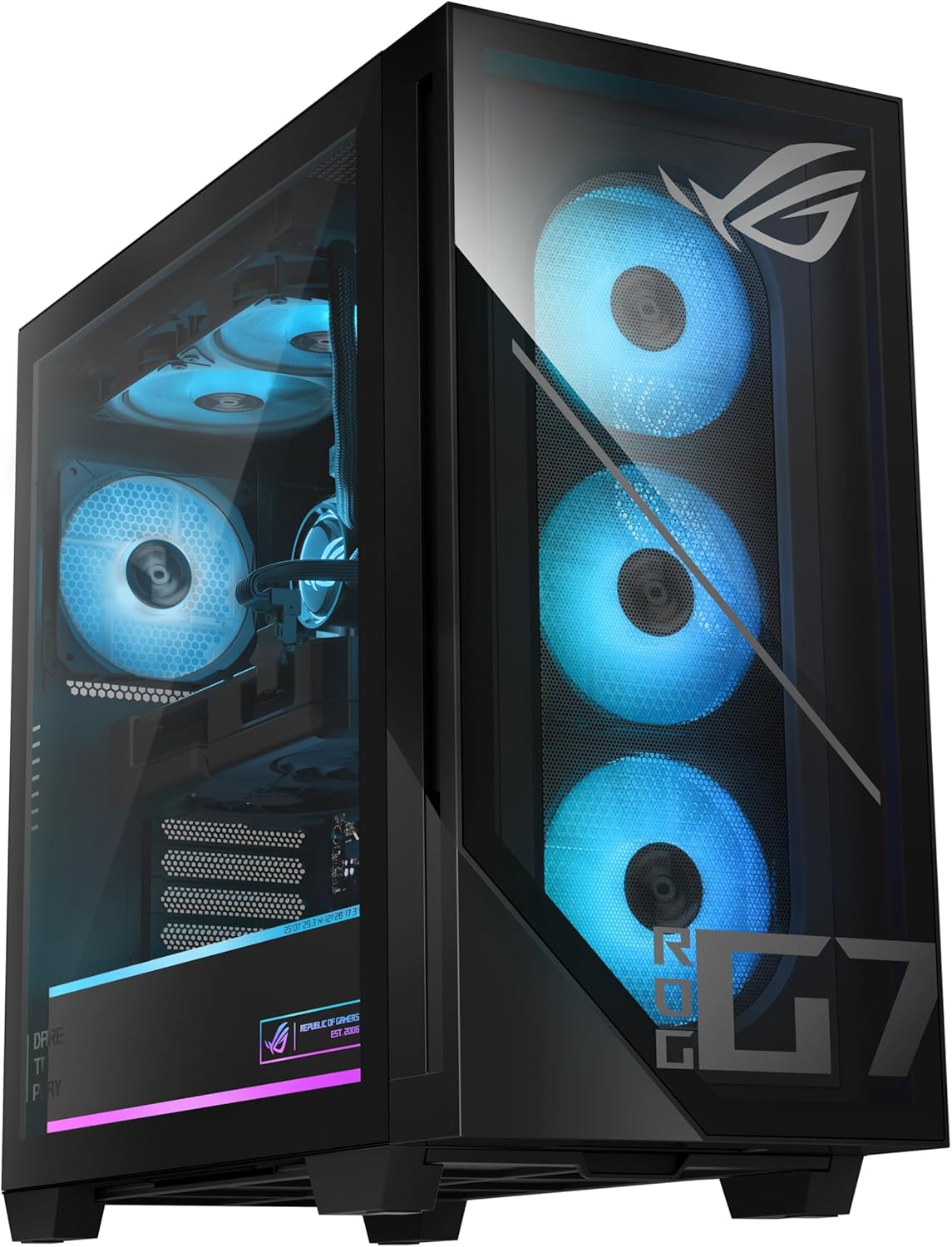
Quick Specs: Intel Core Ultra 7 265F (30MB L3 cache) | NVIDIA GeForce RTX 5070 12GB | 16GB DDR5 | 1TB M.2 PCIe 4.0 NVMe SSD | 58L Tool-Less Dual-Glass Case | Wi-Fi 6 & 2.5GbE | Price Tier: Upper tier (under $1,900)
Audit Score: 8.6 / 10
- GPU & VRAM Headroom (35%): 9.2 / 10
- CPU & Upgrade Runway (25%): 9.0 / 10
- Memory & Storage Balance (20%): 7.4 / 10
- Cooling, Connectivity & Support (20%): 8.8 / 10
Builders who plan to swap cooling, drives, or graphics cards over time will love ASUS’s 58-liter ROG G700 enclosure. Its dual-glass chassis opens completely tool-less, packs quad fans behind removable dust filters, and easily swallows oversized triple-slot GPUs. Under the hood, you get the exact same Intel Core Ultra 7 265F and RTX 5070 12GB pairing found in the Alienware Aurora (#2), alongside 2.5Gbps Ethernet and bundled Aura Sync peripherals.
Unfortunately, ASUS stops at 16GB of DDR5 in an upper-tier bracket where both the MSI Codex Z2 (#1) and Alienware Aurora (#2) ship 32GB preinstalled. Early buyer feedback on this newer SKU is promising, yet that missing 16GB stick keeps the ROG G700 in fourth place until you factor in a quick aftermarket memory bump.
Buyer Verification Alert: This G700TF-DS774 variant ships with 16GB DDR5 rather than 32GB—confirm whether you want to budget an extra matching 16GB or 32GB DDR5 kit if running heavy creative apps.
Pros
- Spacious 58L tool-less dual-glass ROG case with quad-fan airflow and dust filters
- Intel Core Ultra 7 265F, RTX 5070 12GB, 2.5Gb Ethernet, and bundled RGB keyboard/mouse
Cons
- Only 16GB DDR5 RAM included in an upper-tier bracket
- Newer listing with a limited customer feedback history so far
Verdict: Buy it if a huge, tool-less ROG showcase tower with Core Ultra 7 + RTX 5070 horsepower matters most. Skip it if you want 32GB DDR5 and 2TB SSD out of the box (#1 MSI Codex Z2). Upgrade roadmap: Expanding to 32GB DDR5 takes under five minutes without a screwdriver.
5. Skytech Crystal Series (Ryzen 7 7700 / RTX 5060 Ti) — Best High-Cache AM5 Esports Build
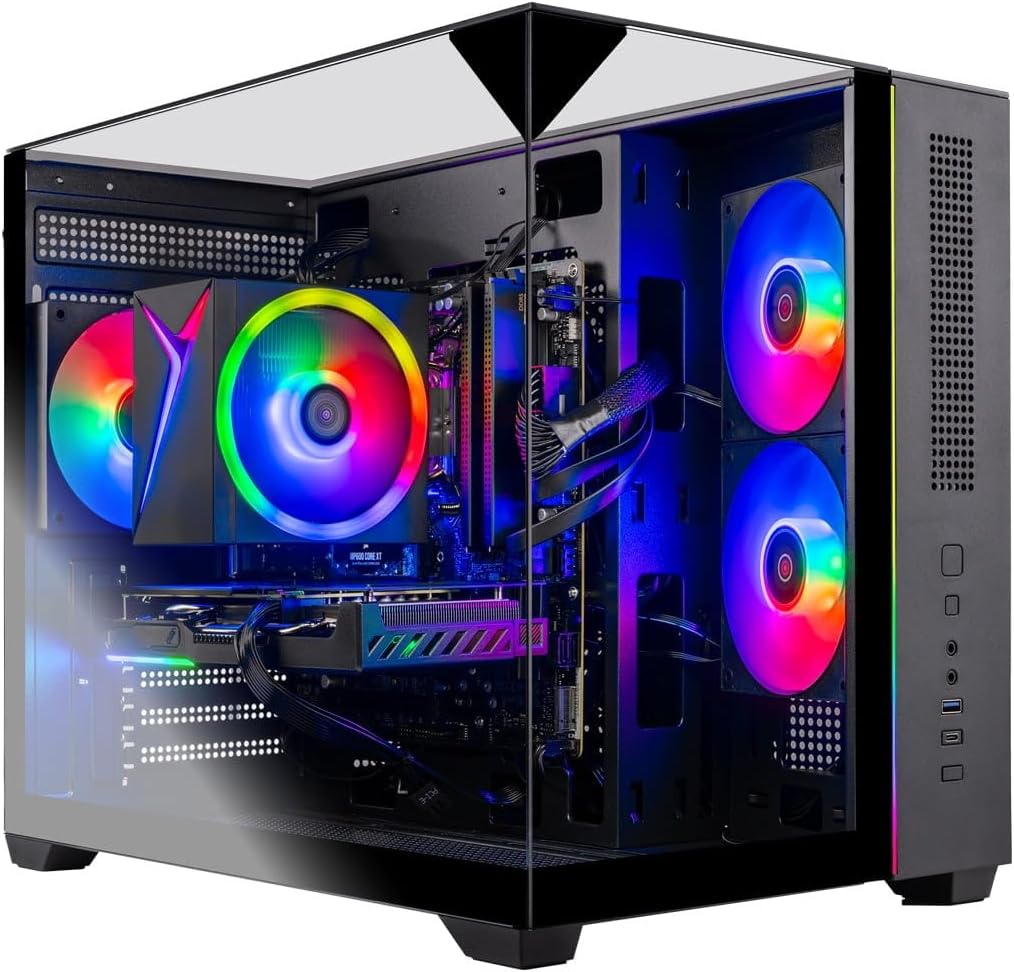
Quick Specs: AMD Ryzen 7 7700 (up to 5.3 GHz, 32MB L3, AM5) | NVIDIA GeForce RTX 5060 Ti 8GB GDDR7 | 32GB DDR5-5600 | 1TB NVMe M.2 SSD | 650W 80+ Gold PSU | Wi-Fi 5 | Price Tier: Mid-upper tier (under $1,700)
Audit Score: 8.5 / 10
- GPU & VRAM Headroom (35%): 8.2 / 10
- CPU & Upgrade Runway (25%): 9.1 / 10
- Memory & Storage Balance (20%): 8.8 / 10
- Cooling, Connectivity & Support (20%): 8.1 / 10
While several mid-priced AM5 systems lean on the cut-down Ryzen 7 8700F, Skytech fits its triple-glass Crystal rig with a full-cache Ryzen 7 7700 (32MB L3 cache boosting to 5.3 GHz), paired with 32GB DDR5-5600, a 1TB NVMe M.2 drive, and a documented 650W 80+ Gold power supply. Over a thousand verified Amazon buyers back this US-assembled tower for steady temperatures and clean out-of-the-box setup.
Its limitation is proximity to RTX 5070 territory: for roughly $150 more, the MSI Codex Z2 (#1) upgrades both GPU class (RTX 5070 12GB) and SSD space (2TB). Skytech also settles for Wi-Fi 5 (802.11ac), making Ethernet preferable for competitive play.
Pros
- Full 32MB L3 cache Ryzen 7 7700 plus 32GB DDR5-5600 keeps esports 1% lows tight
- 650W 80+ Gold PSU and high verified buyer satisfaction across a large user base
Cons
- 8GB RTX 5060 Ti trails 12GB RTX 5070 rigs sitting just slightly higher in spend
- Ships with 802.11ac Wi-Fi 5 instead of Wi-Fi 6 or 6E
Verdict: Buy it if full-cache AM5 CPU speed, 32GB DDR5-5600, and an 80+ Gold PSU matter more than stepping up to an RTX 5070. Skip it if stretching slightly gets you the #1 MSI Codex Z2. Upgrade roadmap: That 650W Gold PSU leaves clean headroom for a mid-high GPU swap later.
6. MSI Codex R2 Gaming Desktop (D14NVP5-613US — RTX 5070) — Best RTX 5070 Wi-Fi 6E Alternative

Quick Specs: Intel Core i5-14400F (20MB cache) | NVIDIA GeForce RTX 5070 12GB | 32GB DDR5 | 1TB NVMe SSD | Dedicated RGB Air Cooler | Wi-Fi 6E | Price Tier: Upper tier (under $1,850)
Audit Score: 8.3 / 10
- GPU & VRAM Headroom (35%): 9.2 / 10
- CPU & Upgrade Runway (25%): 7.5 / 10
- Memory & Storage Balance (20%): 8.4 / 10
- Cooling, Connectivity & Support (20%): 8.1 / 10
If your home router broadcasts on the uncluttered 6GHz band and the MSI Codex Z2 (#1) temporarily sells out, the Intel-based MSI Codex R2 delivers the same RTX 5070 12GB frame buffer and 32GB DDR5 memory inside a four-fan ATX tower equipped with Wi-Fi 6E. At 1440p and 4K where GPU shading does the heavy lifting, the RTX 5070 keeps frame rates high and responsive.
Placed directly next to the MSI Codex Z2 (#1) in virtually the same price tier, however, the Codex R2 falls short on both processor longevity and drive capacity: its Core i5-14400F sits on end-of-socket LGA1700 and loses multi-core speed against the Ryzen 7 8700F, while storage drops from 2TB to 1TB.
Buyer Verification Alert: Inventory moves tightly on this configuration; always compare live cart availability against the higher-value MSI Codex Z2 (#1) before checking out.
Pros
- RTX 5070 12GB and 32GB DDR5 with standard off-the-shelf MSI parts
- Wi-Fi 6E support for faster 6GHz wireless gaming
Cons
- Core i5-14400F trails Ryzen 7 8700F and Core Ultra 7 265F in CPU-heavy tasks at similar spend
- 1TB SSD instead of 2TB, alongside mixed early buyer feedback
Verdict: Buy it as an RTX 5070 + Wi-Fi 6E backup if #1 MSI Codex Z2 is out of stock. Skip it whenever the Z2 is available at the same tier. Upgrade roadmap: Add a second M.2 NVMe SSD when your drive fills.
7. MSI Codex Z2 Gaming Desktop (A8NVM-671US — RTX 5060 Ti) — Best Budget AM5 Upgrade Base

Quick Specs: AMD Ryzen 7 8700F (AM5) | NVIDIA GeForce RTX 5060 Ti 8GB GDDR7 | 16GB DDR5 | 1TB M.2 NVMe SSD | 4-Fan Airflow Tower | USB Type-C | Price Tier: Value tier (under $1,350)
Audit Score: 8.6 / 10
- GPU & VRAM Headroom (35%): 8.3 / 10
- CPU & Upgrade Runway (25%): 8.8 / 10
- Memory & Storage Balance (20%): 8.4 / 10
- Cooling, Connectivity & Support (20%): 8.9 / 10
Sitting near the top of Amazon’s tower bestsellers, MSI’s RTX 5060 Ti variant of the Codex Z2 brings an AM5 Ryzen 7 8700F, 16GB DDR5, and a 1TB M.2 NVMe SSD down into the under-$1,350 bracket. That leaves massive breathing room inside a budget under $2,000 for peripherals or targeted future upgrades.
Choosing between this system and the CyberPowerPC Gamer Xtreme (#3) comes down to one clear fork: CyberPowerPC wins out-of-the-box multi-core productivity via its 20-core i7-14700F, whereas MSI wins long-term platform flexibility because the AM5 socket accepts future Ryzen CPUs seamlessly without swapping motherboards.
Pros
- Strong entry value under $1,350 for AM5 Ryzen 7 8700F plus Blackwell RTX 5060 Ti
- Four-fan airflow tower with standard ATX upgradability
Cons
- Ships with 16GB DDR5 instead of 32GB
- 8GB GPU VRAM caps heavy 4K texture presets compared with 12GB RTX 5070 rigs
Verdict: Buy it if you want the lowest entry price into an upgradeable AM5 Blackwell system. Skip it if you want 20-core productivity right away (#3 CyberPowerPC) or 32GB/RTX 5070 out of the box (#1 MSI Codex Z2). Upgrade roadmap: Add a matching 16GB DDR5 stick first for 32GB dual-channel capacity.
8. STORMCRAFT Sirius Gaming PC (Ryzen 7 8700F / RTX 5060 Ti) — Best Fast DDR5-6000 B650 Boutique Rig

Quick Specs: AMD Ryzen 7 8700F (AM5) | NVIDIA GeForce RTX 5060 Ti 8GB GDDR7 | 16GB DDR5-6000 RGB | 1TB PCIe 4.0 NVMe SSD | AMD B650 Chipset & 650W 80+ Gold PSU | Price Tier: Mid tier (under $1,650 with Prime promo)
Audit Score: 8.1 / 10
- GPU & VRAM Headroom (35%): 8.2 / 10
- CPU & Upgrade Runway (25%): 8.7 / 10
- Memory & Storage Balance (20%): 7.7 / 10
- Cooling, Connectivity & Support (20%): 8.0 / 10
California-assembled STORMCRAFT discloses component grades better than most small-batch builders: its Sirius model explicitly pairs an AMD B650 chipset board with fast 6000MHz RGB DDR5, a PCIe 4.0 NVMe drive, and a 650W 80+ Gold PSU. When Prime promotional pricing drops it under $1,650, it gives boutique shoppers clean cable management and bundled peripherals.
Even with Prime savings, however, the MSI Codex Z2 (#7) offers the same core Ryzen 7 8700F and RTX 5060 Ti pairing for substantially less, while Skytech Crystal (#5) delivers 32GB RAM and a full-cache Ryzen 7 7700 in roughly the same mid-upper bracket.
Buyer Verification Alert: Check active Amazon Prime pricing before buying—non-Prime list pricing on this configuration can cross over $2,000, making it uncompetitive against RTX 5070 systems.
Pros
- Fast 6000MHz DDR5, documented B650 board, PCIe 4.0 NVMe, and 650W 80+ Gold PSU
- California hand assembly with bundled keyboard and mouse
Cons
- Regular non-Prime list pricing climbs over $2,000
- 16GB RAM and 8GB VRAM trail #5 Skytech Crystal and #1 MSI Codex Z2
Verdict: Buy it only during Prime deal windows if B650 and DDR5-6000 transparency plus US boutique assembly appeal to you. Skip it outside promo pricing (#7 MSI Codex Z2 or #1 MSI Codex Z2 win cleanly). Upgrade roadmap: Add a second matching DDR5-6000 stick to reach 32GB.
Buying Guide: How to Choose the Best Prebuilt Gaming PC Under $2000
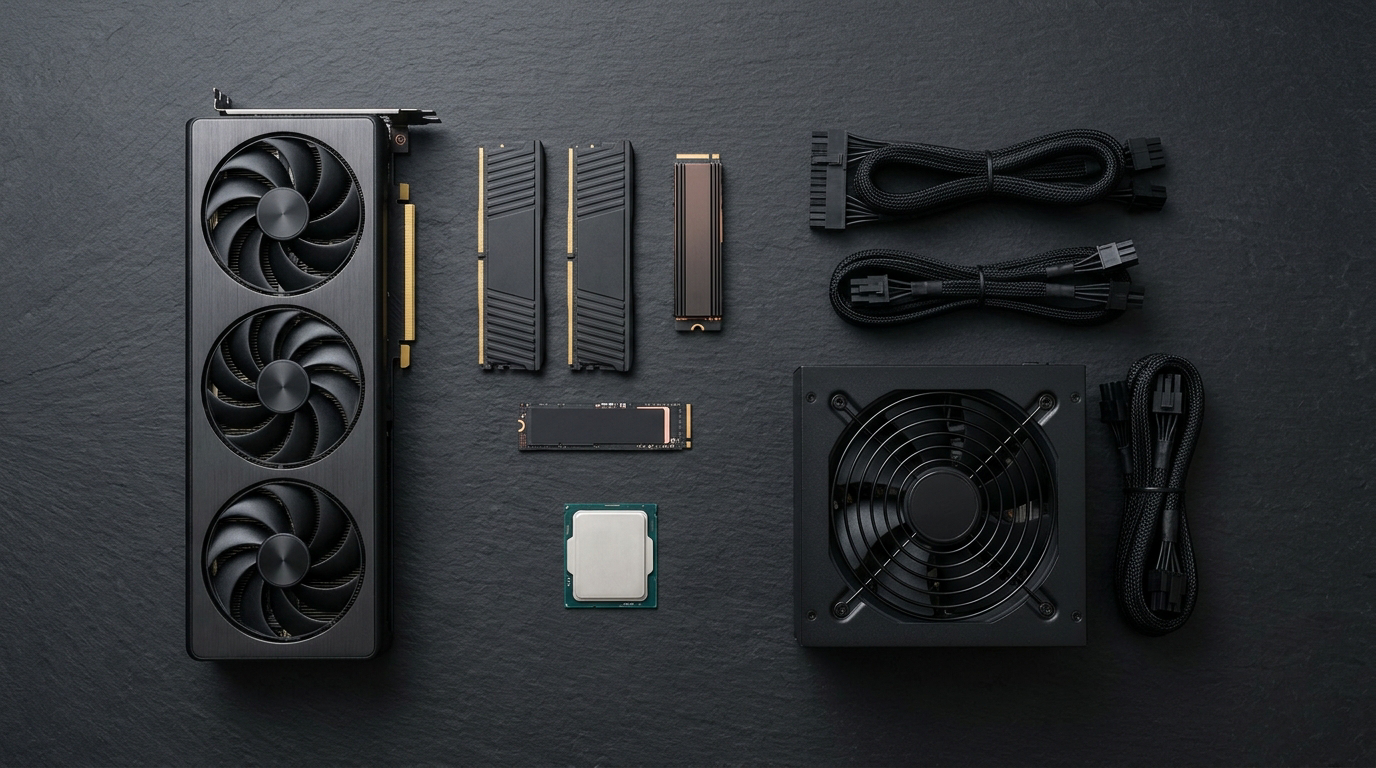
Once your budget stretches up to $2,000, small spec mismatches make a huge performance difference. Focus on four hardware checkpoints—plus realistic post-purchase upgrade costs—before picking the best prebuilt gaming PC under $2000 for your desk.
1. RTX 5070 12GB vs. RTX 5060 Ti 8GB for 1440p and 4K
The single biggest dividing line in this bracket sits between 8GB RTX 5060 Ti models (typically under $1,700) and 12GB RTX 5070 builds (under $1,950). Both share Blackwell GDDR7 memory and DLSS frame generation, yet stepping up to 12GB VRAM on an RTX 5070 prevents texture hitching at 1440p ultra and unlocks comfortable 4K gaming with DLSS enabled.
2. AM5 Longevity vs. Intel Core Ultra 7 and 14th-Gen Sockets
AMD’s AM5 platform (#1 MSI Codex Z2, #5 Skytech Crystal, #7 MSI Codex Z2, #8 STORMCRAFT Sirius) offers the longest forward CPU upgrade runway across Ryzen generations. Intel’s Core Ultra 7 265F (#2 Alienware, #4 ASUS ROG) leads in raw multi-core polish and cache out of the box, whereas 14th-Gen LGA1700 rigs (#3 CyberPowerPC, #6 MSI Codex R2) have reached end-of-socket.
3. Upgrade Roadmap & Hidden Ownership Costs
Factor small aftermarket tweaks into your total ownership plan. Buying a 16GB value rig like the CyberPowerPC i7-14700F (#3) or ASUS ROG G700 (#4) saves upfront cash or scores a better chassis, while adding a matching 32GB DDR5 kit or secondary 2TB NVMe SSD later keeps total spend cleanly under $2,000. Verify 80+ Gold PSU wattage (650W+) if you plan future GPU upgrades.
4. Prebuilt vs. Building Your Own Under $2,000
Building DIY used to beat prebuilts effortlessly, yet aggressive seasonal Amazon promos on systems like the RTX 5070 MSI Codex Z2 (under $1,850 with 32GB DDR5 and 2TB SSD) and CyberPowerPC i7-14700F + RTX 5060 Ti (under $1,350) leave almost zero DIY savings once you add a Windows 11 license. Buy prebuilt for full-system warranty convenience unless you specifically want boutique custom liquid cooling.
How We Audited, Scored & Filtered These Gaming PCs
Every prebuilt gaming PC under $2,000 here was verified in stock on Amazon US and audited across four weighted pillars totaling 100%, cross-checked against official NVIDIA, AMD, Intel, and Wi-Fi Alliance hardware specifications. Read our full Editorial Evaluation Methodology for details.
| Evaluation Criterion | Weight | What We Audited |
|---|---|---|
| GPU & VRAM Headroom | 35% | Blackwell shading tier, 8GB vs 12GB VRAM capacity, DLSS support, and 1440p/4K readiness. |
| CPU & Upgrade Runway | 25% | Core count, L3 cache size, AM5 vs LGA1851/LGA1700 socket longevity, and PCIe lane bandwidth. |
| Memory & Storage Balance | 20% | 32GB vs 16GB DDR5 allocation and 1TB vs 2TB NVMe SSD capacity per dollar tier. |
| Cooling, Connectivity & Support | 20% | Chassis airflow, 80+ Gold PSU clarity, Wi-Fi 7/6E networking, and OEM warranty terms. |
Models We Audited & Rejected (And Why)
- Skytech Gaming Desktop (Ryzen 7 5700 / RTX 5060 8GB / DDR4 — B0G2RDTD1Y): Pairs a last-generation AM4 Ryzen 7 5700 (DDR4, PCIe 3.0) and Wi-Fi 5 with a base RTX 5060 above faster AM5 DDR5 RTX 5060 Ti builds.
- HP OMEN Desktop (GTX 1660 Super 6GB / Ryzen 7 5700X): Legacy Turing GTX 1660 Super lacks DLSS and hardware ray tracing needed for modern 1440p gaming.
- Olialia Prebuilt Tower (RTX 3060 Ti / Ryzen 5 5500 / 512GB SSD): Older PCIe 3.0 CPU, modest 512GB drive, and smaller third-party support fall behind current RTX 50-series desktops.
- CyberPowerPC Gamer Xtreme (Core i5-13400F / RTX 5060 8GB — B0DW4BY993): Costs more than CyberPowerPC’s own 20-core Core i7-14700F + RTX 5060 Ti build (#3) while downgrading both CPU and GPU.
Continue Your Audit
- Parent hub: Best Prebuilt Gaming PC (2026): 9 Audited Amazon Builds for Every Budget
- Best RTX 5070 & RTX 5070 Ti Prebuilt Gaming PCs (2026): Audited 1440p Picks
- Best Radeon RX 9070 XT Prebuilt Gaming PCs (2026): Audited RDNA 4 Rigs
- Best 1440p Graphics Cards (2026): RTX 5070 Ti, RX 9070 XT & Mid-Range Picks
Frequently Asked Questions About Prebuilt Gaming PCs Under $2,000
Can a prebuilt gaming PC under $2,000 handle 1440p and 4K gaming?
Yes—especially RTX 5070 12GB systems, which sustain high-refresh 1440p ultra presets and 4K gaming at 60+ FPS using DLSS upscaling and frame generation. RTX 5060 Ti 8GB rigs shine at 1080p/1440p high settings, though heavy ray tracing at 4K favors stepping up to an RTX 5070.
Is 16GB or 32GB of DDR5 RAM better under $2,000?
32GB DDR5 is strongly preferred at this budget tier because modern AAA games, Discord, browser tabs, and capture tools quickly exceed 16GB. If you choose a higher-value 16GB rig like the ASUS ROG G700 or CyberPowerPC i7-14700F, adding a matching second kit is inexpensive.
Should I pick an RTX 5070 12GB build over an RTX 5060 Ti 8GB build?
Choose an RTX 5070 12GB desktop if your budget stretches to the upper tier under $1,950 and you play on a 1440p 165Hz+ or 4K display. The extra 4GB of VRAM and higher shading throughput keep high-resolution textures smooth much longer than 8GB cards.
Is AM5 Ryzen 7 or Intel Core Ultra 7 better for future upgrades?
AMD’s AM5 socket—used in the MSI Codex Z2, Skytech Crystal, and STORMCRAFT Sirius—gives the longest confirmed CPU upgrade runway across Ryzen generations. Intel’s Core Ultra 7 265F offers brisk multi-core speed today, while 14th-Gen LGA1700 rigs have reached end-of-socket.
What specs should I avoid when shopping under $2,000 on Amazon?
Skip older AM4 DDR4 builds (such as Ryzen 5 5500 or Ryzen 7 5700), legacy GTX 16-series or RTX 30-series GPUs priced above $1,200, and 16GB configurations sitting near $1,900 unless you plan an immediate memory upgrade.
Final Verdict: Which Prebuilt Gaming PC Under $2000 Should You Buy?
Overall, the best prebuilt gaming PC under $2000 is the MSI Codex Z2 (A8NVP-436US) because it puts an RTX 5070 12GB, 32GB DDR5, and a massive 2TB SSD onto an upgradeable AM5 motherboard while staying under $1,850. Buyers who prioritize Wi-Fi 7 and 1-year onsite service should step up to the Alienware Aurora ACT1250, while budget-focused shoppers can pocket serious savings with the 20-core CyberPowerPC Gamer Xtreme (i7-14700F / RTX 5060 Ti) well under $1,350.


