
On This Page
Affiliate Disclosure: As an Amazon Associate, The PC Audit (https://thepcaudit.com) earns from qualifying purchases at no extra cost to readers. Every clearance figure, thermal guideline, and SKU pairing in this guide is audited against official OEM specification sheets and PCI-SIG M.2 mechanical standards.
Modern gaming motherboards across AMD AM5 and Intel LGA 1851 ship wrapped in thick brushed-aluminum M.2 armor plates, while high-speed PCIe 5.0 and PCIe 4.0 NVMe drives are frequently sold in both bare and pre-heatsinked retail editions. Ignoring m2 ssd heatsink motherboard compatibility during parts selection triggers two costly headaches: stacked heatsinks that cannot physically latch underneath motherboard armor, and tall aftermarket coolers that collide directly with CPU tower fins or multi-slot graphics cards.
Direct Answer: Never stack a pre-installed SSD heatsink under motherboard M.2 armor. Always buy a bare M.2 2280 SSD for armored motherboard slots, peel every thermal pad liner, match rubber support spacers strictly to single-sided PCBs, and reserve tall factory heatsinks only for unarmored secondary slots or boards lacking built-in thermal guards.
Choosing the right cooling interface is just as critical as picking between PCIe 4.0 and PCIe 5.0 throughput in our Best Gaming NVMe SSDs pillar hub. Because modern 2TB and 4TB drives vary across single-sided and double-sided PCB layouts, controller heat loads, and M.2 slot routing, matching your storage SKU to your board’s exact armor geometry protects both sustained speeds and warranty coverage.
Quick Reference: M.2 SSD Heatsink & Motherboard Armor Compatibility Matrix
Use this compatibility reference table before adding an M.2 2280 NVMe drive or motherboard to your cart. Every scenario below reflects mechanical envelope rules established in the PCI-SIG PCI Express & M.2 specifications and current 2026 AM5 and LGA 1851 board layouts.
| SSD Cooling Configuration | Typical Z-Height (Above PCB) | Armored M2_1 Slot (Primary CPU) | Under-GPU Slots (M2_2 / M2_3) | Dual-Tower Air Cooler Overlap | Recommended Pairing Rule |
|---|---|---|---|---|---|
Bare M.2 2280 PCB (e.g., Samsung 9100 PRO bare, WD_BLACK SN850X bare, Crucial T705 SSD3) | ~2.2–3.7 mm (flat PCB + thin foil label) | 100% Compatible (mates cleanly to board armor) | 100% Compatible (fits flush under GPU shrouds) | Zero Conflict (relies on motherboard armor height) | Default pick for B850, X870, X870E, B860 & Z890 boards |
| Slim Console-Spec Heatsink (e.g., Samsung 990 PRO Heatsink, SN850X Heatsink) | ~8.2–10.3 mm total stack | Leave Board Armor Off (or remove board plate) | Fits Most ATX Boards (verify backplate clearance) | Rare Conflict (check low-slung front overhang) | Use only on unarmored B650/budget slots or PS5 consoles |
Tall Finned / Active Gen 5 Tower (e.g., Crucial T705 SSD5 at 21.08 mm, MP700 PRO Air) | ~18–23+ mm vertical profile | Remove Board Armor (tool-less latches stay detached) | Severe Interference (blocks 3-slot GPU insertion) | High Risk (collides with 140 mm tower heatpipes) | Pair strictly with AIO liquid coolers on boards lacking Gen 5 armor |
| Double-Sided 4TB/8TB Bare Drive (NAND chips on top & bottom) | ~3.5–3.88 mm PCB thickness | Verify Backplate Pad (omit extra rubber spacer) | Verify Bottom Pad (avoid bowing PCB downward) | Zero Conflict (uses integrated board armor) | Follow board manual’s double-sided pad diagram strictly |
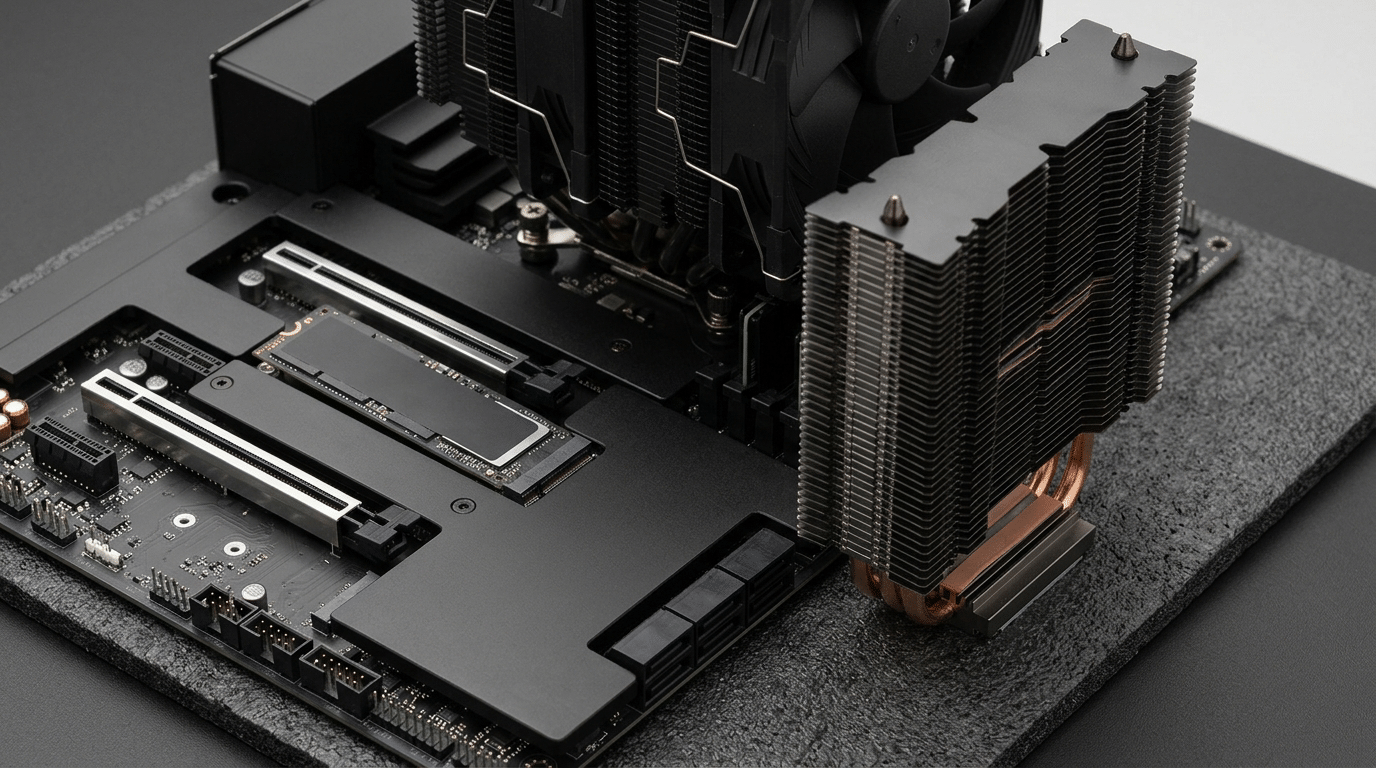
1. Why Stacking Two Heatsinks Fails: The Physics of Double-Armor Conflicts
The single most common storage assembly error occurs when a builder purchases a factory-heatsinked NVMe SSD and tries to install it underneath a motherboard’s pre-installed M.2 armor plate. In 2026, almost every mainstream and enthusiast platform—including Best AM5 Motherboards for Gaming across B850, X870, and X870E—ships with machined aluminum blocks covering at least the primary CPU-wired M.2 socket, and often all three or four sockets.
Stacking a motherboard armor plate on top of an SSD that already carries a pre-installed heatsink fails for three distinct mechanical and thermal reasons:
- Zero Mechanical Clearance for Tool-Less Latches: Motherboard armor plates incorporate fixed standoffs and spring-loaded tool-less mechanisms—such as GIGABYTE’s EZ-Latch Click on the B850 AORUS Elite WIFI7 or ASUS’s M.2 Q-Release on X870 boards. Those latches calibrate for a bare 2.2 mm to 3.7 mm PCB compressed against a 1.0 mm or 1.5 mm silicone pad. Adding an 8 mm to 21 mm factory SSD cooler makes closing the armor impossible without bending the hinge or stripping threads.
- Increased Thermal Boundary Resistance: Even if you forced two flat metal surfaces together using longer screws, trapping air pockets and mismatched thermal pad layers between an aluminum SSD cover and an aluminum motherboard plate degrades heat conduction rather than improving it. Heat must cross extra interface boundaries before reaching ambient chassis airflow.
- Warranty-Voiding Disassembly Risks: Builders who discover the conflict mid-build sometimes attempt to pry a factory heatsink off a retail drive. According to Samsung Semiconductor’s 9100 PRO product documentation, pre-installed heatsink editions are permanently bonded assemblies; prying them apart risks tearing BGA NAND packages or controller solder joints off the thin fiberglass PCB and immediately voids the manufacturer’s 5-year warranty.
Compatibility Rule #1: Check your motherboard’s M.2 Thermal Guard layout before clicking buy. If the slot you plan to occupy includes an aluminum armor bar, order the bare non-heatsink SSD SKU—look for model suffixes like
MZ-VAP2T0B/AM(Samsung bare) orCT2000T705SSD3(Crucial bare) rather than heatsink suffixes.
2. Vertical Z-Height Conflicts: CPU Air Coolers, GPUs & Mini-ITX Boards
Removing motherboard armor completely to make room for a factory-heatsinked drive seems like an easy workaround, until you inspect the tight three-dimensional tolerances surrounding modern motherboards. Every M.2 socket sits inside a different structural neighborhood of the chassis.
Primary M2_1 Slot vs. Dual-Tower CPU Air Coolers
On virtually all ATX and micro-ATX motherboards, the primary CPU-direct PCIe 5.0 x4 slot (M2_1 or M2A_CPU) sits wedged directly between the bottom edge of the CPU socket keep-out zone and the top edge of the primary reinforced PCIe 5.0 x16 graphics card slot. If you cool your processor with an all-in-one (AIO) liquid cooler, the pump block footprint rarely extends downward into the M2_1 corridor, leaving generous overhead space.
Dual-tower air coolers tell a very different story. Wide dual-140 mm or dual-120 mm fin stacks frequently hover over the upper PCIe edge, leaving only 12 mm to 16 mm of vertical room above an M.2 socket unless the cooler uses an asymmetric offset baseplate. While slim motherboard armor blocks stay comfortably below that threshold, tall flagship PCIe 5.0 SSD heatsinks—such as Crucial’s 21.08 mm T705 heatsink edition (CT2000T705SSD5) or active fan-cooled assemblies like the Corsair MP700 PRO Air Cooler—shoot far upward into lower aluminum cooling fins or bottom heatpipe bends. Even if the SSD installs before mounting the CPU tower, a colliding heatsink can physically prevent you from seating the graphics card’s top backplate cleanly.
Secondary Under-GPU M.2 Slots vs. 3.5-Slot Graphics Cards
Secondary and tertiary M.2 sockets (M2_2, M2_3, or chipset-linked M2D_SB bays) normally run parallel directly beneath the primary PCIe x16 slot. Modern Blackwell RTX 50-series and RDNA 4 RX 9070 XT cards span 2.5 to 3.5 expansion slots thick, meaning their lower shroud or copper heatpipe housing sweeps flush across the motherboard surface roughly 8 mm to 12 mm off the PCB.
Motherboard manufacturers sculpt secondary M.2 armor specifically to stay recessed beneath that GPU envelope—typically keeping total height under 9 mm. Installing an aftermarket finned SSD heatsink or a tall Gen 5 factory heatsink into an under-GPU slot makes locking a triple-slot graphics card into the PCIe x16 latch physically impossible. Worse, even a narrow 10.31 mm console-spec heatsink on a high-capacity 4TB drive can press upward against thick GPU backplates or restrict intake airflow beneath axial cooler fans.
Mini-ITX Stacked Daughterboards & Rear-PCB Sockets
Small form factor (SFF) motherboards such as the ASRock B850I Lightning WiFi or ASUS ROG Strix B850-I Gaming WiFi cram dual M.2 sockets onto a tiny 170 × 170 mm footprint by using either multi-story front audio/M.2 riser sandwiches above the PCIe x16 slot or a bare rear-facing M.2 socket glued to the back of the motherboard tray. Neither location tolerates tall third-party heatsinks:
- Front Stacked Riser Cards: Built around strict custom-molded VRM/M.2 shrouds; only bare M.2 2280 drives fit inside the aluminum stack.
- Rear Motherboard M.2 Sockets: Typically face the steel motherboard tray cutout with just 5 mm to 8 mm of cable-chamber clearance. Adding even a slim 8.9 mm SSD heatsink can short or press into chassis standoffs, whereas a flat 1 mm graphene strip or thin low-profile copper foil shim fits safely.
3. Single-Sided vs. Double-Sided M.2 PCBs & Thermal Pad Thickness
Physical compatibility is not limited to top-side Z-height; what happens underneath the 0.8 mm fiberglass SSD PCB matters equally for structural longevity and heat transfer. Under PCI-SIG mechanical nomenclature, M.2 modules fall into two physical population classes:
- Single-Sided M.2 2280 Drives (S1–S3): Every active component—the NVMe controller, DRAM cache chip, PMIC, and NAND flash packages—is soldered exclusively on the top side of the PCB. Most 1TB and 2TB gaming sweet-spot drives, including the bare WD_BLACK SN850X 2TB, Samsung 990 PRO 2TB, Samsung 9100 PRO 2TB, and Crucial T500 2TB, use clean single-sided layouts with flat solder mask underneath.
- Double-Sided M.2 2280 Drives (D1–D3): To pack 4TB or 8TB of capacity onto a compact 22 × 80 mm strip, manufacturers mount half the NAND flash packages (and occasionally the DRAM IC) on the underside of the PCB.
The Thermal Pad & Rubber Spacer Trap
Look inside the accessory pouch of any modern B850, X870, or Z890 motherboard and you will notice small square black rubber blocks alongside extra strips of gray or blue silicone thermal pads (commonly 0.5 mm, 1.0 mm, or 1.5 mm thick). Here is why those tiny rubber spacers cause catastrophic PCB flex when misapplied:
| Drive PCB Topology | Motherboard Backplate Thermal Pad Present? | Bundled Rubber Support Spacer Action | Additional Top/Bottom Pad Rule | Mechanical Risk If Installed Incorrectly |
|---|---|---|---|---|
| Single-Sided SSD (1TB / 2TB Standard) | Yes (bottom heatsink plate included) | Install Rubber Spacer in the center M.2 slot cutout beneath the PCB | Keep standard single-sided thermal pad stack (often 1.5 mm or 2-layer pad per manual) | Without spacer, heavy top armor bends the thin single-sided PCB into a downward arc |
| Single-Sided SSD (1TB / 2TB Standard) | No (bare motherboard PCB beneath slot) | Install Rubber Spacer at mid-span M.2 support hole | Ensure top armor pad compresses slightly against controller & NAND height step | Controller sits slightly lower than NAND on some drives; verify full silicone impression |
| Double-Sided SSD (4TB / 8TB High Capacity) | Yes (bottom heatsink plate included) | REMOVE Rubber Spacer completely; do not install underneath NAND chips | Peel only single thin bottom pad (never stack thick pads); keep single top pad | Stacking rubber spacer + underside NAND chips bows the PCB upward like a bridge when latched |
When a motherboard’s dual-sided thermal armor clamps down onto a double-sided 4TB SSD with an extra single-sided rubber spacer left underneath, the midpoint of the SSD gets pushed upward by 1.2 mm to 1.5 mm while the standoff end locks down at the rear. Over months of thermal expansion and contraction from 35°C idle to 75°C under load, PCB bowing places continuous shear fatigue on delicate surface-mount BGA solder balls—the exact failure mode that leads to intermittent drive disappearance or unrecoverable controller disconnects.
Checking Pad Height Step-Downs & Protective Plastic Liners
Before snapping any tool-less M.2 armor plate shut, perform two quick tactile audits:
- Peel Every Clear Film Liner: Almost every motherboard armor plate ships with a transparent protective plastic strip covering the tacky silicone thermal pad—and dual-sided armor slots include a second liner on the lower motherboard-side pad. Leaving that thin PET film attached turns your aluminum heatsink into an insulated oven, trapping heat directly over the controller.
- Check Controller-to-NAND Height Equality: On certain M.2 2280 SSDs, the metallic controller package sits roughly 0.2 mm to 0.4 mm lower than surrounding stacked TLC NAND dies. Soft, compliant 1.0–1.5 mm silicone pads (rated around 3.0 to 6.0 W/m·K) compress neatly across both heights. After installing and removing the heatsink once during dry-fit, confirm you see clean, uniform indentation marks over both the controller and the NAND packages—if the controller surface looks untouched, add a 0.5 mm pad shim exclusively above the controller or consult the board’s pad thickness note.
4. PCIe 4.0 vs. PCIe 5.0 Thermal Realities & Tool-Less Armor Design
Thermal urgency separates PCIe 4.0 x4 gaming drives from PCIe 5.0 x4 enthusiast drives by a wide margin. As detailed in our Samsung 9100 Pro vs. WD Black SN850X head-to-head audit, PCIe 4.0 x4 drives deliver 7,000 to 7,450 MB/s sequential throughput with zero FPS disadvantage and within 0 to 2 seconds of identical game load times compared to PCIe 5.0 flagships.
That bandwidth gap changes everything for heatsink selection:
- PCIe 4.0 x4 DRAM + TLC Drives (~5W–8W Peak): Drives like the WD_BLACK SN850X and Samsung 990 PRO run cool enough during normal Windows operation and gaming asset streaming that virtually any flat 4 mm to 8 mm aluminum motherboard armor bar prevents thermal throttling effortlessly. Even under sustained DirectStorage decompression or 100GB game patching, slim secondary motherboard plates keep controller temperatures comfortably in check.
- PCIe 5.0 x4 Flagships (~9W–12W+ Peak): Pushing 12,400 MB/s to 14,900 MB/s requires massive controller processing power. While newer 5nm controllers such as Samsung’s
Prestocontroller on the 9100 PRO operate noticeably cooler than early-generation 12nm Gen 5 designs, Phison E26 and Gen 5 flagship controllers still hit thermal throttle thresholds (typically ~75°C–82°C composite/controller limits) quickly if run bare without mass and surface area. On modern boards like the GIGABYTE B850 AORUS Elite WIFI7 or ASUS TUF Gaming X870-PLUS WiFi, the oversized sculpted primaryM2_1Thermal Guard armor uses tall extruded aluminum fins and dual-sided contact specifically engineered to tame Gen 5 heat without spilling into CPU air-cooler or GPU boundaries.
Myth vs. Engineering Reality: M.2 Cooling & Slot Routing
| Common Builder Myth | Verified Engineering Reality |
|---|---|
| Myth 1: “Factory SSD heatsinks always outperform motherboard armor.” | Reality: Modern ATX B850, X870, and X870E primary M.2 armor blocks often pack more aluminum thermal mass—plus dual-sided backplate pads—than slim retail console heatsinks. Removing heavy board armor for a thin aftermarket strip can actually raise sustained controller temperatures. |
| Myth 2: “Any M.2 slot with armor delivers full CPU speed without penalties.” | Reality: Motherboard armor only addresses heat, not PCIe lane routing. On several X870 and X870E boards, populating secondary CPU M.2 slots (M2B_CPU or M2_2) halves your primary graphics card slot from PCIe 5.0 x16 down to x8—always audit the board’s block diagram, as highlighted in our Best AMD B850 Motherboards guide. |
| Myth 3: “Copper foil stickers alone can cool a PCIe 5.0 NVMe SSD.” | Reality: Thin graphene or copper labels spread heat laterally by a few degrees on low-power Gen 3/Gen 4 HMB drives, but offer nowhere near enough thermal mass or fin surface area to stop sustained write throttling on 14,000+ MB/s Gen 5 controllers inside a closed gaming chassis. |
5. Actionable 6-Step Buyer & Builder Compatibility Checklist
Before installing your NVMe drives or ordering storage alongside a new platform, execute these six quick hardware audits to eliminate physical interference and thermal throttling:
- 1. Inspect Motherboard M.2 Armor Coverage First: Open the motherboard specification page and count how many M.2 slots include factory heatsinks. Most mid-range B850 and B860 boards cover
M2_1andM2_2(or all three slots), meaning bare M.2 2280 drives are the correct purchase. - 2. Match Drive Suffixes to Slot Needs: Only order a factory-heatsinked SKU (like Crucial
SSD5or SamsungC/AM) if you are populating an unarmored motherboard slot, an older B650 entry board lacking thermal covers, or a PlayStation 5 expansion bay. - 3. Audit CPU Air Cooler Overhang Over
M2_1: If pairing a massive dual-tower air cooler with an ATX or mATX board, avoid tall 20 mm+ standalone SSD heatsinks in the top CPU slot; rely exclusively on the low-profile motherboard armor instead. - 4. Verify Single- vs. Double-Sided Rubber Spacers: Check the back of your SSD before mounting. Install the motherboard’s rubber support pad for single-sided 1TB/2TB drives, and remove extra spacer blocks before seating double-sided 4TB/8TB drives onto bottom thermal pads.
- 5. Peel Both Top and Bottom Silicone Liners: Confirm every transparent plastic protector is peeled off both the upper heatsink pad and any lower backplate pad prior to locking tool-less latches (
EZ-Latch ClickorQ-Latch). - 6. Cross-Check PCIe Lane-Sharing Before Using Secondary Slots: On X870/X870E boards with USB4 controllers sharing CPU lanes, place your OS drive in the unshared primary
M2_1slot and additional game drives in chipset-routedM2D_SBslots to keep your GPU running at full x16 bandwidth.
Recommended Verified Hardware for Zero-Conflict Fitment
To eliminate guesswork when building a 2026 gaming rig, pair bare M.2 2280 DRAM+TLC drives directly with an AM5 motherboard engineered around full-coverage, tool-less M.2 Thermal Guard heatsinks and zero PCIe x16 lane compromises. Below are four verified Amazon US components matched specifically for clean m2 ssd heatsink motherboard compatibility.
1. WD_BLACK 2TB SN850X NVMe SSD (Bare M.2 2280 PCIe 4.0 Sweet Spot)

Fitment & Thermal Role: The bare-PCB edition of the 2TB WD_BLACK SN850X remains our top gaming value pick because its single-sided M.2 2280 profile drops straight under any motherboard armor plate—whether in a primary slot or a tight under-GPU M2_2 socket. Dedicated DRAM cache and TLC NAND maintain consistent random 4K IOPS and DirectStorage responsiveness while drawing low enough power that standard flat aluminum motherboard covers keep temperatures comfortably controlled.
- Interface & Speed: PCIe 4.0 x4 NVMe | Up to 7,300 MB/s Sequential Read
- Mechanical Profile: Bare Single-Sided M.2 2280 (fits 100% of motherboard armor & SFF rear slots)
- Best Slot Placement: Primary
M2_1or secondary under-GPU chipsetM2_2/M2_3slots
2. Samsung SSD 9100 PRO 2TB PCIe 5.0 x4 (Bare Enthusiast Gen 5 Edition)

Fitment & Thermal Role: Specifically verify model code MZ-VAP2T0B/AM—Samsung’s bare non-heatsink variant of its flagship PCIe 5.0 x4 drive. Powered by Samsung’s power-efficient 5nm Presto controller, V-NAND TLC, and dedicated DRAM cache, it delivers up to 14,700 MB/s read and 13,400 MB/s write throughput for 8K media workflows and large AI datasets while mating cleanly underneath sculpted B850, X870, and Z890 primary CPU M.2 armor without tool-less latch obstruction.
- Interface & Speed: PCIe 5.0 x4 NVMe | 14,700 MB/s Read / 13,400 MB/s Write
- Mechanical Profile: Bare M.2 2280 (no factory cooler attached; avoids double-armor interference)
- Thermal Requirement: Install strictly in an armored primary PCIe 5.0 M.2 slot with fresh silicone TIM contact
3. Crucial T705 2TB PCIe Gen5 NVMe SSD (Bare Non-Heatsink CT2000T705SSD3)
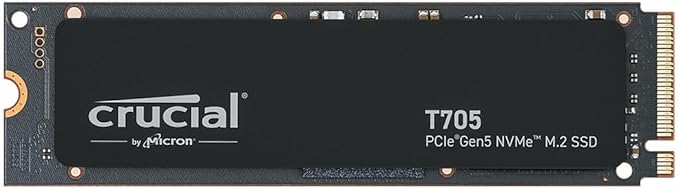
Fitment & Thermal Role: While Crucial’s heatsink-equipped T705 edition towers 21.08 mm above the motherboard and routinely fouls wide dual-tower CPU air coolers, the bare CT2000T705SSD3 module keeps full 14,500 MB/s read and 12,700 MB/s write workstation speed in a clean M.2 2280 footprint. Because Gen 5 Phison controllers generate substantial heat under sustained transfers, pair this bare drive exclusively with a heavy primary motherboard armor block featuring both top and bottom thermal pads.
- Interface & Speed: PCIe 5.0 x4 NVMe | 14,500 MB/s Read / 12,700 MB/s Write (TLC + DRAM)
- Mechanical Advantage: Bare
SSD3SKU eliminates the 21.08 mm tower cooler collision risk ofSSD5 - Cooling Mandate: Never run bare without motherboard Thermal Guard armor installed and film peeled
4. GIGABYTE B850 AORUS Elite WIFI7 (Tool-Less EZ-Latch Click Armor & Unshared M.2 Layout)

Fitment & Thermal Role: Sitting in the high-value $200–$250 tier (~$230 Launch MSRP), the GIGABYTE B850 AORUS Elite WIFI7 illustrates ideal modern M.2 armor ergonomics. All three M.2 sockets—one CPU PCIe 5.0 x4 slot, one CPU PCIe 4.0 x4 slot, and one chipset PCIe 4.0 x4 slot—sit beneath tool-less EZ-Latch Click M.2 heatsinks and quick-latch drive anchors that stay flush beneath thick triple-slot GPUs and dual-tower air coolers while preserving full PCIe 5.0 x16 GPU bandwidth with zero lane sharing.
- M.2 Storage Layout: 3x M.2 (1x PCIe 5.0 x4 + 2x PCIe 4.0 x4) with zero GPU x8 lane sharing
- DIY Armor Mechanics: Tool-less EZ-Latch Plus M.2 retention + EZ-Latch Click Thermal Guard heatsinks
- Platform Specs: AM5 ATX | 14+2+2 60A DrMOS VRM | Wi-Fi 7 & 2.5GbE LAN | 5-Year Warranty
Editorial Compatibility Verdict
Smart m2 ssd heatsink motherboard compatibility boils down to avoiding redundant aluminum. On any modern B850, X870, X870E, B860, or Z890 motherboard equipped with integrated M.2 Thermal Guards, purchase bare non-heatsink NVMe SSDs—such as the WD_BLACK SN850X for 95% of gaming rigs or the bare Samsung 9100 PRO for Gen 5 creator workstations—peel every silicone liner cleanly, and verify rubber spacer rules before clicking the armor shut.
How We Audited This Guide
- Processors, motherboards, memory, and storage were compared by socket longevity, chipset lane allocation, VRM design, DDR5 EXPO/XMP support, and PCIe generation.
- Every specification claim was cross-checked against official OEM datasheets, platform vendor documentation, and published industry standards (PCI-SIG, JEDEC, VESA, Intel ATX) rather than marketplace listing copy.
- Recommendations were evaluated against our weighted audit rubric and documented compatibility rules; we do not publish fabricated FPS, thermal, or acoustic numbers.
Frequently Asked Questions
Should I buy an M.2 SSD with a heatsink if my motherboard already has armor?
No. Always buy the bare non-heatsink SSD version when installing into an armored motherboard slot. Pre-installed SSD heatsinks physically block motherboard M.2 Thermal Guards and tool-less latches from closing, while attempting to pry a bonded factory cooler off risks damaging NAND chips and voiding your drive warranty.
Can a PCIe 4.0 or PCIe 5.0 SSD run safely without any heatsink?
PCIe 5.0 x4 drives require either heavy motherboard armor or a dedicated heatsink to prevent rapid controller thermal throttling during sustained loads. Moderate PCIe 4.0 x4 drives can survive light desktop tasks bare, yet installing them beneath standard motherboard armor keeps controller temperatures lower and sustains peak DirectStorage speeds.
Do I install the motherboard’s rubber M.2 pad under a double-sided SSD?
No. Motherboard rubber support spacers are engineered exclusively to level thinner single-sided 1TB and 2TB drives from sagging downward. On double-sided 4TB or 8TB drives with NAND packages soldered underneath, remove extra rubber spacers and rely solely on the manual’s single thin underside thermal pad to avoid PCB bowing.
Will a tall M.2 SSD heatsink block my CPU air cooler or graphics card?
Yes, tall 18 mm to 22 mm Gen 5 factory heatsinks frequently collide with overhanging dual-tower CPU air cooler fins in the primary M2_1 slot and physically block triple-slot graphics cards if mounted in lower M2_2 or M2_3 slots. Low-profile motherboard armor stays flush under both components.
Is motherboard M.2 armor better than an aftermarket SSD heatsink?
On modern B850, X870, and Z890 boards, integrated primary M.2 armor plates match or beat slim aftermarket coolers because they use thick machined aluminum, dual-sided silicone contact, and exact slot clearance. Aftermarket finned tower coolers only win on legacy unarmored boards paired with open AIO cooling.


