
Affiliate & Editorial Disclosure: As an Amazon Associate, The PC Audit earns from qualifying purchases. If you buy through verified affiliate links on this page, we may earn a small commission at no extra cost to you. Every Amazon catalog pattern and specification rule below is audited independently with zero paid brand placements.
Direct Buyer Alert: What Must Be Audited Before Checkout
Mastering how to choose gaming pc components on amazon requires auditing ten distinct hardware and catalog axes—not trusting headline CPU badges or star counts. Amazon sidebar filters cap graphics memory at “8 GB & above,” parent listings pool outdated reviews under modern configurations, and sellers routinely omit PSU wattage, motherboard chipsets, RAM stick counts, and Wi-Fi speed. Verify all ten axes before clicking Buy Now.
Shopping for a prebuilt tower or core upgrade parts on Amazon can feel deceptive because nearly every listing leads with bright panoramic glass and two headline badges: a recognizable processor family and a current-generation graphics card name. Behind those two marketing labels, however, system integrators and OEM builders configure eight additional subsystems—motherboards, memory channels, SSD NAND flash, CPU cooling capacity, power supply transient compliance, wireless adapters, chassis airflow geometry, and fulfillment condition—that govern whether a desktop stays cool, quiet, and upgradeable for five years or throttles out of the box.
Across our live catalog evaluations supporting The PC Audit’s 2026 prebuilt gaming PC hub, we distilled Amazon’s entire gaming desktop marketplace into a repeatable 10-axis specification audit. Whether you are evaluating an off-the-shelf tower from CyberPowerPC, MSI, Skytech Gaming, STORMCRAFT, or ZOTAC, or cross-checking parts for a custom build using our step-by-step DIY PC blueprint, this pillar guide breaks down every selectable Amazon configuration axis, every hidden downgrade pattern, and four specification-transparent builds that clear the audit cleanly.
Inside This 10-Axis Amazon Audit Guide
- 10-Axis Master Dissection Table: Headline vs. Reality
- Pre-Audit: Amazon Sidebar & Parent ASIN Review Pooling Traps
- Axis 1: Graphics Card (GPU), VRAM Ceilings & “Brand May Vary”
- Axis 2: Processor (CPU), Cache Cuts & Variant Dropdown Noise
- Axis 3: Motherboard Chipsets, VRM Limits & Proprietary Lock-In
- Axis 4: System Memory (DDR5 Capacity, Channel Count & Latency)
- Axis 5: NVMe SSD Storage (Capacity, TLC vs. QLC & DRAM Cache)
- Axis 6: CPU Cooling Sizing & Thermal Chassis Topology
- Axis 7: Power Supply (PSU Wattage, 80+ Gold & ATX 3.1 Safety)
- Axis 8: Wireless & Wired Networking (Avoiding Stealth Wi-Fi 5)
- Axis 9: Case Clearances, Smart LCD Extras & Build Cost Parity
- Axis 10: Operating System, Seller Fulfillment & Condition Filters
- What Realistically Appears by Amazon Budget Bracket
- The 60-Second Pre-Checkout Verification Checklist
- Audited Clean Alternatives: 4 Specification-Transparent Amazon Builds
- Frequently Asked Questions
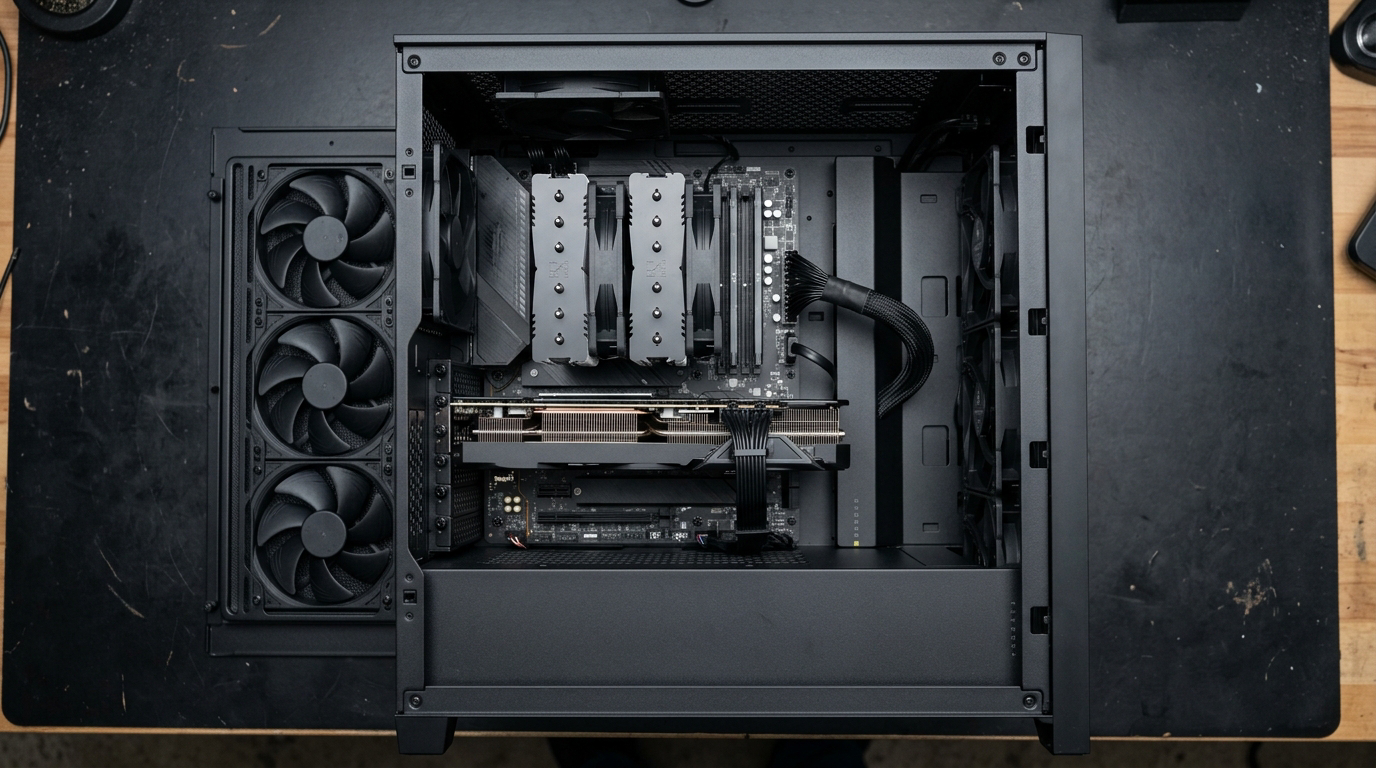
10-Axis Master Dissection Table: Amazon Headline vs. Hidden Reality
When auditing how to choose gaming pc components on amazon, every selectable configuration boils down to ten hardware and listing axes observed directly across live 2026 /dp/ product pages. Use this master map as your baseline decoder before reading deeper into any single subsystem.
| Component Axis | What Amazon Headlines & Dropdowns Show | What Is Often Hidden or Omitted | 30-Second Audit Protocol |
|---|---|---|---|
| 1. GPU & VRAM | “RTX 5060 Ti”, “RX 9070”, or sidebar “8 GB & above” | 8GB vs. 16GB split, OEM RX 9070 GRE 12GB, legacy 4GB–6GB cards, or “Brand may vary” | Verify exact GPU chip and VRAM capacity in bullet text; reject 8GB cards above $1,100 |
| 2. CPU & Cache | “Ryzen 7”, “Core Ultra 7”, or messy duplicate dropdowns | Ryzen 7 8700F 16MB L3 cache cut, F-series iGPU removal, or obsolete AM4 silicon | Match full SKU code (e.g., 9800X3D vs. 8700F vs. 265F vs. 5500) on the active variant |
| 3. Motherboard | Omitted entirely or vague “Gaming Motherboard” | Bare VRM entry boards, unlocked i9-14900KF on locked B760, or proprietary OEM PCBs | Confirm AMD B850/X870 or Z-series ATX boards via specs, Q&A, and interior photos |
| 4. System RAM | “16GB DDR5” or “32GB DDR5” | Single-stick 1x16GB, slow DDR5-4800 CL42–46, DDR5-5600 drops, or 4-DIMM instability | Require 2-stick dual-channel layout; target 32GB (2x16GB) DDR5-6000+ |
| 5. NVMe SSD | “1TB NVMe SSD”, “2TB Gen4 SSD”, or “5TB” hybrids | Cramped 500GB OS drives, DRAM-less QLC NAND write-cliffs, or zero spare M.2 slots | Confirm at least 1TB NVMe (2TB ideal) and inspect for a second M.2 slot for TLC+DRAM upgrades |
| 6. CPU Cooling | “ARGB Air Cooling” or “Liquid Cooled” | Tiny 92mm coolers or thin 120mm AIOs mounted onto 170W–250W processors | Verify dual-tower air cooling (160W or lower) or 240mm/360mm AIO radiators in chassis photos |
| 7. Power Supply | Completely omitted on many $1,000–$1,500 pages | Missing wattage, non-modular Bronze units, or lack of ATX 3.1 / native 12V-2×6 cabling | Require explicit wattage + 80+ Gold minimum and ATX 3.1 headroom for 1440p/4K GPUs |
| 8. Networking | “Wi-Fi Ready” or buried “802.11ac” | Stealth Wi-Fi 5 adapters inside $1,500–$3,000 prebuilt towers | Demand Wi-Fi 6E or Wi-Fi 7 paired with 2.5GbE or 5GbE Ethernet LAN |
| 9. Case & Extras | Panoramic glass, 11.3″ LCDs, White/Black, KB/Mouse | Choked solid front glass panels, <35mm GPU cable bend clearance, or 25%+ markups | Verify front mesh or angled side vents, standard ATX mounts, and fair part parity |
| 10. OS & Condition | “Windows 11” with promotional deal badges | Blended Renewed/Used third-party sellers or heavy trial antivirus bloatware | Lock sidebar Condition filter to “New” and check “Shipped & Sold by Amazon” |
Pre-Audit: Amazon Sidebar & Parent ASIN Review Pooling Traps
Before inspecting your first graphics card or processor, neutralize two structural distortions built directly into Amazon’s storefront interface. Left unchecked, these catalog behaviors steer buyers toward outdated inventory long before they read a single component line.
1. Broken Left-Sidebar Facets
Amazon’s left-hand shopping filters have not kept pace with modern PC hardware segmentation. The Graphics Memory checkbox list caps out at “8 GB & above”, offering zero filtering separation between an entry-level 8GB RTX 5060, a 12GB RTX 5070, a 16GB RX 9070 XT, and a flagship 32GB RTX 5090. Worse, the Graphics Processor filter still promotes legacy tags such as Radeon RX 500, Vega, and Intel HD Graphics alongside current cards, while the RAM Size and Memory Capacity facets use overlapping buckets that blend legacy DDR4 systems with current DDR5 towers. Our deep-dive on why Amazon gaming PC sidebar filters mislead buyers walks through every broken facet—and the rule is simple: treat sidebar checkboxes as loose discovery only, lock Condition strictly to New, and verify every component directly inside the title and spec section.
2. Parent ASIN Review Pooling & Cloned Dropdown Strings
High-volume Amazon /dp/ pages routinely merge multiple hardware generations into a single shared Parent ASIN via the Set name, Style, or Configuration selector. Under this pooling pattern, a brand-new 2026 build sporting a Ryzen 7 9850X3D and Radeon RX 9070 XT sits inside the exact same dropdown menu as a discontinued 2019 configuration (2600 | 1660Ti), inheriting 1,000+ legacy star ratings that say nothing about current VRM thermals, BIOS stability, or packaging quality. Equally confusing, other integrators publish fragmented, duplicated processor strings across selectors—listing "AMD Ryzen 7", "AMD Ryzen 7 8700 F", and "AMD Ryzen 7 8700F" as separate clickable buttons. Always read our guide to spotting Amazon prebuilt review pooling on /dp/ pages, click your exact target variant, switch customer reviews to “This format only”, and examine recent buyer photos showing the exact shipped build.
Axis 1: Graphics Card (GPU), VRAM Ceilings & “Brand May Vary”
In a balanced gaming desktop, the GPU commands roughly 35% to 52% of total build allocation and represents 35% of our evaluation rubric because graphics compute, memory bus width, and VRAM capacity dictate playable framerates at 1080p, 1440p, and 4K. On Amazon, selecting GPU hardware requires looking far past headline series branding.
Navigating the 8GB VRAM Ceiling & Page-1 Legacy Cards
Amazon’s first search page routinely mixes three distinct GPU generations at deceptively close prices:
- Disqualified Legacy Traps (4GB–6GB VRAM): Entry listings under $800 to $950 still push aging Radeon RX 6500 XT 4GB, GeForce RTX 3050 6GB, and RTX 3060 Ti 8GB clearance inventory. A 4GB or 6GB framebuffer chokes on modern 1080p textures and forces drastic visual compromises. Disqualify any 4GB–6GB GPU listing priced alongside modern entry hardware.
- The 8GB Split Trap Above $1,100: Both NVIDIA’s RTX 5060 ($299 Launch MSRP) and the 8GB RTX 5060 Ti ($379 Launch MSRP) use 8GB GDDR7 on a 128-bit bus, while AMD’s RX 9060 XT ($299 Launch MSRP) also ships in an 8GB variant. While 8GB remains viable in strictly budget 1080p esports rigs under $1,100, paying above $1,100–$1,500 for an 8GB card invites texture pop-in and frametime stutters at 1440p Ultra or with hardware ray tracing enabled. Step up to the 16GB RTX 5060 Ti ($429 Launch MSRP) or 16GB RX 9060 XT ($349 Launch MSRP) for 1080p/1440p longevity, or consider Intel’s 12GB Arc B580 ($249 Launch MSRP) and 10GB Arc B570 ($219 Launch MSRP) in budget DIY builds—provided Resizable BAR is enabled in BIOS.
- OEM 12GB Variants & 1440p/4K Sweet Spots: Prebuilt listings frequently feature the OEM-oriented AMD Radeon RX 9070 GRE (48 CUs, 12GB GDDR6, 192-bit, 220W TBP), which trails the full retail 16GB RX 9070 ($549 Launch MSRP) and 16GB RX 9070 XT ($599 Launch MSRP). For crisp 1440p Ultra gaming, target the 12GB RTX 5070 ($549 Launch MSRP), 16GB RX 9070 / RX 9070 XT, or 16GB RTX 5070 Ti ($749 Launch MSRP). Serious 4K high-refresh setups require the 16GB RTX 5080 ($999 Launch MSRP) or 32GB RTX 5090 ($1,999 Launch MSRP).
Upscaling Realism, Rumored GPUs & “Brand May Vary” Lotteries
First, interpret upscaling claims critically: frame generation technologies like NVIDIA DLSS 4 Multi-Frame Generation, AMD FSR 4, and Intel XeSS 2 multiply visual motion smoothness, not raw input responsiveness—always require a baseline of 50 to 60 native FPS paired with NVIDIA Reflex or AMD Anti-Lag 2. Second, ignore marketplace speculation around unreleased silicon: rumored refreshes such as the RTX 5070 Super and RTX 5080 Super remain unannounced and unreleased, so they should never factor into active retail buying decisions. Finally, watch for fine print stating “Graphics card brand may vary based on availability”: while add-in-board (AIB) partner swaps among ASUS, MSI, Gigabyte, or ZOTAC still deliver the same core GPU chip, cooler fin density and fan acoustics vary by batch—making customer interior photos essential before checkout.
Axis 2: Processor (CPU), Cache Cuts & Variant Dropdown Noise
Representing 18% to 24% of build value and 25% of our system scoring rubric, the processor controls game logic, draw calls, shader compilation, and critical 1% Low frametime consistency. On Amazon, selecting the right CPU requires understanding socket longevity alongside hidden silicon trims inside popular OEM chips.
Decoding OEM-Heavy CPUs: Ryzen 7 8700F & Core Ultra 7 265F
Between $1,100 and $2,000, two processors dominate Amazon’s bestseller charts—each carrying specific architectural tradeoffs rarely explained in seller titles:
- AMD Ryzen 7 8700F: Sits on the modern AM5 socket with 8 cores, 16 threads, a 5.0 GHz boost, and a 65W power envelope, preserving an easy future upgrade path to 3D V-Cache silicon. However, derived from monolithic Phoenix silicon, it ships with only 16MB of L3 cache (half that of a Ryzen 5 9600X or Ryzen 7 9700X and one-sixth of X3D’s 96MB L3), caps usable PCIe 4.0 lanes at 16, and lacks integrated graphics. Expect lower 1% Low framerates in CPU-bound competitive shooters—see our full Ryzen 7 8700F vs. Ryzen 7 9800X3D audit for exact tradeoffs.
- Intel Core Ultra 7 265F: Common across ASUS ROG G700 and Alienware Aurora ACT1250 desktops, this LGA 1851 Arrow Lake chip brings 20 cores (8P+12E), 66MB total cache (30MB L3 + 36MB L2), up to 5.3 GHz boost, and a 65W base / 182W turbo thermal profile that runs noticeably cooler than 14th-Gen Intel silicon. Just remember the F suffix deletes the integrated GPU, disabling Intel Quick Sync hardware encoding in video timelines and removing fallback video output.
Pure Gaming vs. Creator Picks & Legacy AM4 Cuts
For pure gaming and competitive esports, prioritize AMD AM5 3D V-Cache processors: the Ryzen 7 9800X3D ($479 Launch MSRP, 8C/16T, 5.2 GHz, 104MB total cache), the faster Ryzen 7 9850X3D ($499 Launch MSRP, up to 5.6 GHz), or discounted Ryzen 7 7800X3D configurations, with the Ryzen 5 9600X (6C/12T Zen 5, 32MB L3) serving as the cleanest full-cache entry AM5 option. Hybrid video editors and 3D creators gain stronger multi-core value from the Ryzen 9 9950X3D ($699 Launch MSRP, 16C/32T), Ryzen 9 9900X3D ($599 Launch MSRP), or LGA 1851 processors with Quick Sync intact such as the Core Ultra 7 270K Plus ($299 Launch MSRP, 24C/24T) and Core Ultra 9 285K ($589 Launch MSRP)—avoiding F or KF variants if your editing software leans on Quick Sync.
Finally, treat any sub-$1,000 listing running last-generation AM4 Ryzen 5 5500 or Ryzen 7 5700X chips cautiously—not because 6 or 8 cores fail light gaming, but because AM4 locks you onto DDR4 and PCIe 3.0/4.0 with zero modern socket runway. And never rely on online “bottleneck percentage calculator” widgets: frame pacing depends dynamically on whether you play 1080p CPU-bound esports or 4K GPU-bound ray tracing, not a fabricated single percentage.
Axis 3: Motherboard Chipsets, VRM Limits & Proprietary Lock-In
The motherboard sets your socket lifespan, VRM power stability under 170W–250W CPU loads, PCIe lane routing, and repairability. Yet Amazon prebuilt titles almost never mention the motherboard chipset, leaving buyers to dig through bullet specs, spec sheets, and buyer photos.
Standard ATX System Integrators vs. Proprietary OEMs
Your single biggest long-term protection on Amazon is choosing a System Integrator that builds with commercial off-the-shelf ATX or micro-ATX parts rather than custom OEM shapes:
- Standard ATX Retail Builders: CyberPowerPC, iBUYPOWER, Skytech Gaming, Thermaltake LCGS, MSI (Codex / Vision), GIGABYTE AORUS, ASUS ROG G700, ZOTAC MEK, and STORMCRAFT assemble around standard 24-pin ATX power harnesses, retail ATX/mATX motherboard standoffs, and standard front-panel headers. Even if one component disappoints later, any retail upgrade fits right inside.
- Major OEM Lines Requiring Extra Scrutiny: Alienware (Aurora), HP (OMEN), Acer (Nitro), and Dell vary by chassis generation. While full-size towers like Lenovo’s Legion Tower 5 embrace clean standard internals, compact OEM boxes frequently deploy proprietary L-shaped motherboards, non-standard 10-pin or 12-pin PSU plugs, and riveted bays that block aftermarket PSU or board swaps once warranties expire.
Chipset Pairings, Unlocked “K” Traps & Catalog Spec Glitches
On AM5 desktops, look for an explicit AMD B850 chipset—guaranteeing a PCIe 5.0 M.2 slot, full CPU and EXPO memory tuning, and strong VRM cooling (target 12+2 or stronger phases rated at 60A+ for DIY picks)—or AMD X870 / X870E when native USB4 and multi-NVMe expansion without cutting the GPU slot from PCIe x16 down to x8 are required. Legacy AMD B650 boards remain solid on budget builds after verifying BIOS support for Ryzen 9000/X3D chips. On Intel platforms, flag one glaring marketplace mismatch: builders pairing unlocked 250W+ Core i9-14900KF chips with entry Intel B760 boards—or Core Ultra K chips with B860 boards—which disables CPU multiplier overclocking and risks VRM thermal throttling under sustained multi-core rendering. Always require Intel Z890 when buying an unlocked Core Ultra K chip for tuning.
When scrolling down into Amazon’s collapsed #prodDetails grid, ignore automated catalog garbage such as Screen Size: 0.01 on desktop towers or ambiguous Cache Size: 8 or 16 rows. Cross-reference actual manufacturer model codes and customer motherboard photos showing clear VRM heatsinks and at least two M.2 slots.
Axis 4: System Memory (DDR5 Capacity, Channel Count & Latency)
Memory and storage balance carries 20% of our audit scoring weight, yet Amazon sellers routinely disguise single-channel and slow JEDEC memory behind generic labels like “16GB DDR5” or “32GB DDR5”.
- The Single-Channel 1x16GB & DDR5-4800 Penalty: Shipping one lone
1x16GBstick halves memory bus width from dual-channel to single-channel, slashing critical 1% Low framerates by 15% to 30% during CPU-heavy world streaming. Likewise, baselineDDR5-4800(often saddled with looseCL42–CL46timings) or compromisedDDR5-5600modules remain widespread across $1,000–$3,000 prebuilts. We dissect the hidden replacement cost of these memory downgrades in our hidden Wi-Fi 5 & DDR5-4800 downgrades audit. - Platform Sweet Spots: On AMD AM5, target 32GB (2x16GB) DDR5-6000 CL30 with AMD EXPO enabled, which holds the memory controller (
UCLK:MCLK) in an optimal 1:1 ratio (~10.0ns first-word latency); pushing past 6400 MT/s triggers a 2:1 divider latency penalty. On Intel LGA 1851 (Core Ultra Series 2), target 32GB (2x16GB) DDR5-6400 CL32 or CUDIMM 7200+ kits. - Avoid 4-DIMM Populations: Never upgrade a 2x16GB gaming desktop by dropping two extra sticks into slots A1 and B1. Populating all four DDR5 slots stresses motherboard trace routing and forces speeds back down toward 4800–5200 MT/s. Always run two matched sticks in primary slots A2 and B2.
Axis 5: NVMe SSD Storage (Capacity, TLC vs. QLC & DRAM Cache)
Practically zero Amazon prebuilt listings disclose exact SSD controller models, whether the drive uses durable TLC NAND or budget QLC NAND, or whether dedicated DRAM cache is present versus DRAM-less Host Memory Buffer (HMB) designs. That opacity hides two real risks:
First, sub-$950 builds often ship 500GB primary drives—capacity that fills immediately once Windows 11 and three modern 120GB–180GB AAA games are installed. Second, DRAM-less QLC drives slow dramatically once their pseudo-SLC write cache saturates past 70% capacity, stalling large game patches and OS updates. Require 1TB PCIe 4.0 NVMe minimum—and treat 2TB as the true sweet spot.
Should you pay a premium on Amazon for a PCIe 5.0 NVMe SSD (such as a Samsung 9100 Pro or Crucial T705 running 12,000–14,800 MB/s)? For pure gaming builds, no: current Microsoft DirectStorage titles show 0 FPS difference and only a 0 to 2 second load gap compared against a cool-running 2TB PCIe 4.0 DRAM+TLC SSD like a WD Black SN850X or Samsung 990 Pro. Save PCIe 5.0 drives for 8K video timelines and local AI dataset ingestion, and make sure any prebuilt motherboard includes a spare M.2 slot with a heatsink for drop-in secondary storage.
Axis 6: CPU Cooling Sizing & Thermal Chassis Topology
Thermal design inside Amazon prebuilts frequently prioritizes glowing RGB rings over airflow physics. Always audit CPU cooler sizing against peak turbo power (PPT on AMD or MTP on Intel—ranging from 162W on Ryzen 7 9800X3D up to 182W–250W on Core Ultra 7/9 and Core i9-14900KF), never nominal 65W or 125W base TDP figures.
- Disqualify 120mm AIOs & Choked Solid Front Glass: Reject any 170W–250W CPU desktop cooled by a single-fan 120mm AIO or tiny 92mm downdraft cooler, and skip cases pressing RGB intake fans flush against a solid, unvented tempered glass front plate. Without side perforation or a fine-mesh front grille, internal chassis temperatures climb toward 85°C–90°C thermal throttling under sustained loads.
- Match Cooler Topology to Case Geometry: Front-to-back fine-mesh towers pair ideally with dual-tower air coolers (zero pump wear, silent long-term reliability for 160W or lower chips), whereas panoramic dual-chamber glass chassis rely on bottom/side reverse-blade intakes feeding a top-mounted 240mm or 360mm AIO liquid radiator.
- Verify Side-Panel Clearance: High-wattage RTX 50-series GPUs require at least 35mm of straight bend clearance between the card’s power header and the tempered glass door so 12V-2×6 connectors never kink laterally. Heavy triple-slot GPUs should also ship with an anti-sag bracket installed or foam insert secured during shipping.
Axis 7: Power Supply (PSU Wattage, 80+ Gold & ATX 3.1 Safety)
Across $1,000 to $1,500 Amazon listings, the power supply is the single most omitted component. Even listings boasting “80+ Gold PSU” frequently omit exact wattage, model tier, or whether the unit meets the modern PCI-SIG ATX 3.1 / PCIe 5.1 standard. Read our omitted PSU ratings & Brand May Vary decoder alongside our ATX 3.1 and 12V-2×6 safety guide to avoid hidden power shortcuts.
Why does ATX 3.1 matter so much in 2026? Modern graphics cards—particularly RTX 5070 Ti, RX 9070 XT, RTX 5080, and RTX 5090—produce microsecond 200% to 300% transient power excursions that trip over-current protections on legacy ATX 2.x group-regulated Bronze units. Furthermore, genuine ATX 3.1 units deliver native 12V-2×6 cables featuring recessed sense pins that shut down power cleanly if a plug is partially unseated, preventing connector thermal damage. Target Cybenetics ETA/Lambda or 80+ Gold certified units sized so gaming load hits roughly 50% to 60% capacity: 650W for entry RTX 5060 / RX 9060 XT / Arc B580 builds, 750W for RTX 5060 Ti / RX 9070 rigs, 750W–850W for RTX 5070 / RTX 5070 Ti / RX 9070 XT builds, 1000W for RTX 5080 4K machines, and 1200W+ for RTX 5090 systems. And remember: never mix modular PSU cables across different brands or unit families—pinouts are not universal and cause immediate short-circuit damage.
Axis 8: Wireless & Wired Networking (Avoiding Stealth Wi-Fi 5)
Nothing signals silent cost-cutting faster than inspecting the wireless specification on an upper-midrange or high-end desktop. Across Amazon’s 2026 storefront, multiple $1,500 to $3,000 desktops—including otherwise attractive standard ATX builds—still ship legacy Wi-Fi 5 (802.11ac) adapters instead of Wi-Fi 6E or Wi-Fi 7 (802.11be) with 320 MHz channels and Multi-Link Operation.
Unless your desktop sits wired directly into a router via 2.5GbE or 5GbE Ethernet, Wi-Fi 5 increases ping jitter, caps wireless download throughput on multi-gigabit fiber connections, and introduces Bluetooth 4.2/5.0 peripheral interference. Budget a $30–$45 M.2 Key-E Wi-Fi 6E/7 module or PCIe x1 card upgrade whenever an otherwise transparent tower drops to Wi-Fi 5, or verify Wi-Fi 6E/7 upfront as documented in our Wi-Fi 5 and DDR5-4800 downgrade breakdown.
Axis 9: Case Clearances, Smart LCD Extras & Build Cost Parity
Amazon configuration dropdowns often surface cosmetic options—Black vs. White chassis colorways, panoramic dual-chamber glass, built-in 11.3-inch smart LCD case screens, back-connect BTF motherboards, and “Free RGB Keyboard & Mouse” packs. None of those extras boost frames per second, and many mask steep markups.
Audit two realities here. First, bundled keyboards and mice are basic membrane giveaways meant for initial setup—serious competitive setups benefit far more from putting saved budget toward Hall Effect Rapid Trigger keyboards, ultralight 8K mice, or a DisplayPort 2.1 OLED display matched cleanly to your GPU output. Second, compute Build Cost Parity before purchasing: add up equivalent retail part costs (GPU, CPU, B850 board, 32GB DDR5, 1TB/2TB NVMe, Gold PSU, mesh case, Windows 11 Home). A fair prebuilt premium for professional assembly, cable management, and single-point warranty sits between 5% and 12% over standalone parts. Any prebuilt priced 25% or more above component parity—especially while hiding PSU wattage or downgrading RAM—fails value parity outright.
Axis 10: Operating System, Seller Fulfillment & Condition Filters
The tenth selectable axis sits right next to the price box and determines warranty safety and out-of-box smoothness:
- Windows 11 Home vs. Pro: Unless you require BitLocker drive encryption or corporate domain join tools, Windows 11 Home performs identically in games. Check listing notes and buyer reviews for heavy preinstalled bloatware (trial antivirus suites or aggressive RGB background suites that add micro-stutter).
- Shipped & Sold by Amazon vs. Third-Party Sellers: Direct “Ships from and sold by Amazon.com” or official manufacturer storefront listings dramatically simplify 30-day returns and protect manufacturer warranty validity compared against unverified third-party marketplace resellers swapping RAM or drives before shipping.
- New vs. Amazon Renewed: Amazon search blends Renewed desktops right alongside New systems at identical price points unless you manually filter Condition: New. Renewed units often carry shorter 90-day warranties instead of 1-year to 3-year OEM coverage and lack guarantees on thermal paste condition or SSD wear.
What Realistically Appears by Amazon Budget Bracket (2026 Reality Check)
Understanding what components dominate each Amazon price tier keeps you from overpaying for obsolete parts when better configurations sit just one step away—a core lesson reinforced across our 10 prebuilt gaming PC red flags audit.
| Amazon Price Bracket | Common Page-1 Listings (Audit Carefully) | What Actually Passes Our 10-Axis Audit |
|---|---|---|
| Under $800 | AM4 DDR4 (Ryzen 5 5500), RX 6500 XT 4GB / RTX 3050 6GB, 8GB DDR4, 500GB SSD, Wi-Fi 5 | Minimum 16GB dual-channel RAM, 6GB–8GB+ modern GPU, 1TB NVMe SSD, standard ATX case for future swaps |
| $1,000 – $1,500 | Core i5-14400F / i7-14700F or Ryzen 7 8700F, RTX 5060 / 5060 Ti 8GB, 16GB DDR5-4800, hidden PSUs | Full-cache Ryzen 5 9600X / Core i5-14400F, disclosed 650W 80+ Gold PSU, dual-channel DDR5, mesh intake, Wi-Fi 6E/7 |
| $1,500 – $2,000 | Core Ultra 7 265F / Ryzen 7 8700F / 9900X, RTX 5060 Ti 8GB or RTX 5070 12GB, 16GB–32GB DDR5, occasional Wi-Fi 5 | 12GB RTX 5070 or 16GB RX 9070/5060 Ti, 32GB DDR5, standard AM5/ATX motherboard, 1TB–2TB NVMe, 750W–850W PSU |
| $2,000 – $3,500+ | Ryzen 7 7800X3D / 9800X3D / 9850X3D or i9-14900KF (watch B760!), RX 9070 XT / RTX 5080, 32GB DDR5-5600, 360mm AIO | 9800X3D/9850X3D + 16GB RX 9070 XT or RTX 5080, disclosed B850/X870, 32GB DDR5-6000, 850W–1000W 80+ Gold ATX 3.1, Wi-Fi 7 |
The 60-Second Pre-Checkout Amazon Verification Checklist
Before adding any gaming desktop or core component bundle to your Amazon cart, execute these seven verification checks in order:
- Lock Condition & Seller: Confirm the buy box specifies Condition: New and Ships from / Sold by Amazon.com (or the verified OEM direct storefront), avoiding blended Renewed resellers.
- Isolate Variant Reviews: Click your exact CPU/GPU selector button under Set name or Style, then filter customer reviews strictly to “This format only” so legacy 2019 build scores do not mask 2026 changes.
- Audit Core Silicon Suffixes: Confirm exact GPU VRAM capacity (12GB–16GB ideal for 1440p/4K; avoid 8GB above $1,100) and CPU designations (X3D or 9600X vs. 16MB-L3 8700F or iGPU-free 265F), ignoring sidebar “8 GB & above” caps and
Screen Size: 0.01catalog noise. - Verify Motherboard & Non-Proprietary ATX Layout: Confirm an explicit chipset (AMD B850/X870 or Z-series for unlocked Intel K chips) and look at interior buyer photos for a standard rectangular ATX PSU bay and 24-pin ATX board plug.
- Check Interior Photos for Dual-Channel RAM & Mesh Airflow: Verify two spaced memory sticks in slots A2/B2 (never a lone stick), perforated mesh or angled intakes rather than sealed glass, and a dual-tower air cooler or 240mm/360mm AIO.
- Scan Q&A for PSU Wattage, ATX 3.1 & Wi-Fi Speed: If PSU wattage, 80+ Gold status, SSD capacity, or Wi-Fi 6E/7 are omitted from bullet points, inspect Q&A and buyer teardowns—and budget replacement costs if Wi-Fi 5 or single-stick DDR5-4800 appears.
- Run Post-Delivery Verification on Day One: Upon arrival, plug your display cable directly into the discrete GPU (never the motherboard I/O), enable AMD EXPO or Intel XMP plus Resizable BAR in BIOS, confirm monitor refresh rate in Windows, and inspect HWiNFO64 clock/thermal sensors during initial benchmark runs.
Audited Clean Alternatives: 4 Specification-Transparent Amazon Builds
Once you understand how to choose gaming pc components on amazon, spotting honest listings becomes immediate. Below are four verified 2026 Amazon US prebuilts spanning flagship 4K through mainstream 1080p budgets that pass our core transparency checks—alongside candid caveats showing exactly where each build trades budget for performance.
1. STORMCRAFT Phantom — Ryzen 7 9800X3D & RTX 5080 (Flagship 10-Axis Benchmark)

Budget Tier: Flagship tier (over $3,500) | Audited Specs: AMD Ryzen 7 9800X3D (8C/16T, up to 5.2 GHz, 96MB L3 3D V-Cache) | NVIDIA GeForce RTX 5080 16GB GDDR7 | 32GB DDR5-6000 RGB | 2TB NVMe Gen4 SSD | AMD B850 Chipset | 360mm AIO Liquid Cooler + 7x ARGB Fans | 850W 80+ Gold PSU | 2-Yr Parts / 3-Yr Labor Warranty.
10-Axis Transparency Audit: Few Amazon listings print as many critical sub-specs upfront as the STORMCRAFT Phantom. Instead of hiding the motherboard or memory speed, STORMCRAFT explicitly declares an AMD B850 AM5 platform, fast 32GB DDR5-6000 memory matching AM5’s 1:1 controller ratio, a spacious 2TB Gen4 NVMe SSD, a 360mm AIO liquid cooler properly scaled to 3D V-Cache loads, and an 850W 80+ Gold power supply feeding the 16GB RTX 5080 ($999 GPU Launch MSRP) and Ryzen 7 9800X3D ($479 CPU Launch MSRP). Caveat: Wi-Fi generation and RAM CAS latency are unstated on the header, and heavy 4K overclockers may prefer 1000W ATX 3.1 PSU headroom over 850W.
Audit Passes: Disclosed AMD B850 chipset; 32GB DDR5-6000 speed; 2TB Gen4 NVMe; 360mm AIO + 7 fans; 850W 80+ Gold PSU; 2-Yr Parts / 3-Yr Labor warranty.
Watch Items: Verify wireless spec and native 12V-2×6 cable routing upon delivery; flagship tier carries high premium pricing.
2. Lenovo Legion Tower 5 (2026) — Ryzen 7 9800X3D & RX 9070 XT 16GB (Connectivity & VRAM Safe Pick)

Budget Tier: Enthusiast tier (around $2,250–$2,350) | Audited Specs: AMD Ryzen 7 9800X3D (8C/16T, 96MB L3 3D V-Cache, AM5) | AMD Radeon RX 9070 XT 16GB GDDR6 | 32GB DDR5 | 1TB NVMe SSD | 850W PSU | Wi-Fi 7 (802.11be) + 2.5GbE LAN | Eclipse Black Tower 5 Chassis | Windows 11 Home.
10-Axis Transparency Audit: Lenovo solves two traps that ruin rival $2,000+ listings: wireless downgrades and opaque power budgets. Pairing the 16GB Radeon RX 9070 XT ($599 GPU Launch MSRP) and Ryzen 7 9800X3D with 32GB DDR5, an explicit 850W PSU, Wi-Fi 7, and 2.5GbE Ethernet eliminates stealth Wi-Fi 5 compromises and avoids proprietary dead-end lock-in across the Eclipse Black Tower 5 layout. Caveat: A 1TB primary SSD fills rapidly with modern 150GB games—use the open M.2 slot for a secondary 2TB PCIe 4.0 DRAM+TLC drive—and confirm dual-channel stick speed in system setup.
Audit Passes: True 16GB RDNA 4 VRAM + 9800X3D X3D silicon; 32GB DDR5; 850W power headroom; Wi-Fi 7 + 2.5GbE LAN.
Watch Items: 1TB SSD capacity warrants later secondary expansion; verify factory DDR5 speed and BIOS EXPO status.
3. MSI Codex Z2 (A8NVP-436US) — Ryzen 7 8700F & RTX 5070 12GB (Upgradeable AM5 1440p Pick)

Budget Tier: Upper Prebuilt Tier (Under $1,850) | Audited Specs: AMD Ryzen 7 8700F (8C/16T, 16MB L3, 16 Usable PCIe 4.0 Lanes, AM5) | NVIDIA GeForce RTX 5070 12GB GDDR7 | 32GB DDR5 | 2TB NVMe SSD | Standard MSI ATX AM5 Motherboard | 4-Fan Airflow + ARGB Air Cooler | Windows 11 Home, USB Type-C.
10-Axis Transparency Audit: The Codex Z2 demonstrates how to apply our CPU and ATX audit criteria objectively in the upper mid-range bracket. It cleanly clears the 8GB VRAM ceiling with a 12GB RTX 5070 ($549 GPU Launch MSRP), includes generous 32GB DDR5 plus a full 2TB NVMe SSD, and uses a 100% standard MSI ATX AM5 motherboard with four chassis fans. Honest 10-Axis Caveat: The Ryzen 7 8700F limits L3 cache to 16MB and usable PCIe 4.0 lanes to 16 without an iGPU, and the listing leaves exact PSU wattage and ATX 3.1 status unstated—yet standard MSI ATX AM5 compatibility makes future drops to an X3D processor or ATX 3.1 PSU straightforward.
Audit Passes: 12GB GDDR7 RTX 5070 clears 8GB limits; 32GB DDR5 + 2TB NVMe out of the box; standard MSI ATX AM5 board.
Watch Items: Ryzen 7 8700F carries 16MB L3 cache ceiling; confirm PSU wattage and dual-channel DDR5 configuration on delivery.
4. ZOTAC MEK Gaming PC White — Ryzen 5 9600X & RTX 5060 (Full Component Transparency Under $1,350)
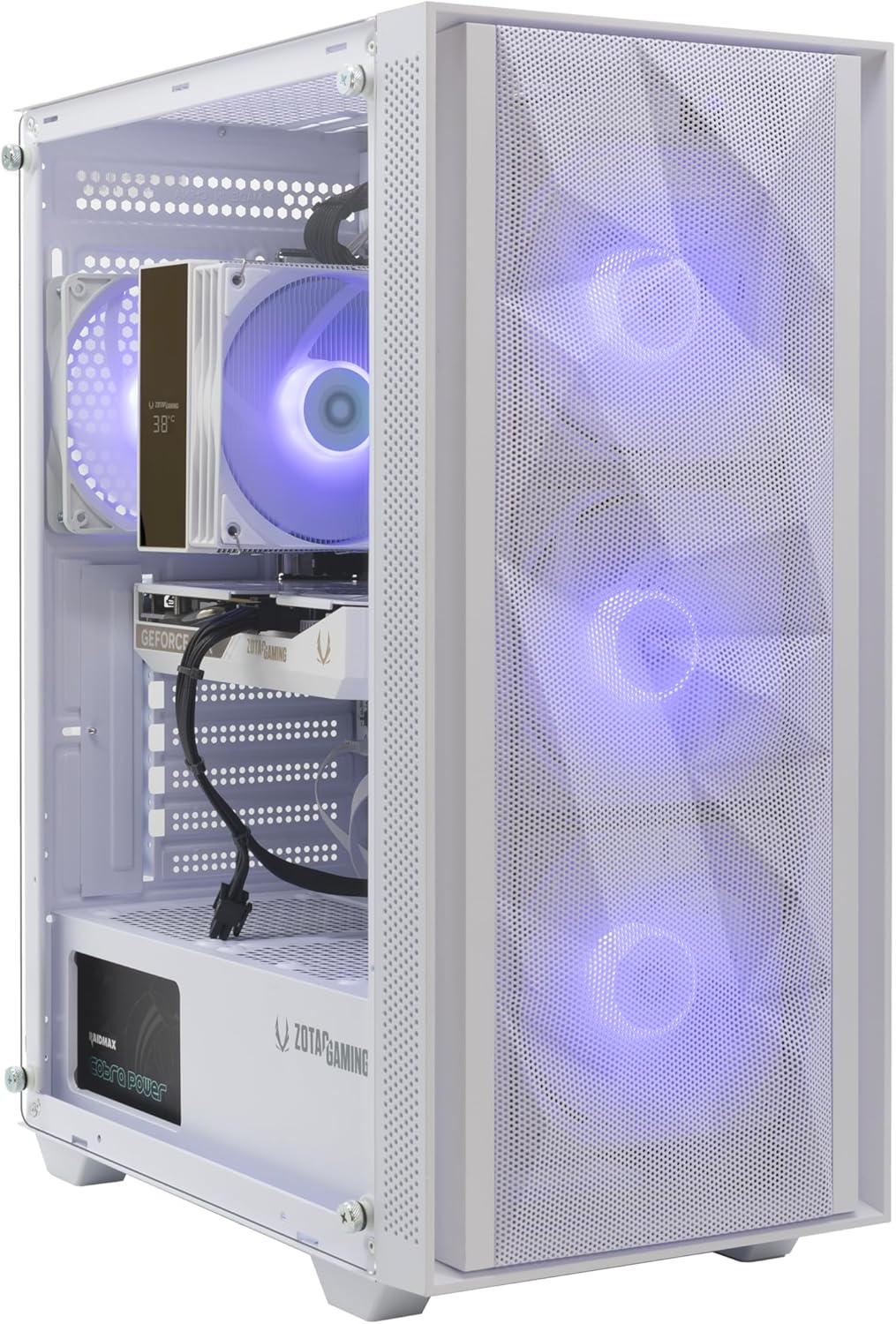
Budget Tier: Mid-upper tier (roughly $1,200–$1,350) | Audited Specs: AMD Ryzen 5 9600X (6C/12T Zen 5, up to 5.4 GHz, 32MB L3, AM5) | ZOTAC GAMING GeForce RTX 5060 8GB GDDR7 | 16GB Dual-Channel DDR5-5200 RGB | 1TB NVMe M.2 SSD | 650W 80+ Gold PSU | Mesh Front, 4x 120mm RGB Fans, Temp Display | Wi-Fi 6E, 5GbE LAN | 1-Yr System + 3-Yr ZOTAC GPU Warranty.
10-Axis Transparency Audit: Whereas most $1,200–$1,350 prebuilts conceal RAM channels, PSU ratings, and cooling airflow, ZOTAC spells out nearly every supporting axis clearly. You get a full-cache Zen 5 Ryzen 5 9600X (32MB L3 on AM5, avoiding 8700F cuts), explicit Dual-Channel DDR5 (avoiding 1x16GB traps), a verified 650W 80+ Gold PSU, perforated mesh front airflow with four 120mm fans, a 1TB NVMe SSD, and standout Wi-Fi 6E + 5GbE LAN backed by a 3-year GPU warranty. Caveat: Because 8GB VRAM cards hit texture limits in heavy 1440p workloads, the 8GB RTX 5060 ($299 GPU Launch MSRP) fits 1080p High/Ultra rather than maxed 1440p textures, and DDR5-5200 trails optimal 32GB DDR5-6000 CL30 if you upgrade later.
Audit Passes: Explicit Dual-Channel DDR5; 650W 80+ Gold PSU; full-cache Zen 5 AM5 CPU; Mesh Front airflow; Wi-Fi 6E + 5GbE LAN.
Watch Items: 8GB VRAM limits heavy 1440p Ultra/RT settings; 16GB DDR5-5200 leaves upgrade room to 2x16GB DDR5-6000 CL30.
Decision Matrix: Picking the Right Verified Path
Best All-Around 10-Axis Clarity
- ZOTAC MEK White (Under $1,350): Discloses 650W 80+ Gold power, Dual-Channel DDR5, Mesh airflow, full-cache Zen 5 9600X, and Wi-Fi 6E + 5GbE for 1080p buyers.
- STORMCRAFT Phantom ($3,500+): Prints explicit AMD B850 chipset, 32GB DDR5-6000, 2TB Gen4 SSD, 360mm AIO, and 850W 80+ Gold for 4K RTX 5080 rigs.
Best 1440p / 4K Value & Networking
- Lenovo Legion Tower 5 (~$2,250–$2,350): Combines Ryzen 7 9800X3D, 16GB RX 9070 XT, 32GB DDR5, 850W PSU, and Wi-Fi 7 + 2.5GbE without Wi-Fi 5 cuts.
- MSI Codex Z2 (Under $1,850): Delivers 12GB RTX 5070, 32GB DDR5, and 2TB NVMe on a standard MSI AM5 ATX board ready for future X3D upgrades.
Continue auditing specific Amazon catalog blind spots across our dedicated series: start at the Best Prebuilt Gaming PC (2026) pillar hub, then inspect why Amazon sidebar filters mislead buyers, Parent ASIN review pooling explained, omitted PSU ratings and Brand May Vary listings, hidden Wi-Fi 5 and DDR5-4800 downgrades, and our 10 prebuilt gaming PC red flags checklist inside Guides & Optimization.
How We Audited This Guide
- Steps were validated against official BIOS, driver, and platform vendor documentation and ordered from lowest-risk to highest-risk so readers can stop as soon as the issue is resolved.
- Every specification claim was cross-checked against official OEM datasheets, platform vendor documentation, and published industry standards (PCI-SIG, JEDEC, VESA, Intel ATX) rather than marketplace listing copy.
- Recommendations were evaluated against our weighted audit rubric and documented compatibility rules; we do not publish fabricated FPS, thermal, or acoustic numbers.
Frequently Asked Questions
How do I verify GPU VRAM when Amazon’s sidebar filter stops at 8 GB & above?
Ignore the sidebar Graphics Memory checkbox completely once you start comparing listings. Read the exact GPU model name and memory figure directly in the product title and bullet points—separating 8GB RTX 5060 / 5060 Ti cards from 12GB RTX 5070 and 16GB RX 9070 XT or RTX 5070 Ti models.
How can I spot Amazon review pooling on prebuilt gaming PCs?
Click your exact configuration inside the Set name or Style selector above the Add to Cart button, then open customer reviews and select “This format only.” If thousands of positive reviews mention obsolete Ryzen 2600 or GTX 1660 Ti systems, old ratings are pooled onto one Parent ASIN.
What does “Brand may vary” mean on an Amazon prebuilt listing?
It means the integrator installs whichever add-in-board GPU, NVMe SSD, or PSU model is in stock that week rather than guaranteeing a specific partner brand. Standard ATX builders remain upgradeable later, but check recent buyer interior photos to confirm acceptable cooler fans and ATX 3.1 PSU quality.
Are Ryzen 7 8700F and Core Ultra 7 265F CPUs bad choices on Amazon?
Not automatically, as long as you factor in their cuts. The AM5 Ryzen 7 8700F trims L3 cache to 16MB and PCIe 4.0 lanes to 16 without integrated graphics, lowering peak gaming ceilings versus X3D chips, while the Core Ultra 7 265F omits Quick Sync video acceleration.
Why do some $1,500–$3,000 Amazon desktops still ship Wi-Fi 5 or DDR5-4800 RAM?
System integrators trim secondary specs shoppers rarely check before purchasing. Pairing flashy GPUs with legacy Wi-Fi 5 (802.11ac) cards, single-stick 1x16GB DDR5-4800 memory, or unlabeled PSUs cuts wholesale build cost while shifting upgrade expenses onto buyers after delivery.
Official Standards & Technical References
- NVIDIA GeForce RTX 50-Series Blackwell Specifications: nvidia.com/en-us/geforce/graphics-cards/50-series/
- AMD Ryzen Desktop Processors & AM5 Platform Specs: amd.com/en/products/processors/desktops/ryzen.html
- Intel Core Ultra Desktop Processors Series 2 Documentation: intel.com/content/www/us/en/products/details/processors/core-ultra.html
- PCI-SIG PCIe CEM 5.1 & 12V-2×6 Power Connector Standards: pcisig.com/specifications
- Cybenetics PSU ETA Efficiency & Lambda Acoustic Database: cybenetics.com
- Wi-Fi Alliance Wi-Fi 7 (802.11be) Technical Overview: wi-fi.org/discover-wi-fi/wi-fi-7


