
Affiliate & Editorial Disclosure: As an Amazon Associate, The PC Audit earns from qualifying purchases. When you buy through verified affiliate links in this guide, we may receive a small commission at no additional cost to you. All catalog patterns, memory latency equations, and wireless platform specifications below are evaluated independently with zero paid brand placements.
Direct Buyer Alert: Catching Stealth Networking & Memory Cuts Before Checkout
Spotting wifi 5 and ddr5 4800 downgrades in prebuilt pcs before clicking Buy Now can save you over $150 in post-delivery replacement parts and eliminate avoidable frametime stutters. Many $1,500–$3,000 Amazon towers advertise flagship RTX 5070 or RX 9070 XT graphics alongside high-core processors while quietly burying single-stick DDR5-4800/5600 memory, loose CL42–CL46 timings, and legacy 802.11ac Wi-Fi 5 adapters.
When a shopper spends $1,500 to $3,000 on a prebuilt gaming desktop, the natural assumption is that every subsystem inside the chassis reflects modern 2026 standards. Graphics cards and CPUs dominate every product title, sponsored banner, and thumbnail badge, so buyers rarely question whether the wireless module supports multi-gigabit 6 GHz channels or whether the system memory runs at full dual-channel speed. Yet across our catalog inspections feeding The PC Audit’s 10-axis Amazon PC component guide, networking cards and DDR5 memory speed remain two of the most frequently trimmed profit-margin corners in upper-midrange and enthusiast desktops.
System integrators rarely highlight a slow memory kit or an obsolete wireless standard in headline copy. Instead, product bullets simply state “16GB DDR5,” “32GB DDR5,” or “Wi-Fi Ready,” leaving buyers to discover after unboxing that a single green 1x16GB JEDEC module at 4800 MT/s or an 802.11ac Wi-Fi 5 card is choking competitive multiplayer ping and 1% Low frametimes. This hidden-cost guide dissects why those cuts happen, calculates exact latency penalties and DIY replacement budgets, exposes overlapping Amazon listing traps, and highlights four audited $1,500–$3,000 builds—like the top Wi-Fi 7 and 32GB DDR5 prebuilt towers—that avoid stealth downgrades.
Inside This Hidden-Downgrade Marketplace Audit
- 10-Axis Dissection Table: Amazon Headline vs. Hidden Reality
- Red Flag 1: Why $1,500–$3,000 Prebuilts Still Ship Wi-Fi 5 (802.11ac)
- Red Flag 2: The DDR5-4800, DDR5-5600 & Single-Stick 1x16GB Latency Tax
- Red Flag 3: Compound Amazon Listing & Silicon Traps Masking Cuts
- The Real Cost-to-Fix Math: Turning a “$1,750 Deal” Into a $2,000+ Project
- The 60-Second Pre-Checkout Verification Checklist
- Clean Alternatives: 4 Audited $1,500–$3,000 Amazon Builds
- Decision Matrix & Related Audit Bridges
- Frequently Asked Questions
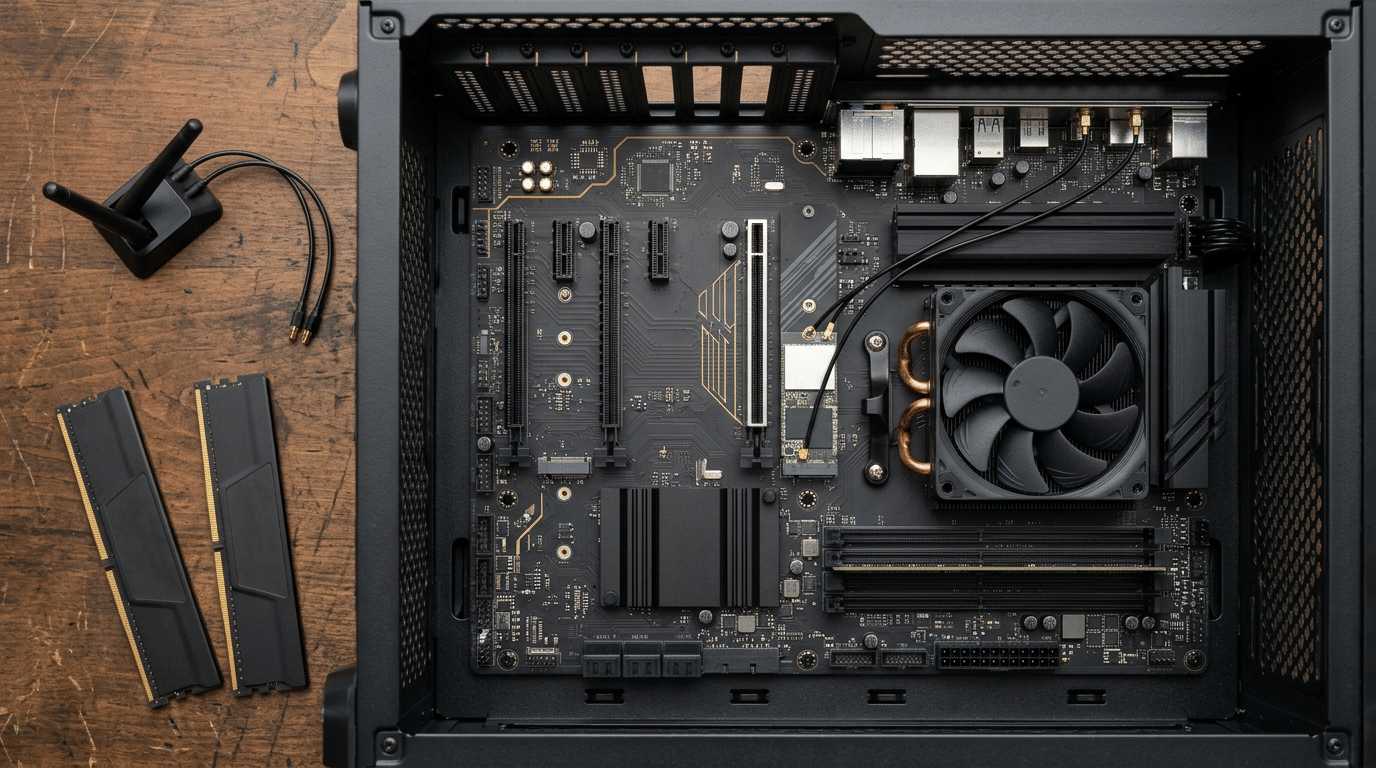
10-Axis Dissection Table: What Amazon Headlines Show vs. What Gets Hidden
Before isolating wireless adapters and memory kits, you must see how networking and RAM downgrades sit inside a broader ten-axis component matrix observed across live 2026 Amazon /dp/ listings. Whenever a prebuilt seller omits specifics on one axis, inspect the remaining axes even more skeptically.
| Component / Listing Element | What Amazon Headline Shows | What Is Often Hidden / Omitted | How to Verify in 30 Seconds |
|---|---|---|---|
| 1. Networking & Wi-Fi | “Wi-Fi Ready”, “High-Speed Wireless”, or buried “802.11ac” | Stealth Wi-Fi 5 (802.11ac) cards and 1GbE-only ports inside $1,500–$3,000 builds | Check bullet points and Q&A for explicit Wi-Fi 6E or Wi-Fi 7 (802.11be) + 2.5GbE LAN; avoid vague “Wi-Fi Ready” |
| 2. System Memory (RAM) | “16GB DDR5” or “32GB DDR5 Gaming Memory” | Single-stick 1x16GB layouts, DDR5-4800 CL40–CL46, DDR5-5600 drops, or 4-DIMM speed caps | Verify both MT/s speed (6000+ ideal) and 2-stick dual-channel layout in customer interior photos |
| 3. GPU & VRAM | “RTX 5070”, “RTX 5060 Ti”, or sidebar “8 GB & above” | 8GB vs. 16GB variant splits, OEM RX 9070 GRE 12GB, legacy 4GB–6GB cards, or “Brand may vary” | Confirm exact VRAM capacity directly in bullet copy; reject 8GB GPUs in rigs above $1,100 |
| 4. Processor (CPU) | “AMD Ryzen 7”, “Core Ultra 7”, or messy duplicate dropdowns | Ryzen 7 8700F 16MB L3 cache cut, F-series iGPU omission, or legacy AM4 silicon | Match full SKU suffixes (9800X3D vs. 8700F vs. 265F) on the selected variant button |
| 5. Motherboard Chipset | Omitted completely or “Gaming Motherboard” | Unlocked i9-14900KF paired with locked B760, bare VRMs, or proprietary OEM layouts | Look for explicit AMD B850 / X870 or Z-series ATX disclosures and standard 24-pin ATX power plugs |
| 6. NVMe SSD Storage | “1TB NVMe SSD” or “2TB Gen4 SSD” | Cramped 500GB OS drives, DRAM-less QLC NAND write-cliffs, or missing spare M.2 slots | Require at least 1TB NVMe (2TB sweet spot) and inspect for a secondary M.2 slot for TLC+DRAM additions |
| 7. Power Supply (PSU) | Frequently omitted on $1,000–$1,850 product pages | Missing wattage, non-modular Bronze units, or no ATX 3.1 / native 12V-2×6 cable | Demand stated wattage, 80+ Gold efficiency, and ATX 3.1 transient protection for 1440p/4K GPUs |
| 8. CPU Cooling | “Liquid Cooled” or “ARGB Air Cooling” | Undersized 92mm coolers or thin 120mm AIOs on 170W–250W processors | Confirm a dual-tower air cooler or 240mm/360mm AIO radiator in chassis images |
| 9. Case & Airflow | Panoramic tempered glass, RGB fans, or smart LCD panels | Choked solid glass front intakes, tight <35mm GPU cable clearance, or 25%+ markups | Verify perforated front mesh or angled side intakes alongside standard retail ATX mounting |
| 10. OS, Seller & Catalog Noise | “Windows 11”, deal badges, and 1,000+ star ratings | Parent ASIN review pooling, blended Renewed units, and Screen Size: 0.01 spec glitches | Lock Condition to “New”, filter reviews to “This format only,” and ignore auto-populated catalog noise |
Red Flag 1: Why $1,500–$3,000 Prebuilt PCs Still Ship Wi-Fi 5 (R-AMZ-06)
Few buyers shopping in the $1,500–$3,000 bracket expect wireless networking from 2014 inside a desktop built around 2026 Blackwell or RDNA 4 silicon. Yet our live marketplace audit flags multiple upper-tier Amazon listings—including select configurations across popular value-focused lines such as certain iBUYPOWER Element and Skytech Azure 3 variants—that still integrate Wi-Fi 5 (802.11ac) modules or hide wireless specifications behind generic “Wi-Fi Ready” phrasing.
How Builders Cut Costs with Legacy 802.11ac & 1GbE Boards
When system integrators assemble high-margin mid-tier and upper-tier prebuilts, the motherboard is often sourced from entry-level OEM revisions rather than retail enthusiast boards. Many cost-optimized B760, B650, or entry B850 motherboards either omit onboard wireless completely—forcing the assembler to drop in an inexpensive M.2 Key-E Wi-Fi 5 card or a low-bandwidth PCIe x1 802.11ac adapter—or ship an older Realtek/Intel AC-series module cleared from warehouse stock. On paper, the PC still claims “Wi-Fi + Bluetooth,” allowing the Amazon title to omit the generation entirely.
Why does that matter in real households? If your gaming rig sits hardwired directly to a multi-gigabit switch, an outdated Wi-Fi module stays dormant—though those same cost-cut boards frequently pair Wi-Fi 5 with capped 1GbE Ethernet instead of modern 2.5GbE or 5GbE LAN. For millions of gamers whose router sits in another room or across a multi-story apartment, however, Wi-Fi 5 imposes immediate structural bottlenecks compared with Wi-Fi 6E and Wi-Fi 7:
- Crowded 5 GHz Spectrum & Bufferbloat: Wi-Fi 5 operates strictly on congested 2.4 GHz and 5 GHz bands without 6 GHz access. Neighboring routers, smart TVs, and streaming phones compete for identical 80 MHz channels, introducing unpredictable ping spikes and packet jitter during competitive shooters.
- No OFDMA or Multi-Link Operation (MLO): Wi-Fi 6/6E introduced OFDMA scheduling to serve multiple devices simultaneously with reduced latency, while Wi-Fi 7 (802.11be) adds 320 MHz wide channels and Multi-Link Operation—bonding 5 GHz and 6 GHz links concurrently to slash latency variance and sustain multi-gigabit game downloads.
- 150GB+ Game Download Wait Times: Modern AAA launches regularly exceed 120GB–180GB. Real-world Wi-Fi 5 throughput through two drywall partitions often stalls well below modern fiber ISP tiers, stretching major patches and fresh installations far longer than Wi-Fi 6E or Wi-Fi 7 adapters paired with compatible routers.
- Bluetooth Version Regression: Many legacy Wi-Fi 5 cards bundle older Bluetooth 4.2 or 5.0 radios instead of Bluetooth 5.3/5.4, lowering range stability for wireless controllers, IEM dongles, and desktop peripherals.
The Hidden Hassle of Upgrading a Prebuilt Wi-Fi 5 Card Yourself
Swapping a Wi-Fi card sounds effortless until you open the chassis. On standard ATX motherboards, the M.2 Key-E Wi-Fi slot frequently sits wedged inside a vertical metal shroud right above the primary PCIe x16 graphics slot—or directly underneath a massive three-slot RTX 5070 or RX 9070 XT heatsink. Upgrading requires powering down, disconnecting GPU cables, unlatching a heavy graphics card, unclipping minuscule 2mm MHF4 coaxial pigtails without snapping the delicate brass pads, and reassembling everything cleanly.
Worse, buyers often order the wrong replacement card. Intel’s popular AX211 and BE201 modules rely on proprietary CNViO2 motherboard interfaces that do not boot at all on AMD AM5 platforms; AMD buyers need standard PCIe M.2 cards such as Qualcomm NCM865, MediaTek MT7925, or Intel BE200 (on compatible boards—always verify AM5 BIOS support first), or a separate PCIe x1 add-in card that consumes bottom-slot clearance below the GPU. Add a magnetic external dual-antenna kit and you have spent $35–$65 plus an hour of teardown work just to match what Lenovo, MSI, and Alienware include natively on transparent Wi-Fi 6E/7 configurations.
Red Flag 2: The DDR5-4800, DDR5-5600 & Single-Stick 1x16GB Performance Tax (R-RAM-01, R-RAM-02)
While Wi-Fi 5 degrades network smoothness and download speed, stealth memory downgrades directly penalize in-game responsiveness—specifically 1% Lows and 0.1% Lows frametime consistency. Across Amazon’s $1,000–$2,000 prebuilt catalog, two overlapping memory shortcuts appear repeatedly: shipping baseline 16GB DDR5-4800 (often as a single 1x16GB stick) and equipping $2,000+ towers with conservative DDR5-5600 CL40–CL46 kits rather than performance-tuned DDR5-6000 CL30 or DDR5-6400 CL32 modules.
First Word Latency Math: Why DDR5-4800 CL40–46 Trails DDR5-6000 CL30
Evaluating DDR5 strictly by capacity (“16GB” vs. “32GB”) or raw megatransfers per second hides half the story. Real memory access responsiveness depends on First Word Latency measured in nanoseconds, governed by the standard formula:
First Word Latency (ns) = (CAS Latency × 2000) / Data Rate (MT/s)
Applying that formula across the exact kits documented in prebuilt desktops reveals why cheap green-PCB JEDEC sticks fall noticeably behind tuned enthusiast memory:
| Memory Configuration Tier | Data Rate & CAS Latency | First Word Latency | Platform Ratio & Gaming Impact |
|---|---|---|---|
| Baseline Prebuilt Cut (JEDEC) | DDR5-4800 CL40 (or CL42–CL46) | 16.67 ns (up to 19.17 ns at CL46) | 67% to 92% higher first-word latency than 6000 CL30; severe CPU feed bottleneck |
| Mid-Prebuilt Step-Down | DDR5-5600 CL40 / CL46 | 14.29 ns to 16.43 ns | Commonly installed in $1,500–$2,500 rigs; leaves AM5 and Arrow Lake bandwidth untapped |
| AMD AM5 Sweet Spot | DDR5-6000 CL30 (32GB 2x16GB) | 10.00 ns | Runs optimal 1:1 UCLK:MCLK synchronous ratio on Zen 4/Zen 5; peak 1% Lows stability |
| Intel LGA 1851 Sweet Spot | DDR5-6400 CL32 (32GB 2x16GB) | 10.00 ns (+6.7% raw bandwidth) | Higher bandwidth ceiling on Core Ultra 200S without CUDIMM price premiums |
| Enthusiast Z890 CUDIMM | DDR5-7200+ CUDIMM (with CKD) | ~10.00–11.11 ns | On-DIMM clock driver stabilizes extreme clocks on Z890; minimal gaming gain over 6400 CL32 |
On AMD AM5 platforms (Ryzen 7000, 8000, and 9000 series), the Infinity Fabric and Unified Memory Controller (UCLK) achieve optimal 1:1 synchronous clocking at DDR5-6000 CL30 (detailed further in our DDR5-6000 CL30 vs. 6400 vs. CUDIMM platform breakdown). Dropping from DDR5-6000 CL30 down to JEDEC DDR5-4800 CL40 raises first-word latency from 10.0 ns to 16.67 ns—nearly 20% slower on raw transfer rate and roughly two-thirds worse on initial row access delay. Even worse, when builders load a system with loose CL46 OEM sticks or forget to enable AMD EXPO / Intel XMP 3.0 in BIOS, performance-capable memory silently boots at 4800 MT/s out of the box.
The Single-Stick 1x16GB Bottleneck & The 4-DIMM Upgrade Trap
Clock speed is only half of the memory red flag. A large share of Amazon prebuilts advertising “16GB DDR5” fulfill that headline using a single 16GB DIMM (1x16GB) rather than a dual-channel 2x8GB or 2x16GB kit. Although DDR5 splits a single module internally into two independent 32-bit subchannels (compared with DDR4’s single 64-bit channel), running one DIMM instead of two still leaves half the CPU’s memory controller channels idle (64-bit aggregate width vs. 128-bit aggregate width).
Under our hardware audit rules (R-RAM-01), single-channel 1x16GB or slow DDR5-4800 CL42–CL46 configurations trigger a heavy penalty because cutting aggregate memory bandwidth triggers 15%–30% drops in 1% Low framerates whenever the processor streams geometry, compiles shaders, or tracks busy multiplayer lobbies. And even if a builder ships 2x8GB to reach 16GB in dual-channel, 8GB DDR5 sticks use cut-down 1Rx16 bank-group organization with lower internal parallelism than 16GB 1Rx8 modules—while leaving zero spare capacity once modern AAA games, Discord, and browser tabs cross 16GB simultaneously.
Why can’t you just buy one more matching 16GB stick later? Because of the 4-DIMM DDR5 Rule (R-RAM-02) and mismatched IC dies. Trying to pair an unknown OEM green stick with a retail module risks subtiming instability, and populating all four DIMM slots forces both AMD AM5 and Intel LGA 1851 memory controllers to drop training speeds back down to 4800–5200 MT/s instead of holding 6000+ MT/s cleanly. The only reliable fix for a 1x16GB DDR5-4800 or 2x8GB prebuilt is pulling the factory stick(s) completely out and replacing them with a matched 2-stick 32GB (2x16GB) DDR5-6000 CL30 (AM5) or DDR5-6400 CL32 (LGA 1851) kit installed in slots A2 and B2.
Red Flag 3: Compound Amazon Catalog & Silicon Traps Masking These Cuts (R-AMZ-01 to R-AMZ-05)
Why do so many shoppers miss wifi 5 and ddr5 4800 downgrades in prebuilt pcs until the box arrives? Because Amazon’s catalog layout creates four overlapping blind spots that obscure secondary specs under glossy photos and high aggregate review stars:
- Outdated Sidebar Filters (R-AMZ-01): Amazon’s left-hand search sidebar stops Graphics Memory filtering at
"8 GB & above"(merging 8GB entry cards with 16GB RTX 5080s), retains legacy Graphics Processor tags likeRX 500andVega, lumps DDR4 and DDR5 together under generic RAM Size buckets without MT/s speed filtering, and mixes Amazon Renewed systems next to factory-new stock unless you manually lock Condition: New. - Parent ASIN Review Pooling & Messy Variant Strings (R-AMZ-02): Multiple builders consolidate vastly different hardware generations under a single Parent ASIN Set name selector—merging obsolete
2600 | 1660Titowers alongside modern9850X3D | 9070XTsystems so the newer configuration inherits 1,000+ legacy five-star ratings. Duplicate CPU dropdown strings ("AMD Ryzen 7"vs."8700 F"vs."8700F") make rapid spec comparisons even harder. - OEM Silicon Caveats & Chipset Mismatches (R-AMZ-03, R-AMZ-04): Even on AM5 and LGA 1851 listings, watch for the AMD Ryzen 7 8700F (whose Phoenix die trims L3 cache to 16MB—half of the Ryzen 5 9600X and one-sixth of X3D’s 96MB L3—alongside 16 usable PCIe 4.0 lanes and zero iGPU) and the Intel Core Ultra 7 265F (20 cores, strong thermal efficiency, but zero Quick Sync hardware media encoding). Worse, some Page-1 listings pair unlocked
i9-14900KFchips with locked/VRM-strainedIntel B760boards or still push legacy AM4 + 4GB/6GB GPUs. - Omitted Supporting Specs & Catalog Noise (R-AMZ-05): Many $1,000–$1,850 listings omit PSU wattage, 80+ efficiency, ATX 3.1 status, cooler radiator size, motherboard chipset, SSD NAND/DRAM type, and RAM stick counts altogether—or print
"Brand may vary"for GPUs alongside automated#prodDetailstable glitches likeScreen Size: 0.01andCache Size: 8. Never assume a missing spec equals ATX 3.1 Gold power, dual-channel DDR5-6000, or Wi-Fi 6E/7.
The Real Cost-to-Fix Math: Turning a “$1,750 Deal” Into a $2,000+ Project
If an un-audited $1,750 prebuilt hides a Wi-Fi 5 adapter, a 1x16GB DDR5-4800 stick, a cramped 500GB/1TB QLC drive, and a questionable non-ATX 3.1 power supply, its real effective price climbs rapidly once you fix the bottlenecks. Compare typical retail replacement budget brackets below—and inspect our complete Amazon prebuilt upgrade priority roadmap if you already own a downgraded system:
| Hidden Prebuilt Shortcut | Real-World Impact | Typical DIY Upgrade Path | Hidden Budget Bracket Added |
|---|---|---|---|
| Wi-Fi 5 (802.11ac) Adapter | 5 GHz congestion, higher ping variance, slower 150GB+ downloads | M.2 Key-E Wi-Fi 7 module + antenna kit (check AMD/Intel compatibility) or PCIe x1 Wi-Fi 7 card | ~$35–$65 hardware tier (+ GPU removal labor) |
| 1x16GB DDR5-4800 / Slow DDR5-5600 | 15–30% 1% Low drop (single-channel) + 16.67ns+ latency penalty | Discard OEM stick; install matched 32GB (2x16GB) DDR5-6000 CL30 or 6400 CL32 kit | ~$90–$125 memory kit tier |
| Omitted / Non-ATX 3.1 Bronze PSU | No 200–300% transient compliance or native 12V-2×6 safety | 750W–850W ATX 3.1 80+ Gold full-modular unit (standard ATX chassis only) | ~$100–$140 PSU tier (+ full cable rewire) |
| Cramped 500GB/1TB DRAM-less QLC SSD | Sustained write cliffs above 70% full; fills after 3–5 AAA installs | Add 2TB PCIe 4.0 DRAM+TLC NVMe (WD Black SN850X / Samsung 990 Pro class) | ~$135–$175 storage tier |
Adding just Wi-Fi 7 and a 32GB DDR5-6000 CL30 dual-channel kit already injects ~$125–$190 in out-of-pocket parts before factoring in shipping delays or PSU/SSD replacements. That hidden surcharge frequently pushes a “discounted” $1,750 tower right past the cost of buying an audited $1,850–$2,300 machine equipped with Wi-Fi 6E/7, 32GB DDR5, and higher-wattage ATX power from day one—while eroding the single-point convenience that motivated buying a prebuilt in the first place.
The 60-Second Pre-Checkout Amazon Verification Checklist
Before placing any $1,500–$3,000 gaming desktop into your Amazon cart, execute these seven quick verification checks directly on the /dp/ product page (also cross-referenced inside our 10 prebuilt gaming PC red flags audit):
- Lock Condition & Fulfillment: Filter search results strictly to Condition: New and confirm the buy box reads Ships from and sold by Amazon.com or the official OEM storefront—never blended Renewed third-party resellers.
- Isolate Your Exact Variant Reviews: Select the exact CPU/GPU button under Set name or Style, scroll to Customer Reviews, and click “This format only” so 2019 GTX 1660 Ti ratings do not conceal 2026 component cuts.
- Verify Explicit Wi-Fi 6E/7 & 2.5GbE LAN: Scan the bullet points and customer Q&A for
Wi-Fi 6EorWi-Fi 7 (802.11be). Any $1,500+ tower stating only802.11ac,Wi-Fi 5, or unspecific"Wi-Fi Ready"flags an instant connectivity penalty. - Audit RAM Capacity, Stick Count & MT/s: Reject 16GB listings above $1,500 unless you deliberately plan an immediate kit swap. Check customer interior photos for two matched sticks seated in slots A2/B2 (never one lonely green stick) and confirm DDR5-6000+ support.
- Confirm GPU VRAM & CPU Suffixes: Ensure $1,500–$3,000 rigs deliver at least 12GB–16GB VRAM (RTX 5070, RX 9070 XT, RTX 5070 Ti, or RTX 5080—avoid 8GB cards above $1,100) and note whether the CPU is a 9800X3D, an L3-trimmed 8700F, or an iGPU-free 265F.
- Inspect Cooling, PSU & Standard ATX Bones: Check buyer photos for perforated mesh or dual-chamber intake airflow, a dual-tower air cooler or 240mm/360mm AIO, an explicit 750W–850W 80+ Gold PSU, and standard 24-pin ATX motherboard cabling.
- Execute a Day-One BIOS & HWiNFO64 Check: After unboxing, plug your DisplayPort 2.1/1.4 cable into the discrete GPU, boot into BIOS to verify AMD EXPO / Intel XMP 3.0 (confirming modules are not stuck at 4800 MT/s) plus Resizable BAR, then confirm channel mode and wireless link speed inside Windows and HWiNFO64.
Clean Alternatives: 4 Audited $1,500–$3,000 Amazon Builds Avoiding Stealth Cuts
Rather than paying an unadvertised $125–$190 upgrade tax after delivery, start with systems that already disclose 32GB DDR5 memory, 12GB–16GB VRAM, and—across the top three builds—explicit Wi-Fi 6E or Wi-Fi 7 + 2.5GbE networking. Below are four verified 2026 Amazon US builds evaluated across all ten axes, complete with honest technical caveats so you know exactly what each configuration delivers out of the box.
1. Lenovo Legion Tower 5 (2026) — Ryzen 7 9800X3D & RX 9070 XT 16GB (Best Wi-Fi 7 + 32GB AM5 Benchmark)

Budget Tier: Enthusiast tier (around $2,250–$2,350) | Verified Core Specs: AMD Ryzen 7 9800X3D (8C/16T, 96MB L3 3D V-Cache, AM5) | AMD Radeon RX 9070 XT 16GB GDDR6 | 32GB DDR5 | 1TB NVMe SSD | 850W PSU | Wi-Fi 7 (802.11be) + 2.5GbE LAN | Eclipse Black Tower 5 Chassis | Windows 11 Home.
Why It Defeats Wi-Fi 5 & 16GB Cuts: Lenovo eliminates every connectivity and VRAM trap common in the $2,000–$2,500 zone. You receive native Wi-Fi 7 (802.11be) alongside 2.5GbE wired LAN, a full 32GB DDR5 memory baseline, an explicit 850W PSU, and the elite AM5 Ryzen 7 9800X3D ($479 CPU Launch MSRP) feeding a 16GB Radeon RX 9070 XT ($599 GPU Launch MSRP) without proprietary dead-end lock-in. Honest Caveat: While 32GB capacity avoids single-stick 16GB starvation, verify factory memory MT/s and EXPO status inside BIOS on day one, and budget for a secondary 2TB PCIe 4.0 DRAM+TLC NVMe drive once the 1TB primary SSD fills up.
Audit Passes: Native Wi-Fi 7 + 2.5GbE LAN; 32GB DDR5; 96MB L3 3D V-Cache AM5 CPU; 16GB GDDR6 VRAM; 850W PSU headroom.
Watch Items: Confirm exact DDR5 MT/s profile in BIOS; 1TB OS drive benefits from a secondary 2TB M.2 addition later.
2. Alienware Aurora Gaming Desktop (ACT1250) — Core Ultra 7 265F & RTX 5070 12GB (Wi-Fi 7 & Killer 2.5GbE Under $1,950)

Budget Tier: Upper tier (under $1,950) | Verified Core Specs: Intel Core Ultra 7 265F (20 cores, up to 5.3 GHz, 66MB total cache) | NVIDIA GeForce RTX 5070 12GB GDDR7 | 32GB DDR5 | 1TB NVMe SSD | Wi-Fi 7 + Killer 2.5Gb Ethernet | 1-Yr Dell Onsite Service.
Why It Defeats Wi-Fi 5 & 16GB Cuts: Unlike value integrators slipping 802.11ac cards and 16GB DDR5-4800 into $1,800–$1,950 towers, the Aurora ACT1250 pairs a 12GB RTX 5070 ($549 GPU Launch MSRP) and 20-core Core Ultra 7 265F directly with Wi-Fi 7, Killer 2.5Gb Ethernet, 32GB DDR5, and 1-year onsite service. Honest Caveat: Keep two platform realities in mind before ordering—the F-series Core Ultra 7 265F lacks integrated graphics and Intel Quick Sync hardware encoding (relying on RTX 5070 NVENC instead), and Alienware’s OEM enclosure limits aftermarket retail ATX motherboard swaps compared with SI towers.
Audit Passes: Explicit Wi-Fi 7 + Killer 2.5GbE; 32GB DDR5 out of the box; 12GB GDDR7 VRAM clears 8GB limits; onsite warranty coverage.
Watch Items: Core Ultra 7 265F has no Quick Sync iGPU; OEM chassis restricts full motherboard transplants; verify DDR5 MT/s speed in BIOS.
3. MSI Codex R2 (D14NVP5-613US) — RTX 5070 12GB, 32GB DDR5 & Wi-Fi 6E (Standard ATX Value Under $1,850)

Budget Tier: Upper tier (under $1,850) | Verified Core Specs: Intel Core i5-14400F (20MB cache) | NVIDIA GeForce RTX 5070 12GB GDDR7 | 32GB DDR5 | 1TB NVMe SSD | Dedicated RGB Air Cooler + 4x Case Fans | Wi-Fi 6E | Windows 11 Home.
Why It Defeats Wi-Fi 5 & 16GB Cuts: Shoppers targeting the lower end of the $1,500–$3,000 bracket gain immediate protection against wireless bottlenecks and 16GB single-stick cuts here: MSI ships Wi-Fi 6E (unlocking the uncrowded 6 GHz band), 32GB DDR5, a dedicated RGB air cooler with four chassis fans, and a 12GB RTX 5070 inside a standard commercial ATX chassis. Honest Caveat: The Core i5-14400F sits on previous-gen LGA 1700 rather than upgradeable AM5, and MSI’s short summary does not print exact PSU wattage or DDR5 MT/s/CL timings—verify power supply specs and XMP status inside BIOS immediately upon delivery.
Audit Passes: Explicit Wi-Fi 6E 6 GHz networking; 32GB DDR5; 12GB RTX 5070 GDDR7; 4-fan standard ATX chassis.
Watch Items: LGA 1700 socket lacks future-gen CPU runway; confirm exact DDR5 speed, dual-channel population, and PSU label on arrival.
4. MSI Codex Z2 (A8NVP-436US) — Ryzen 7 8700F, RTX 5070 12GB, 32GB DDR5 & 2TB SSD (Upgradeable AM5 2TB Case Study)

Budget Tier: Upper Prebuilt Tier (Under $1,850) | Verified Core Specs: AMD Ryzen 7 8700F (8C/16T, 16MB L3, 16 Usable PCIe 4.0 Lanes, AM5) | NVIDIA GeForce RTX 5070 12GB GDDR7 | 32GB DDR5 | 2TB NVMe SSD | Standard MSI ATX AM5 Motherboard | 4-Fan Airflow + ARGB Air Cooler | Windows 11 Home, USB Type-C.
How Our Audit Evaluates This Listing: The Codex Z2 fixes capacity pain points upfront with 32GB DDR5, a full 2TB NVMe SSD, a 12GB RTX 5070, and a standard MSI ATX AM5 motherboard—making future CPU, RAM, or networking upgrades completely straightforward. Transparent Audit Watch Items (R-AMZ-03 & R-AMZ-05): Notice two critical details buyers must factor in before purchasing: first, the Ryzen 7 8700F limits L3 cache to 16MB and usable PCIe 4.0 lanes to 16 with no iGPU (lagging X3D silicon in 1% Lows until swapped later); second, the concise listing omits exact Wi-Fi generation, DDR5 MT/s speed, and PSU wattage—verify those specs in Amazon Q&A or via HWiNFO64 upon arrival, or step up to the Lenovo Legion Tower 5 above if native Wi-Fi 7 and 9800X3D out of the box matter most.
Audit Passes: 32GB DDR5 + 2TB NVMe SSD out of the box; 12GB RTX 5070; standard retail-compatible MSI ATX AM5 board.
Watch Items: Unstated Wi-Fi tier, DDR5 MT/s, and PSU wattage in short spec block; 8700F carries 16MB L3 cache ceiling.
Decision Matrix: Choosing the Cleanest $1,500–$3,000 Path
Zero Wireless or CPU Compromises
- Lenovo Legion Tower 5 (~$2,250–$2,350): Native Wi-Fi 7 + 2.5GbE LAN, 32GB DDR5, 850W PSU, 16GB RX 9070 XT, and AM5 Ryzen 7 9800X3D with zero legacy cuts.
- Alienware Aurora ACT1250 (Under $1,950): Native Wi-Fi 7 + Killer 2.5GbE, 32GB DDR5, 12GB RTX 5070, and Core Ultra 7 265F with 1-year onsite service.
Standard ATX Sub-$1,850 Value Picks
- MSI Codex R2 RTX 5070 (Under $1,850): Explicit Wi-Fi 6E + 32GB DDR5 + 12GB RTX 5070 in a standard 4-fan ATX chassis.
- MSI Codex Z2 AM5 (Under $1,850): 32GB DDR5 + 2TB NVMe SSD + 12GB RTX 5070 on an upgradeable standard MSI AM5 ATX board.
Continue refining your prebuilt selection across The PC Audit’s connected buying guides: start with our parent 10-Axis Amazon PC Component Buyer Guide and Best Prebuilt Gaming PC (2026) hub, compare audited Wi-Fi 7 & 32GB DDR5-6000 towers, review our DDR5-6000 CL30 vs. 6400 vs. CUDIMM technical breakdown, or follow our Amazon Prebuilt Upgrade Priority Roadmap if you already own a PC needing RAM, Wi-Fi, SSD, or PSU swaps inside Guides & Optimization.
How We Audited This Guide
- Steps were validated against official BIOS, driver, and platform vendor documentation and ordered from lowest-risk to highest-risk so readers can stop as soon as the issue is resolved.
- Every specification claim was cross-checked against official OEM datasheets, platform vendor documentation, and published industry standards (PCI-SIG, JEDEC, VESA, Intel ATX) rather than marketplace listing copy.
- Recommendations were evaluated against our weighted audit rubric and documented compatibility rules; we do not publish fabricated FPS, thermal, or acoustic numbers.
Frequently Asked Questions
How much performance does DDR5-4800 or 1x16GB RAM lose versus DDR5-6000 CL30?
Dropping from dual-channel 32GB (2x16GB) DDR5-6000 CL30 (10.0 ns latency) to single-stick 1x16GB DDR5-4800 CL40–CL46 (16.67–19.17 ns) slashes aggregate memory bandwidth and typically drops 1% Low framerates by 15% to 30% in CPU-sensitive titles.
Can I just buy one extra 16GB DDR5 stick to fix a 1x16GB prebuilt PC?
Mixing an unknown OEM stick with a retail stick risks timing mismatches, and populating four DDR5 slots forces memory controllers down to 4800–5200 MT/s. Pulling factory RAM and installing a matched 2x16GB DDR5-6000 CL30 kit delivers cleaner stability.
Is Wi-Fi 5 really a problem on a $1,500–$3,000 gaming desktop?
If you cannot run Ethernet directly to your desk, yes. Wi-Fi 5 (802.11ac) lacks 6 GHz spectrum, OFDMA scheduling, and Wi-Fi 7 Multi-Link Operation, causing higher ping jitter in crowded apartment 5 GHz bands and noticeably slower multi-gigabit downloads.
Why do some Amazon prebuilts run DDR5-6000 kits at 4800 MT/s out of the box?
Every DDR5 module defaults to conservative JEDEC 4800 MT/s timings until AMD EXPO or Intel XMP 3.0 is activated inside BIOS. Always check Windows Task Manager or HWiNFO64 on day one and enable the memory profile manually if needed.
What does replacing Wi-Fi 5 and 16GB DDR5-4800 actually cost after purchase?
Budget roughly $35–$65 for a compatible M.2 Key-E or PCIe x1 Wi-Fi 7 adapter with antennas plus $90–$125 for a 32GB (2x16GB) DDR5-6000 CL30 or 6400 CL32 kit—adding $125–$190 in hidden costs plus manual GPU-removal installation.
Official Standards & Technical References
- Wi-Fi Alliance Wi-Fi 7 (802.11be) & Multi-Link Operation Architecture: wi-fi.org/discover-wi-fi/wi-fi-7
- JEDEC DDR5 SDRAM Standard (JESD79-5) Specifications: jedec.org/standards-documents
- AMD EXPO Memory Overclocking & Ryzen AM5 Documentation: amd.com/en/products/processors/technologies/expo.html
- Intel Core Ultra Desktop Series 2 & XMP 3.0 Platform Documentation: intel.com/content/www/us/en/products/details/processors/core-ultra.html
- NVIDIA GeForce RTX 50-Series Blackwell Specifications: nvidia.com/en-us/geforce/graphics-cards/50-series/
- PCI-SIG PCIe CEM 5.1 & 12V-2×6 Power Connector Standards: pcisig.com/specifications


