
On This Page
Affiliate Disclosure: As an Amazon Associate, The PC Audit earns from qualifying purchases. When you buy a gaming monitor through our Amazon links, we may earn an affiliate commission at no extra cost to you. Every specification and compatibility verdict below is independently audited against official OEM datasheets.
Choosing between QD-OLED vs. WOLED vs. Mini-LED in 2026 comes down to one hard engineering tradeoff: per-pixel black depth and instant pixel transitions versus sustained daytime luminance and zero burn-in anxiety. Pair a flagship graphics card with the wrong coating or backlight topology, and dark-room contrast washes into violet glare, small desktop fonts fringe around edges, or white subtitles trigger distracting backlight halos. After auditing 2026 panel specs across our Monitors & Peripherals hub, this comparison breaks down how Samsung Display Quantum Dot OLED, LG Display WOLED and fourth-generation Tandem OLED, and high-zone Mini-LED LCD monitors actually perform on your desk.
TL;DR Winner Matrix: QD-OLED vs. WOLED vs. Mini-LED
Each display architecture dominates a distinct room and workload. Use this quick verdict matrix to identify your best match by lighting environment, refresh ceiling, and daily desktop hours.
| Comparison Category | Clear Winner | Decisive Architectural Advantage |
|---|---|---|
| Overall Dark-Room Gaming | QD-OLED | Per-pixel illumination delivers infinite contrast, 99% DCI-P3 color volume, and 0.03ms response without white-subpixel dilution. |
| Bright Rooms & Esports Speed | WOLED / Tandem OLED | Polarizer layers preserve deep blacks under room lighting while supporting Dual-Mode OLED 4K 240Hz / 1080p 480Hz switching. |
| Sustained HDR Brightness & Office Work | Mini-LED (1,152-Zone FALD) | Pushes 1,000–1,600+ nits peak and high full-screen luminance with standard RGB text sharpness and zero burn-in risk. |
| Color Volume at High Luminance | QD-OLED | Pure RGB emission maintains rich saturation in bright HDR scenes where traditional WRGB subpixels skew cooler. |
| Value for Money | Mini-LED | Brings genuine VESA DisplayHDR 1000 contrast and high-refresh 4K or 1440p clarity starting in the $300–$500 tier. |
Side-by-Side Verified Panel Architecture Specifications
Compare the core hardware metrics governing contrast, response speed, DisplayPort bandwidth, and longevity across all three 2026 gaming panel families.
| Verified Technical Metric | QD-OLED (Gen 3 / Gen 4) | WOLED / Primary RGB Tandem OLED | Mini-LED (Rapid IPS / Fast VA FALD) |
|---|---|---|---|
| Contrast Ratio & Blacks | Infinite (~1,500,000:1 rated) in dim rooms | Infinite (~1,500,000:1 rated) even under room lighting | ~1,000:1 (IPS) to ~4,000:1 (VA) native; boosted by 336–1,152+ zones |
| HDR Standard & Brightness | DisplayHDR True Black 400; ~250 nits SDR, ~1,000 nits peak | True Black 400–500; ~275–335 nits SDR, 1,300–1,500 nits peak | DisplayHDR 1000–1400; 400–600 nits full-screen, 1,000–1,600+ nits peak |
| Pixel Response Time | 0.03ms response (GtG) — virtually zero motion blur | 0.03ms response (GtG) — virtually zero motion blur | 0.5ms–4ms GtG (budget VA risks black smearing) |
| Refresh Ceilings & Dual-Mode | 4K 240Hz; 1440p 360Hz to 500Hz | 4K 240Hz; Dual-Mode OLED (4K 240Hz / 1080p 480Hz & QHD 540Hz / HD 720Hz) | 1440p 180Hz–240Hz; Dual-Mode 4K 160Hz / 1080p 320Hz |
| Subpixel Structure | Triangular RGB (V-Stripe RGB on newer panels) | RWBG / RGWB (4-layer Primary RGB Tandem on Gen 4) | Standard vertical RGB stripe |
| Surface Coating Behavior | Semi-glossy without polarizer; faint purple tint in bright light | TrueBlack Glossy zero-haze or matte anti-glare with polarizer | Matte anti-glare diffuse coating |
| DisplayPort Bandwidth | DisplayPort 2.1 UHBR20 (80Gbps) on 2025–2026 flagships | DP 1.4 DSC on Dual-Mode flagships; DP 2.1 on select 1440p 480Hz units | DisplayPort 1.4a (HBR3 + DSC) & dual HDMI 2.1 |
| VRR Flicker & Burn-In Risk | Dark-gamma VRR flicker in unstable frametimes; 3-year burn-in warranty | Dark-gamma VRR flicker in unstable frametimes; 3-year burn-in warranty | Minimal VRR flicker; zero burn-in vulnerability |
| Typical Budget Tier | $700–$1,300 tier | $700–$1,200 tier | $300–$700 tier |
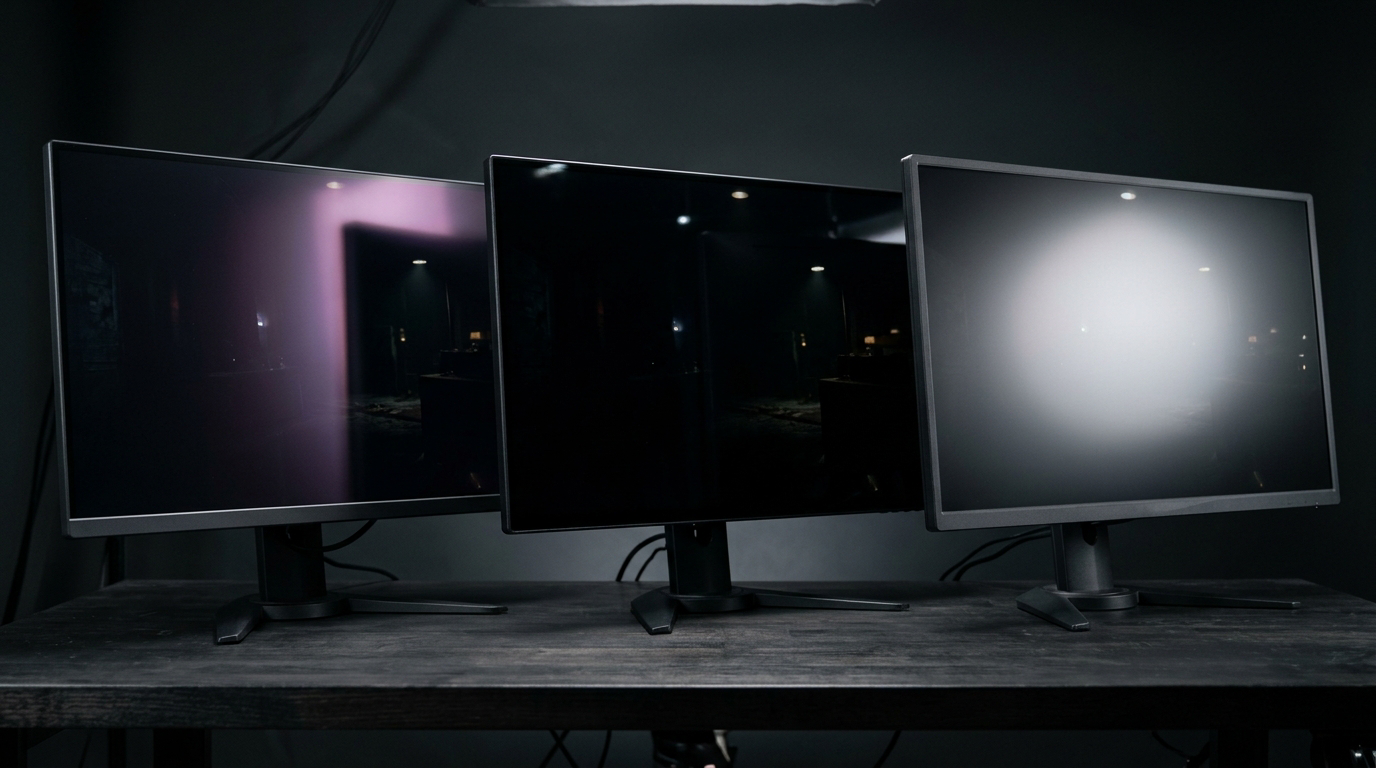
Battleground 1: Ambient Light, Coatings & The Purple-Tint Tradeoff
Room lighting dictates whether OLED contrast lives up to its reputation. Many shoppers assume every OLED holds pitch-black depth at noon, yet front-panel polarization separates QD-OLED from WOLED the moment sunlight or an overhead lamp strikes the display.
QD-OLED panels omit a circular polarizer to maximize transmission from their quantum dot layer. Inside a dark or blackout gaming room, black pixels emit zero light and produce striking depth. Under bright ceiling LEDs or an unshaded window, however, ambient light enters the stack and excites the red and blue quantum dots slightly, raising blacks into a noticeable purplish-gray haze.
WOLED panels integrate an internal polarizer beneath either a matte anti-glare surface or newer zero-haze glossy finishes like ASUS’s TrueBlack Glossy layer. Because the polarizer traps incoming light before it reflects back through the emitters, WOLED preserves deep ink blacks in lit rooms. Matte WOLED disperses harsh window glare effectively at the cost of slight grain over white backgrounds, while zero-haze glossy WOLED keeps crisp micro-contrast without QD-OLED’s violet lift—leaving only direct mirror reflections behind your chair to avoid.
Mini-LED monitors pair a matte anti-glare polarizer with high backlight power. If your desk sits in direct daylight or beneath bright studio lights, a Mini-LED IPS or VA panel suppresses glare effortlessly and sustains 400 to 600 nits across the full screen without aggressive automatic dimming.
Battleground 2: Subpixel Layouts & Desktop Text Clarity
Windows ClearType anti-aliasing assumes a standard vertical Red-Green-Blue (RGB) pixel column. Mini-LED IPS panels use this exact RGB stripe, keeping spreadsheets, code editors, and tiny browser text razor-sharp at 1080p, 1440p, and 4K.
OLED panels alter that geometry, making both subpixel layout and pixel density (PPI) decisive for hybrid work-and-play setups:
- QD-OLED Triangular Subpixels: Gen 1–3 QD-OLED monitors stack green subpixels above offset red and blue subpixels. At 27-inch 1440p (~109 PPI) or 34-inch ultrawide (~110 PPI), black text on white pages exhibits subtle green top edges and magenta bottom fringes. Stepping up to 31.5-inch 4K (~140 PPI) or 27-inch 4K (~163 PPI) shrinks subpixels enough that normal viewing distances erase most fringing, while newer V-Stripe RGB layouts align subpixels into vertical columns for clean OS rendering.
- WOLED RWBG / RGWB Subpixels: LG Display adds a white subpixel alongside RGB emitters. Early RWBG panels produced slight horizontal softness on fine text at 1440p, whereas refined RGWB and fourth-generation Primary RGB Tandem layouts tighten subpixel pitch for sharper 1440p and 4K office legibility.
- macOS Rendering Difference: macOS relies on grayscale high-DPI scaling instead of subpixel ClearType math, so MacBooks connected via USB-C exhibit less color fringing on 4K OLED monitors than uncalibrated Windows desktops.
Battleground 3: HDR Brightness, Color Volume, Blooming & Tandem OLED
Headline 1,000-nit and 1,500-nit HDR specs mean totally different things depending on Average Picture Level (APL). Under the VESA DisplayHDR True Black standard, OLED monitors qualify via near-zero black levels down to 0.0005 nits rather than brute full-screen output.
QD-OLED generates every color through pure red, green, and blue emitters without white-subpixel dilution. As a result, QD-OLED delivers superior HDR color volume—bright explosions, neon signs, and sunlit foliage retain deep saturation at peak brightness. Traditional WOLED relies on its white subpixel to push small specular peaks up to 1,300 nits on MLA+ panels like the ASUS ROG Strix OLED XG32UCWMG, though very bright highlights appear slightly cooler and less saturated than QD-OLED.
LG Display’s fourth-generation Primary RGB Tandem OLED—deployed in displays such as the LG UltraGear 27GX700A-B—stacks multiple primary emission layers to close that gap. It boosts peak HDR highlights to 1,500 nits, elevates full-screen SDR brightness to ~335 nits, and covers 99.5% DCI-P3 while lowering thermal stress per nit.
Mini-LED still owns sustained full-field luminance. A 1,152-zone Full-Array Local Dimming (FALD) display pushes 1,000 to 1,600+ nits across snowfields, sunny racetracks, and daytime skies where OLEDs cap around 250–335 nits full-screen due to Automatic Brightness Limiter (ABL) throttling. The tradeoff is blooming: white mouse cursors, starfields, or subtitles over dark scenes reveal a faint gray halo around lit dimming zones.
Battleground 4: Motion Clarity, Dual-Mode OLED, DP 2.1 UHBR20 & VRR Flicker
Competitive shooters magnify transition speed and display interface limits. Both QD-OLED and WOLED deliver an instant 0.03ms response, erasing trailing ghost blur across 240Hz, 1440p 360Hz, and 480Hz–540Hz panels. Even rapid 0.5ms-rated Mini-LED IPS displays measure closer to 1.5–3ms in real pixel transitions, while budget VA Mini-LED units often suffer noticeable black smearing during fast pans.
- Dual-Mode OLED & Mini-LED Flexibility: Instead of choosing between cinematic sharpness and esports speed, Dual-Mode OLED monitors toggle with one button between native 4K 240Hz and 1080p 480Hz (or QHD 540Hz and HD 720Hz on extreme esports WOLED models). Newer 27-inch Mini-LED panels adopt the same concept, switching between 4K 160Hz and 1080p 320Hz.
- DisplayPort 2.1 UHBR20 vs. DSC Compression: DisplayPort 1.4 (32.4Gbps) relies on visually lossless DSC compression for 4K 240Hz 10-bit RGB, occasionally causing brief Alt+Tab black screens or driver scaling limits. Certified DisplayPort 2.1 UHBR20 (80Gbps over DP80 cables) drives uncompressed 4K 240Hz natively from RTX 50-series GPUs on flagships like the MSI MPG 322URX QD-OLED.
Always match panel tier to GPU muscle. Running an RTX 5080 or RTX 5090 on a 1080p or 4K 60Hz monitor wastes GPU headroom; target 1440p 240Hz–360Hz or 4K 240Hz OLED with DisplayPort 2.1 UHBR20. Buyers stepping into upper-midrange GPUs covered in our RTX 5070 Ti vs. RX 9070 XT comparison and best graphics cards guide get optimal pairing from 1440p 360Hz OLED or 4K 160Hz–240Hz with DLSS 4 or FSR 4.
Both OLED architectures also remain sensitive to VRR flicker. Because OLED gamma curves shift slightly across variable refresh swings, games experiencing shader-compilation hitches or unstable loading frametimes can show faint dark-gray pulsing under G-Sync or FreeSync. Mini-LED displays resist VRR flicker far better, while OLED owners can minimize it by capping frame rates cleanly and configuring Windows HDR and VRR settings via our post-build PC tuning checklist.
Battleground 5: Burn-In Longevity, 3-Year Warranties & Rejected Traps
Organic subpixels wear gradually with cumulative heat and static brightness. Leaving fixed taskbars, spreadsheets, or MMO action bars on screen eight hours daily accelerates uneven aging on both QD-OLED and WOLED. Modern 2026 panels mitigate this using graphene or fanless heatsinks, pixel shifting, logo dimming, proximity sensors that blank idle screens, and scheduled pixel refreshes.
Crucially, ASUS, MSI, Dell/Alienware, and LG now back gaming OLEDs with an explicit 3-year burn-in warranty—provided built-in OLED Care routines remain enabled. Even so, anyone spending 80% of desk time in static productivity apps at high brightness avoids organic wear altogether with Mini-LED.
Avoid three common catalog traps when shopping:
- 4K Flagships Missing Fast DisplayPort or HDMI 2.1: Omitting 48Gbps HDMI 2.1 or high-bandwidth DisplayPort forces aggressive chroma compression on consoles and PCs.
- OLEDs Without Explicit Burn-In Coverage: Skip off-brand OLED listings that exclude burn-in from US warranty terms.
- Low-Zone VA Mini-LED Monitors: Cheap VA panels with under 350 dimming zones suffer severe dark-transition black smearing and distracting halos despite HDR marketing badges.
Verified 2026 Monitor Picks Across Each Panel Class
These three audited 2025–2026 Amazon US monitors represent the clearest real-world benchmark in each panel class.
1. Best QD-OLED Gaming Monitor: MSI MPG 322URX QD-OLED ($1,300 Tier)

Audited Specs ($1,299 Launch MSRP): 31.5-inch flat 3rd-Gen QD-OLED | 4K UHD 240Hz | 0.03ms GtG | 1x DisplayPort 2.1a UHBR20 (80Gbps), 2x HDMI 2.1, USB-C 98W PD + KVM | True Black 400 | MSI OLED Care 2.0 + 3-year burn-in warranty.
Why It Wins QD-OLED: Most 4K 240Hz OLEDs still lean on DP 1.4 DSC. The MPG 322URX combines vibrant QD-OLED color volume with full 80Gbps DisplayPort 2.1a UHBR20 for uncompressed 4K 240Hz on RTX 50-series GPUs plus 98W USB-C charging.
- Pros: Native UHBR20 uncompressed 4K 240Hz; top-tier HDR color volume; silent fanless heatsink and 3-year burn-in coverage.
- Cons: Semi-glossy surface shows faint magenta tint under direct room lamps; lower sustained full-screen brightness than Mini-LED.
2. Best WOLED Gaming Monitor: ASUS ROG Strix OLED XG32UCWMG ($1,100 Tier)
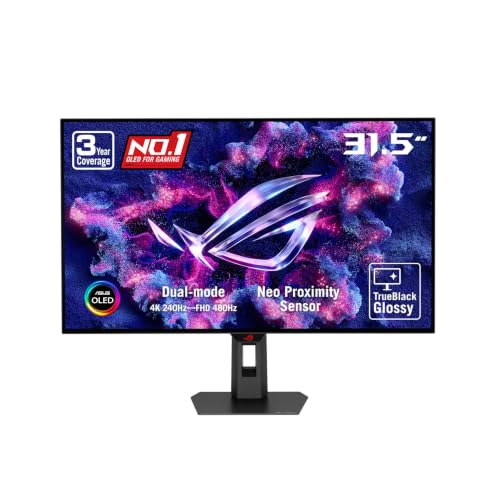
Audited Specs ($1,099 Launch MSRP): 31.5-inch Dual-Mode WOLED | 4K 240Hz or FHD 480Hz | TrueBlack Glossy zero-haze coating | 0.03ms GtG | Up to 1,300 nits peak HDR | 1x DP 1.4 (DSC), 2x HDMI 2.1, USB-C 15W PD, Auto KVM | Neo Proximity Sensor + 3-year burn-in warranty.
Why It Wins WOLED: ASUS pairs Dual-Mode 4K 240Hz / 1080p 480Hz versatility with a TrueBlack Glossy polarizer layer, delivering crisp glossy clarity with ink-black lit-room contrast and zero violet lift.
- Pros: Zero-haze glossy clarity without QD-OLED purple sheen; instant 4K 240Hz / 1080p 480Hz Dual-Mode switching; Neo Proximity Sensor protection.
- Cons: Uses DP 1.4 DSC instead of DP 2.1 UHBR20; USB-C Power Delivery stops at 15W.
3. Best Mini-LED Gaming Monitor: MSI MPG 274URDFW E16M ($500 Tier)
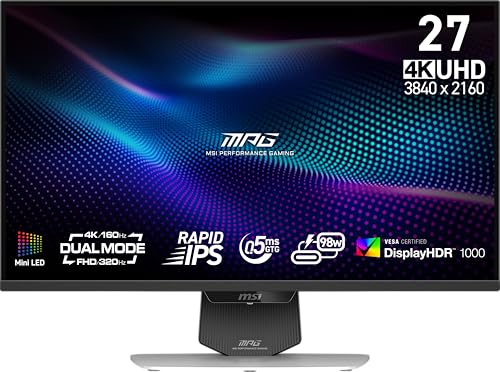
Audited Specs ($500 Launch MSRP Tier): 27-inch Rapid IPS + Quantum Dot Mini-LED | 1,152 Full-Array Local Dimming zones | Dual-Mode 4K 160Hz / FHD 320Hz | 0.5ms GtG (min) | DisplayHDR 1000 (1,000 nits peak, 400 nits SDR) | 1x DP 1.4a, 2x HDMI 2.1, USB-C 98W PD + KVM | Zero burn-in risk.
Why It Wins Mini-LED: Packing 1,152 dimming zones behind a crisp 27-inch 4K Rapid IPS panel controls haloing tightly while delivering HDR 1000 punch, Dual-Mode 320Hz esports agility, 98W USB-C docking, and standard RGB text clarity.
- Pros: 1,152-zone dimming density in the $500 tier; bright 400-nit SDR and HDR 1000 daylight visibility; zero burn-in anxiety plus 98W USB-C PD.
- Cons: 0.5ms IPS response trails 0.03ms OLED motion clarity; faint haloing appears around white cursors on dark backgrounds.
Decisive Verdict: Which Panel Should You Buy in 2026?
Choose QD-OLED If…
You play in dim lighting, prioritize unmatched HDR color saturation, and want uncompressed DisplayPort 2.1 UHBR20 bandwidth paired with 0.03ms motion clarity.
Choose WOLED If…
Ambient room light turns QD-OLED blacks purple on your desk, or you split hours between 4K 240Hz RPGs and 480Hz–540Hz Dual-Mode esports shooters.
Choose Mini-LED If…
You work 8+ hours daily with static UI bars, game in sunlit rooms demanding sustained 400+ nit brightness, or want HDR 1000 at half OLED pricing.
How We Audited This Guide
- Displays and peripherals were compared by panel technology, refresh rate and response specifications, connectivity standards, sensor and polling specifications, and warranty terms.
- Every specification claim was cross-checked against official OEM datasheets, platform vendor documentation, and published industry standards (PCI-SIG, JEDEC, VESA, Intel ATX) rather than marketplace listing copy.
- Recommendations were evaluated against our weighted audit rubric and documented compatibility rules; we do not publish fabricated FPS, thermal, or acoustic numbers.
Continue Your Audit
- Parent hub: Best Gaming Monitors (2026): QD-OLED, WOLED & Dual-Mode Picks Audited
- Best 4K 240Hz OLED Gaming Monitors (2026): DisplayPort 2.1 Flagships
- OLED Gaming Monitor Burn-In Care & VRR Flicker Fixes Explained (2026)
Frequently Asked Questions
Is QD-OLED or WOLED better in a bright gaming room?
WOLED performs noticeably better in bright rooms because its internal polarizer blocks ambient reflections and holds ink blacks. QD-OLED omits a polarizer to maximize color transmission, causing ceiling lamps or sunlight to lift dark shadows into a faint magenta-gray tint.
Does Tandem OLED solve WOLED brightness and color limits?
Fourth-generation Primary RGB Tandem OLED stacks multiple organic emission layers to hit up to 1,500 nits peak HDR brightness, ~335 nits full-screen SDR output, and 99.5% DCI-P3 coverage while reducing per-layer thermal stress for longer panel life.
How noticeable is subpixel text fringing on 2026 OLED monitors?
On 27-inch 1440p triangular QD-OLED or older RWBG WOLED monitors, Windows ClearType produces faint green or purple fringes along small fonts. Stepping up to 4K at 27 or 32 inches—or newer V-Stripe RGB and RGWB subpixels—makes fringing virtually invisible.
Do I need DisplayPort 2.1 UHBR20 instead of DisplayPort 1.4 DSC?
Although DSC compression appears visually lossless during gameplay, DisplayPort 2.1 UHBR20 delivers 80Gbps uncompressed bandwidth for 4K 240Hz 10-bit video on RTX 50-series GPUs, removing Alt+Tab black-screen delays and preserving full driver scaling support.
Is OLED burn-in still a dealbreaker if I work from home?
Major brands now cover flagship OLED monitors under a 3-year burn-in warranty alongside automated pixel shifting and panel refreshes. However, if you spend 8+ hours daily in static spreadsheets or CAD tools, a 1,152-zone Mini-LED IPS display eliminates burn-in risk completely.


