
Disclosure: As an Amazon Associate, I earn from qualifying purchases. If you buy through links on this page, we may earn a small commission at no extra cost to you.
Even an RTX 5090 paired with a Ryzen 7 9850X3D hits an immediate visual ceiling if the final link in your desk chain bottlenecks motion clarity, black depth, or cable bandwidth. Evaluating the best gaming monitors in 2026 comes down to balancing four rapidly shifting hardware pillars: QD-OLED color volume, WOLED daytime readability, Dual-Mode 480Hz refresh switching, and native DisplayPort 2.1 UHBR20 bandwidth. We audited specifications, subpixel layouts, local dimming counts, and warranty terms across dozens of current Amazon US listings to isolate 10 standout displays spanning from the $200-$250 budget Mini-LED bracket up to flagship 4K 240Hz OLED panels.
Whether you are building around one of our The PC Audit hardware guides or upgrading an existing workstation, panel selection dictates both your target GPU tier and daily eye comfort. If you already know you want an emissive organic display but still weigh glossy coatings against bright-room glare resistance, pair this roundup with our dedicated QD-OLED vs. WOLED vs. Mini-LED comparison before finalizing your desk setup.
In This Guide
- Quick Picks: Best Gaming Monitors at a Glance
- Side-by-Side Comparison: Top 10 Audited Displays
- Match Your Use Case: Which Display Fits Your Rig?
- Detailed Audits (Ranks 1–10)
- 1. ASUS ROG Swift OLED PG32UCDMR (Best Overall)
- 2. AOC Q27G3XMN (Best Budget HDR)
- 3. ASUS ROG Strix OLED XG32UCWMG (Best Dual-Mode Flagship)
- 4. Samsung Odyssey OLED G8 G80SH (Best Bright-Room 4K QD-OLED)
- 5. LG UltraGear 32GX870A-B (Best Dual-Mode DP 2.1)
- 6. ASUS ROG Swift OLED PG27UCDM (Best 27-Inch 4K Clarity)
- 7. MSI MPG 271QRX QD-OLED (Best 1440p 360Hz QD-OLED)
- 8. LG UltraGear 27GX790A-B (Best 1440p 480Hz Esports OLED)
- 9. MSI MPG 274URDFW E16M (Best Hybrid Mini-LED)
- 10. ASUS ROG Strix XG27AQDMGR (Best Entry Glossy OLED)
- Buying Guide & Upgrade Roadmap
- Scoring Methodology & Rejected Models
- Frequently Asked Questions
- Final Verdict
Quick Picks: Best Gaming Monitors at a Glance
#1 Best Overall
ASUS ROG Swift OLED PG32UCDMR
Uncompressed 4K 240Hz QD-OLED clarity via DisplayPort 2.1 (DP80) plus 90W USB-C PD in the $850-$950 tier. (Jump to audit)
#2 Best Budget HDR
AOC Q27G3XMN
336-zone VA Mini-LED panel delivering genuine DisplayHDR 1000 highlights and 180Hz speed in the $200-$250 tier. (Jump to audit)
#3 Best Dual-Mode Flagship
ASUS ROG Strix OLED XG32UCWMG
Zero-haze TrueBlack Glossy WOLED switching seamlessly between 4K 240Hz adventures and 1080p 480Hz esports. (Jump to audit)
Side-by-Side Comparison: Top 10 Gaming Monitors Audited
| Product & Award | Best For | Panel & Refresh | Key Connectivity | Link |
|---|---|---|---|---|
| ASUS ROG Swift OLED PG32UCDMR Best Overall | RTX 5080/5090 4K setups | 31.5″ 4K 240Hz QD-OLED | DP 2.1 (DP80), HDMI 2.1, USB-C 90W | View on Amazon |
| AOC Q27G3XMN Best Budget HDR | True HDR under $250 | 27″ 1440p 180Hz VA Mini-LED | DP 1.4, HDMI 2.1, USB 3.2 | View on Amazon |
| ASUS ROG Strix OLED XG32UCWMG Best Dual-Mode Flagship | Glossy 4K + 480Hz esports | 31.5″ 4K 240Hz / FHD 480Hz WOLED | DP 1.4 (DSC), 2x HDMI 2.1, Auto KVM | View on Amazon |
| Samsung Odyssey OLED G8 (G80SH) Best Bright-Room 4K QD-OLED | Sunlit rooms + DP 2.1 | 32″ 4K 240Hz Glare-Free QD-OLED | DP 2.1 (80Gbps), HDMI 2.1, USB-C 98W | View on Amazon |
| LG UltraGear 32GX870A-B Best Dual-Mode DP 2.1 | Dual-Mode value + DP 2.1 | 32″ 4K 240Hz / FHD 480Hz WOLED | DP 2.1, HDMI 2.1, USB Type-C | View on Amazon |
| ASUS ROG Swift OLED PG27UCDM Best 27-Inch 4K Clarity | 166 PPI text & compact desks | 26.5″ 4K 240Hz 4th-Gen QD-OLED | DP 2.1, HDMI 2.1, USB-C | View on Amazon |
| MSI MPG 271QRX QD-OLED Best 1440p 360Hz QD-OLED | 1440p GPU sweet spot + KVM | 27″ 1440p 360Hz QD-OLED | DP 1.4, HDMI 2.1, USB-C KVM | View on Amazon |
| LG UltraGear 27GX790A-B Best 1440p 480Hz Esports OLED | Native 1440p FPS grinders | 27″ 1440p 480Hz WOLED | DP 2.1, 2x HDMI 2.1, USB 3.0 | View on Amazon |
| MSI MPG 274URDFW E16M Best Hybrid Mini-LED | Workday spreadsheets + HDR | 27″ 4K 160Hz / FHD 320Hz Rapid IPS | DP 1.4a, 2x HDMI 2.1, USB-C 98W KVM | View on Amazon |
| ASUS ROG Strix XG27AQDMGR Best Entry Glossy OLED | 1440p OLED under $400 | 26.5″ 1440p 240Hz Glossy WOLED | DP 1.4, HDMI 2.1, USB Hub | View on Amazon |
Match Your Use Case: Which Display Fits Your Rig?
| Buyer Scenario | Best Match | Why & Expected Outcome |
|---|---|---|
| RTX 5080 / 5090 Uncompressed 4K 240Hz | ASUS PG32UCDMR | 80Gbps DisplayPort 2.1 avoids DSC Alt+Tab stalls while QD-OLED delivers maximum HDR color volume. |
| Single Monitor for 4K RPGs & 480Hz CS2 | ASUS XG32UCWMG | One-button Dual-Mode switches from sharp 4K 240Hz to ultra-fast 1080p 480Hz on a glossy WOLED surface. |
| Bright Sunlit Room 4K Gaming | Samsung Odyssey G8 G80SH | Glare Free matte layer suppresses window reflections while DisplayHDR True Black 500 boosts highlights. |
| Dedicated Competitive 1440p Esports | LG 27GX790A-B | Native 1440p 480Hz WOLED preserves sharp long-range visibility without downscaling to 1080p. |
| 8-Hour Office Work + Evening HDR Gaming | MSI MPG 274URDFW E16M | 1,152-zone Rapid IPS Mini-LED eliminates burn-in risk on static toolbars while adding 98W USB-C KVM. |
| Strict Budget Under $250 Wanting Real HDR | AOC Q27G3XMN | 336-zone VA Mini-LED produces genuine 1,000-nit HDR pop unreachable by edge-lit IPS panels. |
Detailed Audits: The 10 Best Gaming Monitors (2026)
1. ASUS ROG Swift OLED PG32UCDMR 32-Inch 4K 240Hz QD-OLED Gaming Monitor — Best Overall

Quick Specs: 31.5-inch flat | 3840×2160 (4K UHD) | 240Hz | QD-OLED (0.03ms GtG, DisplayHDR True Black 400) | DisplayPort 2.1 (DP80), HDMI 2.1, USB-C (90W PD) | Price Tier: $850-$950 tier
Audit Score: 9.6 / 10
- Panel Contrast, Color & HDR (35%): 9.7 / 10
- Motion Clarity & Refresh Architecture (25%): 9.4 / 10
- Connectivity & Bandwidth (DP 2.1) (20%): 9.8 / 10
- Burn-In Care, Ergonomics & Value (20%): 9.3 / 10
Pairing a Blackwell RTX 5080 or RTX 5090 with an older DisplayPort 1.4 display forces every 4K 240Hz frame through DSC compression, triggering annoying two-to-four-second black-screen pauses whenever you Alt+Tab out of full-screen games. ASUS eliminates that friction on the ROG Swift OLED PG32UCDMR by equipping a full DisplayPort 2.1 UHBR20 (DP80) input alongside HDMI 2.1 and 90W USB-C Power Delivery. Its 31.5-inch QD-OLED panel meets VESA DisplayHDR True Black 400 criteria for infinite pixel-level contrast, rich HDR color volume, and near-instant 0.03ms response times.
Placed against the Samsung Odyssey OLED G8 (G80SH) in a similar budget bracket, the PG32UCDMR keeps a cleaner semi-gloss finish that preserves razor-sharp contrast in dim rooms instead of diffusing incoming light. It also easily beats the overpriced MSI MPG 322URX (around $1,300) on value while keeping ASUS’s 3-year OLED Care Pro burn-in warranty. If you want a closer look at competing uncompressed flagships, browse our dedicated Best 4K 240Hz OLED Gaming Monitors guide.
Buyer Verification Alert: Passive copper DP80 cables capable of full 80Gbps UHBR20 bandwidth are typically capped around one meter in length; if your PC tower sits farther away, invest in an active VESA DP80LL cable so the link does not down-train to 40Gbps.
Pros
- True DP80 DisplayPort 2.1 drives uncompressed 4K 240Hz signals without Alt+Tab blackouts
- QD-OLED quantum-dot emitter stack delivers richer saturated HDR highlights than standard WOLED
- 90W USB-C Power Delivery powers modern ultrabooks alongside full HDMI 2.1 console I/O
- Aggressive $850-$950 tier positioning undercuts rival 80Gbps QD-OLED releases
Cons
- Lacks a polarizing layer, allowing direct overhead lamps to tint blacks slightly purple
- Requires an RTX 5080, RTX 5090, or DLSS 4 / FSR 4 upscaling to exploit high 4K frame rates
Verdict: Buy it if you want a no-compromise 32-inch 4K 240Hz QD-OLED flagship with future-proof 80Gbps DisplayPort 2.1 and laptop-ready 90W USB-C. Skip it if your desk faces bright sunlit windows without blinds or if you want a 480Hz esports toggle. Consider a heavy-duty gas-spring monitor arm if your desk is under 24 inches deep.
2. AOC Q27G3XMN 27-Inch QHD 180Hz Mini-LED HDR1000 Gaming Monitor — Best Budget HDR

Quick Specs: 27-inch flat | 2560×1440 (QHD) | 180Hz | VA Mini-LED (336 dimming zones, DisplayHDR 1000, 1ms GtG) | DisplayPort 1.4, HDMI 2.1, USB 3.2 | Price Tier: $200-$250 tier
Audit Score: 8.4 / 10
- Panel Contrast, Color & HDR (35%): 8.5 / 10
- Motion Clarity & Refresh Architecture (25%): 7.6 / 10
- Connectivity & Bandwidth (DP 2.1) (20%): 7.8 / 10
- Burn-In Care, Ergonomics & Value (20%): 9.7 / 10
Most entry-tier 1440p monitors slap a meaningless DisplayHDR 400 badge onto edge-lit IPS panels that struggle to break 1,000:1 native contrast. The AOC Q27G3XMN breaks that pattern inside the $200-$250 tier by deploying a 336-zone Full-Array Local Dimming VA Mini-LED array certified to VESA DisplayHDR 1000. Specular explosions, neon reflections, and torchlit dungeons gain real punch while native VA dark floors prevent distracting IPS backlight glow during night sessions.
Compared against our #10 entry OLED pick (the ASUS ROG Strix XG27AQDMGR in the $350-$400 tier), AOC gives up instantaneous 0.03ms pixel transitions and shows mild blooming halos around white text on black backdrops. Yet for roughly $150 less, the Q27G3XMN completely eliminates burn-in maintenance and pairs nicely with mid-range 1440p cards like an RX 9060 XT 16GB or RTX 5060 Ti 16GB.
Buyer Verification Alert: Amazon frequently groups lower-cost standard edge-lit Q27G3 variants alongside the Mini-LED listing; verify that the exact model code ends in Q27G3XMN with 336 dimming zones before checking out.
Pros
- True 336-zone Mini-LED local dimming reaches VESA DisplayHDR 1000 luminance under $250
- Strong native VA contrast ratio eliminates greyish edge-lit IPS bleed in dark games
- Zero permanent burn-in risk during marathon HUD-heavy RPG or daytime office workloads
Cons
- 336 dimming zones produce noticeable blooming halos around small cursors and subtitles
- VA dark-pixel transitions show slight smearing in fast-paced shooters compared with OLED or Rapid IPS
Verdict: Buy it if you want authentic 1,000-nit HDR gaming and deep VA contrast on a strict budget under $250. Skip it if you play fast-twitch competitive FPS titles where VA ghosting bothers your aim or if you sit far off-axis. Set overdrive to Medium in the OSD and disable local dimming on the Windows desktop for clean uniformity.
3. ASUS ROG Strix OLED XG32UCWMG — Best Dual-Mode Flagship
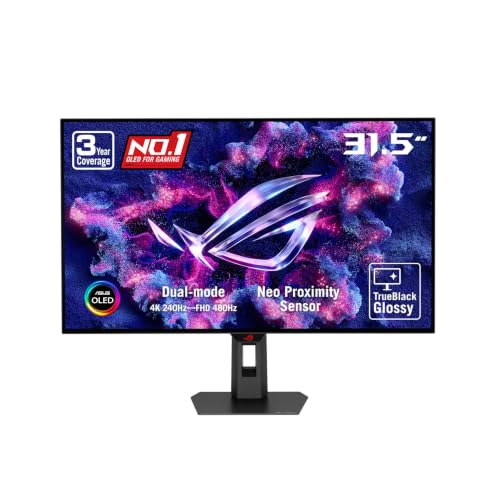
Quick Specs: 31.5-inch flat | Dual-Mode: 3840×2160 (4K) at 240Hz / 1920×1080 (FHD) at 480Hz | TrueBlack Glossy WOLED (0.03ms GtG, up to 1,300 nits peak) | 1x DisplayPort 1.4 (DSC), 2x HDMI 2.1, USB-C (15W PD), Auto KVM | Price Tier: around $1,100 tier
Audit Score: 9.2 / 10
- Panel Contrast, Color & HDR (35%): 9.5 / 10
- Motion Clarity & Refresh Architecture (25%): 9.7 / 10
- Connectivity & Bandwidth (DP 2.1) (20%): 8.3 / 10
- Burn-In Care, Ergonomics & Value (20%): 9.0 / 10
Historically, choosing a Dual-Mode 4K 240Hz / 1080p 480Hz WOLED panel meant settling for a grainy matte anti-glare coating that muted fine surface sharpness. The ASUS ROG Strix OLED XG32UCWMG fixes that compromise with a zero-haze TrueBlack Glossy finish that preserves obsidian inkiness in bright rooms without QD-OLED’s purple ambient black raise. A hardware hotkey drops resolution to 1080p 480Hz in seconds for Counter-Strike 2 or Valorant while delivering up to 1,300-nit HDR highlights under ASUS OLED Care Pro.
Compared directly with the LG UltraGear 32GX870A-B in the $800-$900 tier, the XG32UCWMG commands a higher bracket around $1,100 and relies on DisplayPort 1.4 with DSC rather than native DP 2.1. What justifies the step up is that razor-sharp TrueBlack Glossy optical stack, built-in Auto KVM, and a Neo Proximity Sensor that automatically dims the display when you leave your chair. Explore more hybrid switches in our Best Dual-Mode OLED Gaming Monitors breakdown.
Buyer Verification Alert: Unlike the PG32UCDMR’s 90W charging port, the XG32UCWMG’s USB-C port supplies only 15W PD—verify you do not expect single-cable power for a workstation laptop.
Pros
- TrueBlack Glossy WOLED coating combines pure ink-black contrast with bright-room polarization
- Instant Dual-Mode OLED toggle shifts seamlessly between 4K 240Hz and 1080p 480Hz esports
- Neo Proximity Sensor and 3-year burn-in warranty protect static desktop elements automatically
Cons
- DisplayPort 1.4 relies on DSC compression at 4K 240Hz rather than native DP 2.1 UHBR20
- USB-C Power Delivery caps at 15W alongside a steep bracket around $1,100
Verdict: Buy it if you want the cleanest glossy WOLED image quality available with both 4K 240Hz RPG immersion and 480Hz esports speed in one chassis. Skip it if uncompressed DisplayPort 2.1 or high-wattage USB-C charging tops your checklist. Pair with an AM5 Ryzen 7 9800X3D or 9850X3D to keep 1080p 480Hz frames saturated.
4. Samsung 32-Inch Odyssey OLED G8 (G80SH) 4K 240Hz QD-OLED Gaming Monitor — Best Bright-Room 4K QD-OLED

Quick Specs: 32-inch flat | 3840×2160 (4K UHD) | 240Hz | QD-OLED (0.03ms GtG, DisplayHDR True Black 500, Glare Free) | DisplayPort 2.1 (80Gbps), HDMI 2.1, USB-C (98W) | Price Tier: $800-$900 tier
Audit Score: 9.4 / 10
- Panel Contrast, Color & HDR (35%): 9.4 / 10
- Motion Clarity & Refresh Architecture (25%): 9.4 / 10
- Connectivity & Bandwidth (DP 2.1) (20%): 9.7 / 10
- Burn-In Care, Ergonomics & Value (20%): 9.1 / 10
Not every desk sits inside a blackout room. For buyers facing sunny bay windows or overhead studio LEDs, the Samsung Odyssey OLED G8 (G80SH) pairs QD-OLED’s wide color gamut with Samsung’s aggressive Glare Free matte surface finish, scattering mirror reflections that ruin glossy panels during daytime play. Crucially, the updated G80SH revision steps up to VESA DisplayHDR True Black 500 luminance alongside full 80Gbps DisplayPort 2.1 and a hefty 98W USB-C Power Delivery link.
Sitting in the $800-$900 tier, the G80SH trades blows directly with our #1 ASUS PG32UCDMR. Choose the ASUS if you control ambient light and want glossy-like contrast micro-detail; choose Samsung if glare rejection and extra 98W USB-C charging headroom matter more for a bright home office.
Buyer Verification Alert: Confirm the exact SKU code reads G80SH on the product page; older G80SD inventory uses DisplayPort 1.4 and lacks 80Gbps UHBR20 bandwidth and 98W USB-C charging.
Pros
- Glare Free matte diffusion eliminates distracting mirror reflections in sunlit workspaces
- DisplayHDR True Black 500 pushes higher peak HDR impact than True Black 400 peers
- 80Gbps DisplayPort 2.1 plus 98W USB-C Power Delivery covers high-end desktops and laptops
Cons
- Matte diffusion softens perceived dark-room micro-contrast slightly versus bare glossy QD-OLED
- No 480Hz 1080p Dual-Mode switch for dedicated esports specialization
Verdict: Buy it if you work and play in a well-lit room and refuse to deal with reflections while still demanding 4K 240Hz QD-OLED and 80Gbps DisplayPort 2.1. Skip it if you game exclusively at night and prefer crystal-clear glossy coatings. Pair with a certified DP80 cable to run 10-bit 4K 240Hz uncompressed.
5. LG UltraGear 32GX870A-B 32-Inch Dual-Mode 4K 240Hz / FHD 480Hz OLED Gaming Monitor — Best Dual-Mode DP 2.1

Quick Specs: 32-inch flat | Dual-Mode: 3840×2160 (4K) at 240Hz / 1920×1080 (FHD) at 480Hz | WOLED (0.03ms GtG, DisplayHDR True Black 400) | DisplayPort 2.1, HDMI 2.1, USB Type-C | Price Tier: $800-$900 tier
Audit Score: 9.3 / 10
- Panel Contrast, Color & HDR (35%): 9.0 / 10
- Motion Clarity & Refresh Architecture (25%): 9.7 / 10
- Connectivity & Bandwidth (DP 2.1) (20%): 9.4 / 10
- Burn-In Care, Ergonomics & Value (20%): 9.2 / 10
First-generation Dual-Mode OLED screens carried eye-watering launch prices over $1,400 while locking users onto DisplayPort 1.4. The LG UltraGear 32GX870A-B fixes both pain points in one sweep: it introduces DisplayPort 2.1 and USB Type-C connectivity while landing squarely inside the $800-$900 tier. You still get instantaneous 0.03ms response times, pure white luminance headroom from LG’s WOLED pixel structure, and effortless one-touch switching from 4K 240Hz open-world exploration to 1080p 480Hz tactical shooters.
Against our #3 ASUS ROG Strix OLED XG32UCWMG, the LG 32GX870A-B sacrifices glossy specular pop and integrated Auto KVM switching, yet it delivers native DisplayPort 2.1 bandwidth for roughly $200-$300 less. Compared with the older LG 32GS95UE still floating around higher price brackets, the 32GX870A-B is a straightforward upgrade across both I/O and value.
Buyer Verification Alert: Check that the title specifies 32GX870A-B rather than the discontinued-value 32GS95UE, which lacks both DisplayPort 2.1 and USB Type-C while often listing at a much higher price.
Pros
- Pairs Dual-Mode 4K 240Hz / 1080p 480Hz switching with DisplayPort 2.1 and USB Type-C
- WOLED white subpixel sustains bright full-screen documents and daylight desktop legibility
- $800-$900 tier pricing delivers enormous savings over earlier Dual-Mode WOLED launches
Cons
- Matte anti-glare layer lacks the crystal-clear sheen of ASUS’s TrueBlack Glossy finish
- Bright HDR colors show slightly lower saturation volume than QD-OLED panels like the PG32UCDMR
Verdict: Buy it if you want Dual-Mode 4K 240Hz / 480Hz versatility plus DisplayPort 2.1 connectivity without crossing into four-figure pricing. Skip it if you strongly favor glossy coatings or need an integrated KVM switch. Use LG’s 24-inch screen-resize mode during 480Hz Valorant or CS2 matches to keep your minimap inside your peripheral scan.
6. ASUS ROG Swift OLED PG27UCDM 27-Inch 4K 240Hz QD-OLED Gaming Monitor — Best 27-Inch 4K Clarity

Quick Specs: 26.5-inch flat | 3840×2160 (4K UHD) | 240Hz | 4th-Gen QD-OLED (0.03ms) | DisplayPort 2.1, HDMI 2.1, USB-C | Price Tier: $850-$950 tier
Audit Score: 9.4 / 10
- Panel Contrast, Color & HDR (35%): 9.6 / 10
- Motion Clarity & Refresh Architecture (25%): 9.3 / 10
- Connectivity & Bandwidth (DP 2.1) (20%): 9.5 / 10
- Burn-In Care, Ergonomics & Value (20%): 8.9 / 10
Subpixel color fringing on sharp black-on-white Windows typography used to be QD-OLED’s biggest weakness at 1440p and even 32-inch 4K distances. Packing full 3840×2160 pixels onto a compact 26.5-inch 4th-Gen QD-OLED panel pushes pixel density to roughly 166 PPI, effectively erasing visible color fringes around small UI labels and code fonts. Equipped with DisplayPort 2.1, HDMI 2.1, and USB-C under ASUS’s 3-year burn-in warranty, it gives compact-desk setups flagship 4th-Gen durability.
Compared with the 31.5-inch PG32UCDMR in the exact same $850-$950 tier, the PG27UCDM swaps expansive cinematic size for razor-tight pixel pitch that competitive players and developers prefer at close viewing distances. Against the 1440p MSI MPG 271QRX, 4K sharpness makes desktop productivity vastly cleaner while retaining 240Hz OLED fluidity.
Buyer Verification Alert: At 166 PPI on a 26.5-inch screen, native 100% Windows scaling renders text tiny; set OS display scaling to 150% right away for crisp, comfortable desktop readability.
Pros
- ~166 PPI 4th-Gen QD-OLED density all but eliminates triangular subpixel text fringing
- DisplayPort 2.1, HDMI 2.1, and USB-C I/O fit modern RTX 50-series desktops cleanly
- 26.5-inch footprint leaves ample space on narrow desks and suits competitive eye-scan distances
Cons
- Sits in the same $850-$950 tier as larger 32-inch 4K 240Hz OLED models
- 4K GPU load still requires RTX 5070 Ti / 5080 class hardware or upscaling despite the 27-inch size
Verdict: Buy it if you sit close to a compact desk and want 4K text sharpness alongside flagship 240Hz QD-OLED contrast without subpixel fuzziness. Skip it if you prefer huge 32-inch movie and RPG immersion at the same spend. Keep an RTX 5070 Ti or better behind it so 4K frame rates stay responsive.
7. MSI MPG 271QRX QD-OLED 27-Inch 1440p 360Hz Gaming Monitor — Best 1440p 360Hz QD-OLED

Quick Specs: 27-inch flat | 2560×1440 (QHD) | 360Hz | QD-OLED (0.03ms GtG, DisplayHDR True Black 400) | HDMI 2.1, DisplayPort 1.4, USB Type-C (KVM) | Price Tier: $600-$650 tier
Audit Score: 9.2 / 10
- Panel Contrast, Color & HDR (35%): 9.3 / 10
- Motion Clarity & Refresh Architecture (25%): 9.5 / 10
- Connectivity & Bandwidth (DP 2.1) (20%): 8.5 / 10
- Burn-In Care, Ergonomics & Value (20%): 9.2 / 10
For mid-to-upper GPU builds running an RTX 5070, RTX 5070 Ti, or RX 9070 XT, pushing 1440p 360Hz delivers far smoother real-world frame pacing than chasing native 4K. The MSI MPG 271QRX QD-OLED hits that performance sweet spot with 0.03ms response times, silent fanless graphene heatsink cooling, a built-in KVM switch over USB-C, and a 3-year burn-in warranty backed by MSI OLED Care 2.0. You can explore more mid-resolution alternatives inside our Best 1440p Gaming Monitors roundup.
Standing head-to-head against the LG UltraGear 27GX790A-B in the exact same $600-$650 tier, MSI wins on HDR color saturation, glossy clarity, and integrated KVM convenience, while LG pulls ahead in raw 480Hz esports refresh rate and DP 2.1 support. MSI also out-features the barebones Alienware AW2725DF by adding HDMI 2.1 bandwidth and USB-C KVM.
Buyer Verification Alert: Keep MSI OLED Care 2.0 protection prompts enabled in the monitor OSD; MSI’s 3-year burn-in warranty stipulates leaving factory panel-protection cycles active.
Pros
- 360Hz QD-OLED motion pairs ideally with RTX 5070 Ti and RX 9070 XT 1440p frame rates
- Fanless custom heatsink eliminates internal cooling noise during quiet late-night sessions
- Full HDMI 2.1 ports and integrated USB-C KVM add multi-device workstation versatility
Cons
- DisplayPort 1.4 relies on DSC compression to achieve full 10-bit 1440p 360Hz output
- 1440p QD-OLED triangular subpixels show faint color fringing on sharp black-on-white Windows text
Verdict: Buy it if you want a balanced 1440p 360Hz QD-OLED with vibrant HDR color volume, silent cooling, and a built-in USB-C KVM. Skip it if you spend most hours reading small spreadsheets or demand native DisplayPort 2.1 at 480Hz. Flash the latest MSI firmware over DisplayPort right after unboxing for full HDR EOTF and DSC controls.
8. LG UltraGear 27GX790A-B 27-Inch 1440p 480Hz OLED Gaming Monitor — Best 1440p 480Hz Esports OLED

Quick Specs: 27-inch flat | 2560×1440 (QHD) | 480Hz | WOLED (0.03ms, DisplayHDR True Black 400) | DisplayPort 2.1, 2x HDMI 2.1, USB 3.0 | Price Tier: $600-$650 tier
Audit Score: 9.2 / 10
- Panel Contrast, Color & HDR (35%): 8.8 / 10
- Motion Clarity & Refresh Architecture (25%): 9.9 / 10
- Connectivity & Bandwidth (DP 2.1) (20%): 9.3 / 10
- Burn-In Care, Ergonomics & Value (20%): 8.9 / 10
Dual-Mode 32-inch monitors drop all the way down to 1080p to unlock 480Hz—noticeably softening pixel edges in long-range battle royales. The LG UltraGear 27GX790A-B removes that resolution sacrifice by running crisp native 2560×1440 at a blistering 480Hz with 0.03ms OLED pixel transitions and DisplayPort 2.1 plus dual HDMI 2.1 inputs. Because it uses LG’s WOLED emitter layout, bright indoor lighting does not wash out blacks with purple glare during tournament scrims.
Compared with the MSI MPG 271QRX at the identical $600-$650 tier, LG skips USB-C charging and KVM hardware to prioritize maximum competitive refresh rate and DP 2.1 bandwidth. Paired with a Ryzen 7 9800X3D or 9850X3D processor and an 8,000Hz polling esports mouse, motion blur during rapid 180-degree flicks virtually disappears.
Buyer Verification Alert: Standard non-X3D CPUs often bottleneck below 350 FPS in competitive titles; verify your processor and memory kit can actually push 400+ FPS to benefit from 480Hz.
Pros
- Native 1440p at 480Hz keeps distant targets sharper than Dual-Mode 1080p scaling
- DisplayPort 2.1 and dual HDMI 2.1 ports offer generous modern input bandwidth
- WOLED architecture preserves black depth in brightly lit competitive arenas
Cons
- Omits USB-C Power Delivery and the KVM switch included on the MSI MPG 271QRX
- Matte anti-glare coat reduces raw glossy contrast pop compared with QD-OLED
Verdict: Buy it if pure competitive FPS motion clarity at native 1440p 480Hz outweighs glossy HDR vibrance or laptop docking. Skip it if you want 4K cinematic detail or single-cable USB-C switching. Cap frame rates cleanly inside Nvidia Reflex or AMD Anti-Lag 2 to minimize dark-menu VRR flicker.
9. MSI MPG 274URDFW E16M — Best Hybrid Mini-LED
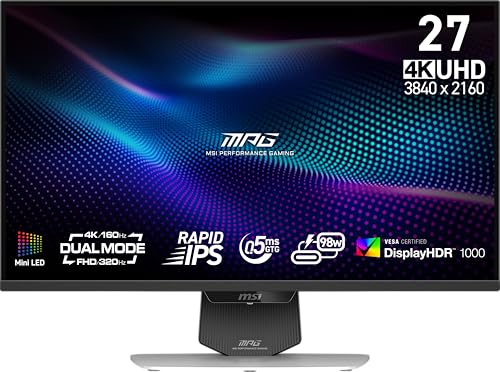
Quick Specs: 27-inch flat | Dual-Mode: 3840×2160 (4K) at 160Hz / 1920×1080 (FHD) at 320Hz | Rapid IPS + Quantum Dot Mini-LED (1,152 dimming zones, DisplayHDR 1000, 0.5ms min GtG) | 1x DP 1.4a, 2x HDMI 2.1, USB-C (98W PD), KVM | Price Tier: around $500 tier
Audit Score: 9.0 / 10
- Panel Contrast, Color & HDR (35%): 8.9 / 10
- Motion Clarity & Refresh Architecture (25%): 8.7 / 10
- Connectivity & Bandwidth (DP 2.1) (20%): 8.8 / 10
- Burn-In Care, Ergonomics & Value (20%): 9.5 / 10
Remote engineers, video editors, and static-HUD strategy fans often hesitate to put eight-hour spreadsheet taskbars on an emissive OLED despite 3-year warranties. Priced around $500, the MSI MPG 274URDFW E16M eliminates burn-in anxiety completely while delivering legitimate 1,000-nit HDR firepower via a 1,152-zone Quantum Dot Rapid IPS Mini-LED backlight. Its standard RGB IPS subpixel grid renders razor-crisp daytime text alongside Dual-Mode 4K 160Hz / 1080p 320Hz versatility and a 98W USB-C KVM dock.
Stepping up from the $200-$250 AOC Q27G3XMN, MSI more than triples dimming-zone density to 1,152 zones, eliminates VA dark-level smearing via Rapid IPS crystals, and upgrades desktop utility with 98W USB-C power delivery. Though it cannot replicate an OLED’s pitch-black starfield contrast, it crushes OLEDs in sustained full-screen daylight brightness.
Buyer Verification Alert: Toggle local dimming down or off in SDR desktop mode so cursor halos do not brighten dark IDE themes during daytime work, then re-enable full dimming for HDR games.
Pros
- 1,152 Full-Array Local Dimming zones shrink halo artifacts while hitting VESA DisplayHDR 1000
- Standard RGB Rapid IPS matrix gives zero text fringing and total immunity to burn-in
- 98W USB-C PD, KVM switch, and Dual-Mode 4K 160Hz / 320Hz switching deliver huge utility around $500
Cons
- Dark starry HDR scenes still show slight blooming compared with pixel-level OLED control
- 0.5ms min GtG LCD response cannot equal OLED’s instantaneous 0.03ms transitions
Verdict: Buy it if your display pulls double duty for eight-hour static productivity and bright HDR gaming with zero burn-in maintenance. Skip it if you play exclusively in dark rooms where per-pixel OLED blacks shine brightest. Leverage its single-cable 98W USB-C KVM to switch between your work laptop and gaming rig instantly.
10. ASUS ROG Strix XG27AQDMGR 27-Inch 1440p 240Hz TrueBlack Glossy WOLED Gaming Monitor — Best Entry Glossy OLED

Quick Specs: 26.5-inch flat | 2560×1440 (QHD) | 240Hz | TrueBlack Glossy WOLED (0.03ms, DisplayHDR 400) | DisplayPort 1.4, HDMI 2.1, USB Hub | Price Tier: $350-$400 tier
Audit Score: 9.0 / 10
- Panel Contrast, Color & HDR (35%): 9.1 / 10
- Motion Clarity & Refresh Architecture (25%): 8.9 / 10
- Connectivity & Bandwidth (DP 2.1) (20%): 8.1 / 10
- Burn-In Care, Ergonomics & Value (20%): 9.6 / 10
OLED image quality used to stay locked behind $600-$900 budgets, forcing mid-tier builders onto standard IPS monitors. Dropping straight into the $350-$400 tier, the ASUS ROG Strix XG27AQDMGR delivers genuine 240Hz WOLED clarity, 0.03ms response speeds, and ASUS’s acclaimed TrueBlack Glossy surface finish at mainstream LCD pricing. Updating earlier generation I/O with full HDMI 2.1 alongside DisplayPort 1.4 makes it equally comfortable on PC and current-gen console desks.
Compared with the $600-$650 MSI MPG 271QRX and LG 27GX790A-B, you step down from 360Hz-480Hz ceilings to 240Hz and forego USB-C or DP 2.1 connectivity. Yet for RTX 5060 Ti 16GB or RX 9070 owners who rarely exceed 240 FPS in modern AAA releases, saving over $200 while keeping crisp glossy OLED contrast is a huge win.
Buyer Verification Alert: Check that your selected listing specifies the XG27AQDMGR TrueBlack Glossy SKU with HDMI 2.1 rather than older XG27AQDMG inventory limited to HDMI 2.0 ports.
Pros
- Delivers glossy TrueBlack WOLED blacks and 0.03ms 240Hz motion clarity under $400
- Adds HDMI 2.1 alongside DisplayPort 1.4 and an integrated USB hub
- Outperforms similarly priced Fast IPS panels dramatically in dark-room shadow detail
Cons
- 240Hz limit trails 360Hz-480Hz OLED rivals for hyper-competitive esports players
- Omits USB-C Power Delivery, built-in KVM, and DisplayPort 2.1 bandwidth
Verdict: Buy it if you want your first 1440p OLED upgrade under $400 without sacrificing glossy black depth or HDMI 2.1 support. Skip it if your esports rig demands 360Hz-480Hz or if you rely on single-cable USB-C laptop charging. Run Windows ClearType calibration after setup and toggle Uniform Brightness on during desktop browsing.
Buying Guide: How to Choose Among the Best Gaming Monitors
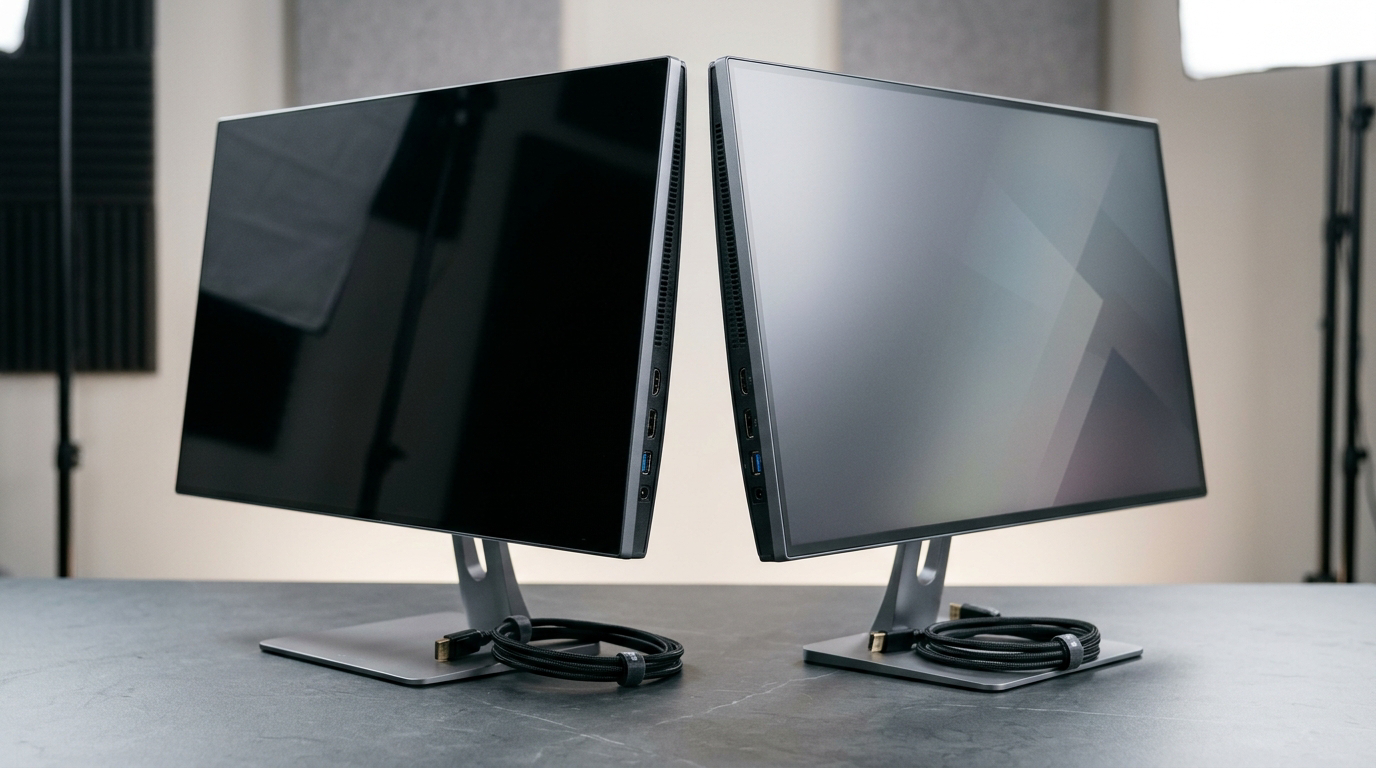
Choosing among the best gaming monitors requires matching panel chemistry, video-cable bandwidth, and pixel pitch to your room lighting and GPU horsepower. Overbuying 4K pixels for a mid-range graphics card bottlenecks frame pacing, while pairing an RTX 5090 with an edge-lit IPS monitor wastes flagship hardware potential.
1. Panel Chemistry: QD-OLED vs. WOLED & Tandem OLED vs. Mini-LED
Quantum-Dot OLED (QD-OLED) panels drive pure RGB emitters through a quantum-dot color conversion layer, achieving wider HDR color volume and punchier reds and greens in light-controlled spaces. However, because current QD-OLEDs omit a traditional circular polarizer, bright ambient lamps falling directly onto glossy screens can gently lift dark pixels toward a faint purplish grey—unless tempered by a matte anti-glare layer like Samsung’s G80SH. Meanwhile, WOLED and newer multi-stack Tandem OLED architectures incorporate a dedicated white subpixel alongside traditional polarizers or TrueBlack Glossy films, maintaining pure obsidian black floors and brighter full-screen white web pages in sunlit offices. When daytime spreadsheet work dominates your schedule, multi-zone Rapid IPS Mini-LED hardware (such as MSI’s 1,152-zone MPG 274URDFW E16M) delivers 1,000-nit HDR highlights with zero burn-in exposure—explore the full panel breakdown in our QD-OLED vs. WOLED vs. Mini-LED comparison.
2. DisplayPort 2.1 UHBR20 vs. DSC Compression & HDMI 2.1
DisplayPort 1.4 tops out at roughly 32.4Gbps gross bandwidth, forcing 4K 240Hz 10-bit streams through Display Stream Compression (DSC compression). While DSC compression looks visually indistinguishable from uncompressed video in motion, it consumes extra internal GPU display heads and frequently causes multi-second blackouts when Alt+Tabbing out of exclusive full-screen games or disabling NVIDIA DSR/DLDSR scaling. Upgrading to DisplayPort 2.1 UHBR20 opens an 80Gbps pipe (77.37Gbps payload) capable of driving native uncompressed 4K 240Hz HDR directly from RTX 50-series Blackwell GPUs—a major edge on the ASUS PG32UCDMR, Samsung G80SH, and LG 32GX870A-B, covered further in our Best 4K 240Hz OLED Gaming Monitors hub.
3. Dual-Mode OLED vs. Native 1440p 360Hz–480Hz
A Dual-Mode OLED panel solves an age-old desktop dilemma: crisp 4K 240Hz immersion for single-player releases on Friday night, followed by 1080p 480Hz competitive fluidity in tactical shooters on Saturday afternoon. Still, dropping a 32-inch screen to 1920×1080 softens long-range pixel acuity compared with native 1440p panels. If 80% of your playtime lives inside Apex Legends, CS2, or Valorant, native 1440p 360Hz or 480Hz displays—like the MSI MPG 271QRX or LG 27GX790A-B featured in our Best 1440p Gaming Monitors and Best Dual-Mode OLED Gaming Monitors guides—keep crisp 1440p crosshairs while staying friendlier to RTX 5070 Ti and RX 9070 XT frame budgets.
4. VRR Flicker, Burn-In Warranty Terms & Text Clarity
Every self-emissive OLED panel responds in roughly 0.03ms, eliminating LCD motion smearing but revealing frametime instability during G-Sync or FreeSync operation—a phenomenon known as VRR flicker in dark loading screens or stutter-prone titles. Minimizing VRR flicker comes down to pairing your display with high-cache CPUs like the Ryzen 7 9800X3D for rock-solid 1% Lows, capping frame rates smoothly, or disabling VRR per-game when engines spike wildly. For image retention, modern 2026 OLEDs combine pixel shift, static logo dimming, proximity sensors, and custom heatsinks under explicit 3-year burn-in warranty coverage from ASUS, MSI, and LG—just avoid turning those safeguards off in the OSD.
Upgrade Roadmap & Hidden Ownership Costs
Budgeting solely for the monitor sticker price overlooks three common post-purchase costs. First, native 80Gbps DisplayPort 2.1 passive copper DP80 cables rarely exceed one meter; desktop towers positioned on the floor often need a longer active DP80LL cable. Second, bulky V-shaped gamer stands on 32-inch displays push screens forward on narrow 24-inch desks—reserve budget for a heavy-duty VESA desk arm to reclaim mousepad space. Third, jumping from 1440p to 4K 240Hz shifts GPU requirements squarely toward RTX 5070 Ti, RX 9070 XT, RTX 5080, or RTX 5090 cards alongside DLSS 4 or FSR 4 upscaling.
One Dual-Mode 4K OLED vs. Dual Specialized Displays
Should you spend around $850-$1,100 on a single Dual-Mode 4K 240Hz / 480Hz OLED or split that budget between a work-safe IPS screen and a 27-inch 1440p OLED? Single-desk setups with limited width benefit most from Dual-Mode OLED consolidation or a single 4K 27-inch QD-OLED like the PG27UCDM (where 166 PPI erases text fringing). Conversely, dual-arm creators who keep static spreadsheets or timeline docks visible all afternoon stay completely immune to burn-in wear by keeping spreadsheets on a Rapid IPS side monitor and reserving an entry glossy OLED like the XG27AQDMGR solely for gaming.
How We Audited, Scored & Filtered These Models
At The PC Audit, we maintain strict editorial independence without fabricated lab FPS charts or sponsored placements; read our complete Editorial Evaluation Methodology. Each candidate selected among the best gaming monitors in this roundup underwent a technical specification audit cross-referencing manufacturer datasheets, VESA DisplayHDR True Black tiers, DisplayPort UHBR20 port allocations, pixel-pitch ergonomics, warranty fine print, and live Amazon variant selector accuracy.
| Evaluation Criterion | Weight | What We Audited |
|---|---|---|
| Panel Contrast, Color & HDR | 35% | QD-OLED vs. WOLED vs. Mini-LED black depth, color volume, local dimming zones, and peak HDR certification. |
| Motion Clarity & Refresh Architecture | 25% | 240Hz-480Hz speed, 0.03ms OLED transitions vs. LCD overdrive, Dual-Mode switching, and VRR flicker stability. |
| Connectivity & Bandwidth (DP 2.1) | 20% | DisplayPort 2.1 UHBR20 80Gbps uncompressed support, HDMI 2.1 port speed, USB-C PD wattage, and KVM utility. |
| Burn-In Care, Ergonomics & Value | 20% | Explicit 3-year burn-in warranty coverage, anti-reflective coating clarity, subpixel text density, and price-tier competitiveness. |
Models We Audited & Rejected (And Why)
- LG UltraGear 32GS95UE ($1,400-$1,500 tier): Disqualified because LG’s newer UltraGear 32GX870A-B keeps the same 32-inch 4K 240Hz / 1080p 480Hz Dual-Mode WOLED versatility while adding DisplayPort 2.1 and USB Type-C in the vastly lower $800-$900 tier.
- MSI MPG 322URX QD-OLED (around $1,300 tier): Excluded on value because both our #1 ASUS PG32UCDMR and #4 Samsung Odyssey OLED G8 (G80SH) deliver 32-inch 4K 240Hz QD-OLED with 80Gbps DisplayPort 2.1 and 90W-98W USB-C PD in the $800-$950 tier.
- Edge-Lit 1440p VA Monitors Without Local Dimming: Excluded because cheap edge-lit VA panels exhibit severe black smearing at high refresh rates and cannot match the 336-zone DisplayHDR 1000 punch of the $200-$250 AOC Q27G3XMN.
Frequently Asked Questions About Gaming Monitors
Should I buy a QD-OLED or WOLED gaming monitor in 2026?
QD-OLED wins in dark rooms thanks to wider HDR color volume and richer saturation. WOLED outperforms in brighter workspaces by maintaining pure white luminance and ink-black contrast without purple ambient tint, while unlocking ultra-fast 480Hz Dual-Mode switching.
Does DisplayPort 2.1 UHBR20 matter for 4K 240Hz gaming monitors?
Yes, if you own an RTX 50-series GPU and dislike Alt+Tab black-screen delays. Full 80Gbps DisplayPort 2.1 UHBR20 drives 4K 240Hz natively without DSC compression, whereas older DisplayPort 1.4 connections depend on visually lossless compression.
Are Dual-Mode OLED gaming monitors worth it for competitive FPS players?
Dual-Mode OLEDs shine for multi-genre players who alternate between scenic 4K 240Hz RPGs and 1080p 480Hz shooters on one screen. Dedicated competitive FPS grinders should still pick a native 1440p 480Hz panel like the LG 27GX790A-B for sharper distant targets.
How long do 2026 OLED gaming monitors last before burn-in occurs?
Modern OLEDs resist permanent burn-in effectively under varied gaming and media loads thanks to pixel shift, logo dimming, proximity sensors, and custom heatsinks. Major brands including ASUS, MSI, and LG back 2026 panels with explicit 3-year burn-in warranties.
When should I pick Mini-LED instead of OLED for PC gaming?
Pick Mini-LED for heavy daytime office work or strict budgets under $250. High-zone Rapid IPS models like the MSI MPG 274URDFW E16M and budget entries like the AOC Q27G3XMN hit 1,000-nit HDR highlights with zero burn-in anxiety.
Final Verdict: Which Gaming Monitor Should You Buy?
Evaluating the best gaming monitors in 2026 ultimately splits along GPU class and room lighting rather than chasing a single panel hype cycle. If you run an RTX 5080 or RTX 5090 in a light-controlled space, the ASUS ROG Swift OLED PG32UCDMR takes our #1 Overall recommendation by pairing vivid 32-inch 4K 240Hz QD-OLED visuals with uncompressed 80Gbps DisplayPort 2.1 and 90W USB-C PD in the $850-$950 tier. Bright-room 4K buyers should pivot directly to the glare-free Samsung Odyssey OLED G8 (G80SH), while multi-genre competitors wanting both 4K immersion and 480Hz esports speed will appreciate the glossy ASUS ROG Strix OLED XG32UCWMG or DP 2.1-equipped LG UltraGear 32GX870A-B.
At 1440p, the MSI MPG 271QRX QD-OLED and 480Hz LG UltraGear 27GX790A-B anchor mid-to-upper esports builds cleanly, while the ASUS ROG Strix XG27AQDMGR brings glossy WOLED blacks under $400. Across all ten best gaming monitors audited here, remote professionals should grab the 1,152-zone MSI MPG 274URDFW E16M for burn-in-free workdays, leaving the AOC Q27G3XMN as the undisputed budget DisplayHDR 1000 champion under $250.


