
Disclosure: As an Amazon Associate, I earn from qualifying purchases. If you buy through links on this page, The PC Audit may earn a small commission at no extra cost to you.
Traditional mechanical switches force every finger lift to pass a rigid physical metal-leaf reset point while imposing 2ms to 5ms of hardware debounce delay—a mechanical bottleneck that leaves frames on the table in Counter-Strike 2 and Valorant. Choosing the best hall effect gaming keyboard replaces physical leaf contacts with contactless magnetic flux sensors or analog optical beams, letting you customize per-key actuation and trigger instantaneous key resets the moment your fingertip lifts.
Across our peripheral audits for The PC Audit hardware hub, we compared dozens of 2026 magnetic and optical-analog models available through verified Amazon US retail listings and narrowed the field to seven standout performers spanning 60%, 75%, and Tenkeyless (TKL) layouts. If you want deeper engineering context on magnetic sensing architectures before comparing SKUs, read our companion breakdown of Hall Effect vs. TMR Switches, Rapid Trigger & CS2 SOCD Rules Explained.
In This Guide
- Quick Picks at a Glance (Top 3)
- Side-by-Side Specs Comparison
- Match Your Use Case
- Detailed Keyboard Audits (1–7)
- 1. CORSAIR K70 PRO TKL — Best Overall
- 2. DrunkDeer A75 Pro — Best Value 75% Compact
- 3. Keychron Q1 HE — Best Premium Wireless & Custom Build
- 4. Razer Huntsman V3 Pro TKL 8KHz — Best 8,000Hz Esports Pick
- 5. SteelSeries Apex Pro TKL Gen 3 — Best Anti-Misclick Protection
- 6. Logitech G PRO X TKL Rapid — Best Minimalist Pro TKL
- 7. NuPhy Air60 HE — Best Ultra-Compact 60% & Low-Profile
- Buying Guide & Upgrade Roadmap
- Scoring Rubric & Excluded Models
- Frequently Asked Questions
- Final Verdict
Quick Picks: Best Hall Effect Gaming Keyboards at a Glance
#1 Best Overall
CORSAIR K70 PRO TKL
Combines double-rail MGX Hyperdrive magnetic switches, true 8,000Hz AXON wired polling, silicone dampening, and a magnetic palm rest inside the $100-$150 tier. (Jump to audit)
#2 Best Value 75% Compact
DrunkDeer A75 Pro
Packs 0.2-3.8mm magnetic actuation, 0.1mm Rapid Trigger sensitivity, PBT keycaps, a volume knob, and driverless browser software into a space-saving 82-key chassis. (Jump to audit)
#3 Best Premium Wireless
Keychron Q1 HE
Pairs a heavyweight CNC aluminum double-gasket chassis and Gateron Double-Rail Magnetic switches with 1,000Hz 2.4GHz wireless and open QMK web tuning. (Jump to audit)
Side-by-Side Comparison: Top 7 Hall Effect Gaming Keyboards
| Keyboard & Award | Best For | Switch & Actuation | Polling & Layout | Link |
|---|---|---|---|---|
| CORSAIR K70 PRO TKL Best Overall | Competitive shooters & value 8K builds | MGX Hyperdrive Magnetic (0.4-3.6mm RT) | 8,000Hz Wired TKL | View on Amazon |
| DrunkDeer A75 Pro Best Value 75% Compact | Compact desk setups & driverless web tuning | DrunkDeer Hall Magnetic (0.2-3.8mm) | 1,000Hz Wired 75% | View on Amazon |
| Keychron Q1 HE Best Premium Wireless | Enthusiast acoustics & multi-OS wireless | Gateron Double-Rail Magnetic (0.1mm steps) | 1,000Hz 2.4GHz / BT / USB-C 75% | View on Amazon |
| Razer Huntsman V3 Pro TKL 8KHz Best 8,000Hz Esports Pick | Tournament FPS & optical consistency | Razer Analog Optical Gen-2 (0.1-4.0mm) | 8,000Hz Wired TKL | View on Amazon |
| SteelSeries Apex Pro TKL Gen 3 Best Anti-Misclick Protection | Hero shooters & onboard OLED control | OmniPoint 3.0 Magnetic (0.1-4.0mm) | 1,000Hz Wired TKL | View on Amazon |
| Logitech G PRO X TKL Rapid Best Minimalist Pro TKL | G HUB Keycontrol users & classic TKL grip | Logitech Magnetic Analog (0.1-4.0mm) | 1,000Hz Wired TKL | View on Amazon |
| NuPhy Air60 HE Best Compact 60% Low-Profile | LAN travel & low-profile 8K speed under $115 | Magnetic Jade Low-Profile (0.1-3.3mm) | 8,000Hz Wired 60% | View on Amazon |
Match Your Use Case: Which Magnetic Keyboard Fits Your Desk?
| Buyer Scenario | Best Match | Why & Expected Outcome |
|---|---|---|
| Best overall 8K polling & Hall Effect balance | CORSAIR K70 PRO TKL | Combines 8,000Hz AXON polling, double-rail magnetic switches, silicone dampening, and a cushioned wrist rest in the $100-$150 tier. |
| Small mousepad clearance + volume knob under $150 | DrunkDeer A75 Pro | Narrow 75% footprint opens extra mouse-swipe room while keeping arrow keys, PBT keycaps, and a browser configurator. |
| Workstation typing acoustics + clean wireless desk | Keychron Q1 HE | Double-gasket 6063 CNC aluminum housing and 1,000Hz 2.4GHz wireless deliver custom-keyboard feel alongside Rapid Trigger. |
| 360Hz-540Hz LAN FPS with 0.1mm optical consistency | Razer Huntsman V3 Pro TKL 8KHz | Analog Optical Gen-2 eliminates magnetic drift completely while giving instant Fn-key actuation adjustments at 8,000Hz. |
| Preventing accidental Ultimate / adjacent key taps | SteelSeries Apex Pro TKL Gen 3 | Protection Mode desensitizes neighboring keys during deliberate presses, while the built-in OLED manages profiles cleanly. |
| Laptop / LAN travel with sub-550g 8K hardware | NuPhy Air60 HE | Low-profile 13.2mm front edge skips the wrist rest and brings 8,000Hz scan speed and NuPhyIO browser control under $115. |
Detailed Audits: 7 Hall Effect Gaming Keyboards Compared
1. CORSAIR K70 PRO TKL RGB Hall Effect Gaming Keyboard — Best Overall

Quick Specs: Tenkeyless (TKL) with rotary dial | CORSAIR MGX Hyperdrive Magnetic (Double-Rail) | 0.1-4.0mm hardware (0.4-3.6mm optimal Rapid Trigger) + FlashTap SOCD | 8,000Hz AXON USB-C wired | Price Tier: $100-$150 tier
Audit Score: 9.3 / 10
- Switch Latency & Actuation Precision (35%): 9.4 / 10
- Ergonomics, Materials & Acoustic Build (25%): 9.1 / 10
- Software, Connectivity & Firmware (20%): 8.9 / 10
- Competitive Legality & Overall Value (20%): 9.6 / 10
Most flagship esports boards ask for steep premium budgets before unlocking 8,000Hz polling or decent internal acoustics, yet Corsair drops both into the $100-$150 tier with the K70 PRO TKL. According to CORSAIR’s official K70 PRO TKL specifications, its pre-lubricated MGX Hyperdrive magnetic switches utilize a double-rail stem structure rated for 150 million actuations, directly reducing horizontal key wobble during frantic off-center taps. Underneath the brushed aluminum top plate, two dedicated layers of silicone sound-dampening foam tame the hollow metallic ping that plagued older K70 generations, while CORSAIR AXON hyper-polling pushes USB report intervals up to 8,000Hz (0.125ms).
Stacked against the Logitech G PRO X TKL Rapid in the same $100-$150 tier, the K70 PRO TKL delivers eight times the polling bandwidth (8,000Hz vs. 1,000Hz), North American double-shot PBT keycaps, dual-point actuation, and an included magnetic cushioned palm rest. While the #3 Keychron Q1 HE still wins easily on heavyweight wireless gasket acoustics and the #4 Razer Huntsman V3 Pro TKL 8KHz allows reliable 0.1mm hair-triggers via light beams rather than Corsair’s recommended 0.3-0.4mm stability band, Corsair strikes the sharpest all-around performance-to-dollar balance on Amazon right now. Saving up to five profiles directly to onboard storage inside iCUE also lets you close background software completely before competitive matches.
Buyer Verification Alert: Confirm your Amazon selection specifies the North American (NA) ANSI SKU so you get thick double-shot PBT keycaps rather than regional ABS caps, and verify FlashTap SOCD stays switched off when entering official Counter-Strike 2 matchmaking.
Pros
- Double-rail MGX Hyperdrive stems stay crisp and wobble-free under rapid strafe taps
- True 8,000Hz AXON wired polling outpaces 1,000Hz competitors in the $100-$150 tier
- Two layers of silicone dampening plus a magnetic palm rest elevate daily comfort
- Stores five onboard Rapid Trigger and Dual-Point Actuation profiles without keeping iCUE open
Cons
- Initial curve editing relies on CORSAIR iCUE desktop software instead of a browser tool
- Recommended Rapid Trigger floor is 0.3-0.4mm to avoid stray ambient magnetic triggers
- No 2.4GHz wireless connectivity and non-NA layouts drop to ABS keycaps
Verdict: Buy it if you want the best hall effect gaming keyboard overall—combining 8K polling, double-rail magnetic precision, PBT keycaps, and real acoustic dampening in the $100-$150 tier. Skip it if you require tri-mode wireless freedom or a browser-based configurator with zero desktop installer. After saving your five onboard profiles in iCUE, quit the suite before queuing games so background CPU overhead stays near zero.
2. DrunkDeer A75 Pro Magnetic Switch Rapid Trigger Gaming Keyboard — Best Value 75% Compact

Quick Specs: 75% Compact (82-key with volume knob) | DrunkDeer Magnetic Hall Switches | 0.2-3.8mm actuation + 0.1-3.6mm Rapid Trigger | 1,000Hz USB-C wired | Price Tier: $100-$150 tier
Audit Score: 8.8 / 10
- Switch Latency & Actuation Precision (35%): 8.8 / 10
- Ergonomics, Materials & Acoustic Build (25%): 8.4 / 10
- Software, Connectivity & Firmware (20%): 8.9 / 10
- Competitive Legality & Overall Value (20%): 9.2 / 10
For low-DPI tactical FPS players who refuse to lose dedicated arrow keys and a physical volume dial, the 75% form factor hits an ideal middle ground—and the DrunkDeer A75 Pro makes that footprint remarkably accessible. As detailed on DrunkDeer’s A75 Pro product page, the 82-key chassis upgrades the original A75 with reinforced plastic housing, anodized aluminum accent strips, EVA case foam, and shock-absorbing tilt feet rated to reduce harsh bottom-out rattle. Its hot-swappable Hall Effect PCB handles adjustable actuation from 0.2mm to 3.8mm alongside 0.1mm-step Rapid Trigger tracking.
The standout advantage over mainstream TKL rivals like the Logitech G PRO X TKL Rapid and SteelSeries Apex Pro TKL Gen 3 is software minimalism: DrunkDeer Antler runs as a lightweight web-based configurator directly inside Chromium browsers, avoiding persistent system tray services. Compared directly with our #1 CORSAIR K70 PRO TKL, the A75 Pro gives up 8,000Hz polling (staying at standard 1,000Hz) and an aluminum top deck, yet claws back horizontal desk clearance for wide mouse sweeps and ships with durable PBT keycaps out of the box.
Buyer Verification Alert: Check the Amazon style dropdown closely before adding to cart, because DrunkDeer splits A75 Pro inventory across standard linear vs. silent magnetic switches and shine-through vs. non-shine-through PBT keycap sets.
Pros
- Web-based DrunkDeer Antler configurator avoids background software bloat
- Space-saving 75% layout retains F-row, arrows, and dedicated volume knob
- PBT keycaps and shock-absorbing tilt feet soften bottom-out shock at a mid-range price
- Hot-swappable magnetic PCB supports easy switch maintenance or silent swaps
Cons
- USB report rate tops out at 1,000Hz rather than 8,000Hz
- Plastic chassis shell with metal trim feels less dense than full CNC aluminum boards
- No wireless mode or included palm rest
Verdict: Buy it if you want a compact 75% magnetic board with a knob, PBT keycaps, and driverless browser setup inside the $100-$150 tier. Skip it if you want 8,000Hz polling or wireless dual-PC versatility. Keep WASD set around 0.4mm Rapid Trigger while raising surrounding ability keys above 1.8mm in Antler to prevent accidental casts.
3. Keychron Q1 HE Wireless Custom Magnetic Keyboard — Best Premium Wireless & Custom Build

Quick Specs: 75% Full CNC Aluminum (82-key with knob) | Gateron Double-Rail Magnetic | 0.2-3.8mm (0.5-3.8mm Amazon listing, 0.1mm steps) + Rapid Trigger + DKS | 2.4GHz (1,000Hz) / Bluetooth 5.2 / USB-C | Price Tier: $175-$200 tier
Audit Score: 9.1 / 10
- Switch Latency & Actuation Precision (35%): 8.6 / 10
- Ergonomics, Materials & Acoustic Build (25%): 9.7 / 10
- Software, Connectivity & Firmware (20%): 9.6 / 10
- Competitive Legality & Overall Value (20%): 8.7 / 10
Gaming keyboards historically forced buyers to accept rattly stabilizers and hollow plastic cases in exchange for low latency, a compromise Keychron obliterates with the Q1 HE. Built from a solid 6063 CNC-machined aluminum block weighing roughly 1,735g, it borrows enthusiast keyboard engineering—a compliant double-gasket mount, acoustic foam stack, screw-in PCB stabilizers, and sculpted OSA-profile double-shot PBT keycaps—while swapping mechanical switches for Gateron Double-Rail Magnetic Nebula sensors. According to Keychron’s official Q1 HE specifications, the 4,000mAh battery supports up to 100 hours (backlight off) alongside a true 1,000Hz 2.4GHz wireless dongle, Bluetooth 5.2 for three work devices, and USB-C wired play.
For software freedom, Keychron runs open-source QMK firmware paired with the Keychron Launcher web-based configurator, supporting Windows, macOS, and Linux equally well with per-key Rapid Trigger and four-action dynamic keystrokes (DKS). Compared against the #2 DrunkDeer A75 Pro, the Q1 HE feels in a completely different structural league for all-day writing and coding, though its 1,000Hz polling ceiling and nearly four-pound desktop heft keep pure LAN tournament sprinters leaning toward the #4 Razer Huntsman V3 Pro TKL 8KHz or #1 CORSAIR K70 PRO TKL.
Buyer Verification Alert: Keychron Q1 HE hot-swap sockets accept ONLY Gateron Double-Rail Magnetic switches due to PCB alignment and sensor polarity; standard 3-pin mechanical switches and non-double-rail magnetic switches such as Gateron Magnetic Jade will not fit.
Pros
- Full CNC aluminum chassis with double-gasket mount sounds and feels like a bespoke custom board
- Tri-mode 1,000Hz 2.4GHz wireless, Bluetooth 5.2, and USB-C paired with a 4,000mAh battery
- Open-source QMK + Keychron Launcher web configurator runs natively across Linux, macOS, and Windows
- Thick OSA double-shot PBT keycaps and screw-in stabilizers eliminate rattle out of the box
Cons
- 1,735g chassis weight is strictly a stationary desk anchor rather than a backpack travel board
- Switch upgrades are locked exclusively to Gateron Double-Rail Magnetic variants
- Capped at 1,000Hz polling on both 2.4GHz wireless and wired USB-C
Verdict: Buy it if you split your desk between eight hours of typing and evening competitive matches and want cable-free custom aluminum acoustics inside the $175-$200 tier. Skip it if you pack your keyboard for LAN events or specifically want an 8,000Hz wired poll rate. Program your QMK gaming and Mac/Windows layers once via USB-C in Keychron Launcher, then run uninterrupted over the 1,000Hz 2.4GHz receiver.
4. Razer Huntsman V3 Pro TKL 8KHz Analog Optical Gaming Keyboard — Best 8,000Hz Esports Pick

Quick Specs: Tenkeyless (TKL) with dial & media keys | Razer Analog Optical Gen-2 (40g) | 0.1-4.0mm Rapid Trigger + Snap Tap | 8,000Hz HyperPolling USB-C wired | Price Tier: $175-$200 tier
Audit Score: 9.0 / 10
- Switch Latency & Actuation Precision (35%): 9.5 / 10
- Ergonomics, Materials & Acoustic Build (25%): 8.9 / 10
- Software, Connectivity & Firmware (20%): 8.4 / 10
- Competitive Legality & Overall Value (20%): 8.8 / 10
Strictly speaking, the Razer Huntsman V3 Pro TKL 8KHz achieves Rapid Trigger without neodymium magnets—it uses Razer Analog Optical Gen-2 switches that measure analog infrared light transmission as the stem depresses. That optical architecture still deserves a core slot in any magnetic-actuation buying roundup because it delivers identical 0.1mm-4.0mm adjustable actuation and Rapid Trigger behavior while remaining immune to temperature shifts or nearby desk magnets. Paired with native 8,000Hz HyperPolling, textured double-shot PBT keycaps, an aluminum top plate, and a firm magnetic leatherette wrist rest, it targets pure tournament speed.
What separates Razer on stage at LAN events is driverless hardware control: simple Fn key combos illuminate the onboard LED array to show live actuation height in tenths of a millimeter and toggle Rapid Trigger or Snap Tap without touching Razer Synapse. Compared with our #1 CORSAIR K70 PRO TKL, Razer reliably pushes closer to true 0.1mm sensitivity without ambient magnetic jitter and includes cleaner on-keyboard adjustment cues, yet it sits in the higher $175-$200 tier and prevents aftermarket magnetic switch swaps. Against the similarly priced #5 SteelSeries Apex Pro TKL Gen 3, Razer brings eight times the USB polling bandwidth (8,000Hz vs. 1,000Hz).
Buyer Verification Alert: Confirm the listing is specifically the 8KHz revision (ASIN B0FRPGVP9G) rather than older 1,000Hz stock, and verify Snap Tap (Fn+Tab) is turned OFF before joining Valve Counter-Strike 2 servers so automated movement detection never kicks you mid-match.
Pros
- Native 8,000Hz HyperPolling slashes USB reporting delay to 0.125ms
- Analog Optical Gen-2 sensing stays immune to magnetic flux drift at 0.1mm actuation
- On-the-fly Fn LED shortcuts configure actuation and Rapid Trigger without opening Synapse
- Brushed aluminum top plate, textured PBT keycaps, and magnetic wrist rest feel tournament-grade
Cons
- Optical mechanism cannot accept third-party Hall Effect or Gateron Jade magnetic switches
- Granular per-key curve edits still depend on Razer Synapse software
- Priced in the $175-$200 tier above the 8,000Hz CORSAIR K70 PRO TKL
Verdict: Buy it if you play competitive tactical shooters on high-refresh OLED monitors and value driverless Fn actuation tuning with 8,000Hz optical consistency. Skip it if you want deeper gasket-mount typing acoustics (choose the Keychron Q1 HE) or 8,000Hz Hall Effect value under $150 (choose the CORSAIR K70 PRO TKL). Keep Snap Tap toggled off via Fn+Tab in CS2 while leaving Rapid Trigger active.
5. SteelSeries Apex Pro TKL Gen 3 Gaming Keyboard — Best Anti-Misclick Protection

Quick Specs: Tenkeyless (TKL) with OLED Smart Display | OmniPoint 3.0 Analog Magnetic (45g) | 0.1-4.0mm + Rapid Trigger + Rapid Tap SOCD + Protection Mode | 1,000Hz USB-C wired | Price Tier: $175-$225 tier
Audit Score: 8.9 / 10
- Switch Latency & Actuation Precision (35%): 9.0 / 10
- Ergonomics, Materials & Acoustic Build (25%): 9.2 / 10
- Software, Connectivity & Firmware (20%): 8.7 / 10
- Competitive Legality & Overall Value (20%): 8.3 / 10
Dialing down actuation sensitivity to 0.2mm solves slow strafing, yet creates an infuriating new hazard in Overwatch 2, League of Legends, or Valorant: grazing the wrong key and blowing your Ultimate ability mid-round. SteelSeries tackles that exact failure mode on the Apex Pro TKL Gen 3 with its patent-pending Protection Mode, documented on the official SteelSeries Apex Pro TKL Gen 3 page. When you deliberately press a key, firmware automatically raises the actuation depth of adjacent keys so stray knuckle brushes do not fire misfired cooldowns.
Gen 3 also meaningfully improves feel over prior Apex Pro revisions by factory-lubricating OmniPoint 3.0 Hall Effect switches (40 actuation levels from 0.1mm to 4.0mm) and sandwiching triple-layer sound-dampening foam beneath double-shot PBT keycaps and an aircraft-grade aluminum top plate. Its built-in OLED Smart Display remains convenient for switching onboard profiles without minimizing games. Where the Apex Pro TKL Gen 3 drops in our overall ranking is price-to-spec headroom: sitting in the flagship $175-$225 tier while remaining capped at 1,000Hz polling—and keeping standard non-magnetic switches on outer function/nav clusters—makes the 8,000Hz CORSAIR K70 PRO TKL and Razer Huntsman V3 Pro TKL 8KHz stronger pure-speed values.
Buyer Verification Alert: Double-check that your Amazon SKU matches the wired USB-C Gen 3 TKL (ASIN B0DGZLHN8G) rather than Gen 2 clearance inventory, and turn Rapid Tap SOCD off in SteelSeries GG or via the OLED menu before queueing Valve Counter-Strike 2 servers.
Pros
- Exclusive Protection Mode prevents accidental adjacent Ultimate and utility misclicks
- Factory-lubed OmniPoint 3.0 switches + triple-layer foam fix earlier Apex acoustic ping
- Onboard OLED Smart Display and clickable roller adjust actuation without tabbing out
- Includes double-shot PBT keycaps, detachable USB-C cable, and magnetic wrist rest
Cons
- Remains at 1,000Hz polling despite flagship $175-$225 tier pricing
- Function and navigation keys use standard non-adjustable switches instead of OmniPoint 3.0
- GG QuickSet automatic per-game profile switching requires SteelSeries GG running
Verdict: Buy it if accidental mis-taps on Q, E, R, or F ruin your ability combos and you love tuning settings right on an OLED screen. Skip it if you want 8,000Hz polling or custom wireless aluminum feel for equal or lower cost. Enable Protection Mode specifically around critical utility binds inside GG QuickSet while keeping WASD fast.
6. Logitech G PRO X TKL Rapid Tenkeyless Wired Gaming Keyboard — Best Minimalist Pro TKL
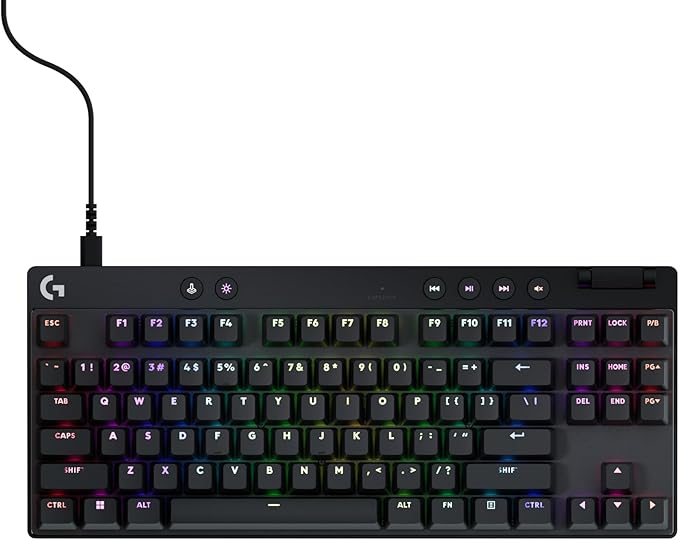
Quick Specs: Tenkeyless (TKL) with dedicated media bar | Logitech Magnetic Analog Linear | 0.1-4.0mm (0.1mm steps) + Rapid Trigger + Keycontrol | 1,000Hz USB-C wired | Price Tier: $100-$150 tier
Audit Score: 8.7 / 10
- Switch Latency & Actuation Precision (35%): 8.8 / 10
- Ergonomics, Materials & Acoustic Build (25%): 8.5 / 10
- Software, Connectivity & Firmware (20%): 8.6 / 10
- Competitive Legality & Overall Value (20%): 8.9 / 10
Players already invested in Logitech G PRO X wireless mice and headsets often prefer keeping one unified control suite rather than juggling three separate peripheral drivers. Logitech answered that crowd with the PRO X TKL Rapid, pairing a clean ~1,001g tournament TKL layout with Magnetic Analog linear switches adjustable across 0.1mm to 4.0mm travel in 0.1mm steps plus Rapid Trigger. Per Logitech G’s official PRO X TKL Rapid specifications, G HUB Keycontrol lets users stack multiple layers and depth-sensitive triggers per key, while onboard Fn shortcuts handle quick actuation shifts without opening software.
Placed directly beside our #1 CORSAIR K70 PRO TKL in the same $100-$150 tier, however, two material shortcuts hold Logitech back from a higher podium spot: the PRO X TKL Rapid caps at 1,000Hz USB polling instead of Corsair’s 8,000Hz AXON speed, and it ships with textured ABS keycaps rather than wear-resistant double-shot PBT keycaps. Heavy WASD grinders will notice smooth finger shine on those ABS caps months earlier than on Corsair, DrunkDeer, Keychron, or SteelSeries.
Buyer Verification Alert: Note that the G PRO X TKL Rapid is strictly a wired USB-C board (do not confuse its listing with the older wireless non-Rapid G PRO X TKL mechanical model) and ships with ABS keycaps out of the box.
Pros
- Granular 0.1-4.0mm actuation and Rapid Trigger integrate smoothly with Logitech G HUB
- Keycontrol layering unlocks multi-action binds and modifier layers per key
- Convenient Fn hardware shortcuts adjust actuation height on the fly
- Standard ANSI bottom row accepts aftermarket Cherry-stem PBT keycap kits cleanly
Cons
- ABS keycaps polish to a shiny finish faster than double-shot PBT keycaps
- 1,000Hz wired polling trails 8,000Hz speeds on the CORSAIR K70 PRO TKL
- No detachable palm rest included in the box
Verdict: Buy it if you already run Logitech G HUB for your mouse and want a clean, no-frills Rapid Trigger TKL in the $100-$150 tier. Skip it if you want stock PBT keycaps, a palm rest, and 8,000Hz polling out of the box—the CORSAIR K70 PRO TKL gives you more hardware per dollar. Factor an affordable aftermarket double-shot PBT keycap set into your upgrade roadmap down the line.
7. NuPhy Air60 HE Wired Magnetic Gaming Keyboard — Best Ultra-Compact 60% & Low-Profile

Quick Specs: 60% Low-Profile (61-key, 534g, 13.2mm front height) | Magnetic Jade Low-Profile (Hot-Swappable) | 0.1-3.3mm + 0.01mm Rapid Trigger step + SOCD + DKS | 8,000Hz wired & 8,000Hz scan rate | Price Tier: $90-$115 tier
Audit Score: 8.6 / 10
- Switch Latency & Actuation Precision (35%): 9.1 / 10
- Ergonomics, Materials & Acoustic Build (25%): 7.8 / 10
- Software, Connectivity & Firmware (20%): 9.0 / 10
- Competitive Legality & Overall Value (20%): 8.6 / 10
Nearly every mainstream magnetic keyboard uses tall, full-height desktop geometry that practically requires a palm rest for neutral wrist angles. NuPhy breaks that mold with the Air60 HE, dropping front case height to just 13.2mm and total weight to 534g while squeezing full 8,000Hz USB polling and an 8,000Hz PCB scan rate into the $90-$115 tier. According to NuPhy’s Air60 HE specifications, its hot-swappable Magnetic Jade Low-Profile switches adjust across 0.1mm to 3.3mm travel with Rapid Trigger resolution selectable down to 0.01mm, backed by the browser-based NuPhyIO web-based configurator across Windows, macOS, and Linux.
On raw speed-per-dollar, nothing in this roundup touches the Air60 HE: it matches the 8,000Hz polling rate of the Razer Huntsman V3 Pro TKL 8KHz at roughly half the budget tier while including dye-sublimated nSA PBT keycaps and a unibody aluminum top frame. Its seventh-place overall rank reflects ergonomic specialization rather than flaws—sacrificing arrow keys, function rows, and full 4.0mm key travel makes sense for minimal 60% esports desks or gaming-laptop travelers, whereas everyday typists are better served by the 75% DrunkDeer A75 Pro or TKL CORSAIR K70 PRO TKL.
Buyer Verification Alert: NuPhy offers the Air60 HE with either 30g Low-Profile Magnetic Jade or 40g POM Magnetic Jade Pro switches—verify the switch variant selected on the Amazon product page before checkout, and note this HE model is wired USB-C only (no wireless battery).
Pros
- True 8,000Hz polling and 8,000Hz scan rate inside the budget-friendly $90-$115 tier
- Slim 13.2mm front height and 534g frame feel comfortable without a wrist rest and travel effortlessly
- NuPhyIO web configurator programs Rapid Trigger, SOCD, and DKS cleanly in any modern browser
- Hot-swappable Magnetic Jade Low-Profile switches and nSA PBT keycaps
Cons
- 60% 61-key layout pushes arrows and F-keys behind Fn combinations
- Shallower 3.3mm maximum key travel takes adjustment if you prefer full-height typing depth
- Wired USB-C only despite its travel-sized proportions
Verdict: Buy it if you play low-sensitivity FPS games on a tight desk or travel frequently with a gaming laptop and want 8,000Hz Rapid Trigger under $115. Skip it if you need dedicated arrow keys, wireless freedom, or deep 4.0mm keystrokes. Start Rapid Trigger sensitivity at 0.2mm in NuPhyIO before experimenting with 0.01mm steps so resting fingers do not trigger stray strafes.
Buying Guide: How to Choose the Best Hall Effect Gaming Keyboard
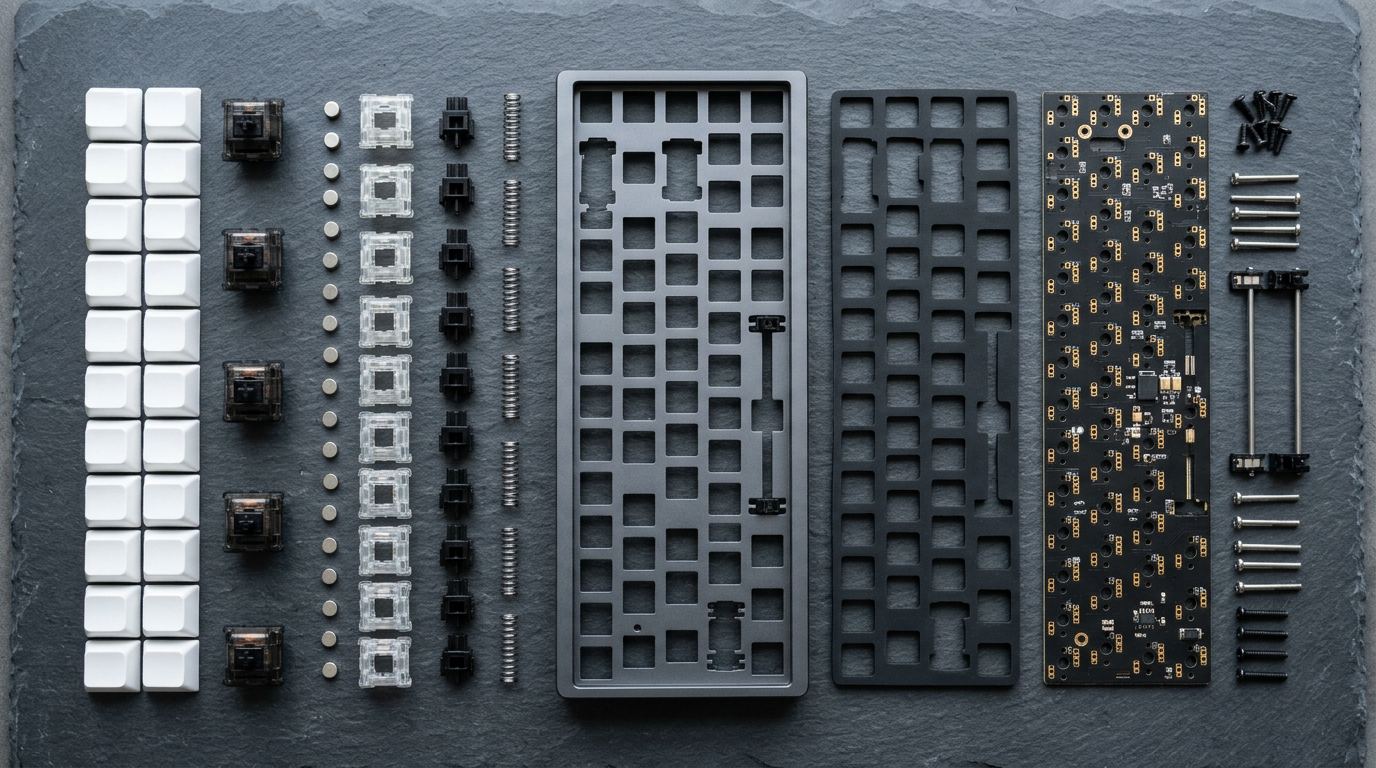
Marketing spec sheets on magnetic keyboards love boasting “0.1mm triggers” and “0.125ms latency,” yet raw numbers rarely tell the full story. Understanding how magnetic sensing hardware, firmware rules, keycap materials, and peripheral balance interact prevents expensive buyer remorse when selecting the best hall effect gaming keyboard for your exact games.
Hall Effect vs. TMR vs. Analog Optical: How Magnetic Sensors Work
Conventional mechanical switches rely on two bent copper leaves physically touching inside a switch housing—meaning the actuation height is fixed permanently around 2.0mm and switches suffer physical bounce chatter that firmware masks with a 2ms to 5ms debounce delay. Hall Effect (HE) keyboards place a tiny neodymium magnet inside each sliding switch stem above a contactless PCB Hall sensor, measuring continuous magnetic flux voltage as you press down or lift up. Because no metal blades collide or bounce, debounce delay disappears completely.
Newer TMR (Tunnel Magnetoresistance) sensors take the same contactless concept further by reading magnetic resistance variations at far lower microamp power draw—a major benefit emerging in wireless magnetic boards, though mature Hall Effect implementations like Keychron Q1 HE already deliver 100-hour 2.4GHz stamina with backlighting off. Meanwhile, Analog Optical switches (used in the Razer Huntsman V3 Pro TKL 8KHz) substitute infrared light-beam intensity for magnetism. Both deliver continuous analog travel curves and zero contact bounce; true Hall Effect boards let you swap magnetic springs or compatible switches (subject to PCB polarity), whereas optical boards remain impervious to strong magnetic desk accessories. Dive deeper into those architectural trade-offs in our Hall Effect vs. TMR Switches, Rapid Trigger & CS2 SOCD guide.
Actuation Distance, Rapid Trigger & Dynamic Keystrokes
Two firmware features actually transform in-game feel far more than raw polling numbers: adjustable actuation and Rapid Trigger. Adjustable actuation lets you raise movement keys (W, A, S, D) to hair-trigger depths between 0.3mm and 0.6mm while leaving adjacent keys (Shift, R, F, G) deeper around 1.8mm to 2.2mm so clumsy thumb or ring-finger brushes never trigger reloads or Ultimates. Rapid Trigger goes a crucial step further: instead of forcing a switch to travel all the way back past a fixed reset plane, the key resets immediately the instant your finger begins rising—even if you are holding the switch near the bottom at 3.2mm. That dynamic reset makes rapid counter-strafing stops and jiggle peeks in tactical shooters crisper and more repeatable than any mechanical switch.
Beyond FPS movement, many magnetic suites (including Corsair Dual-Point Actuation, Keychron DKS, NuPhy DKS, and Logitech Keycontrol) support dynamic keystrokes—assigning up to two or four distinct commands across a single press and release stroke, such as walking gently at 1.0mm press depth and sprinting automatically when bottoming out at 3.2mm. Before enabling multi-action binds competitively, always verify whether a given game’s tournament ruleset allows multi-output macros.
Counter-Strike 2 SOCD & Snap Tap Rules: What Is Legal in 2026?
In late 2024, keyboard makers popularized SOCD (Simultaneous Opposite Cardinal Directions) hardware filters—sold as Razer Snap Tap, Corsair FlashTap, SteelSeries Rapid Tap, and NuPhy SOCD—that automatically prioritize the latest direction key pressed when you hold A and D simultaneously. According to Valve’s Counter-Strike 2 official release notes, Valve explicitly banned hardware-assisted counter-strafing automation on official servers, resulting in immediate match kicks whenever SOCD priority or multi-input binds are detected.
Crucially, Valve’s rule targets opposing-key automation (SOCD/Snap Tap), NOT Rapid Trigger or adjustable actuation on individual keys. Every keyboard on this list remains 100% legal for Counter-Strike 2 Premier, FACEIT, and Valorant ranked queues provided you keep SOCD, Snap Tap, FlashTap, and Rapid Tap disabled in your active profile while letting standard Rapid Trigger work freely.
8,000Hz Polling, Display Refresh Rates & Peripheral Synergy
Stepping from standard 1,000Hz USB polling (1.0ms report window) up to 8K polling (8,000Hz, or 0.125ms intervals) tightens worst-case input delivery variance across high-speed USB ports. However, hardware upgrades work as a chain rather than in isolation. Dropping an 8,000Hz board like the CORSAIR K70 PRO TKL or Razer Huntsman V3 Pro TKL 8KHz onto a slow 60Hz office monitor hides nearly all latency gains behind 16.7ms frame persistence. Pairing magnetic Rapid Trigger with ultra-fast displays from our Best Dual-Mode OLED Gaming Monitors (2026) audit and balanced pointer tracking from our Best Ultralight 8K Wireless Gaming Mice (2026) roundup ensures display response, cursor motion, and movement stops reinforce each other cleanly.
60% vs. 75% vs. Tenkeyless (TKL): Choosing Your Layout Footprint
Choosing between 60%, 75%, and TKL layouts boils down to mousepad arm space versus daily productivity keys. Full-size 100% keyboards push your mouse hand far to the right, forcing awkward shoulder rotation during low-DPI shooter sweeps—which is why serious FPS players overwhelmingly drop the numpad. A 60% layout like the NuPhy Air60 HE frees maximum horizontal room for 400-800 DPI flicks and packs neatly beside a gaming laptop, yet hides arrows and function keys behind Fn chords. A 75% layout (DrunkDeer A75 Pro, Keychron Q1 HE) squeezes the function row and arrows flush against the alphas with a rotary knob, saving width without losing spreadsheet navigation. Finally, standard TKL (CORSAIR K70 PRO TKL, Razer Huntsman V3 Pro TKL 8KHz, SteelSeries Apex Pro TKL Gen 3, Logitech G PRO X TKL Rapid) preserves muscle-memory spacing around Delete, Home, and arrows for zero typing friction.
Upgrade Roadmap & Hidden Ownership Costs
Even with magnetic boards, small post-purchase considerations affect multi-year satisfaction:
- Keycap upgrades: Boards shipping with thin ABS caps (such as Logitech G PRO X TKL Rapid or non-North-American Corsair variants) polish quickly under sweaty WASD fingers; budget around $25 to $45 for thick double-shot PBT keycaps with a standard Cherry MX cross stem.
- Switch cross-compatibility traps: Unlike standardized 5-pin mechanical hot-swap PCBs, magnetic boards rely on exact north/south magnet pole orientation and rail spacing. Never purchase aftermarket switches unless explicitly listed for your exact board—for example, Keychron Q1 HE supports only Gateron Double-Rail Magnetic switches.
- Ergonomic wrist rests: High front-bezel TKLs and tall CNC aluminum boards like the Keychron Q1 HE benefit noticeably from an angled palm rest during multi-hour writing sessions, whereas NuPhy’s 13.2mm low-profile frame sits flush without one.
Rounding out the rest of your desk: a magnetic board pairs best with a low-latency mouse, but 8,000 Hz polling only pays off when your CPU and display keep up, as our 8,000 Hz polling rate explainer details. Size a speed or control mousepad to the arm space your 60%, 75%, or TKL layout frees up, and consider gaming IEMs or a wireless headset for clear positional audio.
How We Audited, Scored & Filtered These Models
Every score in this guide follows The PC Audit’s hardware specification audit framework rather than sponsored claims or unverified marketing numbers. We verified active Amazon US ASIN inventory, cross-referenced official OEM switch datasheets and firmware capabilities, checked regional keycap and variant pitfalls, and scored every board against our peripheral vertical’s 100% weighted rubric below.
| Evaluation Criterion | Weight | What We Audited |
|---|---|---|
| Switch Latency & Actuation Precision | 35% | Hall Effect, TMR, or Analog Optical architecture, actuation range, Rapid Trigger step resolution, stem wobble control, and USB polling ceiling (1,000Hz vs. 8,000Hz). |
| Ergonomics, Materials & Acoustic Build | 25% | Layout footprint (60%/75%/TKL), aluminum top plate vs. CNC gasket mount, double-shot PBT vs. ABS keycaps, internal dampening layers, and wrist support. |
| Software, Connectivity & Firmware | 20% | Driverless web-based configurator availability vs. resident software load, onboard profile slots, DKS layering, and 2.4GHz wireless battery life. |
| Competitive Legality & Overall Value | 20% | Clean toggleability for CS2 SOCD/Snap Tap bans, switch replacement clarity, warranty terms, and real hardware delivered per price tier. |
Models We Audited & Excluded (And Why)
- Traditional Mechanical Keyboards (Cherry MX Speed Silver & MX Red): Physical metal-leaf contact switching imposes 2ms-5ms mechanical debounce delay and locks actuation at a fixed depth (1.2mm or 2.0mm), making repeatable micro-step resets far slower than Rapid Trigger magnetic hardware.
- SteelSeries Apex 9 TKL (Legacy OptiPoint Optical): Older two-point optical switching (1.0mm vs. 1.5mm) lacks continuous analog travel tracking and true Rapid Trigger resets, making it poor value against modern Hall Effect boards in the same budget bracket.
- Wooting 80HE & Wooting 60HE v2 (Direct-Store Allocation): Wooting’s Wootility web configurator and firmware remain industry benchmarks, yet direct-store batch waitlists and patchy Amazon US Prime fulfillment leave the seven immediately verified Amazon SKUs above as stronger actionable retail recommendations right now.
Frequently Asked Questions About Hall Effect Gaming Keyboards
Is Rapid Trigger allowed in Counter-Strike 2 and Valorant, or will it get you kicked?
Rapid Trigger itself is completely legal in both Counter-Strike 2 and Valorant because it only dynamically resets individual key travel when your finger lifts. However, Valve actively kicks players from official CS2 servers when SOCD or Snap Tap input-automation features override opposing A/D directional keys.
What is the real difference between Hall Effect, TMR, and Analog Optical switches?
Hall Effect switches measure magnetic flux voltage changes from a stem magnet, while TMR (Tunnel Magnetoresistance) sensors achieve similar magnetic travel resolution with lower power draw for wireless boards. Analog Optical switches like Razer Gen-2 measure infrared light beam interruption instead of magnetism, delivering equivalent Rapid Trigger behavior without magnetic drift.
Does an 8,000Hz keyboard polling rate actually matter for competitive gaming?
An 8,000Hz polling rate lowers theoretical USB reporting intervals from 1.0ms to 0.125ms, which narrows worst-case input jitter on 240Hz to 540Hz OLED monitors paired with fast CPUs. Most casual players notice Rapid Trigger and 0.3mm actuation far more than jumping from 1,000Hz to 8,000Hz.
Can I swap mechanical Cherry MX switches into a Hall Effect gaming keyboard?
No. Hall Effect keyboards use contactless magnetic sensors soldered directly onto the PCB rather than metal pin sockets, so standard 3-pin or 5-pin mechanical switches will not register. Even among magnetic switches, verify socket polarity and rail geometry—such as Keychron Q1 HE requiring Gateron Double-Rail Magnetic switches.
What actuation point should I use for FPS gaming versus everyday typing?
Set movement keys (W, A, S, D) around 0.3mm to 0.6mm with Rapid Trigger enabled for crisp counter-strafing without accidental resting triggers. Use 1.8mm to 2.2mm with Rapid Trigger turned off on typing layers and ultimate ability keys to prevent fat-fingered inputs.
Final Verdict: Which Hall Effect Gaming Keyboard Should You Buy?
For most competitive gamers seeking the best hall effect gaming keyboard without overspending, the CORSAIR K70 PRO TKL earns our top recommendation by pairing double-rail MGX Hyperdrive magnetic stability, true 8,000Hz AXON polling, silicone sound dampening, and North American PBT keycaps in the $100-$150 tier. Buyers who prefer compact 75% desk space and lightweight browser software should grab the DrunkDeer A75 Pro, while workstation enthusiasts wanting full CNC aluminum gasket acoustics and tri-mode wireless freedom belong on the Keychron Q1 HE.
Tournament grinders demanding 0.1mm optical consistency at 8,000Hz can step straight into the Razer Huntsman V3 Pro TKL 8KHz, and frequent travelers wanting sub-550g low-profile speed under $115 will love the NuPhy Air60 HE. Ready to complete your desktop setup? Explore more peripheral and display hardware audits across The PC Audit homepage.


