
Disclosure: As an Amazon Associate, I earn from qualifying purchases. If you buy through links on this page, we may earn a small commission at no extra cost to you.
Finding the best 4k oled gaming monitor in 2026 comes down to one major architectural shift: true 80Gbps DisplayPort 2.1 UHBR20 flagships have dropped from early-adopter luxury prices straight into the competitive $800-$950 tier. Until recently, pairing a high-end GPU with a 4K 240Hz OLED forced every frame through DisplayPort 1.4 DSC compression, triggering annoying two-to-four-second black screens whenever you Alt+Tab out of full-screen games. Today’s top releases eliminate that compression bottleneck while adding high-wattage USB-C Power Delivery, built-in KVM switching, and three-year burn-in coverage.
We audited eight verified 2026 4K 240Hz OLED models across 32-inch and 26.5-inch QD-OLED panels, glare-fighting matte surfaces, and Dual-Mode 480Hz WOLED hybrids. If you are weighing 4K panels against 1440p high-refresh or Mini-LED options, explore our broader Best Gaming Monitors (2026) hub, and pair these screens carefully using our Best 4K Graphics Cards (2026) audit so your GPU can actually feed 240Hz throughput.
In This Guide
- Quick Picks at a Glance
- Side-by-Side Specs Comparison
- Match Your Use Case
- Detailed Product Audits (1–8)
- 1. ASUS ROG Swift OLED PG32UCDMR — Best Overall DP 2.1 Flagship
- 2. Samsung Odyssey OLED G8 (G80SH) — Best for Bright Rooms & HDR 500
- 3. ASUS ROG Swift OLED PG27UCDM — Best 27-Inch High-PPI 4th-Gen QD-OLED
- 4. LG UltraGear 32GX870A-B — Best Dual-Mode OLED with DP 2.1
- 5. ASUS ROG Strix OLED XG32UCWMG — Best Glossy Dual-Mode WOLED
- 6. GIGABYTE MO32U24 US — Best Value 32-Inch 4K QD-OLED
- 7. ASUS ROG Swift OLED PG32UCDP — Best Value Dual-Mode + 90W USB-C
- 8. MSI MPG 322URX QD-OLED — Best Creator-Grade DP 2.1a & 98W KVM
- Buying Guide & Upgrade Roadmap
- Scoring Methodology & Rejected Models
- Frequently Asked Questions
- Final Verdict
Quick Picks: Best 4K OLED Gaming Monitors at a Glance
#1 Best Overall DP 2.1 Flagship
ASUS ROG Swift OLED PG32UCDMR
Uncompressed 80Gbps DisplayPort 2.1, vivid 31.5-inch QD-OLED color, and 90W USB-C Power Delivery in the $850-$950 tier. (Jump to audit)
#2 Best Bright-Room & HDR 500
Samsung Odyssey OLED G8 (G80SH)
Pairs 80Gbps DisplayPort 2.1 and 98W USB-C with DisplayHDR True Black 500 and a Glare Free matte panel. (Jump to audit)
#3 Best 27-Inch High-PPI
ASUS ROG Swift OLED PG27UCDM
4th-Gen 26.5-inch QD-OLED hits roughly 166 PPI for crisp text clarity alongside DisplayPort 2.1 speed. (Jump to audit)
Side-by-Side Comparison: Top 8 4K OLED Gaming Monitors
| Product & Award | Best For | Panel & Refresh | Ports & DP 2.1 | Link |
|---|---|---|---|---|
| ASUS ROG Swift OLED PG32UCDMR Best Overall DP 2.1 Flagship | Uncompressed 4K 240Hz RTX 5080/5090 builds ($850-$950 tier) | 31.5″ QD-OLED, 4K 240Hz, True Black 400 | DP 2.1 (DP80 80Gbps), HDMI 2.1, USB-C (90W PD) | View on Amazon |
| Samsung Odyssey OLED G8 (G80SH) Best for Bright Rooms & HDR 500 | Sunlit rooms wanting matte anti-glare + HDR 500 ($800-$900 tier) | 32″ QD-OLED Glare Free, 4K 240Hz, True Black 500 | DP 2.1 (80Gbps), HDMI 2.1, USB-C (98W) | View on Amazon |
| ASUS ROG Swift OLED PG27UCDM Best 27-Inch High-PPI 4th-Gen | Coding, text clarity, compact desks ($850-$950 tier) | 26.5″ 4th-Gen QD-OLED, 4K 240Hz (~166 PPI) | DisplayPort 2.1, HDMI 2.1, USB-C | View on Amazon |
| LG UltraGear 32GX870A-B Best Dual-Mode OLED with DP 2.1 | 4K AAA + 480Hz esports with DP 2.1 ($800-$900 tier) | 32″ WOLED, Dual-Mode 4K 240Hz / FHD 480Hz | DisplayPort 2.1, HDMI 2.1, USB Type-C | View on Amazon |
| ASUS ROG Strix OLED XG32UCWMG Best Glossy Dual-Mode WOLED | Zero-haze glossy blacks & 1,300-nit peaks (around $1,100 tier) | 31.5″ TrueBlack Glossy WOLED, 4K 240Hz / 480Hz | DP 1.4 (DSC), 2x HDMI 2.1, USB-C (15W), Auto KVM | View on Amazon |
| GIGABYTE MO32U24 US Best Value 32-Inch 4K QD-OLED | Entry-tier 32″ 4K QD-OLED + KVM ($750-$850 tier) | 31.5″ QD-OLED ObsidianShield, 4K 240Hz | HDMI 2.1, DisplayPort, USB Type-C (KVM) | View on Amazon |
| ASUS ROG Swift OLED PG32UCDP Best Value Dual-Mode + 90W USB-C | Dual-Mode 480Hz + laptop charging ($750-$850 tier) | 32″ Matte WOLED, 4K 240Hz / FHD 480Hz | DP 1.4 (DSC), HDMI 2.1, USB-C (90W PD) | View on Amazon |
| MSI MPG 322URX QD-OLED Best Creator DP 2.1a & 98W KVM | 98% Adobe RGB color work + UHBR20 (around $1,300 tier) | 31.5″ QD-OLED, 4K 240Hz, 1,000 nits peak | DP 2.1a (UHBR20 80Gbps), 2x HDMI 2.1, 98W USB-C, KVM | View on Amazon |
Match Your Use Case: Which 4K OLED Gaming Monitor Fits Your Rig?
| Buyer Scenario | Best Match | Why & Expected Outcome |
|---|---|---|
| Uncompressed 4K 240Hz RTX 5080 / 5090 gaming in a dim room | ASUS ROG Swift OLED PG32UCDMR | Full 80Gbps DP80 bandwidth eliminates DSC Alt+Tab blackouts while preserving rich QD-OLED color volume. |
| Bright office or living room gaming with overhead light glare | Samsung Odyssey OLED G8 (G80SH) | Glare Free matte finish suppresses reflections while True Black 500 and 98W USB-C power work and play. |
| Razor-sharp 4K text clarity and coding on a compact desk | ASUS ROG Swift OLED PG27UCDM | 4th-Gen 26.5-inch QD-OLED (~166 PPI) minimizes subpixel text fringing without giving up DisplayPort 2.1. |
| 4K AAA storytelling + 480Hz esports with DP 2.1 connectivity | LG UltraGear 32GX870A-B | Instant Dual-Mode 4K 240Hz / 1080p 480Hz switching plus DP 2.1 at nearly half the cost of older 32GS95UE stock. |
| Glossy true-black WOLED contrast + 480Hz competitive toggle | ASUS ROG Strix OLED XG32UCWMG | TrueBlack Glossy coating avoids purple ambient black-lift while pushing up to 1,300-nit HDR highlights. |
| Lowest-cost entry into 32-inch 4K 240Hz QD-OLED + KVM | GIGABYTE MO32U24 US | Delivers 31.5-inch 4K 240Hz QD-OLED speed and integrated USB-C KVM switching in the accessible $750-$850 tier. |
Detailed Audits: The 8 Best 4K OLED Gaming Monitors of 2026
1. ASUS ROG Swift OLED PG32UCDMR 32-Inch 4K 240Hz QD-OLED Gaming Monitor — Best Overall DP 2.1 Flagship

Quick Specs: 31.5-inch flat | 3840×2160 (4K UHD) at 240Hz | QD-OLED (0.03ms GTG, DisplayHDR True Black 400) | DisplayPort 2.1 (DP80), HDMI 2.1, USB-C (90W PD) | Price Tier: $850-$950 tier
Audit Score: 9.6 / 10
- Panel Contrast, Color & HDR (35%): 9.6 / 10
- Motion Clarity & Refresh Architecture (25%): 9.4 / 10
- Connectivity & Bandwidth (DP 2.1) (20%): 9.8 / 10
- Burn-In Care, Ergonomics & Value (20%): 9.5 / 10
Every specification bottleneck that held back first-generation 4K 240Hz OLEDs gets resolved on the ASUS ROG Swift OLED PG32UCDMR. Built around a 31.5-inch QD-OLED panel meeting VESA DisplayHDR True Black 400 standards, it pairs infinite per-pixel contrast and rich quantum-dot HDR color volume with 0.03ms GTG pixel transitions. Crucially, ASUS equips a verified DisplayPort 2.1 (DP80) input alongside HDMI 2.1 and 90W USB-C Power Delivery, allowing RTX 50-series graphics cards to drive native 4K 240Hz signals completely uncompressed without Alt+Tab black-screen delays or multi-monitor port throttling.
Stacked against the #2 Samsung Odyssey OLED G8 (G80SH) in a similar budget bracket, the PG32UCDMR preserves a cleaner semi-gloss finish that pops with sharper perceived micro-contrast when you control room lighting. It also delivers nearly identical I/O and 80Gbps signaling to the #8 MSI MPG 322URX while sitting squarely in the $850-$950 tier rather than around $1,300, backed by ASUS’s three-year OLED Care Pro burn-in warranty.
Buyer Verification Alert: Passive copper DP80 cables certified for full 80Gbps DisplayPort 2.1 UHBR20 speeds max out near one meter in length; if your PC tower rests on the floor or across a wide desk, order an active VESA DP80LL cable so the link does not drop down to compressed rates.
Pros
- Full 80Gbps DisplayPort 2.1 (DP80) drives uncompressed 4K 240Hz without DSC mode-switch pauses
- QD-OLED emitter stack maintains high saturated color luminance across bright HDR explosions
- 90W USB-C Power Delivery and HDMI 2.1 handle work laptops and consoles effortlessly
- Aggressive $850-$950 tier pricing undercuts older DP 2.1 4K OLED flagships
Cons
- Standard QD-OLED surface lacks a polarizer, creating a slight magenta lift under direct sunlight
- Omits the 480Hz 1080p Dual-Mode scaling toggle found on LG and ROG Strix WOLED hybrids
Verdict: Buy it if you want the cleanest all-around 32-inch 4K 240Hz QD-OLED flagship with uncompressed DisplayPort 2.1 UHBR20 and 90W USB-C laptop charging in the $850-$950 tier. Skip it if harsh window glare hits your screen directly or if you switch frequently to 480Hz Full HD esports. Budget for a sturdy gas-spring VESA monitor arm if your desk is shallower than 24 inches.
2. Samsung 32-Inch Odyssey OLED G8 (G80SH) 4K 240Hz QD-OLED Gaming Monitor — Best for Bright Rooms & HDR 500

Quick Specs: 32-inch | 3840×2160 (4K UHD) at 240Hz | QD-OLED (0.03ms GtG, DisplayHDR True Black 500, Glare Free) | DisplayPort 2.1 (80Gbps), HDMI 2.1, USB-C (98W) | Price Tier: $800-$900 tier
Audit Score: 9.5 / 10
- Panel Contrast, Color & HDR (35%): 9.6 / 10
- Motion Clarity & Refresh Architecture (25%): 9.4 / 10
- Connectivity & Bandwidth (DP 2.1) (20%): 9.8 / 10
- Burn-In Care, Ergonomics & Value (20%): 9.3 / 10
Daytime glare ruins dark-scene legibility on standard semi-gloss QD-OLED monitors, turning deep shadows into reflections of your desk lamp or sunny window. Samsung’s Odyssey OLED G8 (G80SH) solves that real-world lighting problem with its Glare Free matte surface while simultaneously stepping up to DisplayHDR True Black 500 luminance, full 80Gbps DisplayPort 2.1 signaling, HDMI 2.1, and 98W USB-C charging—all within the $800-$900 tier.
Compared directly with the #1 ASUS PG32UCDMR, Samsung gives up a touch of mirror-like dark-room contrast in favor of superior reflection dispersion, higher DisplayHDR True Black 500 headroom, and 98W vs. 90W USB-C Power Delivery. Meanwhile, buyers cross-shopping the around $1,300 tier MSI MPG 322URX get the same 80Gbps DisplayPort 2.1 and 98W USB-C power envelope on the G80SH for substantially less money.
Buyer Verification Alert: Confirm the exact model code reads G80SH before adding to cart—older Samsung Odyssey G8 G80SD variants still circulate on marketplace pages with DisplayPort 1.4 instead of 80Gbps DisplayPort 2.1 and without 98W USB-C Power Delivery.
Pros
- DisplayHDR True Black 500 certification lifts HDR punch over typical True Black 400 rivals
- Full 80Gbps DisplayPort 2.1 plus 98W USB-C Power Delivery and HDMI 2.1
- Glare Free matte layer diffuses bright overhead fixtures and sunlit windows cleanly
- Strong $800-$900 tier value for an 80Gbps DP 2.1 flagship
Cons
- Matte diffusion subtly softens perceived dark-room crispness next to glossy screens
- Lacks a 480Hz 1080p Dual-Mode competitive frequency toggle
Verdict: Buy it if your desk sits in a bright room or doubles as a 98W USB-C laptop workstation while still demanding uncompressed 80Gbps DisplayPort 2.1 4K 240Hz QD-OLED speed. Skip it if you game strictly in the dark and crave pure glossy depth. Clean the Glare Free coating exclusively with a dry or distilled-water microfiber cloth rather than chemical sprays.
3. ASUS ROG Swift OLED PG27UCDM 27-Inch 4K 240Hz QD-OLED Gaming Monitor — Best 27-Inch High-PPI 4th-Gen QD-OLED

Quick Specs: 26.5-inch | 3840×2160 (4K UHD) at 240Hz | 4th-Gen QD-OLED (0.03ms) | DisplayPort 2.1, HDMI 2.1, USB-C | Price Tier: $850-$950 tier
Audit Score: 9.4 / 10
- Panel Contrast, Color & HDR (35%): 9.6 / 10
- Motion Clarity & Refresh Architecture (25%): 9.4 / 10
- Connectivity & Bandwidth (DP 2.1) (20%): 9.5 / 10
- Burn-In Care, Ergonomics & Value (20%): 9.1 / 10
If 32-inch screens feel oversized on your desk or make subpixel text fringing distracting during daytime spreadsheets, the ASUS ROG Swift OLED PG27UCDM shrinks full 3840×2160 resolution onto a 26.5-inch 4th-Gen QD-OLED panel. Pushing roughly 166 pixels per inch tightens font edges dramatically over 140 PPI 32-inch OLEDs and makes 1440p OLEDs look noticeably softer by comparison. You still keep a 240Hz ceiling, near-instant 0.03ms response, DisplayPort 2.1, HDMI 2.1, and USB-C.
Sitting in the same $850-$950 tier as the 31.5-inch #1 PG32UCDMR, the PG27UCDM prioritizes pixel density, compact desk ergonomics, and tighter competitive HUD scan area rather than raw physical screen width. Competitive FPS players who sit close to their monitor and hate scanning corners on a 32-inch display—while still demanding 4K detail for story campaigns—will appreciate the 26.5-inch framing immediately.
Buyer Verification Alert: At 26.5 inches and 3840×2160, native 100% Windows desktop scaling makes icons tiny; apply 150% DPI scaling in Display Settings immediately and enable ClearType for crisp workspace fonts.
Pros
- ~166 PPI 4th-Gen QD-OLED sharpness virtually erases visible subpixel text fringing
- Includes DisplayPort 2.1 alongside HDMI 2.1 and USB-C connectivity
- Compact 26.5-inch footprint fits shallower desks and keeps minimaps in central vision
- 0.03ms transitions and 240Hz motion clarity stay clean across fast competitive pans
Cons
- Matches 32-inch PG32UCDMR pricing in the $850-$950 tier despite less total screen area
- Less sweeping peripheral cinema presence than 31.5-inch monitors in open-world RPGs
Verdict: Buy it if you code, edit, or play fast competitive titles at close viewing distances and want razor-sharp 166 PPI 4th-Gen QD-OLED clarity with DisplayPort 2.1. Skip it if you want a sweeping 32-inch cinematic display at the same price tier. Pair it with an auto-hiding OS taskbar and dark wallpaper to keep static UI wear minimal.
4. LG UltraGear 32GX870A-B 32-Inch Dual-Mode 4K 240Hz / FHD 480Hz OLED Gaming Monitor — Best Dual-Mode OLED with DP 2.1

Quick Specs: 32-inch | Dual-Mode 3840×2160 (4K) at 240Hz / 1920×1080 (FHD) at 480Hz | WOLED (0.03ms GtG, DisplayHDR True Black 400) | DisplayPort 2.1, HDMI 2.1, USB Type-C | Price Tier: $800-$900 tier
Audit Score: 9.3 / 10
- Panel Contrast, Color & HDR (35%): 9.1 / 10
- Motion Clarity & Refresh Architecture (25%): 9.8 / 10
- Connectivity & Bandwidth (DP 2.1) (20%): 9.5 / 10
- Burn-In Care, Ergonomics & Value (20%): 9.0 / 10
LG’s UltraGear 32GX870A-B fixes the two biggest flaws of LG’s first-generation Dual-Mode monitor—the costly $1,400-$1,500 tier 32GS95UE—by adding DisplayPort 2.1 and USB Type-C connectivity while sliding all the way down into the $800-$900 tier. With a single button press, this Dual-Mode OLED pivots between razor-sharp 4K 240Hz rendering for single-player campaigns and blistering 1080p 480Hz speed for tactical esports shooters, powered by a 0.03ms GtG WOLED panel.
Compared with the around $1,100 tier #5 ASUS ROG Strix XG32UCWMG and the #7 PG32UCDP, LG’s 32GX870A-B is the only Dual-Mode 4K/480Hz option here featuring DisplayPort 2.1. Because WOLED uses a dedicated white subpixel instead of QD-OLED’s quantum-dot layer without a polarizer, blacks never shift purple under sunlit desks, though maximum saturated HDR color volume remains slightly behind QD-OLED rivals like the PG32UCDMR.
Buyer Verification Alert: Verify the included box accessories on the Amazon listing before checkout, as some Dual-Mode WOLED bundles include an HDMI 2.1 or DisplayPort 1.4 lead rather than a VESA-certified 80Gbps DP80 cable.
Pros
- Hardware Dual-Mode switches instantly between 4K 240Hz fidelity and 1080p 480Hz esports speed
- Upgrades LG’s Dual-Mode chassis with DisplayPort 2.1 and USB Type-C connectivity
- WOLED architecture preserves deep blacks in bright rooms without magenta ambient tint
- Massive $800-$900 tier savings compared with older $1,400-$1,500 tier LG 32GS95UE listings
Cons
- 1080p looks noticeably coarse across a full 32-inch diagonal unless cropped down via OSD scaling
- HDR color saturation trails QD-OLED competitors in neon-heavy scenes
Verdict: Buy it if you split time evenly between cinematic 4K RPGs and 480Hz Counter-Strike 2 or Valorant matches and want DisplayPort 2.1 under $900. Skip it if you prefer TrueBlack Glossy depth or highest-possible QD-OLED HDR saturation. Use the monitor’s 24-inch or 27-inch aspect crop mode whenever running 480Hz Full HD to keep crosshair pixel density tight.
5. ASUS ROG Strix OLED XG32UCWMG — Best Glossy Dual-Mode WOLED
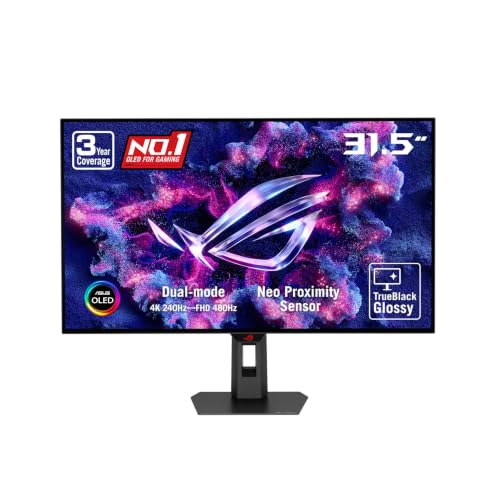
Quick Specs: 31.5-inch flat | Dual-Mode 4K (3840×2160) at 240Hz / FHD (1920×1080) at 480Hz | TrueBlack Glossy WOLED (0.03ms GtG, up to 1,300 nits peak) | DP 1.4 (DSC), 2x HDMI 2.1, USB-C (15W PD), Auto KVM | Price Tier: around $1,100 tier
Audit Score: 9.2 / 10
- Panel Contrast, Color & HDR (35%): 9.5 / 10
- Motion Clarity & Refresh Architecture (25%): 9.8 / 10
- Connectivity & Bandwidth (DP 2.1) (20%): 8.3 / 10
- Burn-In Care, Ergonomics & Value (20%): 8.8 / 10
Most WOLED panels wear matte anti-glare coatings that diffuse room light at the expense of crisp perceived contrast. ASUS breaks that mold on the ROG Strix OLED XG32UCWMG with a TrueBlack Glossy zero-haze anti-reflective finish that delivers ink-deep blacks without QD-OLED’s ambient purple tint, backed by VESA DisplayHDR True Black 400 certification pushing up to 1,300 nits peak HDR luminance. You also get full Dual-Mode 4K 240Hz / FHD 480Hz toggling, Auto KVM switching, Neo Proximity Sensor auto-dimming, and a three-year burn-in warranty under ASUS OLED Care Pro.
Compared against the #4 LG UltraGear 32GX870A-B and #7 PG32UCDP, the XG32UCWMG wins visually on glossy black depth and brighter specular HDR highlights. However, it costs noticeably more in the around $1,100 tier while sticking to DisplayPort 1.4 with DSC compression and capping USB-C Power Delivery at just 15W—requiring laptops to stay plugged into their own wall bricks.
Buyer Verification Alert: Because the XG32UCWMG drives 4K 240Hz via DisplayPort 1.4 DSC rather than DisplayPort 2.1, run modern games in Borderless Windowed mode rather than Exclusive Fullscreen to avoid multi-second Alt+Tab display resync pauses.
Pros
- TrueBlack Glossy zero-haze coating pairs mirror-crisp contrast with true WOLED black stability
- Peak HDR highlights reach up to 1,300 nits alongside Dual-Mode 4K 240Hz / 1080p 480Hz speeds
- Auto KVM switch plus Neo Proximity Sensor and three-year burn-in warranty
- Dual HDMI 2.1 ports support two current-gen consoles alongside a primary gaming desktop
Cons
- Relies on DisplayPort 1.4 (DSC) rather than 80Gbps DisplayPort 2.1 UHBR20
- USB-C Power Delivery tops out at 15W despite sitting in the around $1,100 tier
Verdict: Buy it if you crave a zero-haze glossy WOLED surface, up to 1,300-nit HDR punch, Auto KVM, and 480Hz Dual-Mode flexibility in one monitor. Skip it if native 80Gbps DisplayPort 2.1 or 90W laptop charging matters more than glossy contrast. Configure the Neo Proximity Sensor trigger distance to match your normal seating depth so the panel dims automatically whenever you leave your chair.
6. GIGABYTE MO32U24 US 31.5-Inch 4K 240Hz QD-OLED Gaming Monitor — Best Value 32-Inch 4K QD-OLED

Quick Specs: 31.5-inch | 3840×2160 (4K UHD) at 240Hz | QD-OLED (0.03ms GtG, ObsidianShield Anti-Reflection) | HDMI 2.1, DisplayPort, USB Type-C (KVM) | Price Tier: $750-$850 tier
Audit Score: 9.1 / 10
- Panel Contrast, Color & HDR (35%): 9.3 / 10
- Motion Clarity & Refresh Architecture (25%): 9.3 / 10
- Connectivity & Bandwidth (DP 2.1) (20%): 8.6 / 10
- Burn-In Care, Ergonomics & Value (20%): 9.2 / 10
Not every builder wants to cross into flagship tiers just to enjoy a 31.5-inch 4K 240Hz QD-OLED display. Positioning itself squarely in the $750-$850 tier, GIGABYTE’s MO32U24 US delivers core 3840×2160 240Hz QD-OLED clarity, 0.03ms GtG pixel transitions, and an ObsidianShield anti-reflection surface engineered to dampen surface glare in moderately lit rooms. Even at this aggressive entry price point, GIGABYTE retains HDMI 2.1 ports and a USB Type-C connection with an integrated KVM switch for toggling peripherals between two systems.
Compared with our #1 ASUS PG32UCDMR and #2 Samsung G80SH one bracket higher, the MO32U24 US trims upfront monitor cost so budget-conscious buyers can put extra funds toward an RTX 5080 or RTX 5070 Ti GPU upgrade. Where it gives ground is interface clarity: unlike our top picks with confirmed 80Gbps UHBR20 inputs, Amazon’s listing specifies DisplayPort without confirming DP 2.1 UHBR20 bandwidth.
Buyer Verification Alert: Verify the exact DisplayPort bandwidth specification and USB-C charging wattage on GIGABYTE’s official spec sheet for your sub-region SKU before buying if uncompressed 80Gbps DisplayPort 2.1 or high-wattage laptop charging is mandatory.
Pros
- Lowest-cost 31.5-inch 4K 240Hz QD-OLED entry point in the $750-$850 tier
- ObsidianShield anti-reflection treatment helps rein in light reflections in mixed-lighting rooms
- Integrated USB Type-C KVM switch simplifies multi-system desk setups
- 0.03ms GtG motion speed matches pricier flagship QD-OLED monitors
Cons
- Listing does not explicitly verify 80Gbps DisplayPort 2.1 UHBR20 uncompressed signaling
- No 480Hz 1080p Dual-Mode scaling toggle for competitive shooters
Verdict: Buy it if you want full 31.5-inch 4K 240Hz QD-OLED visual quality and a built-in USB-C KVM switch in the $750-$850 tier. Skip it if guaranteed 80Gbps DisplayPort 2.1 UHBR20 bandwidth or DisplayHDR True Black 500 peak highlights are top priorities. Allocate HDMI 2.1 for your console or secondary PC so the USB-C upstream port stays dedicated to KVM peripheral switching.
7. ASUS ROG Swift OLED PG32UCDP 32-Inch Dual-Mode 4K 240Hz / FHD 480Hz Gaming Monitor — Best Value Dual-Mode + 90W USB-C

Quick Specs: 32-inch | Dual-Mode 3840×2160 (4K) at 240Hz / 1920×1080 (FHD) at 480Hz | WOLED (0.03ms, Matte) | DisplayPort 1.4, HDMI 2.1, USB-C (90W PD) | Price Tier: $750-$850 tier
Audit Score: 9.0 / 10
- Panel Contrast, Color & HDR (35%): 8.9 / 10
- Motion Clarity & Refresh Architecture (25%): 9.7 / 10
- Connectivity & Bandwidth (DP 2.1) (20%): 8.4 / 10
- Burn-In Care, Ergonomics & Value (20%): 8.9 / 10
Dual-Mode OLED monitors originally launched at eye-watering flagship prices, making the ASUS ROG Swift OLED PG32UCDP’s slide into the $750-$850 tier an unexpected bargain for hybrid laptop-and-desktop owners. Unlike the XG32UCWMG—which limits USB-C charging to 15W—the PG32UCDP delivers full 90W USB-C Power Delivery alongside HDMI 2.1, matte anti-glare WOLED shielding, and instant 4K 240Hz / 1080p 480Hz Dual-Mode switching.
Placed side by side with the #4 LG UltraGear 32GX870A-B and #5 ASUS XG32UCWMG, the PG32UCDP sits lower in overall scoring strictly because it runs DisplayPort 1.4 with DSC compression and carries a matte WOLED texture that softens dark-room micro-contrast compared with TrueBlack Glossy glass. Still, if your main workstation is a USB-C laptop by day and a 480Hz esports rig by night, no other Dual-Mode monitor in the $750-$850 tier matches its 90W charging convenience.
Buyer Verification Alert: Because the PG32UCDP depends on DisplayPort 1.4 (DSC) to achieve 4K 240Hz, buyers running RTX 50-series GPUs who want zero DSC mode-switching overhead should step up slightly to the DisplayPort 2.1 LG UltraGear 32GX870A-B.
Pros
- Brings Dual-Mode 4K 240Hz / FHD 480Hz WOLED speed down into the $750-$850 tier
- Full 90W USB-C Power Delivery charges demanding creator ultrabooks over one cable
- Matte WOLED surface suppresses daytime glare and keeps full-screen whites uniform
- 0.03ms transitions make 480Hz esports tracking ultra-clean without overshoot
Cons
- DisplayPort 1.4 relies on DSC compression rather than 80Gbps DisplayPort 2.1
- Matte surface looks noticeably flatter in dark rooms than the TrueBlack Glossy XG32UCWMG
Verdict: Buy it if you want an affordable Dual-Mode 4K 240Hz / 480Hz WOLED panel with 90W USB-C laptop charging in the $750-$850 tier. Skip it if you demand uncompressed DisplayPort 2.1 or glossy QD-OLED color saturation. Bind the Dual-Mode resolution toggle to a custom joystick shortcut so switching into 480Hz mode takes one click before competitive queues.
8. MSI MPG 322URX QD-OLED — Best Creator-Grade DP 2.1a & 98W KVM

Quick Specs: 31.5-inch flat | 4K UHD (3840×2160) at 240Hz | QD-OLED (0.03ms GtG, 1,000 nits peak, 99% DCI-P3, 98% Adobe RGB) | DP 2.1a (UHBR20 80Gbps), 2x HDMI 2.1, USB-C (98W PD), KVM | Price Tier: around $1,300 tier
Audit Score: 8.9 / 10
- Panel Contrast, Color & HDR (35%): 9.5 / 10
- Motion Clarity & Refresh Architecture (25%): 9.4 / 10
- Connectivity & Bandwidth (DP 2.1) (20%): 9.9 / 10
- Burn-In Care, Ergonomics & Value (20%): 6.4 / 10
Strictly on raw hardware specification sheets, the MSI MPG 322URX QD-OLED earns our highest Connectivity & Bandwidth rating. It checks every single flagship box: true DisplayPort 2.1a (UHBR20 80Gbps), dual HDMI 2.1 ports, 98W USB-C Power Delivery, an integrated KVM switch, 99% DCI-P3 and 98% Adobe RGB color accuracy, fanless graphene thermal film cooling, and MSI OLED Care 2.0 backed by a three-year burn-in warranty.
Why does it rank eighth overall instead of competing for first? Pure market positioning. With both the #1 ASUS PG32UCDMR and #2 Samsung Odyssey OLED G8 (G80SH) offering full 80Gbps DisplayPort 2.1 and 90W-98W USB-C charging in the $800-$950 tier, paying around $1,300 for the MSI MPG 322URX delivers poor price-to-performance unless you explicitly require its verified 98% Adobe RGB print/photo calibration and dual HDMI 2.1 + KVM layout.
Buyer Verification Alert: Check the product title and ASIN carefully to avoid mixing up the DisplayPort 2.1a UHBR20 MPG 322URX with MSI’s older DisplayPort 1.4 MPG 321URX lookalike variant.
Pros
- Verified DisplayPort 2.1a (UHBR20 80Gbps) runs uncompressed 4K 240Hz without DSC compromises
- 99% DCI-P3 and 98% Adobe RGB gamut coverage pairs with 98W USB-C PD and built-in KVM
- Fanless custom heatsink and graphene film run completely silent under sustained HDR loads
- Three-year burn-in warranty under MSI OLED Care 2.0
Cons
- Around $1,300 tier price sits dramatically higher than $800-$950 tier DP 2.1 QD-OLED competitors
- Omits 480Hz Dual-Mode scaling support
Verdict: Buy it if you are a color-critical creator needing 98% Adobe RGB accuracy alongside 80Gbps DisplayPort 2.1a, 98W USB-C, and a built-in KVM switch—or if seasonal discounts push it down into the $850-$950 tier. Skip it at full retail when the PG32UCDMR and G80SH deliver matching 80Gbps gaming speed for hundreds less.
Buying Guide: Choosing the Best 4K OLED Gaming Monitor
Selecting the best 4k oled gaming monitor in 2026 requires looking far past headline 3840×2160 resolution and 240Hz numbers. Almost every current 4K OLED delivers near-instant 0.03ms response times and infinite contrast ratios in dark rooms. Real-world ownership differences emerge in panel subpixel structure, anti-reflective coatings, DisplayPort 2.1 bandwidth, USB-C Power Delivery, and your graphics card’s ability to sustain high frame rates without excessive latency.
QD-OLED vs. WOLED and Glossy vs. Matte Coatings
Two competing emissive architectures dominate 4K 240Hz monitors today: Samsung’s QD-OLED and LG’s WOLED (now evolving alongside multi-layer Tandem OLED stacks). QD-OLED panels pair blue self-emissive pixels with quantum-dot color converters, achieving broader HDR color volume and punchier saturated reds, yellows, and cyans in dark rooms. Because standard QD-OLED monitors omit a front polarizing layer, direct daylight or unshaded overhead lamps can lift dark pixels into a subtle purple-gray haze unless the monitor uses an aggressive matte treatment like the Samsung Odyssey OLED G8 (G80SH).
WOLED panels add a dedicated white subpixel behind color filters, preserving neutral deep blacks even under bright office lighting while driving higher full-screen white brightness for bright productivity windows. Historically, matte WOLED finishes muted micro-contrast, which makes the TrueBlack Glossy surface on the ASUS XG32UCWMG especially noteworthy. Text rendering also diverges: triangular or RGWB subpixel layouts can introduce faint subpixel text fringing on 32-inch 4K displays (~140 PPI), whereas shrinking 4K onto the 26.5-inch 4th-Gen QD-OLED PG27UCDM (~166 PPI) renders spreadsheet cells and code fonts markedly cleaner.
DisplayPort 2.1 UHBR20 (80Gbps) vs. DP 1.4 DSC Compression
Uncompressed 3840×2160 video at 240Hz with 10-bit color demands over 70Gbps of raw display bandwidth—far exceeding DisplayPort 1.4’s 25.92Gbps payload limit. Older DP 1.4 monitors rely on Display Stream Compression (DSC compression), which compresses pixels visually losslessly in real time. While image quality remains virtually indistinguishable from uncompressed feeds, DSC occupies extra internal GPU display heads, complicates multi-monitor setups, and often freezes the screen black for two to four seconds during full-screen Alt+Tab switches.
True 80Gbps DisplayPort 2.1 UHBR20 (certified as DP80) transmits 4K 240Hz 10-bit signals natively without DSC compression when paired with compatible GPUs such as NVIDIA GeForce RTX 50-series cards supporting DisplayPort 2.1b UHBR20. Dive deeper into bandwidth math, multi-display limitations, and cable-length rules in our DisplayPort 2.1 (UHBR20) vs. DP 1.4 DSC technical breakdown.
GPU Pairing, DLSS 4, FSR 4, and Dual-Mode 480Hz Scaling
Do not buy a 4K 240Hz OLED expecting an entry-level graphics card to push triple-digit native frame rates. High-refresh 4K AAA gaming belongs squarely to flagship GPUs: the GeForce RTX 5080 (16GB GDDR7, around $999 Launch MSRP) and RTX 5090 (32GB GDDR7, around $1,999 Launch MSRP), both armed with DisplayPort 2.1b UHBR20 outputs and DLSS 4 Multi-Frame Generation. Upper-tier cards like the RTX 5070 Ti (around $749 Launch MSRP) and Radeon RX 9070 XT (around $599 Launch MSRP) can also drive 4K OLEDs comfortably by leaning on DLSS 4 or ML-based AMD FSR 4 upscaling.
When using Frame Generation or DLSS 4 Multi-Frame Generation to climb toward 240Hz, always maintain a 50 to 60 base FPS baseline before multiplying frames and pair it with NVIDIA Reflex or AMD Anti-Lag 2 so mouse response stays crisp instead of turning sluggish. If you compete heavily in Counter-Strike 2 or Valorant where even an RTX 5090 shines at extreme refresh ceilings, Dual-Mode OLED panels like the LG 32GX870A-B drop cleanly to 1080p 480Hz with 24-inch and 27-inch aspect crop modes.
Upgrade Roadmap & Hidden Ownership Costs
Factor three secondary setup costs into your budget before checking out on a 4K OLED monitor:
- Active VESA DP80LL Cables: Passive copper 80Gbps DP80 cables rarely exceed one meter. If your tower sits beneath your desk or to the side, budget for a longer active DP80LL DisplayPort 2.1 cable so your monitor does not negotiate down to 40Gbps or DSC.
- Heavy-Duty VESA Monitor Arm: Wide V-shaped stock monitor stands eat significant desk depth on 24-inch-deep desks; clamping a gas-spring VESA arm frees up low-sensitivity mousepad room and stabilizes tall 32-inch panels.
- Proper Care & Standby Power: Never unplug an OLED completely from the wall overnight via switched power strips—monitors run short pixel-compensation cycles during standby to prevent image retention and preserve three-year burn-in warranty eligibility. Clean glossy or Glare Free screens exclusively with clean microfiber cloths dampened lightly with distilled water.
27-Inch vs. 32-Inch 4K OLED (Or Should You Step Down to 1440p?)
Choose a 31.5-inch or 32-inch 4K OLED if immersive open-world visuals, racing sims, and console couch play sit at the center of your setup. Pick the 26.5-inch PG27UCDM if you spend eight hours daily reading dense code or spreadsheets before gaming at night, since ~166 PPI clears up subpixel softness. Conversely, if your PC runs an RTX 5070 or Radeon RX 9070, stepping back to a 1440p 360Hz-500Hz OLED from our Best Gaming Monitors guide delivers higher native frame rates with far less GPU stress.
How We Audited, Scored & Filtered These 4K OLED Displays
Rather than fabricating synthetic benchmark charts, every monitor in this roundup went through a transparent specification and architecture audit grounded in our Editorial Evaluation Methodology. We cross-checked official manufacturer spec sheets, VESA DisplayHDR True Black luminance tiers, DisplayPort 2.1 UHBR20 vs. DP 1.4 DSC link budgets, USB-C Power Delivery wattage, KVM switch routing, surface coating glare trade-offs, and documented three-year burn-in warranty policies across current Amazon US retail tiers.
| Evaluation Criterion | Weight | What We Audited |
|---|---|---|
| Panel Contrast, Color & HDR | 35% | QD-OLED vs. WOLED black floor stability, DisplayHDR True Black 400 vs. 500 luminance, color gamut volume, and PPI text sharpness. |
| Motion Clarity & Refresh Architecture | 25% | Native 4K 240Hz speed, 0.03ms pixel response, Dual-Mode 480Hz scaling flexibility, and VRR flicker mitigation features. |
| Connectivity & Bandwidth (DP 2.1) | 20% | Uncompressed 80Gbps DisplayPort 2.1 UHBR20 vs. DP 1.4 DSC, HDMI 2.1 bandwidth, 90W-98W USB-C Power Delivery, and KVM switching. |
| Burn-In Care, Ergonomics & Value | 20% | Documented three-year burn-in warranty terms, thermal heatsink or graphene dissipation, anti-glare coatings, and street budget tier. |
Models We Audited & Rejected (And Why)
- LG UltraGear 32GS95UE ($1,400-$1,500 tier): Disqualified because LG’s newer UltraGear 32GX870A-B delivers the exact same 32-inch Dual-Mode 4K 240Hz / FHD 480Hz WOLED versatility while adding DisplayPort 2.1 and USB Type-C in the vastly lower $800-$900 tier.
- First-Gen DisplayPort 1.4 4K OLEDs Over $1,100 Without USB-C PD: Excluded because paying flagship money for compression-bound DP 1.4 inputs makes poor sense when verified 80Gbps DisplayPort 2.1 QD-OLEDs like the PG32UCDMR and Samsung G80SH sit in the $800-$950 tier.
- Off-Brand 4K OLED Listings Lacking Explicit Burn-In Warranties: Disqualified because sustained desktop HUDs and high-APL HDR scenes require verified three-year burn-in coverage and dedicated graphene or custom heatsink cooling.
Frequently Asked Questions About 4K OLED Gaming Monitors
Do I actually need DisplayPort 2.1 UHBR20 for a 4K 240Hz OLED monitor?
Not strictly, though 80Gbps UHBR20 removes real friction. DisplayPort 1.4 reaches 4K 240Hz via visually lossless DSC compression, whereas DisplayPort 2.1 UHBR20 transmits uncompressed 10-bit video cleanly—eliminating full-screen Alt+Tab blackouts and multi-monitor display-head limits on RTX 50-series graphics cards.
Should I choose QD-OLED or WOLED for 4K 240Hz gaming?
Match the panel to your room lighting. QD-OLED excels in dim or blackout rooms thanks to superior HDR color volume and quantum-dot saturation. WOLED wins in bright daytime rooms by avoiding magenta ambient black-lift, pushing cleaner full-screen whites, and enabling 480Hz Dual-Mode options.
What graphics card is required to drive a 4K 240Hz OLED gaming monitor?
An RTX 5080 or RTX 5090 makes the cleanest pairing. Both Blackwell cards include DisplayPort 2.1b UHBR20 outputs and DLSS 4 Multi-Frame Generation to approach 240Hz smoothly. Upper-tier cards like the RTX 5070 Ti or Radeon RX 9070 XT also perform nicely using DLSS 4 or FSR 4 upscaling.
Are 27-inch or 32-inch 4K OLED monitors better for productivity and text?
27-inch 4K wins for razor-sharp text. Packing 3840×2160 onto the 26.5-inch 4th-Gen QD-OLED PG27UCDM yields roughly 166 PPI, dramatically minimizing OLED subpixel text fringing in code editors. A 32-inch 4K OLED (~140 PPI) remains comfortable for browsing while offering broader cinematic immersion.
How long do 2026 4K OLED burn-in warranties last and what do they cover?
Leading brands cover pixel burn-in for three years. Flagships from ASUS, MSI, Samsung, and LG pair multi-year burn-in warranty coverage with hardware graphene heatsinks, pixel shifting, logo dimming, and Neo Proximity Sensors—provided you leave automatic standby pixel-refresh cycles enabled.
Can I prevent VRR flicker on a 4K 240Hz OLED monitor?
Yes, by stabilizing frametimes. VRR flicker appears as faint dark-gray pulsing during choppy loading screens or unstable frame-rate swings under G-Sync or FreeSync. Capping frame rates slightly below your GPU minimum, keeping CPU 1% Lows steady, or toggling VRR off per-game removes visible flickering.
Final Verdict: Which Best 4K OLED Gaming Monitor Should You Buy?
Choosing the best 4k oled gaming monitor comes down to matching DisplayPort 2.1 bandwidth and screen finish to your room and GPU. For most RTX 5080 and RTX 5090 owners, the ASUS ROG Swift OLED PG32UCDMR stands out as our #1 flagship, combining uncompressed 80Gbps DP80 signaling, vivid 31.5-inch QD-OLED color, and 90W USB-C Power Delivery in the $850-$950 tier.
If your gaming desk sits under bright overhead lamps or windows, step directly to the #2 Samsung Odyssey OLED G8 (G80SH) for Glare Free reflection control, DisplayHDR True Black 500 punch, 80Gbps DisplayPort 2.1, and 98W USB-C charging. Meanwhile, hybrid programmers and compact-desk players should pick the #3 ASUS PG27UCDM for ~166 PPI 4th-Gen sharpness, while competitive players chasing 480Hz esports speed without overpaying get the strongest balance from the #4 LG UltraGear 32GX870A-B.


