
Disclosure: As an Amazon Associate, The PC Audit earns from qualifying purchases. If you buy through links on this page, we may earn a small commission at no extra cost to you.
Direct Answer: Navigating Hall Effect, TMR, Rapid Trigger, and SOCD rules separates hardware speed from matchmaking bans. Both Hall Effect and ultra-low-power TMR magnetic sensors enable legal Rapid Trigger (instant upward key resets eliminating mechanical debounce), whereas SOCD filters like Snap Tap prioritize opposing A/D presses and trigger automatic server kicks in Counter-Strike 2.
Even a system built around an AMD Ryzen 7 9850X3D and an NVIDIA GeForce RTX 5080 loses crisp responsiveness if human finger movement hits a mechanical bottleneck at the desk. Traditional mechanical keyboard switches rely on physical copper leaf contacts that wait for a fixed vertical travel threshold on the downstroke and a static reset point on the upstroke, forcing every rapid directional tap through a physical dead zone and 2ms to 5ms of electrical debounce filtering.
Competitive esports keyboards built on magnetic and analog optical sensing solve that latency bottleneck through a clear engineering principle: Hall Effect / TMR Switches + Rapid Trigger --[ELIMINATES]--> Mechanical Debounce & Fixed Reset Latency. At the same time, aggressive firmware automation added a new legal boundary: SOCD / Snap Tap Macros --[TRIGGER_KICK_OR_BAN_IN]--> Competitive CS2 Matchmaking. Below, we examine the silicon physics separating Hall Effect from Tunnel Magnetoresistance (TMR), break down how dynamic directional resetting works during counter-strafing, audit Valve’s exact Counter-Strike 2 enforcement boundaries, and link back to our complete Best Hall Effect & Rapid Trigger Gaming Keyboards (2026) buyer hub and Monitors & Peripherals archive.
In This Guide
- Switch Architecture Comparison: Mechanical vs. Hall Effect vs. TMR vs. Analog Optical
- How Hall Effect and TMR Sensors Measure Key Travel
- Adjustable Actuation, Debounce Elimination & Rapid Trigger Mechanics
- CS2 SOCD Rules, Snap Tap, FlashTap & Competitive Legality Matrix
- Myth vs. Engineering Reality: Five Magnetic Switch & SOCD Myths Audited
- Actionable Buyer & Tuning Checklist for Magnetic Gaming Keyboards
- Contextual Hardware Picks: Verified Magnetic & Optical Keyboards Worth Comparing
- Frequently Asked Questions About Hall Effect, TMR, Rapid Trigger & SOCD
Switch Architecture Comparison: Mechanical vs. Hall Effect vs. TMR vs. Analog Optical
Before examining firmware features like Rapid Trigger or Protection Mode, clarify the four distinct physical switch mechanisms sold inside 2026 gaming keyboards. While retail product pages frequently lump every magnetic design under the “HE” umbrella, the underlying PCB sensor determines battery longevity, noise immunity, and switch socket flexibility.
| Switch Technology | Physical Sensing Mechanism | Power Draw & Signal Output | Adjustable Actuation & Rapid Trigger | Magnetic Interference & Switch Compatibility |
|---|---|---|---|---|
| Traditional Mechanical (Cherry MX / Kailh) | Physical copper leaf contacts closing an electrical switch circuit | Near-zero passive draw; digital on/off state only | Fixed actuation (~1.2–2.0mm); fixed reset; 2–5ms debounce delay | Immune to magnets; standard 3-pin/5-pin hot-swap sockets across brands |
| Hall Effect (HE) | Lorentz force voltage shift across semiconductor strip via perpendicular stem magnet | Moderate continuous bias current; requires op-amp amplification | Continuous 0.1–4.0mm actuation + dynamic Rapid Trigger | Sensitive to strong nearby magnets/steel; strictly magnetic switches (check rail/pole spec) |
| TMR (Tunnel Magnetoresistance) | Quantum electron tunneling resistance change across dual ferromagnetic barrier | Ultra-low microamp/sub-milliamp draw; high raw signal amplitude | Continuous 0.1–4.0mm actuation + high-resolution Rapid Trigger | Off-axis tolerance enables wireless endurance and hybrid mechanical+magnetic PCBs |
| Analog Optical (Razer Gen-2) | Infrared light beam interruption modulated by tapered stem blocker | Low LED/phototransistor draw; zero magnetic flux reliance | Continuous 0.1–4.0mm actuation + Rapid Trigger | 100% immune to external magnetic fields; proprietary non-swappable optical ecosystem |
Notice the most surprising hardware reality in that matrix: for a wired desktop keyboard plugged permanently into a 5V USB-C motherboard port, modern high-end Hall Effect chips, TMR sensors, and Analog Optical switches all deliver functionally indistinguishable Rapid Trigger travel precision. Where TMR breaks cleanly away from legacy Hall Effect is wireless power efficiency, raw signal-to-noise ratio, and novel multi-axis PCB layouts.
How Hall Effect and TMR Sensors Measure Key Travel
Every contactless magnetic switch shares a deceptively simple mechanical layout: a linear housing, a stainless coil spring, a cross-stem slider holding a small cylindrical neodymium magnet at its base, and zero metal contact leaves inside the switch shell. All intelligence lives directly underneath on the printed circuit board (PCB), where a tiny surface-mount sensor tracks the magnet’s millimeter-by-millimeter vertical position over 4.0mm of travel.
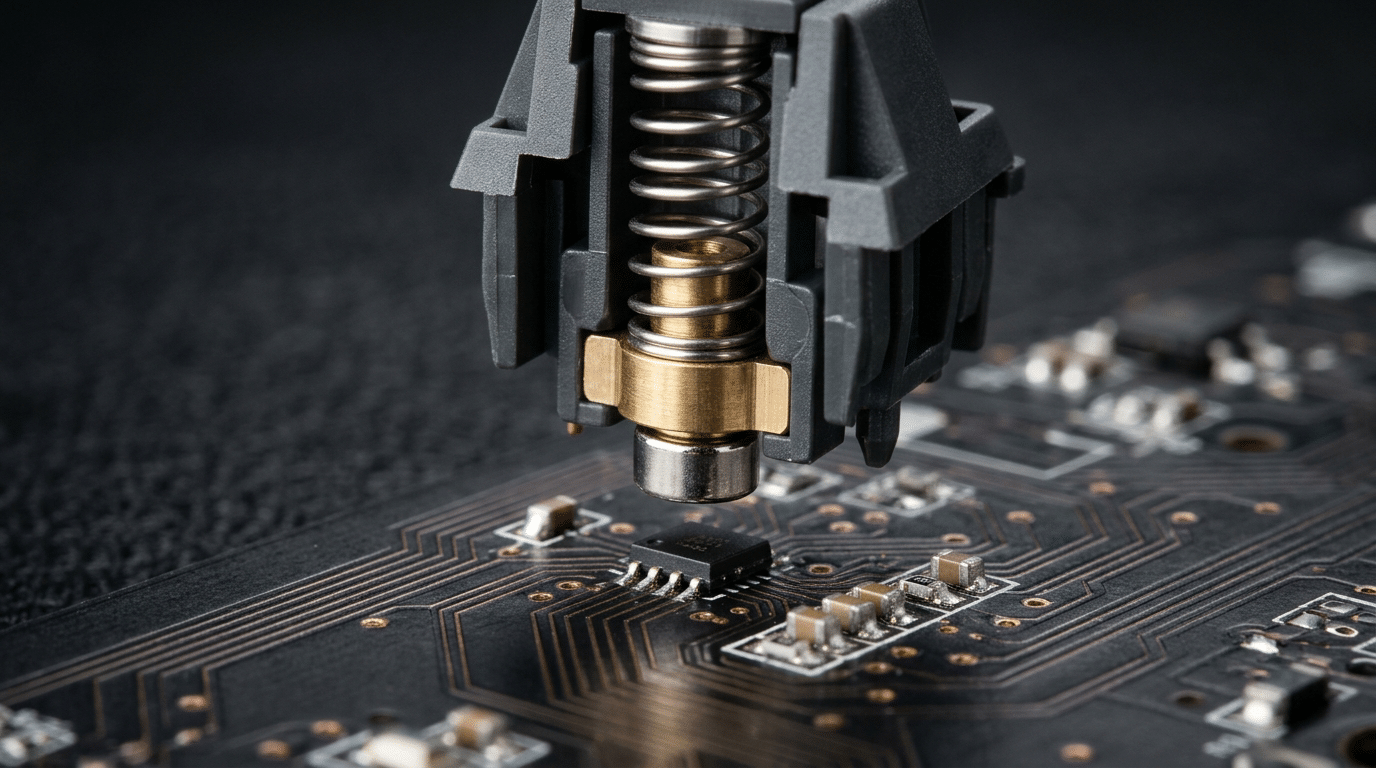
Lorentz Force Voltage vs. Quantum Tunnel Magnetoresistance (TMR)
Although both Hall Effect and TMR switches feel identical under your fingertips when built around matching springs and POM/nylon housings, the semiconductor physics reading that downward magnet movement are fundamentally different:
- Hall Effect (Lorentz Force Deflection): A traditional Hall Effect element drives a steady bias current across a thin semiconductor plate. When the switch stem descends, the vertical magnetic field exerts a Lorentz force on moving charge carriers, deflecting them sideways to generate a tiny analog voltage (the Hall voltage). Because raw Hall voltage is relatively small—measured in millivolts—each sensor or matrix channel relies on internal operational amplifiers and Analog-to-Digital Converters (ADCs) to amplify and clean the signal before the keyboard’s microcontroller (MCU) determines depth.
- TMR (Tunnel Magnetoresistance): TMR belongs to the spintronic magnetoresistive family (evolving past earlier AMR and GMR designs). Instead of deflecting electrons inside a conductor, a TMR element sandwiches an ultra-thin insulating tunnel barrier—often magnesium oxide just nanometers thick—between a pinned ferromagnetic reference layer and a free magnetic layer. As your stem magnet alters the external field orientation, quantum mechanical electron tunneling probability across that barrier shifts dramatically, producing a massive relative change in electrical resistance and a much stronger raw voltage swing with minimal external amplification.
Why Power Efficiency & Startup Speed Matter for Wireless Keyboards
Electrical current draw explains why TMR gained traction alongside wireless 75% and TKL gaming keyboards. In a full 82-key or 87-key keyboard, polling dozens of sensors thousands of times per second adds up rapidly when the board runs on an internal Li-Po battery rather than motherboard USB power.
Early Hall Effect sensors drew several milliamps when active, which meant turning off RGB lighting barely preserved battery life during 2.4GHz wireless play. To conserve power, firmware engineers aggressively duty-cycle the sensor matrix—rapidly waking rows, reading ADC values, and returning them to sleep milliseconds later. Because TMR sensors achieve high signal amplitude on sub-milliamp operating currents and wake cleanly from microamp standby states in microseconds, manufacturers such as Keychron on its Q1 HE wireless custom architecture leveraged magnetoresistive sensing early under the familiar “HE” consumer label. Note that semiconductor suppliers have also shipped low-power next-generation Hall Effect ICs in 2025–2026 that narrow the power gap—meaning wired 8,000Hz Hall Effect boards remain equally capable on desk power.
Signal-to-Noise Calibration, Hybrid Sockets & Magnetic Interference
Raw magnetic sensitivity also creates an unexpected engineering paradox. Because a TMR junction responds strongly across off-axis magnetic angles, designers can mount the sensor offset beside standard 5-pin mechanical hot-swap pads—enabling hybrid PCBs where a gamer drops magnetic switches under W/A/S/D and tactile mechanical switches under typing keys. However, overly sensitive sensors also risk picking up high-frequency PWM flicker from RGB LEDs, unstable USB power ripple, or nearby steel desk frames.
In real-world keyboards, firmware calibration routines, multi-point deadzone trimming, and temperature-drift compensation dictate true 0.05mm–0.1mm repeatability far more than whether a chip uses Hall Effect or TMR. Meanwhile, boards like Razer’s Analog Optical Gen-2 avoid magnetic interference entirely by replacing the stem magnet with a tapered optical shutter slicing an infrared beam—a major practical benefit if you rest magnetic phone chargers, heavy ferrous wrist rests, or speaker drivers directly beside your left hand.
Adjustable Actuation, Debounce Elimination & Rapid Trigger Mechanics
Once your keyboard PCB reads continuous analog distance rather than a binary closed circuit, three separate latency killers unlock simultaneously: debounce elimination, per-key adjustable actuation, and dynamic Rapid Trigger.
Mechanical Leaf Contact Bounce vs. Contactless Analog Polling
Inside a conventional mechanical switch, pressing the stem forces two springy brass or gold-alloy leaves together. Because microscopic metal plates physically vibrate upon collision, they chatter open and closed for several milliseconds—a phenomenon called contact bounce. Keyboard firmware must enforce a static 2ms–5ms (or longer on aged switches) debounce delay before registering or releasing the keystroke so one tap does not type “aa”.
Hall Effect, TMR, and Analog Optical switches have zero colliding metal leaves. There is zero mechanical chatter to filter out. Furthermore, mechanical switches lock you into fixed physical geometry—typically 2.0mm down to actuate and roughly 1.5mm–1.7mm back up to reset. If you bottom out at 4.0mm, release only up to 1.8mm, and tap down again, the mechanical key stays stuck active the entire time, ignoring your intended second input.
Dynamic Directional Resetting & Counter-Strafing Physics
Adjustable actuation moves that initial downstroke threshold anywhere between 0.1mm and 4.0mm (often in 0.1mm steps inside web configurators like Wooting’s Wootility, NuPhyIO, DrunkDeer Antler, or Keychron Launcher). Yet adjustable actuation alone still uses a fixed point: a 0.2mm actuation forces you to lift nearly all the way back to the top cap before releasing.
Rapid Trigger solves that return-travel bottleneck by tracking direction and relative delta rather than a fixed coordinate on the stem:
- Initial Press: Your finger passes the initial actuation floor (for example,
0.4mmonW/A/S/D), activating the movement command immediately. - Continuous Travel Tracking: Whether you push down to
2.1mmor full4.0mmbottom-out, the PCB sensor continuously logs your deepest point. - Instant Upward Reset: The exact millisecond your finger begins lifting—even by a tiny configured upward sensitivity step such as
0.15mmor0.3mm—Rapid Trigger deactivates the key immediately regardless of depth (for instance, shutting off at3.85mminstead of waiting 2.3mm higher). - Immediate Re-Actuation: Pressing back down by that same
0.15mm–0.3mmdelta from mid-stroke fires a brand-new input instantly without climbing back past a mechanical hysteresis gap.
In tactical shooters like Counter-Strike 2 and Valorant, stopping horizontal momentum (counter-strafing) requires releasing A and tapping D cleanly so weapon spread resets to zero before your first shot. Rapid Trigger removes the dead time between lifting off A and zeroing your character velocity, cutting missed timing windows dramatically—especially when paired with an ultralight 8K gaming mouse and a high-refresh OLED panel from our gaming monitors buyer guide.
1,000Hz vs. 8,000Hz Keyboard Polling & System Balance
Standard USB keyboards report state changes at 1,000Hz (one packet every 1.0ms). True 8,000Hz wired USB-C boards—including the CORSAIR K70 PRO TKL, Razer Huntsman V3 Pro TKL 8KHz, and NuPhy Air60 HE—shrink that theoretical USB packet interval to 0.125ms. Just remember two constraints before chasing an 8K badge: first, internal PCB switch-scanning frequency must match or exceed polling so stale states aren’t repeated eight times; second, 0.875ms average polling savings only become meaningful alongside high-frequency 240Hz–540Hz displays and strong 1% Low CPU frametime stability. For most players, Rapid Trigger physics delivers ten times the perceptible snap of jumping from 1,000Hz to 8,000Hz.
CS2 SOCD Rules, Snap Tap, FlashTap & Competitive Legality Matrix
Confusion between Rapid Trigger and SOCD causes more unnecessary match kicks than any other peripheral setting in 2026. Although both features frequently appear in the same keyboard software tab, they solve completely unrelated problems.
SOCD stands for Simultaneous Opposing Cardinal Directions—a conflict-resolution rule borrowed from fighting-game arcade leverless controllers that dictates what output the PCB sends to Windows when you physically hold two opposing movement keys (most commonly A and D) at the exact same moment. Hardware suites expose three main modes:
- Neutral SOCD (Standard Keyboard Behavior): Pressing both
AandDsends both signals simultaneously, which most FPS engines resolve to zero lateral movement (stopping in place, though still carrying timing penalties if overlapping carelessly). - Last-Input Priority (Razer Snap Tap, CORSAIR FlashTap, SteelSeries Rapid Tap, Wooting Snappy Tappy, NuPhy SOCD): If you are holding
Aand pressDwithout letting go ofA, the keyboard firmware automatically cancelsAin software and transmits onlyD. ReleaseDwhile still holdingA, andAresumes instantaneously. - Dynamic Keystrokes (DKS) & Multi-Input Macros: Binding two or four actions along different depths of a single key press (such as half-press walk, full-press crouch).
In August 2024, Valve drew a bright legal line inside official Counter-Strike 2 release notes. Valve declared that automating movement coordination—specifically hardware-assisted counter-strafing via Snap Tap, FlashTap, Rappy Snappy, Rapid Tap, and in-game “null bind” movement scripts—crosses the line into prohibited input automation. Rather than issuing immediate VAC bans, Valve deployed server-side input-pattern detection across Premier, Competitive, Wingman, and official Deathmatch servers: if the server detects SOCD overlap suppression or automated multi-input binds (cl_allow_multi_input_binds remains locked out on official servers), it immediately kicks you from the live match.
| Firmware Feature | What It Actually Controls | Valve CS2 Official Servers | Valorant & Apex Legends | LAN / League Tournament Rules |
|---|---|---|---|---|
| Adjustable Actuation (0.1–4.0mm) | Sets single-key downward trigger depth | Allowed (Fully Legal) | Allowed | Allowed |
| Rapid Trigger | Dynamically resets single key on upward lift | Allowed (Fully Legal) | Allowed | Allowed (Universal pro standard) |
| SOCD Last-Input Priority (Snap Tap / FlashTap / Rapid Tap) | Auto-releases held opposing key (A vs D) | BANNED (Triggers automatic match kick) | Permitted currently (verify patch notes) | Restricted in CS2 (ESL/BLAST/FACEIT follow Valve) |
| Multi-Action DKS / Null-Bind Scripts | Fires multiple keys or jump-throw combos from one switch | BANNED on official servers | Restricted (1-key-to-1-action rule) | Banned in competitive play |
That distinction is straightforward: keep Rapid Trigger ON, and turn SOCD / Snap Tap / FlashTap OFF before queuing Counter-Strike 2. Major tournament circuits (including ESL, BLAST, and FACEIT) mirror Valve’s input-automation rulebook directly, making hardware toggles like Razer’s Fn+Tab LED indicator or dedicated CS2 onboard profiles essential before every match.
Myth vs. Engineering Reality: Five Magnetic Switch & SOCD Myths Audited
Marketing jargon around magnetic keyboards routinely blurs physics and competitive rules. Here are five recurring claims separated from engineering facts:
- Myth 1: “Rapid Trigger and SOCD are the same feature, so Rapid Trigger will get you kicked from CS2.”
Engineering Reality: False. Rapid Trigger adjusts only single-key downward and upward reset behavior based on physical finger travel; Valve explicitly targets inter-key automation where firmware suppressesAwhile you are still holding it down wheneverDis pressed. Nearly every CS2 Major competitor uses Rapid Trigger legally every match with SOCD disabled. - Myth 2: “TMR sensors automatically deliver faster wired latency than Hall Effect sensors.”
Engineering Reality: On a wired USB-C desk keyboard, both modern Hall Effect chips and TMR sensors achieve sub-millisecond input latency determined primarily by MCU scan loop speed, ADC filtering, and USB polling rate (1,000Hz vs. 8,000Hz). TMR’s structural superiority shines in power efficiency for wireless magnetic boards and off-axis hybrid socket PCB design—not magical wired click-speed gains. - Myth 3: “Setting every key to 0.1mm actuation with 0.1mm Rapid Trigger maximizes performance.”
Engineering Reality: Ultra-shallow0.1mmthresholds across the entire keyboard cause constant accidental keystrokes simply from resting your ring finger onQorShift, or brushing Spacebar with your thumb—and can cause minor thermal or keycap-wobble noise to chatter inputs. KeepW/A/S/Daround0.3mm–0.6mmwith a0.2mm–0.35mmRapid Trigger delta, and leave Ultimate ability keys or chat keys at1.8mm–2.2mm. - Myth 4: “Any magnetic keyboard can hot-swap Cherry MX mechanical switches or third-party Hall Effect stems.”
Engineering Reality: Standard Hall Effect PCBs lack metal pin contact sockets entirely, meaning Cherry MX mechanical switches will not register at all (only specialized TMR hybrid sockets support both). Even between magnetic keyboards, magnet pole orientation (North-down vs. South-down) and rail footprints vary—for instance, Keychron Q1 HE uses Gateron Double-Rail Magnetic switches while CORSAIR MGX Hyperdrive and Razer Analog Optical Gen-2 use brand-specific layouts. - Myth 5: “8,000Hz keyboard polling compensates for loose switch rails or sloppy counter-strafing.”
Engineering Reality: A loose single-rail magnetic stem that tilts0.3mmsideways during off-center presses ruins0.1mmactuation consistency regardless of USB polling speed. Prioritize double-rail stabilized stems, proper factory calibration, and disciplinedA/Dfinger discipline before chasing 8K polling badges.
Actionable Buyer & Tuning Checklist for Magnetic Gaming Keyboards
Apply these six practical checks before purchasing or configuring a magnetic or analog optical gaming keyboard:
- Choose Sensor Architecture by Connectivity Need: If you play exclusively wired USB-C at your main desk, proven 8,000Hz Hall Effect or Analog Optical Gen-2 keyboards give rock-solid precision. If you demand wireless 2.4GHz cleanliness without burning through battery life in two evenings, prioritize low-power magnetoresistive/TMR architectures.
- Separate Movement Keys from Utility & Typing Layers: Assign
0.3mm–0.5mmactuation + Rapid Trigger strictly to movement keys (W/A/S/D,Ctrl,Space) or rhythm-game keys, while pushingR,F,Q, andEdeeper to1.6mm–2.2mm(or enabling anti-misclick logic like SteelSeries Protection Mode) so panic squeezes never burn critical abilities. - Create an Explicit CS2-Safe Onboard Profile: Configure one hardware profile saved directly to keyboard flash with SOCD / Snap Tap / FlashTap toggled OFF and Rapid Trigger ON. Verify your keyboard offers a clear visual LED indicator or hardware hotkey so you never queue Valve Premier accidentally with SOCD left active from another game.
- Inspect Stem Stabilization & Keycap Material Before Checkout: Favor dual-rail or box-stem magnetic switches paired with thick double-shot PBT keycaps—and double-check regional SKUs (for example, verifying North American ANSI CORSAIR K70 PRO TKL stock ships PBT rather than ABS keycaps).
- Weigh Web Configurator Freedom vs. Desktop Suites: Driverless browser configurators (Wootility, Keychron Launcher, NuPhyIO, DrunkDeer Antler) run across Windows, macOS, and Linux with zero background CPU tax. If picking a mainstream suite like CORSAIR iCUE or Razer Synapse, write your profiles to onboard memory and exit background tray bloat during matches.
- Calibrate Away from Ferrous Steel & Desk Magnets: Run your board’s built-in travel calibration routine after placing it on your actual desk pad, and keep magnetic Qi chargers, MagSafe pucks, and steel desk clamps away from the edge of Hall Effect or TMR switch arrays.
Contextual Hardware Picks: Verified Magnetic & Optical Keyboards Worth Comparing
Three audited keyboards currently available on Amazon US demonstrate the exact engineering trade-offs explored above—spanning high-speed 8,000Hz wired Hall Effect, wireless custom magnetoresistive efficiency, and magnetically immune Analog Optical Rapid Trigger. For full 7-board rankings across 60%, 75%, and TKL footprints (including budget low-profile NuPhy Air60 HE and DrunkDeer A75 Pro options), visit our Best Hall Effect & Rapid Trigger Gaming Keyboards hub.
1. CORSAIR K70 PRO TKL — Best 8,000Hz Hall Effect Benchmark & Value

Budget Tier: $100-$150 tier | Audited Specs: TKL Layout | CORSAIR MGX Hyperdrive Double-Rail Magnetic Switches | 0.1–4.0mm Hardware (0.4–3.6mm Optimal) Rapid Trigger + Toggleable FlashTap SOCD | 8,000Hz AXON USB-C Wired Hyper-Polling | Dual Silicone Sound Dampening.
How It Fulfills This Guide’s Engineering Rules: Built around double-rail MGX Hyperdrive stems that cut sideways keycap wobble during rapid A/D taps, the K70 PRO TKL pairs true 8,000Hz wired polling with five onboard profiles per CORSAIR K70 PRO TKL technical documentation. Save a FlashTap-disabled Rapid Trigger profile directly to onboard memory for CS2 Premier, verify the North American ANSI SKU for double-shot PBT keycaps, and close iCUE before queuing.
2. Keychron Q1 HE Wireless — Best Wireless Custom Magnetic & Web QMK Engineering

Budget Tier: $175-$200 tier | Audited Specs: 75% (82-Key Full CNC 6063 Aluminum Double-Gasket) | Gateron Double-Rail Magnetic Switches | 0.5–3.8mm Adjustable Actuation (0.1mm Sensitivity) + Rapid Trigger | Tri-Mode 2.4GHz (1,000Hz) / Bluetooth 5.2 / USB-C + 4,000mAh Battery.
How It Fulfills This Guide’s Engineering Rules: Pioneering low-power magnetoresistive sensing under Keychron’s “HE” wireless banner, the Keychron Q1 HE QMK architecture proves you do not need wired-only cables to enjoy crisp Rapid Trigger. Driverless browser-based Keychron Launcher tuning writes custom 0.1mm actuation curves and Dynamic Keystrokes straight to open-source QMK firmware across Windows and macOS while a heavy double-gasket aluminum chassis elevates everyday typing acoustics.
3. Razer Huntsman V3 Pro TKL 8KHz — Best Magnetically Immune Analog Optical & Hardware SOCD Toggle

Budget Tier: $175-$200 tier | Audited Specs: TKL Layout | Razer Analog Optical Gen-2 Switches (40g Force) | 0.1–4.0mm Full-Range Rapid Trigger + Snap Tap | 8,000Hz Wired HyperPolling | Brushed Aluminum Top Plate + Double-Shot PBT Keycaps.
How It Fulfills This Guide’s Engineering Rules: For players who want 0.1–4.0mm Rapid Trigger and 8,000Hz polling with complete immunity to desk magnets or temperature drift, Razer’s Analog Optical Gen-2 platform tracks infrared beam occlusion instead of magnetic flux. Even better for tournament compliance, a physical Fn+Tab shortcut with onboard LED feedback lets you verify Snap Tap is strictly disabled before entering CS2 matchmaking.
Official Standards & Engineering References
- Valve Counter-Strike 2 Official Release Notes & Input Automation Policy: counter-strike.net/news/updates
- Wooting Wootility Magnetic Actuation & Rapid Trigger Configurator Documentation: wooting.io/wootility
- CORSAIR K70 PRO TKL MGX Hyperdrive, 8,000Hz AXON & FlashTap Technical Specifications: corsair.com/us/en/p/keyboards/ch-911911g-na/k70-pro-tkl
- Keychron Q1 HE Wireless QMK Magnetic Custom Keyboard Specifications: keychron.com/products/keychron-q1-he-qmk-wireless-custom-keyboard
- Razer Huntsman V3 Pro TKL Analog Optical Gen-2 & Snap Tap Specifications: razer.com/gaming-keyboards/razer-huntsman-v3-pro-tkl
How We Audited This Guide
- Displays and peripherals were compared by panel technology, refresh rate and response specifications, connectivity standards, sensor and polling specifications, and warranty terms.
- Every specification claim was cross-checked against official OEM datasheets, platform vendor documentation, and published industry standards (PCI-SIG, JEDEC, VESA, Intel ATX) rather than marketplace listing copy.
- Recommendations were evaluated against our weighted audit rubric and documented compatibility rules; we do not publish fabricated FPS, thermal, or acoustic numbers.
Frequently Asked Questions About Hall Effect, TMR, Rapid Trigger & SOCD
What is the technical difference between Hall Effect and TMR keyboard switches?
Hall Effect sensors measure small Lorentz-force voltages requiring continuous bias current, whereas TMR (Tunnel Magnetoresistance) sensors measure large resistance shifts across quantum tunnel barriers using far less power. Both unlock identical adjustable actuation and Rapid Trigger, though TMR enables superior wireless battery efficiency and hybrid switch sockets.
Is Rapid Trigger banned in Counter-Strike 2 alongside Snap Tap?
No. Rapid Trigger remains 100% legal on official Counter-Strike 2 matchmaking servers, FACEIT, and pro tournaments because it only dynamically resets individual key travel when your finger lifts. Valve restricts only SOCD input-prioritization features—such as Snap Tap, FlashTap, and Rapid Tap—that resolve overlapping A and D directional presses automatically.
What happens if you leave Snap Tap or FlashTap enabled in CS2?
If Valve’s server-side input monitor detects hardware SOCD overrides or multi-input null binds on Premier, Competitive, or official Deathmatch servers, it does not issue an immediate VAC ban. Instead, the server flags the automated counter-strafing pattern and kicks you straight out of the active match until disabled.
What actuation and Rapid Trigger sensitivity works best for FPS games?
Configure movement keys (W, A, S, D) between 0.3mm and 0.5mm actuation with Rapid Trigger reset sensitivity set around 0.2mm to 0.35mm so deliberate lifts snap instantly without false triggers from resting finger weight. Set ultimate abilities, reload, and chat keys deeper at 1.8mm to 2.2mm with Rapid Trigger off.
Do Analog Optical switches perform as reliably as Hall Effect or TMR magnetic switches?
Yes. Second-generation Analog Optical designs like Razer Huntsman V3 Pro TKL 8KHz deliver full 0.1mm to 4.0mm adjustable actuation and instantaneous Rapid Trigger resets matching magnetic switches, while offering complete immunity to magnetic desk interference. Their only limitation is staying within proprietary non-swappable optical switches.


