
Disclosure: As an Amazon Associate, I earn from qualifying purchases. If you buy through links on this page, The PC Audit may earn a small commission at no extra cost to you.
Finding the best RTX 5060 Ti prebuilt gaming PC on Amazon in late 2026 requires navigating one hidden trap before anything else: VRAM capacity. NVIDIA manufactures two distinct desktop cards under the same GeForce RTX 5060 Ti specification sheet—an 8GB GDDR7 model carrying a Launch MSRP starting at $379 and a 16GB GDDR7 version starting at $429. Because Amazon’s sidebar graphics filter stops at “8 GB & above,” nearly every off-the-shelf mid-range tower listed under $1,700 quietly ships the 8GB card while leaning on the Blackwell headline.
Rather than pretending those 8GB systems carry 16GB, we audited 7 verified, in-stock Amazon configurations to expose exactly where an 8GB RTX 5060 Ti desktop makes financial sense and when you should step up. Alongside our broader Best Prebuilt Gaming PC hub and our dedicated RTX 5060 Ti 8GB vs. 16GB breakdown, this guide evaluates CPU cache trade-offs, AM5 versus LGA 1700 upgrade longevity, memory channels, power supply transparency, and wireless hardware across every rig on the list.
In This Audit
- Quick Picks: Top 3 Recommendations
- Side-by-Side Comparison of All 7 Audited Rigs
- Match Your Use Case
- Detailed Product Audits (1–7)
- 1. CyberPowerPC Gamer Master GMA2900A3 (Best Overall AM5 Value)
- 2. CyberPowerPC Gamer Xtreme GXiVR8040A19 (Best for Creators)
- 3. KOTIN Gaming PC Desktop (Best Spec Transparency & Wi-Fi 7)
- 4. MSI Codex Z2 A8NVM-671US (Best Tier-1 Airflow Build)
- 5. Skytech Crystal Series (Best Out-of-Box 32GB RAM & Cache)
- 6. STORMCRAFT Sirius Gaming PC (Best Documented DDR5-6000)
- 7. WIWB Panoramic RGB Desktop (Best Under-$1,000 Entry)
- Buying Guide: 8GB vs. 16GB Reality & Upgrade Roadmap
- Scoring Methodology & Rejected Models
- Frequently Asked Questions
- Final Verdict
Quick Picks: Best RTX 5060 Ti Prebuilt Gaming PC Recommendations
#1 Best Overall AM5 Value
CyberPowerPC Gamer Master GMA2900A3
Pairs an RTX 5060 Ti 8GB GPU with a documented AMD B850 AM5 motherboard and Amazon-direct fulfillment under $1,400 (Jump to audit).
#2 Best for Creators & Streamers
CyberPowerPC Gamer Xtreme GXiVR8040A19
Delivers 20 Intel Core i7-14700F cores, 33MB L3 cache, Wi-Fi 6, and USB-C 3.2 under $1,350 for heavy multitasking (Jump to audit).
#3 Best Spec Transparency
KOTIN Gaming PC Desktop
Spells out a 650W 80+ Gold PSU, 6-heatpipe tower cooler, 3x M.2 slots, and Wi-Fi 7 upfront around $1,400–$1,500 (Jump to audit).
Side-by-Side Comparison: 7 Audited RTX 5060 Ti Prebuilt Gaming PCs
| Product & Award | CPU & Platform | GPU & VRAM | RAM / Storage / Key Extras | Price Tier & Link |
|---|---|---|---|---|
| 1. CyberPowerPC Gamer Master GMA2900A3 Best Overall AM5 Platform Value | Ryzen 7 8700F (8C/16T) AMD B850 (AM5) | RTX 5060 Ti 8GB GDDR7 | 16GB DDR5 / 1TB PCIe 4.0 NVMe Shipped & Sold by Amazon | Under $1,400 ($1,200–$1,350) View on Amazon |
| 2. CyberPowerPC Gamer Xtreme GXiVR8040A19 Best for Creators & Multitasking | Core i7-14700F (20C/28T) Intel B760 (LGA 1700) | RTX 5060 Ti 8GB GDDR7 | 16GB DDR5 / 1TB PCIe 4.0 NVMe Wi-Fi 6, BT 5.3, USB-C 3.2 | Under $1,350 ($1,200–$1,350) View on Amazon |
| 3. KOTIN Gaming PC Desktop Best Spec Transparency & Wi-Fi 7 | Ryzen 7 8700F (8C/16T) AM5 (4x DIMM / 3x M.2) | RTX 5060 Ti 8GB GDDR7 | 16GB DDR5 / 1TB Gen4 NVMe 650W 80+ Gold PSU, Wi-Fi 7 | Around $1,400–$1,500 View on Amazon |
| 4. MSI Codex Z2 A8NVM-671US Best Tier-1 Brand Airflow Build | Ryzen 7 8700F (8C/16T) AM5 Platform | RTX 5060 Ti 8GB GDDR7 | 16GB DDR5 / 1TB M.2 NVMe 4-fan airflow chassis, USB-C | Under $1,350 ($1,200–$1,350) View on Amazon |
| 5. Skytech Crystal Series Best Out-of-Box 32GB RAM & Cache | Ryzen 7 7700 (8C/16T, 32MB L3) AM5 Platform | RTX 5060 Ti 8GB GDDR7 | 32GB DDR5-5600 / 1TB NVMe 650W 80+ Gold PSU, Wi-Fi 5 | Under $1,700 tier View on Amazon |
| 6. STORMCRAFT Sirius Gaming PC Best Documented DDR5-6000 Kit | Ryzen 7 8700F (8C/16T) AMD B650 (AM5) | RTX 5060 Ti 8GB GDDR7 | 16GB DDR5-6000 / 1TB NVMe 650W 80+ Gold PSU, CA assembly | Under $1,650 (Prime promo) View on Amazon |
| 7. WIWB Panoramic RGB Desktop Best Strict Under-$1,000 Entry | Core i5-13400F option (Verify selector vs. 4700LE) | RTX 5060 Ti 8GB option (Verify vs. RTX 4060) | 16GB DDR4 / 1TB NVMe Wi-Fi 6, Gigabit Ethernet | Under $1,000 cap View on Amazon |
Match Your Use Case: Which Rig Fits Your Setup?
| Buyer Scenario | Best Match | Why & Expected Outcome |
|---|---|---|
| Upgrade-ready 1080p/1440p AM5 system under $1,400 | CyberPowerPC Gamer Master GMA2900A3 | Confirmed AMD B850 board lets you add 32GB DDR5-6000 and swap to an X3D processor later without replacing the chassis or board. |
| Streaming, OBS capture & Premiere timelines under $1,350 | CyberPowerPC Gamer Xtreme GXiVR8040A19 | 20-core i7-14700F and 33MB L3 cache pair with Blackwell dual NVENC encoders for heavy background multitasking. |
| Zero hidden PSU or cooling guesswork under $1,500 | KOTIN Gaming PC Desktop | Upfront disclosure of a 650W 80+ Gold PSU, 6-heatpipe cooler, Wi-Fi 7, and 3x M.2 slots removes mid-tier component surprises. |
| No-tinkering 32GB RAM & double CPU L3 cache | Skytech Crystal Series | Ships ready with 32GB DDR5-5600 and a Ryzen 7 7700 (32MB L3), ideal if you plug in over Ethernet rather than Wi-Fi 5. |
| Strict sub-$1,000 budget maximizing 1080p frame rates | WIWB Panoramic RGB Desktop | Unlocks RTX 5060 Ti DLSS 4 performance under $1,000 once you carefully verify the GPU and CPU variant before checkout. |
Detailed Audits: Best RTX 5060 Ti Prebuilt Gaming PC Picks (1–7)
1. CyberPowerPC Gamer Master (GMA2900A3 — Ryzen 7 8700F / RTX 5060 Ti) — Best Overall AM5 Platform Value

Quick Specs: AMD Ryzen 7 8700F (8C/16T, up to 5.0 GHz, 16MB L3) | AMD B850 Motherboard (AM5) | NVIDIA GeForce RTX 5060 Ti 8GB GDDR7 | 16GB DDR5 | 1TB PCIe 4.0 NVMe SSD | Shipped & Sold by Amazon | Price Tier: Mid-upper tier (under $1,400; roughly $1,200–$1,350)
Audit Score: 8.4 / 10
- GPU & VRAM Headroom (35%): 8.0 / 10
- CPU & Platform Runway (25%): 9.0 / 10
- Memory & Storage Balance (20%): 8.2 / 10
- Cooling, PSU & Warranty Support (20%): 8.4 / 10
CyberPowerPC takes the top overall rank not because it hides a 16GB graphics card, but because it pairs an 8GB RTX 5060 Ti with the smartest long-term motherboard foundation in its price bracket. Unlike vague listings that conceal chipset tiers, the GMA2900A3 specifies a modern AMD B850 Socket AM5 platform, bringing mandatory PCIe 5.0 M.2 support, standard ATX component spacing, and an open CPU upgrade lane toward future Ryzen X3D silicon. Sitting in the roughly $1,200–$1,350 window with direct Shipped and Sold by Amazon fulfillment keeps the 8GB framebuffer priced sensibly for 1080p Ultra and selective 1440p gaming.
That honesty matters when weighing its AMD Ryzen 7 8700F processor against sibling picks. Built on Zen 4 Phoenix silicon, the 8700F delivers 8 cores, 16 threads, and 65W efficiency, yet drops L3 cache to 16MB—half of the 32MB found on the #5 Skytech Crystal’s Ryzen 7 7700—and trims usable PCIe 4.0 lanes to 16 without integrated graphics. Against the #2 CyberPowerPC Gamer Xtreme, the GMA2900A3 trails in heavy video rendering and multi-core encoding, while beating the Intel system hands-down on socket longevity and future upgrade economics.
Buyer Verification Alert: The product summary confirms 16GB DDR5 and a 1TB PCIe 4.0 NVMe SSD, but omits whether RAM ships as single-channel 1x16GB or dual-channel 2x8GB alongside exact PSU wattage. Inspect the internal memory slots and power supply label immediately upon unboxing before planning a GPU jump.
Pros
- Confirmed AMD B850 AM5 board supports drop-in Ryzen 7 9800X3D upgrades later
- Standard off-the-shelf ATX chassis with zero proprietary PSU or motherboard locks
- Shipped and Sold directly by Amazon under $1,400 simplifies returns
- 1TB PCIe 4.0 NVMe SSD, Windows 11 Home, and RGB peripherals included
Cons
- Uses the 8GB RTX 5060 Ti rather than the 16GB GDDR7 edition
- Ryzen 7 8700F limits L3 cache to 16MB and omits backup integrated graphics
- DDR5 speed, stick count, and PSU wattage are omitted on the listing
Verdict: Buy it if you want a reasonably priced RTX 5060 Ti rig on an AM5 B850 board with Amazon-direct shipping under $1,400. Skip it if you run maxed-out 1440p ray-traced textures demanding 16GB VRAM out of the box. Upgrade note: Budget around $95–$110 later for a 32GB (2x16GB) DDR5-6000 CL30 EXPO kit and use the spare M.2 slot for a 2TB game drive.
2. CyberPowerPC Gamer Xtreme (GXiVR8040A19 — Core i7-14700F / RTX 5060 Ti) — Best for Creators & Multitasking

Quick Specs: Intel Core i7-14700F (20C/28T: 8P+12E, 33MB L3) | Intel B760 Chipset (LGA 1700) | NVIDIA GeForce RTX 5060 Ti 8GB GDDR7 | 16GB DDR5 | 1TB PCIe 4.0 NVMe SSD | Wi-Fi 6, BT 5.3, USB-C 3.2 | Price Tier: Mid-upper tier (under $1,350; roughly $1,200–$1,350)
Audit Score: 8.3 / 10
- GPU & VRAM Headroom (35%): 8.1 / 10
- CPU & Platform Runway (25%): 8.6 / 10
- Memory & Storage Balance (20%): 8.1 / 10
- Cooling, PSU & Warranty Support (20%): 8.3 / 10
If your gaming machine doubles as an editing station, stream encoder, or software build box, the CyberPowerPC Gamer Xtreme GXiVR8040A19 packs far more raw CPU muscle under $1,350 than any Ryzen 7 8700F tower on this page. Per Intel’s official ARK datasheet, the Core i7-14700F combines 8 Performance cores and 12 Efficient cores (28 total threads) alongside 33MB of Intel Smart Cache and boost clocks reaching 5.4 GHz. Paired with Blackwell’s 9th-Gen NVENC AV1 encoder on the RTX 5060 Ti, background OBS capture, Discord, browser tabs, and code compilation barely dent your foreground frame pacing.
Two architectural catches explain why it finishes one tenth behind the #1 Gamer Master overall. First, the Intel B760 motherboard uses the retired LGA 1700 socket—so CPU swaps stop at 14th-Gen Core parts—and locks processor multiplier tuning. Second, the F-suffix disables Intel integrated graphics, meaning editors who rely heavily on Quick Sync timeline scrubbing in Premiere Pro lose hardware iGPU decode acceleration. Compared with the #3 KOTIN build, CyberPowerPC wins on core count and Amazon-direct fulfillment while sacrificing Wi-Fi 7 and upfront PSU disclosure.
Buyer Verification Alert: Check the B760 motherboard BIOS revision immediately after Windows setup and flash the newest vendor BIOS if needed so Intel microcode voltage limits stay properly enforced for the Core i7-14700F’s 219W maximum turbo power envelope.
Pros
- 20 cores / 28 threads and 33MB L3 cache dominate 8-core rivals in heavy creator multitasking
- Confirmed Wi-Fi 6, Bluetooth 5.3, and USB-C 3.2 connectivity under $1,350
- Shipped and Sold directly by Amazon with standard ATX chassis layout
- 1TB PCIe 4.0 NVMe SSD and starter RGB keyboard and mouse in the box
Cons
- End-of-line LGA 1700 B760 board leaves zero path to newer Intel CPU generations
- No integrated GPU or Intel Quick Sync due to the F-series CPU SKU
- 8GB VRAM ceiling plus undisclosed PSU wattage and DDR5 stick count
Verdict: Buy it if you stream, edit, or compile regularly under $1,350 and want 20 Intel cores backed by Amazon-direct shipping. Skip it if future socket upgrades or Quick Sync timeline decoding sit high on your priority list. Upgrade note: Stepping up from 16GB DDR5 to 32GB (2x16GB) gives video timelines and virtual machines immediate breathing room.
3. KOTIN Gaming PC Desktop (Ryzen 7 8700F / RTX 5060 Ti / Wi-Fi 7) — Best Spec Transparency & Wi-Fi 7

Quick Specs: AMD Ryzen 7 8700F (8C/16T, AM5, 16MB L3) | NVIDIA GeForce RTX 5060 Ti 8GB GDDR7 | 16GB DDR5 (4x DIMM slots) | 1TB PCIe Gen4 NVMe (3x M.2 slots) | 650W 80+ Gold PSU | 6-Heatpipe Digital Tower Cooler + 5x 120mm ARGB Fans | Wi-Fi 7 | Price Tier: Upper budget ceiling (around $1,400–$1,500)
Audit Score: 8.2 / 10
- GPU & VRAM Headroom (35%): 7.5 / 10
- CPU & Platform Runway (25%): 8.6 / 10
- Memory & Storage Balance (20%): 8.3 / 10
- Cooling, PSU & Warranty Support (20%): 8.9 / 10
Most Amazon prebuilts below $1,500 hide their weakest components behind vague phrasing like “high-efficiency power supply” or “air cooling.” KOTIN takes the opposite approach, documenting nearly every supporting subsystem on the spec sheet: a 650W 80+ Gold PSU clearing NVIDIA’s 600W system baseline with ease, a 6-heatpipe digital tower CPU cooler paired with five 120mm ARGB case fans, Wi-Fi 7 wireless connectivity, four DDR5 DIMM sockets, and three total M.2 NVMe slots on an AM5 board.
That component clarity easily outclasses both the #1 CyberPowerPC GMA2900A3 and the #4 MSI Codex Z2 when comparing cooling airflow and wireless speed. Still, two practical drawbacks keep KOTIN in third place overall. Pushing toward the $1,400–$1,500 ceiling while retaining 8GB VRAM and 16GB RAM places it within striking distance of 12GB–16GB GPU systems highlighted in our best prebuilt gaming PC under $1,500 guide, and warranty service runs through third-party seller Kotin rather than Shipped and Sold by Amazon.
Buyer Verification Alert: This configuration is sold by third-party storefront Kotin and fulfilled by Amazon, so confirm Kotin’s direct warranty coverage duration on your invoice. Also keep memory upgrades to two sticks (2x16GB) rather than filling all four DDR5 slots to preserve peak AM5 memory stability.
Pros
- Discloses 650W 80+ Gold PSU, 6-heatpipe digital cooler, and 5x 120mm ARGB fans upfront
- Built-in Wi-Fi 7 beats Wi-Fi 5 and Wi-Fi 6 cards on rival rigs in this bracket
- 3x M.2 NVMe slots and 4x DDR5 slots on AM5 simplify storage expansion
- 65W Ryzen 7 8700F runs cool and quiet beneath a 6-heatpipe tower heatsink
Cons
- Upper $1,400–$1,500 tier feels tight for an 8GB GPU paired with 16GB RAM
- Third-party brand warranty support instead of Tier-1 US system integrator service
- Ryzen 7 8700F carries 16MB L3 cache and 16 usable PCIe 4.0 lanes
Verdict: Buy it if PSU transparency, multi-heatpipe cooling, triple M.2 expansion, and Wi-Fi 7 matter more to you than saving roughly $100 with a larger integrator. Skip it if you prefer Amazon-direct vendor warranty or want 16GB VRAM near $1,500. Upgrade note: Drop two extra PCIe 4.0 NVMe drives into the open M.2 slots and swap to 2x16GB DDR5-6000 CL30 when ready.
4. MSI Codex Z2 Gaming Desktop (A8NVM-671US — Ryzen 7 8700F / RTX 5060 Ti) — Best Tier-1 Brand Airflow Build

Quick Specs: AMD Ryzen 7 8700F (8C/16T, up to 5.0 GHz, 16MB L3, AM5) | NVIDIA GeForce RTX 5060 Ti 8GB GDDR7 | 16GB DDR5 | 1TB M.2 NVMe SSD | 4-Fan Airflow Tower + ARGB Air Cooler + USB Type-C | Shipped & Sold by Amazon | Price Tier: Mid-upper tier (under $1,350; roughly $1,200–$1,350)
Audit Score: 8.1 / 10
- GPU & VRAM Headroom (35%): 8.1 / 10
- CPU & Platform Runway (25%): 8.2 / 10
- Memory & Storage Balance (20%): 8.0 / 10
- Cooling, PSU & Warranty Support (20%): 8.3 / 10
Buyers who trust first-party hardware brands over boutique integrators get a tidy package in the MSI Codex Z2 A8NVM-671US. Priced in the roughly $1,200–$1,350 sweet spot and Shipped and Sold by Amazon, the Codex Z2 uses standard off-the-shelf MSI components inside a four-fan airflow chassis with an ARGB tower air cooler and front-panel USB Type-C access. Moving from a standard RTX 5060 desktop to this RTX 5060 Ti 8GB rig adds noticeably stronger Blackwell shading throughput and smoother 1080p high-refresh framing.
On paper, core CPU and GPU silicon mirror the #1 CyberPowerPC Gamer Master almost identically. What separates the two is spec granularity: CyberPowerPC explicitly guarantees an AMD B850 motherboard, whereas MSI leaves the exact AM5 chipset (B650 versus B850), PSU wattage rating, and DDR5 memory speed unspecified on the Amazon product card. Compared with the #5 Skytech Crystal, the Codex Z2 saves several hundred dollars upfront, though you sacrifice 32GB memory and half the Ryzen L3 cache.
Buyer Verification Alert: Neither the exact AM5 chipset nor the PSU wattage/80+ certification appears in the Codex Z2 listing summary. Verify the power supply label and confirm dual-channel memory population with HWiNFO64 on day one, and remove unnecessary MSI bloatware background services.
Pros
- Built by Tier-1 motherboard and GPU manufacturer MSI with standard ATX layout
- 4-fan airflow chassis and ARGB tower air cooler handle 65W CPU heat quietly
- Shipped and Sold by Amazon under $1,350 with front USB Type-C
- Socket AM5 base retains an easy path to future X3D processor drops
Cons
- 8GB VRAM ceiling strains modern 1440p Ultra textures and heavy ray tracing
- Motherboard chipset, PSU wattage, and DDR5 transfer rate are undisclosed
- Ryzen 7 8700F halves L3 cache to 16MB compared with standard Ryzen 7000/9000 chips
Verdict: Buy it if you want Tier-1 MSI hardware consistency, clean airflow, and AM5 upgradeability under $1,350 from Amazon directly. Skip it if you demand upfront B850 chipset and 80+ Gold PSU confirmation before checkout. Upgrade note: Swap to a clean 32GB (2x16GB) DDR5-6000 CL30 EXPO memory kit if MSI ships a single 16GB stick.
5. Skytech Crystal Series (Ryzen 7 7700 / RTX 5060 Ti) — Best Out-of-Box 32GB RAM & CPU Cache
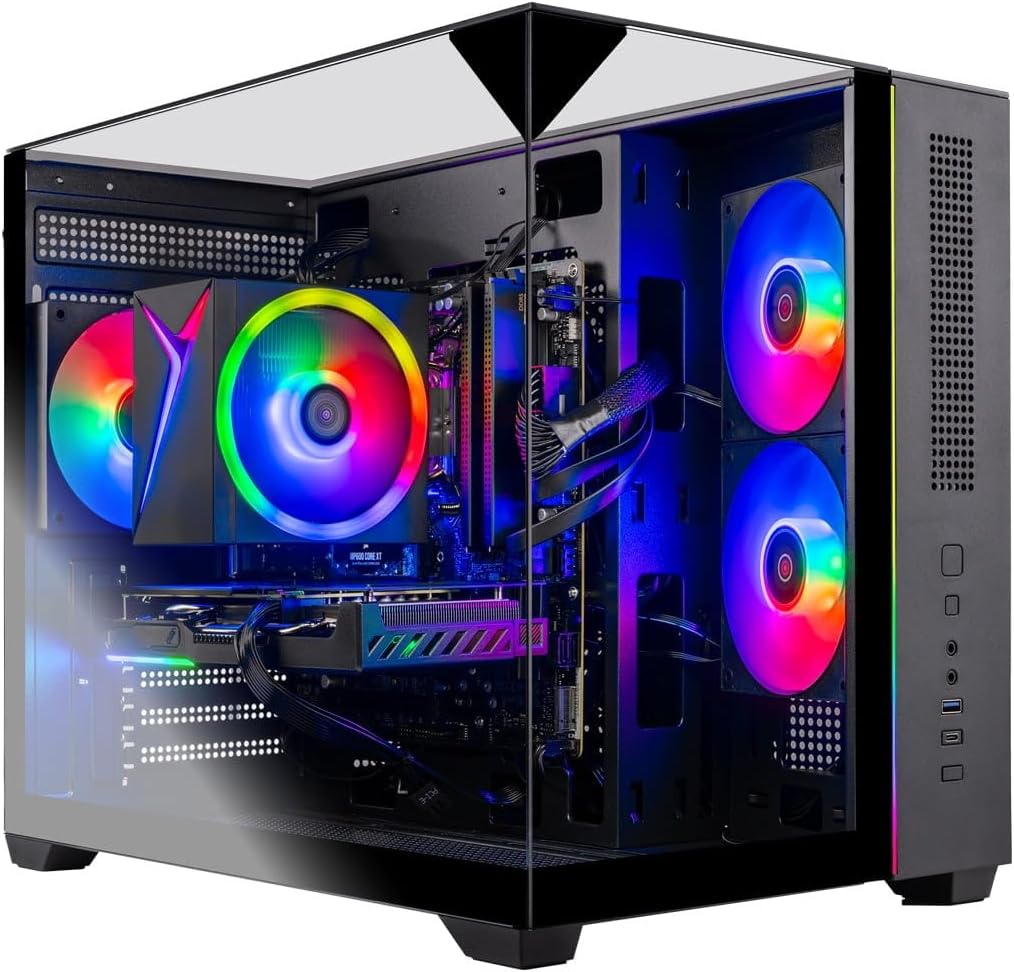
Quick Specs: AMD Ryzen 7 7700 (8C/16T, 3.8–5.3 GHz, 32MB L3, AM5) | NVIDIA GeForce RTX 5060 Ti 8GB GDDR7 | 32GB DDR5-5600 | 1TB NVMe M.2 SSD | 650W 80+ Gold PSU | Triple-Glass Crystal Chassis | Wi-Fi 5 | Price Tier: Mid-upper tier (under $1,700)
Audit Score: 8.0 / 10
- GPU & VRAM Headroom (35%): 7.1 / 10
- CPU & Platform Runway (25%): 9.1 / 10
- Memory & Storage Balance (20%): 8.8 / 10
- Cooling, PSU & Warranty Support (20%): 7.6 / 10
From a pure CPU and memory standpoint, Skytech’s Crystal Series beats every Ryzen 7 8700F system in this guide. According to AMD’s Ryzen 7 7700 specifications, you gain a full 32MB of L3 cache (twice the 8700F’s 16MB), 5.3 GHz peak boost clocks, full PCIe lane routing, and integrated RDNA 2 graphics for display troubleshooting. Better yet, it is the only rig in our 7-system roundup pre-equipped with 32GB of DDR5-5600 RAM alongside a confirmed 650W 80+ Gold PSU.
So why does it land in 5th place behind cheaper builds? Because sitting near the under-$1,700 ceiling with an 8GB RTX 5060 Ti triggers a steep VRAM value penalty: above $1,500, shoppers can routinely find 12GB RTX 5070 or 16GB RX 9070 prebuilts. Skytech also commits a classic mid-upper hidden downgrade by shipping legacy Wi-Fi 5 (802.11ac) inside a triple-glass Crystal case that impedes front intake compared with open mesh panels like the #1 CyberPowerPC or #4 MSI Codex Z2.
Buyer Verification Alert: Skytech Gaming often merges older and current builds onto shared parent-ASIN dropdowns (“Set name”) carrying inherited reviews. Double-check that your selected variant explicitly displays the Ryzen 7 7700 and RTX 5060 Ti 8GB before clicking Buy Now, and confirm side-intake fan orientation inside the triple-glass chassis.
Pros
- Only audited rig shipping 32GB DDR5 memory ready out of the box
- Full-cache Ryzen 7 7700 (32MB L3) boosts 1% Lows over 16MB L3 Ryzen 8700F systems
- Confirmed 650W 80+ Gold PSU and US-based Skytech support desk
- Backup integrated graphics make GPU troubleshooting far simpler
Cons
- Poor VRAM-per-dollar near $1,700 with only 8GB GDDR7 instead of 12GB or 16GB
- Dated Wi-Fi 5 adapter bottlenecks modern gigabit fiber wireless setups
- Triple-glass showcase aesthetic trades away direct front mesh airflow
Verdict: Buy it if you refuse to touch RAM modules yourself, want the 32MB L3 Ryzen 7 7700, and game over wired Gigabit Ethernet. Skip it if you are paying close to $1,700 without a heavy sale—at that budget tier, 16GB graphics cards belong in your cart. Upgrade note: Drop in a roughly $25 PCIe Wi-Fi 6E/7 card if you cannot run Ethernet.
6. STORMCRAFT Sirius Gaming PC (Ryzen 7 8700F / RTX 5060 Ti) — Best Documented DDR5-6000 Kit

Quick Specs: AMD Ryzen 7 8700F (AM5, up to 5.0 GHz) | AMD B650 Motherboard | NVIDIA GeForce RTX 5060 Ti 8GB GDDR7 | 16GB DDR5-6000 RGB | 1TB PCIe 4.0 NVMe SSD | 650W 80+ Gold PSU | Assembled in California | Price Tier: Mid tier (under $1,650 with Prime promo)
Audit Score: 7.8 / 10
- GPU & VRAM Headroom (35%): 7.2 / 10
- CPU & Platform Runway (25%): 8.1 / 10
- Memory & Storage Balance (20%): 8.4 / 10
- Cooling, PSU & Warranty Support (20%): 8.1 / 10
STORMCRAFT’s Sirius configuration avoids two silent prebuilt pitfalls right on its Amazon card: it pairs the system with genuine DDR5-6000 memory—right in AM5’s optimal 1:1 clock sweet spot instead of sluggish DDR5-4800 base kits—and confirms a 650W 80+ Gold rated power supply on an AMD B650 board assembled in California. Combined with a 1TB PCIe 4.0 NVMe SSD and standard ATX layout, its core build quality beats opaque generic towers.
Price positioning is what holds the Sirius back to 6th place. Without an aggressive Prime markdown, its mid-tier under-$1,650 bracket charges roughly $300 more than the #1 CyberPowerPC GMA2900A3 while stepping backward from an AMD B850 chipset to older B650 silicon (where PCIe 5.0 M.2 support is optional rather than mandatory) and keeping the same 8GB GPU and 16GB RAM cap. If a live Prime promo pulls it down near $1,350, its appeal climbs fast; at list tier, both #1 CyberPowerPC and #5 Skytech offer stronger value.
Buyer Verification Alert: Check whether a Prime discount is actively applied before ordering, because paying near $1,650 for 8GB VRAM, 16GB RAM, and an 8700F undercuts value. Verify AMD EXPO is turned on in the B650 BIOS so the DDR5-6000 kit actually runs at 6000 MT/s rather than 4800 MT/s.
Pros
- Confirmed 16GB DDR5-6000 memory hits AM5’s optimal speed target
- Specifies a 650W 80+ Gold PSU and AMD B650 motherboard upfront
- Assembled in California using standard ATX components
Cons
- Non-promo price near $1,650 is too steep for 8GB VRAM and 16GB RAM
- Legacy B650 chipset lags behind B850 on mandatory PCIe 5.0 M.2 support
- Wi-Fi generation and CPU heatsink specs lack full detail on the listing
Verdict: Buy it if an active Prime discount drops it under $1,400 and you value confirmed DDR5-6000 speeds with a 650W Gold PSU. Skip it at full under-$1,650 sticker levels in favor of #1 CyberPowerPC or a 16GB GPU build. Upgrade note: Update the B650 BIOS before dropping in any Ryzen 9000X3D chip down the road.
7. WIWB Panoramic RGB Gaming Desktop (RTX 5060 Ti 8GB / i5-13400F + RTX 4060 Option) — Best Strict Under-$1,000 Entry

Quick Specs: Intel Core i5-13400F Option (or Ryzen 7 4700LE Base) | NVIDIA GeForce RTX 5060 Ti 8GB Option (or RTX 4060 8GB) | 16GB DDR4 | 1TB NVMe M.2 SSD | Wi-Fi 6 & Gigabit Ethernet | Windows 11 | Price Tier: Upper budget (under $1,000)
Audit Score: 7.5 / 10
- GPU & VRAM Headroom (35%): 8.4 / 10
- CPU & Platform Runway (25%): 6.8 / 10
- Memory & Storage Balance (20%): 7.1 / 10
- Cooling, PSU & Warranty Support (20%): 7.0 / 10
An 8GB RTX 5060 Ti makes far more technical and economic sense under $1,000 than it does near $1,700. The WIWB Panoramic RGB Desktop squeezes Blackwell graphics, DLSS 4 Multi-Frame Generation, a 1TB NVMe M.2 SSD, Wi-Fi 6, and Gigabit Ethernet under $1,000—delivering substantially higher 1080p frame rates than entry-level RTX 3050 or RTX 4060 towers that still populate Amazon’s budget results.
Everything around the GPU explains its 7th-place finish. To hit that budget target, WIWB pairs older 16GB DDR4 memory instead of DDR5, leaves PSU wattage, efficiency certifications, and CPU cooler hardware completely undocumented, and relies on a multi-configuration Amazon listing that mixes the RTX 5060 Ti 8GB option with legacy RTX 4060 and Ryzen 7 4700LE variants. Buyers with an extra $200–$350 in their budget get a dramatically healthier AM5 DDR5 chassis with the #1 CyberPowerPC GMA2900A3 or #4 MSI Codex Z2.
Buyer Verification Alert: Critical Amazon selector hazard! This product page bundles multiple distinct CPU and GPU configurations—including older RTX 4060 and Ryzen 7 4700LE builds—on one listing. Confirm that both the RTX 5060 Ti 8GB and Core i5-13400F configuration appear in your cart summary before placing an order.
Pros
- Unlocks RTX 5060 Ti 8GB and DLSS 4 Multi-Frame Generation under $1,000
- Includes 1TB NVMe M.2 SSD, Wi-Fi 6, and Gigabit Ethernet out of the box
- 8GB VRAM trade-off fits 1080p Ultra gaming expectations cleanly at this budget cap
Cons
- Multi-variant page risks accidentally ordering an older RTX 4060 or Ryzen 4700LE config
- Older 16GB DDR4 memory and dead-end CPU options limit long-term upgrades
- PSU wattage, 80+ rating, and cooler hardware are undisclosed
Verdict: Buy it if your ceiling is strictly under $1,000 for 1080p gaming and you carefully confirm the RTX 5060 Ti variant at checkout. Skip it if you can stretch into the $1,200–$1,350 tier for AM5 DDR5 longevity and Amazon-direct fulfillment. Upgrade note: Inspect the internal PSU label before adding extra storage or higher-draw GPUs later.
Buying Guide: How to Choose the Best RTX 5060 Ti Prebuilt Gaming PC
Shopping for an RTX 5060 Ti desktop in 2026 means looking far beyond the graphics card model name printed in the Amazon title. Every component downstream—VRAM buffer size, CPU L3 cache, memory channel layout, PSU transient headroom, and wireless hardware—determines whether your system stays responsive for four years or stalls within twelve months.
8GB vs. 16GB GDDR7 VRAM: Why Every Audited Rig Ships 8GB—And When It Matters
Both the 8GB GDDR7 and 16GB GDDR7 versions of NVIDIA’s GeForce RTX 5060 Ti share the same GB206 Blackwell die, 4,608 CUDA cores, 128-bit memory interface running at 28 Gbps (448 GB/s), and 180W TDP. Only memory capacity separates them—with a Launch MSRP gap of roughly $50 (starting at $379 for 8GB versus starting at $429 for 16GB). Yet prebuilt assemblers overwhelmingly ship the 8GB card because Amazon’s left-sidebar filter caps at “8 GB & above,” hiding the distinction from casual shoppers.
At 1080p gaming resolutions across competitive shooters (Valorant, Counter-Strike 2, Apex Legends) and tuned AAA titles, 8GB GDDR7 holds up smoothly. Once you push into demanding 1440p gaming with Ultra textures, ray tracing, or DLSS 4 Multi-Frame Generation enabled, frame buffers spill across the PCIe bus into system RAM, causing sudden texture pop-in and sharp 1% Low stutters. Remember the Frame Generation baseline rule too: Multi-Frame Generation needs 50–60+ native base FPS paired with NVIDIA Reflex to feel crisp, and enabling Frame Gen consumes extra VRAM on top of base textures. For deeper frame-buffer comparisons, read our RTX 5060 Ti 8GB vs. 16GB guide and our Radeon RX 9060 XT 16GB vs. RTX 5060 Ti 16GB value audit.
Ryzen 7 8700F vs. Ryzen 7 7700 vs. Core i7-14700F: Cache & Socket Longevity
Five of the seven audited Amazon rigs rely on the AMD Ryzen 7 8700F. While it fits modern AM5 motherboards cleanly at 65W, Phoenix silicon halves L3 cache to 16MB (compared with 32MB on the Ryzen 7 7700 and 104MB on X3D chips), trims usable PCIe 4.0 lanes to 16, and removes integrated graphics. That makes an AMD B850 board (such as on the #1 CyberPowerPC GMA2900A3) especially valuable—it gives you an effortless path to a Ryzen 7 7800X3D or 9800X3D later without tearing out the motherboard. Meanwhile, the Core i7-14700F in the #2 Gamer Xtreme wins heavily in multi-core creator rendering with 20 cores and 33MB cache, though its LGA 1700 B760 socket offers no future CPU generation runway.
Spotting Hidden Prebuilt Compromises: Single-Stick RAM, PSU Specs & Wi-Fi 5
Integrators frequently protect margins on items absent from Amazon search titles. Watch three areas closely: first, check whether “16GB DDR5” arrives as a single 1x16GB module rather than dual-channel 2x8GB or 2x16GB, since single-channel memory strips half your bandwidth and hammers 1% Low framerates. Second, check power supply wattage and ATX 3.1 / 80+ Gold disclosure; NVIDIA calls for a 600W minimum PSU for a 180W RTX 5060 Ti, and verified 650W–750W 80+ Gold units keep transient power spikes safe. Third, check wireless networking—upper mid-tier rigs like the #5 Skytech Crystal still ship dated Wi-Fi 5 adapters that bottleneck gigabit broadband unless you wire Ethernet.
Upgrade Roadmap & Hidden Ownership Costs
Plan a realistic post-purchase budget before picking an 8GB prebuilt so total ownership costs never surprise you:
- Memory Dual-Channel Check (Budget roughly $95–$110 if needed): Open HWiNFO64 or Task Manager on day one. If your 16GB rig shipped with a single 1x16GB stick or slow DDR5-4800, swap to a matched 32GB (2x16GB) DDR5-6000 CL30 kit and enable AMD EXPO or Intel XMP in BIOS so AM5 maintains its optimal 1:1 UCLK:MCLK ratio.
- Secondary Storage Expansion (Budget roughly $110–$140 for 2TB): A 1TB PCIe 4.0 NVMe SSD fills quickly with modern 120GB+ AAA installs. Add a 2TB PCIe 4.0 DRAM-equipped TLC NVMe drive into your open M.2 slot rather than overpaying for PCIe 5.0 SSDs, which yield virtually zero gaming framerate difference while running hotter.
- Wireless & BIOS Setup (Roughly $25 if Wi-Fi 5): Plug in via Ethernet whenever possible, or add an entry PCIe Wi-Fi 6E/7 card costing around $25 if your build ships Wi-Fi 5. Confirm Resizable BAR (ReBAR) is enabled in BIOS and set your monitor’s maximum refresh rate inside Windows Display Settings before removing bloatware apps.
8GB Prebuilt vs. Stepping Up to 16GB Prebuilts or Custom DIY
Should you buy one of these 8GB RTX 5060 Ti builds today or hold out? If you play at 1080p, compete in high-refresh esports, or find a verified sub-$1,350 AM5 rig like the #1 CyberPowerPC Gamer Master or #4 MSI Codex Z2, an 8GB RTX 5060 Ti prebuilt delivers smooth DLSS 4 performance right out of the box without DIY assembly headaches. Conversely, if you play heavily modded AAA titles at 1440p Ultra or plan to spend over $1,500, step up to a 12GB RTX 5070, 16GB RX 9060 XT, or 16GB RX 9070 prebuilt from our under-$1,500 prebuilt hub, or build DIY with a standalone 16GB RTX 5060 Ti paired with an AMD B850 board and 32GB DDR5-6000 CL30.
How We Audited, Scored & Filtered These Builds
Every system in this guide underwent a technical specification and Amazon catalog audit rather than fabricated lab claims—following our Editorial Evaluation Methodology. We cross-referenced official silicon datasheets from NVIDIA, AMD, and Intel against each Amazon listing’s disclosed motherboard chipset, DDR5 speed, PSU certification, cooling layout, seller fulfillment channel, and variant selector structure, then scored each rig across four weighted pillars totaling 100%.
| Evaluation Criterion | Weight | What We Audited |
|---|---|---|
| GPU & VRAM Headroom | 35% | Blackwell 8GB vs. 16GB GDDR7 bandwidth, DLSS 4 Multi-Frame Generation readiness, 1080p/1440p VRAM ceiling, and price-tier fairness. |
| CPU & Platform Runway | 25% | Core count, L3 cache capacity (16MB vs. 32MB vs. 33MB), AM5 vs. LGA 1700 socket longevity, and usable PCIe lanes. |
| Memory & Storage Balance | 20% | DDR5 vs. DDR4 generation, 16GB vs. 32GB capacity, speed transparency, dual-channel risks, and PCIe 4.0 NVMe M.2 expansion. |
| Cooling, PSU & Warranty Support | 20% | 80+ Gold PSU wattage clarity, tower cooler heatpipes/fan counts, mesh vs. glass intake airflow, Wi-Fi 6/7 networking, and seller fulfillment. |
Models We Audited & Rejected (And Why)
- Proprietary OEM RTX 5060 Ti 8GB Towers Over $1,700: Paying above $1,700 for an 8GB VRAM GPU inside a proprietary motherboard and non-ATX power enclosure fails both value and upgradeability audits when open-ATX 16GB systems exist in the same bracket.
- Parent-ASIN Variant-Pooled Legacy Listings (RTX 3050 6GB / RTX 4060 Traps): Multiple Amazon pages inherit over a thousand legacy ratings by folding outdated AM4, RTX 3050, or RTX 4060 configs under a single “Set name” selector alongside current GPUs, tricking shoppers who skip checking the final cart SKU.
- Single-Stick 1x16GB DDR5-4800 & Choked Solid-Glass Budget Builds: Prebuilts pairing single-channel memory with sealed tempered-glass front panels and unlabeled Bronze PSUs suffer steep 1% Low framerate dips and elevated thermal throttling under sustained gaming loads.
Frequently Asked Questions About RTX 5060 Ti Prebuilt Gaming PCs
Is an 8GB RTX 5060 Ti prebuilt gaming PC enough in 2026?
Yes, for 1080p High–Ultra gaming and competitive esports titles like Valorant or Counter-Strike 2, 8GB GDDR7 performs smoothly. At 1440p Ultra with ray tracing or Frame Generation enabled, however, 8GB regularly hits VRAM bottlenecks—making 16GB GPUs a safer choice above $1,400.
Why do almost all Amazon RTX 5060 Ti prebuilts ship the 8GB card instead of 16GB?
NVIDIA sets an official Launch MSRP starting at $379 for the 8GB RTX 5060 Ti versus starting at $429 for the 16GB variant. System integrators default to the 8GB model to hit lower headline tiers while Amazon’s sidebar filter groups everything under 8GB and above.
Should I choose the Ryzen 7 8700F, Ryzen 7 7700, or Core i7-14700F with an RTX 5060 Ti?
Pick the Ryzen 7 8700F on an AMD B850 board if you want an affordable AM5 path to later X3D upgrades. Choose the Ryzen 7 7700 for double the L3 cache (32MB), or pick the 20-core Core i7-14700F when streaming and editing matter most.
Is 16GB DDR5 enough inside an RTX 5060 Ti prebuilt, or should I upgrade to 32GB?
Sixteen gigabytes of dual-channel DDR5 handles light gaming, yet modern AAA titles paired with Discord, browser tabs, and launchers frequently pass 16GB. Worse, some prebuilts ship a single 1x16GB stick that hurts 1% Lows—upgrading to 2x16GB DDR5-6000 CL30 adds smooth headroom.
What power supply wattage does an RTX 5060 Ti prebuilt gaming PC need?
NVIDIA specifies a 180W graphics card TDP and recommends a 600W minimum system PSU. For reliable long-term transient handling and future GPU upgrades, look for a confirmed 650W to 750W 80+ Gold unit, ideally compliant with modern ATX 3.1 standards.
Final Verdict: Which Best RTX 5060 Ti Prebuilt Gaming PC Should You Buy?
Choosing the best RTX 5060 Ti prebuilt gaming PC starts with keeping your budget honest relative to an 8GB VRAM ceiling. For most 1080p and mainstream 1440p players, the CyberPowerPC Gamer Master GMA2900A3 (#1) wins overall by combining a sub-$1,400 bracket and Amazon-direct fulfillment with a documented AMD B850 AM5 board ready for future X3D processor and 32GB DDR5 upgrades. If you stream or render video regularly, step laterally to the CyberPowerPC Gamer Xtreme GXiVR8040A19 (#2) for 20 Intel cores under $1,350, or pick the KOTIN Gaming PC Desktop (#3) when you want a confirmed 650W 80+ Gold PSU, 6-heatpipe cooler, and Wi-Fi 7 documented upfront. Strictly budget-capped buyers under $1,000 can look at the WIWB Panoramic RGB Desktop (#7)—just confirm the RTX 5060 Ti variant in your cart before buying.


