
On This Page
Affiliate Disclosure: As an Amazon Associate, The PC Audit (https://thepcaudit.com) earns from qualifying purchases at no extra cost to readers. Every dimensional threshold and power-connector guideline in this article is audited against official OEM specification sheets and PCI-SIG / ATX 3.1 mechanical standards.
Modern graphics cards have outgrown legacy mid-tower assumptions. Across 2026 flagship and upper-midrange GPUs, triple-fan coolers routinely span 312 mm to 360 mm in length, occupy 3 to 3.5 expansion slots, and tip the scales well past 1.3 kg. Ignoring GPU length, clearance, sag bracket support, or side-panel cable spacing during planning leads directly to front-radiator collisions, PCIe slot stress, and pinched 16-pin power connectors.
Direct Answer: To guarantee safe hardware fitment in 2026, choose a chassis whose rated GPU length clearance exceeds your graphics card by at least 25–30 mm (or 65 mm with a front radiator), reserve 35 mm of straight side-panel width for 12V-2×6 bend clearance, and install a dedicated sag bracket on cards over 300 mm.
Whether you are upgrading an existing desktop or mapping a fresh chassis alongside our Best Graphics Cards for Gaming hub, physical compatibility requires auditing all three spatial axes—length (X), lateral width (Y), and vertical slot thickness (Z)—plus mechanical load support under sustained thermal cycles.
Quick Reference: 2026 GPU Clearance, Sag & 12V-2×6 Fit Matrix
Use this engineering decision table before ordering a chassis or add-in board (AIB) graphics card. All clearance targets incorporate realistic front cooling hardware, mandatory power-plug straight runs, and PCIe mechanical safety margins.
| GPU Form Factor Tier | Typical Card Dimensions (L × H × Thickness) | Min. Case Max GPU Spec (Top AIO / Air) | Min. Case Max GPU Spec (Front 360mm Rad) | Recommended Case Side Width Margin | Sag Bracket Requirement |
|---|---|---|---|---|---|
| Compact / SFF-Ready Dual-Fan (e.g., RTX 5070 2X, RTX 5060 Ti Dual) | 229–245 × 120–126 × 44–50 mm (2–2.5 slots) | ≥ 275 mm | ≥ 312 mm | Card height + 35 mm (~161 mm total) | Optional (secure dual PCIe bracket screws) |
| Mid-Length 2.5-Slot Triple-Fan (e.g., RX 9060 XT Swift, RX 9070 Prime) | 272–312 × 115–130 × 44–50 mm (2–2.5 slots) | ≥ 340 mm | ≥ 375 mm | Card height + 35 mm (~165 mm total) | Recommended above 300 mm |
| Full-Size 3-Slot Enthusiast (e.g., RTX 5070 Ti TUF, RTX 5080 OC) | 325–335 × 137–142 × 59.7–62.5 mm (3–3.125 slots) | ≥ 365 mm | ≥ 400 mm | Card height + 35 mm (~175 mm total) | Mandatory (pillar or standoff bracket) |
| Oversized 3.5-Slot Flagship (e.g., RX 9070 XT Swift, Custom RTX 5090) | 325–360 × 145–155 × 65–72 mm (3.5 slots) | ≥ 395 mm | ≥ 425 mm (or top-mount AIO only) | Card height + 35–40 mm (~185–190 mm) | Mandatory + verify vertical/angled cable option |
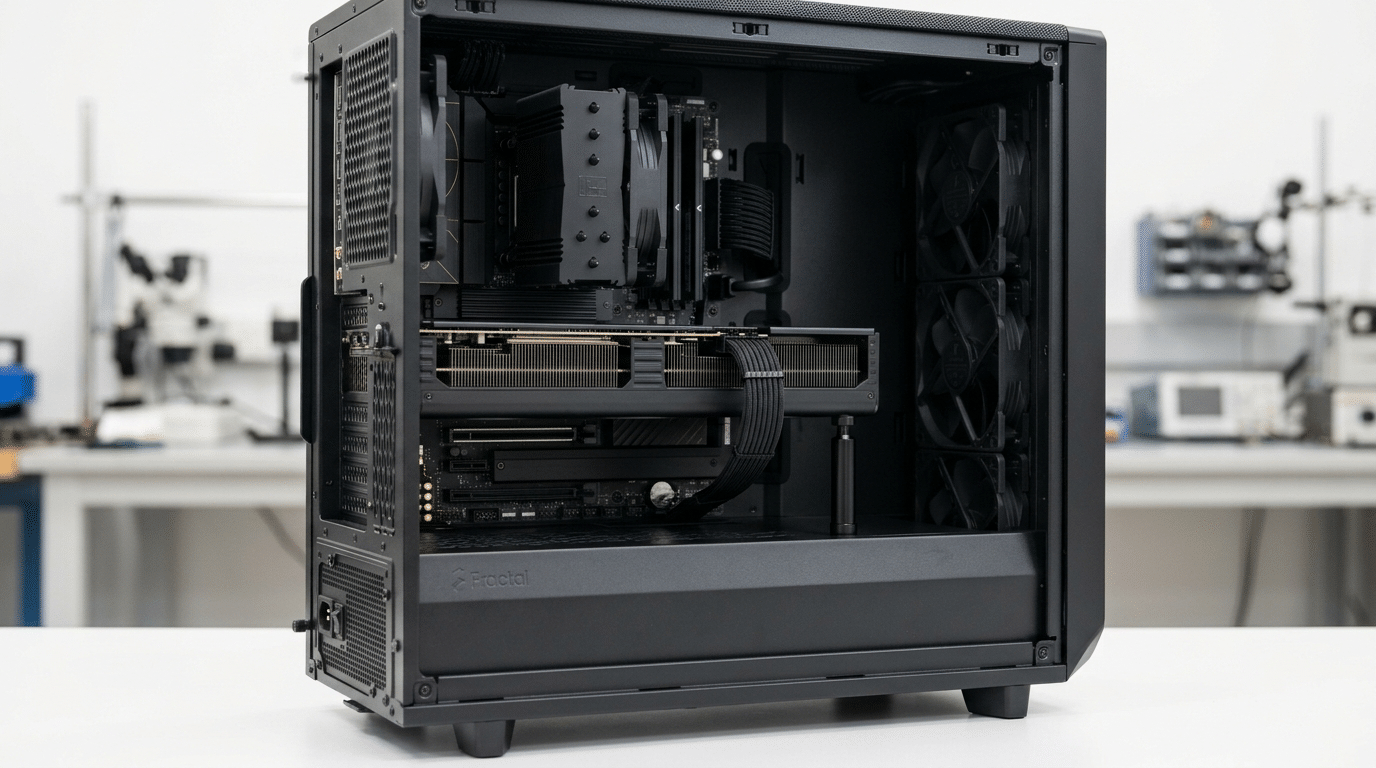
1. Decoding GPU Length Clearance: Why Listed Case Specs Mislead Builders
Every PC chassis product page advertises a headline “Maximum GPU Length” number, such as 355 mm, 400 mm, or 420 mm. That headline figure almost always reflects the raw distance from the rear PCIe expansion bracket face to the front steel frame—either with no front fans installed or with slim 25 mm fans tucked inside the front bezel. It rarely accounts for a thick front liquid-cooling radiator, reservoir, or recessed cable-management bar.
Before assuming a 329 mm graphics card fits inside a 355 mm mid-tower, apply the verified usable clearance equation below:
Usable GPU Length = Rated Case Max GPU Length − (Front Radiator Thickness + Front Fan Thickness + 15 mm Installation Margin)
The Front Radiator Collision Trap (Real 2026 Examples)
Standard 240 mm and 360 mm all-in-one (AIO) liquid coolers pair a 27 mm to 38 mm aluminum radiator core with 25 mm static-pressure fans, consuming 52 mm to 63 mm of internal depth when front-mounted. High-performance thick radiators in custom loops consume 70 mm or more. Look at what happens in real-world 2026 chassis pairings:
- 355 mm Airflow Mid-Tower + Front 360 mm AIO: Subtracting a typical 55 mm to 63 mm radiator-and-fan stack drops usable length from 355 mm down to 292–300 mm. Both the 329 mm ASUS TUF Gaming RTX 5070 Ti and the 325 mm XFX Swift RX 9070 XT physically collide with the radiator fins—forcing you to either mount the radiator on the top panel (if supported) or drop down to a 236 mm dual-fan card like the MSI RTX 5070 Ventus 2X OC.
- 410 mm Compact Top-Radiator ATX Chassis (e.g., LIAN LI LANCOOL 207): By moving the 360 mm AIO mount exclusively to the top roof panel while keeping 140 mm intake fans cleanly recessed up front, the entire 410 mm GPU bay stays clear. Even a 330 mm triple-fan GPU retains roughly 80 mm of open airflow buffer ahead of the shroud.
- 420 mm Dual-Chamber Chassis (e.g., MONTECH King 95 PRO): Dual-chamber layouts route radiators onto the top or recessed side bracket rather than directly in front of the primary PCIe slots, preserving full 420 mm horizontal clearance for oversized 350 mm+ flagship models.
Remember to check the 15 mm installation margin as well. Sliding a 330 mm metal shroud through a mid-tower opening requires angling the rear I/O tabs past the motherboard tray while the front end clears the intake fan screws. A 3 mm theoretical paper clearance often translates to scratched paint or impossible mounting angles during assembly. For a full case-by-case measurement sequence covering CPU coolers and PSU bay depths alongside GPU length, cross-reference our dedicated PC Case Clearance Checklist.
NVIDIA SFF-Ready Guidelines Explained
To eliminate guesswork for Mini-ITX and compact micro-ATX builders, NVIDIA published its SFF-Ready Enthusiast GeForce Cards specification alongside case partners. Any graphics card carrying the SFF-Ready badge must stay within strict maximum boundaries: 304 mm length, 151 mm height (explicitly inclusive of power cable bend room), and 50 mm (2.5-slot) depth. Certified SFF-Ready enclosures guarantee at least 312 mm length and 154.5 mm height clearance from the PCIe riser or motherboard surface to the outer side panel, providing built-in assurance for compact builds.
2. GPU Sag Physics & Choosing the Right Anti-Sag Bracket
While card length determines whether the side door closes, card mass and slot thickness dictate long-term mechanical reliability. Current Blackwell and RDNA 4 partner cards frequently use dense copper vapor chambers, multi-heatpipe arrays, and cast aluminum shrouds weighing 1.3 kg to over 2.2 kg. Mounted horizontally in a standard ATX case, the entire overhang acts as a cantilevered beam suspended from only two points: the steel rear I/O bracket screws and the fragile plastic/soldered PCIe x16 connector on your motherboard.
Why Motherboard Steel Armor Does Not Stop PCB Flex
Modern AM5 (B850, X870E) and LGA 1851 (B860, Z890) motherboards ship with stainless-steel reinforcement sleeves wrapped around the primary PCIe 5.0 x16 slot. Those reinforced shields increase shear strength so the slot itself is far less likely to rip off the motherboard during shipping. However, slot armor does nothing to support the far front corner of a 325 mm graphics card. Over months of heating and cooling cycles, unsupported droop bends the GPU’s multi-layer PCB downward, introducing microscopic tensile strain on the heavy GPU core and surrounding GDDR7 or GDDR6 BGA memory solder pads closest to the PCIe finger edge.
Comparing the 4 Anti-Sag Bracket Designs
| Sag Support Type | How It Anchors | Load Capacity & Stability | Common Clearance Pitfalls | Best Use Case |
|---|---|---|---|---|
| 1. Vertical Pillar / Telescoping Stand | Magnetic rubberized base sits on PSU shroud or chassis floor, cradling outer GPU corner | High (direct vertical compression) | Can collide with bottom intake fans in LANCOOL 207 or dual-chamber fishbowl cases; verify contact hits rigid shroud frame, not spinning fan blades | Full-size 3-to-3.5-slot cards (310–360 mm) with solid PSU shroud space |
| 2. Motherboard Standoff Bracket | Bolts directly onto two ATX motherboard standoff threads behind the GPU backplate | High (zero floor obstruction) | Requires matching ATX standoff spacing; check conflict with side-mounted radiators or thick ATX 24-pin cables | Dual-chamber & bottom-fan airflow cases where lower shroud is populated by fans |
| 3. Rear PCIe Slot Cantilever Brace | Mounts to 2–3 empty expansion slot screws below the GPU at the rear chassis wall | Low to Moderate (depends on rigid steel rail) | Longer 330 mm cards still droop slightly at the far corner due to leverage; may block lower PCIe capture/Wi-Fi cards | 2.5-slot cards (280–310 mm) when bottom fans cover the PSU shroud |
| 4. Vertical GPU Riser Mount | Rotates card 90° vertically onto chassis bracket via shielded PCIe riser cable | Complete sag elimination (weight rests directly on bottom bracket) | Must verify 60–65 mm vertical slot clearance from CPU air coolers and confirm PCIe 4.0/5.0 riser signal integrity | Showpiece dual-chamber builds (e.g., HYTE Y70) or heavy 3.5-slot vapor-chamber flagships |
Regardless of which mechanism ships in your GPU or chassis box, follow one golden leveling rule: never over-jack an anti-sag pillar upward. Pushing the outer edge higher than horizontal creates upward reverse flex in the PCB. Use a small bubble level or align the GPU backplate strictly parallel to the motherboard’s horizontal PCIe slot seam before tightening the locking collar.
3. 12V-2×6 Bend Radius Engineering & Side-Panel Clearance
Length and sag are visible problems; lateral side-panel compression against the 16-pin GPU power connector is a silent electrical hazard. High-wattage RTX 50-series cards—including the RTX 5070, RTX 5070 Ti, RTX 5080, and RTX 5090 featured in our 4K GPU audit—draw between 250 W and 575 W through a compact 16-pin 12V-2×6 interface.
12VHPWR vs. 12V-2×6: Why Pin Geometry Improved—and Where Risk Remains
Ratified under the PCI-SIG PCI Express CEM 5.1 specification and paired with Intel’s ATX 3.1 power supply standard, the 12V-2×6 connector (stamped H++ on compliant housings) replaced the first-generation 12VHPWR header (H+). Internally, engineers shortened the four sideband sense pins (SENSE0 / SENSE1) by roughly 1.5 mm while extending the twelve main 12V power conductor terminals by 0.25 mm. If a plug is inserted only partway, the recessed sense pins lose contact before the power pins disengage, forcing the GPU to either refuse boot or throttle wattage safely.
However, recessed sense pins only protect against incomplete straight insertion. They cannot compensate for extreme lateral bending force applied right outside the connector housing. When a narrow PC case’s tempered-glass panel presses hard against an unbent 16-pin bundle, the resulting sideways torque twists the crimped terminals inside the plastic plug. Even a fractional separation on two or three 12V pins forces the remaining conductors to carry unbalanced amperage—spiking localized terminal resistance and heat during 300 W to 575 W sustained gaming loads.
The Mandatory 35 mm Straight Exit Rule & Width Calculation
Leading PSU engineering teams—including Seasonic and Corsair Explorer installation documentation—specify leaving at least 30 mm to 35 mm of completely straight, unbent cable exiting perpendicularly from the GPU header before initiating any horizontal or vertical curve. Applying a strict 35 mm budget yields the essential lateral chassis check:
Required Lateral Width = GPU Height (from PCIe slot/PCB edge) + 35 mm Straight Cable Zone
Consider how tight this margin becomes in real builds:
- Tall AIB Cards (137–150 mm height): The ASUS TUF RTX 5070 Ti stands 140 mm tall; PNY’s RTX 5080 OC measures 137.7 mm; XFX’s Swift RX 9070 XT hits 150 mm. Adding 35 mm of straight cable clearance pushes required lateral clearance to 172.7 mm–185 mm from the motherboard PCIe edge to the tempered glass. Legacy narrow mid-towers offering only 160 mm–165 mm CPU cooler height will visibly press the side glass into the cable harness!
- Compact SFF-Ready Cards (120–126 mm height): Cards like the MSI RTX 5070 Ventus 2X OC (126 mm height) or ASUS Dual RTX 5060 Ti (120 mm height) require only 155 mm–161 mm of lateral depth including the 35 mm straight zone, clearing nearly any standard mid-tower or SFF-Ready enclosure effortlessly.
- Recessed Headers & Native 90-Degree Cables: If your chassis offers tight side-panel headroom, do not attach sketchy universal third-party 90-degree rigid plastic bridge adapters unless explicitly validated by the card vendor. Instead, upgrade to an ATX 3.1 PSU offering a native 90-degree 12V-2×6 cable (available in Style A and Style B latch orientations matched strictly to your PSU brand’s pinout) or a wider dual-chamber chassis. Pairing native cables with an audited ATX 3.1 PSU also guards against 200%–300% transient power excursions; see our breakdown in 80 Plus vs. Cybenetics Explained to evaluate PSU build quality alongside cable design.
4. Myth vs. Engineering Reality: 4 Clearance Traps That Break Builds
Misleading spec sheets and forum myths cause most physical GPU fitment failures. Below are four widespread misconceptions contrasted with verified mechanical behavior.
| Common Builder Myth | Verified Engineering Reality |
|---|---|
| Myth 1: “My case specs list 355 mm GPU clearance, so a 329 mm RTX 5070 Ti fits regardless of cooler.” | Reality: Adding a 360 mm front radiator + 25 mm fans deducts 52–63 mm, leaving 292–303 mm. A 329 mm GPU only fits if you move the AIO to the top panel or use a dual-fan air cooler. |
| Myth 2: “12V-2×6 is completely immune to side-panel pressure because of recessed sense pins.” | Reality: Recessed sense pins catch partial insertion during assembly, not post-installation side torque. Glass pushing against the plug still levers individual 12V pin contacts sideways. |
| Myth 3: “Steel-reinforced motherboard PCIe slots prevent GPU sag on 3-slot coolers.” | Reality: Slot steel prevents socket tear-out during movement, but an unsupported 330 mm card still sags at its outer corner, stressing GPU and memory BGA solder joints. |
| Myth 4: “Any modular 12V-2×6 cable or universal splitter works interchangeably across PSU brands.” | Reality: Modular PSU-side pinouts are NOT universal outside the standardized 16-pin GPU end. Never mix modular PSU cables between brands or legacy series—doing so can destroy your GPU instantly. |
5. Verified 2026 GPU Dimensions & Connector Comparison
When cross-shopping current NVIDIA GeForce RTX 50-series, AMD Radeon RX 9000 RDNA 4, and Intel Arc Battlemage GPUs, dimensions vary dramatically by AIB partner cooling tier. Notice in particular how AMD’s dual 8-pin cards still demand substantial lateral width when shroud height approaches 150 mm.
| Verified 2026 GPU Model | Exact Dimensions (L × H × T) | Slot Thickness | Power Interface & TBP | Recommended Case Profile |
|---|---|---|---|---|
| PNY GeForce RTX 5080 OC Triple-Fan 16GB | 328.7 × 137.7 × 59.7 mm | 3.0 Slots | 1x 16-pin 12V-2×6 (360W TDP) | ≥ 360 mm GPU bay + ≥ 173 mm lateral width + sag stand |
| ASUS TUF Gaming RTX 5070 Ti 16GB OC | 329.0 × 140.0 × 62.5 mm | 3.125 Slots | 1x 16-pin 12V-2×6 (300W Class) | ≥ 360 mm GPU bay + ≥ 175 mm lateral width + sag stand |
| XFX Swift RX 9070 XT Triple Fan 16GB | 325.0 × 150.0 × 65.0 mm | 3.5 Slots | 2x PCIe 8-Pin (304W Class) | ≥ 355 mm GPU bay + ≥ 185 mm width + mandatory sag support |
| ASUS Prime RX 9070 EVO 16GB OC | 312.0 × 130.0 × 50.0 mm | 2.5 Slots | 2x PCIe 8-Pin (220W Class) | ≥ 345 mm GPU bay + ≥ 165 mm width + optional brace |
| XFX Swift RX 9060 XT Triple Fan 16GB | 290.0 × 124.0 × 49.0 mm | Dual-Slot | 1x PCIe 8-Pin (160W Class) | Fits almost all standard mid-towers (≥ 320 mm) |
| Intel Arc B580 Limited Edition 12GB | 272.0 × 115.0 × 44.0 mm | 2.0 Slots | 1x PCIe 8-Pin (190W TBP) | Fits compact micro-ATX & budget ATX towers (≥ 300 mm) |
| MSI RTX 5070 12G Ventus 2X OC | 236.0 × 126.0 × 50.0 mm | 2.5 Slots (SFF-Ready) | 1x 16-pin 12V-2×6 (250W TDP) | SFF-Ready Mini-ITX & front-radiator mid-towers (≥ 270 mm) |
| ASUS Dual RTX 5060 Ti 16GB OC | 229.0 × 120.0 × 50.0 mm | 2.5 Slots | 1x PCIe 8-Pin (180W TBP) | Universal fit including compact SFF & front-AIO enclosures |
6. Actionable Buyer & Builder 6-Point Fitment Checklist
Before finalizing your checkout cart or opening your chassis panels, run through these six physical verification steps:
- 1. Calculate Real Usable GPU Length: Subtract any front-mounted radiator and fan stack (typically 52–63 mm) from the chassis manufacturer’s maximum GPU length rating, then verify at least 15–25 mm remains clear ahead of your chosen GPU’s millimeter length.
- 2. Check Lateral Width Using CPU Cooler Clearance as a Proxy: Most case listings omit exact motherboard-to-glass GPU height room, but almost all list Max CPU Cooler Height. Because CPU heatspreaders and GPU PCBs share roughly similar planes above the motherboard standoffs, ensure your case allows at least
GPU Height + 35 mm—meaning any 135–140 mm tall 12V-2×6 GPU thrives best in enclosures listing 170 mm to 180 mm+ CPU cooler clearance (or dual-chamber designs). - 3. Inspect Bottom Shroud Fans Before Placing a Sag Pillar: If your case mounts intake fans directly underneath the GPU (such as the dual 120 mm GPU fans inside the LANCOOL 207 or bottom triple mounts in dual-chamber cases), measure whether an anti-sag pillar has flat solid metal framing near the front corner—otherwise use a motherboard standoff sag bracket.
- 4. Shape Your 12V-2×6 Cable Before Plugging It In: Pre-curve the gentle downward sweep 35 mm to 45 mm back from the connector housing outside the case. Never force a tight bend after clicking the plug into the GPU header.
- 5. Use Native ATX 3.1 Cabling (Avoid Multi-Plug Pigtails): Connect a single native dual-ended 12V-2×6 cable from an ATX 3.1 power supply rather than stacking bulky 2x or 3x 8-pin adapter dongles inside tight side-panel space.
- 6. Verify Full Seating Visually and Tactilely: Push the 12V-2×6 plug straight in until you feel and hear the retention latch click cleanly, confirm zero visible gap between plug and socket flanges (or zero exposed dual-color indicator trim on color-coded plugs), and check gently once more after routing behind the motherboard tray.
7. Proven Hardware Pairings for Stress-Free Clearance & Routing
Applying these rules comes down to matching GPU footprint to chassis topology. Below are four verified 2026 retail components illustrating both sides of the equation—from a full-size 3.125-slot 12V-2×6 card and an SFF-Ready compact card to two high-value ATX cases engineered specifically to prevent radiator and side-panel clearance headaches. Once you confirm physical dimensions here, explore our full GPU tier rankings on the Best Graphics Cards for Gaming guide.
1. ASUS TUF Gaming GeForce RTX 5070 Ti 16GB GDDR7 OC (Full-Size 3.125-Slot Benchmark)

Fitment Profile: Measuring 329 × 140 × 62.5 mm in the upper-midrange tier (starting at $749 Launch MSRP), the ASUS TUF RTX 5070 Ti delivers 16GB GDDR7 bandwidth and cool triple-fan acoustics—while serving as the textbook example of why modern builds need spacious clearance. Its 329 mm span exceeds front-radiator limits on shorter 355 mm towers, its 140 mm height mandates at least 175 mm of side-panel room for a straight 35 mm 12V-2×6 exit, and its 3.125-slot mass requires a dedicated sag support pillar.
- Dimensions & Mass Class: 329 × 140 × 62.5 mm (3.125-Slot Triple Axial-Tech)
- Power & Header: 300W Class TBP | 1x 16-pin 12V-2×6 | 850W ATX 3.1 PSU Recommended
- Core Hardware: 16GB GDDR7 (256-bit) | 8,960 CUDA Cores | 3x DP 2.1b (UHBR20)
2. MSI GeForce RTX 5070 12G Ventus 2X OC (Compact NVIDIA SFF-Ready Fitment)

Fitment Profile: Built strictly within NVIDIA SFF-Ready guidelines at just 236 × 126 × 50 mm in the mid-range tier (starting at $549 Launch MSRP), MSI’s Ventus 2X OC eliminates front-radiator collisions and excessive slot sag in compact Mini-ITX or legacy mid-towers. Because the shroud stands only 126 mm tall, even narrow 161 mm side-panel clearances preserve a full 35 mm straight exit for its 16-pin 12V-2×6 power connector.
- Dimensions & Form Factor: 236 × 126 × 50 mm | NVIDIA SFF-Ready Dual-Fan
- Power & Header: 250W TDP | 1x 16-pin 12V-2×6 (2x 8-Pin Adapter Included) | 650W+ PSU
- Core Hardware: 12GB GDDR7 (192-bit) | 6,144 CUDA Cores | 3x DP 2.1b + HDMI 2.1b
3. LIAN LI LANCOOL 207 Black Compact ATX Case (410 mm Length + Top 360 mm Rad Layout)

Fitment Profile: Priced in the value-packed under $100 tier, the LANCOOL 207 solves the classic compact-ATX GPU vs. radiator collision by supporting a 360 mm AIO up top while relocating the PSU forward to keep a generous 410 mm GPU length bay completely open. Two pre-installed 120 mm bottom fans direct cool air straight into thick 3-slot heatsinks alongside dual 140 mm ARGB front intake fans.
- Max GPU Clearance: 410 mm unobstructed horizontal bay
- Radiator & Airflow: 360 mm top mount | 2x 140 mm ARGB front + 2x 120 mm GPU fans included
- Sag Bracket Note: Verify stand placement on the narrow shroud edge clear of the lower 120 mm fan blades
4. MONTECH King 95 PRO Curved Dual-Chamber ATX Case (420 mm Bay + Wide Side-Panel Depth)

Fitment Profile: Positioned in the $120–$140 tier, the MONTECH King 95 PRO dual-chamber architecture shifts the PSU and cabling behind the motherboard tray, unlocking both a massive 420 mm maximum GPU length and ample lateral width between tall 140 mm–150 mm GPUs and the curved tempered glass. With six pre-installed ARGB PWM fans and zero front-radiator interference, it gives oversized 12V-2×6 cards the straight-run space they need.
- Max GPU Clearance: 420 mm across ATX / mATX / Mini-ITX motherboards
- Radiator & Cooling: 360 mm top / 240 mm side mount | 6x ARGB PWM fans pre-installed
- Clearance Advantage: Dual-chamber width prevents glass-on-cable pinch on wide 3-to-3.5-slot AIBs
Editorial Fitment Verdict
Always buy chassis clearance from the inside out: lock your target GPU length and height first, add 35 mm for straight 12V-2×6 exit depth, add 55–63 mm if mounting a radiator on the front panel, and mount a properly leveled anti-sag support on any card exceeding 300 mm. If your current mid-tower falls short on side width, upgrading to a dual-chamber enclosure like the MONTECH King 95 PRO or switching to a native 90-degree ATX 3.1 cable is far safer than forcing tempered glass against a bent 16-pin harness.
How We Audited This Guide
- Graphics cards were evaluated by VRAM capacity, memory bus, power connector and PSU requirements, slot width and length clearance, and display output standards.
- Every specification claim was cross-checked against official OEM datasheets, platform vendor documentation, and published industry standards (PCI-SIG, JEDEC, VESA, Intel ATX) rather than marketplace listing copy.
- Recommendations were evaluated against our weighted audit rubric and documented compatibility rules; we do not publish fabricated FPS, thermal, or acoustic numbers.
Frequently Asked Questions
How much extra GPU length clearance should a PC case have?
Reserve at least 25 to 30 mm beyond your graphics card’s listed length for standard front fans so you can angle the card smoothly into the PCIe slot. If installing a front-mounted AIO liquid cooler, add 55 to 65 mm to accommodate both the radiator core and fans.
Does a 12V-2×6 cable still need 35 mm of clearance before bending?
Yes. While 12V-2×6 shortens the sense pins to prevent partial straight insertion, major PSU brands still specify keeping 30 to 35 mm straight from the connector housing before curving. Sharp immediate bends apply lateral stress to individual 12V terminals, increasing contact resistance and heat.
When is a GPU sag bracket strictly necessary?
Install an anti-sag support pillar or motherboard standoff bracket on any graphics card measuring over 300 mm long, occupying 2.75 slots or thicker, or weighing more than 1.3 kg. Motherboard PCIe slot steel armor prevents socket tear-out, not PCB flex at the front corner.
Can a vertical GPU mount eliminate both sag and side-panel cable stress?
Yes. Rotating the graphics card vertically shifts its weight directly onto the bottom chassis bracket and faces the 12V-2×6 header upward toward the top panel rather than the side glass. Confirm at least 60 mm of vertical cooler clearance and use a shielded PCIe 4.0 or 5.0 riser.
Are third-party 90-degree 12V-2×6 adapters safe to use?
Avoid generic inline rigid plastic bridge adapters, as each added pin junction introduces contact resistance and potential seating play. If side clearance is tight, purchase a single-piece native 90-degree 12V-2×6 cable manufactured specifically for your exact power supply model and modular pinout.


