
On This Page
Affiliate Disclosure: As an Amazon Associate, The PC Audit (https://thepcaudit.com) earns from qualifying purchases at no extra cost to readers. Every millimeter tolerance, radiator dimension, and ATX 3.1 connector margin in this checklist is audited against official OEM specification sheets and PCI-SIG electromechanical standards.
Building a high-airflow gaming system in 2026 means fitting triple-slot graphics cards, thick 360 mm liquid radiators, tall dual-tower heatsinks, and high-wattage ATX 3.1 power supplies into tighter footprints than ever before. Relying on a case box’s headline maximum numbers without accounting for overlapping components causes costly mid-build collisions. Follow this complete PC case GPU cooler PSU clearance guide to audit every millimeter across all five physical clearance zones before clicking order.
Direct Answer: Prevent physical collisions using five safety buffers: leave 25–30 mm beyond GPU length (55–65 mm with a front radiator), reserve 35 mm of side depth for 12V-2×6 power cables, add 6–10 mm above air coolers for tall DDR5, allow 52–63 mm for top radiators, and add 35 mm behind PSUs for cables.
Physical enclosure fitment sits at the foundation of our Best Airflow Gaming PC Cases (2026) hub inside the Cases, Cooling & Power category. Because modern components interact directly across shared space—where a front radiator shrinks GPU length, tall DDR5 heatsinks raise air cooler fans, and storage cages steal PSU cable depth—checking specs in isolation leads to forced cable bends, crushed memory heatspreaders, or open side panels.
Quick Reference: The 5-Axis PC Case Clearance Matrix
Keep this engineering reference table open while cross-checking chassis specification sheets against your motherboard, graphics card, cooler, and power supply dimensions. Every minimum safety margin reflects real-world assembly tolerances verified against 2026 retail hardware.
| Clearance Zone | Typical 2026 Hardware Footprint | Headline Case Spec Trap | Required Safety Buffer | Minimum Verified Target |
|---|---|---|---|---|
| 1. GPU Length (X-Axis) | 290–355 mm triple-fan cards (up to 360 mm flagship) | Spec assumes bare front steel or thin fans, ignoring front AIOs | +25–30 mm (or +55–65 mm if front AIO) | ≥ 365 mm (top AIO) / ≥ 400 mm (front AIO) |
| 2. Lateral Width & 12V-2×6 (Y-Axis) | 125–155 mm PCB/shroud height + 16-pin connector | Cases omit motherboard-to-glass GPU depth metric | +35 mm straight exit before cable curve | ≥ 175–185 mm CPU cooler clearance proxy |
| 3. Top / Front Radiator Stack | 27 mm standard core or 38 mm thick core + 25 mm fans | 360 mm slot support hides VRM & tall DIMM interference | 52–63 mm vertical drop + 5 mm margin | ≥ 65 mm roof offset (or dual-chamber frame) |
| 4. CPU Air Cooler & RAM | 157–168 mm dual-tower + 33–56 mm DDR5 modules | Raising front 120/140 mm fan adds directly to cooler height | +5–12 mm above default cooler spec | ≥ 170–180 mm cooler limit (or ≤ 35 mm RAM) |
| 5. PSU Bay & Cable Loop | 140–180 mm+ ATX 3.1 PSU body + connector shells | Rated max PSU assumes HDD drive cage removal | +35–40 mm behind PSU modular faceplate | ≥ 190–220 mm open bay (check cage impact) |
1. GPU Length, Thickness & 12V-2×6 Side-Panel Clearance
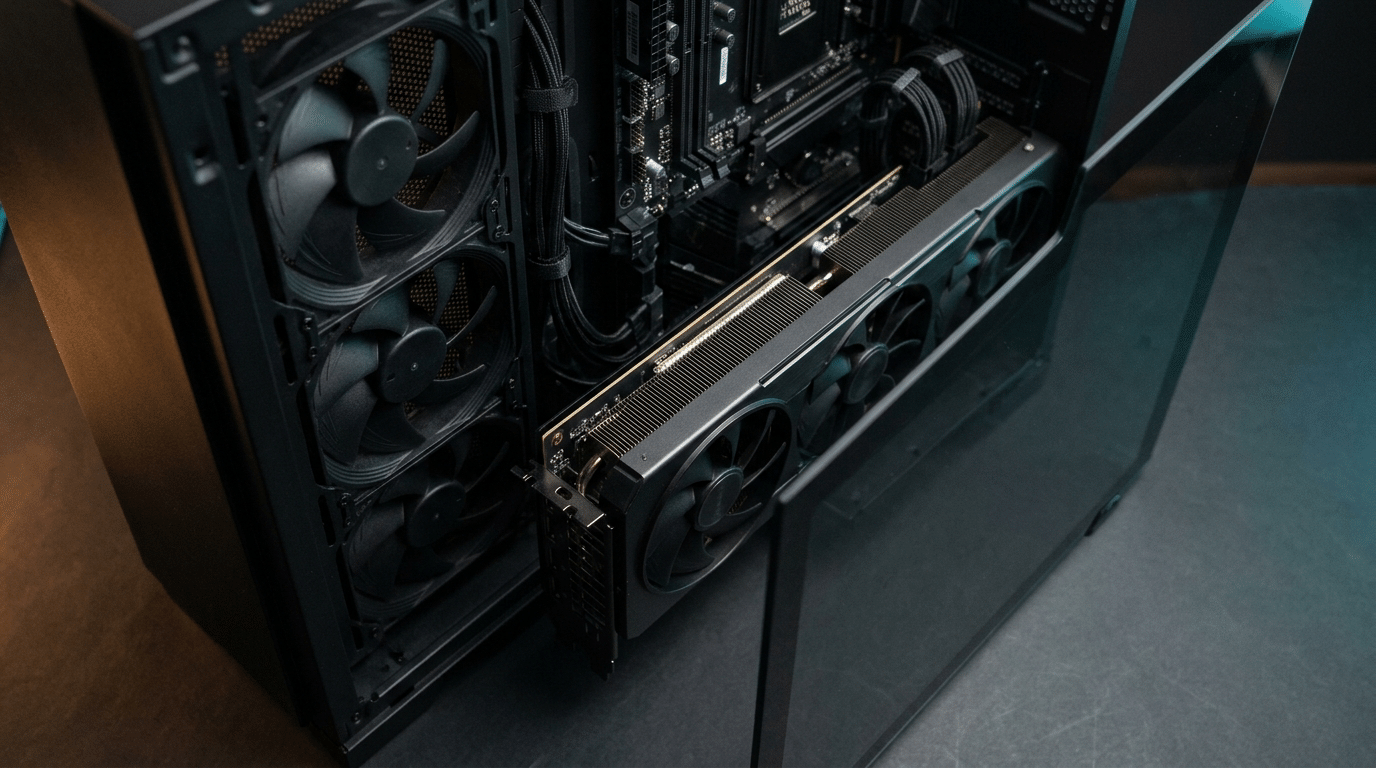
In our hardware knowledge graph, the enclosure directly governs graphics card installation through the core principle PC Case --[CONSTRAINS_PHYSICAL_FIT]--> GPU & 12V-2x6 Cabling. Auditing graphics card compatibility requires measuring three separate spatial planes rather than stopping at length alone.
X-Axis: Subtracting Front Radiators from Rated GPU Length
Most mid-tower chassis advertise a headline maximum GPU length between 340 mm and 420 mm. Almost without exception, manufacturers measure that span from the rear PCIe slot bracket to either the front chassis frame or the rear edge of thin 25 mm factory front fans. The moment you mount a front-intake all-in-one (AIO) liquid cooler, usable horizontal length shrinks by the combined depth of the radiator core plus its fans.
Usable GPU Length = Rated Case Max GPU Length − (Front Radiator Thickness + Front Fan Thickness + 15 mm Maneuvering Margin)
Standard 240 mm and 360 mm radiators use a 27 mm aluminum core paired with 25 mm static-pressure fans, subtracting 52 mm immediately. Thick performance units such as the ARCTIC Liquid Freezer III Pro 360 jump to a 38 mm core plus 25 mm fans—consuming 63 mm of depth, or 88 mm if configured in push-pull. For example, a 355 mm mid-tower like the Fractal Design North drops to exactly 300 mm of GPU clearance once a front radiator sits behind the bezel. Any 325 mm to 335 mm triple-fan RTX 5070 Ti, RTX 5080, or RX 9070 XT physically collides with the radiator fins unless you relocate the cooler to the roof or select a longer 400 mm+ frame.
Y-Axis: Maintaining a 35 mm Straight 12V-2×6 Bend Margin
Even when a graphics card slides comfortably into the front bay, modern PCB widths routinely push the side-mounted 16-pin 12V-2×6 power header perilously close to the tempered glass panel. The updated PCI-SIG CEM 5.1 / ATX 3.1 12V-2×6 socket specification—detailed in the PCI-SIG Specifications Library and Intel ATX Version 3 Multi Rail Desktop Platform Power Supply Design Guide (Document 336521)—recesses the four sense pins by 1.5 mm and extends power conductors by 0.25 mm so partially unseated plugs cut power before overheating.
However, recessed sense pins do not protect against sideways mechanical leverage. Pinching a straight 12V-2×6 harness sharply against closed side glass pulls individual 12V pins off-axis, raising contact resistance under 300W to 575W GPU loads. As documented by Corsair’s FRAME 4000D RTX 50-series GPU compatibility breakdown and NVIDIA’s SFF-Ready Enthusiast GeForce Guidelines (which cap SFF-Ready cards at 151 mm height *inclusive* of cable bend room), reserve at least 30 mm to 35 mm of straight cable projection from the GPU shroud before curving downward.
- Use Max CPU Cooler Height as a Lateral Width Proxy: Because both a graphics card PCB and a CPU heatsink rise from roughly the same motherboard standoff plane, a case listing 175 mm to 185 mm CPU cooler clearance provides enough depth for a 140 mm tall GPU plus a safe 35 mm straight cable exit.
- Beware 160–165 mm Narrow Mid-Towers: Enclosures capped near 160–165 mm lateral depth force tight glass contact on 140 mm–150 mm wide custom cards unless you install an OEM-matched single-piece 90-degree 12V-2×6 PSU cable.
- Z-Axis & Sag Bracket Room: Graphics cards thicker than 2.75 slots (55–72 mm) must clear lower PSU shroud fans and motherboard front-panel headers. For a dedicated breakdown of vertical GPU mounts, standoff braces, and 90-degree cables, read our GPU Clearance, Sag Brackets & 12V-2×6 Bend Radius guide.
2. Radiator Thickness, Motherboard VRM Armor & Roof Collisions
Case listings frequently advertise “360 mm Top Radiator Support” without specifying maximum total assembly thickness or motherboard tray offset. Following the architecture rule PC Case --[DICTATES_COOLER_TOPOLOGY]--> CPU Cooler & Radiator Stack, roof clearance fails far more often along the vertical drop and lateral motherboard edge than along total 360 mm length.
27 mm Standard Cores vs. 38 mm Thick Radiators
A typical 240 mm or 360 mm AIO such as the CORSAIR NAUTILUS 360 RS uses a 27 mm thick aluminum fin core paired with 25 mm fans, reaching 52 mm total thickness. High-capacity radiators like the ARCTIC Liquid Freezer III Pro 360 measure 38 mm at the core (398 × 120 × 38 mm) and 63 mm with mounted 25 mm fans. That extra 11 mm frequently slams directly into three motherboard obstacles when roof-mounted in shallow mid-towers:
- Tall Motherboard VRM Heatsinks & I/O Shrouds: Modern AMD B850, X870E, and Intel Z890 boards feature tall anodized aluminum VRM blocks wrapping around the top-left corner of the PCB. If the top fan rail sits directly over the motherboard plane without a 25–35 mm outward offset toward the glass panel, a 63 mm radiator-and-fan stack collides with the upper VRM fins.
- 8-Pin EPS CPU Power Connectors: Even when a 52 mm or 63 mm radiator barely misses the VRM heatsink, it often leaves less than 10 mm above the top-left EPS 12V motherboard sockets. Always route and latch both 8-pin EPS cables before bolting the top radiator bracket into place.
- 280 mm & 420 mm Width Overhang: A 280 mm or 420 mm radiator uses 140 mm wide fans—adding 20 mm of lateral width inward toward the motherboard compared to 120 mm-based 240/360 mm units. Because 140 mm radiators overlap taller DDR5 memory heatspreaders far more aggressively, verify whether the chassis provides dedicated top offset slots for 140 mm-wide rails.
3. CPU Air Cooler Height & Tall DDR5 RAM Overhang
Dual-tower air coolers dominate value cooling on 120W–170W gaming processors, yet buyers frequently misread static tower height specifications. Under the physical constraint Tall RGB DDR5 Modules --[CONFLICTS_WITH]--> Front Fan of Dual-Tower Air Coolers, your real cooler height changes the instant you install decorative tall memory sticks.
The Hidden Fan-Shift Height Penalty
Consider two real-world 2026 air cooling setups. An accessible 157 mm dual-tower like the ID-COOLING FROZN A620 PRO SE leaves 40 mm of clearance beneath its front 120 mm intake fan in its factory position. Meanwhile, flagship 140 mm dual-towers like the Noctua NH-D15 G2 measure 168 mm tall at default settings and provide just 32 mm under the front 140 mm fan, as outlined in Noctua’s Compatibility Centre.
Standard low-profile DDR5 kits (such as G.Skill Flare X5 or Corsair Vengeance non-RGB) stand roughly 33 mm to 35 mm tall—sliding neatly under 120 mm-fan dual-towers with zero adjustments. By contrast, popular RGB DDR5 modules commonly reach 44 mm to 56 mm in height. Sliding the front cooler fan up the fin stack to clear a 48 mm RGB module adds 8 mm to 16 mm straight onto the cooler’s vertical footprint:
- 157 mm Dual-Tower + 48 mm RGB DDR5: Raising the front fan by 8 mm pushes effective cooler height from 157 mm to 165 mm, clearing 170 mm+ cases cleanly while failing inside compact 160 mm enclosures.
- 168 mm Dual-Tower + 48 mm RGB DDR5: Raising a 140 mm front fan by 16 mm pushes total height to 184 mm—breaking compatibility with virtually every 170 mm and 180 mm mid-tower glass panel on the market.
- Practical Resolution: Pair dual-tower air coolers with low-profile ≤ 35 mm DDR5-6000 CL30 kits, shift to a 120 mm front fan on 140 mm towers where supported, or choose a chassis offering 180 mm CPU height clearance like the MONTECH AIR 903 MAX or LIAN LI LANCOOL 207.
4. PSU Chassis Length, Drive Cages & Modular Cable Loops
Power supply depth catches experienced builders off guard more often than GPU length because ATX power supplies share one standardized width (150 mm) and height (86 mm) while varying dramatically in depth—from compact 140 mm frames up to 160 mm, 180 mm, and 210 mm chassis lengths on 1000W to 1600W ATX 3.1 flagship models.
Why “180 mm Max PSU” Rarely Fits a 180 mm PSU
Case manufacturers measure PSU bay length from the rear rubber mounting pads straight forward to the front edge of the lower hard-drive cage or front fan shroud. A full-modular ATX 3.1 PSU requires an additional 30 mm to 40 mm in front of its modular socket faceplate so rigid 24-pin ATX, dual EPS, and thick braided 12V-2×6 plugs can exit cleanly and turn toward motherboard grommets without stressing socket solder joints.
- Watch Conditional Drive-Cage Specs: On the Fractal Design North, PSU clearance reaches 255 mm when using a single HDD tray positioned forward, yet drops sharply to 155 mm if two 3.5-inch drive trays occupy the default lower slots. Removing unused HDD sleds instantly unlocks 40 mm to 80 mm of hidden PSU cable breathing room.
- Front-Mounted & Compact ATX PSU Limits: Modern high-airflow compact towers like the LIAN LI LANCOOL 207 relocate the power supply up front beneath the shroud to keep a 410 mm GPU bay unobstructed—but enforce a strict under 160 mm PSU length ceiling. Installing a 170 mm or 180 mm 1200W unit physically blocks lower front intake fan brackets or pinches modular ports sideways into the motherboard tray.
- Cable Safety First: Never force sharp 90-degree kinks immediately at the PSU modular output terminals, and never mix modular cable sets across different PSU brands or revisions due to mismatched pinouts. Review our Modular PSU Cable Safety & Chassis Length Clearance guide before buying replacement cables or high-wattage units.
5. Back-Connect Motherboards (BTF / Project Zero) & Rear Tray Depth
Reverse-connector motherboards—sold under ASUS BTF, MSI Project Zero, and Gigabyte Project Stealth—flip the 24-pin ATX, 8-pin EPS, SATA, and fan headers onto the backside of the PCB for nearly wire-free display interiors. Under the compatibility rule Back-Connect Motherboard --[REQUIRES]--> Matching Rear-Cutout PC Case, standard ATX cases cannot physically accommodate these boards at all because their steel motherboard trays lack recessed window cutouts behind each header.
Even on explicitly certified BTF-ready cases such as the Corsair 4000D RS ARGB FRAME or Lian Li O11 Vision Compact, verify two rear dimensions before purchasing:
- Motherboard Form-Factor Cutout Alignment: Some dual-chamber chassis align rear cutouts specifically for ATX back-connect boards while partially blocking mATX Project Zero connector positions (or vice versa). Confirm exact form-factor compatibility on the case QVL table.
- Rear Cable Chamber Depth: Standard single-chamber towers typically provide 25 mm to 33 mm behind the motherboard tray—enough for flat ribbon cables, though tight once bulky sleeved 24-pin extensions stack over reverse-mounted headers. Dual-chamber designs allocate 90 mm+ behind the tray, effortlessly absorbing thick ATX 3.1 harnesses, RGB hubs, and angled back-connect plugs. For deeper layout planning, see our Back-Connect BTF & Project Zero compatibility guide.
Clearance Myths vs. Engineering Reality
| Common Builder Assumption | Physical Engineering Reality |
|---|---|
| “A 355 mm GPU bay fits a 330 mm card alongside a front 360 mm AIO.” | Front 360 mm radiators + fans consume 52–63 mm, cutting usable length to 292–303 mm and causing a direct collision. |
| “12V-2×6 fixed melting plugs, so tight side-panel bends no longer matter.” | Recessed sense pins stop partial straight seating, but sharp sideways pressure against tempered glass still loads 12V terminals unevenly. Keep 30–35 mm straight exit. |
| “Every case listing top 360 mm support fits every 360 mm AIO.” | Thick 38 mm radiators (63 mm total stack) and wide 280/420 mm rails hit tall motherboard VRM armor and DDR5 RAM unless the roof mount is offset. |
| “A 160 mm PSU fits comfortably inside a 160 mm rated bay.” | Zero extra millimeters remain for modular plug shells and cable bend radius. Reserve 35–40 mm ahead of the PSU faceplate or remove unused HDD trays. |
6. Actionable 6-Point Pre-Buy & Pre-Assembly Clearance Checklist
Before finalizing your component cart or breaking factory seals on a new chassis, execute these six physical verification audits in order:
- 1. Audit GPU Length Net of Front Cooling: Take your case’s rated max GPU length, subtract 55–65 mm if placing a liquid radiator up front (or 0 mm if using a top-mounted AIO or front mesh fans tucked inside the bezel), and confirm at least 20 mm remains clear ahead of your chosen GPU.
- 2. Verify Lateral GPU + 35 mm Cable Clearance: Subtract your GPU’s PCB/shroud height (excluding the PCIe gold fingers, typically 120–150 mm) from the case’s max CPU cooler height spec. If the remainder falls below 35 mm, step up to a wider dual-chamber chassis or use an OEM single-piece 90-degree 12V-2×6 PSU cable.
- 3. Match Radiator Thickness to Top Roof Offset: Check whether your chosen 240/360 mm AIO uses a standard 27 mm core (52 mm total) or a thick 38 mm core (63 mm total), then cross-check the case manual’s maximum top radiator + fan thickness limit and RAM height cap.
- 4. Pair Dual-Tower Air Coolers with Low-Profile DDR5: If running a 157–168 mm dual-tower heatsink inside a 165–170 mm chassis, select low-profile ≤ 35 mm DDR5 modules so you never have to slide the front fan upward into the side glass.
- 5. Add 35–40 mm to PSU Body Depth: Check your PSU model’s exact chassis length (140 mm vs 160–180 mm+), add 35–40 mm for modular plugs, and verify whether HDD drive bays must be shifted or removed to maintain that clearance.
- 6. Dry-Fit & Pre-Route in Correct Assembly Sequence: Outside the case, mount the CPU, M.2 NVMe SSD, and DDR5 RAM onto the motherboard; inside the open chassis, route EPS 8-pin top power cables before securing top AIO fans or large dual-tower heatsinks, and verify balanced intake-to-exhaust fan orientation using our PC case airflow and fan orientation guide.
7. Clearance-Verified 2026 Cases & Coolers for Real-World Builds
Every enclosure and cooler below solves a distinct physical clearance scenario highlighted in this guide. Compare their exact millimeter limits before choosing the topology that matches your GPU, motherboard, and ATX 3.1 power supply footprint.
1. MONTECH AIR 903 MAX High-Airflow E-ATX Case (Maximum Mid-Tower Headroom)

Clearance Profile: Positioned in the high-value under $100 tier, the MONTECH AIR 903 MAX removes almost every mid-tower spatial compromise in a single mesh frame. It supports 400 mm graphics cards (with 190 mm lateral width for tall 12V-2×6 cards), 180 mm CPU air coolers, 360 mm radiators on both the front and top panels, and up to 240 mm power supplies—while shipping with four 140 mm PWM fans pre-installed.
- GPU & Cable Margin: 400 mm max GPU length | 190 mm lateral GPU width clearance
- Cooling & PSU Room: 180 mm CPU cooler height | 360 mm top/front rad | 240 mm max PSU
- Best Match: Oversized 3.5-slot flagships, thick top 360 mm AIOs, or tall dual-tower air coolers
2. LIAN LI LANCOOL 207 Black Compact ATX Case (410 mm GPU Bay + Offset Top Rad)

Clearance Profile: Also landing in the under $100 tier, the LANCOOL 207 illustrates how layout engineering beats sheer exterior bulk. Relocating the PSU forward beneath the lower shroud clears a full 410 mm GPU length bay, 180 mm CPU cooler headroom, and an offset top 360 mm radiator mount—paired with two 140 mm front fans and two 120 mm bottom GPU intake fans. Builders must strictly select an ATX PSU under 160 mm long.
- GPU & Air Cooler Room: 410 mm max GPU length | 180 mm CPU cooler height
- Radiator & PSU Rule: 360 mm top mount (offset tray) | Strict < 160 mm PSU length limit
- Best Match: Compact desk footprints paired with 330 mm+ GPUs and standard 140–150 mm ATX 3.1 PSUs
3. Fractal Design North Charcoal Black ATX Case (Front-Radiator Audit Benchmark)

Clearance Profile: Sitting in the $150–$170 tier, Fractal Design’s North combines walnut-slat airflow styling with clean 355 mm GPU clearance and 170 mm air-cooler support (or 145 mm if mounting the Mesh side fan bracket). Crucially, mounting a 360 mm front radiator reduces usable GPU length to 300 mm, making it the classic case study for pairing dual-tower air coolers or a top 240 mm radiator with long 320 mm+ graphics cards.
- GPU Length Behavior: 355 mm with front 140 mm fans | 300 mm with front 360 mm radiator
- Cooler & PSU Fit: 170 mm CPU cooler max | 255 mm PSU (1 HDD tray) / 155 mm (2 HDD trays)
- Best Match: Aesthetic wood-accent air-cooled builds or top 240 mm AIO systems with long GPUs
4. ARCTIC Liquid Freezer III Pro 360 AIO CPU Cooler (Thick 38 mm Core Reference)
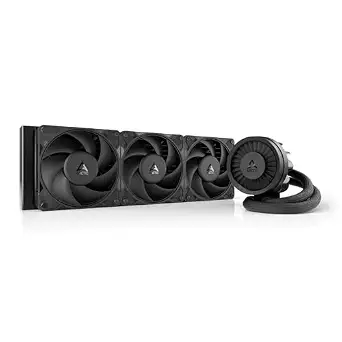
Clearance Profile: Priced in the $65–$75 tier, ARCTIC’s Liquid Freezer III Pro 360 delivers heavyweight thermal capacity for 170W–250W processors plus an integrated VRM pump fan—thanks to a thicker 38 mm radiator core (398 × 120 × 38 mm). With 25 mm P12 Pro PWM fans mounted, the full 63 mm stack requires verifying top roof clearance and motherboard VRM heatsink height prior to checkout.
- Radiator Stack Depth: 38 mm core + 25 mm fans = 63 mm total thickness (398 mm length)
- Hardware Compatibility: AMD AM5/AM4, Intel LGA 1851/1700 | Integrated VRM cooling fan
- Clearance Rule: Pair with offset top-mount cases (LANCOOL 207, AIR 903 MAX, or dual-chamber)
5. ID-COOLING FROZN A620 PRO SE Dual-Tower CPU Cooler (157 mm Universal Fit)

Clearance Profile: Available under $35, the FROZN A620 PRO SE showcases how a thoughtful 157 mm tower footprint protects compatibility across virtually all standard ATX and micro-ATX cases. Its cut-out fin design clears up to 40 mm RAM modules under the default front 120 mm fan position—and leaves 13 mm of vertical margin inside 170 mm enclosures if you need to nudge the front fan slightly upward.
- Tower Dimensions: 120 × 142 × 157 mm height | Dual 120 mm PWM fans
- Memory Overhang: 40 mm default RAM clearance (63 mm fin cut-out without front fan)
- Best Match: 65W–170W AM5 and LGA 1851 builds pairing low-profile DDR5 inside compact towers
Editorial Clearance Verdict
Build your chassis shortlist around real worst-case stack dimensions rather than best-case brochure headlines. Choose a case with at least 365 mm to 400 mm net GPU room, 175 mm+ lateral depth for an unbent 35 mm 12V-2×6 exit, an offset top 360 mm radiator zone if running thick 38 mm AIOs, and 35–40 mm spare depth ahead of your ATX 3.1 PSU faceplate. Once your millimeter checklist is locked in, compare complete mesh and dual-chamber chassis rankings in our main hub.
How We Audited This Guide
- Power supplies, coolers, and cases were audited for ATX 3.1 / PCIe 5.1 compliance, 12V-2x6 support, efficiency certification, radiator and GPU clearance, and fan configuration.
- Every specification claim was cross-checked against official OEM datasheets, platform vendor documentation, and published industry standards (PCI-SIG, JEDEC, VESA, Intel ATX) rather than marketplace listing copy.
- Recommendations were evaluated against our weighted audit rubric and documented compatibility rules; we do not publish fabricated FPS, thermal, or acoustic numbers.
Frequently Asked Questions
How much space should remain between a GPU and front case fans or radiators?
Leave at least 25 to 30 mm beyond your graphics card’s exact length when using standard front fans so you can angle the card safely into the PCIe slot. If installing a front-mounted AIO liquid cooler, reserve 55 to 65 mm extra for the radiator core and fans.
How do I check if my PC case has enough 12V-2×6 cable bend clearance?
Most chassis listings omit lateral GPU-to-glass depth, so use the rated Max CPU Cooler Height specification as a reliable proxy. Subtract your graphics card’s height (typically 125 to 150 mm) from Max CPU Cooler Height and confirm at least 35 mm remains for a straight cable exit.
Why do some 360 mm AIO liquid coolers hit motherboard VRM heatsinks?
Standard 360 mm AIOs measure 52 mm thick with fans, whereas thick-core units like 38 mm radiators span 63 mm total. In shallow mid-towers lacking an offset top tray, that extra thickness drops low enough to collide with tall motherboard VRM heatsinks or tall RGB RAM.
Does tall RGB DDR5 memory affect CPU air cooler case compatibility?
Yes. Most dual-tower air coolers provide 32 to 40 mm of memory clearance under the front fan. Installing 44 to 56 mm tall RGB DDR5 sticks forces you to slide that front fan upward, increasing total cooler height millimeter for millimeter toward the glass side panel.
How much extra PSU bay clearance do modular power supply cables need?
Always add 35 to 40 mm to your power supply’s physical chassis length—such as 140 mm or 160 mm—to leave relaxed room for modular plug housings and cable bends. Also check whether lower HDD drive cages must be slid forward or removed to achieve full listed bay depth.


