
Disclosure: As an Amazon Associate, The PC Audit earns from qualifying purchases. If you buy through links on this page, we may earn a small commission at no extra cost to you.
Direct Answer: Comparing 2 sticks vs 4 sticks ddr5 comes down to electrical signal integrity: running 2 DIMMs (1DPC) in slots A2 and B2 sustains rated DDR5-6000 CL30 to 6400+ speeds, whereas 4 sticks (2DPC) overload the CPU memory controller, forcing EXPO/XMP fallback to 3600–5200 MT/s and hurting 1% Lows.
During the DDR4 era, filling all four motherboard memory slots became an easy habit. Builders populated two slots at initial assembly and dropped two extra modules into the remaining slots a year later—often preserving advertised XMP speeds with minimal fuss. On modern DDR5 platforms, that old upgrade reflex causes more boot failures, silent downclocking, and frame-pacing hiccups than almost any other DIY mistake. Across our best DDR5 RAM for gaming hub and Processors & Platforms archive, system memory follows one uncompromising hardware rule: Populating 4 DDR5 DIMMs --[DEGRADES]--> Memory Stability & Max MT/s Speed.
Every DDR5 module splits its bus into two independent 32-bit sub-channels, runs on-stick Power Management Integrated Circuit (PMIC) voltage regulation, and pushes signaling frequencies far beyond legacy DDR4 limits. When you install four DIMMs onto a consumer daisy-chain motherboard, electrical capacitance doubles and signal reflections spike—dragging official AMD AM5 and Intel LGA 1851 memory controller guarantees straight off a cliff. Below, we examine the exact engineering physics behind 2 sticks vs 4 sticks ddr5, compare official vendor speed limits, bust five common quad-slot myths, and map the clean two-stick path to 32GB, 48GB, or 64GB stability.
In This Guide
- 2 Sticks vs. 4 Sticks of DDR5: Quick Stability & Speed Comparison Table
- Why Populating 4 DDR5 DIMMs Hurts Speed, Latency & Stability
- AMD AM5 vs. Intel LGA 1851: Official IMC Limits & First Word Latency
- Myth vs. Engineering Reality: Five 2-Stick vs. 4-Stick DDR5 Myths Audited
- Actionable DDR5 Slot & Stability Checklist
- Verified 2-Stick DDR5 Kits to Replace Unstable 4-DIMM Setups
- Frequently Asked Questions
2 Sticks vs. 4 Sticks of DDR5: Quick Stability & Speed Comparison Table
You do not need speculation to see how severely four modules penalize modern memory controllers—both AMD and Intel publish hard official Plan-of-Record speed reductions whenever a board moves from one DIMM per channel (1DPC) to two DIMMs per channel (2DPC). Review how stick count and rank geometry govern achievable gaming clocks in 2026:
| DIMM Layout & Rank Topology | Official Baseline (AMD AM5 / Intel LGA 1851) | Realistic EXPO / XMP Ceiling (2026) | Electrical Load & Editorial Audit Verdict |
|---|---|---|---|
| 2 Sticks (1DPC: Slots A2 & B2) Single-Rank (1Rx8: 2x16GB, 2x24GB) | AM5: 5600 MT/s LGA 1851: 5600 UDIMM / 6400 CUDIMM | 6000 CL30 (AM5 1:1) 6400 CL32 to 8200+ CUDIMM (Intel) | Canonical Gaming Sweet Spot: Clean termination, zero stub reflection, lowest voltage stress on IMC. |
| 2 Sticks (1DPC: Slots A2 & B2) Dual-Rank (2Rx8: 2x32GB, 2x48GB) | AM5: 5600 MT/s LGA 1851: 5600 UDIMM / 6400 CUDIMM | 6000 CL30 (AM5 1:1) 6000–6400 CL32 (Intel) | Recommended 64GB+ Path: Delivers 64GB–96GB with rank interleaving while avoiding 4-slot signal collapse. |
| 4 Sticks (2DPC: All 4 Slots) Four Single-Rank (4x1R: 4x16GB) | AM5: 3600 MT/s LGA 1851: 4800 MT/s | 4800–5200 MT/s (Frequent EXPO/XMP boot failure) | Disqualified for Gaming (Rule R-RAM-02): Severe multi-drop capacitance drops clocks and spikes latency. |
| 4 Sticks (2DPC: All 4 Slots) Four Dual-Rank (4x2R: 4x32GB / 4x48GB) | AM5: 3600 MT/s LGA 1851: 4400 MT/s | 3600–4800 MT/s (Requires manual downclocking) | Workstation Capacity Only: Sacrifice speed for 128GB–192GB rendering/VM pools; poor gaming responsiveness. |
| 1 Stick (Single-Channel Prebuilt) 1x16GB or 1x32GB | 5600 MT/s on half memory bus | 4800–6000 MT/s at 50% bandwidth | Disqualified (Rule R-RAM-01): Halves memory bandwidth and slashes 1% Lows by 15%–30% in games. |
Those official processor specs tell the entire story before overclocking profiles even enter the picture. On Socket AM5 processors—spanning Ryzen 7 7800X3D, Ryzen 7 9800X3D, Ryzen 7 9850X3D, and Ryzen 9 9950X3D—AMD’s official Ryzen desktop specifications validate DDR5-5600 across two modules (2x1R or 2x2R), yet plummet straight down to DDR5-3600 when four modules (4x1R or 4x2R) populate the motherboard. Intel’s Arrow Lake processors show the same structural drop in the Intel Core Ultra 200S Series Datasheet, falling from 5600/6400 MT/s in 1DPC down to 4800 MT/s (2DPC single-rank) and 4400 MT/s (2DPC dual-rank).
Why Populating 4 DDR5 DIMMs Hurts Speed, Latency & Stability
Four physical mechanisms converge to make four DDR5 sticks drastically harder to stabilize than two. Every single one stems from high-frequency electrical signaling and motherboard PCB physics rather than arbitrary firmware locks.
1. Daisy-Chain PCB Routing & Unterminated Stub Reflections
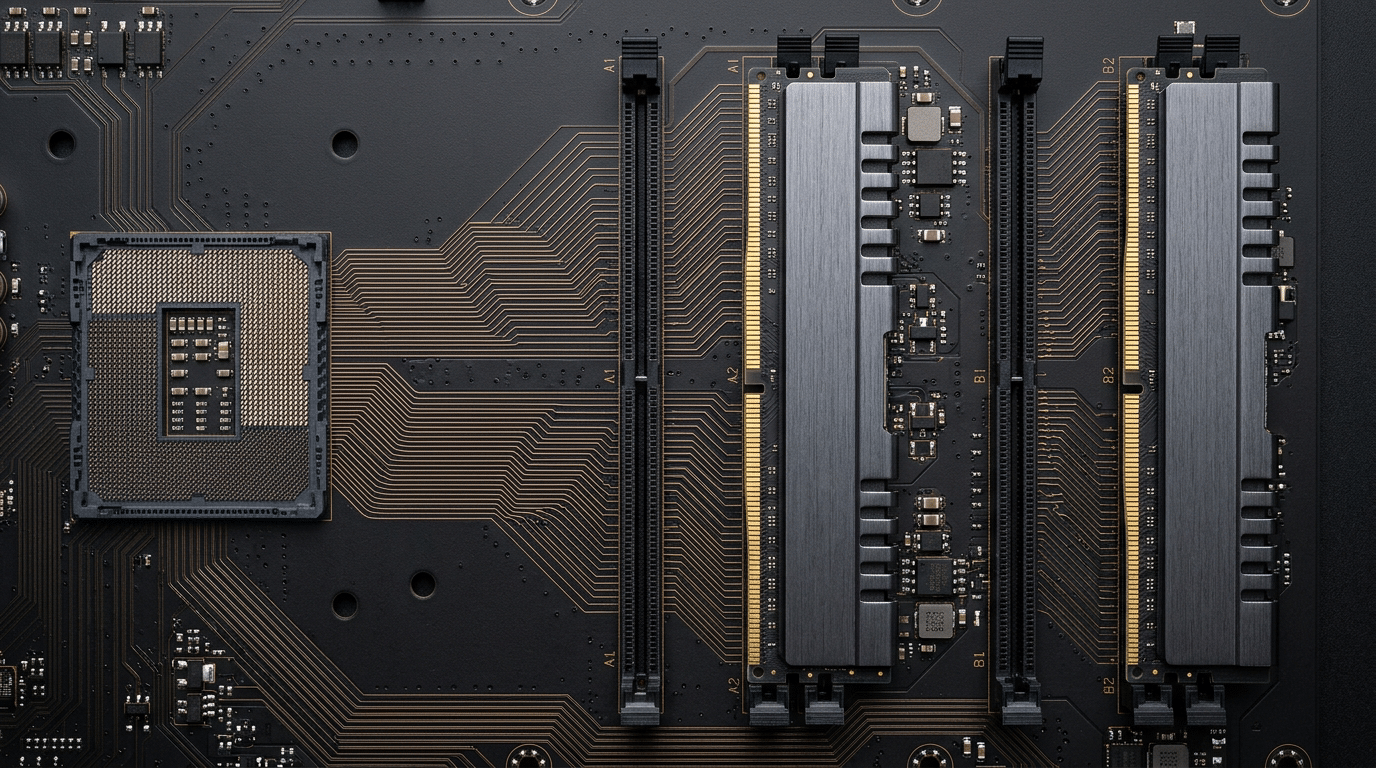
Consumer four-slot ATX and Micro-ATX motherboards—including mainstream AMD B850, X870, X870E and Intel Z890, B860 boards—overwhelmingly route memory signals using daisy-chain topology rather than older symmetric T-topology layouts. In a daisy-chain trace layout, copper pathways exit the processor socket, pass directly underneath the inner slot (A1 or B1), and continue onward to terminate cleanly at the outermost slot (A2 or B2).
When you install two DDR5 sticks into A2 and B2, high-speed command and data signals travel straight to the end of each trace and terminate cleanly at the module’s on-die termination (ODT) resistors. That is why every motherboard manual instructs builders to populate A2 and B2 first—placing two sticks into A1 and B1 instead leaves an empty, unterminated copper stub extending out to A2/B2 that bounces electrical signals backward.
Installing four DDR5 sticks forces each memory channel’s driver to power two physical DIMM connectors simultaneously on a shared trace (2DPC). Electrical capacitance doubles across the signal pins, sharp clock edges round off into noisy curves, and impedance discontinuities at the intermediate A1/B1 connectors trigger cross-talk and signal reflections that shrink the usable voltage and timing window (the “eye diagram”) required for 6000 MT/s+ transfers.
2. Dual 32-Bit Sub-Channels, On-Die ECC & Tighter Timing Windows
Under JEDEC DDR5 SDRAM architecture standards, each 288-pin stick operates two independent 32-bit addressable sub-channels (40-bit wide physically to support on-die error-correcting code) rather than DDR4’s single 64-bit bus. At DDR5-6000 (3000 MHz real clock) or DDR5-6400 (3200 MHz real clock), each data bit lasts a fraction of a nanosecond—nearly twice the data rate of mature DDR4-3200.
Moreover, DDR5 relocated voltage regulation off the motherboard and onto every stick via an integrated PMIC (Power Management Integrated Circuit). Running four separate PMICs alongside 32 to 64 DRAM chips on two memory channels creates substantially higher current draw, ground bounce, and signal skew across traces than running two modules. Even minor trace-length variations or termination mismatches between the inner and outer slots push high-speed training loops past failure thresholds.
3. The Mixed-IC Lottery When Adding a Second Kit Later
Even if a motherboard manages to train four matched modules from a rare factory-binned 4-DIMM kit at reduced speeds, the overwhelming majority of 4-stick headaches happen when buyers purchase a 2x16GB kit during initial assembly and order a “matching” 2x16GB kit a year or two later to hit 64GB.
Retail RAM brands regularly retain the identical product name, heatspreader color, SKU string, and primary CL30 timing badge while silently rotating underlying DRAM chip suppliers (SK Hynix A-die vs. SK Hynix M-die vs. Samsung vs. Micron) and PMIC controller revisions across production quarters. Mixing two kits with different DRAM silicon revisions forces the motherboard to find a single common denominator for dozens of sensitive secondary sub-timings (tRFC, tFAW, tRCD) and termination resistances (RTT_WR, RTT_PARK, ProcODT)—almost guaranteeing training loops, spontaneous Windows crashes, or permanent lockup at 4800 MT/s JEDEC defaults.
4. Thermal Crowding & Dual-Tower Air Cooler Clearance Collisions
Packing four sticks side by side eliminates the millimeter air gap that normally channels motherboard intake airflow between modules in slots A2 and B2. Trapped heat drives up DRAM IC and PMIC temperatures during long gaming or compilation sessions; once DDR5 modules exceed roughly 50°C–55°C under aggressive refresh intervals (tREFI), thermal bit-flips trigger silent WHEA errors or mid-game freezes.
Physically, populating slot A1 (the slot closest to the CPU socket) also triggers an immediate mechanical clearance conflict documented in our hardware knowledge graph: Tall RGB DDR5 Modules --[CONFLICTS_WITH]--> Front Fan of Dual-Tower Air Coolers. While two low-profile sticks in A2 and B2 often tuck safely away from or neatly beneath an offset fan, tall 42mm+ RGB modules seated in A1 collide squarely with the front 120mm fan of popular dual-tower coolers—forcing builders to slide the fan upward against side-panel glass or downgrade to an open-fin single-tower or 360mm AIO cooler.
AMD AM5 vs. Intel LGA 1851: Official IMC Limits & First Word Latency
Not all desktop memory controllers react identically when pressured by four DIMMs, yet both modern platforms impose severe penalties once all four slots are filled. Comparing how AMD Zen 4/Zen 5 (Socket AM5) and Intel Arrow Lake (LGA 1851) behave clarifies why 2 sticks dominate both ecosystems.
AMD AM5 (Ryzen 7000 / 9000 / X3D): The 1:1 UCLK Sync Wall
Every modern AM5 processor adheres to one clear optimization principle: AM5 Memory Controller (UCLK) --[RUNS_OPTIMAL_1_TO_1_AT]--> DDR5-6000 CL30. At DDR5-6000, the memory clock (MCLK) runs at 3000 MHz, matching the Integrated Memory Controller clock (UCLK) in a tight 1:1 ratio while Infinity Fabric (FCLK) ticks cleanly around 2000 MHz. Enabling a certified AMD EXPO DDR5-6000 CL30 profile across two sticks gives nearly 100% plug-and-play reliability.
Introduce four sticks onto that same B850 or X870E motherboard and AM5 memory training instantly hits a wall. First, AM5 AGESA memory initialization runs thorough impedance and training sweeps across all four slots—stretching boot screens into multi-minute wait loops or triggering DRAM amber debug LEDs, a failure mode we troubleshoot step-by-step in our AM5 slow first boot & DDR5 EXPO crash playbook. Second, even when four modules POST, the IMC rarely sustains 6000 MT/s in 1:1 mode without heavy SoC voltage bumps or unstable manual sub-timing work, instead falling back to 4800–5200 MT/s or AMD’s official 3600 MT/s 4-DIMM floor.
Intel LGA 1851 (Core Ultra 200S / 270K Plus): Why CUDIMM Still Demands 2 Sticks
Intel’s LGA 1851 memory controller tolerates higher memory transfer frequencies than AM5, scaling comfortably from DDR5-6000 CL30 up to DDR5-6400 CL32 on standard UDIMMs and unlocking CUDIMM (Clocked Unbuffered DIMM) modules on 800-series chipsets like Z890 and B860. As detailed in our DDR5-6000 CL30 vs. 6400 vs. CUDIMM guide, CUDIMM embeds a dedicated Client Clock Driver (CKD) chip onto each stick to regenerate clean clock waveforms at 7200–8400+ MT/s under Intel XMP 3.0 profiles.
Crucially, however, Intel’s own datasheet limits DDR5-6400 CUDIMM baseline compliance strictly to 1DPC (2 sticks)—dropping official LGA 1851 support down to 4800 MT/s (1R) or 4400 MT/s (2R) as soon as four sticks fill the board. Even with an onboard CKD cleaning up the clock pair, the data (DQ) and command/address lines still suffer 2DPC capacitive drag across four slots. Installing four CUDIMM sticks defeats the entire purpose of buying high-frequency memory.
First Word Latency Formula: Quantifying the 4-Stick Gaming Penalty
Whenever four DIMMs force your BIOS to drop XMP/EXPO back to fallback clocks, gaming responsiveness degrades across two metrics: peak memory bandwidth and First Word Latency. Calculate true column access time in nanoseconds with the standard industry formula:
First Word Latency (ns) = (CAS Latency × 2000) ÷ Data Rate (MT/s)
- 2 Sticks DDR5-6000 CL30 (AM5 1:1 Optimal):
(30 × 2000) ÷ 6000 = 10.0 ns - 2 Sticks DDR5-6400 CL32 (Intel LGA 1851 Optimal):
(32 × 2000) ÷ 6400 = 10.0 ns(with ~6.7% higher raw bandwidth) - 4 Sticks Fallback to DDR5-4800 CL40 (Common JEDEC Drop):
(40 × 2000) ÷ 4800 = 16.67 ns(66.7% slower access latency) - 4 Sticks Fallback to DDR5-3600 CL36 (AM5 Official 4-DIMM Spec):
(36 × 2000) ÷ 3600 = 20.0 ns(double the latency and 40% less bandwidth)
Inside CPU-bound 1080p and 1440p competitive titles, open-world asset streaming, and heavy simulation engines, doubling memory latency while choking bandwidth directly hammers 1% Lows and 0.1% Lows—the slowest frame spikes you feel as micro-stutters during gunfights and fast camera pans. Even processors equipped with 96MB of stacked L3 cache (like the Ryzen 7 9800X3D) still suffer slower shader decompression, world-loading transitions, and Windows background responsiveness whenever four sticks drag memory down to 3600–4800 MT/s.
Myth vs. Engineering Reality: Five 2-Stick vs. 4-Stick DDR5 Myths Audited
Persistent legacy advice from the DDR3 and DDR4 eras continues to trap first-time builders into four-stick headaches. Here is how modern DDR5 electrical reality stacks up against five widespread forum claims:
- Myth 1: “Populating 4 sticks of DDR5 turns on quad-channel mode and doubles gaming bandwidth.”
Engineering Reality: Consumer AM5 (B850,X870,X870E) and Intel LGA 1851 (Z890,B860) motherboards only wire two physical 64-bit memory channels (four 32-bit DDR5 sub-channels total) back to the CPU socket. SlotsA1+A2share Channel A and slotsB1+B2share Channel B. Four sticks remain strictly dual-channel—adding extra electrical capacitance with zero extra channel width. True quad-channel or 8-channel memory belongs exclusively to workstation Threadripper and server platforms. - Myth 2: “Buying 2x16GB now and adding a second identical 2x16GB kit next year is the smartest upgrade path.”
Engineering Reality: Under hardware audit ruleR-RAM-02, adding a second2x16GBkit later creates both a 2DPC electrical penalty and mixed-IC batch mismatching. If you outgrow 32GB down the road, selling or repurposing your2x16GBpair and installing a factory-matched2x32GBkit—as outlined in our 16GB vs. 32GB vs. 64GB RAM guide—preserves full 6000 CL30 or 6400 CL32 stability. - Myth 3: “A BIOS update will fix 4-stick EXPO/XMP crashes and unlock full 6400+ MT/s speeds.”
Engineering Reality: Updated AGESA and Intel microcode BIOS builds steadily improve memory training resilience, yet software cannot rewrite physical PCB trace capacitance or silicon IMC pin-driving limits. Official 3600 MT/s (AM5) and 4400–4800 MT/s (Intel) 4-DIMM specifications reflect hard physics boundaries, not incomplete firmware. - Myth 4: “Empty slots A1 and B1 mean your motherboard is running below full capability.”
Engineering Reality: Motherboard makers include four slots so workstation users needing massive 128GB–192GB capacity for multi-VM rendering or dataset caching can sacrifice speed for volume. For high-refresh gaming and creator workstations up to 96GB (2x48GB) or 64GB (2x32GB), keeping slotsA1andB1empty—while populatingA2andB2—is the fastest, cleanest electrical topology possible on a 4-slot board. - Myth 5: “If 4 sticks are unstable, dropping down to 1 stick of 32GB is safer than 2 sticks.”
Engineering Reality: Running a lone stick (1x16GBor1x32GB) violates ruleR-RAM-01, cutting total system memory bus width in half (single-channel mode) and depressing1% Lowsby 15% to 30%. Always run exactly two matched sticks across Channels A and B—never one stick and rarely four.
Actionable DDR5 Slot & Stability Checklist
Whether assembling a custom gaming PC or auditing an existing desktop upgrade, apply these six engineering checks before clicking buy or opening your side panel:
- Buy Your Target Capacity in a Single 2-Stick Kit: Lock in 32GB (2x16GB) for 90% of gaming builds, 48GB (2x24GB) for high-speed Intel Z890 streaming rigs, or 64GB (2x32GB) for heavy simulation modding, 4K editing, and local AI—never
4x8GBor4x16GB. - Seat Modules Strictly in Primary Slots A2 and B2: Count slots outward from the CPU socket and install your two sticks into the second and fourth slots (confirmed by your motherboard manual silk-screen) so daisy-chain signals terminate at the far endpoints with zero open stub reflections.
- Never Combine Two Separate Retail Memory Kits: Even if two boxes carry identical labels, batch-to-batch DRAM die and PMIC revisions break shared secondary sub-timings. If upgrading capacity, replace the old pair outright with a higher-density two-stick kit.
- Match Rated Speed to Your CPU Platform & QVL List: Pair AMD AM5 processors with certified
DDR5-6000 CL30AMD EXPO kits (avoiding overpriced 7200+ MT/s 2:1 divider kits under ruleR-RAM-03); pair Intel LGA 1851 processors withDDR5-6400 CL32UDIMMs or Z890CUDIMMkits listed on your motherboard vendor’s Qualified Vendor List (QVL list). - Update BIOS First & Allow Full First-Boot Memory Training: Flash your board to the latest stable UEFI BIOS via BIOS Flashback or EZ Flash before enabling EXPO/XMP 3.0, and never power-cycle prematurely during initial AM5 memory training (45 seconds to 3 minutes on first cold boot).
- Verify Dual-Channel Operation & Validate Stability Post-Build: Inspect prebuilt listings carefully so you do not get trapped by hidden
1x16GBor slowDDR5-4800downgrades (rulesR-AMZ-05andR-AMZ-06). After enabling EXPO/XMP, confirm6000/6400 MT/sdual-channel speed inHWiNFO64and run anOCCTmemory stability validation pass watching for zero WHEA errors.
Verified 2-Stick DDR5 Kits to Replace Unstable 4-DIMM Setups
If four memory sticks have trapped your system in slow JEDEC fallback speeds or boot loops—or if you want to spec a clean 1DPC build from day one—these three verified 2-DIMM kits deliver 32GB, 64GB, and 48GB CUDIMM stability without touching slots A1 or B1. Explore full multi-kit rankings in our best DDR5 RAM for gaming buyer guide, review exact capacity sizing inside our 32GB vs. 64GB RAM comparison, or troubleshoot existing boot stalls in our AM5 slow first boot & EXPO crash guide.
1. TEAMGROUP T-Create Expert DDR5 32GB (2x16GB) 6000MHz CL30 — Best Low-Profile 2-Stick Gaming Baseline

Budget Tier: Midrange tier | Audited Specs: 32GB (2x16GB) | 6000MHz (6000 MT/s) | CL30-36-36-76 (10.0 ns First Word Latency) | Dual Intel XMP 3.0 & AMD EXPO | Model CTCED532G6000HC30DC01.
Why It Solves 4-DIMM Instability: Running strictly two low-profile single-rank modules in slots A2 and B2 gives AMD AM5 memory controllers effortless 1:1 UCLK synchronization at 6000 MT/s with sharp sub-timings—and its compact, non-RGB aluminum heatspreader slides cleanly underneath massive dual-tower air coolers without fan-offset clearance drama.
2. CORSAIR Vengeance RGB DDR5 64GB (2x32GB) 6000MHz CL30 — Best 2-Stick 64GB Replacement for 4x16GB

Budget Tier: Enthusiast tier | Audited Specs: 64GB (2x32GB) Dual-Rank | 6000MHz | CL30-36-36-76 at 1.4V | Dual AMD EXPO & Intel XMP 3.0 | Model CMH64GX5M2B6000Z30W.
Why It Solves 4-DIMM Instability: Built specifically to fulfill rule R-RAM-02 without sacrificing capacity, this two-stick 64GB kit packs tight CL30-36-36-76 timings alongside dual EXPO and XMP 3.0 profiles—eliminating the signal reflections and mixed-IC headaches of 4x16GB upgrades while powering heavy simulation mods, 4K timelines, and local AI workloads.
3. G.SKILL Trident Z5 CK RGB DDR5 CUDIMM 48GB (2x24GB) 8200MT/s CL40 — Best 2-Stick High-Speed Intel LGA 1851 Kit

Budget Tier: Enthusiast tier | Audited Specs: 48GB (2x24GB) | 8200MT/s | CL40-52-52-131 at 1.40V | CUDIMM with On-Stick CKD | Intel XMP 3.0 (Z890 / LGA 1851) | Model F5-8200C4052G24GX2-TZ5CRK.
Why It Solves 4-DIMM Instability: CUDIMM technology pairs a dedicated Client Clock Driver (CKD) chip with non-binary 24GB single-rank density, stabilizing 8200 MT/s bandwidth on Intel Z890 platforms strictly when populated as a two-stick 1DPC pair—giving creators and high-refresh LGA 1851 builders 48GB headroom impossible to sustain across four DIMM slots.
Memory Topologies Disqualified Under Audit Rules R-RAM-01, R-RAM-02 & R-RAM-03
- 4x16GB & Mixed Dual-Kit Upgrades (Rule R-RAM-02): Populating four slots on consumer daisy-chain boards overloads the CPU memory controller, forcing EXPO/XMP fallback to 3600–5200 MT/s or endless memory training loops.
- Single-Stick 1x16GB / 1x32GB Prebuilt Setups (Rule R-RAM-01): Dropping down to a single DIMM strips away dual-channel bus width and depresses 1% Low gaming frametimes by 15%–30%.
- DDR5-7200+ Non-1:1 Kits on AMD AM5 (Rule R-RAM-03): Even in 2-stick setups, pushing Ryzen 7000/9000/X3D above 6400 MT/s forces a 2:1 UCLK divider that raises latency compared to DDR5-6000 CL30.
Official Standards & Engineering References
- AMD Ryzen Desktop Processor Memory Speed Specifications (2x1R/2x2R vs. 4x1R/4x2R): amd.com/en/products/processors/desktops/ryzen.html
- AMD Extended Profiles for Overclocking (EXPO) Specification: amd.com/en/products/processors/technologies/expo.html
- Intel Core Ultra 200S Series Processors Datasheet (1DPC vs. 2DPC POR & CUDIMM Guidelines): intel.com/content/www/us/en/products/docs/processors/core-ultra/core-ultra-200s-series-datasheet.html
- Intel Extreme Memory Profile (XMP 3.0) DDR5 Architecture Guide: intel.com/content/www/us/en/gaming/extreme-memory-profile-xmp.html
- JEDEC DDR5 SDRAM Memory & Dual Sub-Channel Module Standards: jedec.org/standards-documents
Capacity Planning by Kit: Die Density, Ranks & the “Add a Second Kit” Trap
Most 4-DIMM problems start as an upgrade decision: a builder owns a 2x16GB kit, wants 64GB, and buys a second identical pair. Modern DDR5 die densities make that unnecessary, because 24Gb and 32Gb memory dies now allow 48GB, 64GB, and even 128GB in just two slots. The table compares each common starting kit with what happens if you add a second kit versus replacing it with a higher-density pair.
| Starting Kit | Die Density & Rank | Typical Retail Profile | Add 2nd Identical Kit (4 DIMMs) | Better 2-DIMM Path |
|---|---|---|---|---|
| 16GB (2x8GB) | 16Gb, single-rank x16 | DDR5-4800 to 5600 | 32GB at ~4800–5200 MT/s | 32GB (2x16GB) DDR5-6000 CL30 |
| 32GB (2x16GB) | 16Gb, single-rank x8 | DDR5-6000 CL30 to 6400 CL32 | 64GB at ~4800–5200 MT/s, frequent EXPO/XMP boot failure | 64GB (2x32GB) DDR5-6000 CL30 |
| 48GB (2x24GB) | 24Gb, single-rank x8 | DDR5-6000 to 8200 (CUDIMM) | 96GB at ~4400–5200 MT/s | 96GB (2x48GB) DDR5-6000 to 6400 |
| 64GB (2x32GB) | 16Gb dual-rank or 32Gb single-rank | DDR5-6000 CL30 to 6400 CL32 | 128GB at ~3600–4800 MT/s | 128GB (2x64GB, 32Gb dual-rank) DDR5-5600 class |
| 96GB (2x48GB) | 24Gb, dual-rank x8 | DDR5-6000 to 6800 | 192GB at ~3600–4400 MT/s | Stay at 2 DIMMs unless a workstation needs 192GB |
The pattern is consistent: adding a second kit doubles capacity but typically costs 800–1,600 MT/s of transfer rate and pushes first word latency back toward the JEDEC range, while replacing the pair with a higher-density kit doubles capacity at full EXPO or XMP speed. Even “identical” kits bought months apart may use different die revisions, which further narrows the stable window because the memory controller must train two mismatched timing sets.
The newer 64GB UDIMMs built on 32Gb dies deserve a caution flag. They require a recent BIOS on AM5 and LGA 1851 boards and currently ship at conservative DDR5-5600 class ratings, so they are a capacity tool, not a gaming speed upgrade. For most gamers the decision is simpler: confirm whether you really need more than 32GB with our 32GB vs. 64GB RAM guide, then follow the profile setup in our AMD EXPO vs. Intel XMP guide. If you are buying a new board, check its QVL listing for the exact density in our best B850 motherboards roundup.
How We Audited This Guide
- Processors, motherboards, memory, and storage were compared by socket longevity, chipset lane allocation, VRM design, DDR5 EXPO/XMP support, and PCIe generation.
- Every specification claim was cross-checked against official OEM datasheets, platform vendor documentation, and published industry standards (PCI-SIG, JEDEC, VESA, Intel ATX) rather than marketplace listing copy.
- Recommendations were evaluated against our weighted audit rubric and documented compatibility rules; we do not publish fabricated FPS, thermal, or acoustic numbers.
Frequently Asked Questions
Why are 2 sticks of DDR5 faster and more stable than 4 sticks?
Populating two DDR5 sticks (one DIMM per channel) minimizes electrical capacitance and terminates signals cleanly at the ends of daisy-chain motherboard traces. Installing four sticks doubles controller load and adds connector reflections, forcing official AMD AM5 and Intel LGA 1851 memory speeds down sharply.
Which motherboard slots should I use for 2 sticks of DDR5 RAM?
Always install two DDR5 modules into your motherboard’s primary daisy-chain endpoints—typically labeled A2 and B2, which are the second and fourth slots counting away from the CPU socket. Placing sticks in A1 and B1 leaves unterminated trace stubs that degrade signal integrity and EXPO stability.
Does running 4 sticks of DDR5 give you quad-channel memory bandwidth?
No. Consumer AMD AM5 and Intel LGA 1851 platforms only support dual-channel memory regardless of whether you install two or four modules. Slots A1 and A2 share Channel A while B1 and B2 share Channel B, meaning four sticks add electrical strain without unlocking extra channels.
Can I add two more identical 16GB DDR5 sticks later to reach 64GB?
Avoid adding a second 2x16GB kit later even if the SKU matches. Memory brands frequently swap DRAM silicon vendors and PMIC batches underneath identical model numbers, and four DDR5 sticks heavily overload the controller—making a clean replacement with a single 2x32GB kit far safer.
What happens if you force 4 sticks of DDR5 to run AMD EXPO or Intel XMP?
Enabling 6000+ MT/s EXPO or XMP profiles across four DDR5 sticks commonly causes failed POST loops, multi-minute AM5 memory training delays, or automatic fallback to 3600–4800 MT/s JEDEC speeds. Even systems that boot often suffer WHEA errors, BSODs, and degraded 1% Lows from doubled access latency.


