
Disclosure: As an Amazon Associate, The PC Audit earns from qualifying purchases. If you buy through links on this page, we may earn a small commission at no extra cost to you.
Direct Answer: Choosing between static pressure vs airflow fans comes down to physical air resistance. High-static-pressure fans (measured in mmH₂O) feature wide, tightly spaced blades that force air through dense AIO radiators, tower heatsinks, and mesh dust filters. High-airflow fans (measured in CFM) use slender blades built for unobstructed rear and top case exhausts.
Every CPU cooler or chassis cooling upgrade hits a common spec-sheet wall: one 120mm PWM spinner advertises huge volumetric airflow on an empty bench, while a rival fan advertises lower free-air CFM alongside double the static pressure rating. Picking the wrong blade geometry for an all-in-one liquid radiator or filtered front intake leaves your cooling system choking on backpressure, forcing fans to spin faster and louder just to hold boost clocks on modern 162W–250W processors.
Whether you are swapping loud stock spinners on a 360mm liquid cooler from our Best CPU Coolers for Gaming hub or balancing positive intake across a new tower using our PC case airflow and fan orientation guide under the Cases, Cooling & Power category, understanding pressure-to-flow physics lets you buy quiet, high-efficiency fans tailored to every mounting zone.
In This Guide
- Static Pressure vs. Airflow vs. Hybrid Fans: Quick Reference
- P-Q Curves, Impedance & Blade Geometry Explained
- Radiator FPI, Thickness & CPU Thermal Sizing
- Myth vs. Engineering Reality: Five Cooling Fan Myths Debunked
- Actionable Radiator & Case Fan Selection Checklist
- Audited Static Pressure, Hybrid & Airflow Hardware Picks
- Official Engineering & Manufacturer References
- Frequently Asked Questions
Static Pressure vs. Airflow vs. Hybrid Fans: Quick Reference
Manufacturer specification sheets highlight two headline metrics: CFM (Cubic Feet per Minute, or m³/h) for open-air volume, and mmH₂O (millimeters of water) for pushing force against resistance. In real PC assemblies, virtually no fan operates in zero-resistance open space—meaning blade design dictates how much of that rated airflow survives once you bolt the frame onto metal fins or nylon filters.
| Fan Archetype | Primary Spec Focus | Impeller & Frame Geometry | Best Mounting Positions | Behavior on Radiators & Filters |
|---|---|---|---|---|
| High Static Pressure | High mmH₂O (typically 2.3 to 6.9 mmH₂O at max RPM) | Wide, overlapping, shallow-angle blades; minimal gap between blade tips and inner shroud | 240mm/360mm AIO radiators, thick 38mm liquid cores, dual-tower heatsinks, fine front dust filters | Resists backpressure stalling and forces steady air velocity straight through dense fin stacks |
| High Airflow (Open Flow) | High free-air CFM at modest RPM (typically 1.0 to 1.6 mmH₂O) | Narrower, steeper-pitched blades with wide open gaps between individual fins | Unobstructed rear case exhaust, open top roof exhaust (non-radiator), coarse perforated panels | Bleeds airflow sharply and creates turbulence noise when pushed tight against dense radiator fins |
| Modern Hybrid P-Q Fan | Balanced mid-curve output (2.3+ mmH₂O paired with 60+ CFM) | Precision LCP or rigid composite blades, tight 0.5mm tip clearance, often paired with stator vanes | Universal duty: 27mm–38mm radiators, air cooler towers, filtered intakes, and open exhausts | Matches specialized pressure fans on radiators while moving strong volume at low noise in open zones |
That third category—the modern hybrid P-Q design—is why building a gaming rig in 2026 looks different from a decade ago. Whereas older lineups separated rigid “SP” radiator spinners from “AF” case spinners, flagship engineering models like the Noctua NF-A12x25 and Corsair AirGuide RS120 bridge both roles through tighter manufacturing tolerances and anti-vortex stator housings. Even so, budget case-fan multi-packs still lean clearly toward one side of the curve, making spec-sheet literacy essential before clicking buy.
P-Q Curves, Impedance & Blade Geometry Explained
Two 120mm fans spinning at an identical 1,500 RPM can deliver radically different CPU and GPU temperatures inside the exact same enclosure. The culprit is not motor wattage or marketing hype—it is the fluid dynamics relationship plotted on every serious fan’s P-Q curve (Pressure versus Flow rate).
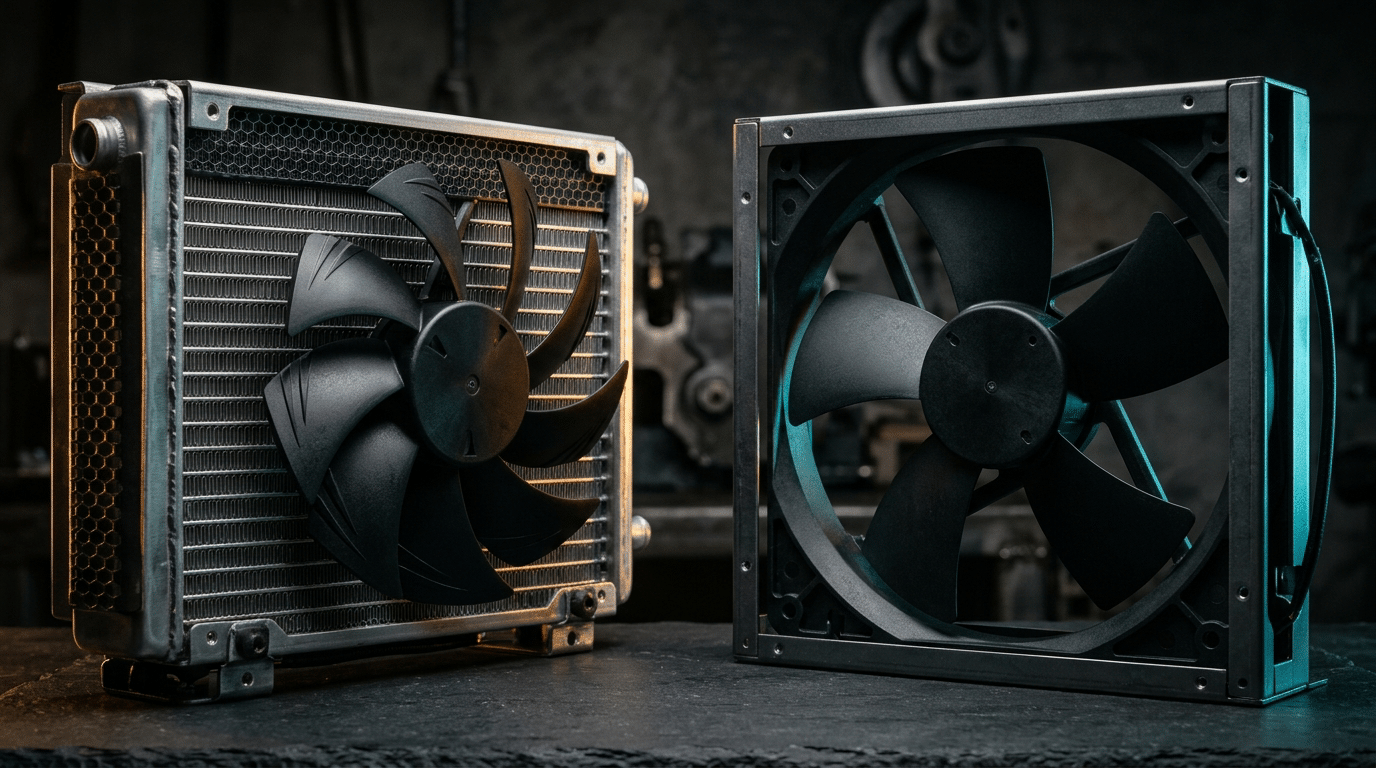
Understanding CFM (Volumetric Flow) vs. mmH₂O (Static Pressure)
Airflow (CFM or m³/h) measures the total volume of air a fan displaces across zero physical resistance—essentially spinning freely in an open wind tunnel with zero grille, filter, or heatsink in front of or behind the frame. One CFM equals roughly 1.699 m³/h. High free-air CFM excels when your sole objective is sweeping warm ambient air out of a wide-open chassis chamber.
Static Pressure (mmH₂O) measures the opposing vertical water-column force a fan can generate when airflow hits a complete dead-end seal (zero CFM flow). On a datasheet, a figure like 2.34 mmH₂O or 6.9 mmH₂O represents maximum stalled pressure—how hard the impeller pushes against an impenetrable wall before air spills backward through gaps between the blades.
The P-Q Curve and System Impedance Point
Neither datasheet maximum occurs in your PC. Instead, every fan operates along a continuous diagonal P-Q curve connecting zero-pressure maximum airflow (bottom right) to zero-airflow maximum static pressure (top left). Meanwhile, every physical component in your chassis—a nylon magnetic dust filter, a dual-tower aluminum fin stack, or a 360mm liquid radiator—presents a distinct system impedance curve where resistance increases exponentially as air velocity rises.
Your actual cooling airflow equals the exact intersection point where the fan’s P-Q curve crosses the radiator or filter’s impedance curve. As documented in Noctua’s engineering P-Q comparison between the NF-A12x25, NF-F12, and NF-S12A, an open-blade airflow design starts higher on the zero-resistance axis, yet collapses sharply into a turbulent stall region the instant impedance climbs. By contrast, a high-pressure blade profile holds a flatter, stronger midsection across moderate-to-high radiator resistance, delivering measurably higher real CFM through metal fins despite a lower paper maximum.
Blade Geometry, Tip Clearance & Frame Thickness
Three physical design details separate a radiator workhorse from a decorative case spinner:
- Blade Overlap & Chord Width: Static-pressure fans pack broad, heavily swept blades whose edges visually overlap when viewed straight on. Eliminating open axial gaps blocks high-pressure air behind a radiator core from leaking backward toward the low-pressure intake side.
- Blade-Tip Clearance & Impeller Rigidity: Under heavy backpressure, cheap polypropylene blades flex outward and expand thermally, forcing factories to leave wide 1.5mm–2.0mm safety gaps around the outer ring—creating a pressurized leak path. Flagship designs like the Noctua NF-A12x25 PWM mold blades from rigid Sterrox liquid-crystal polymer (LCP) to shrink tip clearance down to an extraordinary 0.5mm.
- Stator Vanes & Frame Depth (25mm vs. 30mm): Anti-vortex stator struts behind the hub straighten swirling exhaust into a focused column aimed squarely through heatsink channels. Meanwhile, stepping up from standard 25mm frames to 30mm frames (such as thicker performance radiator fans) boosts blade surface area without shrinking hub integrity, provided your chassis clearance accommodates the extra 5mm depth.
Radiator FPI, Thickness & CPU Thermal Sizing
Under Knowledge Graph rules Case --[DICTATES_COOLER_TOPOLOGY]--> Cooler and Cooler --[SUSTAINS_PPT_MTP_BOOST]--> CPU, choosing radiator fans requires auditing both the physical radiator core and the thermal package power of your processor—never base TDP alone.
Fin Density (FPI), Core Thickness & Push vs. Pull vs. Push-Pull
Liquid cooling radiators vary dramatically in impedance based on two mechanical dimensions:
- Fins Per Inch (FPI): Standard aluminum AIO radiators pack roughly 18 to 22 FPI—densely folded serpentine louvers engineered to maximize surface contact per millimeter. High-FPI cores quickly stall low-pressure airflow fans at quiet 900–1,200 RPM operating speeds. Custom copper radiators with looser 12 to 16 FPI spacing tolerate lower-pressure fans slightly better at low RPM, though strong P-Q blades still dominate.
- Core Thickness (27mm vs. 38mm+): Standard 240mm and 360mm AIO radiators measure roughly 27mm thick, bringing total stack height with 25mm fans to 52mm. Extra-thick 38mm radiators—such as the ARCTIC Liquid Freezer III Pro 360—add massive thermal fluid volume and fin surface depth (63mm stack height), demanding high-static-pressure blades like ARCTIC’s 6.9 mmH₂O P12 Pro series to drive cool air all the way through the rear face.
- Push vs. Pull vs. Push-Pull: Running fans in push (blowing into the core) or pull (drawing air out of the core) yields virtually identical thermal performance once gasket seals sit flush; pull mounting simply makes cleaning dust buildup off the radiator face far easier. Push-pull (fans sandwiching both sides) boosts combined pressure across thick 38mm–60mm radiators and lowers required RPM for a given noise target, yet adds 25mm to stack thickness that often collides with motherboard VRM armor or tall RGB DDR5 heatspreaders.
Matching Pressure Headroom to 2026 CPU Power Limits (PPT & MTP)
Modern processors demand cooler capacity scaled to full sustained boost power rather than nominal box TDP:
- Pure Gaming AM5 Chips (120W TDP / 162W PPT): Per AMD’s official Ryzen 7 9800X3D specifications, this 8-core gaming flagship pulls up to 162W PPT with a 95°C Tjmax ceiling and liquid cooling recommended for peak sustained clocks. Either a capable dual-tower air cooler or a 240mm/360mm AIO equipped with balanced static-pressure fans keeps temperatures comfortably in check without screaming RPMs.
- Creator & Hybrid Flagships (230W PPT – 250W MTP): Processors like the AMD Ryzen 9 9950X3D (230W peak power) and Intel Core Ultra 9 285K / Core Ultra 7 270K Plus (250W MTP) sustain heavy continuous thermal loads during rendering, shader compilation, and multi-tasking streams. Here, a 360mm AIO powered by high-static-pressure fans prevents coolant saturation and thermal throttling far better than undersized radiators or choked airflow setups.
Dust Filters, Dual-Chamber Layouts & Reverse-Blade Fans
Radiators are not the only impedance trap inside a modern gaming rig. Fine nylon magnetic dust filters and dense perforated front mesh panels introduce substantial static resistance—meaning front and bottom case intake fans also benefit meaningfully from static-pressure blade geometry. Conversely, rear exhaust mounts and unobstructed upper vents sit behind wide honeycomb cutouts where open-flow CFM designs move hot GPU air quickly at minimal decibels.
Builders assembling panoramic tempered-glass dual-chamber cases also encounter reverse-blade fans on side and bottom intake rails. Flipping blade camber lets reverse-blade fans display their clean center hub inside glass chambers while pushing air inward; however, standard-orientation static-pressure fans still retain a slight pressure advantage on thick radiators and tight bottom dust filters. Consult our positive-pressure fan orientation playbook to map standard vs. reverse-blade positions cleanly.
Fan Size & Frame Thickness Spec Matrix: 80mm to 200mm Compared
The static pressure vs. airflow debate is usually framed around blade shape, but fan diameter and frame thickness shift the P-Q curve just as much. To isolate size from blade design, the table below compares one manufacturer’s same-generation A-series family using Noctua’s published datasheet ratings, so impeller philosophy stays constant while only the frame changes.
| Fan (Frame Size) | Max RPM | Max Airflow | Max Static Pressure | Rated Noise | Best-Fit Placement |
|---|---|---|---|---|---|
| Noctua NF-A8 PWM (80 × 80 × 25 mm) | 2,200 RPM | ~33 CFM (55.5 m³/h) | 2.37 mmH₂O | 17.7 dB(A) | Compact SFF exhaust, small heatsinks |
| Noctua NF-A9 PWM (92 × 92 × 25 mm) | 2,000 RPM | ~46 CFM (78.9 m³/h) | 2.28 mmH₂O | 22.8 dB(A) | Low-profile and 92mm tower coolers |
| Noctua NF-A12x15 PWM (120 × 120 × 15 mm) | 1,850 RPM | ~55 CFM (93.5 m³/h) | 1.53 mmH₂O | 23.9 dB(A) | Slim radiators and tight top-mount clearance |
| Noctua NF-A12x25 PWM (120 × 120 × 25 mm) | 2,000 RPM | ~60 CFM (102.1 m³/h) | 2.34 mmH₂O | 22.6 dB(A) | 240mm/360mm radiators, filtered intakes |
| Noctua NF-A14 PWM (140 × 140 × 25 mm) | 1,500 RPM | ~83 CFM (140.2 m³/h) | 2.08 mmH₂O | 24.6 dB(A) | 280mm/420mm radiators, front intake |
| Noctua NF-A20 PWM (200 × 200 × 30 mm) | 800 RPM | ~86 CFM (146.9 m³/h) | 1.08 mmH₂O | 18.1 dB(A) | Open mesh front intake only (no radiators) |
Two patterns stand out. First, larger diameters buy airflow at lower RPM: the 140mm NF-A14 moves roughly 38% more air than the 120mm NF-A12x25 while spinning 500 RPM slower, which is why 140mm intakes sound deeper and calmer. Second, pressure does not scale with size. The 200mm NF-A20 matches the 140mm fan’s airflow but delivers less than half its static pressure, so it collapses against a dense 20 FPI radiator or fine dust filter. Frame thickness matters too: the slim 15mm NF-A12x15 gives up about a third of the 25mm model’s pressure, a fair trade only where motherboard or RAM height blocks a standard fan.
For radiators, prioritize 120mm or 140mm frames at 25mm thickness and check slot support in our 360mm AIO cooler roundup. Reserve 200mm fans for unrestricted mesh fronts, and once the hardware is installed, tune ramp points with the method in our PWM fan curve guide so pressure headroom only arrives when the CPU actually needs it.
Myth vs. Engineering Reality: Five Cooling Fan Myths Debunked
Marketing labels on fan packaging frequently exaggerate single-number maximums while hiding real-world pressure losses. Auditing the engineering physics clears up five costly buyer mistakes:
- Myth 1: “Higher Max CFM Always Guarantees Lower Radiator Temperatures.”
Engineering Reality: Max CFM is measured at 0 mmH₂O free air. Slapping an 85 CFM open-flow spinner with weak 1.2 mmH₂O pressure onto a 20 FPI radiator causes severe backflow leakage around the outer frame, dropping effective through-fin airflow below that of a 60 CFM static-pressure fan rated above 2.3 mmH₂O. - Myth 2: “Static Pressure Fans Cannot Work as Case Airflow Fans.”
Engineering Reality: Static pressure fans still displace ample volumetric CFM—and because virtually every modern gaming case covers its intakes with mesh bezels and washable dust filters, static-pressure fans often push more net filtered air into a case than pure airflow models. - Myth 3: “You Need 3,000 RPM Industrial Fans to Cool a 360mm Radiator.”
Engineering Reality: High ceiling RPM only raises your emergency peak capacity alongside intolerable acoustic roar. What matters for daily gaming is noise-normalized pressure between 900 and 1,500 RPM—tracked in independent certification catalogs like the Cybenetics Phi fan performance database at fixed 20 dBA and 25 dBA thresholds. - Myth 4: “Push-Pull Fans Double Your Radiator Cooling Capacity.”
Engineering Reality: Doubling fan count from three to six on a standard 27mm radiator improves thermal margins only marginally while doubling wiring complexity, acoustic hum, and RAM/VRM clearance conflicts. Push-pull delivers worthwhile returns primarily on thick 38mm–60mm radiators or tight chassis intake bottlenecks. - Myth 5: “Static Pressure and Airflow Fans Remain Completely Separate Product Worlds.”
Engineering Reality: While budget ARGB bundles still lean clearly toward open airflow (~1.5 mmH₂O), flagship 2025–2026 PWM engineering merges Sterrox LCP blades, tight 0.5mm gaps, and stator vanes into hybrid P-Q fans capable of anchoring every slot in a rig.
Actionable Radiator & Case Fan Selection Checklist
Run through these six concrete engineering checks before ordering replacement fans or upgrading your AIO cooling loop:
- Audit Mounting Impedance First: Assign high-static-pressure or hybrid P-Q fans (≥2.2 mmH₂O) to 240mm/360mm AIO radiators, dual-tower heatsinks, and filtered front/bottom intakes; reserve lower-pressure airflow fans (~1.5 mmH₂O) for unobstructed rear and top exhaust vents.
- Verify Physical Stack Thickness & Frame Depth: Add radiator core thickness (27mm standard vs. 38mm thick) plus fan depth (25mm standard vs. 30mm performance) and verify at least 55mm–65mm of roof clearance above motherboard VRM heatsinks and tall DDR5 DIMMs.
- Choose 4-Pin PWM & Fluid Dynamic Bearings (FDB/SSO2): Reject cheap 3-pin DC voltage fans or sleeve bearings that buzz when mounted horizontally on top radiators; insist on 4-pin PWM control with FDB or magnetic-dome bearings for long horizontal lifespan.
- Match Fan Diameter to Mount Slots (120mm vs. 140mm): Where front or top rails natively accept 140mm fans (and 280mm/420mm radiators), 140mm spinners move equivalent airflow at lower RPM and deeper, less irritating acoustic pitch than 120mm spinners.
- Seal Frame-to-Radiator Gaps With Rubber Gaskets: Use the included corner anti-vibration pads or radiator sealing gaskets so pressurized air cannot escape sideways between adjacent fan frames before entering the fin core.
- Tune Hysteresis & Duty Curves in BIOS: Following our cooling audit standards, hold radiator and intake PWM curves steady at a quiet 30%–40% floor below 60°C and configure a 2- to 3-second spin-up hysteresis delay so brief CPU clock spikes never cause jarring fan surges.
Audited Static Pressure, Hybrid & Airflow Hardware Picks
Translating P-Q engineering into real retail hardware is straightforward once you match blade geometry to mounting resistance. Below are four verified 2026 fans and radiator assemblies demonstrating each architectural tier—from budget multi-pack static pressure workhorses to flagship noise-normalized hybrids. For full thermal rankings across complete CPU coolers, explore our Best CPU Coolers for Gaming (2026) hub and our Best Airflow Gaming PC Cases guide.
1. ARCTIC P12 Pro PST 120mm PWM Fan (5-Pack) — Best Value High-Static-Pressure Pack for Radiators

Budget Tier: Under $25 | Audited Specs: 5x 120x120x25mm PWM PST Fans | 600–3,000 RPM (0 dB passive stop below 5% PWM) | 77 CFM (131 m³/h) Max Airflow | 6.9 mmH₂O Static Pressure | Fluid Dynamic Bearing (FDB) | Integrated 4-Pin PST Daisy-Chain Connectors.
Why It Fulfills Radiator Engineering Rules: Documented in the ARCTIC P12 Pro PST technical datasheet, this 5-pack pushes an extraordinary 6.9 mmH₂O static pressure ceiling while maintaining 77 CFM capacity—effortlessly punching through dense 20 FPI radiators, thick 38mm cores, and restrictive nylon front dust filters. Built-in PST daisy-chain headers allow three radiator fans to share one synchronized motherboard CPU_FAN PWM curve cleanly, leaving two extra static-pressure spinners for filtered intakes at an unbeatable per-fan value.
2. Noctua NF-A12x25 PWM chromax.Black.swap — Best Noise-Normalized Hybrid P-Q Reference Fan
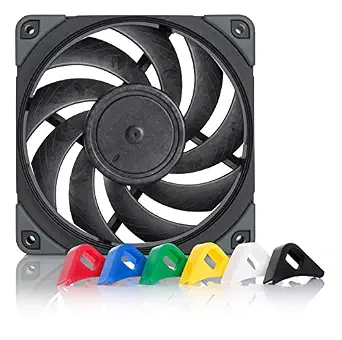
Budget Tier: Under $40 | Audited Specs: 1x 120x120x25mm PWM Fan | Up to 2,000 RPM | 60.09 CFM (102.1 m³/h) | 2.34 mmH₂O Static Pressure | 22.6 dB(A) Max Noise | Sterrox LCP Impeller (0.5mm Tip Clearance) | SSO2 Bearing.
Why It Fulfills Radiator & Case Engineering Rules: Rather than chasing loud 3,000 RPM peak numbers, Noctua engineered the NF-A12x25 around an ultra-tight 0.5mm blade-tip clearance using non-flexing Sterrox LCP blades. That eliminates edge leakage across radiators and dual-tower heatsinks while producing a remarkably smooth acoustic profile free of harsh tonal whine—making it our benchmark choice when silent gaming operation matters as much as thermal dissipation.
3. Thermalright TL-C12C-S X3 120mm ARGB (3-Pack) — Best Budget Open-Airflow Case Exhaust Kit

Budget Tier: Under $20 | Audited Specs: 3x 120x120x25mm ARGB PWM Fans | 1,550 RPM (±10% Max) | 66.17 CFM Max Airflow | 1.53 mmH₂O Static Pressure | ≤25.6 dBA Max Noise | S-FDB Bearing | 4-Pin PWM + 3-Pin 5V ARGB.
Why It Fulfills Open-Exhaust Engineering Rules: Pairing 66.17 CFM free-air throughput with a modest 1.53 mmH₂O pressure rating at ≤25.6 dBA, the TL-C12C-S X3 demonstrates exactly where airflow-oriented budget fans belong: unrestricted rear exhausts, open roof exhaust vents on air-cooled builds, and coarse perforated mesh panels. Keep dense high-FPI AIO radiators reserved for higher-pressure blades while using this three-pack to evacuate heated GPU exhaust affordably.
4. ARCTIC Liquid Freezer III Pro 360 AIO — Best Complete 360mm Thick-Radiator + Static-Pressure Bundle
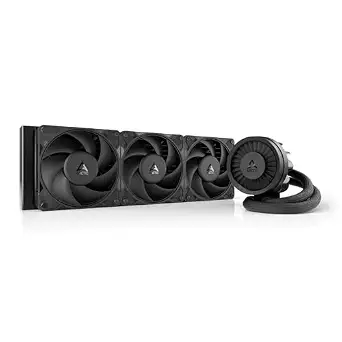
Budget Tier: $65–$75 tier | Audited Specs: 360mm (398x120x38mm) Thick Aluminum Radiator | 3x 120mm P12 Pro PWM Fans (600–3,000 RPM, 6.9 mmH₂O) + Integrated 400–2,500 RPM VRM Fan | AM5/AM4 & LGA 1851/1700 | 6-Year Warranty.
Why It Fulfills High-Load AIO Engineering Rules: If you are upgrading from an undersized cooler rather than replacing fans alone, ARCTIC ships its thick 38mm radiator pre-equipped with three high-pressure P12 Pro PWM fans and an active VRM cooling blower. Just confirm your chassis roof supports the 63mm combined radiator-plus-fan thickness before ordering, and cap PWM speed below 50%–60% for whisper-quiet 230W–250W cooling.
Fan & Radiator Setups Disqualified Under Audit Rule R-CASE-01
- 120mm Single-Fan AIO Radiators on Modern Gaming CPUs: Even with aggressive static-pressure fans, a 120mm radiator core lacks sufficient fluid thermal capacity for 162W–250W processors and loses outright to affordable dual-tower air coolers.
- Solid Unvented Front Glass Panels Choking Intake Fans: No static-pressure fan rating can overcome a solid wall of tempered glass sealed a few millimeters away from blade intakes; prioritize fine mesh front bezels or properly ducted dual-chamber side/bottom intakes.
- Sleeve-Bearing 3-Pin DC Fans Mounted Horizontally on Top Radiators: Gravity drains lubricant away from horizontal sleeve bearings prematurely, creating rattle and thermal risk over a 3- to 5-year service cycle.
Official Engineering & Manufacturer References
- Noctua Engineering Data: NF-A12x25 P-Q Curve Performance Comparison vs. NF-F12 (Pressure) and NF-S12A (Airflow)
- Noctua Official Specification: NF-A12x25 PWM Sterrox LCP Tip Clearance, CFM, and mmH₂O Ratings
- ARCTIC Technical Datasheet: P12 Pro PST 120mm High Static Pressure Fan (6.9 mmH₂O / 77 CFM)
- Cybenetics Phi (Φ) Fan Performance Database: Noise-Normalized 20 dBA & 25 dBA Static Pressure Metrics
- AMD Official Processor Specification: Ryzen 7 9800X3D Thermal Design Power (120W TDP / 162W PPT) & Cooling Guidance
How We Audited This Guide
- Power supplies, coolers, and cases were audited for ATX 3.1 / PCIe 5.1 compliance, 12V-2x6 support, efficiency certification, radiator and GPU clearance, and fan configuration.
- Every specification claim was cross-checked against official OEM datasheets, platform vendor documentation, and published industry standards (PCI-SIG, JEDEC, VESA, Intel ATX) rather than marketplace listing copy.
- Recommendations were evaluated against our weighted audit rubric and documented compatibility rules; we do not publish fabricated FPS, thermal, or acoustic numbers.
Frequently Asked Questions
Are static pressure or airflow fans better for AIO radiators?
Static pressure fans are significantly better for 240mm and 360mm AIO radiators. Densely folded 18–22 FPI aluminum fins create heavy backpressure that stalls open-blade airflow designs, whereas wide, overlapping static-pressure blades maintain steady velocity straight through the radiator core at quieter RPMs.
What static pressure rating (mmH₂O) do I need for a PC radiator?
Target at least 2.0 to 2.5 mmH₂O at maximum rated speed for standard 27mm radiators, or 3.0+ mmH₂O if running a thicker 38mm radiator core or restrictive front dust filter. Always verify noise-normalized performance between 1,000 and 1,500 RPM rather than chasing noisy peak ratings alone.
Can I use static pressure fans as regular PC case intake fans?
Yes. Most gaming PC intake mounts sit directly behind fine mesh bezels and washable nylon dust filters that create noticeable impedance. Static pressure and modern hybrid P-Q fans push cleaner, higher net volume past filtered front or bottom intakes than low-pressure open-flow models.
Should radiator fans be configured in push or pull orientation?
Thermal difference between push and pull on standard 27mm radiators is negligible once fan frames seal flush against the core. Choose push if matching RGB ring visibility facing inward, or choose pull when you want quick access to vacuum lint off the exposed radiator fin face.
Where do high-airflow fans actually outperform static pressure fans?
High-airflow fans shine in unobstructed open zones with virtually zero impedance—specifically rear exhaust vents and open top exhaust mounts on air-cooled chassis. Without dense metal fins or fine mesh filters blocking the blade path, wide-pitched airflow fans expel warm ambient case air efficiently.


