
Affiliate Disclosure: As an Amazon Associate, The PC Audit earns from qualifying purchases. Every thermal dissipation specification, fan static-pressure rating, clearance dimension, and warranty comparison in this guide is verified directly against official AMD, Intel, Noctua, Thermalright, ARCTIC, and NZXT documentation without sponsored placements.
Navigating the aio liquid cooler vs air cooler decision comes down to a clear architectural trade-off between sustained heat capacity and mechanical simplicity. A modern 360mm all-in-one loop excels at exhausting 230W–250W+ continuous multi-core heat straight out of panoramic cases while keeping memory slots wide open, whereas a quality dual-tower air cooler handles 120W–170W gaming processors quietly for under $40 with zero pump wear.
Expanding on our best CPU coolers for gaming buyer hub inside the Cases, Cooling & Power channel, this head-to-head audit evaluates both cooling architectures across our 100-point rubric: Thermal Dissipation Capacity across PPT/MTP loads (35%), Acoustic Profile & Pump/Fan Noise (25%), Compatibility & RAM/Case Clearance (20%), and Reliability, Warranty & Value (20%).
In This Comparison
- TL;DR Winner Matrix: Quick Verdict
- Side-by-Side Verified 360mm AIO vs. Dual-Tower Air Specification Table
- Battleground 1: Thermal Dissipation Capacity Across 88W–250W+ PPT & MTP Wattage Tiers (35%)
- Battleground 2: Noise-Normalized Acoustics, Pump Reliability & PWM Fan Curve Tuning (25%)
- Battleground 3: Chassis Airflow Topology, RAM Clearance & Radiator Thickness Traps (20%)
- Battleground 4: Service Lifespan, Thermal Compound Maintenance & Total Cost of Ownership (20%)
- Battleground 5: Audited 360mm AIO & Dual-Tower Air Cooler Picks on Amazon US
- Decisive Verdict: Should You Buy a 360mm AIO or Dual-Tower Air Cooler?
- Frequently Asked Questions
TL;DR Winner Matrix: Quick Verdict
Unless you push flagship 16-to-24-core CPUs under sustained 230W–250W+ rendering workloads or build inside a panoramic glass showcase chassis, a sub-$50 dual-tower heatsink matches mid-tier liquid loops in pure gaming while lasting longer.
| Evaluation Category | Declared Winner | Verified Specification Rationale |
|---|---|---|
| Overall Gaming Sweet Spot (88W–170W CPUs) | Dual-Tower Air Cooler | Delivers complete thermal headroom for Ryzen 5 9600X, Ryzen 7 9800X3D/9850X3D (162W PPT), and Core Ultra 5 245K without pump noise or leak risk. |
| Sustained 230W–250W+ All-Core Workloads | 360mm AIO Liquid Cooler | Large 360x120mm surface area and liquid thermal mass reject sustained Ryzen 9 9950X3D (230W PPT) and Core Ultra 9 285K (250W MTP) heat outside the case. |
| Idle Acoustics & Multi-Build Lifespan | Dual-Tower Air Cooler | Zero pump whine or impeller vibration at desktop idle; soldered copper heatpipes outlast multiple CPU sockets with only inexpensive fan swaps after years of use. |
| Dual-Chamber Aesthetics & Tall RAM Fit | 360mm AIO Liquid Cooler | Compact CPU waterblock leaves tall DDR5 RGB heatspreaders and motherboard VRM armor completely unobstructed inside dual-chamber fishbowl cases. |
| Value per Dollar (Total Cost of Ownership) | Dual-Tower Air Cooler | Under-$40 six-heatpipe towers outperform cheap 120mm and budget 240mm liquid loops, leaving $40–$140 extra for a stronger GPU or 3D V-Cache CPU tier. |
Side-by-Side Verified 360mm AIO vs. Dual-Tower Air Specification Table
Comparing flagship and value models across both architectures—alongside the undersized 120mm liquid trap common in budget prebuilt systems—reveals exactly how radiator thickness, heatpipe count, static pressure, and physical dimensions separate reliable coolers from marketing compromises.
| Specification Metric | Value Dual-Tower Air (Thermalright Peerless Assassin 120 SE) | Flagship Dual-Tower Air (Noctua NH-D15 G2) | Thick-Rad 360mm AIO (ARCTIC Liquid Freezer III Pro 360) | LCD Slim-Rad 360mm AIO (NZXT Kraken Plus 360) | Rejected Trap (120mm AIO / Unvented Glass Case) |
|---|---|---|---|---|---|
| Cooling Topology & Dimensions | Dual-tower air; 125 x 110 x 155 mm height | Dual-tower air; 150 x 152 x 168 mm height | 360mm AIO; 398 x 120 x 38 mm thick radiator | 360mm AIO; 401 x 120 x 27 mm slim radiator | Single-fan 120mm radiator (~27 mm thick) |
| Heat Transfer Architecture | 6x 6mm copper heatpipes, nickel-plated C1100 base | 8x 6mm soldered copper heatpipes, offset tower design | Copper cold plate + 800–2800 RPM PWM pump + integrated VRM fan | Copper cold plate + integrated pump LCD display | Single-pass loop with low fluid thermal capacity |
| Included PWM Fans & Speed | 2x 120mm TL-C12C (1550 RPM max, S-FDB bearing) | 2x 140mm NF-A14x25r G2 (0–1500 RPM, SSO2 bearing) | 3x 120mm P12 Pro (600–3000 RPM, FDB) + VRM fan (400–2500 RPM) | 3x 120mm F120P (500–2000 RPM, FDB) | 1x high-RPM fan masking minimal fin surface area |
| Static Pressure & Airflow | 1.53 mmH2O / 66.17 CFM | 2.56 mmH2O / 91.58 CFM (155.6 m³/h) | 6.9 mmH2O / 77 CFM (131 m³/h) | 4.5 mmH2O / 73.47 CFM | Inadequate total heat rejection across 120mm core |
| Rated Acoustics & Pump Floor | 25.6 dBA fan max; 0 dBA pump noise | 24.8 dBA fan max (speed-offset); 0 dBA pump noise | Wide PWM headroom; quiet mid-curve once tuned + PWM pump | 30 dBA F120P max + pump acoustics | Loud fan scream under sustained load |
| Target PPT / MTP Comfort Tier | Ideal for 88W–170W (9600X, 9800X3D, 9850X3D, 245K) | Handles 162W–230W+ cleanly in mesh airflow towers | Excels at 230W–250W+ (9950X3D, 270K Plus, 285K) | Excels at 200W–250W+ with easy case fitment | Triggers thermal throttling on >120W–150W CPUs |
| RAM & Chassis Clearance Notes | 155mm height fits most mid-towers; front fan overhangs tall DIMMs | 168mm height; 32mm default front-fan RAM clearance (59mm single-fan) | 63mm total rad+fan stack requires spacious top or side clearance | 53mm total rad+fan stack; leaves all 4 DIMMs completely open | Wastes an exhaust mount while underperforming budget air |
| Service Life & OEM Warranty | Indefinite heatsink life (fan swaps only); 3–6 yr regional | Indefinite heatsink life; 6-year Noctua warranty | 4–7 yr loop envelope; 6-year ARCTIC warranty | 4–7 yr loop envelope; 6-year AIO / 2-year fan warranty | Poor value and early pump wear risk |
| Amazon US Budget Tier | Under $40 tier | $150–$175 tier | $65–$75 tier | $175–$200 tier | Disqualified from gaming recommendations |
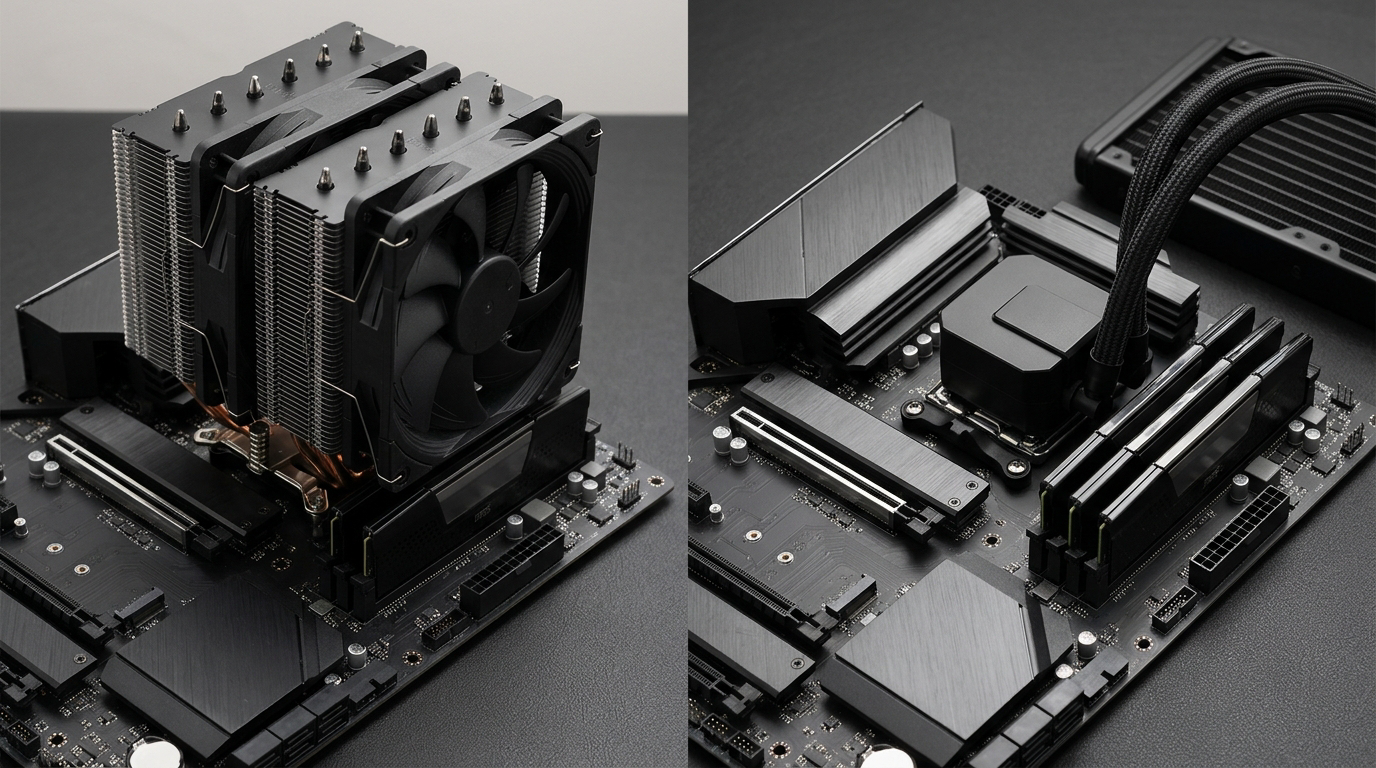
Battleground 1: Thermal Dissipation Capacity Across 88W–250W+ PPT & MTP Wattage Tiers (35%)
The biggest mistake builders make in the aio liquid cooler vs air cooler debate is sizing hardware around marketing base TDP figures instead of real boost power envelopes. Modern processors run dramatically hotter under full-core load than their base labels imply, meaning you must match your heatsink or radiator directly to actual PPT (Package Power Tracking on AMD AM5) and MTP (Maximum Turbo Power on Intel LGA 1851).
As documented in official AMD Ryzen desktop processor specifications and Intel Core Ultra 200S architecture documentation, desktop gaming silicon separates cleanly into three thermal classes based on PPT/MTP wattage:
- Mainstream Efficiency Tier (65W–125W Base / 88W–162W PPT & MTP): Processors like the AMD Ryzen 5 9600X (65W TDP / 88W PPT), Intel Core Ultra 5 245K (125W Base / 159W MTP), and even the undisputed gaming champions—Ryzen 7 9800X3D, Ryzen 7 9850X3D, and Ryzen 9 9900X3D (120W TDP / 162W PPT)—rarely exceed 80W–130W during active gaming. A competent dual-tower air cooler dissipates 162W peaks during shader compilation with zero boost-clock drop, meaning a 360mm liquid loop adds almost no gaming frame-rate advantage.
- Hybrid Workstation & Creator Tier (125W–170W Base / 230W–250W+ MTP & PPT): Flagship multi-core chips such as the AMD Ryzen 9 9950X3D (170W TDP / 230W PPT), Intel Core Ultra 7 270K Plus (250W MTP), and Intel Core Ultra 9 285K (125W Base / 250W MTP) sustain heavy continuous thermal output during Blender rendering, Unreal Engine shader builds, 4K/8K encoding, or AVX-heavy compilation. Once sustained load climbs past 210W–250W, a 360mm AIO maintains lower steady-state core temperatures because its 360x120mm fin array spans nearly triple the surface area of a single-chassis tower and vents heat directly through the case boundary.
- Why Heatpipes React Faster While Liquid Absorbs Longer: Phase-change vapor inside six to eight sintered copper heatpipes transfers sudden millisecond gaming load spikes straight into the aluminum fin stack almost instantaneously. Liquid coolant, by contrast, leverages water’s high specific heat capacity to buffer short bursts before steadily reaching thermal equilibrium over 15 to 30 minutes of continuous full-core saturation.
This physics split also exposes why mid-sized and undersized liquid loops frequently disappoint buyers. Any 240mm AIO priced below $90 rarely beats an inexpensive dual-tower air cooler like our top picks in our best air CPU coolers audit, and should be reserved strictly for compact SFF cases lacking 155mm tower clearance. Even worse are single-fan 120mm AIO units still found in corner-cutting prebuilt desktops: paired with solid unvented front glass panels, 120mm loops cause immediate thermal throttling and howling fans above 120W–150W and fail our cooling baseline outright.
Battleground 2: Noise-Normalized Acoustics, Pump Reliability & PWM Fan Curve Tuning (25%)
Peak thermal capability tells only half the story; what actually determines desktop comfort is how many decibels a cooler emits when calibrated to identical noise-normalized output—especially during light browsing, late-night indie sessions, or sustained 1440p gaming.
Broadband Air Acoustics vs. Continuous Pump Whine
Every liquid cooler adds an electromechanical motor sitting directly atop the CPU socket alongside three radiator fans. Even whisper-engineered modern pumps emit a distinct tonal signature between 800 and 2800 RPM. When a room sits quiet at 28–30 dBA ambient, a high-frequency pump buzz or trapped air gurgle stands out far more sharply to the human ear than the soft broadband whoosh of large 120mm or 140mm air-cooler fans spinning at 700–900 RPM.
Dual-tower air coolers produce strictly 0 dBA of mechanical pump noise. Flagship towers like the Noctua NH-D15 G2 even offset the rotational speed of their dual NF-A14x25r G2 fans by roughly 50 RPM to prevent acoustic beating harmonics, capping peak fan noise at just 24.8 dBA—while the budget Thermalright Peerless Assassin 120 SE stays remarkably polite at 25.6 dBA maximum.
Static Pressure (mmH2O) Engineering & Fin Density
Comparing fan specifications highlights why you cannot swap generic high-airflow case fans onto a dense liquid radiator. Radiators pack tight aluminum fin channels per inch across 27mm to 38mm depth, creating heavy aerodynamic impedance that requires a dedicated static pressure fan:
- 38mm Thick Radiators (ARCTIC Liquid Freezer III Pro 360): Pushing air through a 38mm core demands intense pressure—which is why ARCTIC pairs P12 Pro Fluid Dynamic Bearing fans rated up to 6.9 mmH2O static pressure and 3000 RPM overhead, allowing strong cooling at moderate RPM without resorting to constant full-speed roar.
- 27mm Standard Radiators (NZXT Kraken Plus 360): Slimmer 27mm cores offer lower flow restriction while still benefiting from high-pressure F120P fans rated at 4.5 mmH2O and 73.47 CFM (30 dBA max).
- Dual-Tower Heatsinks: Open-sided aluminum fin arrays present gentler resistance, enabling Noctua’s NF-A14x25r G2 (2.56 mmH2O, 91.58 CFM) and Thermalright’s TL-C12C (1.53 mmH2O, 66.17 CFM) to move massive air volume quietly at lower fan speeds. Conversely, we reject budget coolers relying on noisy 2500+ RPM fans to mask sparse fin density or fewer heatpipes.
The 2-Second Hysteresis Rule for Your PWM Fan Curve
Whichever cooler you install, factory motherboard defaults frequently ruin acoustics by ramping fans abruptly whenever a modern Ryzen X3D or Arrow Lake core momentarily boosts to open a browser tab. Inside BIOS or fan-control software, configure a custom PWM fan curve using two non-negotiable settings: hold a flat, quiet 30%–40% baseline duty cycle below 60°C, and apply a 2 to 3 second fan spin-up hysteresis delay so brief millisecond temperature spikes pass without revving your radiator or tower fans. For 360mm AIO owners, verify your pump header runs steady between 60% and 80% PWM (or fixed quiet speed) rather than surging noisily alongside CPU fan ramps.
Battleground 3: Chassis Airflow Topology, RAM Clearance & Radiator Thickness Traps (20%)
Your PC case dictates cooling performance just as strongly as the cooler itself. Matching a dual-tower heatsink to an unvented glass box—or cramming an extra-thick 38mm radiator into a tight mid-tower roof—creates immediate clearance collisions and stale hot-air recirculation.
Airflow Mesh Mid-Towers vs. Dual-Chamber Fishbowl Cases
Traditional Front-to-Back Airflow Mesh Mid-Towers (such as Lian Li Lancool, Corsair Air, and Fractal Design Pop series) push cool ambient air straight through a perforated front panel across the motherboard and straight through a dual-tower air cooler toward the rear exhaust fan. In this straight-line wind tunnel, a dual-tower air cooler works in near-ideal aerodynamic harmony while feeding cool air across motherboard VRM heatsinks and DDR5 slots simultaneously.
Panoramic Dual-Chamber “Fishbowl” Cases—evaluated thoroughly in our best dual-chamber fishbowl PC cases guide—shift power supplies behind the motherboard tray and replace the front mesh with tempered glass. That layout starves straight front-to-back tower wind tunnels while creating dedicated top and angled-side mounting rails engineered specifically around a 360mm AIO. Better yet, pairing bottom intake fans and side reverse-blade intake fans with a top-exhaust 360mm radiator preserves slight positive pressure (total intake exceeding exhaust), keeping dust outside unfiltered cracks while showcasing a clean dual-chamber aesthetic.
Mandatory 4-Point Physical Clearance Audit
- Dual-Tower Height vs. Case Side Panel: Measure your case’s maximum CPU cooler clearance before ordering. Budget 155mm towers like the Thermalright Peerless Assassin 120 SE clear almost all standard ATX mid-towers, whereas tall 140mm towers like the Noctua NH-D15 G2 demand at least 168mm natively—plus extra millimeters if the front fan must rise over tall RAM.
- RAM Clearance & Front-Fan Overhang Traps: Large dual-tower coolers overhang primary DDR5 memory slots. The Noctua NH-D15 G2 provides just 32mm of default RAM clearance under its front 140mm fan; installing 44mm tall RGB DIMMs forces you to slide the front fan up (raising total height past 171mm), swap in a 120mm front fan (52mm clearance), or drop to single-fan mode (59mm clearance). Always choose low-profile DDR5 kits (such as G.Skill Flare X5) under dual towers, or pick a 360mm AIO when displaying tall RGB memory.
- Radiator + Fan Stack Thickness vs. VRM Heatsinks: A slim 27mm radiator plus standard 25–26mm fans totals 52–53mm, clearing almost every B850, X870, or Z890 board’s top VRM armor and 8-pin EPS connectors. By contrast, a thick 38mm radiator like the ARCTIC Liquid Freezer III Pro 360 plus 25mm P12 Pro fans builds a 63mm stack—check your case specification sheet for top-radiator thickness limits before assuming an automatic fit.
- Pump Orientation & Air Pocket Protection: Never install an AIO radiator strictly below the CPU socket block on the floor of a chassis. Keeping the top tank of your radiator higher than the pump block ensures any trapped micro-bubbles migrate harmlessly into the radiator end tank instead of cavitating inside the pump rotor.
Battleground 4: Service Lifespan, Thermal Compound Maintenance & Total Cost of Ownership (20%)
When buyers weigh an aio liquid cooler vs air cooler over a five-to-eight-year desktop ownership window, total cost of ownership shifts decisively toward metal heatsinks.
A copper-and-aluminum dual-tower air cooler contains zero fluid, zero rubber tubing seams, and zero motorized water pumps. Sealed vapor heatpipes operate reliably for decades without losing efficiency; the only wear components are standard PWM cooling fans rated for tens of thousands of hours, which take three minutes and $15–$35 to clip-swap years later. Even Noctua’s flagship NH-D15 G2 ships with a 6-year warranty and multi-socket mounting longevity across future CPU generations.
By comparison, every sealed AIO carries an inherent 4-to-7-year operational window governed by pump reliability, slow fluid permeation through FEP/EPDM tubing, and internal galvanic interaction between copper cold plates and aluminum radiators. While quality 2026 coolers back that lifespan with strong 5-to-6-year warranties (ARCTIC covers the Liquid Freezer III Pro 360 for 6 years; NZXT backs the Kraken Plus 360 loop for 6 years and included F120P fans for 2 years), an AIO eventually requires full unit replacement once warranty coverage expires or the pump weakens.
For builders seeking zero-maintenance thermal consistency across long 4-to-6-year ownership stretches—especially on bare-mount or high-heat dual-tower rigs—swapping standard silicone paste for a Honeywell PTM7950 phase-change thermal pad prevents conventional paste “pump-out” degradation across years of thermal expansion cycles. And from a strict gaming budget perspective, choosing an under-$40 dual-tower air cooler over a $175–$200 LCD 360mm AIO frees up roughly $135–$160—enough to jump an entire GPU performance tier (from RTX 5070 to RX 9070 XT or RTX 5070 Ti) where real-world 1440p frame rates climb dramatically.
Battleground 5: Audited 360mm AIO & Dual-Tower Air Cooler Picks on Amazon US
Below are four verified, officially released 2026 retail CPU coolers audited directly against OEM specifications—representing the value benchmark and flagship standard-bearer on both sides of the air-versus-liquid divide. For full category roundups, browse our best 360mm AIO liquid coolers guide and best air CPU coolers roundup.
1. Thermalright Peerless Assassin 120 SE CPU Cooler — Value Dual-Tower Air Champion

Budget Tier: Under $40 | Type: Dual-Tower Air Cooler | Audited Specs: 155mm Height (125 x 110 x 155mm) | 6x 6mm Copper Heatpipes + C1100 Nickel-Plated Copper Base | Dual 120mm TL-C12C PWM Fans (1550 RPM, 66.17 CFM, 1.53 mmH2O, 25.6 dBA, S-FDB Bearing) | AMD AM4/AM5 & Intel LGA 1851/1700/1200/115x Support.
Comparison Audit: Confirmed against Thermalright’s official Peerless Assassin 120 SE datasheet, this compact 155mm tower remains the price-to-performance disruptor of PC cooling. It dissipates 88W–170W AM5 and mainstream Intel gaming loads smoothly—keeping Ryzen 7 9800X3D and 9850X3D boost clocks stable well below thermal throttling—while outperforming entry 120mm and budget 240mm liquid loops at half the price. Note that its symmetrical front fan sits directly above primary memory slots, making low-profile DDR5 kits the cleanest pairing.
Pros: Unrivaled cooling per dollar under $40; compact 155mm height clears virtually every airflow mesh mid-tower; quiet 25.6 dBA ceiling and zero pump maintenance.
Cons: Front 120mm fan overhangs tall RGB RAM modules without raising fan height; reaches thermal saturation earlier than 360mm AIOs on sustained 230W–250W+ multi-core renders.
2. Noctua NH-D15 G2 Dual Tower CPU Cooler — Flagship Low-Noise Air Engineering
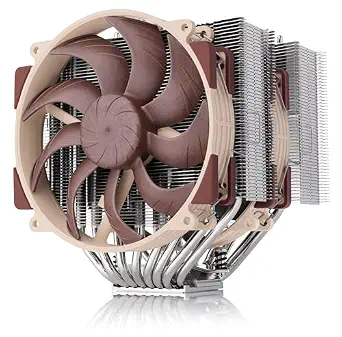
Budget Tier: $150–$175 tier | Type: Dual-Tower Air Cooler | Audited Specs: 168mm Height (150 x 152 x 168mm, 1525g) | 8x 6mm Soldered Copper Heatpipes | Dual 140mm NF-A14x25r G2 PWM Fans (0–1500 RPM, 91.58 CFM / 155.6 m³/h, 2.56 mmH2O, 24.8 dBA, SSO2 Bearing) | SecuFirm2+ Torx Mounting | AMD AM5/AM4 & Intel LGA 1851/1700 | 6-Year Warranty.
Comparison Audit: Detailed in Noctua’s official NH-D15 G2 technical specifications, stepping up from six to eight soldered heatpipes and roughly 20% greater fin area bridges the gap between air towers and mid-tier liquid loops at high 200W–250W heat loads. Its speed-offset NF-A14x25r G2 fans eliminate harmonic droning while maintaining a whisper-quiet 24.8 dBA ceiling and 0 dBA idle pump noise. Builders must verify two clearances before ordering: 168mm case tower height and 32mm default front-fan RAM clearance (requiring low-profile DDR5 or lifting/swapping the front fan).
Pros: Reference-class noise-normalized acoustic profile with zero pump hum; eight-heatpipe thermal headroom; legendary 6-year warranty and indefinite heatsink lifespan.
Cons: Premium $150–$175 pricing rivals strong 360mm AIOs; massive 168mm height and 32mm default front-fan RAM clearance limit compact cases and tall RGB memory.
3. ARCTIC Liquid Freezer III Pro 360 AIO CPU Cooler — Best Value 360mm Thermal Powerhouse
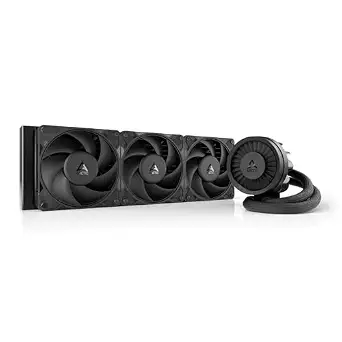
Budget Tier: $65–$75 tier | Type: 360mm AIO Liquid Cooler | Audited Specs: 398 x 120 x 38mm Thick Aluminum Radiator | 3x 120mm P12 Pro PWM FDB Fans (600–3000 RPM, 77 CFM, 6.9 mmH2O Static Pressure) | Integrated PWM VRM Fan (400–2500 RPM) | PWM Pump (800–2800 RPM) | MX-6 Paste Included | AMD AM5/AM4 & Intel LGA 1851/1700 | 6-Year Warranty.
Comparison Audit: Verified in ARCTIC’s official Liquid Freezer III Pro 360 product datasheet, this cooler demolishes the myth that top-tier 360mm liquid cooling requires spending $200+. Its oversized 38mm radiator core paired with ultra-high 6.9 mmH2O static-pressure P12 Pro fans conquers sustained 230W–250W+ workloads on Ryzen 9 9950X3D and Core Ultra 9 285K builds, while the built-in pump-cap VRM fan cools surrounding motherboard power stages. Just measure carefully: its combined 63mm radiator-plus-fan thickness demands roomy top or side chassis mounts.
Pros: Exceptional thermal dissipation per dollar in the $65–$75 tier; 38mm radiator + 6.9 mmH2O fans + integrated VRM cooling fan; long 6-year manufacturer warranty.
Cons: 63mm combined radiator and fan thickness can clash with tall motherboard VRM heatsinks in tight mid-tower roofs; P12 Pro fans reach loud speeds at max RPM unless tamed via a PWM fan curve.
4. NZXT Kraken Plus 360 360mm AIO CPU Cooler with LCD — Dual-Chamber Aesthetic & Slim-27mm Fit

Budget Tier: $175–$200 tier | Type: 360mm AIO Liquid Cooler (LCD) | Audited Specs: 401 x 120 x 27mm Slim Aluminum Radiator | Integrated Pump-Block LCD Screen | 3x 120mm F120P Static Pressure FDB Fans (500–2000 RPM, 73.47 CFM, 4.5 mmH2O, 30 dBA) | AMD AM5/AM4 & Intel LGA 1851/1700 | 6-Year AIO Warranty (2-Year F120P Fan Warranty).
Comparison Audit: Documented on NZXT’s official Kraken Plus 360 product specification page, the Kraken Plus 360 targets showcase builders prioritizing a clean dual-chamber aesthetic, live coolant/CPU telemetry on a crisp pump-block LCD display, and broad mid-tower roof compatibility. Unlike bulky 38mm cores, its standard 27mm radiator + 26mm F120P fans (4.5 mmH2O static pressure) fit comfortably above most VRM heatsinks while leaving all four DDR5 RAM slots fully visible. Note that while the sealed loop carries 6-year coverage, the included F120P fans carry a shorter 2-year warranty.
Pros: Slim 27mm radiator avoids top-VRM clearance collisions; clean pump-block LCD display elevates dual-chamber panoramic rigs; leaves tall RGB DDR5 modules completely unobstructed.
Cons: Substantial aesthetic premium in the $175–$200 tier vs. ARCTIC’s value flagship; F120P fan warranty spans 2 years compared to 6 years on the pump/radiator assembly.
Decisive Verdict: Should You Buy a 360mm AIO or Dual-Tower Air Cooler?
Match your cooler architecture to your processor’s real PPT/MTP wattage, chassis airflow topology, and how long you expect the build to run untouched.
Choose a Dual-Tower Air Cooler If…
- You game primarily on a 65W–170W PPT/MTP processor (Ryzen 5 9600X, Ryzen 7 9800X3D, 9850X3D, or Core Ultra 5 245K) inside a front-to-back airflow mesh mid-tower.
- You demand 0 dBA pump silence at desktop idle, zero risk of pump wear or evaporation over 6–10+ years, and maximum cooling performance per dollar under $40.
- You run low-profile DDR5 modules and confirm 155mm–168mm case side-panel clearance so front fans sit cleanly without crowding glass.
Get Thermalright Peerless Assassin 120 SE (Air Value Winner)
Choose a 360mm AIO Liquid Cooler If…
- You push sustained 230W–250W+ multi-core creator, rendering, or AI workloads on a Ryzen 9 9950X3D, Core Ultra 7 270K Plus, or Core Ultra 9 285K.
- You build inside a dual-chamber panoramic glass case engineered for top-exhaust or side-intake 360mm radiators and positive-pressure reverse-blade airflow.
- You want tall RGB DDR5 memory modules and VRM armor completely unobstructed—or want a crisp pump-block LCD display without sacrificing thermal headroom.
How We Audited This Guide
- Power supplies, coolers, and cases were audited for ATX 3.1 / PCIe 5.1 compliance, 12V-2x6 support, efficiency certification, radiator and GPU clearance, and fan configuration.
- Every specification claim was cross-checked against official OEM datasheets, platform vendor documentation, and published industry standards (PCI-SIG, JEDEC, VESA, Intel ATX) rather than marketplace listing copy.
- Recommendations were evaluated against our weighted audit rubric and documented compatibility rules; we do not publish fabricated FPS, thermal, or acoustic numbers.
Frequently Asked Questions
Does a 360mm AIO give higher gaming FPS than a dual-tower air cooler?
No, provided your CPU stays below its thermal throttling limit. On 120W–162W gaming processors like the Ryzen 7 9800X3D or 9850X3D, a quality dual-tower air cooler already sustains peak boost clocks, yielding identical gaming frame rates while costing substantially less.
How long does an AIO liquid cooler last compared to an air cooler?
Most sealed AIO liquid coolers operate reliably for 4 to 7 years before gradual coolant permeation or pump impeller wear prompts replacement, usually backed by 5-to-6-year warranties. Copper-heatpipe dual-tower air coolers last indefinitely, needing only occasional thermal paste or fan swaps.
Is a dual-tower air cooler quieter than a 360mm AIO liquid cooler?
At desktop idle and light gaming loads, yes. Dual-tower air coolers produce zero mechanical pump hum or liquid noise, whereas an AIO pump always spins continuously. Under sustained 230W–250W+ full-core rendering, however, a 360mm radiator allows slower, quieter fan speeds.
Are 120mm or 240mm AIO coolers worth buying instead of dual-tower air?
Avoid 120mm AIO coolers completely, as they underperform inexpensive single-tower air coolers on modern CPUs. A 240mm AIO only makes sense inside compact Small Form Factor chassis lacking 155mm tower clearance; standard mid-tower rigs get stronger cooling per dollar from dual-tower air.
Will a dual-tower air cooler block my DDR5 RAM slots?
Often yes, depending on module height. For example, the Noctua NH-D15 G2 offers 32mm of default clearance beneath its front 140mm fan. Choose low-profile DDR5 kits, lift the front fan upward if case width permits, or pick a 360mm AIO for tall RGB memory.
Official Standards & Manufacturer References
- Noctua NH-D15 G2 Official Technical Specifications & Clearance Documentation: noctua.at/en/nh-d15-g2
- Thermalright Peerless Assassin 120 SE Official Heatsink & TL-C12C Fan Datasheet: thermalright.com/product/peerless-assassin-120-se/
- ARCTIC Liquid Freezer III Pro 360 Official Radiator, Pump & P12 Pro Fan Specifications: arctic.de Liquid Freezer III Pro 360
- NZXT Kraken Plus 360 Official Datasheet, F120P Static Pressure Specs & Warranty Policy: nzxt.com/product/kraken-plus-360
- AMD Ryzen Desktop Processors & Intel Core Ultra Processor Official Power Envelopes (PPT / MTP): amd.com Ryzen Specifications & intel.com Core Ultra Specifications
Continue refining your thermal and chassis pairing inside our best CPU coolers for gaming buyer hub, compare top heatsink picks in best air CPU coolers, inspect flagship liquid options in best 360mm AIO liquid coolers, or match radiator fitment inside our best dual-chamber fishbowl PC cases guide.


